Super Hybrid Quantum EA
- Experts
-
Bashar Taisir Saleh Al Zubaidi
 Over the years, I have tested and evaluated hundreds of Expert Advisors available on the market, including several premium and high-priced systems. While many looked impressive in backtests or marketing materials, I often found that real trading conditions exposed weaknesses in consistency, risk
 - Version: 8.0
- Mise à jour: 2 octobre 2026
- Activations: 5
COMPTE RÉEL — SIGNAL MQL5
Suivi du compte réel :
https://www.mql5.com/en/signals/2387380
Le compte réel est présenté uniquement à des fins de suivi et de transparence. Les performances historiques ne garantissent pas les résultats futurs.
Présentation généraleSuper Hybrid Quantum EA est un Expert Advisor automatisé pour MetaTrader 5, développé principalement pour le trading de XAUUSD (Or).
L’EA combine une architecture composée de 5 stratégies de breakout indépendantes, une analyse automatique de la structure du marché, un système Adaptive Candle Lookback, la gestion des ordres en attente, une gestion du risque configurable, l’adaptation automatique à la précision des cotations du broker ainsi qu’un panneau de contrôle complet directement sur le graphique.
Contrairement aux systèmes traditionnels basés sur un seul timeframe, Super Hybrid Quantum EA peut exécuter simultanément 5 moteurs de breakout indépendants, permettant d’analyser plusieurs structures de marché et plusieurs unités de temps au sein du même EA.
Chaque stratégie dispose de ses propres paramètres pour :
-
Activation / Désactivation
-
Timeframe du signal
-
Configuration du Lookback
-
Magic Number
-
Analyse du breakout
-
Suivi des ordres en attente
-
Suivi des entrées répétées
En parallèle, les cinq stratégies partagent les systèmes globaux de protection de l’EA, notamment :
-
Gestion du capital
-
Contrôle des horaires de trading
-
Filtre d’actualités
-
Contrôle du drawdown
-
Protection contre les ordres en attente dupliqués
Super Hybrid Quantum EA comprend :
-
5 stratégies de Breakout indépendantes
-
Analyse de marché Multi-Timeframe
-
Magic Number indépendant pour chaque stratégie
-
Lookback Profiles sélectionnables
-
Adaptive Candle Lookback
-
Lookback manuel individuel pour les Strategies 1 à 5
-
Validation des Swings confirmés
-
Protection globale des prix des ordres en attente
-
Tolérance configurable pour les prix dupliqués
-
Contrôle des répétitions sur le même niveau d’entrée
-
Exécution Buy Stop et Sell Stop
-
Gestion de position par Fixed Lot ou Risk %
-
Paramètres de trading en USD ou Points
-
Adaptation automatique à la précision du broker
-
Reconnaissance des préfixes / suffixes du symbole
-
Stop Loss et Take Profit
-
Gestion automatique du Trailing Stop
-
Trade Pause / contrôle de réentrée
-
Filtre d’actualités MT5 Economic Calendar
-
Daily Profit Target
-
Daily Loss Protection
-
Daily Equity Protection
-
Contrôle individuel des jours de trading
-
Planning de trading basé sur GMT
-
Friday Protection
-
Advanced Daily Mimic Control Panel
-
Estimation en temps réel du risque et du profit
-
Signal Visualization
-
Contrôle EA ON / OFF
-
Close Pending Orders
-
Close Open Trades
-
Surveillance du Maximum Daily Drawdown
Super Hybrid Quantum EA contient 5 moteurs de breakout indépendants.
Chaque stratégie peut analyser le marché en utilisant son propre timeframe et sa propre structure de marché, tout en partageant le système global de gestion du risque et de protection du compte.
L’architecture standard comprend :
Strategy 1
Analyse de breakout à court terme.
Strategy 2
Analyse secondaire de breakout indépendante.
Strategy 3
Analyse de structure de marché à moyen terme.
Strategy 4
Analyse de breakout sur un timeframe supérieur.
Strategy 5
Analyse d’une structure de marché plus large.
Chaque stratégie peut être activée ou désactivée indépendamment.
Le trader peut également sélectionner individuellement le timeframe utilisé par chaque stratégie directement dans les Inputs de l’EA.
Chaque stratégie reçoit un Magic Number unique basé sur le :
MagicNumber
principal, avec des Magic Numbers consécutifs pour les stratégies supplémentaires.
Cela permet à l’EA d’identifier, surveiller et gérer chaque stratégie séparément.
Système Adaptive Candle LookbackLa version V3.24 introduit une approche plus flexible pour l’analyse de la structure du marché.
Au lieu d’obliger toutes les stratégies à analyser exactement le même nombre de bougies, l’EA peut utiliser différentes profondeurs historiques en fonction du LookbackProfile sélectionné.
Les profils disponibles sont :
Default
Utilise la logique standard originale de lecture des bougies de l’EA.
Dans ce mode :
-
Adaptive Lookback est désactivé
-
Le Lookback n’influence pas la génération du signal
-
L’EA utilise sa méthode historique standard d’analyse
Manual
Offre un contrôle manuel complet.
Chaque stratégie dispose de ses propres paramètres :
-
StrategyX_LookbackMode
-
StrategyX_ManualLookback
L’utilisateur peut ainsi déterminer exactement combien de bougies chaque stratégie doit analyser.
Dans V3.24, Manual est le LookbackProfile sélectionné par défaut.
Aggressive
Conçu pour une analyse de structure plus rapide et plus réactive :
-
Strategy 1 : 100 bougies
-
Strategy 2 : 120 bougies
-
Strategy 3 : 140 bougies
-
Strategy 4 : 160 bougies
-
Strategy 5 : 180 bougies
-
Minimum Confirmed Swings : 3
Lorsque ce profil est sélectionné :
-
AdaptiveLookback = true
-
LookbackAffectsTradeSignal = true
sont activés automatiquement.
Balanced Active
Conçu pour équilibrer réactivité et confirmation de structure :
-
Strategy 1 : 120 bougies
-
Strategy 2 : 140 bougies
-
Strategy 3 : 160 bougies
-
Strategy 4 : 180 bougies
-
Strategy 5 : 200 bougies
-
Minimum Confirmed Swings : 4
Lorsque ce profil est sélectionné :
-
AdaptiveLookback = true
-
LookbackAffectsTradeSignal = true
sont activés automatiquement.
Conservative
Utilise une structure historique plus large :
-
Strategy 1 : 160 bougies
-
Strategy 2 : 180 bougies
-
Strategy 3 : 220 bougies
-
Strategy 4 : 260 bougies
-
Strategy 5 : 300 bougies
-
Minimum Confirmed Swings : 4
Lorsque ce profil est sélectionné :
-
AdaptiveLookback = true
-
LookbackAffectsTradeSignal = true
sont activés automatiquement.
Analyse des Swings confirmésL’EA utilise une analyse interne de la structure du marché et des Swing Points pour identifier des niveaux potentiels de breakout.
Lorsque Adaptive Lookback est actif, l’EA vérifie si un nombre suffisant de Swings confirmés est disponible dans la plage de bougies sélectionnée.
Si la structure disponible est insuffisante, le système peut automatiquement élargir la plage historique analysée.
Cela permet d’éviter que la stratégie repose uniquement sur un échantillon trop limité de données récentes.
Tous les calculs sont effectués en interne et ne nécessitent aucun indicateur personnalisé externe.
Global Pending-Order Price ProtectionL’une des fonctions importantes de V3.24 est le système Global Pending Price Protection.
Comme les cinq stratégies indépendantes peuvent parfois identifier le même niveau de breakout ou des niveaux très proches, l’EA empêche plusieurs stratégies de placer des ordres en attente dans la même zone de prix.
Le principe est :
Un niveau de prix protégé = un seul ordre en attente parmi les Strategies 1 à 5.
Par exemple :
Si Strategy 1 possède déjà une Pending Order à un certain niveau, Strategies 2, 3, 4 et 5 ne pourront pas créer une autre Pending Order dans la tolérance de prix configurée.
Avant d’envoyer une nouvelle commande, le système vérifie les Magic Numbers des cinq stratégies.
Tolérance réglable du prix PendingLa protection globale comprend une tolérance configurable.
Le trader peut définir la distance maximale entre deux prix afin que l’EA les considère comme le même niveau d’entrée protégé.
La tolérance peut être configurée en :
-
USD / Price Distance
-
Points
Cela permet de bloquer non seulement les prix strictement identiques, mais également les ordres presque identiques.
Pending Repeat ControlSuper Hybrid Quantum EA peut éventuellement autoriser de nouvelles entrées à partir du même niveau de breakout.
Le système enregistre séparément les répétitions de chaque stratégie et peut limiter le nombre maximum d’ouvertures sur le même niveau au cours d’une journée.
Les ordres répétés restent soumis à :
-
Global Pending Price Protection
-
Validation des horaires de trading
-
Risk Protection
-
Vérification des ordres existants
-
Restrictions de Repeat Entry
Le système de répétition ne peut donc pas contourner la protection globale contre les entrées dupliquées.
Exécution automatique des BreakoutsL’EA gère automatiquement :
-
Analyse de la structure du marché
-
Identification des Swings
-
Calcul des niveaux de breakout
-
Préparation Buy Stop / Sell Stop
-
Validation des Pending Orders
-
Stop Loss
-
Take Profit
-
Trailing Stop
-
Calcul de la taille de position
-
Trade Pause
-
Validation des Repeat Entries
-
Planning de trading
-
Validation des jours de trading
-
Restrictions liées aux actualités
-
Conditions de protection du compte
Une nouvelle commande ne peut être envoyée que lorsque toutes les conditions nécessaires sont remplies.
Auto XAUUSD ScalperL’EA comprend une configuration dédiée appelée Auto XAUUSD Scalper.
Lorsqu’il est utilisé sur un symbole XAUUSD compatible, le système calcule automatiquement les distances de trading nécessaires et normalise les valeurs selon la précision des cotations du broker.
Le profil gère :
-
Entry Distance
-
Stop Loss
-
Take Profit
-
Trail Start
-
Trail Stop
-
Trade Pause
-
Pending-Order Management
L’EA a été principalement conçu et testé pour XAUUSD, des brokers compatibles et des environnements de comptes financés.
Avant toute utilisation avec de l’argent réel, il est recommandé de tester la configuration avec le broker concerné.
Reconnaissance automatique du symbole et de la précision du brokerLes brokers peuvent utiliser différents noms pour XAUUSD ainsi que différentes structures décimales.
Exemples :
-
XAUUSD
-
XAUUSD.r
-
XAUUSDm
-
XAUUSD.pro
-
m.XAUUSD
Super Hybrid Quantum EA lit automatiquement les spécifications du symbole actif et normalise les distances de trading en fonction de la précision des cotations.
Cela réduit la nécessité de recalculer manuellement les paramètres lorsque l’EA est utilisé avec des brokers compatibles.
Custom Scalper ModeCustom Scalper Mode utilise le même framework interne de structure de marché et de breakout, tout en permettant de modifier manuellement les principaux paramètres de gestion des trades.
Les paramètres personnalisables incluent :
-
Take Profit
-
Stop Loss
-
Trail Start
-
Trail Stop
-
Step / Entry Distance
-
Trade Pause
Custom Mode est destiné aux tests et à l’optimisation sans modifier la logique principale de génération des signaux.
Configuration en USD ou PointsLes distances de trading peuvent être configurées en :
USD / Price Distance
ou
Points
L’EA convertit automatiquement les valeurs selon les spécifications et la précision du symbole.
Gestion du risqueSuper Hybrid Quantum EA propose deux principales méthodes de calcul de la taille des positions.
Fixed Lot
Le trader définit directement le volume de trading.
L’EA normalise le Lot Size selon :
-
Minimum Volume
-
Maximum Volume
-
Broker Volume Step
Risk Percentage
Le trader définit le pourcentage de l’Account Equity qu’il souhaite risquer.
L’EA calcule la taille de position appropriée en utilisant :
-
Account Equity
-
Risk %
-
Stop Loss Distance
-
Tick Size
-
Tick Value
-
Symbol Volume Specifications
Risk % et Fixed Lot doivent être configurés en fonction de la taille du compte et de la tolérance individuelle au risque.
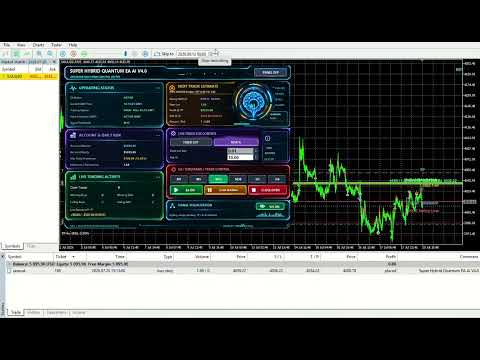
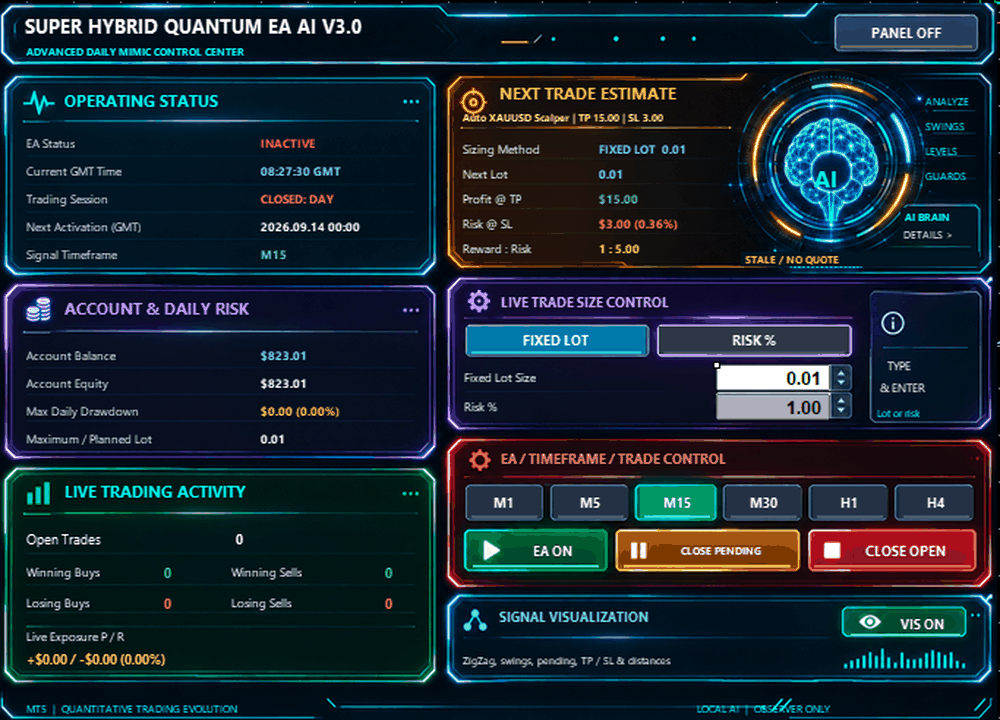
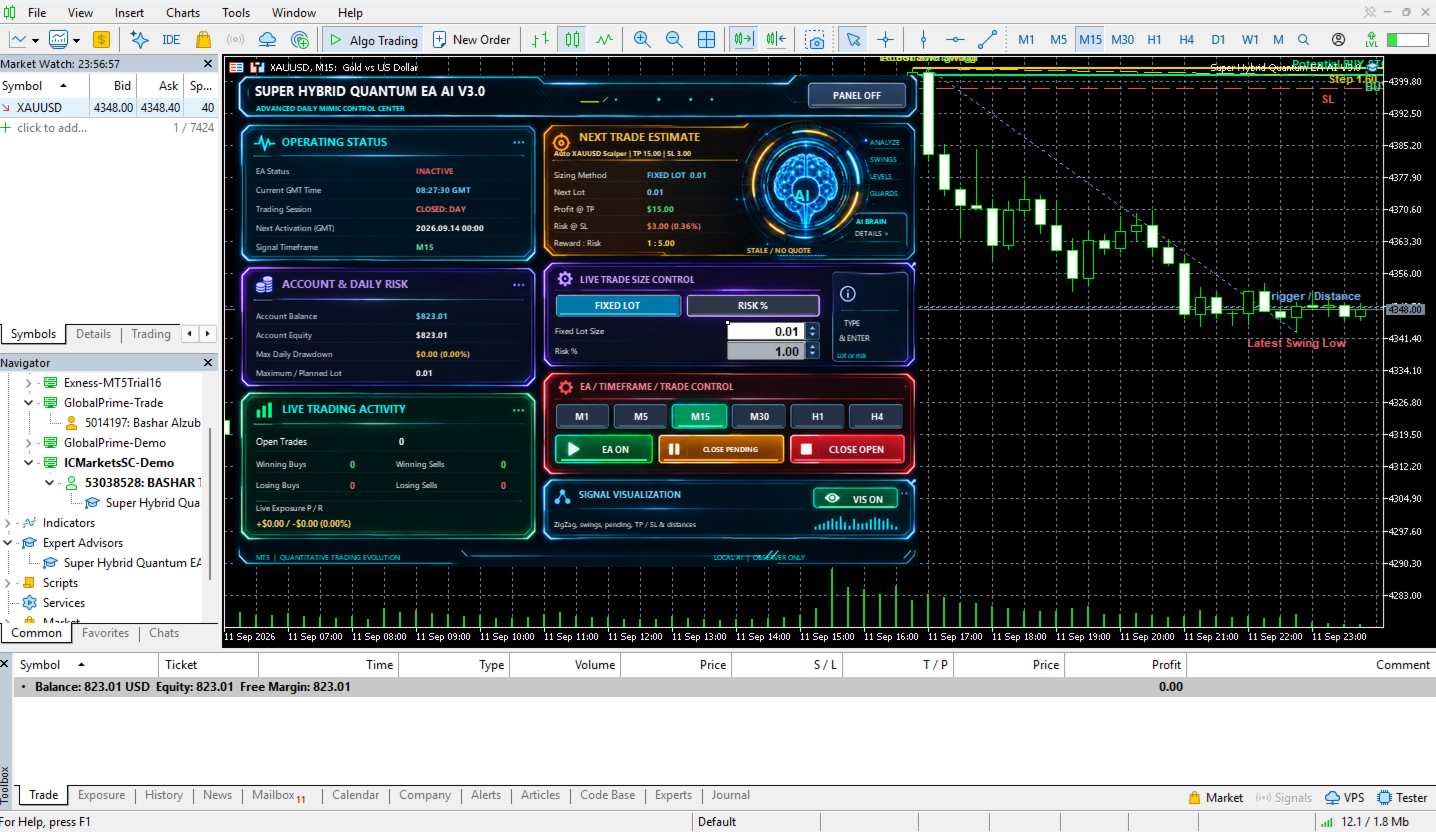
Advanced Daily Mimic Control PanelSuper Hybrid Quantum EA comprend un Daily Mimic Control Panel intégré au graphique.
Le panneau fournit des informations en temps réel ainsi qu’un contrôle direct de l’EA.
Il peut afficher :
-
EA ACTIVE / INACTIVE
-
GMT Time
-
Account Balance
-
Account Equity
-
Open Trades
-
Current Exposure
-
Winning Trades
-
Losing Trades
-
Maximum Daily Drawdown
-
Risk Method sélectionné
-
Planned / Maximum Lot
-
Estimated Next Trade Profit
-
Estimated Next Trade Risk
-
Reward-to-Risk Estimate
-
Trading Session Information
L’EA permet de visualiser les signaux de trading en temps réel.
Le graphique peut afficher :
-
Internal Market Structure
-
Swing High
-
Swing Low
-
Actionable Swing
-
Potential Entry
-
Buy Stop / Sell Stop
-
Stop Loss
-
Take Profit
-
Entry Distance
-
Current Setup Status
Toutes les visualisations correspondent à des calculs générés directement par l’EA.
EA Master ControlLe Daily Mimic Panel comprend un contrôle EA ON / OFF.
Lorsque EA ON est activé :
Les nouvelles entrées automatiques ne peuvent être traitées que si toutes les conditions de stratégie et de protection sont remplies.
Lorsque EA OFF est sélectionné :
-
Les nouvelles entrées automatiques sont désactivées
-
Les Pending Orders de l’EA peuvent être supprimées
-
Les positions existantes peuvent continuer à être gérées normalement
Le panneau comprend des commandes distinctes :
CLOSE PENDING
Supprime les ordres en attente gérés par l’EA.
CLOSE OPEN
Permet de fermer directement depuis le graphique les positions ouvertes gérées par l’EA.
Gestion du temps basée sur GMTL’EA comprend une gestion automatique des horaires basée sur GMT.
Le système calcule la relation entre :
-
Broker Server Time
-
GMT
Cela permet d’utiliser un planning de trading cohérent, indépendamment de l’heure du serveur du broker.
Daily Trading ScheduleLe trader peut configurer :
-
Daily Close Time
-
Daily Reopen Time
-
Delete Pending Orders at Close
-
Close Positions at Close
Friday Protection permet de limiter le trading avant le week-end.
Paramètres configurables :
-
Friday Close Time
-
Delete Pending Orders
-
Close Open Positions
Les jours du lundi au vendredi peuvent être activés ou désactivés séparément.
Cela permet de limiter le fonctionnement de l’EA à certains jours de trading.
MT5 Economic Calendar News FilterSuper Hybrid Quantum EA comprend un filtre optionnel basé sur le MetaTrader 5 Economic Calendar.
Lorsqu’il est activé, l’EA peut restreindre les nouvelles entrées avant et après des événements économiques importants.
Paramètres :
-
News Filter ON / OFF
-
Time Before News
-
Time After News
L’EA comprend plusieurs mécanismes optionnels de protection du compte.
Daily Profit Target
Peut restreindre les nouvelles opérations automatiques une fois qu’un objectif de profit quotidien configuré est atteint.
Daily Loss Limit
Peut arrêter les nouvelles entrées automatiques une fois que la limite de perte quotidienne est atteinte.
Daily Equity Protection
Fournit une protection supplémentaire basée sur un pourcentage de l’Equity.
Maximum Daily Drawdown Monitoring
Le panneau enregistre le drawdown intraday maximal atteint pendant la journée.
Ces fonctions peuvent être configurées en fonction des besoins d’un compte personnel ou d’une Prop Firm.
Validation des ordres en attenteAvant d’envoyer une Pending Order, l’EA effectue plusieurs vérifications, notamment :
-
Existing Strategy Exposure
-
Existing Pending Orders
-
Global Duplicate-Price Protection
-
Pending Price Tolerance
-
Broker Stop-Level Requirements
-
Trading Conditions
-
Position Size
-
Available Margin
-
Trading Time
-
Trading Day
-
News Restrictions
-
Daily Risk Protections
-
Repeat-Entry Restrictions
Une nouvelle Pending Order n’est envoyée qu’après validation des conditions nécessaires.
Automatic Trade PauseL’EA comprend un système interne de Trade Pause afin de réduire les réentrées trop rapides.
Le Trade Pause est mesuré en secondes et peut être configuré selon le mode sélectionné.
Tests recommandésAvant d’utiliser Super Hybrid Quantum EA avec des fonds réels, il est recommandé de :
-
Utiliser MetaTrader 5 Strategy Tester
-
Tester le symbole et le broker prévus
-
Vérifier les spécifications du contrat
-
Tester d’abord sur un Demo Account
-
Vérifier le Spread
-
Vérifier la Commission
-
Vérifier les Trading Hours
-
Vérifier le Leverage
-
Vérifier le Minimum Stop Level
-
Vérifier le Freeze Level
-
Sélectionner un Risk % approprié
-
Sélectionner un Fixed Lot approprié si utilisé
-
Configurer les protections du compte
-
Tester différents Lookback Profiles
-
Surveiller attentivement l’EA pendant la phase initiale de fonctionnement
Super Hybrid Quantum EA ne garantit ni bénéfices ni performances futures.
Le trading de l’Or, du Forex, des CFD et d’autres instruments financiers à effet de levier comporte des risques financiers importants.
Les résultats historiques, MQL5 Signals, Strategy Tester, optimisations, captures d’écran ou performances passées ne garantissent pas les résultats futurs.
L’utilisateur est responsable de sélectionner et de configurer correctement :
-
Risk %
-
Lot Size
-
Stop Loss
-
Lookback Profile
-
Strategy Timeframes
-
Trading Schedule
-
Broker
-
Account Type
-
Account Protection Settings
-
Trading Capital
Avant toute utilisation du Expert Advisor sur un compte réel, il doit être soigneusement testé et configuré en fonction des conditions du broker, des exigences du compte et de la tolérance individuelle au risque.