Super Hybrid Quantum EA
- Experts
-
Bashar Taisir Saleh Al Zubaidi
 Over the years, I have tested and evaluated hundreds of Expert Advisors available on the market, including several premium and high-priced systems. While many looked impressive in backtests or marketing materials, I often found that real trading conditions exposed weaknesses in consistency, risk
 - Versione: 8.0
- Aggiornato: 2 ottobre 2026
- Attivazioni: 5
CONTO REALE — SEGNALE MQL5
Monitoraggio del conto reale:
https://www.mql5.com/en/signals/2387380
Il conto reale viene mostrato esclusivamente a fini di monitoraggio e trasparenza. I risultati storici di trading non garantiscono performance future.
PanoramicaSuper Hybrid Quantum EA è un Expert Advisor automatizzato per MetaTrader 5, sviluppato principalmente per il trading di XAUUSD (Oro).
L’EA combina un’architettura composta da 5 strategie breakout indipendenti, analisi automatica della struttura di mercato, Adaptive Candle Lookback, gestione degli ordini pendenti, gestione del rischio configurabile, adattamento automatico alla precisione delle quotazioni del broker e un pannello di controllo completo direttamente sul grafico.
A differenza dei sistemi tradizionali basati su un solo timeframe, Super Hybrid Quantum EA può eseguire contemporaneamente 5 motori breakout indipendenti, consentendo di analizzare differenti strutture di mercato e timeframe all’interno dello stesso EA.
Ogni strategia dispone di controlli indipendenti per:
-
Attivazione / Disattivazione
-
Timeframe del segnale
-
Configurazione Lookback
-
Magic Number
-
Analisi breakout
-
Monitoraggio degli ordini pendenti
-
Monitoraggio delle entrate ripetute
Allo stesso tempo, tutte e cinque le strategie condividono i sistemi globali di protezione dell’EA, inclusi:
-
Gestione del capitale
-
Controllo degli orari di trading
-
Filtro delle notizie
-
Controllo del drawdown
-
Protezione contro ordini pendenti duplicati
Super Hybrid Quantum EA include:
-
5 strategie Breakout indipendenti
-
Analisi di mercato Multi-Timeframe
-
Magic Number indipendente per ogni strategia
-
Lookback Profiles selezionabili
-
Adaptive Candle Lookback
-
Lookback manuale individuale per Strategies 1–5
-
Validazione degli Swing confermati
-
Protezione globale del prezzo degli ordini pendenti
-
Tolleranza configurabile per prezzi duplicati
-
Controllo delle ripetizioni sullo stesso livello di entrata
-
Esecuzione Buy Stop e Sell Stop
-
Dimensionamento mediante Fixed Lot o Risk %
-
Gestione delle distanze in USD o Points
-
Adattamento automatico alla precisione del broker
-
Riconoscimento di prefissi e suffissi del simbolo
-
Stop Loss e Take Profit
-
Gestione automatica del Trailing Stop
-
Trade Pause / controllo della riapertura
-
Filtro notizie MT5 Economic Calendar
-
Daily Profit Target
-
Daily Loss Protection
-
Daily Equity Protection
-
Controllo individuale dei giorni di trading
-
Programmazione basata su GMT
-
Friday Protection
-
Advanced Daily Mimic Control Panel
-
Stima in tempo reale di rischio e profitto
-
Signal Visualization
-
Controllo EA ON / OFF
-
Close Pending Orders
-
Close Open Trades
-
Monitoraggio del Maximum Daily Drawdown
Super Hybrid Quantum EA contiene 5 motori breakout indipendenti.
Ogni strategia può analizzare il mercato utilizzando il proprio timeframe e la propria struttura di mercato, condividendo al contempo il sistema globale di gestione del rischio e protezione del conto.
L’architettura standard include:
Strategy 1
Analisi breakout di breve termine.
Strategy 2
Analisi breakout secondaria e indipendente.
Strategy 3
Analisi della struttura di mercato di medio termine.
Strategy 4
Analisi breakout su un timeframe superiore.
Strategy 5
Analisi di una struttura di mercato più ampia.
Ogni strategia può essere attivata o disattivata in modo indipendente.
Il trader può inoltre selezionare individualmente il timeframe utilizzato da ciascuna strategia direttamente negli Inputs dell’EA.
Ogni strategia riceve un Magic Number unico basato sul:
MagicNumber
principale, utilizzando Magic Number consecutivi per separare le strategie aggiuntive.
Questo permette all’EA di identificare, monitorare e gestire ogni strategia separatamente.
Sistema Adaptive Candle LookbackLa versione V3.24 introduce un approccio più flessibile all’analisi della struttura di mercato.
Invece di obbligare tutte le strategie ad analizzare esattamente lo stesso numero di candele, l’EA può utilizzare differenti profondità storiche in base al LookbackProfile selezionato.
I profili disponibili sono:
Default
Utilizza la logica standard originale dell’EA per la lettura delle candele.
In questa modalità:
-
Adaptive Lookback è disattivato
-
Il Lookback non influenza la generazione del segnale
-
L’EA utilizza il proprio metodo storico standard di analisi
Manual
Offre il controllo manuale completo.
Ogni strategia dispone dei propri parametri:
-
StrategyX_LookbackMode
-
StrategyX_ManualLookback
L’utente può quindi determinare esattamente quante candele deve analizzare ogni strategia.
Nella V3.24, Manual è il LookbackProfile selezionato di default.
Aggressive
Progettato per un’analisi della struttura più rapida e reattiva:
-
Strategy 1: 100 candele
-
Strategy 2: 120 candele
-
Strategy 3: 140 candele
-
Strategy 4: 160 candele
-
Strategy 5: 180 candele
-
Minimum Confirmed Swings: 3
Quando questo profilo è selezionato:
-
AdaptiveLookback = true
-
LookbackAffectsTradeSignal = true
vengono attivati automaticamente.
Balanced Active
Progettato per bilanciare reattività e conferma della struttura:
-
Strategy 1: 120 candele
-
Strategy 2: 140 candele
-
Strategy 3: 160 candele
-
Strategy 4: 180 candele
-
Strategy 5: 200 candele
-
Minimum Confirmed Swings: 4
Quando questo profilo è selezionato:
-
AdaptiveLookback = true
-
LookbackAffectsTradeSignal = true
vengono attivati automaticamente.
Conservative
Utilizza una struttura storica più ampia:
-
Strategy 1: 160 candele
-
Strategy 2: 180 candele
-
Strategy 3: 220 candele
-
Strategy 4: 260 candele
-
Strategy 5: 300 candele
-
Minimum Confirmed Swings: 4
Quando questo profilo è selezionato:
-
AdaptiveLookback = true
-
LookbackAffectsTradeSignal = true
vengono attivati automaticamente.
Analisi degli Swing ConfermatiL’EA utilizza un’analisi interna della struttura di mercato e degli Swing Points per identificare potenziali livelli di breakout.
Quando Adaptive Lookback è attivo, l’EA verifica se è disponibile un numero sufficiente di Swing confermati all’interno dell’intervallo di candele selezionato.
Se la struttura disponibile è insufficiente, il sistema può ampliare automaticamente l’intervallo storico analizzato.
Questo aiuta a evitare che la strategia si basi esclusivamente su un campione troppo limitato di dati recenti.
Tutti i calcoli vengono eseguiti internamente e non richiedono indicatori personalizzati esterni.
Global Pending-Order Price ProtectionUna delle funzioni più importanti della V3.24 è il sistema Global Pending Price Protection.
Poiché cinque strategie indipendenti possono occasionalmente identificare lo stesso livello di breakout o livelli molto vicini, l’EA impedisce a più strategie di collocare ordini pendenti nella stessa area di prezzo.
Il principio è:
Un livello di prezzo protetto = un solo ordine pendente tra Strategies 1–5.
Ad esempio:
Se Strategy 1 possiede già una Pending Order a un determinato prezzo, Strategies 2, 3, 4 e 5 non potranno creare un altro ordine all’interno della tolleranza di prezzo configurata.
Prima di inviare un nuovo ordine, il sistema verifica i Magic Number di tutte e cinque le strategie.
Tolleranza Regolabile del Prezzo PendingLa protezione globale include una tolleranza configurabile.
Il trader può definire la distanza massima tra due prezzi affinché l’EA li consideri lo stesso livello di entrata protetto.
La tolleranza può essere configurata in:
-
USD / Price Distance
-
Points
Questo consente di bloccare non solo prezzi esattamente identici, ma anche ordini quasi identici.
Pending Repeat ControlSuper Hybrid Quantum EA può opzionalmente consentire nuove entrate dallo stesso livello di breakout.
Il sistema registra separatamente le ripetizioni di ogni strategia e può limitare il numero massimo di aperture sullo stesso livello durante la giornata.
Gli ordini ripetuti restano soggetti a:
-
Global Pending Price Protection
-
Validazione degli orari di trading
-
Risk Protection
-
Verifica degli ordini esistenti
-
Restrizioni Repeat Entry
Pertanto, il sistema di ripetizione non può aggirare la protezione globale contro le entrate duplicate.
Esecuzione Automatica BreakoutL’EA gestisce automaticamente:
-
Analisi della struttura di mercato
-
Identificazione degli Swing
-
Calcolo dei livelli breakout
-
Preparazione Buy Stop / Sell Stop
-
Validazione delle Pending Orders
-
Stop Loss
-
Take Profit
-
Trailing Stop
-
Calcolo della dimensione della posizione
-
Trade Pause
-
Validazione Repeat Entry
-
Programmazione del trading
-
Validazione dei giorni di trading
-
Restrizioni legate alle notizie
-
Condizioni di protezione del conto
Un nuovo ordine può essere inviato solo quando tutte le condizioni richieste sono soddisfatte.
Auto XAUUSD ScalperL’EA include una configurazione dedicata denominata Auto XAUUSD Scalper.
Quando viene utilizzato su un simbolo XAUUSD compatibile, il sistema calcola automaticamente le distanze di trading necessarie e normalizza i valori in base alla precisione delle quotazioni del broker.
Il profilo gestisce:
-
Entry Distance
-
Stop Loss
-
Take Profit
-
Trail Start
-
Trail Stop
-
Trade Pause
-
Pending-Order Management
L’EA è stato progettato e testato principalmente per XAUUSD, broker compatibili e ambienti di conti finanziati.
Prima dell’utilizzo con denaro reale, si raccomanda di testare la configurazione con il broker specifico.
Riconoscimento Automatico del Simbolo e Precisione del BrokerBroker differenti possono utilizzare nomi diversi per XAUUSD e differenti strutture decimali.
Esempi:
-
XAUUSD
-
XAUUSD.r
-
XAUUSDm
-
XAUUSD.pro
-
m.XAUUSD
Super Hybrid Quantum EA legge automaticamente le specifiche del simbolo attivo e normalizza le distanze di trading in base alla precisione delle quotazioni.
Questo riduce la necessità di ricalcolare manualmente i parametri quando l’EA viene utilizzato con broker compatibili.
Custom Scalper ModeCustom Scalper Mode utilizza lo stesso framework interno di struttura di mercato e breakout, consentendo però di modificare manualmente i principali parametri di gestione delle operazioni.
I parametri personalizzabili includono:
-
Take Profit
-
Stop Loss
-
Trail Start
-
Trail Stop
-
Step / Entry Distance
-
Trade Pause
Custom Mode è pensato per test e ottimizzazione senza modificare la logica principale di generazione dei segnali.
Configurazione in USD o PointsLe distanze di trading possono essere configurate in:
USD / Price Distance
oppure
Points
L’EA converte automaticamente i valori in base alle specifiche e alla precisione del simbolo.
Gestione del RischioSuper Hybrid Quantum EA offre due principali metodi per il calcolo della dimensione della posizione.
Fixed Lot
Il trader definisce direttamente il volume di trading.
L’EA normalizza il Lot Size in base a:
-
Minimum Volume
-
Maximum Volume
-
Broker Volume Step
Risk Percentage
Il trader definisce la percentuale dell’Account Equity che desidera rischiare.
L’EA calcola la dimensione appropriata della posizione utilizzando:
-
Account Equity
-
Risk %
-
Stop Loss Distance
-
Tick Size
-
Tick Value
-
Symbol Volume Specifications
Risk % e Fixed Lot devono essere configurati in base alla dimensione del conto e alla tolleranza individuale al rischio.
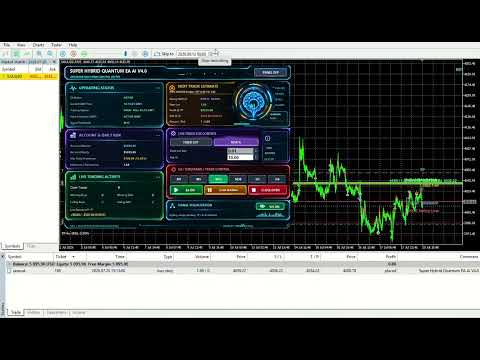
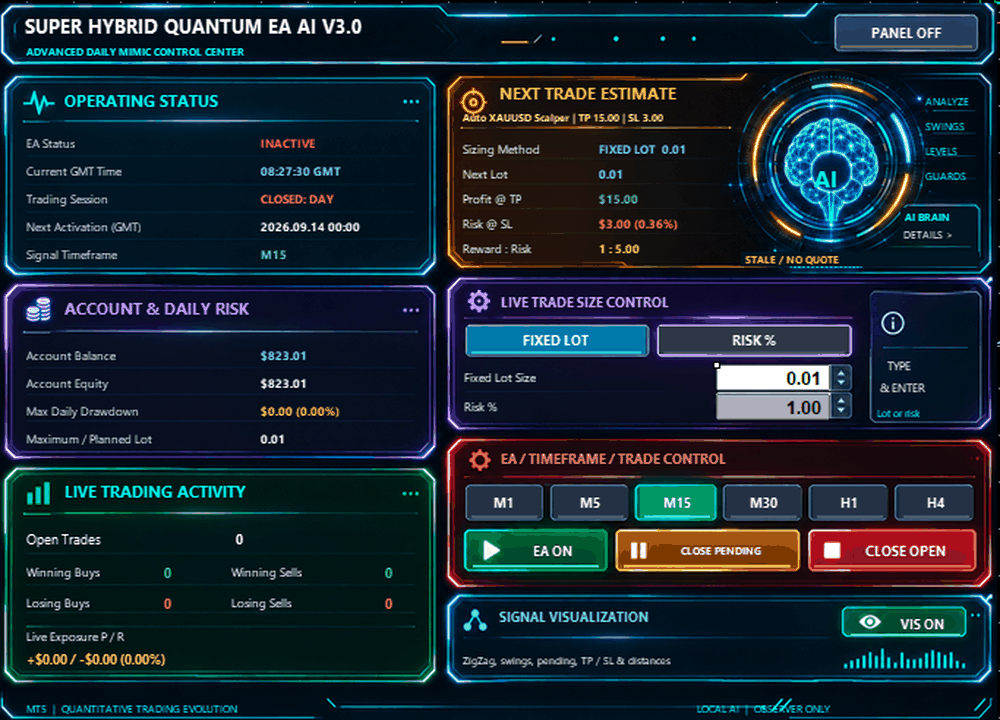
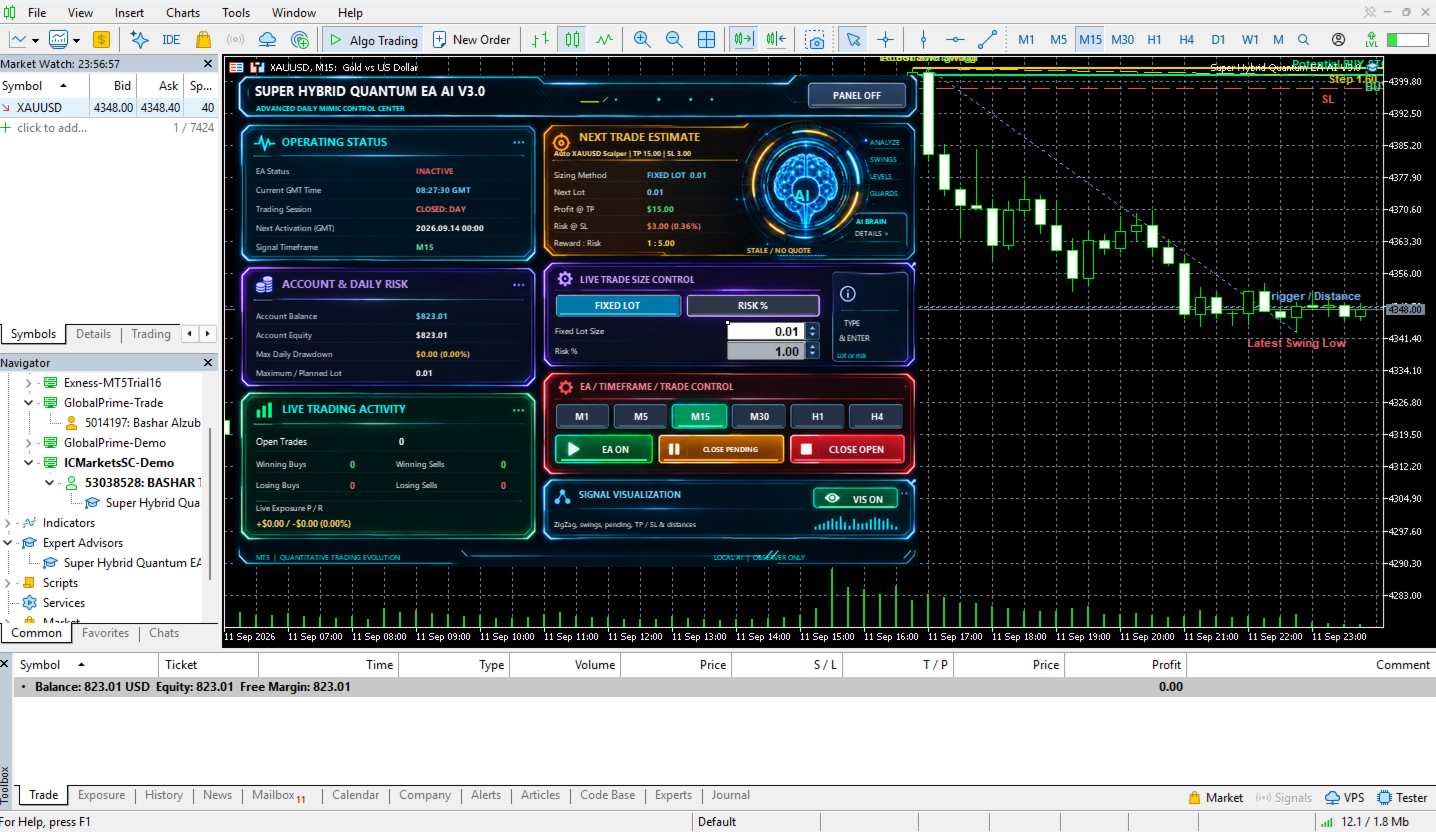
Advanced Daily Mimic Control PanelSuper Hybrid Quantum EA include un Daily Mimic Control Panel integrato nel grafico.
Il pannello fornisce informazioni in tempo reale e controlli diretti dell’EA.
Può visualizzare:
-
EA ACTIVE / INACTIVE
-
GMT Time
-
Account Balance
-
Account Equity
-
Open Trades
-
Current Exposure
-
Winning Trades
-
Losing Trades
-
Maximum Daily Drawdown
-
Risk Method selezionato
-
Planned / Maximum Lot
-
Estimated Next Trade Profit
-
Estimated Next Trade Risk
-
Reward-to-Risk Estimate
-
Trading Session Information
L’EA consente di visualizzare i segnali di trading in tempo reale.
Sul grafico possono essere visualizzati:
-
Internal Market Structure
-
Swing High
-
Swing Low
-
Actionable Swing
-
Potential Entry
-
Buy Stop / Sell Stop
-
Stop Loss
-
Take Profit
-
Entry Distance
-
Current Setup Status
Tutte le visualizzazioni corrispondono a calcoli generati internamente dall’EA.
EA Master ControlIl Daily Mimic Panel include un controllo EA ON / OFF.
Quando EA ON è attivo:
Le nuove entrate automatiche possono essere elaborate solo se tutte le condizioni della strategia e di protezione sono soddisfatte.
Quando EA OFF è selezionato:
-
Le nuove entrate automatiche vengono disabilitate
-
Le Pending Orders dell’EA possono essere eliminate
-
Le posizioni esistenti possono continuare a essere gestite normalmente
Il pannello include controlli separati:
CLOSE PENDING
Rimuove gli ordini pendenti gestiti dall’EA.
CLOSE OPEN
Consente di chiudere direttamente dal grafico le posizioni aperte gestite dall’EA.
Gestione del Tempo Basata su GMTL’EA include una gestione automatica degli orari basata su GMT.
Il sistema calcola la relazione tra:
-
Broker Server Time
-
GMT
Questo consente di utilizzare una programmazione di trading coerente indipendentemente dall’orario del server del broker.
Daily Trading ScheduleIl trader può configurare:
-
Daily Close Time
-
Daily Reopen Time
-
Delete Pending Orders at Close
-
Close Positions at Close
Friday Protection può limitare il trading prima del fine settimana.
Parametri configurabili:
-
Friday Close Time
-
Delete Pending Orders
-
Close Open Positions
I giorni da lunedì a venerdì possono essere attivati o disattivati separatamente.
Questo consente di limitare il funzionamento dell’EA a specifici giorni di trading.
MT5 Economic Calendar News FilterSuper Hybrid Quantum EA include un filtro opzionale basato sul MetaTrader 5 Economic Calendar.
Quando è attivo, l’EA può limitare nuove entrate prima e dopo importanti eventi economici.
Parametri:
-
News Filter ON / OFF
-
Time Before News
-
Time After News
L’EA include diversi meccanismi opzionali di protezione del conto.
Daily Profit Target
Può limitare nuove operazioni automatiche dopo il raggiungimento di una condizione di profitto giornaliero configurata.
Daily Loss Limit
Può interrompere nuove entrate automatiche dopo il raggiungimento del limite di perdita giornaliero.
Daily Equity Protection
Fornisce una protezione aggiuntiva basata su una percentuale dell’Equity.
Maximum Daily Drawdown Monitoring
Il pannello registra il massimo drawdown intraday raggiunto durante la giornata.
Queste funzioni possono essere configurate in base alle esigenze di un conto personale o di una Prop Firm.
Validazione degli Ordini PendentiPrima di inviare una Pending Order, l’EA esegue diverse verifiche, tra cui:
-
Existing Strategy Exposure
-
Existing Pending Orders
-
Global Duplicate-Price Protection
-
Pending Price Tolerance
-
Broker Stop-Level Requirements
-
Trading Conditions
-
Position Size
-
Available Margin
-
Trading Time
-
Trading Day
-
News Restrictions
-
Daily Risk Protections
-
Repeat-Entry Restrictions
Una nuova Pending Order viene inviata solo dopo la validazione delle condizioni necessarie.
Automatic Trade PauseL’EA include un sistema interno di Trade Pause per ridurre re-entrate troppo rapide.
Il Trade Pause viene misurato in secondi e può essere configurato in base alla modalità selezionata.
Test ConsigliatiPrima di utilizzare Super Hybrid Quantum EA con fondi reali, si raccomanda di:
-
Utilizzare MetaTrader 5 Strategy Tester
-
Testare il simbolo e il broker previsti
-
Verificare le specifiche del contratto
-
Testare prima su un Demo Account
-
Verificare lo Spread
-
Verificare la Commission
-
Verificare i Trading Hours
-
Verificare il Leverage
-
Verificare il Minimum Stop Level
-
Verificare il Freeze Level
-
Selezionare un Risk % appropriato
-
Selezionare un Fixed Lot appropriato se utilizzato
-
Configurare le protezioni del conto
-
Testare differenti Lookback Profiles
-
Monitorare attentamente l’EA durante la fase iniziale di utilizzo
Super Hybrid Quantum EA non garantisce profitti né performance future.
Il trading di Oro, Forex, CFD e altri strumenti finanziari con leva comporta rischi finanziari significativi.
I risultati storici, MQL5 Signals, Strategy Tester, ottimizzazioni, screenshot o performance passate non garantiscono risultati futuri.
L’utente è responsabile della corretta selezione e configurazione di:
-
Risk %
-
Lot Size
-
Stop Loss
-
Lookback Profile
-
Strategy Timeframes
-
Trading Schedule
-
Broker
-
Account Type
-
Account Protection Settings
-
Trading Capital
Prima dell’utilizzo dell’Expert Advisor su un conto reale, è necessario testarlo e configurarlo attentamente in base alle condizioni del broker, ai requisiti del conto e alla propria tolleranza al rischio.