Super Hybrid Quantum EA

Super Hybrid Quantum EA  is an advanced MetaTrader 5 Expert Advisor designed for traders who want automated scalping combined with professional risk management, automatic symbol recognition, real-time chart control, advanced account protections, and a comprehensive trading dashboard.

The EA has been developed primarily for XAUUSD and BTCUSD (With ICmarket only), with dedicated automatic Scalper profiles for each market.

The system automatically recognizes the instrument attached to the chart and applies the appropriate configuration while maintaining the same underlying Scalper signal and execution framework.

The objective is to provide a highly automated trading environment while still allowing the trader to control risk, lot sizing, operating times, trading days, visualization, and account protections directly from the chart.

Live Signal with Jut market:

https://www.mql5.com/en/signals/2387380?source=Site+Signals+Favorites#!tab=history

Main Features

Super Hybrid Quantum EA  combines automated execution with an advanced control environment including:

  • Auto XAUUSD Scalper

  • Auto BTCUSD Scalper - (With ICmarket only)

  • Custom Scalper Mode

  • Automatic XAUUSD / BTCUSD symbol detection

  • Broker prefix and suffix recognition

  • Automatic broker-price precision normalization

  • Buy Stop and Sell Stop execution

  • Fixed Lot and automatic Risk % position sizing

  • Live editable Lot Size and Risk % directly from the chart

  • USD or Points-based trade-management settings

  • Dynamic timeframe selection

  • Advanced Daily Mimic Control Panel

  • Live Current GMT Time display

  • Real-time Signal Visualization

  • Automatic GMT broker-time synchronization

  • Individual trading-day control

  • Configurable daily trading schedules

  • Friday protection

  • MT5 Economic Calendar News Filter

  • Daily Profit Target protection

  • Daily Loss Limit protection

  • Daily Equity Protection

  • Automatic trailing management

  • Pending-order management

  • EA ON/OFF chart control

  • Close Pending Orders control

  • Close Open Trades control

  • Hide / Show Daily Mimic Panel

  • Next-trade Profit / Risk estimation

  • Maximum Daily Drawdown monitoring

The previous version already included automated execution, risk management, visualization, GMT controls, news filtering and daily protections; the latest version expands this architecture with automatic XAUUSD/BTCUSD profile management and enhanced chart controls.

Automated Scalping System

Super Hybrid Quantum EA  uses an internally calculated market-structure and swing-analysis system to identify potential short-term trading opportunities.

The EA automatically manages the trading process, including:

  • Market analysis

  • Potential entry identification

  • Buy Stop / Sell Stop placement

  • Stop Loss

  • Take Profit

  • Trailing management

  • Position sizing

  • Pending-order management

  • Trading-session validation

  • Risk and account-protection checks

The trading calculations are performed internally and do not require an external custom indicator.

The EA is designed as a Scalping system and does not rely on a traditional Martingale or Grid order-expansion model.

Automatic XAUUSD and BTCUSD Profiles

The EA now includes dedicated automatic profiles for both Gold and Bitcoin.

Auto XAUUSD Scalper

When the EA detects an XAUUSD chart, it automatically activates the Auto XAUUSD Scalper configuration.

The existing XAUUSD Scalper framework remains unchanged.

The profile uses the EA's established Scalper structure and manages:

  • Entry positioning

  • Stop Loss

  • Take Profit

  • Trailing activation

  • Trailing distance

  • Entry distance

  • Trade pause

  • Pending-order lifetime

The base Scalper timeframe is M15, while the trader can dynamically change the active signal timeframe directly from the Daily Mimic Panel.

Auto BTCUSD Scalper- (With ICmarket only)

When BTCUSD is detected, the EA automatically activates the dedicated Auto BTCUSD Scalper profile.

BTCUSD uses the same core Scalper entry, market-structure, timeframe and execution framework as XAUUSD.

There is no separate or simplified BTC trading algorithm.

Only the profile-specific trade-management configuration is different.

The BTCUSD Scalper uses:

  • Take Profit: $150

  • Stop Loss: $30

  • Trail Start: $14

  • Trail Stop: $4

  • Step / Entry Distance: -$16

  • Pause: 60 seconds

These values are automatically translated into the broker's required point representation.

Automatic Symbol Detection

Super Hybrid Quantum EA  automatically identifies whether the chart represents XAUUSD or BTCUSD.

The EA does not require an exact symbol-name match.

It recognizes symbols containing:

XAUUSD

or

BTCUSD

This means broker variations such as the following can be automatically recognized:

  • XAUUSD

  • XAUUSD.r

  • XAUUSDm

  • XAUUSD.pro

  • m.XAUUSD

  • BTCUSD

  • BTCUSD.r

  • BTCUSDm

  • BTCUSD.pro

  • m.BTCUSD

This makes the Expert Advisor easier to transfer between brokers without manually creating separate versions for different symbol suffixes or prefixes.

Automatic Broker Precision Handling

Different brokers can quote Gold and Bitcoin using different numbers of decimal places.

Super Hybrid Quantum EA AI automatically reads the broker's symbol specification and converts its reference distances into the correct broker points.

The trader therefore does not need to manually recalculate TP, SL, trailing or entry-distance values every time the EA is moved to another compatible broker.

The original EA already included automatic XAUUSD digit normalization; the latest version extends the profile-management architecture to support both XAUUSD and BTCUSD automatic Scalper configurations.

Custom Scalper Mode

Custom Mode has also been upgraded.

Custom is no longer a separate trading strategy with different entry logic.

It now uses the same Scalper signal and entry framework as the automatic Scalper profiles.

This includes the same:

  • Market-structure framework

  • Swing-analysis framework

  • Entry methodology

  • Pending-order framework

  • Trigger behavior

  • Scalper execution logic

  • Timeframe behavior

The trader can customize only the trade-management parameters:

  • Take Profit

  • Stop Loss

  • Trail Start

  • Trail Stop

  • Step / Entry Distance

  • Pause

This makes Custom Mode useful for optimization and experimentation without unintentionally changing the underlying Scalper strategy.

The previous description already allowed these trade-management parameters to be modified in Custom Mode.

USD and Points Configuration

Custom settings can be expressed using either:

USD / price-distance mode

or

Points mode

This gives traders flexibility when optimizing the Expert Advisor or adapting settings to different broker specifications.

In USD mode, the EA converts the requested market-price distance automatically into the broker's point format.

In Points mode, the EA automatically normalizes its reference-point settings according to the broker's symbol precision.

Advanced Risk Management

Super Hybrid Quantum EA AI supports two money-management methods.

Fixed Lot

The trader specifies the exact trading volume.

Example:

0.01 lot

The EA normalizes the requested lot size according to the broker's:

  • Minimum volume

  • Maximum volume

  • Volume step

Auto / Risk Percentage Mode

The trader specifies the desired account risk percentage.

The EA automatically calculates the corresponding lot size according to:

  • Account equity

  • Selected Risk %

  • Stop Loss distance

  • Tick size

  • Tick value

  • Broker volume specifications

The original EA already supported Fixed Lot and Risk Percentage sizing.

The latest version makes these values directly editable from the Daily Mimic Panel.

Direct Lot Size and Risk % Editing

The Daily Mimic Panel now provides true live input fields.

The trader can click directly on:

Fixed Lot Size

or

Risk %

and type a new value.

The new value can be applied by pressing Enter or leaving the edit field.

When a Lot Size value is entered, the EA can operate in Fixed Lot mode.

When a Risk % value is entered, the EA can operate in automatic Risk Percentage mode.

Changes are passed directly to the EA's runtime sizing engine without requiring the Expert Advisor to be removed and reattached.

The earlier panel already contained editable Fixed Lot and Risk % controls; the latest implementation expands them into direct live-entry fields.

BTCUSD Automatic Operating Configuration

When Auto BTCUSD Scalper is activated, the EA automatically starts with a dedicated BTCUSD operating configuration.

The BTC profile uses:

  • Auto / Risk mode: ON

  • Risk: 1%

  • Lot Size reference: 0.01

  • News Filter: OFF

  • Manual Daily Close: OFF

  • Friday Close Protection: OFF

  • Monday: ON

  • Tuesday: ON

  • Wednesday: ON

  • Thursday: ON

  • Friday: ON

  • Saturday: ON

  • Sunday: ON

  • Prop Firm Mode: ON

  • Daily Profit Target: OFF

  • Daily Loss Limit: OFF

  • Daily Equity Protection: OFF

Because Risk mode is active, the EA calculates BTCUSD trading volume dynamically using the selected 1% risk setting rather than forcing every trade to use 0.01 lot.

The 0.01 lot value remains available as a reference/fallback Fixed Lot setting.

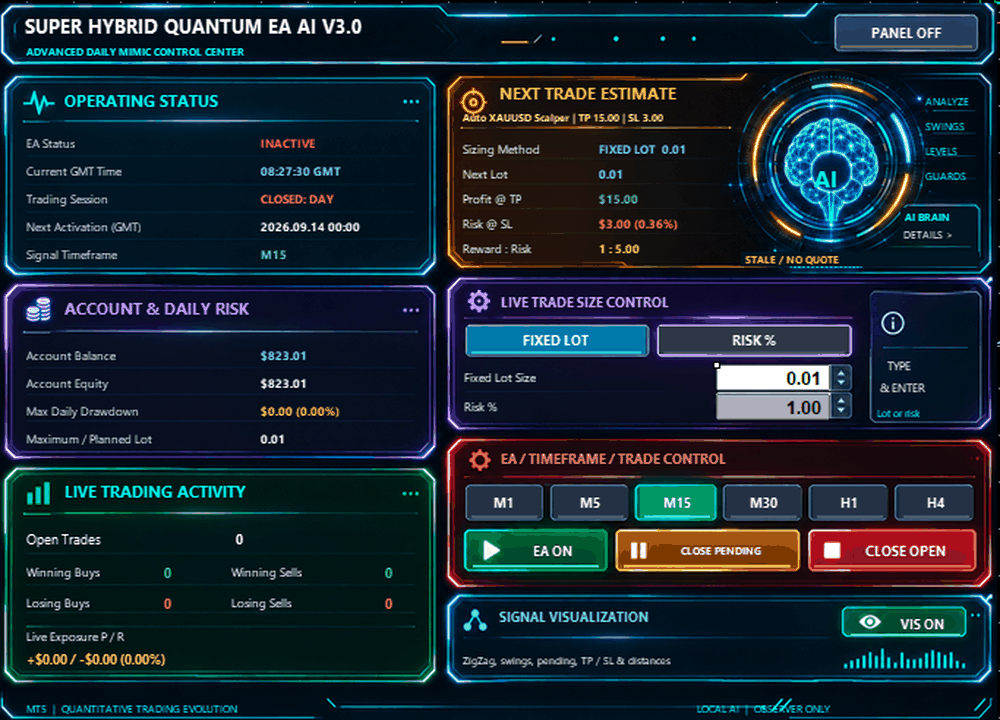
Advanced Daily Mimic Control Center

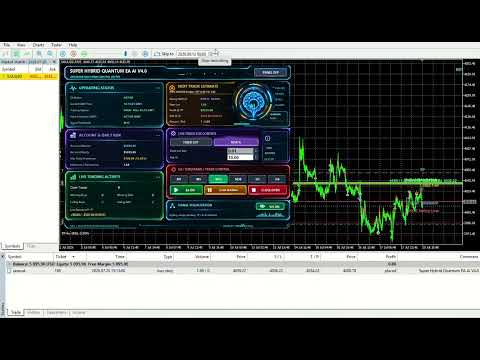
Super Hybrid Quantum EA AI includes a comprehensive Daily Mimic Control Center directly on the chart.

The panel provides real-time monitoring and direct control of the Expert Advisor.

The existing control center already monitors EA operation, account condition, trading activity and next-trade estimates.

Operating Status

The panel displays:

  • EA ACTIVE / INACTIVE

  • Current GMT Time

  • Current trading session

  • Next activation time

  • Active Signal Timeframe

The newly added Current GMT Time is displayed live directly inside the Operating Status section.

This is particularly useful because the EA's trading schedules and protections operate using GMT-based time management.

Account & Daily Risk Monitoring

The panel displays:

  • Account Balance

  • Account Equity

  • Maximum Daily Drawdown

  • Maximum / Planned Lot Size

The Maximum Daily Drawdown monitor records the highest drawdown reached during the trading day.

Live Trading Activity

The trader can monitor:

  • Number of Open Trades

  • Winning Buy Trades

  • Winning Sell Trades

  • Losing Buy Trades

  • Losing Sell Trades

  • Current Live Exposure

This provides a quick overview of current EA activity without needing to navigate through several MetaTrader windows.

Next Trade Estimate

The panel provides a real-time estimate for the next potential trade.

It can display:

  • Active profile

  • Selected sizing method

  • Calculated Next Lot

  • Estimated Profit at TP

  • Estimated Risk at SL

  • Estimated Reward-to-Risk ratio

The calculation automatically follows the currently active XAUUSD, BTCUSD or Custom configuration.

The original panel already provided profit, risk and lot previews; this behavior is retained and extended to the new automatic symbol profiles.

Dynamic Timeframe Control

The signal timeframe can be changed directly from the Daily Mimic Panel.

Available selections are:

  • M1

  • M5

  • M15

  • M30

  • H1

  • H4

The selected timeframe is applied to the EA's internal signal analysis and highlighted visually on the panel.

The default Scalper timeframe remains M15.

EA Master Control

The panel includes an EA ON / OFF switch.

When EA ON is active, new automated entries can be processed according to the strategy and protection conditions.

When EA OFF is selected:

  • New automated exposure is disabled

  • EA pending orders can be removed

  • Existing positions can continue to receive normal management

The existing panel uses clear green/red visual status indications for the master switch.

Close Pending Orders

The CLOSE PENDING button allows the trader to remove pending orders belonging to this Expert Advisor.

The command uses the EA's Magic Number identification and is designed not to intentionally interfere with unrelated trades.

Close Open Trades

The CLOSE OPEN button allows the trader to close current EA positions directly from the Daily Mimic Panel.

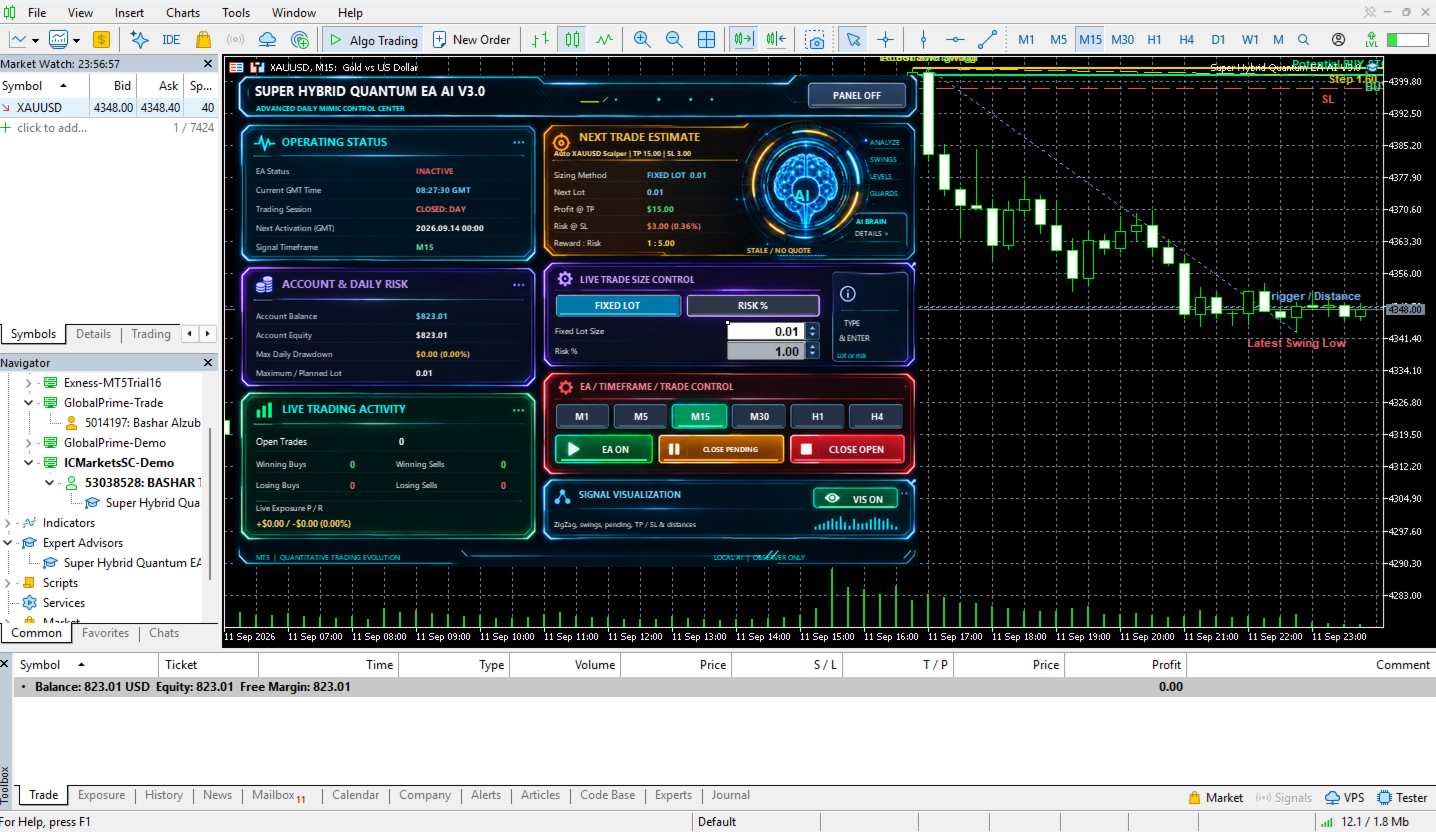
Real-Time Signal Visualization

Signal Visualization is ON by default.

The visual system can display:

  • Internal market structure

  • Latest Swing High

  • Latest Swing Low

  • Actionable Swing

  • Potential Buy Stop

  • Potential Sell Stop

  • Entry level

  • Take Profit

  • Stop Loss

  • Trigger level

  • Step / Entry Distance

  • Current setup status

  • Active signal timeframe

  • Existing EA pending-order information

Possible setup indications include:

BUY SETUP WAITING

SELL SETUP WAITING

NO VALID SETUP

The visualization reflects the EA's internal calculations rather than a separate external indicator.

The visualization is also arranged so that the Daily Mimic Panel remains readable while chart objects are displayed.

Hide / Show Daily Mimic Panel

The complete control panel can be hidden when a cleaner chart is preferred.

Press:

PANEL OFF

to hide the full dashboard.

When hidden, the Expert Advisor continues to operate.

A compact:

SHOW MIMIC PANEL

button remains available on the chart and can restore the interface immediately.

Automatic GMT Time Control

Super Hybrid Quantum EA  includes automatic GMT-based time management.

The EA calculates the relationship between:

  • Broker server time

  • GMT

This reduces the need for traders to manually calculate broker time offsets.

The current GMT time is now also displayed directly inside the Daily Mimic Panel.

Daily Trading Schedule

For profiles where Time Control is enabled, the trader can configure:

  • Daily Close Time

  • Daily Reopen Time

  • Delete Pending Orders at Close

  • Close Open Positions at Close

The schedule remains configurable from the EA Inputs.

The Auto BTCUSD Scalper profile overrides Manual Daily Close to OFF as part of its dedicated BTC configuration.

Friday Close Protection

The EA includes optional Friday protection.

Available controls include:

  • Friday close time

  • Delete pending orders

  • Close open positions

These protections remain available for profiles where they are enabled.

For Auto BTCUSD Scalper, Friday Close Protection is automatically OFF.

Individual Day Control

The EA allows each day of the week to be individually controlled.

This gives the user flexibility to create different operating schedules.

The dedicated Auto BTCUSD Scalper configuration automatically enables:

Monday through Sunday

allowing the profile to operate on brokers that provide weekend BTCUSD trading.

MT5 Economic Calendar News Filter

Super Hybrid Quantum EA  includes an optional news filter using the MetaTrader 5 Economic Calendar.

When enabled, the system can restrict new entries around relevant high-impact events.

The trader can configure:

  • News Filter ON/OFF

  • Minutes Before News

  • Minutes After News

The original news system uses configurable before/after windows and focuses on relevant high-impact events.

For Auto BTCUSD Scalper, News Filter is automatically OFF.

Daily Profit Target

An optional Daily Profit Target can restrict further trading after a configured daily objective is reached.

The feature remains independently configurable for profiles that use it.

For Auto BTCUSD Scalper, Daily Profit Target is automatically OFF.

Daily Loss Limit

The EA includes an independent Daily Loss Limit.

When enabled, it can restrict further automated trading after the configured daily loss condition is reached.

For Auto BTCUSD Scalper, Daily Loss Limit is automatically OFF.

Daily Equity Protection

An additional percentage-based Daily Equity Protection mechanism is available.

For Auto BTCUSD Scalper, Daily Equity Protection is automatically OFF.

Prop Firm Protection Environment

The EA includes a Prop Firm protection framework capable of combining:

  • Daily Profit Target

  • Daily Loss Limit

  • Daily Equity Protection

These functions can be configured independently according to account requirements.

For Auto BTCUSD Scalper, Prop Firm Mode remains ON, while the three individual daily protection limits are OFF by default.

Pending Order Management

Before submitting a new pending order, the EA performs multiple validation checks.

These can include:

  • Existing EA exposure

  • Existing pending orders

  • Broker trading conditions

  • Required stop distances

  • Position sizing

  • Available margin

  • Trading schedule

  • Day restrictions

  • News restrictions

  • Daily protection rules

The EA also manages pending orders according to the currently active profile.

Automatic Trade Pause

The EA contains an internal trade-pause mechanism to prevent uncontrolled immediate re-entry.

Pause is measured in seconds, not price distance.

The automatic XAUUSD and BTCUSD Scalper profiles currently use a 60-second pause.

Magic Number Control

A dedicated Magic Number identifies trades belonging to the Expert Advisor.

This allows functions such as:

  • Close Pending

  • Close Open

  • Pending-order management

to operate on the EA's own trades rather than intentionally managing unrelated manual or third-party positions.

Designed for XAUUSD and BTCUSD

Super Hybrid Quantum EA AI now provides dedicated automated scalping environments for:

XAUUSD — Gold

and

BTCUSD — Bitcoin

The EA automatically identifies the chart instrument and applies the corresponding automatic profile.

Both automatic profiles use the same core Scalper framework.

Their primary differences are their market-specific trade-management parameters and operating configuration.

Recommended Initial Use

For Gold:

Symbol: XAUUSD or compatible broker variation
Profile: Auto XAUUSD Scalper
Default Scalper Timeframe: M15
Signal Visualization: ON

For Bitcoin:

Symbol: BTCUSD or compatible broker variation
Profile: Auto BTCUSD Scalper
Auto Risk Mode: ON
Risk: 1%
Trading Days: Monday-Sunday
Signal Visualization: ON

For traders who want to test alternative TP, SL, trailing or entry-distance settings:

Profile: Custom

Custom retains the same Scalper signal framework while allowing the trade-management parameters to be adjusted.

Before Live Trading

Users are encouraged to test the Expert Advisor before using real funds.

Recommended steps include:

  • Run MetaTrader 5 Strategy Tester

  • Test with the intended broker

  • Confirm XAUUSD or BTCUSD contract specifications

  • Test on a demo account

  • Verify spread and commission

  • Verify available trading hours

  • Review leverage

  • Select appropriate Risk % or Fixed Lot

  • Configure optional account protections

  • Monitor the EA during initial operation

Trading results can vary between brokers because of differences in spread, commission, slippage, execution speed, liquidity, contract size, tick value, leverage and stop-level restrictions.

Important Risk Notice

Super Hybrid Quantum EA  does not guarantee profit or future trading performance.

Trading Forex, Gold, Bitcoin, CFDs and other leveraged instruments involves financial risk.

Historical results, backtests, optimizations, screenshots, signals or previous trading performance are not guarantees of future results.

Users remain responsible for selecting suitable:

  • Risk %

  • Lot Size

  • Stop Loss

  • Trading schedule

  • Account protections

  • Broker

  • Account type

  • Trading capital

The Expert Advisor should be tested and configured according to the trader's broker conditions and individual risk tolerance.

제작자의 제품 더 보기
Super Hybrid EA AI Pro
Bashar Taisir Saleh Al Zubaidi
5 (1)
Super Hybrid EA AI Pro MetaTrader 5용 XAUUSD 그리드, 마틴게일, 헤징 및 바스켓 리스크 관리 전문 EA 제품 개요 Super Hybrid EA AI Pro는 주로 XAUUSD 거래를 위해 개발된 MetaTrader 5용 Expert Advisor입니다. 이 EA는 그리드 거래, 마틴게일 방식의 랏 진행, 선택적 헤징, 바스켓 수익 관리, 거래 세션 제어, 뉴스 필터, 미국 연방준비제도 이벤트 필터, 드로다운 보호, 스프레드 제어 및 규칙 기반 시장 리스크 방어 모듈을 결합합니다. 이 EA는 거래를 바스켓 단위로 관리하도록 설계되었습니다. 각 포지션을 개별 거래로 따로 처리하는 대신, EA가 관리하는 여러 포지션을 하나의 완전한 거래 사이클로 관리할 수 있습니다. 선택한 설정에 따라 가격이 활성 바스켓에 불리한 방향으로 움직일 경우, EA는 추가 거래를 열고, 마틴게일 방식으로 랏 크기를 증가시키며, 단계별 그리드 간격을 적용하고, 헤징 로직을 사용하
Super Hybrid Ultimate With 5 AI Engine Version
Bashar Taisir Saleh Al Zubaidi
5 (1)
Super Hybrid AI Gold Engine 은 MetaTrader 5에서 XAUUSD 거래를 위한 고급 Expert Advisor 입니다. 이 EA는 구조화된 시장 분석, 단계별 바스켓 관리, 스마트 복구 제어, 세션 필터링, 뉴스 보호 기능, 그리고 다층 AI 스타일 의사결정 로직을 기반으로 설계되었습니다. 이 EA는 골드 거래에 특화된 자동화 시스템을 원하는 트레이더를 위해 제작되었습니다. 차트에서 명확한 피드백을 제공하고, 유연한 리스크 설정을 지원하며, Grid, Martingale, Hedge, Trend-following 전략 주변에 여러 보호 레이어를 제공합니다. 이 Expert Advisor는 단 하나의 신호에만 의존하지 않습니다. 새로운 거래 사이클이나 복구 동작을 허용하기 전에 트렌드 구조, 시장 레짐 감지, Fair Value Gap 분석, 지지선과 저항선 매핑, 스프레드 상태, 뉴스 필터, Federal Reserve 이벤트 필터, 바스켓 노출도, 드로다
BTC Hybrid EA
Bashar Taisir Saleh Al Zubaidi
BTC Hybrid EA 는 BTCUSD 거래를 위한 구조적이고 설정 가능한 접근 방식을 원하는 트레이더를 위해 개발된 MetaTrader 5용 Expert Advisor입니다. 이 EA는 방향성 진입, 헤징 로직, 단계별 그리드 관리, 바스켓 수익 관리, 여러 보호 기능을 결합한 하이브리드 거래 프레임워크를 기반으로 합니다. 시장 상황, 거래 노출, 스프레드 변화, 변동 손실률, 열린 거래 바스켓 상태를 모니터링하며, 주요 정보를 차트의 Daily Mimic Panel 을 통해 직접 표시합니다. BTCUSD는 변동성이 매우 높은 거래 상품입니다. 이 Expert Advisor는 수익을 보장하지 않으며, 거래 위험을 제거하지 않습니다. 실제 계정에서 사용하기 전에 Strategy Tester와 데모 계정에서 충분히 테스트해야 합니다. 주요 거래 개념 BTC Hybrid EA는 BTCUSD를 위한 단계별 거래 구조를 사용합니다. EA는 선택된 시작 모드, 현재 그리드 단계, 바스켓 상
Quantum FVG AI Manual Trader
Bashar Taisir Saleh Al Zubaidi
Quantum FVG AI Manual Trader V1.0 MetaTrader 5용 전문 수동 트레이딩 보조 도구 Quantum FVG AI Manual Trader V1.0 은 MetaTrader 5용 수동 트레이딩 보조 EA로, 트레이더가 하나의 명확한 패널에서 시장 구조, Fair Value Gap, 다중 타임프레임 방향, 지지와 저항, RSI 움직임, 모멘텀, 거래 관리 레벨을 분석할 수 있도록 설계되었습니다. 이 EA는 완전 자동 블랙박스 로봇이 아니라, 전문적인 시각적 의사결정 보조 도구를 원하는 트레이더를 위해 제작되었습니다. 시장을 더 빠르게 읽고, 거래 계획을 더 체계적으로 세우며, 수동 주문을 더 구조적으로 관리할 수 있도록 도와줍니다. 전체 개요 Quantum FVG AI Manual Trader V1.0 은 여러 시장 분석 요소를 컴팩트한 Daily Mimic Panel 안에 통합합니다. 이 패널은 현재 심볼 프로필, 활성 타임프레임, 가격, 스프레드, 방향성
SafePair Manual Trader Pro MultiPairs SafePair Manual Trader Pro MultiPairs 는 MetaTrader 5용 고급 Expert Advisor로, 전문적인 수동 매매, 반자동 거래 관리, 다중 심볼 모니터링, 리스크 계획, 지능형 시장 분석을 하나의 강력한 제어 패널에서 지원하도록 설계되었습니다. 이 EA는 빠른 수동 주문 실행, 체계적인 리스크 관리, 스마트 트레이딩 보조 기능, 차트 위에서 명확한 의사결정 지원을 원하는 트레이더를 위해 개발되었습니다. 무작위 신호나 느린 대시보드에 의존하지 않도록 설계되었습니다. EA에는 전문적인 Daily Mimic Panel 이 포함되어 있으며, 사용자는 차트에서 직접 거래를 관리하고, 시장 상황을 모니터링하며, 주요 거래 기능을 제어하고, 지능형 매매 추천을 확인할 수 있습니다. 고급 EA 인텔리전스 엔진 이 EA에는 고급 시장 인텔리전스 엔진이 포함되어 있으며, 현재 시장 상황을 다음
Aegis QuadFlow Manual AI Trader
Bashar Taisir Saleh Al Zubaidi
Aegis QuadFlow AI Trader Aegis QuadFlow AI Trader는 MetaTrader 5용 반자동 Expert Advisor로, 멀티 타임프레임 시장 분석, 수동 주문 실행, 자동 포지션 관리 및 그리드 바스켓 제어 기능을 하나의 전문적인 트레이딩 인터페이스에 통합한 시스템입니다. 이 EA는 규칙 기반의 중앙 집중형 AI 엔진을 사용하여 여러 타임프레임에서 10개의 기술적 구성 요소를 분석하고 다음 5가지 시장 권고 중 하나를 제공합니다. 대기 매도 강한 매도 매수 강한 매수 10개 지표 기반 AI 엔진 분석 엔진은 다음 10개의 기술적 구성 요소를 지속적으로 평가합니다. 유동성 스윕 — LS 이전 시장 고점과 저점 주변에서 발생할 수 있는 상승 및 하락 유동성 스윕을 감지합니다. 앵커드 VWAP — AVW 현재 가격이 앵커 기준 거래량 가중 평균 가격에 대해 어디에 위치하는지 평가합니다. 볼륨 프로파일 — VP 선택한 과거 구간의 거래량 분포와 Poi
Major Pairs Hybrid EA
Bashar Taisir Saleh Al Zubaidi
Major Pairs Hybrid EA MT5 는 MetaTrader 5용 멀티 심볼 Expert Advisor입니다. Grid Stage 기반의 구조적 관리, 연결형 바스켓 관리, 통화쌍별 TP 설정, 그리고 깔끔한 트레이딩 패널이 필요한 트레이더를 위해 설계되었습니다. 이 EA는 주요 Forex 통화쌍, Dual Trading Modes, Triangular Trading Modes, Group Trading Mode, 그리고 각 Grid Stage별 독립적인 통화쌍 설정을 지원합니다. Major Pairs Hybrid EA MT5 Major Pairs Hybrid EA MT5 는 MetaTrader 5용으로 개발된 멀티 심볼 Expert Advisor입니다. 주요 Forex 통화쌍을 구조화된 바스켓 관리 시스템, 유연한 Grid Stages, 통화쌍별 활성화 설정, 개별 TP 목표, 선택 가능한 start modes를 통해 관리하도록 설계되었습니다. 이 EA는 여러 차트에 여러
필터:
리뷰 없음
리뷰 답변