Auto TP Helper
- ユーティリティ
- バージョン: 2.0
- アクティベーション: 5

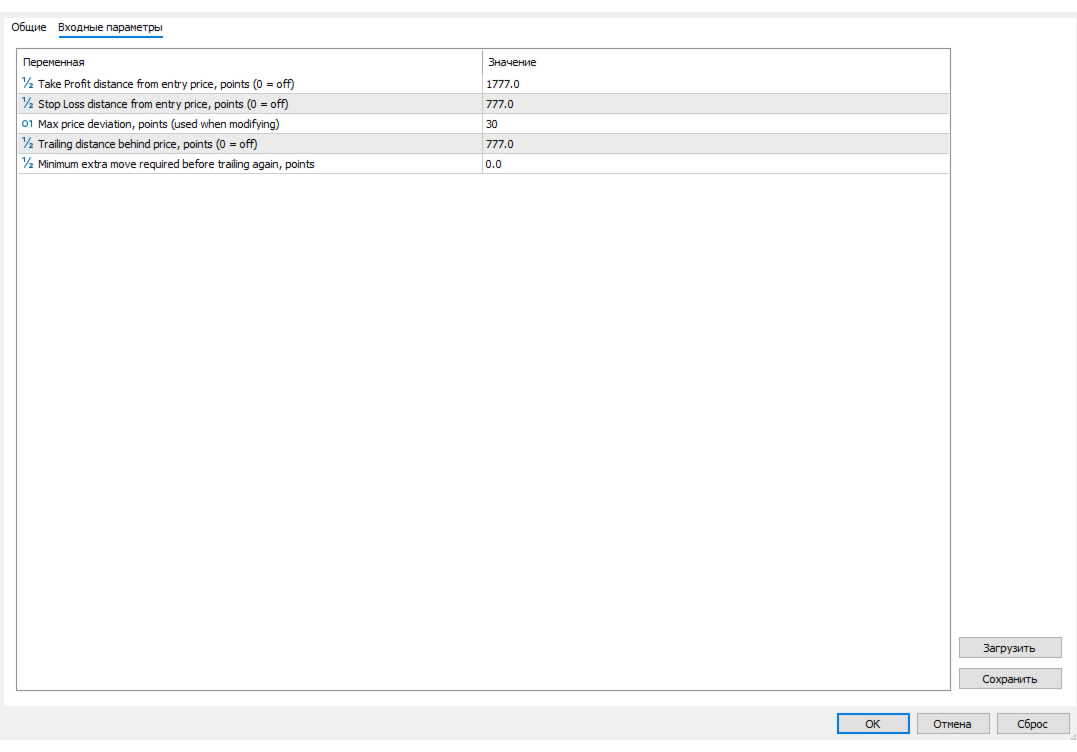
In brief Auto TP Helper is a lightweight tool for manual traders who want to ensure they never forget to set Stop Loss and Take Profit levels after opening a trade. It runs in the background: as soon as you open a position manually, it instantly applies your preset SL and TP levels and then manages the position using a classic trailing stop—adjusting the stop toward profit as the price moves. No trading logic, no entry signals—just protection for the positions you have opened yourself.
Who is this tool for? ● For traders who enter the market manually (based on their own strategy, signals, or market intuition) but want automated, disciplined protection for every trade ● For those who sometimes forget to set a stop-loss during a quick entry—especially with volatile instruments where a delay of even a few seconds can be costly ● For those who want to manage multiple open positions simultaneously but find manually adjusting the trailing stop for each one inconvenient and distracting from market analysis
Key operating principles Does not interfere with other trades. It acts only on positions without a magic number (those opened manually via the terminal); trades placed by other Expert Advisors are completely ignored. Does not overwrite your manual settings. If you have already set a Stop Loss (SL) or Take Profit (TP) manually, the assistant will not alter them; it only fills in missing values. Does not affect existing positions. It only acts on trades opened after the assistant has been launched. The trailing stop moves only in the direction of profit. The stop never moves against the profit; it only trails the price.
Important information before use ● This is not a trading robot; it does not automatically open or close trades, analyze the market, or generate signals. You make all decisions regarding trade entry. ● It operates on one symbol at a time; launch a separate instance on the chart of each instrument where you want automated trade protection. ● Before using it on a live account, it is recommended to test it on a demo account to ensure that the SL, TP, and trailing settings are appropriate for the instrument's volatility. Disclaimer
Past performance and risk management logic do not guarantee future profits. Trading in financial markets involves the risk of capital loss. The author bears no responsibility for trading decisions or results obtained through the use of this product. Before using it on a live account, test the tool on a demo account and ensure you understand its operating logic.