Universal Magic Number Generator
- ユーティリティ
- バージョン: 1.0
- アクティベーション: 5

Universal Magic Number Generator
Tired of Magic Number collisions? This simple yet powerful utility generates unique, reproducible Magic Numbers for your Expert Advisors based on three parameters: Symbol, Timeframe, and EA Identifier.
It includes THREE tools in one:
-
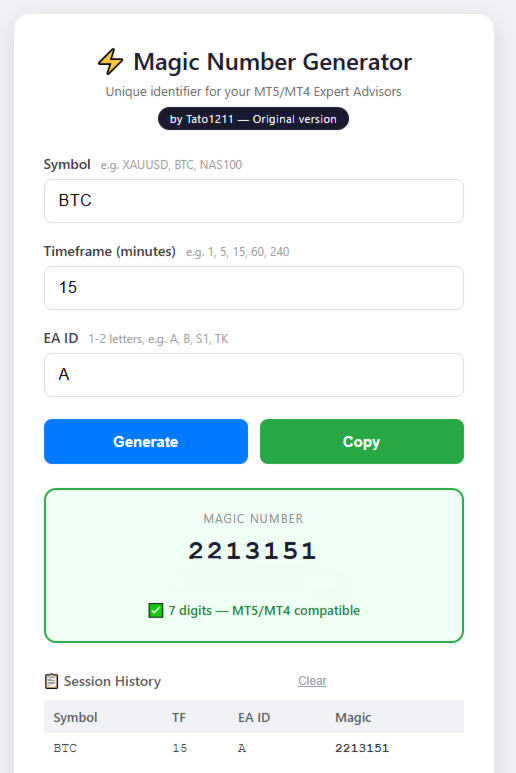
HTML Web Tool: Works in any browser for quick, offline generation. It includes real-time decoding and session history.
-
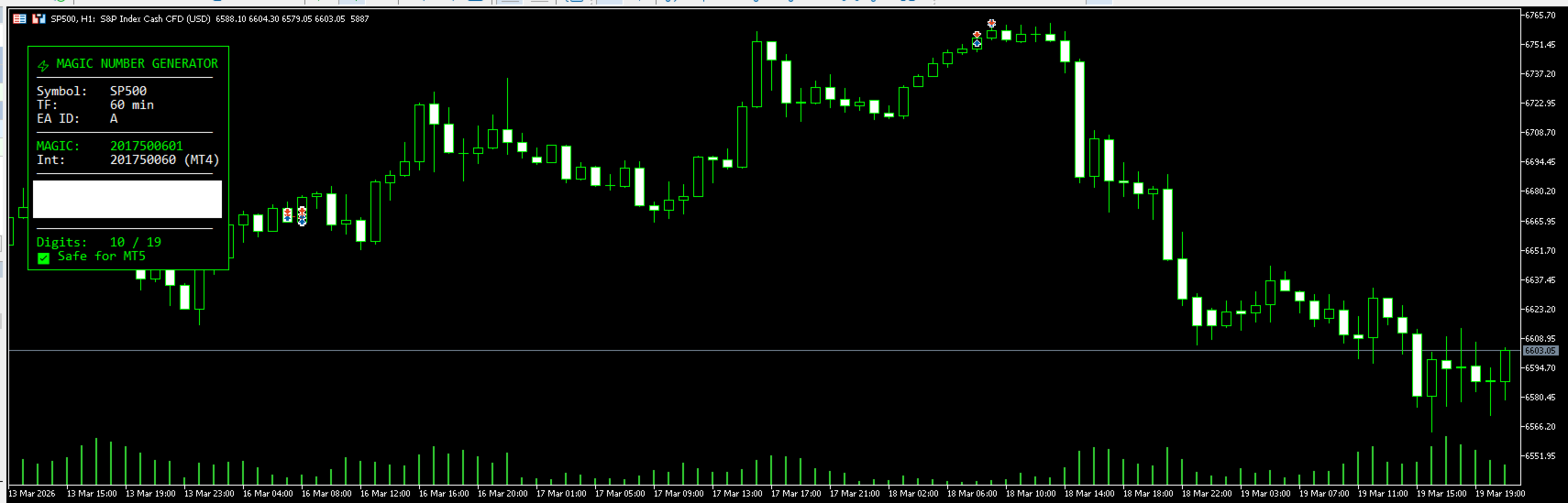
MT5 Script: Just drag it to any chart, input your EA ID (1-2 characters), and it instantly displays the Magic Number and its decoded parts on a clean, black panel.
-
MQL5 Include File ( MagicGen.mqh ): Add #include <MagicGen.mqh> to any EA code and auto-generate the Magic Number in OnInit() with a simple function call.
Perfect for:
-
Developers running multiple EAs on the same symbol.
-
Traders who need to avoid Magic Number conflicts in their portfolios.
-
Anyone who wants a simple, standardized way to generate identifiers.
User Guide — Magic Number Generator
1️⃣ Web Tool (HTML)
How to use:
-
Open the MagicNumberGenerator.html file in any browser (Chrome, Firefox, Edge, etc.).
-
Fill in the three fields:
-
Symbol: the asset you use in MT5 (e.g., XAUUSD, BTCUSD, NAS100).
-
Timeframe: the period in minutes (e.g., 1, 5, 15, 60, 240).
-
EA ID: a 1 or 2-letter identifier for your EA (e.g., A, B, S1, TK).
-
-
Click Generate.
-
The generated number appears in large text. You can copy it using the Copy button.
-
The history panel keeps the last combinations used. Click on any row to load it again.
2️⃣ MT5 Script ( MagicDisplay.ex5 )
How to use:
-
Copy the MagicDisplay.ex5 file to your MT5 terminal's MQL5/Scripts/ folder.
-
In MT5, drag the script from the indicator/script navigator onto any chart.
-
In the parameters window, enter your EA ID (e.g., A, B, S1, TK).
-
The script will display a black panel in the top-left corner showing:
-
Current symbol and timeframe.
-
The generated Magic Number (as string and as integer for MT4 compatibility).
-
The decoded parts of each block.
-
A warning if the number exceeds 19 digits.
-
-
If you change the chart or timeframe, the panel updates automatically.
-
To close it, remove the script from the navigator or restart MT5.
3️⃣ Include File for EAs ( MagicGen.mqh )
How to use:
-
Copy the MagicGen.mqh file to your terminal's MQL5/Include/ folder.
-
In your EA code, add at the top:
cpp#include <MagicGen.mqh>
-
In OnInit() , call the function:
cppint magic = GenerateMagicNumber("A", Symbol(), Period());Replace "A" with your EA's identifier.
-
Use the magic variable as the Magic Number in your orders.
-
The generated number is always the same for the same combination of symbol, timeframe, and ID.
⚠️ Important Note
The conversion algorithm (letter → number) is part of the product.
If you want to know exactly how the number is generated, buy it. 😉