Extra Orders Manager

Extra Orders Manager EA

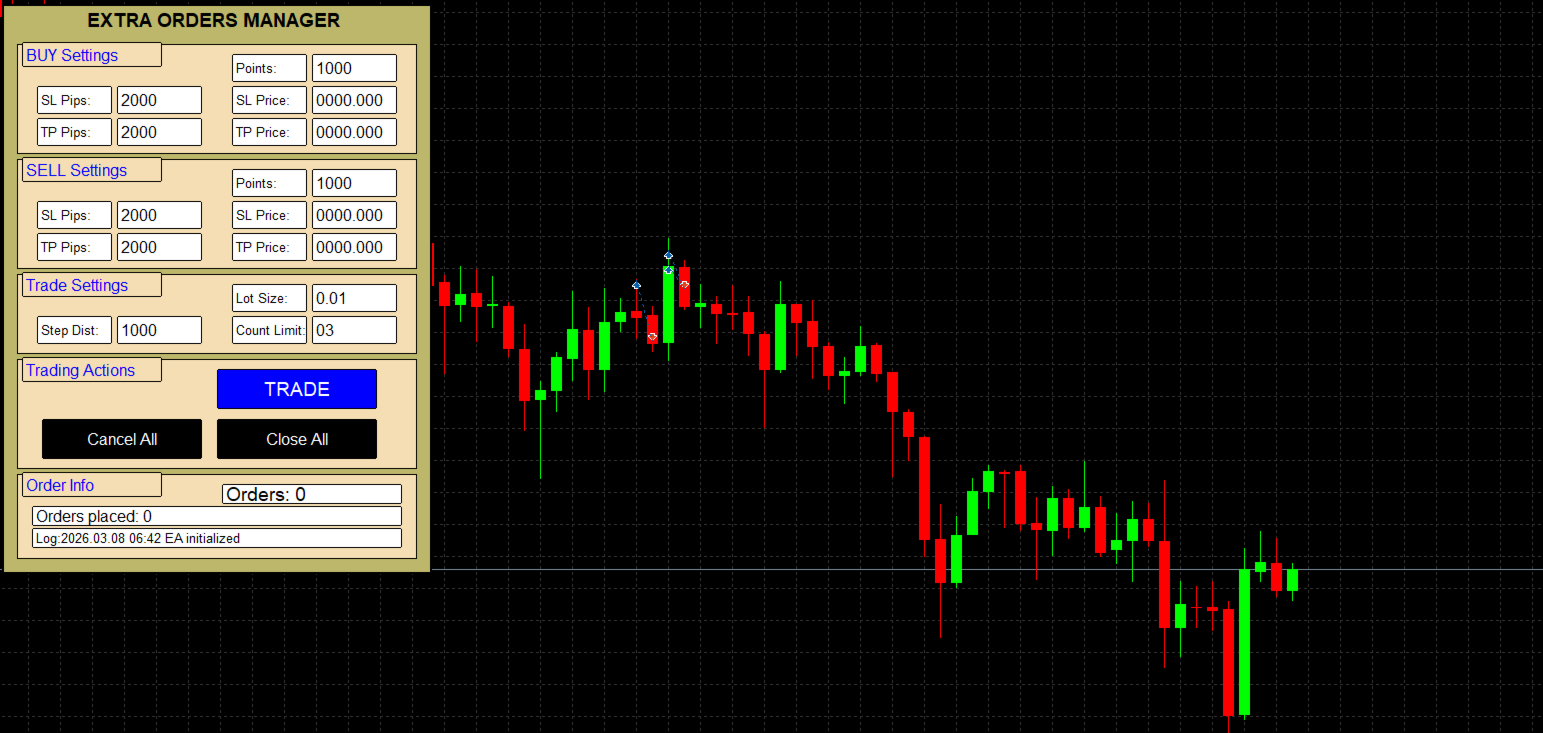
  • Professional Trading Panel – A fully interactive on-chart dashboard that allows traders to manage buy and sell ladder orders directly from the chart with clear input fields and large buttons.

  • Buy & Sell Ladder Order System – Automatically places multiple pending or market orders in a ladder/grid structure with customizable step distance, order count, and entry points.

  • Flexible Stop Loss & Take Profit Options – SL and TP can be defined either by pips distance or exact price, providing precise risk management for every order in the ladder.

  • Smart Order Type Detection – Automatically decides whether to place Buy/Sell Limit, Buy/Sell Stop, or Market Orders depending on the position of the price relative to the current market.

  • Integrated Order Management Tools – Includes quick Trade, Cancel All Pending Orders, and Close All Positions buttons for efficient trade control.

  • Real-Time Order Tracking Panel – Displays the number of active orders, ticket numbers, entry prices, and an internal activity log directly on the chart.

  • Safety and Validation System – Built-in checks for maximum orders, lot size limits, SL/TP distance validation, and spread tolerance to reduce trading errors.

  • Dry Run Simulation Mode – Allows traders to test order placement logic without sending real trades to the broker.

  • Hotkey Trading Support – Execute trades instantly using customizable keyboard shortcuts for faster manual trading.

  • Detailed Logging System – Maintains a rolling activity log both on the chart and in the terminal journal for better monitoring and troubleshooting.

作者のその他のプロダクト
Smart Move EA  Smart Move EA is a powerful, fully independent trend-following Expert Advisor built around an advanced ATR-based SmartTrend engine. It detects real market reversals and executes trades with precision — no external indicators required. Why Traders Love It SmartTrend reversal entries Multi-timeframe confirmation Dynamic Trendline Stop Loss Fixed or Risk-Reward Take Profit Automatic lot increase after losses Built-in breakeven & trailing logic Daily loss & equity
FREE
1. Trading Settings Section Core Configuration for Your Trading Strategy Default Lot Size : Set your preferred trade volume with precision Magic Number : Isolate EA trades for easy identification and management Trade Comment : Customize order comments for better trade tracking Multiple Orders Control : Toggle between single or multiple simultaneous positions Maximum Orders Limit : Prevent over-trading with configurable order limits Perfect for traders who want complete control over their trading
FREE
Key Features – Smart Order Executor EA Ladder order execution (supports multi-order grid placement) Buy / Sell trading via chart buttons and keyboard hotkeys Market, stop, and limit order execution with automatic type detection User-defined ladder parameters: points, lot size, order count, and distance Optional SL and TP control using price level or pip distance Broker safety validation for stop-level compliance Dry-run mode for testing without real trade execution Logging system with chart log
FREE
1. Core Configuration & Magic Number Management Professional Trading Foundation Magic Number System : Isolate EA trades for precise tracking and management Deviation Control : Customizable slippage tolerance for all orders Visual Interface : Customizable on-chart panel with adjustable font sizing Even Order Offset : Configurable price spacing between sequence orders Perfect for traders who need clear trade identification and precise execution control. 2. Twelve-Step Order Sequence System Revolut
FREE
1. Position Sizing & Risk Management Intelligent Capital Allocation System Flexible Lot Options : Choose between fixed lot sizes or dynamic auto-sizing Auto-Lot Configuration : Calculate position size based on account equity or balance Risk Multiplier : Fine-tune exposure with percentage-based risk adjustment Trade Direction Control : Enable/disable buy and sell signals independently Professional traders will appreciate the granular control over position sizing while beginners benefit from autom
FREE
Smart Flow Pro - Trading Dashboard Core Features Dual Trading Modes Manual-Assisted Trading : Instant BUY/SELL buttons with configurable interval trading Time-Based Automation : Schedule trades at specific times with GMT offset adjustment Smart Time Management Real-time GMT Clock   with adjustable timezone offset Visual Countdown Timer   showing hours:minutes:seconds to next trade Automatic Daily Reset   with session management Color-coded countdown   (White > Yellow > Red as time approa
FREE
Smart Flow Light -  Trading Assistant Core Selling Points Smart Interval Trading   - Automated buy/sell execution with configurable millisecond intervals Visual Dashboard   - Clean, professional control panel with real-time P&L display One-Click Operations   - Instant BUY/SELL/STOP/CLOSE ALL functionality Risk Management   - Built-in lot size validation and position monitoring Key Features   Intuitive Interface   - Professional dashboard with title banner and organized controls   Preci
FREE
フィルタ:
レビューなし
レビューに返信