 MetaTrader 5
 エキスパート
 インディケータ
 ライブラリ
ライブラリ
 ユーティリティ
 ウィジェット
 ルール
ルール
YouTubeにあるマーケットチュートリアルビデオをご覧ください
ロボットや指標を購入する
仮想ホスティングで
EAを実行
EAを実行
ロボットや指標を購入前にテストする
マーケットで収入を得る
販売のためにプロダクトをプレゼンテーションする方法
MetaTrader 5用取引ユーティリティ - 34
 以下はMetaTrader5での取引を簡素化する取引プログラムです。ユーティリティにカーソルを合わせると、その説明と目的が表示されます。
Smart Trade Manager EA – Simple, Visual, and Risk-Based Trading Take control of your trades with ease!
This free Expert Advisor is designed for traders who want a fast, intuitive, and risk-based way to manage entries directly from the chart. Risk-Based Position Sizing – Just set your preferred % risk in the EA settings, and lot size is calculated automatically.
One-Click Trading – Place trades instantly with two simple buttons: BUY or SELL .
Interactive SL & TP Lines – Drag and drop stop-
FREE

CopyStar – File-based Trade Copier (MT5 Master/Slave, MT4-compatible) Short description
CopyStar mirrors changes to your open net positions from the master to any slaves – quickly, robustly, and without network configuration. Communication runs via common files (shared file folder), enabling CopyStar to support MT5↔MT5, MT5→MT4, MT4→MT4, and MT4→MT5. Supports symbol mapping, lot multiplication, optional SL/TP copying, magic/comment filters, and a clear chart status display including heartbeat.
FREE

http://www.tradepositive.lat
ALGO Smart Flow Risk Manager (Keyboard Edition)
Have you ever spotted the perfect entry but hesitated so long calculating the lot size that the price ran away without you? Or has a bad streak ever wiped out 20% of your account because you didn't know when to stop? The ALGO Smart Flow Risk Manager is not an automated trading bot. It is a professional Execution Tool designed strictly for Manual Traders who demand speed, structure, and discipline. We turn your keyboar
FREE
This utility exports candle data which you chosed by input parameter to CSV file. Time Frames: M1,M5,M15,M30,H1,H4
Inputs:
StartTime: Start time for exporting data. EndTime: End time for exporting data. DataType: Close, Open, High, Low, Median(HL/2), Typical(HLC/3), Weighted(HLCC/4), Pip(H-L). DecimalSeperator: Decimal seperator for candle price data. (Default = ".") CSVDelimiter: Delimiter character for CSV file. (Default = ";") * This utility exports candle data horizontally. That me
FREE

This is a utility created to ease charts watching on tablet PCs. The indicator allows you automatically alternately display "slide show" of all currency charts from "MarketWatch". The user can set the display time interval (in seconds) between charts in indicator settings. In addition, there is an option of selecting the angle of Start/Stop button which starts and stops the display of charts. This function is very useful if a trader noticed a trading signal and would like to study it in more det
FREE

Equity monitor
This is a simple means change informer. I wrote it for myself, maybe someone will need it...
1. Displays the change in funds for the day. Every day, when the terminal is first launched, it remembers the current funds and monitors changes throughout the day.
2. The first day of the month, well remembers the money and, within months, to monitor changes.
3. Well, it displays the profit of the open position.
To work, you need to create 4 global variables: gvarEqityDay , gvarEq
FREE

Get Economic Calendar History Script is an economic calendar data downloader. The time of the Economic Calendar is based on your broker's time, so if you are going to use the same calendar history file on different brokers, make sure their times are the same. The economic calendar history is organized as follows:
Time: Date and time of the news.
Importance: Degree of Possible impact of the news on the market.
Currency: Currency.
Country: Country.
Description: Description of the news.
Peri
FREE

This is an EA designed to support manual trading. It can accurately calculate risk, automatically enter trades, set stop loss, and perform trailing stop loss using buttons on the chart. There are many features for risk calculation, setting stop loss, and trailing stop loss to suit various trading styles. It can also automatically manage prop firms by closing trades when reaching the target profit level or maximum daily loss. Additionally, it can perform manual backtesting using the strategy test
FREE

**Advanced Position Manager EA** is a professional-grade MetaTrader 5 Expert Advisor designed to protect and maximize trading profits through intelligent stop-loss management. It automatically trails stop losses as profits grow, ensuring you lock in gains while giving trades room to run.
Core Functionality
- **Automatic Profit Protection**: Trails SL as profits grow
- **Works Immediately**: Manages existing positions on startup
- **Two Trailing Modes**: STEP-based or CONTINUOUS
- **Two Manageme
FREE

日常の取引から抜け出し、魔法の世界に少しの間飛び込む機会があります。私はあなたの注意を引くためにゲームを提示します-カードトリック。 mql言語では、エキスパートアドバイザー、インジケーター、スクリプトだけでなく、そのような小さなゲームも作成できます。 私はトレーダーでありプログラマーであるだけでなく、自由な時間にカードトリックを見せたいと思っています。それが起こったので、お気に入りのトリックの1つをデジタル化することにしました。焦点に多くのメンタリズムが含まれていることを考えると、それは簡単ではありませんでした。 トリックは、珍しいカードのデッキによって示されます。これらは優れた紙のカード「ロシア風」です。 1903年2月に冬宮殿で開催された、コートボールの参加者の衣装を繰り返した、衣装を着た人物が描かれたこのトランプのデッキ。カードのスケッチは、1911年にドイツのカードゲームDondorf(Frankfurt am Main)の工場で開発されました。王、婦人、ジャックの服は17世紀のスタイルで作られています。エース-古代ロシアの武器と鎧に囲まれた盾の画像。カード自体はサンクトペテ
FREE

経済指標カレンダーのタブが空になっている、あるいはニュースフィルターが効かなくなった。原因はフィードの停止なのか、PC の時刻ずれなのか、それとも単にタブ側でフィルターされているだけなのか。カレンダータブから眺めている限り、この三つはまったく同じに見えます。 このスクリプトは三つを切り分け、次に何をすべきかまで示します。 何をするか カレンダーのデータベースを API 経由で読みます。API は画面側のフィルターの影響を一切受けないため、これだけで三つ目の原因が切り分けられます。API が将来のイベントを返しているのにカレンダータブに何も出ないなら、それはタブがフィルターされているだけで、ターミナルは正常です。 読み取った状態は、次のいずれかの判定に分類されます。 HEALTHY — 将来のイベントが存在し、フィードは生きている STALE_FEED — 行は存在するが、現在時刻より先のものがない EMPTY — 対象期間に行が一つもない API_ERROR — 呼び出し自体が失敗した UNSUPPORTED — このターミナルはカレンダーを提供していない CLOCK_SUSPECT
FREE

ExpertGain Risk Manager MT5 is a professional MetaTrader 5 utility designed to help traders manage risk, protect trading capital, and improve trading discipline. It is built for manual traders, semi-automated traders, prop-firm traders, forex traders, gold traders, and anyone who needs better control over daily losses, drawdown, trade exposure, and open positions. This utility does not open trades automatically and does not provide buy or sell signals. Instead, it focuses on responsible trade ma
FREE
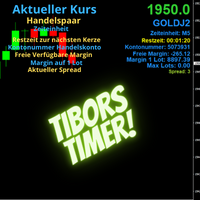
Indikator mit den Notwendigen Anzeigen im Chart - Als Expert installieren !
Dieser Indikator wurde von mir Entwickelt damit die Anzeige der relevanten Parameter klar und deutlich im Chart ist. Er dient zur Information und ist ohne Gewähr. Folgende Parameter werden angezeigt:
- Aktueller Kurs - Das Aktuelle Handelspaar - Die Restzeit zur nächsten Kerzenbildung / Zum Abschluss der Aktuellen Kerze - Die Kontonummer des Handelskontos - Die Frei Verfügbare Margin - Die Margin auf 1 Lot - Der Akt
FREE

G Trade Broker Check – Instantly Evaluate Broker Performance Across Multiple Accounts and Leverage Settings
Take your trading to the next level by analyzing your broker’s performance in real time! With G Trade Broker Check , traders can effortlessly track their broker’s behavior over the past 24 hours on any symbol added to the Market Watch in MT5. Whether you’re comparing multiple brokers, testing different account types, or analyzing varying leverage setups, this powerful Expert Advisor prov
FREE

Manage your prop firm challenges with Raba Challenge Manager EA (FTMO, Rocket21, etc...). Functionalities: Close all positions when the goal profit is reached. Close all positions before reaching the daily drawdown limit. Close all positions before reaching the total drawdown limit. Notes: Auto enabling/disabling algo trading is disabled due to MQL Market policies.
I you have any doubt you can leave it in comments and I will anwer it asap. If you found this tool helpful for you, a comment an
FREE
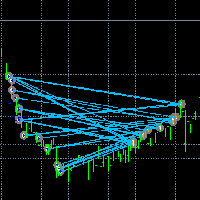
取引を見える化。 MT4のストラテジーテスターやチャート上のシグナル可視化で、取引を分析したことはありますか?
もし答えが「はい」なら、取引ラインがどれほど見えにくいかご存じでしょう。
その解決策がユーティリティ “Visible Deals” です。
“Visible Deals” を使えば、取引ラインを太くしたり、色を変更したりできます。
チャートに “Visible Deals” をドロップして、新しいライン形式を調整するだけです。 Make the deal visible. Have you ever analyzed the deals in the MT5 Strategy Tester or Signal Visualization on Chart? If the answer is "Yes", then you know how sightless trade lines are. The solution is the utility "Visible Deals". The utility "Visible Deals" allow you to make t
FREE
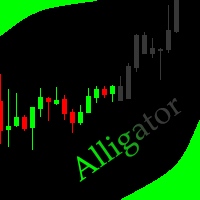
This indicator allows to hide Bill Williams Alligator (on all MT5 timeframes) from a date define by the user with a vertical line (Alone) or a panel (with "Hidden Candles"). Indicator Inputs: Jaws Period Jaws Shift Teeth Period Teeth Shift Lips Period Lips Shift Method Apply To Information on "Alligator" indicator is available here: https://www.metatrader4.com/en/trading-platform/help/analytics/tech_indicators/alligator ************************************************************* Hey traders!
FREE

Script "Bar Close Timer Pro" is designed to display a real-time countdown to the closure of the current bar. This professional tool is tailored for traders working on any timeframe, enhancing chart analysis efficiency through precise time control. The script automatically adapts to the chart’s current timeframe (M1, H1, D1, etc.), calculating the remaining time until the candle closes. (Note: When switching timeframes, the script must be reattached to the chart.) Flexible display settings: Cus
FREE

The Close script is a simple tool that allows traders to close their trades by three methods. Just run the script and choose the close method.
Closing methods Symbol - Allows closing all open trades for a specific symbol. All_Trades - Allows closing all open trades. Magic_Number - Allows closing all open trades according to their magic number. Recommendation AutoTrading functions must be activated. If the AutoTrading function is disabled, the script will not work. EA should be stopped.
FREE
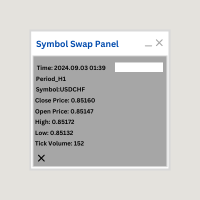
Symbol Swap Panel: Effortlessly switch the active symbol on your chart while simultaneously adding the new symbol to Market Watch. This tool ensures seamless integration and access to real-time market data, optimizing your trading workflow.
Description:
The "Symbol Swap Panel" is a versatile utility designed for traders seeking to manage their chart symbols and Market Watch more efficiently. This tool allows you to easily swap the current symbol on your chart while automatically adding the se
FREE

This is a decorative utility that replaces the standard marks of completed deals with "Kingdom Come: Deliverance" game style markers.
In addition to the graphic display of the price and time of the transaction, the notes also contain a textual representation of the transaction volume. Running utility Drag the utility from the Navigator window to the desired graph. The utility does not use input parameters and does not require configuration. All trademarks available on the chart will be replaced
FREE

About Equity Watching Telegram EA Equity Watching Telegram is an intelligent assistant tool designed for investors who want to monitor their portfolios in real-time. This EA continuously tracks your account's Equity and sends instant notifications directly to your private Telegram account whenever your Equity changes according to your specified conditions. Why do you need this EA? In highly volatile market conditions, or while you are running other EAs, unexpected errors or significant drawdown
FREE
MSP_Bridge は、AI Grok 4 を RiskKILLER AI Navigator に接続する無料ユーティリティです。これは、AI に基づくマルチタイムフレームの 市場方向性&戦略アシスタント です。
このバンドルは、 あなたの取引スタイルに合わせて調整された、AI 駆動のトレンド、センチメント、マクロ分析による機関レベルの洞察を得るのに役立ちます。
RiskKILLER AI Navigator [ MT5 - MT4 ]
取引のパフォーマンスは、プロのように市場を理解することにかかっています。それを提供するのが、 RiskKILLER_AI Navigator です: MQL5では利用できないAI駆動のトレンド、センチメント、マクロ分析により、あなたの取引スタイルに合わせた機関級の洞察を獲得できます。
実装方法
ダウンロードして、以下の指示に従ってください。
問題が発生した場合は、お気軽にプライベートメッセージをお送りください。ご対応いたします。
FREE

** LIMITED version** This EA utility helps Price Action traders calculate the risk as Big Money profesional traders do: in points or percentages. Allows to also set a desired Profit:Risk ratio and optionally enter a second and third orders simultaneously with different ratios and risk percentages. Great for BTMM, ICT, and other methodologies.
Very simple to use, just "point and shoot"!!!
Full version available here .
FREE

Many prop firm traders fail challenges because they lose track of daily drawdown or overall risk. Prop Firm Tracker helps you monitor your challenge directly on the MetaTrader 5 chart. No spreadsheets.
No manual calculations.
Everything updates automatically. Features
Current Balance Current Equity Profit / Loss Challenge Progress (%) Daily Drawdown Daily Drawdown Usage Maximum Drawdown Maximum Drawdown Usage Color Progress Bars Automatic Daily Reset Challenge Status: ACTIVE, PASSED,
FREE

Boost Your Trading with the Trade AST PRO Imagine having a personal trading assistant that transforms how you trade. With our EA, success is just one click away: Drag & Drop Smart Setup Place entry, SL and TP by simply dragging lines on the chart Automatic real-time risk and volume calculations Instant adaptation to every market move Lightning-Fast Execution Direct BUY/SELL buttons on the chart MARKET mode for instant entry PENDING mode for planned trades Auto Mobile Mirror Co
FREE

I’m sharing this EA here for free to support the trading community. I hope it’s helpful, and don’t hesitate to reach out if you have any questions or feedback!
Closes all Trades with click on a button. This button will appear on the right bottom side of the chart. When you remove the utility, the button will also dissappear. It closes all trades, no matter if Sell, Buy, the Symbol, if in profit or loss. One Click - and you solve it all. Especially made for demo and testing purposes. Use it wi
FREE

ZeroG CyberClock Pro is not just another standard MetaTrader clock—it is a premium, beautifully crafted, cyberpunk-style desktop utility designed for the modern algorithmic and manual trader. Tired of basic, ugly text overlapping your charts? CyberClock Pro introduces a sleek, draggable Neon HUD that seamlessly blends into your trading environment without cluttering your analysis. Stay perfectly synchronized with the world’s major financial hubs thanks to its real-time Smart Session Engine.
FREE

SHINO Trade Manager – Smart Risk Management EA (Auto SL, TP & Trailing Stop + Telegram Alerts) Take full control of your trades and eliminate emotional decision-making with SHINO Trade Manager , a powerful and lightweight Expert Advisor designed to automate your risk management on MetaTrader 5. Whether you are a scalper, day trader, or swing trader, this EA ensures every position is protected and managed with precision — 24/7. Protect Your Capital Automatically Never leave a trade unprotec
FREE

You can send MetaTrader screenshot easily to your identified telegram channel via press the send button that on the chart. TelegramBotToken: Telegram API credentials. You can create API credentials on my.telegram.org web page ChatId: Your telegram chatId. Secreenshots will be sending this channel - Please do not press the button repeatedly. This may cause your bot or ip address to be blocked. - You have to add telegram api address ( https://api.telegram.org ) in Option > Expert Advisors > Allow
FREE

Salah Guard Prayer times, Hijri calendar, and optional trade protection for Muslim traders — calculated entirely inside MetaTrader 5. Salah Guard is a MetaTrader 5 utility designed for Muslim traders. It combines daily prayer time calculation, an integrated Hijri calendar, and an optional Trade Guard system that helps you manage your trading activity around prayer times. Trading can be demanding, and it is easy to lose track of time when watching the markets. Salah Guard provides timely reminder
FREE

https://youtu.be/E5AqInoWcFc Visual Risk Panel Pro is a premium, lightweight utility designed specifically for manual traders who value speed, precision, and strict risk management. Instead of typing numbers into a clunky panel or calculating position sizes on a separate app mid-trade, this utility brings interactive math directly onto your charts. Simply draw your structural zone, drag your entry or exit lines, and let the panel manage the rest flawlessly. Key Advantages Zero Math Anxiety: Th
FREE

PropFolio Copy trading Hub Pro MT5 Slave: Cross-Platform Trade Copier Lightning-Fast Execution & Precision Risk Scaling for Retail and Prop Firm Traders The PropFolio Copy trading Hub Pro MT5 Slave is the receiving engine of the ultimate trade management ecosystem. Designed to work exclusively with the PropFolio Copytrading Hub Pro Master EA, this high-performance bridging tool allows you to instantly replicate trades across multiple accounts and platforms with sub-millisecond precision. Whethe
FREE

When creating, modifying and moving a trend line, two anchor points will be selected: high / low, open / close, median or weighted from the candlestick prices.
For high / low, open / close, if the anchor point is above the candlestick, the upper price will be taken, below the candlestick - the lower one. If the point is inside the candlestick, then if the first point is higher than the second, then the first one goes up, the second goes down. Conversely, if the second is higher than the first.
FREE

ApexForge Quote Paused Notification is a lightweight monitoring utility designed for MetaTrader 5 that detects when market quotes stop updating and immediately alerts you when abnormal quote interruptions occur. Whether caused by server issues, network disconnections, market closures, or temporary liquidity interruptions, the tool helps traders recognize quote freezes before they lead to missed opportunities or unexpected trading behavior. A notification is also generated once normal price upda
FREE
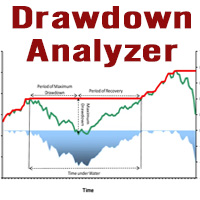
This tool is specifically designed to calculate drawdowns in a trading or investment account, expressed as a percentage, by using user-input balance figures. In essence, it allows users to track how much their account dips from a peak balance to a subsequent low point, a metric that is instrumental in understanding risk exposure. By supporting the option to choose a specific timeframe, it empowers traders and investors to pinpoint the start date of their measurement, ensuring that the data refle
FREE

Having a chart window that has multiple pairs (symbols), timeframes, and indicators displayed simultaneously can be quite advantageous. This indicator will allow traders to place multiple chart objects in a sub window of the main chart window. The indicator is capable of adding all available MT5 indicators and custom indicators to the existing chart. The list and parameters of the indicators are for reference at: https://www.mql5.com/en/docs/indicators
Input parameters Name
Example
Indicator
FREE

Right here, is the utility tool to help traders with opening, managing, and closing multiple trading positions at the same time. This Utility tool does not work on strategy tester. To test this utility, follow the blog link below to download the demo version. https://www.mql5.com/en/blogs/post/751097
Specifications. 1) User-friendly - No complications and any trader can find it easy to use. - A simple click on a button is all it takes to perform the desired task. 2) Doe
FREE

RoundNum Readme (Traders Club)
特徴: このツールはDOWやNIKKEIなど500や1000ポイントがラウンドナンバーの 指数を取引する際に表示するように開発しました。 もちろんメジャー通貨でも表示はされます。
更新頻度を制限しているのでチャート表示が遅くなるということは ありません。
XMでDOWを取引される場合、Main Levelsを10000 Sub Levelsを5000にしてください。
各パラメータの説明: Number to display lines:表示するライン数を設定します。 Main Levels:メインレベルをポイントで指定します。 Main Line Color:メインラインの色を設定します。 Main Line Style:メインラインで使用されるラインを設定します。 Show Sub Lines:サブラインを表示するか設定します。 Sub Levels:サブレベルをポイントで指定します。 Sub Line Color:サブラインの色を設定します。 Sub Line Style:サブラインで使用され
FREE
SmartSetup Bot Is an advanced trading tool that combines the flexibility of manual configurations with the power of semi-automated features. It automatically generates graphical objects, displaying critical zones such as support and resistance levels, stop loss and take profit areas, and other essential indicators. SmartSetup Bot provides clear and precise visualization of your trading parameters, facilitating informed decision-making. This bot is designed for traders who value manual control bu
FREE

For those who use the Trading Arrows on the chart for later study, but use the Triple Screen approach and got all those arrows everywhere on all additional charts, here it is: Arrows Cleaner! Just drop it on the chart and leave it there. When needed, just with 1-click you get rid of all those annoying arrows...
SETTINGS You can position the little Button on any corner of the chart. Additionally you can displace it with the Offset settings. You can enlarge or shrink its size, as well as the text
FREE

AdaptiveStats is a comprehensive and visually stunning performance analysis tool for the MetaTrader 5 (MQL5) platform, featuring a professional "Fintech Dark" (JARVIS-inspired) aesthetic. It is engineered to provide traders with real-time, actionable insights into their trading performance directly on the chart interface. Key features and capabilities include: Multi-Timeframe Performance Tracking : Automatically calculates and aggregates Net Profit, Win Rate, and Total Trades for three critical
FREE

ApexTPGrid is a powerful Trade Management Utility designed to professionalize your grid and averaging strategies. Whether you trade manually or use other EAs, this utility takes control of your open "basket" of orders to manage them to a safe exit. The standout feature is the Swap-Aware Logic . We all know the pain of holding a grid for weeks, only to close at "breakeven" and realize negative swaps ate your capital. ApexTPGrid solves this by automatically calculating all accumulated costs (Swap
FREE

ARMOR Risk Calculator Trade with a plan. Calculate your risk before you enter the market. ARMOR Risk Calculator is a professional and easy-to-use risk management tool for MetaTrader 5, designed to help traders calculate their position size and potential trade risk before placing a trade. Instead of manually calculating lot sizes and risk values, ARMOR Risk Calculator provides a clean and intuitive dashboard where you can enter your trade parameters and instantly review the calculated results. Ke
FREE

TRAILINATOR is a unique Solution to use different Trailing-Stop Variants and change your settings via Remotecontrol. You configure your Trailing-Stop for a specified Symbol only once. This setting will be used for all your Positions of the same Symbol. Currently we support these different Trailing-Stops: Standard : works like you use in Metatrader Terminal, starts trailing if your profit is greater than trailing stop Start after points : trailing stop will start after your defined points in p
FREE

Orders Manager is a simple and indispensable assistant for managing all your orders. Inputs: Magic = 999; // Magic TakeProfit = 1000; // Take Profit. If = 0 the level is not setts. StopLoss = 0; // Stop Loss. If = 0 the level is not setts. Slippage = 10; // Slippage GeneralProfit = false; // Closing all orders based on total profit. If false the function is disabled and works according to TakePr
FREE

The spread in trading is the difference between the purchase price and the sale price of a financial instrument on the market. The spread is a commission fee that traders pay brokers for the opportunity to trade.
It's no secret that each broker offers its own terms for trading. The size of the spread is important. There are a lot of advisors (especially scalpers) who show different results at different brokers. We have repeatedly encountered this. Therefore, using this utility, find out what s
FREE

Comprehensive OHLC Data Downloader for MetaTrader 5 This powerful and efficient script allows traders, quantitative analysts, and developers to download the complete OHLC history of any financial instrument available in MetaTrader 5. Whether you need historical data for a specific asset or want to download data for all assets in the Market Watch , this tool simplifies the process with just a few clicks. Key Features: Flexible Data Extraction – Download OHLC data for a single asset or all asse
FREE

This script deletes all objects attached to all open charts. It's a bulk operation that can save a lot of time, avoiding the need to open the Objects List (Ctrl+B), pressing "List all", then manually selecting the objects and hitting "Delete" (for each single chart)... If you've tried "Delete all objects from chart", this script does the same thing, but to all open charts . So beware! You'll have to add all those Fibonacci retracements, trendlines, etc. back to your charts if you run this script
FREE

PositionRelay Slave Subscriber は PositionRelay マスター口座のオープンポジションを読み取り、ローカルの MetaTrader 5 ターミナルにミラーします。固定・スケール・残高適応ロット、シンボル単位の制御、ダッシュボード表示のための定期セルフレポートに対応します。
関連製品:PositionRelay Master Publisher(無料)。スレーブがポジションをミラーする前に、マスター口座で同じ User ID の PositionRelay Master Publisher を実行する必要があります。
要件: - プランに利用可能なスレーブ枠がある有効な PositionRelay クラウドサブスクリプション(positionrelay.com で登録) - positionrelay.com ダッシュボードの PositionRelay User ID - マスター口座で動作中の PositionRelay Master Publisher - スレーブターミナルごとに一意の InpAccountLabel
セットアップ:
FREE

Spread Monitor Live Real-time Spread Monitoring Tool for MT5 Version: 1.00
Last update: 15.06.2026
Author: Aleksandr Bezverkhikh Description Spread Monitor Live is a lightweight and efficient indicator for MetaTrader 5 that displays the current spread in real time directly on your chart. Perfect for scalpers, day traders, and anyone who needs to keep a close eye on trading conditions. The indicator shows the spread in points with clear color coding, allowing you to instantly s
FREE

“One-Click Flatten — Fast, Clean, Reliable” Close all orders and positions in your account with a single click — no hassle, no fumbling through tabs.
Time-saving tool for traders needing instant exit from the market—especially during volatile moves or news events.
Emotion-free execution reduces human errors and hesitation—just click and it's done.
Easy to use: load the EA in MT5 and let it handle the rest. Perfect for both beginners and seasoned traders.
Fu
FREE

Aurum Position Manager は、MetaTrader 5 向けのポジション管理ユーティリティです。チャートシンボル上の既存のポジションを監視し、それらの損切り(ストップロス)をブレークイーブンロックへ移動した上で、さらに ATR ベースのトレーリングレベルへ移動させることができます。 これは取引戦略ではありません。エントリーの選択、トレードの実行、またはポジションサイズの計算は行いません。 機能 約1秒ごとに一致するオープンポジションを確認します。 現在のチャートシンボルのみを使用します。 各ポジションチケットについて、エントリー価格から最初に観測されたストップロスまでの価格距離を記録します。 設定されたブレークイーブン倍率に達した後、ストップロスをエントリー価格プラス/マイナスの設定されたロック金額へ移動します。 設定されたトレーリング開始倍率に達した後、最新の確定済み ATR バーを使用して ATR ベースのトレーリング距離を適用できます。 ストップロスの変更を送信する際、利確(テイクプロフィット)値は変更せずに維持します。 ポジション側およびブローカーのストップ
FREE

SymbolScope MT5 は、銘柄仕様のパーソナルアシスタントです。ターミナルで契約仕様を調べたり、インターネットでデータを検索したりする必要はもうありません。必要な情報はすべて、チャート上のエレガントでミニマルなパネルですぐに確認できます。 これは何のために?
トレーダーにとって、取引を開始する前に銘柄の正確なパラメータ(ポイントの価値、契約サイズ、最小ロット、スワップ)を知ることは不可欠です。SymbolScope MT5 は、現在の銘柄に関するこのデータを瞬時に提供し、他の銘柄に素早く切り替えてその仕様を調べることもできます。 主な機能: ワンクリックで完全な仕様を表示:INFOボタンを押すとパネルが展開され、選択した銘柄の包括的なパラメータリストが表示されます。 重要なパラメータがすべて見える: 現在のASK価格とBID価格。 ポイント(最小価格変動幅)の値。 ティック値 と ティックサイズ。 契約サイズ。 最小ロット、最大ロット、およびロット変更幅。 買いポジションと売りポジションのスワップ値。 素早い銘柄切り替え:市場概観で利用可能なすべての銘柄の内蔵ドロップダウン
FREE

️ Multi-Symbol ATR Drawdown Mitigation EA (Smart Risk Manager) Advanced Drawdown Control Using ATR-Based Dynamic Profit Balancing “Professional Risk Management Engine”
This Expert Advisor is designed to help traders actively reduce drawdown by intelligently closing losing trades using profits from winning positions — based on market volatility (ATR) . Core Concept Instead of letting losing trades grow uncontrollably, this EA: ️ Identifies the worst losing position
️ Selects profi
FREE

PositionPilot — Менеджер позиций в один клик PositionPilot размещает исполнение сделок и управление позициями прямо на вашем графике. Один клик — и ваша сделка под защитой. В отличие от большинства советников, которые обрабатывают только собственные ордера, PositionPilot работает со ВСЕМИ позициями — открытыми вручную, другими советниками или через его панель. Исполнение в один клик Кнопки BUY/SELL с автоматическим лотом по проценту риска Горячие клавиши F1–F6 для торговли с клавиату
FREE

Trading Panel Pro Trading Panel Pro is a professional MetaTrader 5 trading panel designed to help traders open and manage positions faster with precision and ease . Execute Buy/Sell orders , place pending orders , and manage trades directly from the chart using a clean, modern, and minimal interface — reducing unnecessary clicks and improving execution speed during fast-moving markets. Built for traders who value speed, simplicity, and efficient trade execution . Features:
Fast trade executio
FREE
The utility helps open a deal with a stop loss that does not exceed the specified amount, or to refrain from it altogether. That is, it determines the number of lots to open the deal so that the stop loss is as close as possible to the specified amount in USD without exceeding it. For example, it will be indispensable when trading according to the Gerchik strategy. That is, when trading based on risks, with a fixed risk and a fixed take profit relative to stop loss. For example, if you always op
FREE

DCA Buddy: Advanced Price Visualiser Take control of your multi-position trading with DCA Buddy , an advanced indicator for MetaTrader 5. It provides a clear and accurate visualisation of the average break-even price for all your open trades on the current chart symbol. This powerful tool goes beyond simple averages, correctly handling both one-sided and complex hedged scenarios, and features a sophisticated alert system to notify you precisely when your net position achieves its goals. Core Fun
FREE

Script for quickly selecting a tool with high correlation. The script is placed on the tool to which you need to select the second correlating one. Then you can change the number of bars to calculate and the timeframe. The script iterates through all available symbols in the market overview and returns the 20 most correlated ones. You can use the selected pairs to trade with THE new SH expert Advisor
FREE

Draws trend lines from the high and / or low values of the week. The color and thickness of the levels are customizable. All trend lines can be edited. Suitable levels of the past can be renamed and other properties changed. Levels are re-read only on the H1 timeframe once an hour.
...
FREE

Margin Tick Ratio — margin efficiency analysis for all broker's instruments
Margin Tick Ratio is a script for MetaTrader 5 that runs through your broker's tools in one run and answers a practical question: how much "tick" profit do you get for each unit of collateral, and how expensive is the entry spread.
The script does not trade. It collects data, ranks tools by efficiency, and generates a user-friendly report in a terminal, CSV, and interactive HTML file.
Who is this product for
• T
FREE

Account Info Utility is a free script for quick analysis of trading conditions for the current account and symbol.
It displays: - account information, balance, equity, margin, free margin and floating profit; - symbol trade restrictions, current price and trade mode; - minimum/maximum lot, lot step, real margin per 1 lot and maximum available lot; - point value for 0.01, 0.10 and 1.00 lots; - long/short swaps; - daily ATR(14) in pips and the value of that range for different lots; - trading se
FREE

OneClickClose-Pro EA allow users to easily close all positions at once with multiple options with simple UI.
Options Includes::
1. Close All Positions
2. Close All Buy Positions
3. Close All Sell Positions
4. Close All Position GreaterThan or Equal to Profit
5. Close All Position LessThan or Equal to Profit
6. Close All Position By Symbol
7. Option to Set Deviation
8. Option to Set Maximum Retry (If position close fails)
MT4 Versio
FREE

Why You Need VLine Alarm
Stop Missing Trade Setups.
News events, session opens, key timeframes - they all happen whether you're watching or not. VLine Alarm keeps you on point.
Set It Once. Forget It.
Drag a line. Walk away. Get alerted. No babysitting charts. No missing opportunities because you switched timeframes or stepped away.
The Problem It Solves:
You know that moment when you realize the news already hit 5 minutes ago? Or you miss the London open because you were analyzing the daily cha
FREE

DataForge exports MetaTrader 5 bars to a CSV file, and writes into that file what the data actually contains.
It does not trade. It places no orders, reads no positions, and requires no account permissions. It reads history and writes a text file.
WHAT THE EXPORT WRITES
1. An instrument passport, placed in the CSV header
Digits, point, contract size, tick value, tick size, and the minimum, step and maximum lot are written as comment lines at the top of the file. Export the same symbol fro
FREE

HorizonProbe measures how the size of a price move compares with the cost of trading it, across several holding times, on your broker's own history and your broker's own spread.
It is a single script. It places no orders, reads no positions, and has no external dependency. Copy the one file into a terminal and run it on a chart.
THE QUESTION IT ANSWERS
The cost of a trade is paid once, whatever happens next. The move you are paid for is not fixed: over a longer holding time, the average move
FREE

простой копировщик сделок между двух терминалов MT5, настраивается только коэффициент копирования на слейв части. мастер часть вешаете на любой новый график на терминал откуда нужно копировать сделки, а слейв часть вешаете на любой график в терминале в который нужно копировать «Программное обеспечение предоставляется по принципу "как есть" (As Is). Разработчик не дает никаких гарантий, явных или подразумеваемых, в отношении работоспособности программы, ее соответствия ожиданиям пользователя или
FREE

простой копировщик сделок между двух терминалов MT5, настраивается только коэффициент копирования на слейв части. мастер часть вешаете на любой новый график на терминал откуда нужно копировать сделки, а слейв часть вешаете на любой график в терминале в который нужно копировать «Программное обеспечение предоставляется по принципу "как есть" (As Is). Разработчик не дает никаких гарантий, явных или подразумеваемых, в отношении работоспособности программы, ее соответствия ожиданиям пользователя или
FREE

Trade Performance Journal — Your Visual Trading Summary Tool Trade smarter by understanding your performance.
This Expert Advisor (EA) provides an instant visual summary of your trading results directly on the chart. Whether you’re a scalper, swing trader, or long-term investor, this tool helps you stay on top of your performance metrics with ease. Key Features Flexible Time Analysis
View your performance by Quarter, Month, or Half-Year. Easily switch between display modes to analyze your res
FREE
MetaTraderマーケットは自動売買ロボットとテクニカル指標を販売するための最もいい場所です。
魅力的なデザインと説明を備えたMetaTraderプラットフォーム用アプリを開発するだけでいいのです。マーケットでプロダクトをパブリッシュして何百万ものMetaTraderユーザーに提供する方法をご覧ください。

取引の機会を逃しています。
- 無料取引アプリ
- 8千を超えるシグナルをコピー
- 金融ニュースで金融マーケットを探索