 MetaTrader 5
 エキスパート
 インディケータ
 ライブラリ
ライブラリ
 ユーティリティ
 ウィジェット
 ルール
ルール
YouTubeにあるマーケットチュートリアルビデオをご覧ください
ロボットや指標を購入する
仮想ホスティングで
EAを実行
EAを実行
ロボットや指標を購入前にテストする
マーケットで収入を得る
販売のためにプロダクトをプレゼンテーションする方法
MetaTrader 5のためのエキスパートアドバイザーとインディケータ - 135
 自動売買ロボットとインジケータを使用して、外国為替取引の収益性を高めます。 自動売買ロボットを使用すると、取引の開始と終了を自動化でき、インジケータは市場の行動をより正確に予測するのに役立ちます。
このページには、MetaTrader5アプリケーションのカタログが掲載されています。
自動売買ロボットとインジケータを使用して、外国為替取引の収益性を高めます。 自動売買ロボットを使用すると、取引の開始と終了を自動化でき、インジケータは市場の行動をより正確に予測するのに役立ちます。
このページには、MetaTrader5アプリケーションのカタログが掲載されています。 
Hi Traders, I coded a free analysis tool for you to use for your trading accounts, because there is nothing more important than tracking and understanding results. Take a look at our website for full EA validation, and the deepest anti curv-fitting analysis: https://ergodiclabs.co/
Trade Statistics Dashboard Pro is a real-time on-chart performance analytics panel that gives you instant visibility into your trading results. Built with an institutional-grade dark interface, it displays every cr
FREE

Take a Break FREE is the free version of Take a Break , the account protection and risk management tool for all your Expert Advisors. It pauses your EAs before news, after a daily loss or when your own rules say so, and lets them continue when the pause is over. What the free version does Daily loss brake: a fixed limit of -5% per day is always active (reset at 00:00 server time). When it triggers, one chart pauses. News filter for one chart symbol: pause before and after scheduled releases, cur
FREE

Indicator that uses ATR and standard deviation to calculate the current trend. It has the top and bottom line. The top line is shown when it is high, and the bottom line when it is low. The indicator does not draw a trend line or show the trend for the day, or for a certain period. It has the function of indicating the current trend, and may indicate a reversal.
use it with caution and at your own risk.
FREE
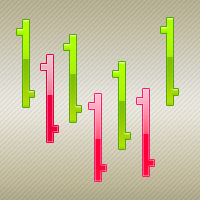
The ColorBars Indicator paints bars with different colors depending on the volume changes. If the volume has increased, the color is green, overwise the color is red.
FREE
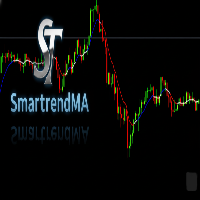
A SmartTrendMA foi projetada para identificar melhor zonas de alta, baixa e consolidação, azul alta, vermelho baixa e branco consolidação, vai te auxiliar a identificar melhor a tendência. Em parâmetro regule melhor conforme sua preferência em grau pois cada par de moeda se adequa diferentemente a cor,mude também o período e se quiser mude exponencial ou simples.
FREE
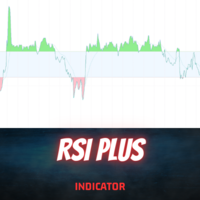
Introduction
The RSI Plus is an innovative technical analysis tool designed to measure the strength and direction of the market trend. Unlike the traditional RSI indicator, the RSI Plus boasts a distinctive ability to adapt and respond to market volatility, while still minimizing the effects of minor, short-term market fluctuations.
Signal
Buy when the RSI plus has been in the oversold (red) zone some time and it crosses above the 20 level on previous candle close
Sell when the RSI plus ha
FREE

For Nasdaq trading, the most important principle is to know the trend of the fund.
This indicator with 6 green and red lights provides you with the daily path of this important indicator.
This indicator has been tested for 6 months and has a win rate of over 85%.
Be sure to contact me before purchasing to get the necessary instructions on how to use and set up this indicator.
You should use a broker that has dollar index, vix, and commodities. MT4 Version
You can contact us via Instagram, Teleg
FREE

**Cosmo Range Estimator は、価格が「どれだけ」動きそうかを示します。「どちらへ」動くかは示しません。**
多くのトレーダーは ATR(14) でストップとターゲットを決めています。この 14 は、Welles Wilder が 1978 年に**日足チャート向け**に選んだ数字です。誰も測り直さないまま、そのまま日中足へ持ち込まれました。
私たちは測りました。EURUSD M15 の 634,970 本のローソク足で、**Cosmo Determinator**(当社独自のボラティリティエンジン)は、次の値動きの大きさを ATR(14) より正確に予測します。さらに、**係数を再フィッティングせずそのまま**、モデル構築に使っていない他の 8 通貨ペアに適用しました。8 ペアすべてで改善しました。
**何に使うか**
- **そもそも入る価値があるか。** パネルは「期待変動幅 ÷ スプレッド」を表示します。変動幅がコストを十分に上回らないなら、その取引は運ではなく算術としてマイナスから始まります。 - **ストップの距離。** 一般的な目安は「1.5
FREE

NOW FREE!! It's crucial to note that, like any trading tool, ForexClimber EA doesn't guarantee profits. Forex trading carries risks, and market volatility means success is never certain. The pricing of ForexClimber EA is dynamic, and as it gains popularity, the cost for renting or buying may increase. Invest now to secure your place in Forex trading advancement. Seize the opportunity, navigate the markets, and let ForexClimber EA support your Forex trading aspirations.
FREE

Trade Governor enforces trading discipline on manual trades or trades opened by another EA. It does not open trades and makes no market prediction - it is a pure risk-governor layer that protects your account with three rules.
Rules it enforces: - Trading-session window: positions held outside your allowed server-time window are closed (for example, keep only the Asian session). - Max trades per day: positions beyond your daily limit are closed (newest first); the counter resets each broker day
FREE

This is a dedicated trading auxiliary tool for the MT5 platform, with the core function of automatic counting and labeling of candlesticks within a custom trading session . It adapts to overnight trading scenarios and broker time differences (summer/winter time), features a lightweight design and flexible configuration, and eliminates manual candlestick counting to improve chart analysis efficiency. Core Features Customize the opening and closing time of the trading session in Beijing Time, sup
FREE

SimpleMACD is a clean, configurable MACD indicator for MetaTrader 5. It computes the classic three-component output — main line, signal line, and histogram — using a transparent EMA implementation with an SMA seed that matches the standard MetaTrader behavior. Why traders use SimpleMACD SimpleMACD gives you a straightforward MACD with no hidden modifications. All EMA periods and the applied price are configurable, so you can match any published MACD setup exactly. The histogram color flips autom
FREE
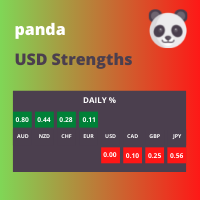
This panel displays the price percentage change
Shows the percentage change in price from the last open: Daily, Weekly and Monthly timeframes. Numbers are easier to use than histogram currency meters. Line up the three timeframes strengths/weaknesses for strong trends. Compare currencies strongest against weakest. USD is the world's reserve currency to compare against.
How to use 1. Match the strongest currency with weakest currency; or 2. Match the strongest or weakest currency against USD;
FREE

Adaptive Alpha EMA is a next-generation trend indicator that revolutionizes the classic EMA crossover by introducing real-time volatility responsiveness. Unlike traditional EMAs that rely on static periods, Adaptive Alpha EMA measures volatility speed through ATR (Average True Range) and automatically scales the alpha (smoothing factor) of both fast and slow EMAs. The result is an indicator that tightens during low-volatility consolidation and expands during explosive trend moves — delivering e
FREE

KC Multi-TF Unicorn Hunter is a professional Multi-Currency & Multi-Timeframe Dashboard designed to scan the entire market from a single chart. Stop wasting hours switching between 20 different charts. This indicator monitors your favorite pairs (Forex, Gold, Indices, Crypto) across 3 distinct timeframes simultaneously and alerts you only when a high-probability "Unicorn" setup occurs. What is a "Unicorn" Setup? Ordinary indicators generate too many false signals. A "Unicorn" setup is a rare, hi
FREE
Easy to use EA designed to auto trade. Works in every market condition. It uses reliable levels of MACD indicator combined with unique logic to perform fully automatic trading operations. *For MT4 version please go here! *If you don't like automated system and only need an alert system to help you in trading. Please check this arrow with alert system here!
FEATURES: Dangerous methods like martingale, hedge, grid or scalping are NOT used. Each position has Stop Loss and Take Profit. Positional
FREE

Account Turbo Flip: The Ultimate Manual Trading & Management Assistant Trading successfully isn't just about finding the perfect entry—it is about how you manage the trade once you are in the market. Account Turbo Flip is a streamlined utility Expert Advisor designed to take the emotion and hesitation out of trade management. Built for traders who prefer to maintain control over their own entries, it acts as your dedicated tactical assistant. You pull the trigger based on your own analysis, an
FREE

Introducing Revolutionary Self-Learning EA with Monte Carlo Simulation
This Expert Advisor (EA) combines advanced trading strategies with state-of-the-art risk management. With integrated Monte Carlo simulation, it elevates your trading to a whole new level of safety and profitability.
Main Features and Benefits
Adaptive Trading Strategy Dynamic threshold values: EA automatically adjusts its trading parameters based on market conditions.
Multi-indicator filtering: Uses ADX, ATR, RS
FREE

Drag the stop loss line to your level and the panel works out the lot size for the risk you set, from your broker's own contract size. FEATURES Entry, stop loss and take profit lines you drag. Lot size normalised to the broker's minimum, maximum and step. Risk as a percentage of balance or equity, fixed cash, or fixed lot. Live risk to reward ratio. HOW TO USE IT 1. Attach it to a chart and drag the three lines. 2. Set the risk basis and value in the inputs. 3. Read the lot size from the panel.
FREE
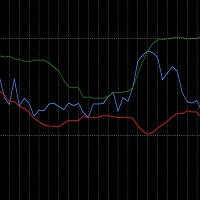
The RSI_BBands is a custom indicator designed to combine the Relative Strength Index (RSI) and Bollinger Bands (BB) for enhanced market analysis. It calculates the RSI using a specified period (default 14) and overlays Bollinger Bands around the RSI values, with adjustable parameters for the Bollinger Bands period and deviation. You can find more free products HERE . If you're looking for a low risk EA , check the Silent Pressure EA .
Key Features: RSI Calculation: The RSI is calcul
FREE

本EAは**M1(1分足)**専用に設計されており、指定された期間( cSeconds )内で価格が一定の変動幅( MinPriceShot )を超えた場合に注文を開きます。 EAは**固定ロット(FixedLotSize) または 自動ロット計算(LotsOptimized())**のいずれかを使用します。 ポジションが開かれた後、EAは以下の方法で管理します:
テイクプロフィット(Take Profit) – 利益を確保。
ストップロス(Stop Loss) – 損失を制限。
トレーリングストップ(Trailing Stop) – 利益を守るための自動ストップ移動。 さらに、直近の利益や現在の口座残高などの統計情報をチャート上に表示します。 リスク管理と安全性 危険な手法(マーチンゲール、ナンピン、グリッドトレードなど)を使用しません。
スプレッドやブローカーの手数料に非常に敏感です。
スプレッドの狭い通貨ペア(例:EUR/USD、USD/JPY)を選択することを推奨します。 EAのパラメータ

Lite Hamster Scalping (Very Fast EA no Graphics)
The Lite Hamster Scalper is a Trading Robot with no use of Classic martingale. Schedule scalping Options. it uses some Indicators as a filter to maximize Correct entries.
Please to check The version 1.4 of Hamster Pro : Hamster_PRO_MT4 && Hamster_PRO_MT5 Recommendations : Lot : 0.01. Balance : 100 USD. Pair : EURUSD. TimeFrame : 5Min. Spread : 30. Broker : Trusted Brokers Inputs descriptions : Period Indicator1 - period of the firs
FREE

DS Quarterly Price Levels Quarterly Theory Price Level Indicator for MetaTrader 5 DS Quarterly Price Levels is a MetaTrader 5 indicator designed to display structured price levels based on Quarterly Theory concepts. The indicator divides price ranges into defined segments and displays key reference levels including quarterly boundaries, midpoint areas, premium zones, and discount zones. It is designed to help traders analyse price location within a defined range and provide additional structure
FREE

PipPal - Your Animated Robot Trading Companion Trading can feel lonely and stressful. PipPal puts a friendly little robot right on your chart who stays with you through every trade. He flies out of a glowing sci-fi portal, follows your live price in real time, and reacts to what is happening in your account - so your chart finally feels alive. PipPal is a pure visual companion. It reads your open trades to show emotions, but it never opens, modifies, or closes any position. Your trading stays 10
FREE

Trade Panel QuantumAlgo — MetaTrader 5用 プロフェッショナル リスク&取引管理ユーティリティ QuantumAlgo Trade Panel は MetaTrader 5用のプロフェッショナル 取引ユーティリティ で、機関的リスク管理とワンクリック実行を組み合わせます。 QuantumAlgo Trade Panel が選ばれる理由 ワンクリック取引実行 、自動ロット計算 リスク%ベース のポジションサイジング チャート上のドラッグ&ドロップ SL/TP ライン 自動 R:R 表示 複数 TP (TP1, TP2, TP3) 部分決済 Break-Even / Trailing Stop 自動化 シンボル・スプレッド情報 純資産・残高・評価損益パネル プロフェッショナル UI あらゆるEAや手動取引と互換 推奨設定 プラットフォーム: MetaTrader 5 シンボル: 全て 口座タイプ: Hedging または Netting VPS: オプション 設定: デフォルト ️ 重要 — 詐欺対策 本ユーティリティは MQL5.com経由でのみ 配
FREE

786 AUREX EXPERT ADVISOR Contact for Set files or see the Screen Shots
WhatsApp: Text only +447716409196
Best for XAUUSD on All Brokers
Minimum and Safest Balance is 500$ at medium Risk
What it does Automatic daily levels — At a chosen time, the EA scans a configurable look-back window (e.g. 180 minutes) and draws the highest high and lowest low as clean horizontal lines, with an optional visual range box. Two entry modes — Choose between a straightforward Level Breaker (trade any candle clos
FREE

InstitutionalExec Suite — Expert Advisor for MetaTrader 5 InstitutionalExec Suite is an Expert Advisor designed to split and distribute order execution into parts, with the aim of obtaining an average entry price instead of executing the total volume at a single moment. Available execution modes Time-based TWAP. Divides the total order into equal parts and executes them at fixed time intervals configured by the user. Price movement TWAP. Executes each part when the price moves a defined number o
FREE

QuAI EA Preflight Check is a free MetaTrader 5 utility designed to answer one simple question before you run an Expert Advisor:
Is this account, broker and symbol environment compatible with the EA settings you intend to use?
Instead of showing only raw account information, the utility performs a practical preflight diagnostic and classifies the most important conditions as PASS, WARN or FAIL.
The tool never opens, modifies or closes trades.
Main checks
- MetaTrader connection - Terminal A
FREE

Product name: Varynex RSI RegimePulse Matrix
Short marketing headline: Adaptive RSI momentum context with trend regime, volatility-aware zones and confirmed divergence mapping.
Overview: Varynex RSI RegimePulse Matrix is a professional momentum-context indicator for MetaTrader 5. It is built around RSI, but it does not behave like a basic overbought/oversold oscillator or a simple arrow signal tool. The indicator combines smoothed RSI momentum, an RSI signal line, adaptive volatility zones, t
FREE
Este indicador apresenta 7 médias configuráveis, que podem facilmente ser utilizadas em robôs ou em operações manuais.
Facilita a identificação de tendências e reversões. Seus buffers estão ordenados e são facilmente identificáveis para utilizar em robôs. Liberado para uso em operações manuais ou automatizadas.
Em breve vamos postar um robô que utiliza estas médias como parâmetro de negociação.
FREE

Everyone knows how to analyze the market , which level to buy / sell this is an easy job , which leads to unusual horrible loses , very little few people knows WHEN then enter the market , time is Money , this is the key!!!
This version is a Proof of concept limited version of ZamanCYcles founded here: https://www.mql5.com/en/market/product/81883?source=Site +Market+Product+Page This works Only on 3 Minutes Time frame for 45 Candles Get rest of planets and more than 10 other algorithms to pred
FREE

This bot uses two CCI indicators one slow and the other fast. Then there is a moving average to determine the trend (if price is above moving average then its an up trend ). If a signal is to be produced in the opposite direction of the current open trade then it closes and reverses the type of trade. An ATR indicator is used for better stop loss and take profit placement. There is a trailing stop function. This robot can be used in the H1 timeframe , other time frames should work though you wil
FREE

Indicador Monte Carlo Simulation Indicador faz uma regressão linear nos preços de fechamento do ativo escolhido e gera uma simulação de Monte Carlo de N preços aleatórios para definir 3 níveis de sobrecompra e 3 níveis de sobrevenda. O primeiro processo é a Regressão Linear dos preços de fechamento do ativo, no qual é regido pela equação: Y = aX + b + R Onde Y é o valor do ativo escolhido, X é o tempo, a é a inclinação da reta, b é a intersecção da reta e R é o resíduo. O resí
FREE

RSI Zeus — Indicator for MetaTrader 5 RSI Zeus is an indicator based on the standard RSI that incorporates volume data as an additional factor in its calculation, with the aim of reflecting not only price movement but also the trading activity behind that movement. What this indicator does It calculates a modified RSI value that weights price with the volume traded on each bar. The result is a line that behaves similarly to the traditional RSI but reacts differently in situations where price mov
FREE

Goal Tracker & Risk Guard Goal Tracker & Risk Guard is a professional on-chart dashboard and psychological assistant designed for every trader. It helps you maintain strict trading discipline, hit your profit targets, and protect your account from severe drawdowns and overtrading. Stop relying on emotions and let this indicator keep your risk in check! Key Features: Profit Targets: Set your custom Daily, Weekly, and Monthly profit targets (in %). The panel tracks your closed trades and fills a g
FREE

SterlingSniperBot is an advanced trading algorithm meticulously designed for the GBP/USD currency pair, specifically tailored to operate on 4-hour bars and synchronize seamlessly with brokers in the UTC+2 time zone. This sophisticated bot stands out as a precision instrument in the world of forex trading. Key Features: Timeframe Optimization: Operating exclusively on 4-hour bars, SterlingSniperBot focuses on capturing strategic trading opportunities within this specific time frame, aligning with
FREE

Market Sessions HUD Pro turns any chart into a clear, professional session map. See exactly which market is open, how far it has moved, when the next one opens — plus elegant session zones with a fully configurable opening range. Built to look great on any broker and any timeframe, with real Daylight Saving handling so your sessions are always on time. Real-time HUD panel Active session name in its own color, with a live server clock Session progress bar (% elapsed) and countdown to the next
FREE

QA Hull Moving Average — Product Description (MQL5 Marketplace) A clean, standalone Hull Moving Average indicator for MetaTrader 5. Configurable period, applied price, color, width and style — all from the Inputs tab. Minimal lag, maximum responsiveness. QA Hull Moving Average The most responsive moving average — built clean for MetaTrader 5. Hull Moving Average (HMA) was developed by Alan Hull to solve the fundamental problem with traditional moving averages: lag. While SMA and EMA delay signal
FREE
ZigZag Reversal Detector Signals This is a technical indicator based on the ZigZag principle, designed to automatically detect market reversal points and generate clear buy and sell signals. Customizable Parameters ️: Level : Determines the sensitivity of the ZigZag to price changes. Ecart : Sets the minimum distance between two ZigZag points. Rebond : Adjusts the confirmation threshold for a reversal. Alerts & Notifications : Enable or disable according to your needs. Pe
FREE

ICT Silver Bullet The Result of Years of Expertise in Algorithmic Trading After years of refining strategies based on the ICT Silver Bullet, I decided to automate them to seize market opportunities with unparalleled precision. This EA is not just another trading robot—it is designed to mimic the decision-making process of an experienced trader while integrating advanced randomization for enhanced adaptability to market conditions and brokers. Through collaboration with an expert programmer, we s
FREE

What are Donchian Channels? Donchian Channels are three lines generated by moving average calculations that comprise an indicator formed by upper and lower bands around a mid-range or median band. The upper band marks the highest price of a security over N periods while the lower band marks the lowest price of a security over N periods. The area between the upper and lower bands represents the Donchian Channel. Career futures trader Richard Donchian developed the indicator in the mid-twentieth c
FREE
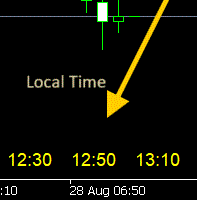
- 사용 설명서 개요 Time Scale Korea Display 는 차트 시간 스케일에 로컬 시간(한국시간)을 표시하는 MT5 커스텀 인디케이터입니다. 각 캔들에 해당하는 한국시간을 보여주어 트레이더가 현지 시간대와 시장 움직임을 쉽게 연결할 수 있습니다. 주요 기능 동적 시간 표시 : 각 차트 캔들에 해당하는 한국시간 표시 위치 선택 : 차트 상단/중앙/하단 표시 위치 선택 가능 윈도우 시간 연동 : 윈도우 시스템 시간으로 정확한 로컬시간 표시 타임프레임 적응 : 차트 타임프레임에 맞춰 자동 조정 외관 커스터마이징 : 폰트 크기, 색상, 위치 조정 가능 브로커 시간 독립 : 브로커 시간대(UTC+2, UTC+3 등)와 무관하게 작동 설정 옵션 표시 설정 매개변수 기본값 설명 DISPLAY_POSITION 하단 표시 위치 (상단/중앙/하단) SCALE_TEXT_COLOR 노란색 시간 텍스트 색상 SCALE_FONT_SIZE 10 폰트 크기 SCALE_FONT_NAME "Arial
FREE
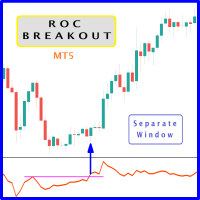
When prices breakout resistance levels are combined with Rate of Change oscillator "ROC" breaks out its historical resistance levels then higher chances emerges to record farther prices. It's strongly encouraged to confirm price breakout with oscillator breakout since they have comparable effects to price breaking support and resistance levels; certainly short trades will have the same perception. Concept is based on find swing levels which based on number of bars by each side to confirm peak or
FREE

Transform your MetaTrader 5 chart into a professional trading cockpit. Apex Dashboard is a high-performance utility designed for serious traders who need complete situational awareness. It moves beyond simple monitoring by providing a comprehensive overview of your account's solvency, performance, and risk exposure in real-time. Unlike standard indicators, Apex Dashboard features a Persistent Data Engine . It records your historical Peak Drawdown to a local file, ensuring your risk metrics r
FREE


This EA was made for educational purposes. Find the full overview of how it was made in the YouTube video. The EA is inspired by Larry Connors double 7s strategy. It's been slightly altered using machine learning. Use on real money at your own risk, as always. How to use: Add to D1 chart for SP500 IMPORTANT: Go to inputs and change name of 'subchart' to the name your broker uses for SP500. What this strategy does It buys short-term dips in a steady, calm uptrend , then sells after a bounce. E
FREE

Title: Correlation & Power Meter Short description:
Pearson correlation matrix for up to 10 symbols plus a Currency Power Meter that ranks the 8 major currencies, side by side in one window. Full description: Correlation & Power Meter combines two analysis tables in a single indicator window. Left table: Correlation Matrix
Shows the Pearson correlation coefficient between up to 10 symbols at once. Correlation measures how closely two symbols move together: Close to +1.00: they tend to move in
FREE

Overview Universal Indicator Scanner MT5 is a utility for MetaTrader 5 designed to help users inspect the visible signal structure of custom indicators. The scanner reads indicator buffers and chart objects to show how an indicator presents its signals on the chart. It is intended for analysis, configuration and troubleshooting. It does not trade, does not open positions and does not provide trading recommendations. Main Purpose Many custom indicators use buffers, arrows, labels or chart objects
FREE
HiperCube VIX へようこそ Darwinex Zero 25%割引コード: DWZ2328770MGM この指標は、sp500 / us500 の市場のボリュームに関する実際の情報を提供します
定義 CBOE ボラティリティ インデックスとして知られる HiperCube VIX は、市場の恐怖やストレスを測る広く認知された指標です。株式市場の不確実性とボラティリティのレベルを示し、S&P 500 インデックスを広範な市場の代理として使用します。VIX インデックスは、S&P 500 インデックスのオプション契約の価格に基づいて計算されます。
機能: カスタムカラー カスタムチャートカラー メイングラフを明瞭に保つためにサブウィンドウにインジケーターを表示 解釈が簡単 完全にカスタマイズ可能 Chat gptとAIが開発に使用されました
使用例: VIX は実際の市場に関する優れた情報を提供するボリュームインジケーターです。このインジケーターの値が高いということは、ボラティリティが高いことを意味します ボラティリティが高いということは、市場の動きにアプローチし、市場
FREE

Sweep Hunter Basic is the simplified entry version of Sweep Hunter Pro for MetaTrader 5. It detects basic Buy-Side and Sell-Side Liquidity zones directly on the chart and marks simple sweep events. The Basic version is limited to 3 new zones per broker day and uses a reduced visual style. For the full version with dashboard, alerts, extended history, tooltips, advanced settings and unlimited zone workflow, visit Sweep Hunter Pro: https://www.mql5.com/de/market/product/177937?source=Site
FREE

Input Menu: * Backtest Start * Market Session * Signal Trigger Type * Take Profit (Pips) * Stop Loss (Pips) * Spread test manual and Live Spread * Simulation Timeframe (M5/M15/H1) * Show Dashboard * Notification Alert * Push Notification * Telegram Notfication
Dashborad Menu: * Show Backtest Start * Show Trigger Active * Show Live Spread or Manual Spread Test * Total Trade / Closed Trade * Success Rate * Hit Take Profit * Hit Stop Loss * Gross P/L * Float Profit * Float Loss * Net Profit (Clos
FREE

Having more expert advisors running on the same account , eventually leads us to the question , which one of them are winners , or which are dragging down the account ? With this in mind I created this simple utility for displaying profits or losses taken by each expert advisor over time . This utility can be run as an expert advisor and can display up to 9 magic number results . If the inputs are left to zero , the results displayed are from the manually placed orders . It also displays deposi
FREE

This indicator is a zero-lag indicator and displays exact trend as is. True Trend Moving Average Pro works best in combination with True Trend Oscillator Pro that displays strength of trend change.
True Trend Oscillator Pro: https://www.mql5.com/en/market/product/103589
If you set PERIOD input parameter to 1 this indicator becomes a sharpshooter for binary options.
Default input parameters: TT_Period = 10; TT_Meth = MODE_SMA; TT_Price = PRICE_MEDIAN;
Before you buy this product, please do t
FREE

This is a classic trading strategy based on two Moving Averages crossover. customized for usdjpy with a Good risk management strategy RR 1/2 . ( Long when fast MA crosses slow MA from below and Short when fast MA crosses slow MA from above ) TF : 5MIN MAX Lot size to use : 2% e.g : Balance =100 => lot size = 0.02 Balance =1000 => lot size = 0.20 Balance =10000 => lot size = 2
------
FREE

。。。。。。。。。。。。。。。。。。。。。。。。。。。。。。。。。。。。。。。。。。。 This indicator is based on Bollinger Bands indicator. It helps user clearly know the Band is expand or contract.
The method of use is the same as the traditional Brin channel index. Users can use different color areas to distribute forest channel indicators in expansion or contraction stage. -------------------------------------------------------------------------------------------
FREE

BAR KAPANIŞ GERİ SAYIMI BAR CLOSE COUNTDOWN, mevcut mumun kapanmasına kalan süreyi göstermek için tasarlanmış pratik bir MetaTrader 5 göstergesidir. Geri sayım, aktif mumun yakınında doğrudan grafikte görünür ve yatırımcıların platform saatini kontrol etmeden veya kalan süreyi manuel olarak hesaplamadan mumun tamamlanmasını izlemelerine olanak tanır. Bu gösterge, geri sayımı her saniye günceller ve seçilen grafik zaman dilimine otomatik olarak uyum sağlar. M1, M5 ve M15 gibi kısa vadeli grafikl
FREE

This indicator is a sophisticated MetaTrader 5 tool that calculates and displays Average Daily Range (ADR) levels on your chart. It draws horizontal lines representing expected price movement ranges based on historical daily volatility, helping traders identify potential daily high and low targets. ADR (Average Daily Range) = The average difference between the daily high and low over a specified period (default: 14 days). Unlike ATR which includes gaps between days, ADR focuses purely on int
FREE

カスタムインジケーターは、最大5つの異なるシンボルからMAを組み合わせることで、移動平均を次のレベルに引き上げます! なぜ? これにより、補完的な市場に基づいた意思決定が可能です。 例: ナスダックを取引していますが、ビットコインやラッセル2000を同時に監視して市場のトレンドを知りたい場合。 またはXRPを取引していますが、全体的な視点をあなたの強みにしたい場合。 今、それが可能です! ブローカーに合わせてシンボルが一致していることを確認してください。大文字と小文字を区別します。 US100CashやXAUEUR#など...ブローカーによって異なります。 これは無料ツールであり、コメントやレビューでサポートしていただければ幸いです。 スクリーンショットでは、EA Bull Scalperがポジションを管理しているのがわかります。 しかし、私のEAを無料で入手することもでき、チャート上にP&Lを作成します。 https://www.mql5.com/en/market/product/128104 私のトレーディングEAはこちらでご覧ください: https://www.mql5.com
FREE

COT Dashboard Basic — スマートマネーの動きをMT5チャートで直接確認。リアルタイムCFTCデータ、手動作業ゼロ。
この版には3銘柄(EUR、ドル指数、ゴールド)と4週間の履歴が含まれます。アップグレード前のテストに最適です。
含まれる機能 - CFTC公式APIからライブデータ——自動更新 - 3銘柄:EUR、DXY(ドル指数)、ゴールド - 銘柄あたり4週間の履歴データ - ロング、ショート、ネット、週間変化(CHG.L / CHG.S) - RANK% — ネットポジションのパーセンタイル - FLIP — 偏向指標 | BIAS — 強気/弱気/中立 - 平均超過変化のカラーハイライトボックス - 日付クリックでその週の高値/安値をチャートに投影
フルバージョンの追加機能 - 49銘柄(金属、エネルギー、穀物、ソフト、畜産、通貨、指数、債券、ビットコイン) - 最大52週間の履歴 - ダイバージェンスアドバイザー:価格とポジショニングの乖離を検出 - 銘柄の折りたたみ/展開 - カスタムブローカーキーワード - ペア両
FREE

SmartRSI Pro – 賢いトレーダーのためのインテリジェントRSIシグナルインジケーター
SmartRSI Proは、RSIをベースにした次世代インジケーターで、トレーダーにチャート上で直接使いやすく信頼性の高い売買シグナルを提供します。人気の相対力指数(RSI)を基に、マーケットノイズをフィルタリングし誤ったシグナルを減らすスマートなロジックを追加しています。初心者から上級者まで幅広く利用可能です。 主な特徴:
自動売買矢印
カスタムRSI閾値に基づくはっきりと見える上下矢印(リペイントなし)。 リセットロジック付きスマートシグナルフィルター
RSIがリセットされた時にのみシグナルを発動し、過剰取引やノイズを回避。 カスタマイズ可能なRSIパラメーター
RSI期間、レベル、タイムフレームを選択可能で戦略に合わせて調整可能。 ミニマリストデザイン
余計なものがなく、正確な矢印シグナルとシンプルなラベルのみ。 全シンボル&タイムフレーム対応
Forex、指数、金属、暗号通貨などに対応。M1から日足まで利用可能。 動作原理:
買いシグナル
FREE

Trading Assistant DARA is a professional MT5 utility Expert Advisor designed to help traders manage risk and protect profits automatically. It works with both manual and automated trades by providing intelligent trade management features without generating trading signals. Key Features: Automatic Broker Stop Loss & Take Profit Break Even Protection Smart Trailing Stop Basket Take Profit & Basket Stop Loss Equity Protection System Real-Time Candle Timer Trading Information Dashboard Compatible wi
FREE

EasyTrade Pro - MT5 手動トレーディングパネル EasyTrade Proで、より速く、よりシンプルに、より効率的なトレードを実現しましょう。 EasyTrade Proは、素早い注文操作と重要な市場情報をチャート上で一目で確認したいトレーダーのために開発された、軽量で使いやすい手動トレーディングパネルです。 複雑な設定は不要。 不要なインジケーターも不要。 毎日のトレードに本当に必要な機能だけを搭載しています。 主な機能 ワンクリックでBUY / SELL注文 すべてのポジションを一括決済 Stop Loss(損切り)と Take Profit(利確)の設定 ブレークイーブン(Break Even)機能 トレーリングストップ(Trailing Stop)機能 ロットサイズのクイックプリセット リアルタイムの含み損益(Open P/L)表示 日次利益の追跡 勝率(Win Rate)統計 プロフィットファクター(Profit Factor)統計 リアルタイムスプレッド監視 市場セッション表示 ローソク足カウントダウン
FREE

DS Volume Value Areas V1.0 Volume Profile Value Area Indicator for MetaTrader 5 Overview DS Volume Value Areas V1.0 is a MetaTrader 5 indicator designed to display key volume profile levels directly on the trading chart. The indicator calculates and displays important volume-based reference levels including Value Area High (VAH), Value Area Low (VAL), and Point of Control (POC). By presenting volume distribution levels in a clear visual format, traders can analyse areas where price has previousl
FREE

To get started, subscribe to the RealTrend Telegram channel. t.me/RealTrendFree
RealTrend is an EA that facilitates trading for expert users.
The user's aim is to identify the right business trend
and let RealTrend suggest the placement of pending orders in strategic points
where the price will retrace and then continue its trend.
RealTrend is very simple to use and includes a single user-defined stoploss input and an intuitive chart panel.
The takeprofit is placed directly by the Bot.
risk l
FREE

Product: Phantom Shadow Reversal Engine Version: 3.0 (Elite Edition) Developer: Trade With Thangam
THE ULTIMATE SCALPING TOOL FOR XAUUSD & MAJOR PAIRS
The Phantom Shadow Reversal Engine is not just another indicator; it is a complete trading system designed for precision scalping and day trading.
Instead of relying on lagging signals, this system uses a "Proprietary Shadow Engine" that analyzes Market
FREE

Heat MA Description - English Heat MA Indicator: A Simplified Guide for Traders The Heat MA indicator is a powerful visual tool designed to identify the intensity of trading flow and market pressure directly on your chart. It appears as a continuous line that changes color, offering clear signals about price behavior and underlying volume. 1. How Heat MA Appears on the Chart Imagine a single, robust line (4 pixels thick) that moves along with the price. This line is not just a trace; it's a mark
FREE
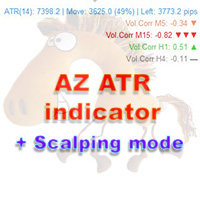
AZ ATR indicator (with volume correlation bonus)
Standard ATR indicator, you can enable ignoring abnormally large candles. It is possible to change the location of the displayed text in 4 corners of the chart. You can change the calculation period (days ago). Bonus - the indicator has a correlation with volumes. Can be enabled to display a possible priority at the current moment in the market.
What do the values mean: Positive correlation (0.3 - 1.0): 0.3-0.7 - moderate connection
FREE

THE HEAT MAP — Smart Money Density Detector
See exactly where price is magnetized to — before it happens.
FEATURES Live density heatmap — spot the market's real "hot zones" instantly Self-flipping Key Zones — support/resistance that evolves with price instead of dying 1-click Trading Style — QuickScalp / Scalp / Intraday auto-tunes the entire engine Pro HUD dashboard — bias, trend strength, HTF direction, risk status, momentum, all live Built-in Zone Touch & Zone Flip alerts
FREE

What this tool does Daily and Max Loss Protector is a protective account monitor for traders on prop firm challenge or funded accounts (built with common prop firm evaluation rule methodology in mind, and adjustable to match similar rules from other firms). It continuously tracks your account against: Daily loss limit — measured from your account BALANCE at the start of each trading day (matching how many prop firms calculate this, rather than a simplified equity-only approximation) Maximum ove
FREE

Noetrix Partial Entry
Noetrix Partial Entry is a visual scale-in planning utility for MetaTrader 5. It helps discretionary traders build and manage a staggered pending-entry plan directly on the chart.
The utility does not generate trading signals and does not place orders automatically. A plan is sent only after an explicit click on PLACE ALL and, by default, a confirmation dialog.
MAIN FEATURES
• Build from 1 to 5 Buy Limit or Sell Limit entries. • Split a total volume across the enabled e
FREE
MetaTraderマーケットは、履歴データを使ったテストと最適化のための無料のデモ自動売買ロボットをダウンロードできる唯一のストアです。
アプリ概要と他のカスタマーからのレビューをご覧になり、ターミナルにダウンロードし、購入する前に自動売買ロボットをテストしてください。完全に無料でアプリをテストできるのはMetaTraderマーケットだけです。

取引の機会を逃しています。
- 無料取引アプリ
- 8千を超えるシグナルをコピー
- 金融ニュースで金融マーケットを探索