EA Saving Money

EA Saving Money will help you save your accumulated profit on trades and protect your deposit from negative trades.

This utility allows you to manage an unlimited number of orders opened manually or by an Expert Advisor. It helps to save profits and increase the account balance both when trading manually and when trading with various Expert Advisors that use Stoploss. The utility also has a built-in panel for the convenience of opening orders. When opening orders through the panel, the Expert Advisor will automatically calculate the lot for the order, according to the specified risk and the specified Stoploss.

The main functions of the utility "EA Saving Money"

1. "Safe Mode" - the mode of partial closing of the transaction. Effective only for strategies that use Stop loss (SL).  When the price passes the Stop loss distance in the right direction, the part of the deal is closed as a percentage (for example, 50%) of the open volume. Thus, if the price does not reach Take profit and returns to Stop loss, your balance will not decrease, or it will decrease significantly less than it could without using this function. You will not lose money, which is very important in trading.

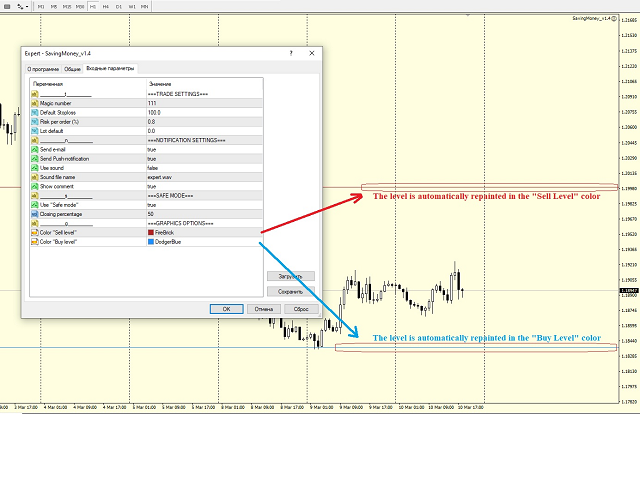
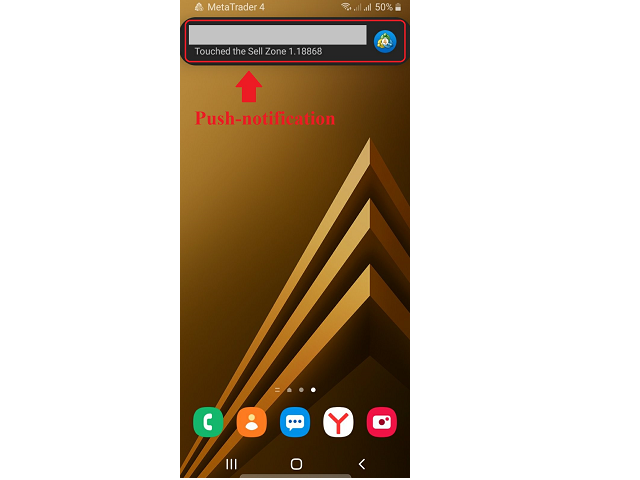
2. Notification when a certain zone is reached. If you use support and resistance zones in your trading, this feature will help you a lot. Just mark the zones on the chart with horizontal lines and the Expert Advisor will send you a Push notification, an e-mail, a sound notification in the terminal, or all together, so that you will not miss the moment when the price reaches the desired zone. Also, the lines will automatically be colored for the convenience of visual perception in the colors set in the settings separately for support and resistance zones. You don't have to do it manually every time. After sending an alert, the Expert Advisor will mark the zone as triggered and will no longer send notifications for it, so as not to flood your email and phone with the same information.

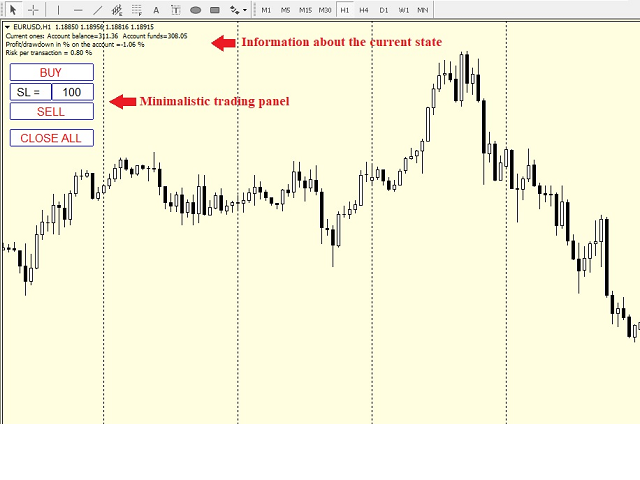
3. The Expert Advisor has a simple, concise panel with a minimum of the most necessary functions.

- function of opening a Buy order with a pre-set Stop loss and automatic calculation of the transaction volume according to the specified risk;

- function of opening a Sell order with a preset Stop loss and automatic calculation of the transaction volume according to the specified risk;

- function of closing all orders on the current pair in order .first profitable, then unprofitable, if any;

- display of the current set Stop loss with the possibility of changing it without entering the Expert Advisor settings.

Thanks to these functions of opening orders, you do not have to calculate the volume for the transaction every time, just once set the risk as a percentage of the deposit and Stop loss, then the expert Advisor will calculate everything automatically. This way you will avoid situations of accidental increase in the risk for the deposit.


The Expert Advisor has the functions of filtering orders by the pair on which it is launched, as well as by the Madis number. Thanks to this, it will only work where you specify.


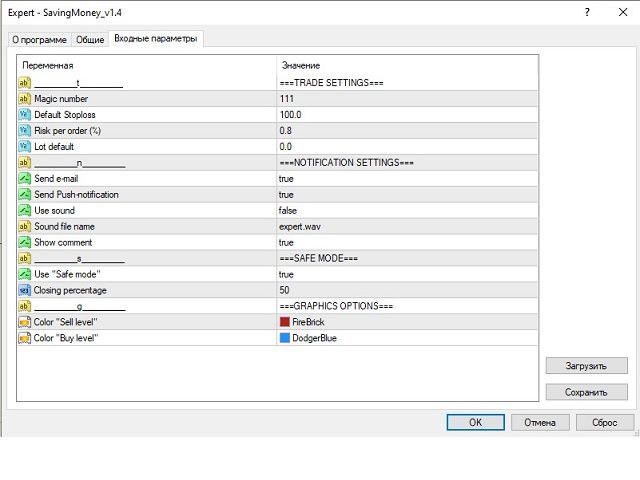
Basic parameters:

- Magic number - the magic number used to filter the orders that EA will work with;

- Default Stoploss - Stoploss used when opening orders from the trading panel. Also used when calculating the transaction volume according to the specified risk;

- Risk per order ( % ) - risk per trade (as a percentage of the deposit), used to calculate the lot per trade, according to the specified Stoploss;

- Lot default - if 0, the lot is calculated according to the specified risk. If it is greater than 0, then the lot specified in this parameter is used to open a trade from the trading panel;

- Send e-mail - send a message to the e-mail when you touch the zone;

- Send Push-notification  -  send a Push to the terminal on the phone when you touch the zone;

- Show comment - show a comment on the chart about the current state of the balance, funds on the account, the percentage of profit or drawdown, etc;

- Use "Safe mode" - use the "Safe mode" mode;

- Closing percentage - what percentage of the order volume to close when using the "Safe mode" function;

- Color "Sell level" - the color of the Sell level;

- Color "Buy level" - the color of the Buy level;

The levels should be indicated by the "Horizontal line" element.



おすすめのプロダクト
THIS EA WILL PROTECT YOUR ACCOUNT IN MANY WAYS  KEY FEATURES ARE :  1. CLOSE ALL TRADES IN ONE CLICK. 2. CLOSE ALL TRADES WHEN INPUT MENTIONED LOSS LIMIT REACH. 3. CLOSE ALL TRADES WHEN INPUT MENTIONED PROFIT LIMIT REACH. 4. IF REVERSE MODE IS ON THIS EA WILL TAKE OPPOSITE TRADES IF YOUR OTHERS EA MAKES LOSS OR MANUAL TRADING ALSO IF YOU ARE GETTING ALWAYS LOSS THEN YOU CAN SWITCH ON REVERSE MODE SO IT WILL TAKE OPPOSITE TRADES WHENEVER ANY TRADES PLACED IN YOUR ACCOUNTS. 5. FIX LOT SIZE 6. STOP
Profit Loss Symbols Dashboard Dashboard displays all manually entered pairs in settings and shows their profit loss information. One click to navigate between all pairs on one chart. Dashboard can be hide or displayed. Green Colour: Symbol(s) in Profit Red Colour: Symbol(s) in Loss Blue Colour: Current Chart Yellow Colour: Timeframe Selected TRY HAWA GOLD WITH 80% WIN RATE MT4 VERSION: https://www.mql5.com/en/market/product/58832 MT5 VERSIION: https://www.mql5.com/en/market/product/59276 Pleas
FREE
Simply clock. Local time as default. There are possible to Select: Local Time /Server Time /GMT Time as input. Please take into account that the local time is the most accurate. However ,this clock always uses local time seconds, even If GMT / Server Time Is selected.  I solved it this way to get more accuracy. Delays can occur when changing minutes or hours, if local time is not selected.
FREE
これは、ほぼ10年前に初めて公開された私の有名なスキャルパー、ゴールドフィンチEAの最新版です。短期間で起こる急激なボラティリティの拡大で市場をスキャルピングします。突然の価格上昇の後、価格変動の慣性を利用しようとします。この新しいバージョンは、トレーダーがテスターの最適化機能を簡単に使用して最適な取引パラメーターを見つけられるように簡素化されています。 [ インストールガイド | 更新ガイド | トラブルシューティング | よくある質問 | すべての製品 ] 最適化を容易にするシンプルな入力パラメーター カスタマイズ可能な取引管理設定 取引セッションの選択 平日の選択 資金管理 注意してください... 多くの要因が見返りを台無しにする可能性があるため、ダニのダフ屋は危険です。変動スプレッドとスリッページは、取引の数学的期待値を低下させ、ブローカーからの低いティック密度は幻の取引を引き起こす可能性があり、ストップレベルは利益を確保する能力を損ない、ネットワークラグはリクオートを意味します。注意が必要です。 バックテスト Expert Advisorはティックデータのみを使用します
FREE
Ultra Scalper Pro
Vadim Korolyuk
4.29 (7)
Scalping Expert Advisor trades from daily support and resistance levels. Trading expert does not use indicators. Recommended use a broker with 5 signs and a low spread. To protect the account from trading during spread expansion, added parameter: "MaxSpread", in which you specify the maximum allowable spread (15-20 pips). A month opens 16-18 deals on average. Benefits: Expert always uses Takeprofit, Stoploss and Traillingstop; Expert does not use a grid or martingale system; Expert can work with
FREE
Ego Guard
Victor Chukwuebuka Okeke
Ego Guard is an advanced Expert Advisor designed to safeguard account equity by implementing robust risk management measures. This EA closely monitors account activity and intervenes when necessary to prevent excessive risk exposure. Specifically, Ego Guard automatically disables any other Expert Advisors that attempt to open trades exceeding the predefined risk threshold. By effectively managing trade volume and ensuring adherence to risk management principles, Ego Guard provides traders with p
FREE
Do you want to have a fully automated trading bot that trades instead of you to make profits all the time? Get your unlimited account license copy for only £49.99 one time payment! Features: Forex Golden Moon EA Automated Forex Trading System For MetaTrader 4 Setup Instructions | Quick & Easy 5 Minute Setup | Set & Forget Unlimited Licenses For All Your MT4 Accounts No Trading Experience Required US Brokers | Non-US Brokers No Trading Account Limitations Optimised SET files included Here’s
この製品は、手動で開かれた各取引、特にそれが接続されているチャート上で自動ストップロスを設定できるように設計されていることに注意してください。 未決注文に関しては、未決注文が有効化された後にのみストップロスが設定されます。 希望のストップロスをポイント単位で設定するには、InpStopLossPoints パラメーターを使用できます。 この商品はGBPUSDなどの通貨ペアのみでテストされていることに注意してください。 他のシンボルでも機能する可能性がありますが、テストされていないため、目的に応じて機能するかどうかを判断するのはあなた次第です。 この製品にはいかなるクレームや権利も与えられないため、実際の口座ではなくデモ口座で製品をテストすることをお勧めします。 この製品を使用するかどうかは完全にお客様の判断によるものであり、弊社ではいかなる保証も提供できません。 この MT4 エキスパートには、開かれたすべての取引ではなく、適用されるチャートに基づいて作業する追加機能が組み込まれました。 Google翻訳
FREE
ADVISOR "GG" - UNIVERSAL, ABLE TO TRADE YOURSELF AND WITH THE HELP OF A TRADER! THE PANEL SHOWS THE ENTIRE DOWNLOAD TO HELP WHEN TRADING. BUTTONS PRESENT   1.CLOSING PROFITABLE ORDERS  2. CLOSE ALL ORDERS  3. LOCKING THESE POSITIONS TO SET UP THE EXPERT, THE DISTANCE IS USED, WHICH DEPENDS ON THE TREND TO OPTIMIZE THE TREND, THERE IS A SPECIAL ALGORITHM! WHEN TRADING, YOU CAN ADD OPENING ORDERS MANUALLY, IT IS ALSO POSSIBLE TO LOCK ALL OPEN ORDERS! IF YOU DO NOT TRADE WITH THE HELP OF
OtmScalp EA V1 - EUR、ゴールド、BTC用AIスキャルピングロボット OtmScalp EA V1 - EUR、ゴールド、BTC用AIスキャルピングロボット 期間限定オファー: 499ドルのみ(通常価格1200ドル - 近日値上げ予定) OtmScalp EA V1が選ばれる理由 安定した日次収益 - 制御された積極的なスキャルピング戦略 3つの専門バージョン - EURペア、ゴールド(XAU/USD)、ビットコイン(BTC/USD)用 完全自動取引 - 24時間5日間、手動操作不要 スマートリスク管理 - 自動ストップロス、テイクプロフィット、動的ロットサイズ 収益化メカニズム 高勝率戦略 - AIがマイクロトレンドを検出しミリ秒単位で執行 低ドローダウン - 高度なリスク管理で資金を保護 ブローカー互換性 - IC Markets、Pepperstone、RoboForex等で検証済み 簡単設定 - 2分でインストール、プログラミング不要 実績データ(バックテスト&実稼働) EUR/USD版:月間平均15-25%(5分・15分足) ゴールド(XAU/USD)版:月
概要 安いときに買い高いときに売る王道のトレードを基本とし、ポジションの一部を長期保有することでスワップポイントと長期含み益も狙うハイブリッド戦略のEAです。 長期保有割合、エントリー/決済に使用する時間足、エントリー間隔などはユーザが設定可能で、カスタマイズにより短期スキャルピングから長期トレードまで多様なスタイルに対応します。 基本戦略 エントリー/決済条件 エントリー/決済はリアルタイムで計測するRSIに基づいて行います。RSIが30より小さい瞬間を安い/RSIが70より大きい瞬間を高いと解釈し、(RSI < 30)のときに買い/(70 < RSI)のときに売りを発動します。 ポジションは買いまたは売り一方向のみが設定可能で、買い設定のときは(RSI < 30)でエントリー/(70 < RSI)で決済、売り設定のときは(70 < RSI)でエントリー/(RSI < 30)で決済となります。 売り買い判断の閾値(30,70)およびRSIを計算する時間足はカスタマイズ可能です。 買い下がり/売り上がり ポジションは一度に大きなロットでエントリーするのではなく、いわゆるナンピンにより
LFA EA Pro
Oluwasegun Emmanuel Banjo
Overview TDI Grid Basket v2.30a is a multi-basket grid EA built around the Traders Dynamic Index (TDI) signals. It opens an initial trade when your TDI conditions align, then manages the position as a basket , adding grid entries only when price moves against the last entry by a defined grid step. The EA targets a basket-level take profit (from break-even) and includes a clear on-chart dashboard for performance and trade status. Core Features TDI Signal Engine (3 signal types) Sharkfin (ReEntr
CCI and ATR Trader
Evgeniia Terekhova
2.33 (3)
Советник работает на двух индикаторах CCI и ADX. Условия для входа в BUY: 1. ADX пересекает уровень 20 2. CCI пересекает уровень 100 снизу вверх 3. Выставляем фиксированный StopLoss и TakeProfit 4. Закрываем позицию по рыночной цене, когда CCI пересекает уровень 100 сверху вниз. Условия для входа в SELL: 1. ADX пересекает уровень 20 2. CCI пересекает уровень -100 сверху вниз 3. Выставляем фиксированный StopLoss и TakeProfit 4. Закрываем позицию по рыночной цене, когда CCI пересекает уровень -10
FREE
BIG CHIEF    Big Chief is an Expert Advisor that runs its own 2 proprietary analysis & algorithms. No indicator is used to analyze the entry point in the first method and the second method has an Ichimoku Indicator with proprietary settings. For the exit plan, it uses the proprietary Sequence Method & implement the cutlosses-let-profit-run strategy. You will be surprised that at the closing of all trades, almost most of them are having a positive profit and almost half of them are
FREE
Sinless
Andrey Kolmogorov
A mathematical multicurrency trading system based on the principle of a neural network. It uses a general database of algorithms "S1M1" consisting of the most stable trading algorithms in its work. Before getting into the "S1М1" general database of algorithms, each block of conditions has passed the testing for stability with the identification of certain market dependencies for that block. A network created in such a way allows the EA to automatically select the most optimal variant of response
HMA Multi-Basket Grid EA (MT4) HMA Multi-Basket Grid EA is a rule-based automated trading system for MetaTrader 4 designed to manage multiple independent trade baskets using a structured grid approach. The Expert Advisor focuses on order management, basket control, and risk handling , making it suitable for traders who want an organized grid framework rather than a single-trade system. Key Features Multi-Basket Architecture Each signal opens and manages its own basket independently using
Multicurrency Expert Advisor with 100% adaptation for any currency pair and timeframe. Based on the Smart Gread indicator. Very flexible setup allows you to get maximum profit. Profit from transactions is set manually in TakeProfit (standart 200 ). Lot size is set manually by Lot (standart = 1 lot). Each subsequent lot is increased by Kolen (standart 2 ). Maximum lot size MaxLot (standart 10 ). To disable the adviser, there are special functions: StopRightNow - all orders will close rig
Smart Funded Hft
Barbaros Bulent Kortarla
4.82 (65)
!! 最新バージョン2.05にアップデートして、さらに高速なパフォーマンスを実現してください!! スマートファンデッドHFTは、2024年1月29日の市場オープンで、低ボラティリティにもかかわらず、KORTANA FXの100Kチャレンジを突破しました。 スクリーンショットセクションをチェックしてください。証拠をそこに置きました。 重要:2024年1月29日までのKORTANA FXの暗号支払いに対する40%の独占割引をお見逃しなく。 スマートファンデッドHFT EAでトレーディングの可能性を解き放ちましょう! VPS不要 / 設定ファイル不要 / プラグアンドプレイを楽しむ 限定時間のプロモーション価格 2024年2月1日に価格が上がります!! https://www.youtube.com/watch?v=56FKxI-noI4 最初の満足なクライアントの結果が添付されています。今日、自分自身でFAST FOREX FUNDINGの50Kチャレンジを突破しました。以下に結果を添付しました)) トレーダーの皆さん、こんにちは、 私のトレーディングの
Trailing Stop_Steps EA is an expert advisor that can manage your order's stop-loss by moving at fixed steps. In particular, this expert advisor can use two parameters to increment the stop-loss according to your preferences. In many cases, you might want to increment the stop-loss by a specific value when the price is at specific distance from the current stop. This trailing stop-loss EA allow you to do exactly this: to trigger a stop-loss increment when the price reaches a specific threshold.
MonsterBot is a multi-currency advisor with a trending strategy. There are 9 currency pairs in operation. The adviser works purely on the trend and accumulates orders mainly on the trend. MonsterBot has wide functionality, is very flexible in settings, and also has a trading panel for managing the trading process. Attention! Testing is fundamentally different from real-time trading, because the tester does not allow you to trade 9 pairs at once. Description of parameters: Languale ……………………………
Patrex Pro: Maximize Your Trading Potential Patrex Pro is an advanced trading bot designed to help traders optimize their trading strategies and maximize their potential returns. With its cutting-edge technology and user-friendly interface, Patrex Pro is the ultimate tool for traders seeking to elevate their trading game. Get MT5 version Key Features: 1. Position Hedging: Patrex Pro allows users to hedge their positions based on their individual risk tolerance and market analysis. 2. Advanced R
CyNeron MT4
Svetlana Pawlowna Grosshans
2.5 (4)
CyNeron: 精密な取引とAIイノベーションの融合 マニュアルと設定ファイル : 購入後にお問い合わせいただければ、マニュアルと設定ファイルをお送りします 価格 : 販売されたコピー数に応じて価格が上昇します 利用可能なコピー : 5 AI駆動のスナップショット分析:市場初 CyNeronは、市場で初めて高度なAIを革命的な取引アプローチに統合したEAであり、 市場状況の詳細なスナップショットをキャプチャして処理します。 最先端のAI対応ニューラルネットワークを利用して価格データと技術指標を評価し、 市場の動きを高精度に予測して、正確かつ戦略的な取引決定を可能にします。 このAI駆動技術はCyNeronを際立たせ、リアルタイムで進化する市場動向に動的に適応し、 これまで得られなかった洞察をトレーダーに提供します。 シンボル XAUUSD (ゴールド) 時間枠 M15またはM30   資本 最低 $100 ブローカー 任意のブローカー 口座タイプ 任意、スプレッドが低いものが推奨 レバレッジ 1:20以上 VPS 推奨されますが必須ではありません、MQL VPSも使用可能 Cy
Alpinist
Andrey Kolmogorov
3.5 (4)
A mathematical multicurrency trading system based on the principle of a neural network. It uses several thousand of the most stable trading algorithms in its work. Before getting into the "А2М1" general database of algorithms, each block of conditions has passed the testing for stability with the identification of certain market dependencies for that block. A network created in such a way allows the EA to automatically select the most optimal variant of response to the market situation from seve
BBVectorDynamics_Robot is an innovative trading advisor specifically designed for volatile markets. Based on unique algorithms for analyzing market forces and identifying imbalances between buyers and sellers, this advisor helps you make precise and well-considered decisions in the trading process. Main features of the bb vector dynamics_robot advisor: Calculation of dynamic vectors. System determines the differences between the extreme price values and smoothed averages over a specified perio
Macd Martin
Roman Yablonskiy
2.5 (2)
Double Breakout   is an automatic expert advisor with two separate strateges that uses martingale. The MACD indicator with adjustable parameters is used as inputs for each flow of orders. The specified takeprofit and stoploss levels are used to exit the position.  General recommendation The minimum recommended deposit is 1000 cents. Spread is recommended not more than 3 points. It is better to use trend currency pairs. The martingale parameter can be set from 0.1 to any value. When martingale i
FREE
This bot using my experience in EURUSD and AUDUSD with period M15/M30. After testing in 2 years with my real money, I got x3 account. FEATURE Timeframe - M15/M30 (recommendation) The symbol: EURUSD, AUDUSD. Leverage - 1:100 or less. Spread is not important. The commission is irrelevant. Recommend deposit from  100 00 USD The passage of history is complete. Optimization is not needed. Account type - while hedging RISK  - The risk calculation function based on trend of market, normally with peri
Dragon Scalper forex trading strategy, carried out on short periods of time and with very small profit / loss targets. The trader concludes a deal from several seconds to several minutes and at the same time tries to take a small profit / loss from several points to tens of points. The Dragon Scalper bot is designed for trading major currency pairs, has crash protection - when the connection is restored, the EA will continue to work with its orders. The Expert Advisor independently controls th
Market Maestro: Your Ideal Partner for Automated Forex Trading If you're looking for a reliable assistant for trading in the currency market, Market Maestro is exactly what you need. This modern Forex bot is built using the latest technologies and algorithms, allowing it to effectively analyze market data and make informed trading decisions in real-time. Key Features of Market Maestro 1. Multicurrency Capability for Broad Opportunities Market Maestro can work with a wide range of currency pairs,
GAP TRADING MT4は、ギャップを取引するためのエキスパートアドバイザーです。この戦略は外国為替市場で非常に人気があります-チャートにギャップが表示されると、価格は後でそれを閉じることがよくあります。 EAは、主に月曜日の新しい週の開始時に取引されることはめったにないため、テストは長期間にわたって実行する必要があります。最も不安定なペアは仕事に適しています:GBPUSD、USDCAD、EURUSD、USDJPY、USDCHF、AUDUSD、NZDUSD。 オプション: OPENING_POSITIONS-開く位置の選択。 TIMEFRAME_ATR-ATRタイムフレーム; PERIOD_ATR-ATR期間; GAP_SIZE_IN_PIPS-ギャップのサイズをポイント単位で、またはATRの%として測定します。 MINIMUM_GAP_SIZE-ギャップサイズ; MAX_SLIPPAGE-取引を開始するときの最大スリッページ。 MAX_SPREAD-取引を開始するときの最大スプレッド。 COMMISSION_CONTROL-ブローカーが取引ごとに手数料を持っている場合
このプロダクトを購入した人は以下も購入しています
--------------Welcome to use [MQL5 Signal Analyze Master]------------------  Function: Draw order tracks of MQL5 MT4 and MT5 signal on MT4 chart. [Using guide] 1.Use it as Experts. 2.Download history record from MQL5 signal(MT4 signal or MT5 signal).  3.Paste history record file below "MQL4/Files/" 4.Load [Signal Analyze Master] on the symbol chart what you want to analyze. 5.Paste the history record file name to parameter 'FileName' 6.Select  SignalType  match the history you download on MT4
Unlimited Trade Copier Pro is a tool to copy trade remotely to multiple MT4, MT5 and cTrader accounts at different computers/locations over internet. This is an ideal solution for you if you are a signal provider and want to copy your trades to other receivers globally on your own rules. One provider can copy trades to multiple receivers and one receiver can get trade from multiple providers as well. The provider can even set the subscription expiry for each receiver, so that receiver will not b
With this Expert Advisor, you can seamlessly integrate various channel, arrow, and reversal indicators. It offers the flexibility to use all popular channel trading strategies, while also providing powerful tools to customize your trading conditions and risk management system.   The Expert Advisor opens orders when the price crosses the channel boundaries. Multiple crossing conditions are available for customization: Price touches boundary on re-entry into the channel Price touches boundary on
Wouldn't it be great if AI had a second look at your trading data — graphics, indicators, and beyond? Introducing AI Trading Station , a revolutionary utility seamlessly integrated with the MetaTrader platform. Powered by the advanced intelligence of OpenAI's ChatGPT, this complete solution covers every step of your trading journey, from data gathering to trade execution. The Complete Trading Process. Reinvented Data Gathering & Visualization: Collect and display vital market data on intuitive
LIMITED OFFER - JUST FOR 2 DAYS | 50% BLACK FRIDAY DISCOUNT $640 -> $320 Your Smart Trading Assistant for the Forex Market Introducing a powerful MetaTrader tool designed to revolutionize the way you trade. This intelligent assistant goes beyond traditional indicators to provide a comprehensive, AI-driven market analysis — so you can trade with clarity and confidence. What It Does This advanced tool continuously monitors and analyzes a wide range of market data to deliver high-quality trading
Crystal Trade Manager PRO – MT4向け 高度リスク管理・トレードコントロールシステム 無料版: https://www.mql5.com/en/market/product/150632 概要 Crystal Trade Manager PRO(CTM)は、MetaTrader 4 のために設計された、プロフェッショナル向けのリスク管理および取引管理ユーティリティです。 厳密な執行、強力な資金保護、高度な自動化を必要とするトレーダーのために構築されています。 本システムは、リスク管理、エクイティ保護、日次制限、SL/TP の自動設定を行い、プロレベルの高速ワンクリック取引パネルを提供します。 Prop Firm チャレンジ、デイトレード、スキャルピング、資金運用者に最適です。 MT5版も利用可能です。 主な特徴 1. 高度なリスク・ドローダウン保護 日次ドローダウン上限を 1%〜70% の範囲で設定可能。 上限超過時、 全てのポジションを即時クローズ 。 オプションで 全ての保留注文(Pending Orders)を自動削除 。 日次ロックアウトモード:翌日
The advantage of using this EA This EA directly updates takeprofit and stop losses that are still empty in a manual order Parameters Multiplier: Multiplier value of the previous transaction Distance: Distance hedging from the previous order Takeprofit: take profit taken from the last price + the value of this column We recommend that you do not add more than one manual transaction in the same pair martingale hedging | manual hedging | hedging manual | hedging lot | best robot | best ea
The FFx Hidden Manager panel will help you to manage easily your orders directly on the chart. Below all features described: TP, SL and TrailingStop are hidden Each order has its own lines on chart Drag & Drop any line to change the TP/SL as per your need Option to move automatically the SL line at breakeven when TP #1 is reached Option to choose the TP/SL type (by pips or price) Option to choose the TrailingStop type (by pips, MA, Fractals, PSAR or ATR) Define which order(s) you want to manage
FFx Risk Calculator panel will help you to calculate very easily your trades size, SL or the risk directly on the chart. All features are described below: Option to select which parameter to calculate: Risk, Stop Loss or Lot Size The panel will show if the lot size is allowed according to the current account free margin Button to maximize/minimize the panel Drag and Drop the panel anywhere on the chart How to use it? Select the parameter you want to be calculated. It will be based on the 2 other
News Trader Pro is a unique robot that allows you to trade the news by your predefined strategy. It loads every piece of news from several popular Forex websites. You can choose any news and preset the strategy to trade it, and then News Trader Pro will trade that news by selected strategy automatically when the news comes. News release gives opportunity to have pips since the price usually has big move at that time. Now, with this tool, trading news becomes easier, more flexible and more exciti
The FFx Watcher PRO is a dashboard displaying on a single chart the current direction of up to 15 standard indicators and up to 9 timeframes. It has 2 different modes: 1. Watcher mode: Multi Indicators User is able to select up to 15 indicators to be displayed User is able to select up to 9 timeframes to be displayed 2. Watcher mode: Multi Pairs User is able to select any number of pairs/symbols User is able to select up to 9 timeframes to be displayed This mode uses one of the standard indicat
Copies transactions between MT4 terminals. Possibilities: quick copy start minimum processor load direct and reverse (reverse) copying. copying Take Profit and Stop Loss levels copying deferred and their changes copy transactions one to many copy trades many to one local copy only Attention: The product is designed for copying trades only within a single computer or VPS with access to the desktop. The product will not work on the built-in Virtual Hosting of the terminal. We will help you set up
エリオット波動カウンターは、エリオット波動を迅速かつユーザーフレンドリーに手動でマークアップするためのパネルです。マークの色とレベルを選択できます。最後のマークアップとツールによって作成されたマークアップ全体を削除する機能もあります。マークアップはワンクリックで作成されます。 5 回クリック - 5 つの波があります。エリオット波動カウンターは、エリオット波動の初心者にもプロのアナリストにも最適なツールです。 エリオット波動カウンターのインストールと入力ガイド 取得したい場合     EA 追加 URL (  http://autofxhub.com   ) MT5 端末に関する 通知 (スクリーンショットを参照)。 MT4 バージョン https://www.mql5.com/en/market/product/14016 MT5 バージョン https://www.mql5.com/en/market/product/15081 一般的な入力: 波の種類ボタン: このボタンを使用すると、ユーザーはチャートで強調表示する波のパターンの種類を選択できます。使用可能なオプションには、イン
If you wish to draw Support and Resistance lines, view: daily market opening, classical pivot levels, Fibonacci pivot levels, trend lines, Fibonacci levels, the remaining time to candle closing, and current spread. If you seek to place your orders with the exact lot that meets your desired stop loss risk. If you wish to do all this and more with just one click, then this is the perfect tool to use. This tool will allow you to feel more relaxed when deciding to open orders, as well as predicting
Unlimited Binary Options Copier Remote is a powerful tool to copy binary options trades remotely between multiple accounts at different locations over internet. This is an ideal solution for signal provider, who want to share his binary options trades with the others globally on his own rules. One provider can copy trades to unlimited receivers and one receiver can get trade from unlimited providers as well. The provider can set the subscription expiry for each receiver, so that receiver will no
Telegram Publisher Agent は、 トレーダーが Telegram チャネルおよびグループにリアルタイムでシグナルを送信できるようにするアドオンです。このツールは、カスタマイズ可能なメッセージ、チャートのスクリーンショット、その他の機能を備えており、トレーダーが取引の洞察や戦略をフォロワーと共有するのに役立ちます。このツールは、明暗のテーマ切り替えを備えた美しいデザインも備えており、ユーザーに美的で機能的な取引体験を提供します。 Telegram Publisher Agent は、すべての取引をチャネルおよびグループ内のシグナルとして公開するように設計されています。あなたがしなければならないことは、取引を提供することだけです。その後、ボタンをクリックするだけで、Telegram Publisher Agent が取引シグナルを取引チャネルまたはグループに送信するためのすべての面倒な作業を実行します。 Telegram パブリッシャーエージェント   インストールと入力ガイド EA に関する通知を受け取りたい場合は、URL  ( http://autofxhub.c
如果产品有任何问题或者您需要在此产品上添加功能,请联系我 Contact/message me if you encounter any issue using the product or need extra feature to add on the base version. There is Demo version of this panel Dashboard Babon Scalping System Demo in my product list, please try it out to get familiar with all functionalities for free, LINK . This system basically utilizes TDI, Heiken Ashi Trend, Price Trend on H1 time-frame and TMA on H1&H4 time-frame to generate the trend (big picture). Then the system will zoom in to genera
The Pairs Trade indicator is a utility for semi-automatic pair trading. It allows combining the charts of two arbitrary instruments, even if the schedules of their trading sessions are different. It displays a spread chart in the form of a histogram with an overlaying moving average. It calculates the swap that will be charged for the synthetic position (in the deposit currency). It is possible to set a level for automatic opening of a synthetic position on the spread chart (analogous to the 'se
The script displays info about the share's corporate reports and dividends. The data is downloaded from   investing.com : Report date Profit per share (EPS) Revenue Market capitalization Amount of dividends Date of payment of dividends Dividend income The product cannot be tested in the tester (since it is not possible to receive data from the Internet). Before launching:  Add 2   URL   https://ru.investing.com/earnings-calendar/Service/getCalendarFilteredData  and   https://ru.investing.com/di
This Stacker EA will: Automatically set Stop loss on a new order Automatically set Take profit on a new order Stack (or open up to 4 additional orders at the same time) when a new order is placed, the SL/TP can be preset individually for each order. Provides a transparent replacement for the standard 1-click trading buttons in MetaTrader 4 (1 click still works and SL/TP will automatically be set as well as Stacking). Automatically calculate lot order size according to preset risk management perc
FXFledgling Exit Tool is a complete risk management tool that analyzes both the open trades and the direction of the pair of open trades. As long as the suggested entry and lotsizing management presented here is followed strictly, you will have a high chance (but no guarantee) of surviving the trade. What It Does It is used as an exit tool. It helps the trader to manage any manual trade that he transacted. It does the following: Trail Stop Dynamic Stop Loss - a calculated stop-loss that changes
New opportunities for analyzing cryptocurrency in the usual MetaTrader 4. For example : We select the symbol of the cryptocurrency and attach any indicators, Expert Advisors or scripts. Startup Mode View cryptocurrency; Data collection. Capabilities Work as with a standard currency chart; Automatic update of open charts; Selection of individual cryptocurrency for updating; Selection of individual timeframes for updating; Work on the desired timeframes; Open charts do not affect the work of Cry
Notify Telegram is a utility that bridge your MetaTrader4 trading activities to your Telegram chat/channel. It will help you to monitor your MetaTrader4 actions such as placing trade, modifying order's TP/SL, closing trades etc and send a notification message to your dedicated Telegram chat/channel. It does not execute any trade on your MetaTrader4 account. It can be useful for monitoring EA performance or providing signal to your Telegram channel/group subscribed. Parameters Token ="" - enter

The  Easy Strategy Builder (ESB)  is a " Do It Yourself " solution that allows you to create a wide range of the automated trading strategies without any line of codes. This is the world’s easiest method to automate your strategies that can be used in STP, ECN and FIFO brokers. No drag and drop is needed. Just by set conditions of your trading strategy and change settings on desired values and let it work in your account. ESB has hundreds of modules to define unlimited possibilities of strategi

Telegram ChartSnap is an utility tool to bridge your MetaTrader 4 activities to your Telegram chat/group/channel. It will screen shot your MetaTrader 4 chart and send it to your dedicated Telegram chat/group/channel through a Telegram bot. The whole process will keep repeating based on a time cycle that predetermined by the user. It is a convenient tool for those who like to get access to their favorite system/dashboard that only available at MetaTrader Desktop. Beside that, trader can easily s

フィボナッチリトレースと拡張ラインツール DiNapoliポイント取引方法とゴールデンセクション取引を使用するトレーダーにとって理想的なMT4プラットフォームのフィボナッチリトレースと拡張ラインツール 主な特長: あなたはフィボナッチリトレースメントの複数のセットを直接描くことができ、重要なリターンポイント間の関係は一目瞭然です。 2.フィボナッチ拡張を描画することができます。 3.フィボナッチフォールドバックとラインの延長は、簡単な観察と数値表示のために左右に動かすことができます。 4.チャートは非常に爽やかな 5.数字キーでサイクルを切り替えることができます。 ファンクションキー: 1。 [戻るを押す、要求に応じて描画する、最大8つのグループにする 2。拡張]を描くには[押す] 3。 \を押すと、現在のサイクルの下にあるすべての拡張機能と折り畳みが削除されます 4。フォールドバックを移動して削除して展開する (1)最初のフォールドバックセットのF5行をクリックします。 一度クリックすると(黄色に変わります)、キーボードのDeleteキーを押すと、フォーカ
Советник риск-менеджер с огромным арсеналом возможностей защиты вашего депозита. Для инвесторов, которые решили передать капитал в доверительное управление. Когда у трейдера нет доступа к настройкам - нивелирует торговые риски. А также для трейдеров, которые осознали необходимость стороннего контроля за их торговлей для улучшения торговых результатов.  Для максимальных результатов - должен стоять на отдельном VPS сервере и у трейдера не должно быть возможности менять настройки в торговый период.
半自動取引のためのユーティリティ。ストップオーダー、ストップロス、テイクプロフィット、トレーリングストップをブローカーに見えないように設定するための動的レベルを適用します。 FIFO要件のある米国のブローカーを含むあらゆるブローカーとの連携に適しています。 アドバイザリンクのMT5バージョン 取引はボタンまたは線を使用して開くことができます。アドバイザが線に沿ってポジションを開くには、チャートに線を引き、名前を変更します。価格がそれを超えると、EAは対応するコマンドを実行します。 OPEN_SELL-売り注文を開きます CLOSE_SELL-すべての売り注文を閉じます OPEN_BUY-オープンバイオーダー CLOSE_BUY-すべての購入注文を閉じる コマンドが実行された後、コメント「OK」が書き込まれ、行はコマンドを1回だけ実行します。 チャートには、受け取った利益、現在のオープンポジション(注文数、ロット数、利益)、オープニング注文のボタン、実行速度、スリッページに関する情報が表示されます。 「i」ボタンをクリックすると、取引履歴が視覚的に表示されます。 オプシ
Grid Hero War Pad is a  GRAPHICAL MANUAL TRADER version of the original Grid Hero EA, designed and created for ADVANCED TRADERS who are experienced in plotting their own market entries. It is coded using ADVANCED GRAPHICAL INTERFACE programming, that combines the power of discretionary trading with Grid Hero algorithm in the form of a graphical console with button-click easy execution. It allows you to execute trades manually using Market Orders and Pending Orders, and then automatically uses th
The new version of  MirrorSoftware 2021  has been completely rewriten and optimized.  This version requires to be loaded only on a single chart because  it can detect all actions on every symbol and not only the actions of symbol where it is loaded. Even the  graphics and the configuration mode  have been completely redesigned. The MirrorSoftware is composed of two components (all components are required to work):  MirrorController  (free indicator): This component must be loaded into the MASTER
フィルタ:
レビューなし
レビューに返信