Smart Stop FX

Smart Stop FX - Never let a winning trade become a losing trade, ever again.


Smart Stop FX is an intelligent trade management robot that gives you the flexibility to manage your trades even when you can't be on the charts. Either sleeping, a long flight, or the myriad of other commitments that life throws our way, Smart Stop FX can give you the security that your positions won't go into unnecessary losses. There are three ways to use Smart Stop FX. 


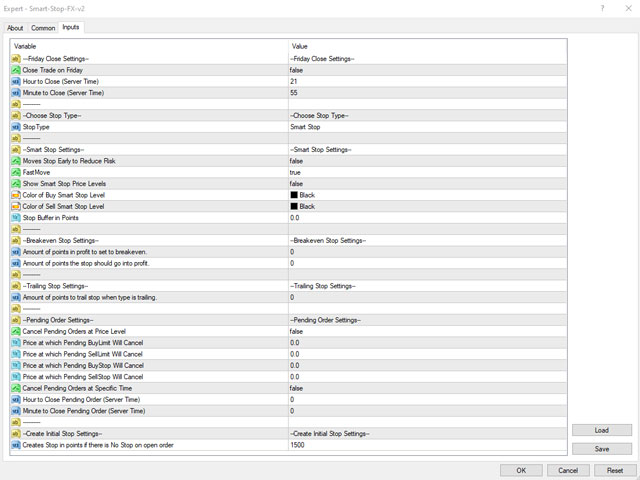
Breakeven Mode - In this mode, Smart Stop FX moves your stop to either a position of reduced risk, to breakeven or to a set amount of locked in profit based on how many pips a trade goes in your favor.

Traditional Trailing - In this mode, Smart Stop FX trails your stop by a fixed amount of pips, set by you, as soon as price goes a predetermined amount of pips in your favor.

Smart Stop Mode - In this mode, Smart Stop FX analyzes price action within price swings to intelligently place your stop to squeeze out as much as possible from a price move. You won't see this mode featured anywhere else!

You won't see a trade management system like this anywhere else! With "Intelligent Mode" enabled, Smart Stop FX uses a unique analysis of price volatility to determine how to trail your stop. To prove our point, we created an Expert Advisor that enters trades completely randomly while using Smart Stop FX's Intelligent Mode for management. We set it to run for a 5 year back-test using high quality TickStory data from Dukascopy. The results?

Consistently profitable. 

Can you do better than total random entries? -- Check out our site at www.SmartStopFX.com to download the back-test results.

In addition, SmartStopFX can automatically close your trades on Friday if you do not wish to hold trades over the weekend. 

We are continually working to improve and add features so your feedback is greatly welcomed!
おすすめのプロダクト
The utility copies trades from the signal provider accounts (master accounts, one or multiple providers) to unlimited number of receiver accounts (slave accounts).  Attention! Y ou need to use identifiers (Provider number) of the same length if you use several master copiers. For example. 1, 2, 3 or 11, 13, 22. The copying can be set in the opposite direction. The comments with all the recently performed actions are displayed on the screen to monitor the utility actions in slave mode. To avoid p

多機能取引ツール:ロット計算機、グリッド注文、R/R比率、トレードマネージャー、需給ゾーン、プライスアクションなど デモ版   |   ユーザーマニュアル トレードアシスタント はストラテジーテスターでは動作しません:この ユーティリティ をテストするには デモ版をこちら からダウンロードしてください。 ご質問 /改善のアイデア/バグ発見 の場合は 私に連絡 してください MT5版が必要な場合は、 こちら から入手できます 取引 プロセス を簡素化、高速化、自動化します。この ダッシュボード で標準ターミナルの機能を拡張します。 取引パネル はあらゆる取引銘柄で動作します:FX、株式、指数、暗号通貨など。 1. 新規取引の開始 :ロット/リスク/RR計算:手動取引のリスク管理 ロット計算機(リスクサイズに基づく取引量計算) リスク計算機(ロットサイズに基づくリスク額) リスクリワード比率 グリッド注文: + 動的間隔オプション、分割ロットオプション 注文アクショントリガー、+ 買いストップリミット/売りストップリミット:Mt4でも可能 仮想SL、仮想TP(非表示SL、非表示TP:ブロ
Copier for the MetaTrader4 terminal. Designed to copy trade from one terminal to another. Compatible with the version for the MetaTrader5 terminal; if available, copying can be performed between different terminals (regardless of the type of accounts: hedging or netting). The number of accounts to which copying is possible is not limited (depends only on the computing power of your computer). Directions for copying the version for MetaTrader 4 together with the version for MetaTrader 5: MT5 Net
MT4/MT5 Dual Copier Pro: Skyrocket Your Trading Success with Seamless Precision! Youtube Demonstration: https://youtu.be/auW00CG386o?si=Du2axdoBzTmUJ3yp Unlock the power of automated trade replication with Dual Copier Pro, the ultimate Expert Advisor (EA) designed to revolutionize your trading experience on MetaTrader 4 and MetaTrader 5. Whether you are a seasoned trader, a hedge fund manager, or a prop firm guru, this robust, feature-packed tool ensures your trades are copied with lightning-fa
VTB High Watermark Drawdown Lock EA for MT4 Advanced Equity Protection & Drawdown Management System VTB High Watermark Drawdown Lock is a professional risk management Expert Advisor designed to protect trading accounts, funded accounts, and proprietary trading challenges from excessive drawdown. Unlike traditional drawdown protection systems that calculate risk from the initial account balance, this EA uses a dynamic High Watermark (HWM) model that continuously protects both your original capita
自動ブレークイーブンレベル この   ユーティリティを   使用 すると、   取引が所望の利益に達したときに自動的にSLを移動する機能を有効にできます。 特に   短期   トレーダー   にとって重要です。   オフセットオプションも利用可能です:一部の利益を保護できます。 多機能ユーティリティ : 66以上の機能、このツールを含む  |   質問がある場合は連絡してください   |   MT5バージョン 自動ブレークイーブン機能の有効化プロセス: 1.   シンボルまたは取引を選択   Auto BE機能を有効にする対象: 現在の   [Symbol]   / すべての取引   [ALL]   / または特定の取引   [Ticket] . [Symbol]または[ALL]ルールに加えて - 特定の取引に個別のルールを設定できます, チケット番号により: 個別の[Ticket]ルールが優先されます. 2. Auto BEを有効にする   取引タイプ   を選択: [ALL]: すべての有効な取引; [Longs]: 買い取引のみ; [Shorts]: 売り取引のみ; 3.  
Утилита  TSim   позволяет симулировать ручную торговлю в Тестере Стратегий MetaTrader 4. В панеле можно устанавливать размеры лота, тейпрофита и стоплосса. Панель имеет кнопки Sell   и Buy для выставления рыночных ордеров, а также кнопки CloseSell, CloseBuy и CloseAll для быстрого закрытия ордеров. Под панелью отображается список открытых ордеров. Внимание. Панель работает только в Визуальном режиме Тестера Стратегий MetaTrader 4.
FREE
手動トレードのための、本格的なトレードパネル。正確なエントリーから口座の保護まで、トレードの全工程をチャート上のひとつのウィンドウで完結させます。設定したリスクに正確に合わせてロット数を計算し、RR Tool でチャートに線を引きながらトレードを組み立て、成行注文・待機注文・Grid・OCO を発注できます。ポジションの管理はパネルが引き受けます。最大5段階の分割決済、6種類のトレーリングストップ、建値、Virtual SL/TP を搭載。日次・週次・月次の上限が資金を守り、上限を超えると自動で作動します。 ガイドと無料の Live デモ 無料の Live デモ版はこちらでご利用いただけます ( Free Live Demo )。 製品の操作ガイドはこちらです ( User Manual )。 NT Trade Manager は、トレーダーの作業の流れ全体を、チャート上のコンパクトなパネルひとつにまとめます。ターミナルのウィンドウを行き来する必要も、エントリーのたびに手計算する必要もありません。自分の意思で手動トレードする人のためのツールです。裁量トレーダーからスキャルパー、スイ
Equity Pulse MT4 Real-time equity, drawdown, and portfolio performance tracking in one clean trading panel. Equity Pulse MT4 is a practical account-monitoring indicator for MetaTrader 4. It helps traders see exactly where they stand across today, yesterday, recent days, the current week, month, and year. Instead of checking account history manually or relying only on the terminal’s floating profit number, Equity Pulse gives you a clear performance snapshot directly on the chart. It is designed
Details of each condition Type 1. Set no use Hedging Martingale, to open the order by yourself only through the push button. TP and SL follow setting. Set Setting_Hedging =false; Set Setting_TrailingStop =false; if not use. Type 2. Semi Auto Recovery Zone You have to open the order by yourself only through the push button. If in the wrong direction and Set true on Hedging Martingale, EA will fix the order with the zone system by use Hedging Martingale Set Setting_Hedging =true; Set Setting_Tra
"Just copier" is designed to copy trading without any complicated settings. The copy can be done in one PC. One EA can be set as master (provider) or slave (receiver). The receiver lot can be set to multiple providers lots. Please also check this product at fxina.hostingerapp.com.  Any type of copy is available. MT4 -> MT5 MT4 -> MT4 MT5 -> MT5 MT5 -> MT4 If you want to copy MT4 -> MT5 or MT5 -> MT4, please purchase "Just copier" for MT4 and "Just copier" for MT5 separately. Just Copier can copy
Copies transactions between MT4 terminals. Possibilities: quick copy start minimum processor load direct and reverse (reverse) copying. copying Take Profit and Stop Loss levels copying deferred and their changes copy transactions one to many copy trades many to one local copy only Attention: The product is designed for copying trades only within a single computer or VPS with access to the desktop. The product will not work on the built-in Virtual Hosting of the terminal. We will help you set up
Program Overview: This program is a trading tool designed to monitor and analyze the 7 major currency pairs. It is a variant of a similar program used for tracking stock indices, but this version focuses on the seven major currency pairs. The program helps in identifying and calculating significant price movements (gaps) between the high and low prices of these currency pairs over a specified time frame. It then provides insights through comments and alerts based on the calculated gaps. Major Cu
BuyLimit and SellLimit Buttons opens any combination of Buy Limit and Sell Limit pending orders and closes all existing pending orders. If boolSL = true, then the EA will add a Stop Loss value to all pending orders. If boolTP = true, then the EA will add a Take Profit value to all pending orders. Inputs Before placing all pending orders, the input window is opened allowing you to modify all input parameters: DeleteAllPendings:  if true , then all pending orders (for the current currency) can be
ChartTrader is a professional trading tool that every trader needs in their toolbox. It has been developed to work with the MT4 Platform. ChartTrader offers a number of options to make placing orders in the Forex market quick and easy. The GUI sits on the chart window so there is no need to navigate to separate windows when placing orders. The program allows you to set pending and instant orders. It has a built in risk management system, so every trade can risk a percentage or a fixed amount in
Stay updated with Multicurrency Overview!! The algorithm of this EA releases an average of the movement percentage of all the Forex currencies linked to a single currency, isolating it, letting us to comprehend its real and specific trend. Above on the left, a panel show us efficiently the trend of the currency, in the timeframe actually used. The second panel will keep you updated on macroeconomic news. P.N.:The news time is based on your pc clock time, this way you won't have any problem reg
Tick Volume Chart — fixed volume bars for MetaTrader 4. The tool creates charts on which each candle has a fixed tick volume. Data sampling is carried out not by time but by the tick volume. Each bar contains a given (fixed) tick volume. Tick volume can be adjusted by changing the value of the Volume parameter. You can apply indicators, Expert Advisors and scripts to the tick chart. You get a fully functional chart, on which you can work just as well as on a regular chart. In the process of work
The Night Scalper EA Lite is a fully automated Expert Advisor that trades at night and relies on price reversion. The EA trades using market orders and has the option to use time averaging to improve performance. This EA works best on EURUSD using the M5 timeframe, but will also work on AUDUSD, GBPUSD, NZDUSD, USDCAD, USDCHF and likely many more. A VPS is advisable when trading this system and a low spread and commission based broker is best. Check the comments for back test results and optimiz
FREE
Supported copying directions MetaTrader 4 → MetaTrader 4 MetaTrader 4 → MetaTrader 5 MetaTrader 5 → MetaTrader 4 MetaTrader 5 → MetaTrader 5 ️ For MT4 ↔ MT5 copying you need both versions (MT4 + MT5). Working modes Master mode -  The terminal is the source of trades (orders are sent from it). Slave mode -  The terminal receives and copies trades from the Master. “From myself” mode -  Deal multiplier mode (useful if you trade via Signals). What can be copied Buy / Sell trades All symbols or onl
Copier Provider RAlabs MT4 — a signal source for local trade copying. A lightweight trade publishing tool for a copying system consisting of Copier Provider RAlabs (signal source) and Copier Master RAlabs (receiver). Copier Provider RAlabs is installed on the donor account whose trades need to be copied and transmits those trades to the Copier Master RAlabs receiver. The provider publishes: position openings, modifications, and trade closures. Features: instant local transmission, minimal resour
FREE
Description: Please tick "Show object descriptions" in chart properties to enable hrays views That utility converts a trendline into a horizontal ray known as tool for drawing supply and demand zones. Simply create a trendline on a chart and once selected, it will get converted. Ray remains horizontal while dragging.  Quick ray plot: press "R" key to create horizontal ray. It will be snapped to the nearest OHLC value Further versions will be improved. For feature request please post new comm
Trade Copier Agent は、複数の MetaTrader(4/5) アカウント/端末間で取引をコピーするように設計されています。 このツールを使用すると、プロバイダー (ソース) または受信者 (宛先) として機能できます。すべての取引アクションは、遅延なくプロバイダーからレシーバーにコピーされます。 このツールを使用すると、0.5 秒未満の超高速のコピー速度で、同じコンピューター上の複数の MetaTrader ターミナル間で取引をコピーできます。 Trade Copier Agent インストール & 入力ガイド コピーを開始する前、または注文がないうちに、プロバイダー アカウントで設定を適用してください。 注文中の変更は、受取人のアカウントに影響します。 例: プロバイダー アカウントが買い注文を適用し、その後、受信者アカウントのすべての買い注文を無効にすると、決済されます。 EA追加URL(   http://autofxhub.com   )MT4端末(スクリーンショット参照) に関する通知を受け取りたい場合 。 MT5 バージョン https://www
MT4用NAS100 Auto SL and TP Makerをご紹介します: MetaTrader4でナスダック100市場をナビゲートするトレーダーにとって不可欠なアシスタントであるNAS100オートSLおよびTPメーカーで、ストップロスおよびテイクプロフィットの設定をもう見逃すことはありません。このツールは、ストップロスとテイクプロフィットのレベル管理を自動化するシームレスなソリューションを求める方々のために設計されています。 主な特徴 簡単な自動化: ストップロスやテイクプロフィットのないナスダック100取引を自動的に監視します。 ユーザーが構成した設定に基づいてレベルを動的に調整します。 注文タイプの多様性: Nasdaq100の成行注文と未決済注文の両方に対応。 MetaTrader 4で利用可能な様々な注文タイプをサポートします。 カスタマイズされた設定: ユーザーフレンドリーなパラメータ設定により、トラッキング設定とストップロス/テイクプロフィットレベルのカスタマイズが可能です。 柔軟な範囲: 実行する特定のNAS100商品、または取引されるすべての商品に対してStop
FREE
Exp Swing
Vladislav Andruschenko
4.43 (63)
これは、Swinger(Pendulum、Cheburashka)と呼ばれる有名な戦略のモデルを使用しています。 戦略は、2つの反対の保留中の注文を出すことにあります。価格が特定の方向に移動すると、一方の保留中の注文がトリガーされ、もう一方の注文のロットサイズが増加します。 EAは3種類のオープン保留中の注文を提供します(TypeofTrade) 配置後の自動オープン(インスタントオープンAutoTrade) 手動開封後の開封と管理(手動開封ManualTrade) 高/低レベルで開く(過去のバーTFTradeの高低) OCO(One-Cancels-the-Other)注文は、2つの注文で構成される条件付き注文の一種です。2つ目の注文が約定すると、1つ目の注文は自動的にキャンセルされます。 スイング-完全な説明 MT5 version 購入する方法 インストールする方法     ログファイルの取得方法     テストと最適化の方法     Expforex のすべての製品 使い方? 開始時に、エキスパートアドバイザーは2つの注文を出します-現在の価格から StopOrderDe
FREE
For use, it is necessary to have both the Hedging or Arbitrage Transmitter and the Hedging or Arbitrage Receiver , and they must run on the same PC or VPS. Hedging or Arbitrage Transmitter It must be installed on the account where the trades will be opened first (preferably the PROP account). In the INPUT section, choose the monetary SL and TP you want on the Transmitter account (PROP) and the monetary SL and TP you want on the Receiver account (Real Account). PollIntervalMs indicates how many
Trade copier MT4
Alfiya Fazylova
4.56 (32)
Trade Copierは、取引口座間の取引をコピーして同期するように設計された専門的なユーティリティです。 コピーは、同じコンピューターまたはvps にインストールされている、サプライヤーのアカウント/端末から受信者のアカウント/端末に行われます。 キャンペーン - すでに「Trade copier MT5」をご購入の方は、「Trade copier MT4」を無料で入手できます(MT4 → MT5 および MT4 ← MT5 のコピー用)。詳細な条件については、どうぞ個別メッセージでお問い合わせください。 購入する前に、デモ アカウントでデモ バージョンをテストできます。 デモ版 こちら 。 詳細な説明は こちら 。 主な機能と利点: MT5ネッティングアカウントを含む、MT4> MT4、MT4> MT5、MT5> MT4のコピーをサポートします。 高いコピー速度(0.5秒未満)。 ベンダーモードと受信者モードは同じ製品内に実装されています。 チャートから直接リアルタイムでコピーを制御できる、簡単で直感的なインターフェイス。 接続が切断されたり、端末が再起動されたりしても、設定と位
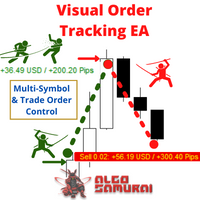
The Visual Order Tracking (VOT) EA makes trade history and performance metrics visible on the chart in four ways: 1) Draw History of closed and open trades with arrows, lines and trade result numbers (pips, $ profit, % profit, % change); 2) Trade Manager to show Open, SL and TP levels as vivid horizontal lines with dynamic specs and partial closing options; 3)  Summary Trade Panel to show sortable table of open and closed trade summaries by symbol, lots, pips, profit and advanced stats; and 4) 
NNFX Tool
Nguyen Thi Kieu Oanh
NNFX TOOL – The Essential Order Management Tool for the Modern Trader A "small but mighty" EA, designed to optimize your trading workflow: High Performance: Lightweight yet powerful operation, ensuring precise and efficient order execution. Versatile: Perfect for NNFX method followers, while being incredibly user-friendly for beginners and sophisticated enough for pro-traders. SPECIAL FEATURE - Mobile Trading Support: Automatically sets immediate Stop Loss (SL) and Take Profit (TP) for pending
FREE
Demo version of the paid product - Copy MT4 copier , limited to lot size of 0.01 Universal copier of deals from MetaTrader 4 to MetaTrader 4 ( MT5<->MT5 version is available ; with both versions, you can copy MetaTrader 5<->MetaTrader 4, MetaTrader 4<->MetaTrader 5, MetaTrader 5<->MetaTrader 5, MetaTrader 4<->MetaTrader 4). Spread filter. Select the best price (start copying positions with a profit or loss). Configure the lot size, fixed or ratio-based (provider signals can be copied with an inc
FREE
Blahtech VWAP
Blahtech Limited
5 (3)
Was: $69    Now: $49   Blahtech VWAP - Volume Weighted Average Price (VWAP) is the ratio of price to total volume. It provides an average price over a specified time interval.  Links [  Install  |  Update  |  Documentation   ] Feature Highlights Configurable VWAP Line Sessions, intervals, anchored or continuous Previous day settlement line Standard Deviation bands Alerts at bar close or real time Automatic Broker or Tick volumes Significantly reduced CPU usage Input Parameters Expert Advisor
このプロダクトを購入した人は以下も購入しています
Unlimited Trade Copier Pro is a tool to copy trade remotely to multiple MT4, MT5 and cTrader accounts at different computers/locations over internet. This is an ideal solution for you if you are a signal provider and want to copy your trades to other receivers globally on your own rules. One provider can copy trades to multiple receivers and one receiver can get trade from multiple providers as well. The provider can even set the subscription expiry for each receiver, so that receiver will not b
The FFx Hidden Manager panel will help you to manage easily your orders directly on the chart. Below all features described: TP, SL and TrailingStop are hidden Each order has its own lines on chart Drag & Drop any line to change the TP/SL as per your need Option to move automatically the SL line at breakeven when TP #1 is reached Option to choose the TP/SL type (by pips or price) Option to choose the TrailingStop type (by pips, MA, Fractals, PSAR or ATR) Define which order(s) you want to manage
FFx Risk Calculator panel will help you to calculate very easily your trades size, SL or the risk directly on the chart. All features are described below: Option to select which parameter to calculate: Risk, Stop Loss or Lot Size The panel will show if the lot size is allowed according to the current account free margin Button to maximize/minimize the panel Drag and Drop the panel anywhere on the chart How to use it? Select the parameter you want to be calculated. It will be based on the 2 other
News Trader Pro is a unique robot that allows you to trade the news by your predefined strategy. It loads every piece of news from several popular Forex websites. You can choose any news and preset the strategy to trade it, and then News Trader Pro will trade that news by selected strategy automatically when the news comes. News release gives opportunity to have pips since the price usually has big move at that time. Now, with this tool, trading news becomes easier, more flexible and more exciti
The FFx Watcher PRO is a dashboard displaying on a single chart the current direction of up to 15 standard indicators and up to 9 timeframes. It has 2 different modes: 1. Watcher mode: Multi Indicators User is able to select up to 15 indicators to be displayed User is able to select up to 9 timeframes to be displayed 2. Watcher mode: Multi Pairs User is able to select any number of pairs/symbols User is able to select up to 9 timeframes to be displayed This mode uses one of the standard indicat
エリオット波動カウンターは、エリオット波動を迅速かつユーザーフレンドリーに手動でマークアップするためのパネルです。マークの色とレベルを選択できます。最後のマークアップとツールによって作成されたマークアップ全体を削除する機能もあります。マークアップはワンクリックで作成されます。 5 回クリック - 5 つの波があります。エリオット波動カウンターは、エリオット波動の初心者にもプロのアナリストにも最適なツールです。 エリオット波動カウンターのインストールと入力ガイド 取得したい場合     EA 追加 URL (  http://autofxhub.com   ) MT5 端末に関する 通知 (スクリーンショットを参照)。 MT4 バージョン https://www.mql5.com/en/market/product/14016 MT5 バージョン https://www.mql5.com/en/market/product/15081 一般的な入力: 波の種類ボタン: このボタンを使用すると、ユーザーはチャートで強調表示する波のパターンの種類を選択できます。使用可能なオプションには、イン
If you wish to draw Support and Resistance lines, view: daily market opening, classical pivot levels, Fibonacci pivot levels, trend lines, Fibonacci levels, the remaining time to candle closing, and current spread. If you seek to place your orders with the exact lot that meets your desired stop loss risk. If you wish to do all this and more with just one click, then this is the perfect tool to use. This tool will allow you to feel more relaxed when deciding to open orders, as well as predicting
Unlimited Binary Options Copier Remote is a powerful tool to copy binary options trades remotely between multiple accounts at different locations over internet. This is an ideal solution for signal provider, who want to share his binary options trades with the others globally on his own rules. One provider can copy trades to unlimited receivers and one receiver can get trade from unlimited providers as well. The provider can set the subscription expiry for each receiver, so that receiver will no
Telegram Publisher Agent は、 トレーダーが Telegram チャネルおよびグループにリアルタイムでシグナルを送信できるようにするアドオンです。このツールは、カスタマイズ可能なメッセージ、チャートのスクリーンショット、その他の機能を備えており、トレーダーが取引の洞察や戦略をフォロワーと共有するのに役立ちます。このツールは、明暗のテーマ切り替えを備えた美しいデザインも備えており、ユーザーに美的で機能的な取引体験を提供します。 Telegram Publisher Agent は、すべての取引をチャネルおよびグループ内のシグナルとして公開するように設計されています。あなたがしなければならないことは、取引を提供することだけです。その後、ボタンをクリックするだけで、Telegram Publisher Agent が取引シグナルを取引チャネルまたはグループに送信するためのすべての面倒な作業を実行します。 Telegram パブリッシャーエージェント   インストールと入力ガイド EA に関する通知を受け取りたい場合は、URL  ( http://autofxhub.c
如果产品有任何问题或者您需要在此产品上添加功能,请联系我 Contact/message me if you encounter any issue using the product or need extra feature to add on the base version. There is Demo version of this panel Dashboard Babon Scalping System Demo in my product list, please try it out to get familiar with all functionalities for free, LINK . This system basically utilizes TDI, Heiken Ashi Trend, Price Trend on H1 time-frame and TMA on H1&H4 time-frame to generate the trend (big picture). Then the system will zoom in to genera
The Pairs Trade indicator is a utility for semi-automatic pair trading. It allows combining the charts of two arbitrary instruments, even if the schedules of their trading sessions are different. It displays a spread chart in the form of a histogram with an overlaying moving average. It calculates the swap that will be charged for the synthetic position (in the deposit currency). It is possible to set a level for automatic opening of a synthetic position on the spread chart (analogous to the 'se
The script displays info about the share's corporate reports and dividends. The data is downloaded from   investing.com : Report date Profit per share (EPS) Revenue Market capitalization Amount of dividends Date of payment of dividends Dividend income The product cannot be tested in the tester (since it is not possible to receive data from the Internet). Before launching:  Add 2   URL   https://ru.investing.com/earnings-calendar/Service/getCalendarFilteredData  and   https://ru.investing.com/di
This Stacker EA will: Automatically set Stop loss on a new order Automatically set Take profit on a new order Stack (or open up to 4 additional orders at the same time) when a new order is placed, the SL/TP can be preset individually for each order. Provides a transparent replacement for the standard 1-click trading buttons in MetaTrader 4 (1 click still works and SL/TP will automatically be set as well as Stacking). Automatically calculate lot order size according to preset risk management perc
FXFledgling Exit Tool is a complete risk management tool that analyzes both the open trades and the direction of the pair of open trades. As long as the suggested entry and lotsizing management presented here is followed strictly, you will have a high chance (but no guarantee) of surviving the trade. What It Does It is used as an exit tool. It helps the trader to manage any manual trade that he transacted. It does the following: Trail Stop Dynamic Stop Loss - a calculated stop-loss that changes
New opportunities for analyzing cryptocurrency in the usual MetaTrader 4. For example : We select the symbol of the cryptocurrency and attach any indicators, Expert Advisors or scripts. Startup Mode View cryptocurrency; Data collection. Capabilities Work as with a standard currency chart; Automatic update of open charts; Selection of individual cryptocurrency for updating; Selection of individual timeframes for updating; Work on the desired timeframes; Open charts do not affect the work of Cry
Notify Telegram is a utility that bridge your MetaTrader4 trading activities to your Telegram chat/channel. It will help you to monitor your MetaTrader4 actions such as placing trade, modifying order's TP/SL, closing trades etc and send a notification message to your dedicated Telegram chat/channel. It does not execute any trade on your MetaTrader4 account. It can be useful for monitoring EA performance or providing signal to your Telegram channel/group subscribed. Parameters Token ="" - enter
The  Easy Strategy Builder (ESB)  is a " Do It Yourself " solution that allows you to create a wide range of the automated trading strategies without any line of codes. This is the world’s easiest method to automate your strategies that can be used in STP, ECN and FIFO brokers. No drag and drop is needed. Just by set conditions of your trading strategy and change settings on desired values and let it work in your account. ESB has hundreds of modules to define unlimited possibilities of strategi
Telegram ChartSnap is an utility tool to bridge your MetaTrader 4 activities to your Telegram chat/group/channel. It will screen shot your MetaTrader 4 chart and send it to your dedicated Telegram chat/group/channel through a Telegram bot. The whole process will keep repeating based on a time cycle that predetermined by the user. It is a convenient tool for those who like to get access to their favorite system/dashboard that only available at MetaTrader Desktop. Beside that, trader can easily s
フィボナッチリトレースと拡張ラインツール DiNapoliポイント取引方法とゴールデンセクション取引を使用するトレーダーにとって理想的なMT4プラットフォームのフィボナッチリトレースと拡張ラインツール 主な特長: あなたはフィボナッチリトレースメントの複数のセットを直接描くことができ、重要なリターンポイント間の関係は一目瞭然です。 2.フィボナッチ拡張を描画することができます。 3.フィボナッチフォールドバックとラインの延長は、簡単な観察と数値表示のために左右に動かすことができます。 4.チャートは非常に爽やかな 5.数字キーでサイクルを切り替えることができます。 ファンクションキー: 1。 [戻るを押す、要求に応じて描画する、最大8つのグループにする 2。拡張]を描くには[押す] 3。 \を押すと、現在のサイクルの下にあるすべての拡張機能と折り畳みが削除されます 4。フォールドバックを移動して削除して展開する (1)最初のフォールドバックセットのF5行をクリックします。 一度クリックすると(黄色に変わります)、キーボードのDeleteキーを押すと、フォーカ
Советник риск-менеджер с огромным арсеналом возможностей защиты вашего депозита. Для инвесторов, которые решили передать капитал в доверительное управление. Когда у трейдера нет доступа к настройкам - нивелирует торговые риски. А также для трейдеров, которые осознали необходимость стороннего контроля за их торговлей для улучшения торговых результатов.  Для максимальных результатов - должен стоять на отдельном VPS сервере и у трейдера не должно быть возможности менять настройки в торговый период.
Grid Hero War Pad is a  GRAPHICAL MANUAL TRADER version of the original Grid Hero EA, designed and created for ADVANCED TRADERS who are experienced in plotting their own market entries. It is coded using ADVANCED GRAPHICAL INTERFACE programming, that combines the power of discretionary trading with Grid Hero algorithm in the form of a graphical console with button-click easy execution. It allows you to execute trades manually using Market Orders and Pending Orders, and then automatically uses th
The advantage of using this EA This EA directly updates takeprofit and stop losses that are still empty in a manual order Parameters Multiplier: Multiplier value of the previous transaction Distance: Distance hedging from the previous order Takeprofit: take profit taken from the last price + the value of this column We recommend that you do not add more than one manual transaction in the same pair martingale hedging | manual hedging | hedging manual | hedging lot | best robot | best ea
The new version of  MirrorSoftware 2021  has been completely rewriten and optimized.  This version requires to be loaded only on a single chart because  it can detect all actions on every symbol and not only the actions of symbol where it is loaded. Even the  graphics and the configuration mode  have been completely redesigned. The MirrorSoftware is composed of two components (all components are required to work):  MirrorController  (free indicator): This component must be loaded into the MASTER
Скрипт открывает графики по всем инструментам находящимся в окне "Обзор рынка" и по желанию может задать для всех графиков один шаблон. Так-же можно удалить все графике открытые в терминале Мт4. В скрипте имеются следующие настройки: "Таймфрейм" по умолчанию M30;             (Можно поставить свой: M1, M5, M15, M30, H1, H4, D1, W1, MN.) "Задержка" по умолчанию "0";                  (Задержка перед открытием следующего графика в миллисекундах.) "Шаблон" по умолчанию "True";                (True=пр
По факту вы выставляете виртуальные Buy Stop и Sell Stop которые срабатывают после закрытия свечи. Данный помощник позволяет заранее выставить уровень Stop Loss и Take Profit. Так-же имеется демо режим для предварительного расчёта параметра риск/прибыль. Помощник имеет следующие настройки "Лот" по умолчанию "0.01" "Проскальзывание" по умолчанию "60"        (Значение в пунктах) "Номер Ордера" по умолчанию "0"               (Магический номер ордера) "Цвет Комментариев" по умолчанию "Black"  "Шрифт
(8th Feb 2019 Launch Promo: $97/lifetime just for 1 day! Price goes to $180/lifetime in 24 hours!) The TFA Trade Manager helps you easily manage your trades with an intelligent vertical "bars" system. You easily now easily click + drag your entry, stop loss, take profit, breakeven, partial profit and trailing stop with a few simple mouse clicks. You can also easily calculate the risk you wish to allocate to each trade by telling the trade manager your desired risk %, lot size or $dollars to risk
This utility automatically draws the trend channel on the price chart. For the time interval from the specified date to the current bar, the drawn channel is almost optimal. Placing the beginning of the channel at a more distant historical price extremum, you get a visualization of a longer-term trend. Channel slope is not a continuous value, but takes one of discrete values (in AxB format, where A is the number of price points (points), and B is the number of timeframes). This program works ONL
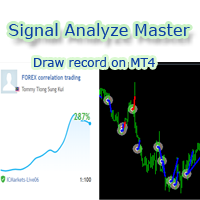
--------------Welcome to use [MQL5 Signal Analyze Master]------------------  Function: Draw order tracks of MQL5 MT4 and MT5 signal on MT4 chart. [Using guide] 1.Use it as Experts. 2.Download history record from MQL5 signal(MT4 signal or MT5 signal).  3.Paste history record file below "MQL4/Files/" 4.Load [Signal Analyze Master] on the symbol chart what you want to analyze. 5.Paste the history record file name to parameter 'FileName' 6.Select  SignalType  match the history you download on MT4
Forex copier
Alexandr Bryzgalov
4.5 (2)
We offer simple and reliable software that can  copy trades  between any MT4 accounts. Easy to use MetaTrader copier which saves valuable time Reliable, so you are protected from technical issues Powerful, with a lot of features available Who can use this MT4 copier? Forex Copier is a solution for individual traders or account managers who need to execute trade signals from external sources or who need to  manage several MetaTrader 4 accounts  at the same time. We do not offer you “yet another
This is the ONLY Trade Copy EA that can copy TO and FROM many slave account. Trader can choose EA to work in ONE WAY (server => slaves) or TWO WAY (server <=> slaves) mode. The copy process is done without leaving magic number or any infomation in the comment field of the orders. Very clean. Order can be partialy closed on both server and slave account. EA only work with 28 currency pairs because CFD and metals sometime have different names on some brokers. EA has ability to protect account by s
フィルタ:
レビューなし
レビューに返信