 MetaTrader 5
 Experts
 지표
지표
 라이브러리
라이브러리
 유틸리티
유틸리티
 위젯
위젯
 규칙
규칙
MetaTrader 4용 새 트레이딩 유틸리티 - 37
 다음은 MetaTrader 4에서 외환 거래를 단순화하는 거래 프로그램입니다. 아래 목록의 유틸리티 위로 마우스를 가져가면 해당 설명과 용도를 읽을 수 있습니다.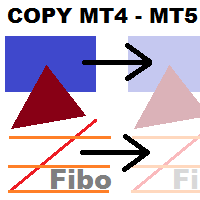
This utility copies graphic objects from the MASTER chart to the SLAVE chart. Install it as an indicator. The version for MT5 is here: https://www.mql5.com/en/market/product/61935 It can work in the following modes: Master CHART to Slave CHART in one MT4 or MT5 Master MT4 to Slave MT4 (one or more) Master MT4 to Slave MT5 (one or more) Master MT5 to Slave MT5 (one or more) Master MT5 to Slave MT4 (one or more) You can use multiple Master-Slave groups by setting the ID parameter . You can copy al
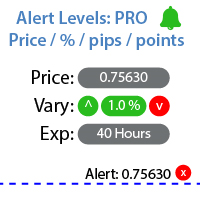
특정 가격 수준에 도달했을 때 알림을 설정하는 유틸리티 내 #1 트레이드 매니저 를 확인하세요: 66+ 기능, 알림 및 추세선 알림 포함 | 질문이 있으면 연락주세요 알림은 세 가지 방법으로 설정할 수 있습니다: 가격 수준을 수동으로 입력; 가격 변동 설정: 퍼센트 / 핍 / 시장 포인트; 마우스로 레벨 이동: 자석 기능도 있어 활성화하면 레벨이 가장 가까운 OHLC 값에 달라붙습니다; 선택적으로 각 알림 유형을 활성화 / 비활성화할 수 있습니다: 터미널 내 알림; 이메일 알림; 모바일 기기로의 푸시 알림; 유틸리티의 추가 기능: 알림 수명 설정 옵션: 활성화되면 지정된 시간 후에 알림이 자동으로 취소됩니다 (분 / 시간 / 일); 차트에 알림 수준을 표시하는 옵션; 기존의 모든 알림을 빠르게 삭제하거나 각각 개별적으로 삭제; 인터페이스의 장점: 패널을 접어 차트 공간을 확보할 수 있습니다: ([^] 버튼 ); 패널을 이동 하여 차트의 아무 곳에나 배치할 수 있
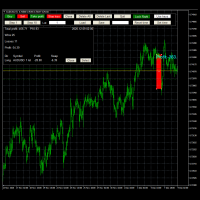
Advanced Trade Simulator
It is an indicator you can attach to any chart and then buy and sell the given symbol virtually. No actual trading takes place. You can attach it to multiple charts. Then you can buy multiple symbols.
A more detailed description here: https://www.mql5.com/en/blogs/post/750336 Features:
- buy and sell immediately on the given time frame - market , limit and stop orders - generalized OCO, more than 2 orders can cancel each other. - OSO, one sends another.. - set lot ba

Odie Trade Manager EA is a simple semi-automatic (two in one) assistant for a manual trader, when having a losing trade the EA begins its work in the form of a martingale or hedging (recovery zone) to leave it in breakeven or positive, it depends on its configuration.
For professional traders and gamblers .
Adapt it to your strategy, MANAGE YOUR RISK CORRECTLY and all your operations will be positive.
TEST ON STRATEGY TESTER WITH YOU STRATEGY AND CREATE YOUR SET FILE AND... GOODBYE LOSSES.
FREE

Smart Copy is an Easy-to-Use EA that supports Multi Copying Metatrader4 and Metatrader5 and Local/Remote Copying. (Remote Version is coming soon)
Free version is available on Smart Copy Local Free MT4
Specifications :
Real Time, Multi Terminal - Multi Account - MT4/MT5 trade copying Copy from netting to hedge and hedge to netting is supported.
Fast and instant copy
All settings are input visually. Easy modifying symbol names, prefix, suffix Enable/Disable copying s
New version based on the product: Trade History MT4 To Excel
Hello Traders! I have received many comments on my product " Trade History MT4 To Excel " which I have decided to create a new more complete version based on your suggestions. The result is fantastic, you will not find anything like it anywhere, I know because I have checked :-) WARNING: To give you an unique product I had to modify the standard mql4 files. Before to run the interface you need to load this file in the directory. You

Utility for informing in telegrams with a wide functionality -->>> English parameters menu version, Russian menu parameters version here first 10 sales at $ 30, next 10 at $ 40 and so on Works correctly with Windows 10, Windows Server 2012 and above Can send notifications to channel or private messages : Signal name (it is convenient to send signals from several terminals to one channel) Opening an order (instrument, volume, order type, quote, take profit, stop loss, order number, opening time

For those who are still not confident in their system or are testing new techniques to make it easier without wasting time to change the charts one by one, we recommend EA Smart Backtest to help you backtest your system efficiently.
-The EA is intended to Backtest your system. -Able to open buy or sell in visual mode and can modify values for LOT, SL, TP. -The chart also shows the Balance Equity Profit status. -Can choose to close, Buy, Close, Sell

Script risk management, which calculates for you the potential profit, possible loss, risk percentage, on the entire account and for each instrument. Shows where stop-losses and take-profits are not set.
Each line summarizes the number of open transactions for a specific instrument and calculates the percentage of loss from the total deposit. Beyond the line, the final calculation of the balance is summarized, if all transactions are triggered by stop loss; Potential loss, as the sum of all st
FREE

This EA utility does not trade on its own, but it only modifies the open trades to add take profit and stop loss that was opened manually or by any other expert advisors.
The distance is based on Pips .
How Does It Work? If Symbol to modify is set to "All Symbol" simply attach it to one chart, and all open trades in the entire terminal will set the take profit and stop loss . If Symbol to modify is set to "Local Symbol" , it will only set the ta

This tool working You can buy or sell from the button of this tool, the lot size can be filled manually, as for the close all buy button to end all buy positions, close all sell button to end all sell positions, Close All profit button to end All profit position, Close All Loss button to end all loss position, Delete Pending button to delete all Pending order, close all orders to end all orders. The variable, you can use close all percent for close all orders when profit in percent, if close

Simple Order and Risk Management Tool. Secure your profits and protect your capital!
Features Visual Stoploss, TakeProfit Levels (Hotkey: SHIFT+M) Visual Pending Order Level (Hotkey: SHIFT+P) 5 Custom LotSizes for Open Orders (Each lotsize has a corresponding hotkey) This requires that an SL level is previously set Automatic Partial Close Expert will automatically close partial positions in when it reaches a target profit level. Automatic Stoploss to Breakeven Expert will automatically set y

FXC Trade AssistanT MT4
This trading software will help you in manual trading. You can use it for open and close positions in many forms. The EA offers you lot sizeing, stop management methods and other usefull tools using with its control panel.
New in v1.13: Ultra-Fast CLOSE operation can close over 100 trades/second (Only MT5) New SETUP panels: Control, Chart, Msg., SFX, Advanced Added SFX sound profiles
Zero-Point Calculation with Swap & Commission Can handle foreign trades
New Info data: St

Avenger Expert Advisor The Avenger Expert Advisor (EA) is a sophisticated trading tool designed to help traders automate their trading strategies with precision and efficiency. This EA leverages advanced trend indicators and customizable settings to optimize trading performance. Key Features: Trend Indicator Settings: Main Trend Indicator: Utilizes the primary trend indicator for position openings. First and Second Trend Filters: Additional filters to refine trend signals and enhance accura

AutoSTPending - Expert Advisor for Automatic Stop Loss and Take Profit
The AutoSTPending expert advisor automatically creates or modifies the Stop Loss and Take Profit levels configured in the properties. It is a user-friendly and easy-to-understand tool. With AutoSTPending, you can simplify and streamline your trading operations by allowing the expert advisor to automatically set and adjust your Stop Loss and Take Profit levels. This allows you to focus on other activities while maintaining ef
FREE

Note: MT4 Backtest cannot test EAs that trades with several symbols simultaneously. For backtest use MT5 versions download here . Note : Limited version can trade with the volume less than 0.05 lots.
Important :
This is Arbitrage EA and may not work on all accounts. It is recommended to follow the testing process described on product screenshots. If you are not familiar with arbitrage trading, It is recommended to use our other trading robots .
Strategy :
EA will place trades based on Tria
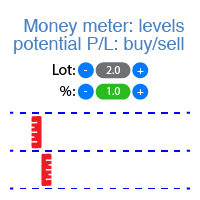
이 인디케이터는 각 방향(매수 및 매도)에 대한 잠재적 이익/손실 수준을 표시합니다. #1 Trade Assistant 확인: 이 도구를 포함한 66+ 기능 | 질문이 있으면 연락하세요 설정 가능: 로트 크기 (마지막으로 사용한 로트 자동 설정 옵션 있음); 그리드 단계 : 백분율 / 금액 (녹색 스위치); 각 방향의 레벨 수 ; 현재 계좌 잔액 또는 사용 가능 마진 에 대한 위험 계산; 인디케이터 초기 설정에서 선택 가능: 차트에서 선 및 텍스트 색상; 인터페이스 테마: 어두운 또는 밝은; 인터페이스 장점: 패널을 접어 차트 공간 확보: ((^) 버튼 ); 패널을 차트의 아무 곳으로 이동 가능: (< move > 버튼 ); 레벨 표시 빠른 활성화/비활성화: ( "On" 버튼 ); #1 Trade Assistant 확인: 이 도구를 포함한 66+ 기능 | 질문이 있으면 연락하세요

This application allows you to broadcast any trading activity of your choice on the account in the telegram channel. You choose: Where to broadcast (you can simultaneously broadcast to several channels by running several copies of the robot on your account at the same time) Orders and positions placed by a robot or a human, or both What symbols (All or are entered through a space EURUSD.i EURGBP.i ...) Information about what actions to send (you can set up several robots on the account to set up
Pro Indicator Trader is a professional trading tool with which you can automate/create a trading strategy using the 31 classical Metatrader 4 indicators. An elegant and intuitive interface allows you to customize your strategy down to the smallest detail and choose whenever the EA should open a buy or sell position. For each entry-trade rule, you can use up to 14 different indicators.
The EA is designed for professional traders, therefore it has many advanced functions. The EA records the order

LEFORT is a multi-currency, fully automatic, high-frequency trading robot. The robot works with any instruments in MT4 on any timeframe. The algorithm of the expert Advisor is as follows Single-scalping trades will. Using the analytical signals module, the robot analyzes the market dynamics, and then makes single trades in the direction of the dominant trend with a profit of several pips. A series of open orders. The robot makes a series of trades on a pullback in the direction of the dominant t
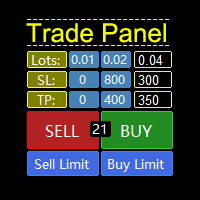
A "Trade Panel" that supports "strategy testing", with excellent compatibility, fast operation, and conforms to the habits of professional traders. At the same time, the design is compact, concise, clear at a glance, and comprehensive in functions. It is a powerful tool for manual operation! Function Description: Click Spread //Delete all arrow Click SL: // Delete stop loss Click TP: // Delete take profit Reverse //Backhand Locked /
FREE
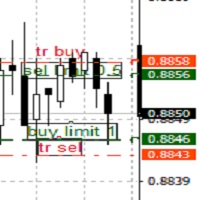
TrailingTakeProfit The script is an assistant in the set levels of TakeProfit relative to High, Low in real time.
Automatically sets the TakeProfit level on all High, Low orders to the required TakeProfit distance, which is set by the TakeProfit parameter in real time relative to the High, Low number of the corresponding Bars number (set by the bars parameter).
Utility settings:
TakeProfit - the distance in points at the maximum and minimum prices, respectively, for sell and buy orders.
Bar

Tester BO and Tester Signal Bar is a script that allows you to test your trading strategies. The tester has two buffers with up / down signals. An example of use can be seen in the screenshots below. Using the indicator tester, you can achieve the maximum ratio of profitable trades for binary options. Improvement for forex is also planned. I wrote the idea at the very bottom in the “Planned work” group. You can filter your signals by the following data: 1- start date analyze. Interval (1 day, 7
FREE

The utility for manual trading to manage open positions.The built-in trailing stop has three modes and seven instruments: by pips, by bar extremes, by fractals, by volumes, by MA, by Parabolic SAR and by ATR. With the help of the built-in trading simulator, you can check how the EA works in the strategy tester. Guide to UTrailingMini can be found in the "Comments" section. Benefits 3 trailing stop modes: normal, total and mobile stop loss; 7 options: by points, by bar extremes, by fractals, by v
APIPS Expert Advisor puts a Take Profit on all positions at the total breakeven distance or at the distance of the specified take Profit value .
If several orders are opened, the Expert Advisor puts a Take Profit on all positions at the total breakeven distance + the specified Take Profit value. You can specify to close all positions only on the excess without profit. If there are no open orders and you open a trade on the market, the APIPS Expert Advisor automatically sets the Take Profit by t
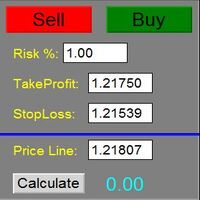
The Panel does not work in the tester. You can test it live with demo version. Demo version link: https://www.mql5.com/en/market/product/61344?source=Site+Market+MT4+Utility+Rating004
Easy Order Panel is a easy panel that can help you to place your orders quickly and easily. Works on all currencies. Configure the Risk and automatically when you press Sell/Buy button an operation with the right lot will be opened. in this way you lose at most the percentage entered.
- just double click on the

Lines Resource is an technical indicator that dysplay lines in the chart giving some notion of supports and resistance levels for the correct functionallity of Optimal Investor EA an multicurrency EA that gives an 52% return monthly. Please install it, to run Optimal Investor EA correctly. Next to it, install Profitnator Resources Indicator FREE , to Run Optimal Investor EA.the second and last one resource.
FREE

This script jumps your chart to a random point in time/random bar. Very useful for back testing, particularly NNFX method.
How To Use: 1. Double click the script in the Navigator 2. Drag script onto chart 3. (Recommended) Right click script in navigator and "Set Hotkey". Use Hotkey instead of having to have navigator open 24/7
Installation: 1. Open MT4 2. Click File -> Open Data Folder 3. Double Click MQL4 -> Scripts 4. Copy Script into this folder 5. Restart MT4
#nononsenseforex #nnfx #bac
FREE
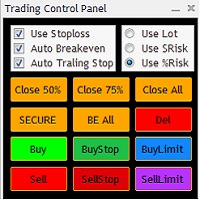
The Trading Control Panel EA let you: - Calculated lot size based on the (% or $ risk) - Place multiple (Market/Limit/Stop) trades at same time - Manage all open trades (move SL to BE, take partial profit, close all trades) This is a handy tool for those who wont to open multiple orders without spending time on lot calculations. When opening multiple orders the first order has the first TP and all other orders get the second TP.

1. Money Printing Robot is a wave trading expert, so please copy it into the 'expert' folder. 2. Please run it in H4 timeframe in order to make the best score of it, the shorter the timeframe you choose ,the worse score you get. 3. the 'Variable' of BuyStopLossPercentage and SellStopLossPercentage is defaulted 0.02,which means 2% of the freemargin ,that is the maximum loss one trade may bring. or you can change it according to your risk management policy. Order lot changes according to the st

S imple arrow with alert on chart. This is NOT an entry indicator but a direction indicator. It uses MACD signal line to show you possible future direction of a trend. Please use it with other filters or confirmations to trade properly. Recommended for scalping and short term trades. Made for EURUSD M5 but it should work on every major pair on M5 timeframe. For MT5 version please go here! *If you need a fully automated trading system. Please check this EA here! FEATURES: Very simple directional
FREE

Trading History - The best visual indicator of trade history.
Shows closed and current deals on the chart.
Closed deals are shown with a solid line, current ones - with a dotted line.
Positive trades are displayed in aqua color, negative ones - in red color .
The panel displays the number of closed and current pips and their profit. The indicator is perfect for trading analysis.
FREE

Dear Friends, Practise master is a Utility program design to work in Live and Strategy Tester. But Main purpose is to work in Strategy Tester. With the help of this program you can take a good practise in strategy Tester. Please rate this application for the better
Benefits. 1. Save lot of time when using this program in Live or Strategy Tester. 2. Very useful to beginners. Demo account will not work in Sat & Sun Days(Market closed days). But for many users have office leave in Sat & Sun(h
FREE
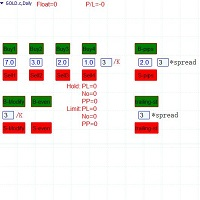
Semi-automatic visual trading panel , place orders or modify them with stop loss and target added automatically only by one click, orders can also be modified manually. 1.Green buttons are long orders,red buttons are short orders, ' /K ' means choosing the highest or the lowest point of the previous chosen K-line as the stoploss level 。 The textbox below “Buy1 , Buy2 , Buy3 , Buy4” are the maximum stoploss you can afford. Calculated arounded off. Click button 'Buy Or Sell' to place an order. 2.

-------------------------------------------------------------------------------------------------------------------------------------------------- First free version of this product is here : https://www.mql5.com/en/market/product/46855?source=Site+Profile+Seller -------------------------------------------------------------------------------------------------------------------------------------------------- This product is an EA that can be used either to practice to educate yourself on Tester

이 작은 스크립트가 당신의 삶을 밝게 할 것입니다. 아래 코드는 로봇의 OnInit에 삽입할 수 있는 코드입니다. 또는 취향에 맞게 색상과 크기를 변경하십시오. #property copyright "V.Temchenko Skype:vasily.temchenko" #property link " Mailto:tvp.prog.96 @gmail.com" #property version "1.00" #property strict #property description "Have questions? Skype: vasily.temchenko Viber: +38098 800-6-800" ; #property description "If the voice - only Russian, Ukrainian or Belarusian" ; #property description "And you can write in English, Russian, Ukrainian" ;
FREE

The utility opens copies of open trades. It is very convenient if you use the Signals service and want to increase the volume of transactions.
Settings: Symbols: all symbols only current symbol Orders: Buy Sell Magic Any Magic Input Magic Lot size Original - lot size from original order; Fix Lot - fix lot size (input); Lot X Mult - lot size X koef; Stop Loss From sender - Stop Loss from original; Without - without Stop Loss; Plus Fix - Stop Loss from original order + fix points; Fix Point - fix
FREE

Stop Guessing Your Lot Size. Trade With Defined Risk. Order Management Script is a FREE risk-management utility that automatically calculates your lot size, Entry, Stop Loss, and Take Profit based on your predefined trading rules. No manual position-size calculations.
No repeated SL/TP calculations.
Just define your risk and trading setup. KEY FEATURES Automatic Lot Size Calculation
Calculate the correct position size using: • Fixed monetary risk
• Percentage of account equi
FREE

Informational indicator to aid in trading English and Russian version Balance Equity Drawdown Margin level Opened orders Spread Total profit Profit for today Profit for yesterday Profit for the week Profit for a month Detailed statistics for 5 pairs Detailed statistics on the current pair ATR MarginCall quote and distance to it Breakeven quote and distance to it Minimum margin level Maximum drawdown Maximum possible lot to open Displaying the breakeven line Displaying MarginCall and Stopout lin
FREE

The S & D Zones Reminder - Never miss a Zone you identified!
If you trade Supply and Demand Zones and don’t want to spend time setting multiple alerts manually, simply use the S & D Reminder Indicator, which will ensure you never miss a trade. Steps to use: 1. Manually identify the zones using below colors: a) DBD Supply Zone – Gold b) RBD Supply Zone - LightCoral c) RBR Demand Zone - StealBlue d) DBR Demand Zone - SeaGreen 2. Add the indicator to a chosen chart, decide if you need phone alerts

VICTOR SCALPER 1.0 MANAGER
Funciones del Robot: Gestionar ordenes realizadas Manualmente desde el metatrader del celular o del ordenador por medio de ordenes pendientes para hacer cobertura incrementando el lotaje y la cantidad de ordenes y a la distancia de separación que se desee. Cerrar las ordenes apenas se tiene el valor en dinero ganado positivamente. O Cerrar las ordenes apenas llegue a un valor negativo indicado por seguridad. Ventajas: La ventaja principal es que el robot no es cont

We found the solution for you. It is a script that allows you to automatically close all your positions that you have improved. To close a position, you must type "Close position" from its context menu in the "Trade" tab. In the window that appears, you must also type "Ask". Then the "Close" button appears in the window. When you press this button, the position is fully closed at the asking price. Please note that the Close button will also remain displayed for a few seconds, while the trader n
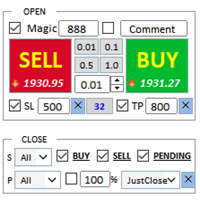
어시스턴트: 트레이드 어시스턴트-MT4 (클릭하여 다운로드) 트레이드 어시스턴트-MT5 (클릭하여 다운로드)
사용설명서를 주의 깊게 읽어보세요.
기초: 언어 선택 및 전환 지원(현재 중국어와 영어 지원) 자동 언어 인식 지원하다 단축키 열기 및 닫기 바인딩, 단축키를 사용하여 위치를 빠르게 열고 닫으세요... 단축키 닫기. 최대 30개의 단축키 지원 잠금 해제는 대부분의 기능을 지원합니다 다시 하다 운영 및 캔 테스트 환경에서 사용 가능 오픈 및 클로징 포지션 영역: 원클릭 포지션 오픈 ( 손절매 및 손절매의 편리한 설정, Lot Size 자동 계산 등의 편리한 기능 포함) 원클릭 닫기 (잠금), 미니멀리스트 스타일의 디자인으로, 마감 유형, 마감 유형(롱 주문, 숏 주문, 보류 주문), 이익이 0보다 큰 경우 주문을 마감할지 여부, 손실 주문을 마감할지 여부, 마감 비
FREE

This is a utility for closing orders or baskets of orders for the total profit or loss. Can work multicurrency, can work with orders opened manually. Has additional trailing profit. Capabilities: Closing an order for the current symbol or for all symbols Closing individual orders or whole baskets of orders Stopping the utility in one click Trailing function for total profit Setting TP and SL in money, in points or as a percentage of the deposit Closing all BUY or SELL orders or closing all orde
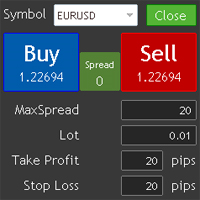
This utility allows you to quickly trade multiple products.
You can open and close positions easily.
Important: -Check allow live trading. -Enable Auto Trade trading.
This uitliy will upgraded.
If the users want to change or add functions, contact me.
Contact Info skype: jupiter0105_01 mail: jupiter010592@hotmail.com
Others: Local signal copier has developed. But Mql not support to upload dll including ex4 files. If you want to use it contact me.
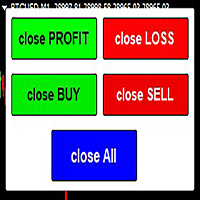
The script allows users to easily close positions if their profit/loss reaches or Close all orders just click function that you want.
Easy Close. - close PROFIT - close LOSS - close BUY - close SELL - close ALL ORDERS
If you find problem about function or you cant not work pls contact me. I will help you anytime.
Please Ratings and Reviews.
Thanks Traders. ENJOY.
FREE
This indicator help you to easily calculate the price moving. You can change the gird size withing the input parameter for your trading style, such as hedge, swing trader, ect. It can let you easy to find your takeprofit and stoploss target price in chart.
For more about my tools and EA, you can join my channel below, thank you. Telegram channel: t.me/HenryEAChannel
FREE

Основное удобство донного индикатора в том, что он не назойлив как большинство, он хорошо показывает среднюю цену на текущем графике. индикатор информирует о количестве открытых позиций по текущему инструменту, а так же по всем открытым инструментам в том числе. при расчете средней цены учитывает комиссию и свопы, показывает чистую цену. Отображается на графике внизу экрана, есть возможность менять цвет и размер шрифта.
FREE
Breakeven Utility MT4 automatically setting breakeven levels, transfers trades to breakeven when passing a given distance . Allows you to minimize risks. Created by a professional trader for traders. Utility works with any market orders opened manually by a trader or using advisors. Can filter trades by magic number. The utility can work with any number of orders simultaneously.
WHAT THE UTILITY CAN DO: Install virtulnoe levels bezubytka from 1 pip I nstall real levels of

Risk Control Utility MT4 designed for manual trading. It helps to calculate and control your risks, transfer transactions to breakeven and accompany positions with trailing stop. Easy to set up and use. It can be used for calculating a trading lot, calculating stop loss and take profit levels. Works with currency pairs, CFDs, stocks, indices, futures, cryptocurrencies Displays volume, potential loss and profit before placing an order Ability to set the expiration time of a pending order
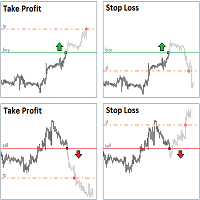
StopLoss and TakeProfit Utility MT4 for automatic setting of stop loss and take profit levels. Created by a professional trader for traders. The utility works with any market orders opened by a trader manually or using advisors. Can filter trades by magic number. The utility can work with any number of orders simultaneously.
WHAT THE UTILITY CAN DO: Set virtual stop loss and take profit from 1 pip Real stop loss and take profit W ork with each order separately ( stop loss and take prof
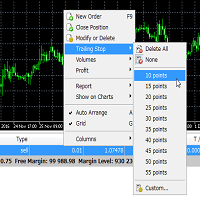
Trailing Stop Utility MT4 for automatic closing of deals by trailing stop levels. Allows you to take the maximum from the profit. Created by a professional trader for traders. Utility works with any market orders opened manually by a trader or using advisors. Can filter trades by magic number. The utility can work with any number of orders simultaneously.
WHAT THE UTILITY CAN DO: Set virtual trailing stop levels from 1 pip Set real trailing stop levels W ork with each order separat
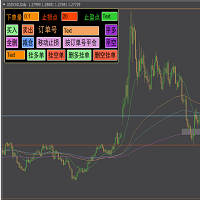
快捷下单控件EA,可以实现很多实用功能,不仅可以实盘中操作,也可以在复盘中使用,大家知道一般情况下复盘只能使用复盘软件,占用多达10个G的内存呢,而且贵的让人难以接受,如今这个EA控件可以让你直接在MT4里实现复盘,实时下单,占用内存几乎可以忽略不计,对于交易者来说,复盘的重要性不用多说了吧,很多时候,盘感都来自于一次次的复盘,那是经验积累的必经之路,如果你需要提升自身的交易能力,需要快速累积盘感,需要快速实现稳定盈利,那么这个复盘EA工具将是你的不二选择,你也可以直接加VX:EURNZD,它集诸多功能于一身,如果你想试用它,不要犹豫,联系我,我会让你高兴而来,满意而归,如果你不想复盘,那么还是花更多的时间来积累经验吧
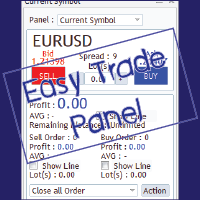
EasyTrade is a dashboard that make trading easier. EasyTrade can help you to calculate and send command. EasyTrade have 3 tabs. Tab 1 Display data about information and orders in the current symbol Show all order Profit/Loss. Show all buy order Profit/Loss. Show all sell order Profit/Loss. Show average price of all opened order(buy and sell). Show average price of all buy order. Show average price of all sell order. Show total lot buy order. Show total lot sell order. Show total order buy. Show

Object replicator is an indicator that allows you to replicate an object in one or as many charts as you like. This indicator is the solution to replicate part of your analysis in exactly the same position and price of a trend line, Fibonacci, vertical line, horizontal line, etc. Download the MT5 version here
Install the indicator on the source chart and follow the steps below: To activate the indicator, simply press the (Activate) button. Once the (Activate) button is pressed, a (Receive obj

Savage Trades M.T.A. is a Manual Trade Assistant expert advisor. This EA contains self-adaptive market algorithm, which uses price action patterns and standard trading indicators. 1.) Quickly Execute trade entries with the click of a button with your own predetermined Stop Loss and Take Profit. 2.) Non-Repainting retracement and reversal warnings indicated by arrows and system alert. 3.) Auto adjusting Support and Resistance levels with strength indicated by color shade. 4.) Auto adjusting Fibo

Photocopy MT4 is an Copier of transactions through Telegram channel. Will help you instantly publish your trade in Telegram channel or copy trades from Telegram channel. The utility can work in two directions by receiving signals in MT4 and transmitting signals to Telegram . No more missed deals No more panic Capital Management Ease of use
You can use it for:
Copying your own deals through Telegram channel (via the Internet); Copying trades from MT5 to MT4 and vice versa. Propagation of signa
FREE
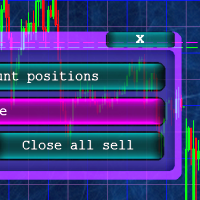
Кнопочная панель для одновременного закрывания большого числа позиций. Всего четыре варианта закрывания: Закрыть все позиции на счёте ( Close all account positions ). Закрыть все позиции по символу графика, на котором находится панель ( Close all positions ). Закрыть все Buy позиции по символу графика, на котором находится панель ( Close all Buy positions ). Закрыть все Sell позиции по символу графика, на котором находится панель ( Close all Sell positions ).
FREE

활성 및 보류 중인 주문 관리: 자동 무손실, TP/SL 변경, 부분/전체 청산, 차트 상의 레벨 시각적 표시 내 #1 Utility 확인: 66+ 기능, PRO 거래 관리 포함 | 문의하기 질문이 있으면 1) 메인 창: 주문 관리를 위해 특정 심볼 [Symbol]을 설정하거나 모든 심볼 [ALL]을 선택할 수 있습니다 모든 활성 포지션 닫기 [ALL] 모든 수익성 있는 거래 닫기 [profits] 모든 손실 거래 닫기 [losses] 모든 롱 거래(매수) 닫기 [longs] 모든 숏 거래(매도) 닫기 [shorts] 모든 지정가 주문 삭제 [Delete limit orders] 모든 스탑 주문 삭제 [Delete stop order] 오른쪽에는 각 주문 카테고리의 현재 부동 손익(계좌 통화 및 현재 잔고 대비 백분율)이 표시되며, 각 카테고리의 주문 수가 계산됩니다. 2) 수동으로 거래를 무손실로 변경 [- Move SL to BE now -]: SL 레벨이 진입 가격
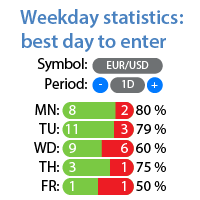
요일별 수익/손실 통계 내 #1 유틸리티 확인: 66+ 기능, 확장 통계 포함 | 문의하기 궁금한 점이 있으면 통계 표시 모드: 선택된 통화 쌍/거래 도구 모든 거래 통계 (" ALL ") 통계를 얻을 기간을 선택할 수 있습니다: 1 일 1 주 1 개월 2 개월 3 개월 6 개월 1 년 2 년 전체 거래 내역 표시 정보: 요일별 통계를 볼 수 있습니다: 각 날짜의 수익/손실 횟수와 승률.
빨간색과 녹색 섹터는 거래에 가장 성공적인 날과 거래를 피하는 것이 좋은 날을 시각적으로 보여줍니다. 인터페이스 장점: 패널을 접어 차트 공간을 확보할 수 있습니다: (버튼 [^]); 패널을 차트의 아무 곳으로 이동 할 수 있습니다: (버튼 [MOVE]); 어두운 / 밝은 인터페이스 테마 : (스위치 [Dark]); 내 #1 유틸리티 확인: 66+ 기능, 확장 통계 포함 | 문의하기 궁금한 점이 있으면
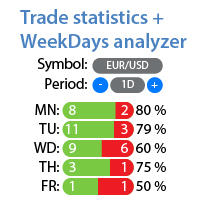
선택한 기간에 대한 상세한 트레이딩 통계 나의 #1 트레이딩 어시스턴트 를 확인하세요: 66+ 기능, 이 도구 포함 | 질문이 있으면 연락주세요 이 유틸리티는 2개의 독립적인 도구를 포함합니다: 트레이딩 통계 요일 분석기 통계 표시 모드: 선택한 통화 쌍/트레이딩 상품 모든 트레이드 에 대한 통계 (" ALL ") 통계를 얻고자 하는 기간을 선택할 수 있습니다: 1일 1주 1개월 2 개월 3 개월 6 개월 1년 2년 전체 트레이딩 기록 1. 트레이딩 통계: 총 이익 총 손실 총 순이익/손실 트레이드 수 매수 수익 트레이드 비율 매도 수익 트레이드 비율 전체 수익 트레이드 비율 평균 보유 시간 수익 트레이드의 평균 보유 시간 손실 트레이드의 평균 보유 시간 2. 요일 분석기: 시장 진입에 가장 좋은 날을 찾으세요 요일별 통계를 확인할 수 있습니다: 각 요일의 이익/손실 횟수와 승률. 빨간색과 녹색 섹터는 트레이딩에 가장 성공적인 날과 트레이딩을 하지 않는 것이 좋은 날을 시각적으로

MetaTrader 4용 실시간 렌코 차트 KT Renko Live Chart는 적용한 심볼을 기반으로 MetaTrader 4에서 실시간 렌코 차트를 만듭니다. 벽돌은 오프라인 차트에 기록되며, 이 차트는 새 틱으로 업데이트되고 사용자 지정 지표와 EA를 사용할 수 있습니다. 설정 순서 변환할 심볼의 차트에 유틸리티를 적용하고 그 차트를 열어 두세요. M1 차트를 사용하면 가장 자세한 히스토리를 얻을 수 있습니다. 파일 메뉴의 오프라인 열기에서 렌코 차트를 열고, 설정한 Offline Time-Frame의 심볼(예: EURUSD,M2)을 선택하세요. 렌코 차트에서 EA를 실행하려면 차트 속성(F8)을 열고 오프라인 차트 선택을 해제해 EA가 새 틱을 받도록 하세요. 파라미터 Renko Box Size in Pips: 벽돌 크기입니다. 5자리 호가와 3자리 JPY 호가에서는 1핍이 10포인트입니다. Offline Time-Frame for Renko Chart: 오프라인 렌코 차트의
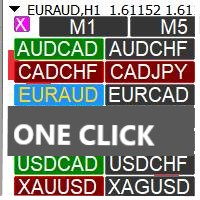
Profit Loss Symbols Dashboard Dashboard displays all manually entered pairs in settings and shows their profit loss information. One click to navigate between all pairs on one chart. Dashboard can be hide or displayed. Green Colour: Symbol(s) in Profit Red Colour: Symbol(s) in Loss Blue Colour: Current Chart Yellow Colour: Timeframe Selected
TRY HAWA GOLD WITH 80% WIN RATE
MT4 VERSION: https://www.mql5.com/en/market/product/58832 MT5 VERSIION: https://www.mql5.com/en/market/product/59276
Pleas
FREE
The stocks that make up the index are one of the drivers of the movement. Analyzing the financial performance of all elements of the index, we can assume further development of the situation. The program (script) displays corporate reports of shares that are part of the index selected in the settings.
"Indexes" cannot be tested in the tester (since there is no way to get information from the Internet).
Information is downloaded from the site investing.com: Report Date Earnings per share (E
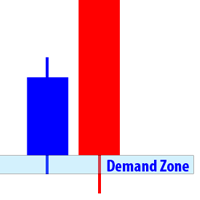
Supply and Demand Dashboard
Supply and Demand Dashboard is a forex system that can help you generate lucrative profits from forex easily without having to work hard to learn forex knowledge because this Dashboard is complete with all the needs and functions that are sophisticated and effective for a forex trader.
This system is made based on Supply and Demand techniques to measure Market Direction (trend) more accurately than using indicators such as Moving Average, MACD, trendline and so on.

This utility is very useful for trader to get an alert when there is interrupt connection (lost connection) to MT4 server and if there your computer is no internet connection. You will get an alert by sound, email and push notification at the moment your MT4 platform lost it connection. Several function available to alert you. 1- Sound notification 2- Email notification 3- Push notification 4- Blinking red background on your MT4 platform chart. If you lost connection to your broker but your inte

HEDGE 120 is an EA that opens an order if the market moves an adverse will make a safe zone . Hedging with Forex is a strategy used to protect one's position in a currency pair from an adverse move. It is typically a form of short-term protection when a trader is concerned about news or an event triggering volatility in currency markets. The main reason that you want to use hedging on your trades is to limit risk. Hedging can be a bigger part of your trading plan if done carefully. I

Скрипт используется для сбора статистики по переходам цены между уровнями сетки, размер которой задается в настройках (смотрите индикатор Transitions between levels ). Данные записываются в CSV файл. Есть два режима сбора статистики: SeparateTransition - учитывается каждый отдельный переход (смотрите скриншот 2). Время перехода - время, когда цена коснулась нового уровня. Accumulation - в файл записывается количество однонаправленных переходов (смотрите скриншот 4). Например, -7 - семь пеерех

Скрипт вычисляет коды свечей на текущем графике и сохраняет их в CSV файл. Таблица в файле состоит из двух колонок: дата/время свечи и ее код. Подробнее о коде свечи и об алгоритме его расчета читайте в описании к индикатору Candle Code .
ПАРАМЕТРЫ FileName: имя файла, в который экспортируются данные. Если оставить поле пустым, то имя файла - "Candle Code. ' ВАЛЮТНАЯ ПАРА' 'ТАЙМФРЕЙМ' "

PO-Plus Readme
機能: 3つのロジックでの買いサイン、売りサインを表示します。 各ロジックでの勝率を表示します。
サイン表示後、勝率を確認して高い勝率でBOやFXでエントリーすることが出来ます。
勝率の判定本数を変更できます。
Indicator Noを変えることによるこのインジケータを複数適用することができます。 これによりRCIの数値を変更して勝率を複数表示が可能になります。 その際は、ラベルの表示位置も変更してください。 ボタンを押すことによりラベルや買いサイン、売りサインを表示、非表示すことが出来ます。
注意:こちらのロジックはZigZag+ロジックでの勝率になりますので 勝率は実際のものより高めに表示されます。 エントリーする際は勝率60%以上のものを推奨します。 ZigZagベースなので価格が動く日本、欧州、NY時間の前半でのエントリしない ことを推奨します。
各パラメータの説明: ----------Basic Setting---------- Indicator No:インジケータNoを設定します。もし同じチャートに複数適用し
MetaTrader 마켓은 거래 로봇과 기술 지표들의 독특한 스토어입니다.
MQL5.community 사용자 메모를 읽어보셔서 트레이더들에게 제공하는 고유한 서비스(거래 시그널 복사, 프리랜서가 개발한 맞춤형 애플리케이션, 결제 시스템 및 MQL5 클라우드 네트워크를 통한 자동 결제)에 대해 자세히 알아보십시오.
