 MetaTrader 5
 Experts
 Indicadores
 Bibliotecas
 Utilitários
 Widgets
 Regras
Conheça o Mercado MQL5 no YouTube, assista aos vídeos tutoriais
Como comprar um robô de negociação ou indicador?
Execute seu EA na
hospedagem virtual
hospedagem virtual
Teste indicadores/robôs de negociação antes de comprá-los
Quer ganhar dinheiro no Mercado?
Como apresentar um produto para o consumidor final?
Novas ferramentas de negociação para MetaTrader 4 - 31
 Abaixo estão os programas de negociação que simplificam o trading no MetaTrader 4. Passe o mouse sobre um produto para ler uma descrição mostrando seu propósito.
Painel de negociação para abertura de ordens em 1 clique! Para ajudar o trader, conjuntos de realização de lucros, stop loss, ordens pendentes de Stop e Limit, transferências para ponto de equilíbrio, trilhas. Há também um fechamento parcial do pedido em %
Todos os parâmetros são personalizáveis. Instalado em especialistas!
Configurações
Lotes - Lote 0,02 StopLoss --- 700 Stop Loss TakeProfit --- 400 Take Profit UseBreekeven ---- falso ponto de equ
FREE

Close All Orders for MT4 script - closes absolutely all orders, whether pending or market ones.
Orders are closed at the current profit/loss indicators at the time of closing.
The script is suitable for moments when you need to quickly close all orders at the current indicators.
The script is very easy to use, just drag the script onto the chart and it will do its job.
Add me as a friend , I have many other useful products.
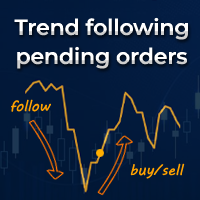
Trend following pending orders detect a group of orders opened by chart buttons and automatically follows market price.
Once your STOP or LIMIT orders are activated Trend following pending orders immediately adds STOP LOSS and TAKE PROFITS . Optionally you can add rule for closing all market orders when sum or price will reach your profit or loss. You can also enable trailing stop loss and traling take profit to market orders. It is a very handy tool in cases where you want to catch the perf

Wicks Trade Panel It's a Trade Panel include Order Management & Risk Management for serious trader. Especially for those traders who pay attention to important events like the CPI, NFP, and ADP. A one-of-a-kind faster technique to fix the Entry Price by simply pointing the mouse pointer at it. This is what I enjoy about it. Automatically closing 50% order size lots when setting TRUE on Breakeven Status. It's especially useful when trading on significant economic events like the CPI, NFP, and A
FREE

It's a smart Investing.com utility signal analyzer on MT4 chart during 28 pairs ,It uses all technical and candlestick patterns for each pairs to analyze the final trend ,You can use it as base entry signal for each pairs, It's easy to use ,You must add the address ' https://www.investing.com/ ' in the list of allowed URL tab 'Advisors' , Added GlobalVariables for each pairs as buffer simulation to get data from any ExpertAdvasor for trading.
Setup
So to work with the server, you must add the U

Main features: I nforming via telegram buttons content and closing orders for one of the pairs or all necessary orders. Alert and information buttons to the telegram window when the specified percentage of profit is reached for each pair, or for two at once. The telegrams "sleep" while no profit we need, when a profit is reached, a menu of 5 buttons appears, in each button the profit will be displayed both in currency and in %%. When you click on the button, the direction of orders for this pa

The trend in the market can be predicted using trend lines but the problem is you don’t know where exactly the price is going to touch the trend line where you can put your pending orders on. Smart Channel Expert Advisor makes it possible to put an advanced channel around the price data, which can be configured to handle placing orders, opening and closing positions, managing risk per trade, spread, slippage, and trailing stop-loss and take-profit automatically. Features Money Management (Calcul

The Silver Volatility Trend Line for MT4 is an EA that helps you trade using the trendlines, drawn on your chart. It basically allows you to send and manage orders using trend lines. It automatically calculates the True Range of your asset to allow you to send orders well calibrated with the market volatility. Take Profit and Stop Loss are calculated in number of True Range. You can do that for two different orders at the same time , so that you can trade two different kind of risk / profit rat

Вспомогательный советник. Советник сам не торгует. В тестере открывает сделки для демонстрации и возможности подбора настроек.
Советник анализирует сделки по всему счету, находит самый убыточный ордер, со значением ( Minimum order LOSS ) и закрывает его с минимальной прибылью ( Minimal annihilation profit for closing ) за счет текущих прибыльных ордеров, минимальная прибыль для закрытия прибыльного ордера ( Minimum order PROFIT ). Советник может оставлять самые прибыльные ордера ( Saving prof

- Go up one more level with the most important Tools to Analyze the Market, such as drawing Horizontal and Dynamic Lines, Zones, Ratios, Trap Level Strategy, Impulse Projection, Bar Information with precision, automatic drawing of the most important Opening Levels (Open Day , Open Week, Open Month, Open Year), floating boxes on the chart where we can see the Countdown of each bar, the Spread and ATR indicator, an independent Panel with buttons for all options and shows the symbol, Time Frame

Ultimate MT4 to Telegram (UMT) sends controlled trades (via symbol, magic, comment) to your telegram channel. It sends open and closed trades, including pending orders and TP/SL modifications, along with chart screenshots, to any telegram channel. Additionally, you can send trade reports of open trades and summary profit/pip reports for day, week, or month. You can customize the design of the trade actions or reports with variables and emoticons.
A beautiful panel allows you to visualize all t

Ultimate MT4 to Telegram Public Channel sends controlled trades (via symbol, magic, comment) to a public telegram channel. It sends open and closed trades, including pending orders and TP/SL modifications, along with chart screenshots, to this public telegram channel. Additionally, you can send trade reports of open trades and summary profit/pip reports for day, week, or month. You can customize the design of the trade actions or reports with variables and emoticons.
A beautiful panel allows
FREE

This is a simple yet really handy assistant. It is useful if you want to close all positions on the market when a definite sum of the free margin is reached. Just place the assistant on a free chart and set a closing amount. All positions of all symbols will be closed when this amount is reached. At that, you don't have to sit by the monitor waiting for a good moment. The EA will do it for you.
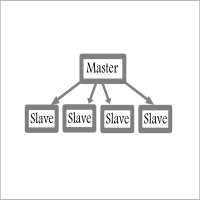
Fast / Reliable / Multi Functions / Simple To use local MT4 to MT4 | MT4 to MT5 platform copier , it will copy all your Master account orders into any Slave accounts very fast , no delay, Also it supports any kind of orders/ExpertAdvisors such as Buy / Sell / BuyStop / SellStop / BuyLimit / SellLimit / Smart Partial Closing / opened in Hedge mode / opened in Martingale mode / Modifying Pending orders / Modifying StopLoss-TakeProfit .using it is simple , Just drop the EA on Master account which y

OpenCharts for OpenOrders, Gestão Inteligente de Gráficos Basta arrastar este script para qualquer gráfico e ele abrirá automaticamente uma nova janela para cada símbolo único com ordens abertas no terminal. Principais funcionalidades : Abre automaticamente um gráfico por símbolo com posições abertas Evita duplicações, mesmo que tenha 10 ordens do mesmo símbolo, abre apenas um gráfico Permite escolher o timeframe antes da execução Leve e eficiente, ideal para quem trabalha com múltiplas ordens P
FREE

Excellent spread indicator. Reflects the spread on each bar as it is. It should be remembered that the spread is displayed at the time of the bar opening. Therefore, the most correct information will be on the minute bars. Spread is one of the basic forex concepts that any trader should know. If explained clearly, you can describe such an example. The trader buys the EUR / USD pair at the rate of 1.1000. However, he immediately goes into negative territory, for example, by 10 points, as if he bo

The CandleStick Factory is a tool that allow you to perform a market scan and search any candlestick pattern that you already created. The lite version can be downloaded here : https://www.mql5.com/en/market/product/75622 You can perform a quick search in the current chart (500 bars will be scanned), or save your custom candlestick patterns, and search in different Symbols/Timeframes that you can select in the settings tab, the scan can be scheduled every 1, 5 or 10 minutes by updating t
FREE

The CandleStick Scanner is a tool that allow you to perform a market scan and search any candlestick pattern that you already created in the current chart, You can perform a quick search in the current chart (500 bars will be scanned), This is a lite version of CandleStick Factory for MT4 . The full version video can be found here : https://www.youtube.com/watch?v=fq7pLXqVO94 The full version can be purchased here: https://www.mql5.com/en/market/product/75628
How it works Yo
FREE

Stop Out Monitor will provide information on how many pips your account will stop out for each currency pair.
With this Stop out info, it is hoped that forex trader can maintain the health of their account and be able to take the necessary actions when a stop out will occur and look for prevention so that a stop out or margin call does not occur. So far, we have only provided standard information from Metatrader in the form of free margin and margin level in percentage , where this info
FREE

Um assistente que ajuda a acompanhar os pedidos em aberto usando um algoritmo integrado. Permite que você abra ordens de compra ou venda clicando no botão no painel de informações na janela do gráfico principal.
O volume da posição desejada em uma negociação é calculado de três maneiras : Automaticamente, dependendo do volume da balança. Especificado manualmente. Dependendo do nível de risco por negociação e do valor de Stop Loss. O Stop Loss pode ser especificado de três maneiras: O máximo ou

Customized Copy is a Multi-Terminal visual trade copying utility that supports Metatrader4 and Metatrader5 for Trade Copying.
You can activate EA on 10 different PCs/VPS. On each PC/VPS can install on Unlimited Terminals.
Specifications :
Real Time, Multi Terminal - Multi Account - MT4/MT5 trade copying (support over 50 accounts at same time) All settings are input visually. Visual display and modify of copy map and network Each copy path can be used with different settings

The utility is convenient for closing trade operations when trade with two instruments.
Should be Installed to Experts folder and launched as an Expert Advisor.
After starting, Metatrader will indicate the device ID that is trying to connect.
In Telegram, start/create the channel with the standard command /start
Next, you need to enter a password that is assigned in the Expert Advisor field. If the password is correct, the Metatrader's comment will indicate that the password was successful,

Hello, boys and girls!
Script allows you either to quickly save opened charts and then close all charts opened by visual tester mode or just faster close all charts. Feel free to take a look at video manual about how to use this script on my YouTube channel. Also, feel free to join my telegram channel , where time to time I publish some exclusive stuffs. Feel free to leave feedback and thoughts how to improve this script - I'd highly appreciate that. All the best.

Levels and risk calculator for the Antimartingale (or Antimartingala) technique Totally visual, setup everything from control panel Decide your risk and margin, it will calculate and show trading lavels on the chart Free version of the orginal Antimartingale EA: https://www.mql5.com/en/market/product/53653 Public Signals using the Antimartingale's technique:
https://www.mql5.com/en/signals/1016250 https://www.mql5.com/en/signals/1018964 This EA does not open trades, it only shows the trading le
FREE

This is script to quickly modify multiple trades all at once and automatically calculate the breakeven point which work perfectly for martingale strategy and can be used alongside any martingale EA to adjust the TakeProfit and StopLoss For all the running orders on the chart. How to use: Pip worth : is for easily calculate the pips according to the chart you are running on, for example (pip = 10 points on major currency pairs, 100 point in indices, and 1000 on some crypto charts like BTCUSD) Sto
FREE

Hi Dear Friends , As i told you ,,, today i produce the management EA to managing your trades and with closing instruments used to closing tow kind of trades.. the profitable trades and losable trades .. u can try it for free for 2 days ,, it is worth every cent .. now .. you do not need to keep tracing your deals.... let the EA do it for you automatically... for any inquires contact me directly in my contacts shown on my profile after adding me ..
best regards
Fawaz A. Al-baker

Информер предназначен для получения информации о состоянии счета (номер, баланс, эквити) через Телеграм канал. Для работы необходимо создать канал и взять токен который указывается в настройках эксперта вместе с именем канала. Выбирается 2 временные отметки по которым отправляются отчеты в Телеграм. Данный инфрормер удобна для мониторинга счетов с работающими экспертами. Возможна отправка отчетов с разных счетов в один телеграм канал. Для запуска скопируйте в папку Experts, наличие файла Telegra

If you use several charts open at the same time, you know how boring it is to apply formats to each chart individually. This script can change all open charts using a single command. Parameters: 1 - Choose symbol to put on charts: apply the selected symbol to all charts. If "current", it does not change the symbol; 2 - Choose timeframe or leave empty: apply the selected timeframe to all charts. If "CURRENT", it does not change the timeframe; 3 - Apply template to the charts: If true, apply the t
FREE

PROMINING EA+Ai é um sistema de negociação algorítmico totalmente automatizado mais eficaz em pares XAUUSD GOLD. O sistema usa o gráfico de vários prazos para negociar, o EA segue a tendência simultaneamente. É um scalper muito rápido que é muito ativo com negociações. É especialmente projetado para negociar em pares XAUUSD.
Junte-se ao nosso grupo MQL5 no qual compartilhamos novo arquivo de conjunto, atualização e atualizações. Quando você compra o robô Promining EA + Ai, você pode participar

Marca de água no Gráfico: Símbolo + prazo / ou o seu próprio texto O meu utilitário #1 : inclui 66 + funções | contacte-me se tiver alguma dúvida Nas opções do indicador, você pode configurar: Tamanho; Cor do texto; Nome Do Tipo De Letra; Posicao:
1 = Superior-Esquerda;
2 = Superior-Direita;
3 = Inferior-Esquerda;
4 = Baixo-Direita;
5 = Centro; Mostrar o período de Tempo actual: ligado/desligado; O prefixo do símbolo a remover (n_AUDCAD --> AUDCAD); O sufixo do símbolo a remover (USD CAD pro
The Five Minutes Strategy EA is designed for trading binary options. EURUSD on the five-minute period is strongly recommended. Trading is performed by the opening prices based on the signals of the Five Minutes indicator. It requires at least 100 bars in history to operate.
Input Parameters Initial Deposit - initial deposit. Lot Value - lot size. Lot Type - lot type: Fixed - fixed. Variable - variable. Last Lot Value - last lot value (used in cases when the EA is reattached) Day lot typ
The Rapid Strategy Expert Advisor is designed for binary option trading. M5 timeframe with the 15-minute expiration is recommended. Available financial instruments: EURUSD, EURCHF, GBPUSD, GBPJPY, USDJPY and XAGUSD. Trading multiple financial symbols at a time is not recommended. The EA trades at Open prices based on the signals of the Rapid indicator. It requires at least 100 history bars.
Input Parameters Experts Number - the number of expert advisors (corresponds to the number o

AutoOrderModifyEAPro: A Vital Aid for Forex Traders, Both Manual and System-based Catering to the diverse needs of forex traders, whether engaged in manual or system-based trading, AutoOrderModifyEAPro emerges as a pivotal tool in this intricate landscape. The tool's efficacy is most evident in scenarios such as: Enhancing EA Strategies: Addressing the common dilemma of lacking Trailing and/or Break Even mechanisms in otherwise promising EAs. Streamlining Position Management: Overcoming the hass

Description: Automatic Equity Manager EA manages the whole account equity. You need to set it up on its own chart. -----------------------------------------------------------------------------------------------------------------------------------------
Parameters: EquityGainPercent = 3 (This automatically closes all trades when your equity shows a gain of X percent.) ---------------------------------------------------------------------------------------------------------------------------------
FREE

Dear Friends ,
this EA helps u to automatically tracing (following) your opening trades .. the trades will opened manually .. you can set all parameters such as lot size sl
tp distance from open price to set the break even point (that's to keep your deal in safe from losing any funds in case of the market go on negative way that you expect ) trailng your trade by set the distance of pips u need
if u need any assistance , add me and contact me on my links in profile .
wish all the best f
FREE

Details of each condition Type 1. Set no use Hedging Martingale, to open the order by yourself only through the push button. TP and SL follow setting. Set Setting_Hedging =false; Set Setting_TrailingStop =false; if not use.
Type 2. Semi Auto Recovery Zone You have to open the order by yourself only through the push button. If in the wrong direction and Set true on Hedging Martingale, EA will fix the order with the zone system by use Hedging Martingale Set Setting_Hedging =true; Set Setting_Tra
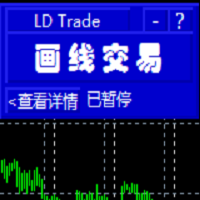
基于MT4的画线交易 辅助 EA。通过在图表上绘制趋势线和/或水平线实现开平仓等多种功能。 EA提供2种功能定义模式: 1.颜色标示模式。 2.文字说明模式。 颜色标示模式下, 默认颜色相应功能如下:
Blue(蓝色):开仓BUY.
Red(红色):开仓SELL.
Yellow(黄色):平仓当前品种所有BUY订单。
White(白色):平仓当前品种所有SELL订单。
Lime: 平仓当前品种所有盈利的BUY订单。
Aqua: 平仓当前品种所有盈利的SELL订单。
你可以在EA参数页修改设置你习惯并喜欢的颜色来实现相关功能.
文字说明模式:参数页输入预定义字符,在图表上添加 线条时,在该线的描述中输入与参数页相匹配的字符即实现相应功能。默认文字详见参数页。
图表中画线的数量不受限制,你可以在图表中不同位置添加多条相同功能的趋势线

This tool will help you hide your stoploss and takeprofit prices of all trades, it will manage them to close your trade when market price reached these levels. And it will replace all these StopLoss, TakeProfit levels for trades when you removed it, so you don't need to worry about missing your StopLoss, TakeProfit level when you remove it. It draw a button for you to control On/Off of working, you can see your SL,TP and modify it easy by the way turn Off the button, then drag your SL,TP price,

The tool will help you to hide your pending orders (buy/sell limit; buy/sell stop) To run it, you just need to add it on any chart (only 1 chart needed). So, when you make any pending order, it will remember that order (with price to open, lot number, symbol, your stop loss, take profit....) then, it will delete your pending order (hide it with broker). And it will make trade when market price reached the open price of your pending order, will all same parameters get from your old pending order.

This application is a close all feature that will allow the user to close all open trades under the chart being used. For an example, if the application is attached to the pair being traded, it will only close those positions. So, if you need to close positions on pairs that is not associated with the active chart, you will need to add the Emergency Stop software to the chart of pairs that you are trading.
**Please note: Data signals that are being sent from your computer, sometimes gets inte

He is a very good tool, if you like him, he can be very effective to help you manage some of the orders, but not so effective every day, this depends on the market, to listen to my words, you need to open it every day, and then set a time to get up every day, he was like an alarm clock, let you every day have spirit, my products will only be released in MQL5, If you see him anywhere else, stay away from him

You can check out comment #1 how does it work This is a very useful tool, enter the currency charts you need to open, use the symbol "/" to distinguish them, and select the periodicity /TF of the chart, press the button and they will open the charts for you in batches without you having to manually open them each! Because some EA use multiple currency pairs strategy, but do not support one chart to support all currency pairs, so I developed this tool, hope you like it, if you are satisfied with
FREE

在使用智能交易的时候,可能需要针对多个品种进行交易,如果手动去把品种一个个打开,会很繁琐,所以我们开发了这个小工具,可以帮你一次性打开列表式所有的品种,只需要1秒时间。 在使用智能交易的时候,可能需要针对多个品种进行交易,如果手动去把品种一个个打开,会很繁琐,所以我们开发了这个小工具,可以帮你一次性打开列表式所有的品种,只需要1秒时间。 在使用智能交易的时候,可能需要针对多个品种进行交易,如果手动去把品种一个个打开,会很繁琐,所以我们开发了这个小工具,可以帮你一次性打开列表式所有的品种,只需要1秒时间。 在使用智能交易的时候,可能需要针对多个品种进行交易,如果手动去把品种一个个打开,会很繁琐,所以我们开发了这个小工具,可以帮你一次性打开列表式所有的品种,只需要1秒时间。

Currency Strength Trade Panel EA MT4 é uma solução inovadora para qualquer trader iniciante ou experiente! Leva o conceito de força da moeda a um nível totalmente novo, uma vez que o combina com a ação do preço e pode ser aplicado em qualquer símbolo / par, além das 28 combinações usuais das 8 moedas principais. Isso significa que você pode negociar a força ou a fraqueza de qualquer par, incluindo todas as moedas, commodities e criptos (não índices). É um produto verdadeiramente inovador que lh

Utility for order reversal. Closes orders on the chart on which it is launched and opens orders with the opposite direction instead of them. Has a simple and intuitive graphical interface. It is also possible to automatically reverse newly opened orders. MT5 version of the utility - https://www.mql5.com/en/market/product/74770 If you like this utility, take a look at my other products - https://www.mql5.com/en/users/nina_yermolenko/seller
FREE

Программа работает на сочетании двух индикаторов. Set _ Lot = 0.01 – значение объема лота Set _ TP = 100 – значение тейкпрофит в пунктах Set _ SL = 100 – значение стоплосс в пунктах Up _ Limit _ CCI = 100 – верхний предел CCI Down _ Limit _ CCI = -100 – нижний предел CCI Delta _ CCI = 25 – отклонение CCI от первой свечи Set _ Time _ Frame _ CCI = 15 – значение таймфрейма для расчета CCI Set _ Period _ CCI = 14 – значение периода для расчета CCI Set _ Price _ CCI = 0 – тип цены, по которому вед

Mr Proper is made for manual trading and is well suited for people who are engaged in scalping and not only.
The idea was to make trading as easy as possible
And in this adviser, I think that I did not do badly.
There are 2 types of levels in the assistant at once. These are Zones and important levels from which the price often reacts.
What is in it?
You can turn zones and levels on or off.
Trailing is not as usual, trailing goes through bars.
There is a breakeven.
Stop loss and Take p

Price Ray indicator is a utility that will improve the way you trade. Primarily, it shows the Bid, Ask or Last price as a line ray which beams till the current candle, last visible chart candle or extended to all candle bars. The enhanced features in this indicator provide information in an area where you focus most, right next to the current candle. You can select text to be shown above or below the Price ray. The indicator is fully customizable, allowing it to fit any strategy requirements. Th
FREE

Disciplina disciplina, quante volte hai sentito dire che e' la chiave del successo nel trading
Tutto vero... ma facile a dirsi , difficile a farsi; sopratutto se sei il tipico trader che usa le lot size in maniera errata o peggio ancora si dimentica totalmente di inserire lo stop loss...
Zerodrawdown.com ti viene incontro con Companion un expert advisor per mt4 che: inserisce automaticamente dopo un tempo configurabile dall'apertura della posizione lo stop loss in tutti quei trade dove:ti sei

Exit strategy is the key to success in Forex. But its hardly followed by any Forex trader leading to huge losses. Without a legitimate exit plan, as where to close with profit, when to close trade and exit, nobody can profit and most markets are loss-making. Considering the significance of money and trade management, we have few alternatives to deal with that: Handle just about all trades and risk your investment by combating apprehension and self-indulgence. That is certainly where almost all

Este utilitário enviar-lhe-á uma notificação detalhada no seu telemóvel e um alerta no Terminal MT4 assim que um Padrão de Candelabro que queira ver aparecer na tabela. A notificação contém o símbolo, o Padrão de Candelabro e o período de tempo em que o padrão se formou.
Terá de ligar o Metatrader 4 Mobile ao seu Terminal Windows. Veja como aqui . https://www.metatrader4.com/pt/trading-platform/help/setup/settings_notifications
Lista de Padrões de Candelabro que podem ser detectados: Três Sol

Isso o ajudará a ter controle de seu comércio e de sua conta, tão simples quanto continuar olhando seu gráfico. Sua interface inovadora permite que você veja o que está acontecendo em sua negociação atual e monitore o status de sua conta. Mantenha suas operações controladas e evite tempos ruins em seu comércio.
Parâmetros: DEFINIÇÕES DO SÍMBOLO Mostrar marca do símbolo: "verdadeiro" Mostrar o símbolo / "falso" Oculta o símbolo. Mostrar carimbo do período: "verdadeiro" Mostrar o período / "
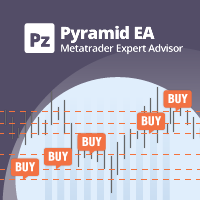
A pirâmide é um método de aumentar o tamanho de uma posição usando lucros não realizados de negociações bem-sucedidas como margem para novas negociações. Este Expert Advisor criará uma pirâmide em suas negociações sem sua intervenção. [ Guia de instalação | Guia de atualização | Solução de problemas | FAQ | Todos os produtos ] Pirâmide de suas negociações de sucesso facilmente Aproveite ao máximo suas negociações vencedoras Comportamento de pirâmide totalmente configurável A pirâmide é independ

Multi Strategy Dashboard Utility Some functions of the MSD Utility can only be used on the full version. Multi instrument and multi time frame scanner, with the best indicators. Comes with an order management panel. The MSD Utility can be used for manual trading. Click on the '?' button on the dashboard to obtain information about the various elements of the MSD Utility. Uses ATR Take Profits, ATR Stop Losses and ATR Trailing Stops. Comes with an FX Currency Strength meter and a Market Session

CyberZingFx Buffer Finder Tool Developed for Finding Buffers of Indicator to use in Universal Indicator EA . This is Not an Indicator or EA CyberZingFx Buffer Finder Tool is utility tool designed specifically for MetaTrader 4 (MT4) users. It is a standalone application that helps you easily find the buffers of any MT4 indicator, allowing you to use them in your Universal Indicator EA. With the Buffer Finder Tool, you no longer have to search through the data window to find the buffers you need.
FREE

The EA closes market orders after a specified time interval (put simply - by timer) after they are opened. Use this utility if you need to close a trade after a certain time. The EA has the following input parameters: Only current symbol - if true , the EA will close only the selected symbol's orders; if set to false - it will close any order of any symbol. Timeout - time (in seconds), after which the EA closes the orders. This EA is simple and very easy to use, does not use up your CP

A utility to close all orders automatically when conditions meet.
Various options are available to filter or select orders : Conditions : Closing conditions. 3 different conditions can be defined. EA will close orders anytime one or more defined conditions meet. Conditions can be defined based on account properties or selected orders properties. Also a fixed time to close orders is available.
Type of orders : Buy / Sell / Buy Limit / Sell Limit / Buy Stop / Sell Stop Symbol Selection : All / Ch

Ajudará você a ter controle do risco de cada operação de forma fácil e rápida. Sua interface inovadora permite calcular o número de lotes e a relação risco / recompensa instantaneamente. Mantenha suas operações dentro da faixa de risco que você deseja e evite tempos ruins em seu comércio.
Função de linha - mostra a linha de abertura, Stop Loss, Take Profit no gráfico. Com esta função é fácil conhecer as características principais e mais relevantes do seu próximo pedido.
Gerenciamento de ri

Se você é um dos traders que possui mais de uma janela de indicador em seu gráfico Metatrader, esta ferramenta é ideal para você.
O Organizer ajuda a organizar todas as subjanelas do indicador automaticamente, mantendo o gráfico o mais limpo possível. Agora você pode ver seus indicadores em seu lazer com apenas alguns cliques. Se você não quiser mais ver os indicadores, basta ocultá-los sem excluí-los para usá-los mais tarde!
- Padronizar a altura das subjanelas - Maximize / Minimize a subjan

Irá ajudá-lo a alterar o símbolo e o período na mesma janela, evitando que se encha de janelas na sua plataforma, fique tonto com tantas janelas, perdendo oportunidades. O Symbol Changer simplifica tudo isso e facilita a visualização do gráfico que você deseja analisar ou observar em uma única janela.
Caracteristicas
- Mude o símbolo.
- Período de mudança.
- Oculta objetos de um ativo diferente do atual.
- Mostra objetos do ativo atual.
- Redimensione a escala do ativo atual.
- Sincroni

Trading panel for manual trading. Has a fairly wide functionality. Allows you to automatically calculate the order size, open both market and pending orders. It has a wide range of options for closing orders, it is possible to partially close orders, close orders after reaching a certain profit or loss, separately close profitable and unprofitable, buy and sell, as well as pending orders. The panel also contains a simple implementation of a grid of pending orders, reverse and lock functions, tr

This expert advisor is a reverse version of the operation of "Dexter EA" ( https://www.mql5.com/en/market/product/67307 ) which works with the martingale method ... therefore it works in the opposite way. For each positive order, it will open one in the same direction with its respective increase in volume if the trader so wishes, on the side of negative orders, its lot will not increase.
Inputs Lot size Multiplier First order stop loss Profit distance to place a stop limit order Revert aver
FREE

Pro-Wealth is a new business entity focused on helping others make a success of their Forex trading. Thus it makes only sense to help others use the correct lot size and start practicing the correct risk management. This utility is a very simple tool to show the lot size respective to one percent of their balance which should be entered by the user when attaching the utility to the EUR/USD chart.

Rewards Taker Utility EA
Rewards Taker Utility EA is a portable semi-automated utility expert advisor which can close profitable trades when the amount set as a
profit target by the user is reached on a single currency pair.
The idea comes from the fact that, forex profit does not stay forever in the account, your trade(s) many be in profits now and be in losses
in the next minutes or hour but by this method, you will detain already made profits by closing the profitable trades to increase

Rewards Taker Utility EA PLUS
Rewards Taker Utility EA PLUS is a portable semi-automated utility expert advisor which can close profitable trades when the amount set as a
profit target by the user is reached while trading.
The idea comes from the fact that, forex profit does not stay forever in the account, your trade(s) many be in profits now and be in losses
in the next minutes or hour but by this method, you will detain already made profits by closing the profitable trades to increase yo
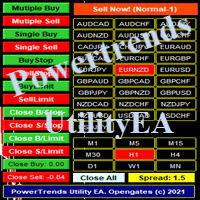
Power Trends System Utility EA
Power Trends System Utility EA is a semi-automated Expert advisor. The user can only open trades manually but it has signal board
where it informs the trader of any trade signals forming according to the current market's states. Many features were combined
together to make up this versatile ONE-in-ALL Utility EA:
1. Trade system that has signals provision:
It has in-built trade system that gives timely trade signals for the trader for profitable trades.
2. Tra

This utility manage your position risk by trailing stop with "Parabolic SAR" indicator value. Indicator Parameters SAR step(Parabolic SAR step value) SAR maximum(Parabolic SAR maximum value) Timeframes(Choose timeframes). Stop Place(put SL in current(open) candle or last close candle). Is the spread considered?(Set SL with considering to Spread or not, the choice is with you). Working with this utility is very simple, Just drag it onto the chart. There is no problem with multi-part trades. It is
FREE

Мы должны терять в сделке как можно меньше и никогда не превышать лимит, который мы установим. Тогда вы забудете, что такое ликвидация, и увидите, что торговля станет намного приятнее. Ведь вы уже заранее знаете, что получив стоп-лосс, вы потеряете не больше N-ой суммы денег. И сумма эта должна быть такой, чтобы вы не тряслись над каждой сделкой, стирая пот со лба, а спокойно позволили рынку идти к вашим целям

Don't purchase before testing the Demo version first. DEMO version: https://www.mql5.com/en/market/product/76917 __________________________________________________ This EA - Tool allow you replay bar in Meta Trader 4 for back test. This Tool can back test in multi timeframe in only one chart. This Tool is very useful for Price action trader. It can work with Indicators, some indicators cannot works. So please download Demo to test before purchase. Demo Version We do not accept refund in any

G-Labs Trade Manager by G-Labs — on-chart trade panel for MetaTrader 4. Risk-based lot sizing, visual entry stop and take profit lines, position management, currency strength, statistics, and OCO breakout tools.
One panel for planning, executing, and managing manual trades. Set risk before you click buy or sell, drag stop loss and take profit on the chart, manage open positions and pending orders, and track performance — you stay in control of every decision. Trading utility, not a black-box si
O Mercado MetaTrader oferece um local conveniente e seguro para comprar aplicativos para a plataforma MetaTrader. Faça download de versões de demonstração gratuitas de Expert Advisors e indicadores a partir do seu terminal para testes no Testador de Estratégia.
Teste os aplicativos em diferentes modos para monitoramento do desempenho e assim fazer um pagamento para o produto que você deseja, usando o sistema de pagamento MQL5.community.

Você está perdendo oportunidades de negociação:
- Aplicativos de negociação gratuitos
- 8 000+ sinais para cópia
- Notícias econômicas para análise dos mercados financeiros
Registro
Login
Você concorda com a política do site e com os termos de uso
Se você não tem uma conta, por favor registre-se