 MetaTrader 5
 エキスパート
 インディケータ
 スクリプト
 ライブラリ
 ストレージ
無料でロボットをダウンロードする方法を見る
Telegram上で私たちを見つけてください。
私たちのファンページに参加してください
私たちのファンページに参加してください
スクリプトを気に入りましたか?MetaTrader 5ターミナルの中でそれを試してみてください。

Symbol Spec Dump - export the trading conditions of all symbols to CSV - MetaTrader 5のためのスクリプト

- ビュー:
- 21
- パブリッシュ済み:
-
 取引の機会を逃しています。
- 無料取引アプリ
- 8千を超えるシグナルをコピー
- 金融ニュースで金融マーケットを探索
-
 このコードに基づいたロボットまたはインジケーターが必要なら、フリーランスでご注文ください
フリーランスに移動
OVERVIEW
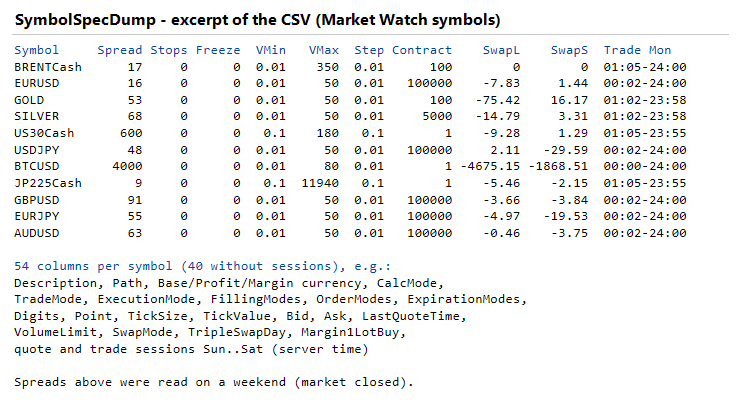
Before an EA goes to a new account, or when you compare two accounts, you need the symbol specifications: how wide the spread is, how far stops must be from the price, the lot limits, the swaps, and when trading is allowed. The terminal shows this one symbol at a time. SymbolSpecDump writes it for all symbols at once into a CSV file that opens in any spreadsheet program.
The script only reads symbol properties with SymbolInfoInteger / SymbolInfoDouble / SymbolInfoString / SymbolInfoSessionQuote / SymbolInfoSessionTrade, plus OrderCalcMargin for the margin of one lot. It never sends orders and never adds or removes symbols in Market Watch.
INPUTS
- Symbols to export: Symbols in Market Watch (default) or All symbols of the server.
- Only names containing this text: e.g. "USD" or "JPY" (upper and lower case ignored). Empty = all.
- File name: ".csv" is added. Letters, digits, _ - . ( ) and spaces, up to 80 characters, no folders.
- Add date and time to the file name: true (default) keeps every run in its own file, e.g. SymbolSpecs_20261115_123740.csv.
- Write to the common Files folder of all terminals: false = <data folder>\MQL5\Files\, true = <common folder>\Files\.
- Column delimiter: comma (default), semicolon (for spreadsheet programs that use a comma as list separator) or tab. Numbers keep the dot as decimal separator with every delimiter (see COLUMNS).
- Export quote and trade sessions: adds 14 columns (quote and trade sessions, Sunday to Saturday).
The full path of the file is printed to the Experts log when the script ends.
COLUMNS
Symbol, Description, Path, InMarketWatch, Custom, BaseCurrency, ProfitCurrency, MarginCurrency, CalcMode, TradeMode, ExecutionMode, FillingModes, OrderModes, ExpirationModes, GTCMode, Digits, Point, TickSize, TickValue, ContractSize, SpreadPoints, SpreadFloating, Bid, Ask, LastQuoteTime, StopsLevelPoints, FreezeLevelPoints, VolumeMin, VolumeMax, VolumeStep, VolumeLimit, SwapMode, SwapLong, SwapShort, TripleSwapDay, MarginInitial, MarginMaintenance, MarginHedged, Margin1LotBuy, AccountCurrency, QuoteSun ... QuoteSat, TradeSun ... TradeSat.
- Enum values are written without their prefix (e.g. FOREX, FULL, MARKET, POINTS). A value the terminal has no name for is written as its number (e.g. TripleSwapDay 7).
- FillingModes, OrderModes and ExpirationModes list the flags the server sets, e.g. "IOC", "FOK|IOC" or "MARKET|LIMIT|STOP|STOP_LIMIT|SL|TP|CLOSEBY". FillingModes shows only the flags of SYMBOL_FILLING_MODE (FOK, IOC, BOC); an empty cell means none of them is set. The Return filling policy is not a flag of this property and is therefore not listed.
- Sessions: all sessions of the day, e.g. "00:05-23:55" or "03:00-15:45 / 16:30-21:15", in server time; "24:00" is the end of the day; an empty cell means no session that day.
- Margin1LotBuy: the margin for one buy lot at the current Ask, in the account currency (OrderCalcMargin).
- Numbers always use a dot as decimal separator, also with the semicolon or tab delimiter. If your spreadsheet program uses a comma as decimal separator, set the dot as decimal separator in its import dialog (or replace the dots after import). The file is UTF-8 with a byte order mark, so names with special characters open correctly.
HOW TO USE
1. Copy SymbolSpecDump.mq5 to MQL5\Scripts\ and compile it (or open it in MetaEditor and press Compile).
2. Drag the script onto any chart, choose the inputs, press OK.
3. Open the file from MQL5\Files\ (File > Open Data Folder in the terminal).
NOTES - PLEASE READ
- The values are what the trade server reports at the moment of the run. Spreads change all the time and are usually wider when the market is closed, at the daily rollover and around news. Run the script several times if you want to compare spreads.
- Symbols that are not in Market Watch have no current prices in the terminal. For them Bid, Ask and Margin1LotBuy are empty and the spread and tick value may be 0. Add the symbols you need to Market Watch for complete values.
- TickValue is copied as the server reports it. On some servers the tick value of CFDs is given in the profit currency of the symbol rather than in the account currency; check it before you use it for risk calculations.
- Stops and freeze levels are in points. 0 means that the server does not set a minimum distance; with floating spreads the real minimum can still be larger than 0.
- If the terminal is not connected to the trade server (for example right after start-up), the script waits up to 15 seconds. Without a connection the margin column stays empty and quotes may be old; a message is printed in that case.
- The CSV contains the account currency, but no account number, account name or server name.
COMPATIBILITY
- MetaTrader 5 (MQL5), hedging and netting accounts.
- No DLL, no WebRequest. Writes one file to MQL5\Files (or the common Files folder) only.
This code is a utility. It does not contain any trading method.
 BrokerTime - DST rules and broker GMT offset (live, model and history estimate)
An include file for daylight saving time and broker server time: US, EU and Australian DST dates, UTC to London / Frankfurt / New York / Tokyo / Sydney time, the live server offset, a broker time model (winter offset + DST rule) that also works for past dates and in the Strategy Tester, and an estimate of that model from the weekly market open in the H1 history. No DLL, no WebRequest, no files.
 デイリー・ピボットポイント - クラシック、フィボナッチ、カマリラ
3つのレジスタンスと3つのサポートを含むデイリー・ピボットポイント。クラシック、フィボナッチ、またはカマリラの計算式。
 Equity Guard - daily loss, max drawdown and profit target lock
1日の損失上限、最大ドローダウン、または1日の利益目標に達すると、すべての取引を決済し、口座残高をゼロに保ちます。プロップファーム式のルール、チャート上のパネル、およびターミナルの再起動後も状態が保持される機能を備えています。
インデックス・ギャップ・マーカー - 日足での寄り付きギャップと埋まり状況
株価指数の毎日の寄り付きギャップをマークし、それぞれが埋まったかどうかを表示します。