 MetaTrader 5
 エキスパート
 インディケータ
 スクリプト
 ライブラリ
 ストレージ
無料でロボットをダウンロードする方法を見る
Facebook上で私たちを見つけてください。
私たちのファンページに参加してください
私たちのファンページに参加してください
スクリプトを気に入りましたか?MetaTrader 5ターミナルの中でそれを試してみてください。

Repaint Checker MT4 - find out whether an indicator repaints - MetaTrader 4のためのエキスパート

- ビュー:
- 73
- 評価:
- パブリッシュ済み:
-
 取引の機会を逃しています。
- 無料取引アプリ
- 8千を超えるシグナルをコピー
- 金融ニュースで金融マーケットを探索
-
 このコードに基づいたロボットまたはインジケーターが必要なら、フリーランスでご注文ください
フリーランスに移動
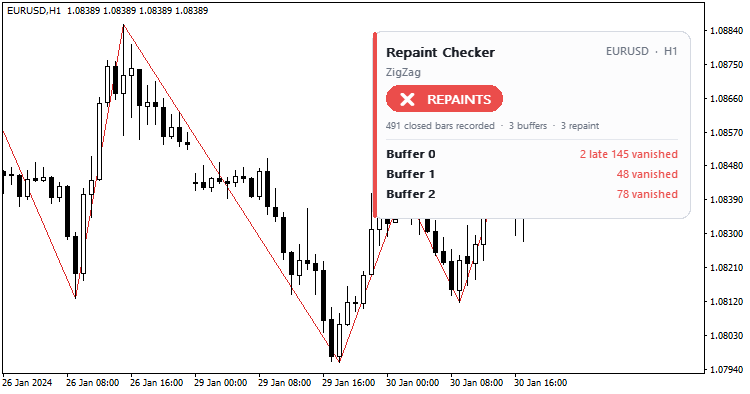
Many indicators look perfect on history and fail live, because their values or signals change after the bar has closed. Repaint Checker tests any MT4 indicator and tells you whether it repaints, buffer by buffer, with example dates.
How it works
When each bar closes, the EA records the value that every buffer of the tested indicator shows at that moment, which is exactly what a trader would have seen live. At the end of the test (or continuously on a live chart) it reads the same bars again and compares them.
For each buffer it counts values that changed, signals that appeared late (empty when the bar closed, filled in later) and signals that vanished (shown when the bar closed, gone later). The verdict, NO REPAINTING FOUND or REPAINTS, is shown on a panel and in the journal with example dates, and a CSV report is written to the terminal Common\Files folder.
Inputs
Indicator to test: its name inside MQL4\Indicators, for example ZigZag; leave it empty for a demo on the built-in Fractals. Its inputs: up to 8 numbers (or true/false), comma separated; empty = the indicator defaults. Buffers to check: MT4 cannot tell how many buffers an indicator has, so the first 8 are read and only buffers that showed a value at least once are reported. Tolerance: relative change to ignore. Show the result panel. Write a CSV report.
Usage
Run the EA in the Strategy Tester on any symbol and timeframe for a few months of data; visual mode shows the panel. Any buffer reported as changed, late or vanished repaints. Some buffers hold internal values that may change; judge the buffers that draw lines or signals. Text inputs cannot be passed in MT4, so test such indicators with their default settings. The EA places no trades.
Examples: the built-in Fractals (the default demo) is reported as REPAINTS, because every fractal appears late: it is only confirmed two bars after the bar it is drawn on. The standard ZigZag is also reported as REPAINTS, because its last leg is redrawn while the market moves. A non-repainting indicator shows no change on every buffer. An MT5 version is also available in CodeBase.
 Previous Day and Week High Low Levels MT4
Previous day high and low, previous week high and low and today's open as horizontal lines with small price labels, on any timeframe.
Trading Session Boxes: Tokyo, London, New York MT4
Draws the Tokyo, London and New York sessions of the last few days as boxes from each session's high to its low, with the high and low printed on the chart. Session hours are set in server time.
Prop Risk Guard MT4 - daily loss and drawdown protection
Protects a prop-firm or personal MT4 account: daily loss limit, max drawdown (static or trailing) and profit-target lock. On a breach it closes all orders, deletes pending orders and keeps the account flat until the lock resets.
MACD Sample
Classical MACD Sample.