Lot calculation based on stop loss and risk

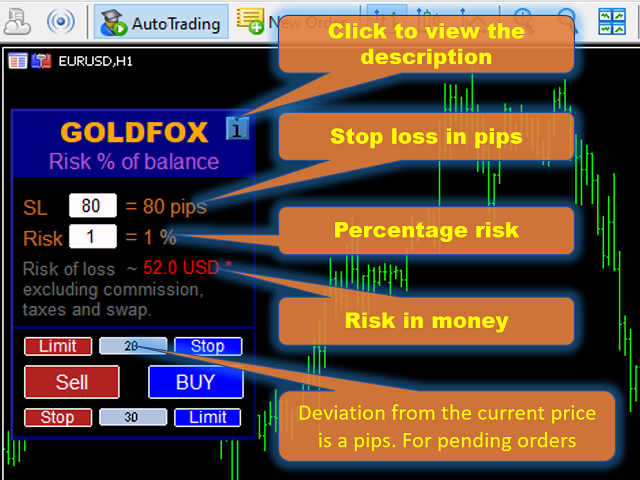
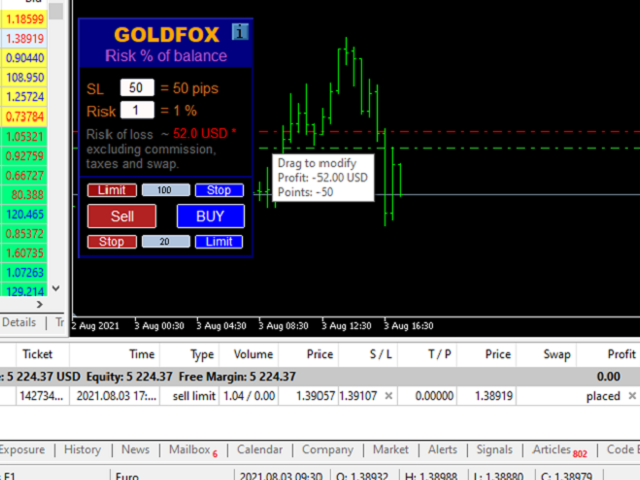
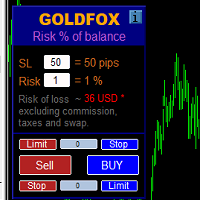
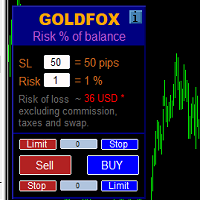
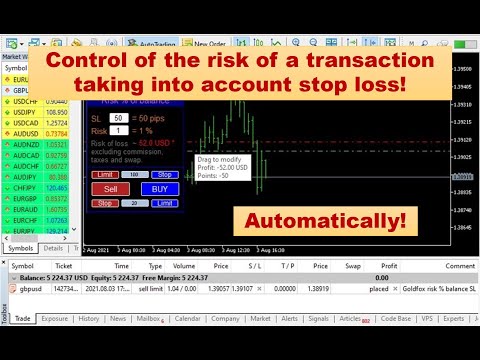
ストップロス(ピップ単位)と口座残高からのリスクのパーセンテージを考慮した取引ロットの自動計算。 Expert Advisorパネルは、左上のチャートにあります。アドバイザのパネルで、ピップ単位のストップロスのサイズとバランスからのリスクのパーセンテージを選択できます。保留中の注文の現在の価格からの偏差をピップで設定できます。赤い色は、ストップロスがトリガーされたときに失う可能性のある預金通貨の金額を示します。この金額には、手数料、スワップ、税金は含まれていません。

   主要な外国為替通貨ペア、XAUUSD(ゴールド)、BTCUSD、ETHUSDには、このアドバイザーを使用することをお勧めします。他の機器については、計算の特殊性を考慮すると、エラーが発生する可能性があります。ほとんどの外国為替商品では、ドットの後に5桁のアカウントをお勧めします。

     説明

-損失のリスク。預金通貨のリスク額は、アドバイザーの情報パネルに赤で表示されます。この値は、商品の証拠金がこのリスクに対して十分であり、SLフィールドでピップサイズを正しく指定している場合、未決済注文(または保留中の注文)に対応します(SLサイズはブローカーによって許可されたもの)!

-ストップロス(ポイントまたはピップ)。ブローカーはポイント値や小数点以下の桁数などが異なる場合があります...したがって、ストップロスを正しく入力するには、最初にブローカーのデモ口座または保留中の注文で適切な値を確認して選択することをお勧めします。たとえば、値1 ...、15、150または1500、15000 ..を選択する必要があります。

- エラー。ロットステップは固定値であるため、Mt-4、Mt-5、ギャップなどで価格のずれが発生するため、計算にエラーが発生する可能性があります。

-推奨事項。 10%以下のリスクでポジションをオープンすることをお勧めします。

-証拠金を超えるリスクを指定した場合、アドバイザーは自動的に計算し、最大許容ロットで取引を開始します! 

おすすめのプロダクト
IMPORTANT: After purchasing this product, please send me a private message to receive the installation guide, setup instructions, and direct product support. ZyloFx Prop Guard Manager MT5 is a professional account protection utility for MetaTrader 5, designed for traders who need disciplined control over daily and overall drawdown. This Expert Advisor does not open trades, does not provide entry signals, and does not use any trading strategy. Its purpose is to work as a protective layer on you
Trade Control Panel Function Normal One Click Function Close All Close All Profit Close All Loss Close All Pending Order Close All Sell Close All Buy Advance One Click Function 1.  Close Partial Lot Sell by Percent It will help you partial close for all open position by desire percent you wanted. No longer partial close one by one for every open position Manual input for desire percent 2. Close Partial Lot Buy by Percent It will help you partial close for all open position by desire percent
All Pending Orders with StopLoss opens any combination of Buy Stop, Sell Stop, Buy Limit and Sell Limit pending orders and closes all existing pending orders. If boolSL = true then this Script will calculate one common StopLoss value as the StopLoss for a first/last orders and put this value in all pending orders. Input Parameters Before placing all pending orders, the input window is opened allowing you to modify all input parameters: DeleteAllPendings : if true , then all pending orders (for
One Click Trader  is a tool designed for MetaTrader 4 platform, which enables you to take your trading to the next level. It enables you to open, manage and close your trades in simple an efficient way by just one click of your mouse button. "-"   ,  "+"  change OCT window size  Up arrow minimizes the OCT panel Down arrow maximizes the OCT panel Right arrow displays the next panel with additional features Left arrow hides the panel with additional features Red  SELL  button enables you to open s
T Manager, the ultimate trade management solution designed by traders for traders. If you are searching for a simple and efficient trade panel, trade manager, or trade assistant, you are at the right place.   The market contains a diverse number of those tools , but this one is designed by traders for traders . I designed this tool, and I am using it daily. Take my advice and stop buying tools blended with un-useful features that you will never use,   T Manager provides you with the essential y
Fair Value Gap strategy. Entries are filtered with Market Profile and range by minimum value of ATR multiplied by a value from parameters. Parameters: MinATRX - ATR multiplier. If range is lower than ATR * MinATRX the signal will be skipped. MPRange - number of bars to form Market Profile. MPPips - a step of Market Profile in pips. EntryPercentage - a minimal level of profile to enter a trade. Magic - magic number. MaxBars - maximum amount of bars to look back in higher timeframe. FVGPeriod - hi
EA PERFORMANCE TERMINAL — すべてを一画面に。口座で動いている EA の全部、それぞれが残高に何をしているのか、そしてそこに至るまでの月々が、レポートの中ではなくチャートの上に描かれます。 残高は平均値です。そして平均は物事を隠します。一本の EA が別の一本の損失を何ヶ月も静かに肩代わりしていても、エクイティカーブは平静に見えます。このパネルは決済履歴を読み、その 1 つの数字をマジックナンバー単位に割り戻します。 無料版があります。テスター内だけでなく実チャートで動くので、購入前にご自分の口座で本物を確認できます。 なぜ作ったか EA を 2 本以上動かしていると、MetaTrader が教えてくれるのは口座全体の損益ひとつだけです。EA #3 が 4 ヶ月分の利益を静かに吐き出しているのを EA #1 の利益が覆い隠していても、そのことは表示されません。気づくのは口座が減ってからです。 EA Performance Terminal は、決済済みの約定と保有中のポジションをマジックナンバー別にまとめ、1 画面に並べます。実現損益、含み損益、勝率、プロフィッ
Pending Orders Grid Complete System   opens any combination of Buy Stop, Sell Stop, Buy Limit and Sell Limit pending orders and closes all existing pending orders. Only one time of the pending order at the same time!!! You will have a possibility to put a legitimate   Open Price   for the first position in the grid. Usually it should in the area of Support/Resistance lines. You just need to drop this script on the chart of a desired currency pair. Input Parameters Before placing all pending ord
Visual Trade Manager for MT5 is an interactive trade execution and position management tool designed for traders who want fast chart-based control over risk and execution. The panel provides a visual trade box with entry, stop and target lines directly on the chart. Position size is calculated from the selected risk percentage, and the tool supports both market execution and pending order placement. Main features - BUY and SELL switching directly from chart buttons - Draggable Entry, Stop and
Nice Trade Bot は、チャート上でトレードエントリーの可能性が高い価格ゾーンを自動的に分析して特定し、チャネルまたはテレグラムグループに即時に通知をユーザーに送信する EA システムです。 売買データには、注文エントリー価格、ストップロス、目標利益の詳細が表示されます。 継続的に更新され、複数の時間枠を使用することで、金、石油、仮想通貨などの米ドルに関連するコモディティ商品の効率が最高になります。 インストールと使用方法は非常に簡単で、チャンネルまたはグループの情報を入力し、チャートウィンドウにドラッグアンドドロップするだけです。 すべての時間枠で機能します。 Nice Trade Bot が分析するストップ注文とともに最大 70% の勝率で売買データを利用することで、取引効率が向上します。 Nice Trade Bot を使用すると、取引がより簡単になり、時間を節約できます。 最大 5 回の購入を一度有効にすると、永久に使用できます。より価値を持ってご判断いただくために、ご利用前にデモやデモをご確認いただくことをお勧めします。 トレーダーの皆様のご協力に感謝し、ここにコ
Smart breakout grid EA with trailing pending orders, trailing stop, session/news filters, drawdown protection, and netting-safe execution for MT5. GridTrailingEA is a smart pending-order grid Expert Advisor with trailing pending orders, trailing stop, session filter, news-time filter, drawdown protection, and market-safe validation for MT5. GridTrailingEA is a MetaTrader 5 Expert Advisor designed for traders who want a clean and controlled grid-style pending order system. The EA places Buy Stop
MultiChart Pro
Pablo Filipe Soares De Almeida
MultiChart Pro – MetaTrader 5用の高機能チャート管理ツール MultiChart Pro は、MetaTrader 5 で複数のチャートを自動的に開き、設定するためのエキスパートアドバイザー(EA)です。トレーダーが異なる時間足のチャートを効率的に管理できるように設計されており、わずか数秒で分析環境を整えることができます。 このツールは、最大4つのチャート(例:D1、M1、M15、および10秒のオフラインチャート)を自動で開き、現在のチャート(例:M5)も設定します。トレード戦略に合わせて時間足を自由に選択できるため、マルチタイムフレーム分析を行うトレーダーに最適です。 主な機能: チャートの自動生成: 複数の時間足を同時に開き、手動操作を省きます。 テンプレートの自動適用: 各チャートに指定されたテンプレートを適用し、存在を確認してから読み込みます。 オフラインチャート対応: 10秒などのカスタム時間足を利用でき、スキャルピングなど短期取引にも活用可能です。 設定の柔軟性: 入力パラメータを通じてすべての設定を簡単に変更可能。 MultiChart Pro
Trade Panel HotKey – MT5 Scalping Utility Fast Trade Panel HotKey is a lightweight MT5 trading utility designed for traders who need to open, manage, and close positions as quickly as possible . The main purpose of this tool is to reduce the time between a trading decision and execution. Instead of moving the mouse, opening order windows, or manually modifying multiple positions, most important actions can be performed instantly through customizable keyboard hotkeys or directly from the compact
Fvg In Fvg
Claudiu-georgian Zavera
FVG In FVG EA — From Learn to Earn. The most-watched imbalance on any chart, taken where you have not seen it before: a Fair Value Gap confirmed inside a Fair Value Gap. A GAP EVERYONE WATCHES. AN EXECUTION NO ONE ELSE HAS. The EA detects the Fair Value Gap — the 3-candle imbalance — on a higher timeframe, then requires a second FVG, formed inside the first, on the timeframes you choose. Only an overlap above your threshold validates the zone: Most Powerful Overlap FVG Zones — rigorously selec
DeepTrade Basket Manager treats a whole group of trades as ONE position. Instead of watching each order, you set a target for the entire basket — and the moment combined profit (or loss) hits your number, it closes everything at once. Built for grid traders and multi-pair portfolios.   KEY FEATURES - Close the entire basket at a profit target (money or % of balance) - Close the entire basket at a loss limit (money or % of balance) - Manage ALL symbols together, or filter by chart symbol / mag
このツールを使用すると、「すべて閉じる」をクリックするだけで、開いている注文をすべてワンクリックで閉じることができます。 収益性の高い注文のみをクローズしたい場合は、「収益性の高い注文をクローズする」ボタンをクリックすると、すべての変動注文がクローズされます。 変動損失のある注文のみを決済したい場合は、「損失可能注文を決済する」ボタンをクリックすると、変動損失のあるすべての注文が決済されます。 このツールは1年間テストされています. ワンクリックポジションクローズ機能は非常に完成しています. ポジションクローズはタイムリーであり、遅延範囲は小さいです. もちろん、遅延はあなたの地域やネットワーク環境にも関係します.ご注意ください。 履歴データのバックテスト プロセス中、このツールのパフォーマンスはさらに完璧になり、100 件の注文すべてを閉じるのに最長 0.495 秒しかかかりませんでした。 実際の取引プロセス中、私のポジション注文の最大数はわずか 26 で、すべてのポジションが決済されるまでにかかった時間は 1.28 秒でした。
justEnter is a semi-automatic trade management utility for MetaTrader 5. You choose the entry; the utility calculates position size, places the stop loss, and manages the position through breakeven, partial closes and trailing until exit. For traders following signals If you take your entries from a signal service, a mentor, or your own alerts, the entry decision is already made by the time you open the terminal. What remains is execution: sizing the position correctly, placing the stop, moving
Live Forex Signals サイト信号での取引用に設計されています   https://live-forex-signals.com/en と https://foresignal.com/en . Live Forex Signal for MetaTrader 4   https://www.mql5.com/en/market/product/81445 パラメータ サイトへのサブスクリプションを持っている場合は、ユーザー名とパスワードlive-forex-signals.com/foresignal.com サブスクリプションがない場合は、フィールドを空のままにします; オープンされているお得な情報へのコメント リスクリスクは、取引のための預金の割合として、リスク=0の場合、値ロットが使用されます 取引のためのロット固定ボリューム UseTakeProfitは、サイトから利益を取る使用します 当サイトからのご利用停止のご案内 F r e c h encysignalupdateinminute顧問のサイトへの訪問頻度を指定します MaximumSpreadForT
[Target currency pair / time] [EURUSD/15M] Recommended. Variable lot MT5EA for compound interest operation! [About EA operation] After purchasing an EA, it is recommended to operate with a real account after operating with a demo account for a certain period of time. [About kikyo/logic overview] Kikyo is an EA that supports EURUSD/15M. Adopts a variable lot system that can easily realize compound interest operation according to the amount of funds (the default is a fixed lot. Please change
Overview The script displays information about the trade account and the current financial instrument. Information about the trade account: Account - account number and type (Real, Contest or Demo); Name - name of the account owner; Company - name of a company that provide the access to trading; Server - trade server name; Connection State - connection state; Trade Allowed - shows whether trading is allowed on the account at the moment; Experts Allowed - shows whether it is allowed to trade usin
RealCost Auditor MT5 is an execution-cost monitor for MetaTrader 5. It does not open, close, or modify trades. It watches the chart symbol, samples live spread, records executed deals, estimates signed slippage when the terminal exposes the requested price, and saves a local CSV audit file. Many backtests use spread, slippage, commission, and swap assumptions that are cleaner than real trading conditions. This utility gives you broker and account data from your own terminal before you trust a s
MT5の取引の新規、決済、一部決済、および変更に関するリアルタイム通知をdiscordへ自動送信します。 このユーティリティは16言語に対応しています:英語、フランス語、ドイツ語、ヒンディー語、インドネシア語、イタリア語、カザフ語、韓国語、オランダ語、ポーランド語、ポルトガル語、ロシア語、スペイン語、トルコ語、ウクライナ語、ベトナム語。本製品は、ターミナルを常に監視することなくdiscord通知を受け取りたいトレーダー向けに設計されています。エキスパートアドバイザーを使用するユーザー、複数のシンボルで取引するトレーダー、vpsユーザーに適しています。 完全および部分的なポジション決済は正確に検出されます(例:0.10 / 0.30 ロット)。また、重複メッセージ防止機能も実装されています。 通知は、取引口座内のすべてのシンボル、またはこのユーティリティを適用したチャートのシンボルのみ(オプション)で送信できます。 「test discord」ボタンが用意されており、チャット機能を確認でき、設定後はチャートから非表示にすることも可能です。また、「send open positions」ボ
FREE
MT5の取引の新規、決済、一部決済、および変更に関するリアルタイム通知をSlackへ自動送信します。 このユーティリティは16言語に対応しています:英語、フランス語、ドイツ語、ヒンディー語、インドネシア語、イタリア語、カザフ語、韓国語、オランダ語、ポーランド語、ポルトガル語、ロシア語、スペイン語、トルコ語、ウクライナ語、ベトナム語。通知テキストをカスタマイズすることで、その他の言語にも対応可能です。本製品は、ターミナルを常に監視することなくSlack通知を受け取りたいトレーダー向けに設計されています。エキスパートアドバイザーを使用するユーザー、複数のシンボルで取引するトレーダー、VPSユーザーに適しています。 完全および部分的なポジション決済は正確に検出されます(例:0.10 / 0.30 ロット)。また、重複メッセージ防止機能も実装されています。 通知は、取引口座内のすべてのシンボル、またはこのユーティリティを適用したチャートのシンボルのみ(オプション)で送信できます。 「Test Slack」ボタンが用意されており、チャット機能を確認でき、設定後はチャートから非表示にすることも可能
FREE
製品名: プロフェッショナル・ピンバー・ディテクター | リアルタイムゼロレイテンシー検出 | M15 M30 H1 H4対応 | マルチシンボルスキャナー | 厳格な品質フィルター | MetaTrader 5 短い説明: プロ仕様のピンバー検出EA。 厳格な条件で、最も強力なピンバーのみを識別。 ローソク足の確定と同時にリアルタイムで検出、遅延ゼロ。 弱い信号をフィルタリングし、影と実体の比率3倍以上、主要ウィック60%以上の高品質パターンのみを通知。 M15/M30/H1/H4マルチタイムフレーム、マルチシンボル監視対応。 品質を重視するトレーダーに最適。 完全な説明: MetaTrader 5用 ピンバー検出システム No.1 強力なピンバーを見逃していませんか? チャートにノイズのような弱い信号が多すぎて困っていませんか? 複数の通貨ペアを同時に監視するのが難しいですか? そんな悩みを解決するのが「プロフェッショナル・ピンバー・ディテクター V2.0」です。 これは単なるインジケーターではありません。 ゼロレイテンシー技術を搭載した、完全自動の検出・通知システムです。 ローソ
### **ProScalpingToolEA.mq5 Analysis & Description** **Overview:**   The `ProScalpingToolEA.mq5` script is an Expert Advisor (EA) for MetaTrader 5, designed to assist with automated trading. It includes features for placing, managing, and monitoring trades. --- ### **Key Functionalities:** 1. **Trade Execution & Management:**    - Uses the `CTrade` class from `Trade.mqh` to manage trading operations.    - Allows placing buy and sell orders with a configurable lot size.    - Trades are iden
TradeGramBot
Mario Fuentes Valenzuela
Telegram Bot EA This Expert Advisor (EA) is a powerful tool that allows traders to receive Telegram notifications, manage Drawdown alerts, set up charts, and much more, all directly from the MetaTrader 5 platform. The Expert Advisor (EA) tool, integrated with Telegram, offers extensive customizable options to enhance your trading activities. The product allows you to display the signal name in the messages for easy tracking. It further provides the feature of sending the MQL5 link, either with
EA PERFORMANCE PANEL — あなたのトレードを一画面に。どの EA が口座を支えていて、どれが出血しているのか、そしてその裏側の月々が、チャートの上に描かれます。 残高は平均値です。そして平均は物事を隠します。このパネルは決済履歴を読み、その 1 つの数字をマジックナンバー単位に割り戻します。 無料版です。テスター内だけでなく、実口座の実チャート上で動作します。 問題 MetaTrader が見せてくれるのは口座全体の損益ひとつだけです。EA を 3 本動かしていても、その利益をどれが稼いだのか、どれが静かに削っているのかは分かりません。 これがすること 取引履歴と保有ポジションを読み取り、マジックナンバー別にまとめて、半透明のフルスクリーン HUD としてチャート上に表示します。小さく置きたい場合はコンパクトパネルにも切り替えられます。 - OVERVIEW — KPI タイル、寄与度バー付きの EA 別テーブル、累積実現損益のカーブ。 - EAs — EA ごとの決済回数、総利益、総損失、プロフィットファクター、勝率、含み損益、純損益。 - RECENT — 決済
FREE
Market Golden Goose
Joao Henrique Pataki Bernardes
Market Golden Goose EA MGG is an Expert Advisor designed for traders who seek consistent performance, intelligent risk management, and fully automated trading on MetaTrader 5. Built with a focus on robustness and control, the EA uses a combination of advanced logic, precise market reading, and volatility filters to deliver safe and efficient trades. EA Objective To provide high-quality entries based on a set of objective and repeatable rules, reducing emotional interference and maximizing op
This EA performs with a Hedging strategy by which Buy and Sell signals are from the MACD indicator.... The lot sizes in the input are Custome for you to adjust as you pleased, so you are able to improve your hedging style. Inputs. Close Money-   this option is basically the take profit in ($), for example if you set the close money at $20 the   EA  will automatically close all trades when your overall profit is $20. Nearby Hedge Pips-   this basically determine the   distance of pips  between yo
ATLAS PRO is a dual-basket grid EA for MetaTrader 5 that runs independent BUY and SELL ladders, each with its own money profit target, hard risk cap, and built-in economic-calendar news filter. It uses a controlled additive lot ladder (0.01, 0.02, 0.03…) — not an aggressive martingale — and is fully account-aware, auto-switching between hedging and netting so it never sends conflicting orders. Free demo included — backtest it on your own broker's history before going live. How it works Opens
FREE
このプロダクトを購入した人は以下も購入しています
Trade Assistant MT5
Evgeniy Kravchenko
4.41 (215)
取引 ごとのリスクの 計算、新規注文 の 簡単 な 設置、部分的 な 決済機能 を 持 つ 注文管理、 7 種類 のトレーリングストップなど 、便利 な 機能 を 備 えています 。 追加の資料と説明書 インストール手順   -   アプリケーションの手順   -   デモアカウント用アプリケーションの試用版 ライン機能 チャート上にオープニングライン、ストップロス、テイクプロフィットを表示します。この機能により、新規注文を簡単に設定することができ、注文を出す前にその特徴を確認することができます。   リスク計算 リスク計算機能は、設定されたリスクとストップロス注文のサイズを考慮して、新規注文のボリュームを計算します。ストップロスの大きさを自由に設定できると同時に、設定したリスクを守ることができます。 Lot calc ボタン - リスク 計算 を 有効 / 無効 にします 。 Risk フィールドでは 、必要 なリスクの 値 を 0 から 100 までのパーセンテージまたは 預金通貨 で 設定 します 。 設定」 タブで 、 リスク 計算 の 種類 を 選択 します :「 $ 通
Trade Manager EAへようこそ。これは、取引をより直感的、正確、そして効率的にするために設計された究極の リスク管理ツール です。これは単なるオーダー実行ツールではなく、包括的な取引計画、ポジション管理、リスク管理のためのソリューションです。初心者から上級者、迅速な実行を必要とするスキャルパーまで、Trade Manager EAはあらゆるニーズに対応し、為替、指数、商品、暗号通貨などさまざまな市場で柔軟に対応します。 Trade Manager EAを使用すると、複雑な計算が過去のものになります。市場を分析し、エントリーポイント、ストップロス、テイクプロフィットのレベルをチャート上のラインでマークし、リスクを設定するだけで、Trade Managerが最適なポジションサイズを即座に計算し、SLとTPをピップ、ポイント、口座通貨でリアルタイムに表示します。すべての取引が簡単かつ効果的に管理されます。 主な機能: ポジションサイズ計算機 :定義されたリスクに基づいて取引サイズを瞬時に決定します。 簡単な取引計画 :エントリー、ストップロス、テイクプロフィットを設定するためのド
TradePanel MT5
Alfiya Fazylova
4.88 (166)
Trade Panelは多機能なトレーディングアシスタントです。アプリには手動取引用の50以上のトレーディング機能が搭載されており、ほとんどの取引作業を自動化することができます。 購入前に、デモアカウントでアプリのデモ版をテストすることができます。デモアカウント用のアプリの試用版をダウンロードするには、次のリンクをご利用ください: https://www.mql5.com/en/blogs/post/750865 。 完全な手順 こちら 。 取引。 ワンクリックで取引操作を行うことができます: リスクを自動計算して指値注文やポジションを開く。 複数の注文やポジションをワンクリックで開く。 注文のグリッドを開く。 保留中の注文やポジションをグループごとに閉じる。 ポジションの方向を反転(Buyを閉じてSellを開く、またはSellを閉じてBuyを開く)。 ポジションをブロックする(不足している量のポジションを開くことでBuyとSellのポジション量を等しくする)。 すべてのポジションを部分的にワンクリックで閉じる。 すべてのポジションの利食い(Take Profit)および損切り(Sto
================================================================================ POC BREAKOUT - V20.72. Full Professional Grade Toolkit ================================================================================ POC Breakout is a full MetaTrader 5 trading dashboard for discretionary traders who want breakout signals, Point of Control (POC) context, volume profiles, order flow, market structure, news, alerts, and advanced trade planning in one professional workspace. Attached directly to you
ベータリリース Telegram to MT5 Signal Trader はまもなく正式なアルファ版をリリースします。いくつかの機能はまだ開発中で、小さな不具合に遭遇する可能性があります。問題が発生した場合はぜひご報告ください。皆さまのフィードバックがソフトウェア改善に役立ちます。 Telegram to MT5 Signal Trader は、 Telegram のチャンネルやグループからの取引シグナルを自動的に MetaTrader 5 にコピーする強力なツールです。 パブリックおよびプライベートの両方のチャネルに対応し、複数のシグナル提供元を複数のMT5口座に接続可能です。ソフトウェアは高速で安定し、すべての取引を細かく制御できます。 インターフェースは直感的で、ダッシュボードとチャートは見やすく設計されており、リアルタイムで動作状況をモニターできます。 必要環境 MQL の制限により、EA は Telegram と通信するためのデスクトップアプリが必要です。 インストーラーは公式の インストールガイド にあります。 主な機能 マルチプロバイダー: 複数の Telegram
AstroTrade Trading Assistant AstroTrade is a comprehensive multi-functional trading utility developed for the MetaTrader 5 platform. It integrates essential tools for trade execution, risk management, and technical monitoring into a single unified interface. The application is designed to assist traders in managing their daily operations through a visual and structured environment. Visual Trade Execution and Risk Management The application includes a specialized trading panel that assists in c
Exp COPYLOT CLIENT for MT5
Vladislav Andruschenko
3.97 (35)
MetaTrader 5 用のプロフェッショナル取引コピー機 MetaTrader 向けの高速・高性能・信頼性の高い 取引コピー機 です。 COPYLOT は、MT4 と MT5 のターミナル間で Forex 取引をコピーでき、 Hedge 口座と Netting 口座の両方に対応しています。 COPYLOT MT5 版の対応構成: - MT5 Hedge → MT5 Hedge - MT5 Hedge → MT5 Netting - MT5 Netting → MT5 Hedge - MT5 Netting → MT5 Netting - MT4 → MT5 Hedge - MT4 → MT5 Netting MT4 版 完全な説明 + DEMO + PDF 購入方法 インストール方法 ログファイルの取得方法 テストと最適化の方法 Expforex のすべての製品 MT4 ターミナルへのコピーも可能です(MT4 → MT4、MT5 → MT4): COPYLOT CLIENT for MT4 COPYLOT は、2台、3台、さらには10台のターミナル間で同時に動作できる、プロフェッ
Power Candles Strategy Scanner - 自動最適化型マルチシンボル設定ファインダー パワーキャンドル・ストラテジー・スキャナーは 、パワーキャンドル・インジケーターを駆動するのと全く同じ自己最適化エンジンを、マーケットウォッチに登録されているすべての銘柄に対して並行して実行します。1つのパネルで、現在統計的に取引可能な銘柄、各銘柄で勝率の高い戦略、最適なストップロス/テイクプロフィットの組み合わせが表示され、新たなシグナルが発生した瞬間に通知が届きます。 このツールは、Stein Investmentsのエコシステムの一部です。  18種類以上のツールをすべて閲覧し、AIを活用したセットアップの推奨を受け取り、  https://stein.investments でコミュニティに参加しましょう 市場動向を網羅。銘柄ごとに3,000件以上の自動最適化。2種類のアラート。ワンクリックでチャートを切り替えて即座にアクション。 なぜこれが必要なのか 多くのマルチ銘柄スキャナーは、 価格の動き (ボラティリティ、変動率、銘柄ごとのRSI)を表示するだけです。それ
Telegram to MT5 Multi-Channel Copier は、Telegram チャンネルのトレードシグナルを MetaTrader 5 に自動的に直接コピーします。ボットも、ブラウザ拡張機能も、手動コピーも不要。Telegram でシグナルを受信すると、EA が数秒でターミナル上でトレードをオープンします。 本製品は 2 つのコンポーネントで構成されています:Telegram チャンネルを監視する Windows アプリケーションと、MT5 ターミナルでシグナルを実行するこの Expert Advisor です。MT4 版も利用可能です。 セットアップガイドとアプリケーションのダウンロード: https://www.mql5.com/en/blogs/post/768988 動作原理 Windows アプリケーションは、ボットではなくあなた自身の API 認証情報を使用して Telegram に接続します。つまり、プライベートおよび VIP チャンネルを含む、購読しているあらゆるチャンネル、グループ、トピックを読み取ることができます。シグナルを検出すると、それを解析し
Farmed Hedge Yield Farming | All Markets (Manual - Hybrid - Semi/Automated EA) MULTI-ASSET SUPPORT Trade any asset available on your broker - Forex: Major, Minor, Exotic pairs - Crypto: BTC, ETH, XRP, SOL, BNB - Stocks: Apple, Tesla, Amazon, Google, etc. - Commodities: Gold, Silver, Oil, Gas - Indices: US30, NAS100, SPX500, DAX40 - Any CFD your broker offers VERIFIED TRADING RESULTS - Farmed Hedge Yield Axi Copy:  https://www.mql5.com/en/signals/2356376 - Farmed Hedge Yield Exn Copy:   https:/
Premium Trade Manager - コーチ内蔵型トレードパネル Premium Trade Manager は、AIトレーディングコーチをあなたのチャートの中に置き、その下に完全な執行エンジンを備えたツールです。いつも通りにトレードをセットアップし、あなた専任のAIトレーディングコーチ Max にそのセットアップをそのまま読み取らせて、発注前に率直な見解を伝えてもらいましょう。ストップの幅が規律あるアプローチに合っているか、リスクサイズは適切か、高影響のニュースイベントが数分後に迫っていないか、プロップファームの制限に近づいていないか。その下には、クリックの後をすべて処理するエンジンが備わっています。ワンクリックのリスクサイズ計算による発注、チャート上でドラッグして組み立て、発注後も動かせるプラン、最大4段階の分割利確、7種類のトレール方式、リアルタイムのプロップファームコンプライアンス、ニュースガード、そしてコストを自ら採点するスプレッド機能。判断はあなたが下す。Max がもう一度確認する。後のことはすべてパネルが担う。 購入前に実際に触れて試せます。 ブラウザ上でライブ
VirtualTradePad PRO SE MT5 — MetaTrader 5向けプロフェッショナル取引コントロールセンター VirtualTradePad PRO SE は、 MetaTrader 5 向けのプレミアムなチャートベースの取引パネルであり、トレード管理ワークスペースです。より速い執行、明確なポジション管理、構造化されたトレード管理、視覚的なレベル計画、そしてチャート上で完結するプロフェッショナルなワークフローを求めるトレーダー向けに設計されています。 これは単なる BUY / SELL パネルではありません。PRO SE は、手動取引、予約注文、ポジション管理、部分決済、バスケット損益管理、平均化レベル、ATMルール、シグナル監視、リアルタイム市場情報、ストラテジーテスター (Strategy Tester) ワークフロー、VPS向け運用を、1つの連携されたインターフェースに統合します。 MT4版 | 完全な説明とスクリーンショット | 購入方法 | インストール方法 | ログファイルの取得方法 | テストと最適化の方法 | Expforex のすべての製品 PRO
Trade Manager は、リスクを自動的に計算しながら、取引を迅速に開始および終了するのに役立ちます。 過剰取引、復讐取引、感情的な取引を防止する機能が含まれています。 取引は自動的に管理され、アカウントのパフォーマンス指標はグラフで視覚化できます。 これらの機能により、このパネルはすべてのマニュアル トレーダーにとって理想的なものとなり、MetaTrader 5 プラットフォームの強化に役立ちます。多言語サポート。 MT4バージョン  |  ユーザーガイド + デモ Trade Manager はストラテジー テスターでは機能しません。 デモについてはユーザーガイドをご覧ください。 危機管理 % または $ に基づくリスクの自動調整 固定ロットサイズを使用するか、ボリュームとピップに基づいた自動ロットサイズ計算を使用するオプション RR、Pips、または価格を使用した損益分岐点ストップロス設定トレーリングストップロス設定 目標に達したときにすべての取引を自動的に終了するための 1 日あたりの最大損失 (%)。 過度のドローダウンからアカウントを保護し、オーバートレードを防ぎます
Anchor: The EA Manager Your EAs manage their own trades. Anchor manages the account around them. Anchor gives you one place to control your EAs, manage risk and decide when trading is allowed. Any EA, any vendor, any broker or symbol. No source-code changes required. The Problem Most EAs only know what they are doing. They cannot see when another EA is already trading, when several EAs open and are stacking risk or when the account has reached your loss limit. Even using just one EA, it may not
Custom Alerts AIO:マルチマーケット監視を一括で実現 — 設定不要ですぐに使えるインテリジェントツール 概要 Custom Alerts AIO は、追加のインジケーター設定が不要で、インストール後すぐに利用できる高機能マーケットスキャナーです。FX Power、FX Volume、FX Dynamic、FX Levels、IX Power を内部にすべて統合し、主要なすべての資産クラス(為替、金属、指数、暗号資産)を一括監視できます。MetaTrader の仕様により、株式は個別のシンボルとして追加可能ですが、一般的には利用頻度は低めです。 1. なぜ Custom Alerts AIO を選ぶべきか 追加ライセンス不要 • 必要なすべての Stein Investments インジケーターが内蔵されており、すぐに使用可能です。 • チャートに表示されるグラフィックは省略されており、アラート生成に特化した構成です。 市場を広範囲にカバー • 為替、金属、暗号資産、株価指数に対応(株式は手動追加可能)。 • シンボル名を入力する必要はなく、プロパティで資産クラス
Footprint Chart Pro — Professional OrderFlow EA for MetaTrader 5 Version 6.34 | Professional tool for real traders | Institutional-Grade Visualization DEMO USERS - PLEASE SELECT EVERY TICK / REAL TICK WHEN TESTING AND YOU HAVE DOWNLOADED HISTORICAL DATA. IF YOU SEE A WAITING SCREEN AND IT IS NOT DOWNLOADING, IT MEANS YOU HAVE LOW HISTORICAL DATA. TRY 1 MIN AND 5 MIN FIRST ON 1 DAY DATA. ONE DAY DATA SHOULD BE THE NEWEST AND MOST CURRENT DATE. PLEASE WAIT UNTIL THE MARKET HAS ROLLED OVER PERIOD.
Timeless Charts
Samuel Manoel De Souza
5 (8)
Timeless Charts is an all-in-one trading utility for professional traders. It combines custom chart types such as Seconds Charts and Renko with advanced order flow analysis using Footprints , Clusters , Volume Profiles , VWAP studies, and anchored analysis tools for deeper market insight. Trading and position management are handled directly from the chart through an integrated trade management panel , while Market Replay and Virtual Accounts provide environments for practicing trading skills and
YuClusters
Yury Kulikov
4.93 (43)
Attention: You can view the program operation in the free version  YuClusters DEMO .  YuClusters is a professional market analysis system. The trader has unique opportunities to analyze the flow of orders, trade volumes, price movements using various charts, profiles, indicators, and graphical objects. YuClusters operates on data based on Time&Sales or ticks information, depending on what is available in the quotes of a financial instrument. YuClusters allows you to build graphs by combining da
Quant AI Agents are independent trading Expert Advisors. Instead of trading using a fixed strategy like other conventional EAs, Quant AI Agents   is a   multi-agent AI trading framework   that turns natural-language strategy prompts into live.  WANT THE SAME RESULTS AS MY LIVE SIGNAL?   Use the exact same brokers I do:   IC MARKETS , IC TRADING   .  Unlike the centralized stock market, Forex has no single, unified price feed.  Every broker sources liquidity from different providers, creating un
The product will copy all telegram signal to MT5 ( which you are member) , also it can work as remote copier.  Easy to set up, copy order instant, can work with almost signal formats, image signal,  s upport to translate other language to English Work with all type of channel or group, even channel have "Restrict Saving Content", work with  multi channel, multi MT5 Work as remote copier: with signal have ticket number, it will copy exactly via ticket number. Support to backtest signal. How to s
Features   With MT5 to Interactive Brokers(IB) Trader, you can: 1. Load chart data from IB to MT5, and Analyze with all standard or customer Indicators. 2. Place Orders to IB Account Directly in MT5. 3. Make your Own EAs upon IB Securities by only making minus changes of the trading function. Usage 1) Installation Copy the "Mt5ToIBTraderEn.ex4" and sample files to [MT5 Data Folder]->MQL5->Experts.  2)  MT5 Settings Add the IP Address to the MT5 Allowed URLs in 'Tools->Options->Expert Adviso
MT5 to Telegram Signal Provider は、Telegramのチャット、チャンネル、またはグループに 指定された シグナルを送信することができる、完全にカスタマイズ可能な簡単なユーティリティです。これにより、あなたのアカウントは シグナルプロバイダー になります。 競合する製品とは異なり、DLLのインポートは使用していません。 [ デモ ] [ マニュアル ] [ MT4版 ] [ Discord版 ] [ Telegramチャンネル ]  New: [ Telegram To MT5 ] セットアップ ステップバイステップの ユーザーガイド が利用可能です。 Telegram APIの知識は必要ありません。必要な全ては開発者から提供されます。 主な特長 購読者に送信する注文の詳細をカスタマイズする機能 例えば、Bronze、Silver、Goldといった階層型のサブスクリプションモデルを作成できます。Goldサブスクリプションでは、すべてのシグナルが提供されます。 id、シンボル、またはコメントによって注文をフィルターできます 注文が実行されたチャート
MetaTrader 5 用トレーディングパネル — チャートとキーボードから行うプロフェッショナルなワンクリック取引 アクティブトレーダーのために設計された高機能 Trading Panel。標準の MetaTrader 操作よりも、はるかに速く、直感的に、そして効率的に取引を実行できます。 本パネルは、ポジション管理、未決注文管理、利益コントロール、執行スピードをひとつのプロフェッショナルなワークスペースに集約した実践的なソリューションです。 これは単なる補助ツールではありません。MetaTrader 5 のための本格的な trading cockpit です。チャートから直接操作し、キーボードで素早くコマンドを実行し、自動計算や視覚的なガイドを活用することで、手動トレードをより速く、より明確に、より快適にします。 このパネルを使えば、チャート上からワンクリックで注文を実行でき、標準の MetaTrader コントロールと比べて最大 30 倍速く取引操作を行うことができます。 新しいプレミアム版が利用可能です: VirtualTradePad PRO SE で取引ワークフローを強
EA Auditor
Stephen J Martret
5 (4)
EA Auditor is an independent analysis tool for traders evaluating Expert Advisors and trading signals on MetaTrader 5. It audits backtest reports, reviews posted developer signals, and cross-verifies the two against each other to help traders assess strategies before committing capital. The MQL5 market offers a wide range of Expert Advisors from many developers, with varying approaches, quality, and transparency. EA Auditor provides a consistent, data-driven framework for reviewing them, answer
News filter, equity guard & session control for all your EAs — one tool, full protection — Free Demo | Latest Updates v26 (August 2026) is the biggest update ever: the EA now protects your entire account — every chart, no helper needed — and the indicator gives any chart its own protection rules (news, loss limits, trading times and more). Existing setups keep working unchanged until you switch; the legacy Chart-Group mode is removed with v27. Versions are now year.month (26.08 = August 2026). U
The Expert Advisor will help you forward all alert from  MetaTrader 5 to Telegram channel/ group.  All alert must save to folder <Data folder>MQL5\Files\Alerts\ , text file with format *.txt and screenshot with format *.gif or *.png. Parameters: - Telegram Bot Token: - create bot on Telegram and get token. - Telegram Chat ID:  - input your Telegram user ID,  group / channel ID - Forward Alert: - default true, to forward alert. - Send message as caption of Screenshot: - default false, set true t
コピー機->便利で高速なインターフェースインタラクション、ユーザーはすぐに使用できます     ->>>> WindowsコンピュータまたはVPS Windowsでの使用を推奨 特徴: 多様でパーソナライズされたコピー取引設定:1. 異なるシグナルソースに異なるロットモードを設定できます。2. フォワードコピー取引とリバースコピー取引に異なるシグナルソースを設定できます。3. シグナルはコメントで設定できます。4. 契約ロットに応じてロットを調整するかどうか 多様でパーソナライズされたコピー注文設定2:1.品種ごとに異なるロットモードを設定できます2.順方向コピー注文と逆方向コピー注文に異なる品種を設定できます3.コメントでシグナルを設定できます4.契約ロットに応じてロットを調整するかどうか コメントフィルタリング、MAGICフィルタリング、シグナルロットフィルタリング、ローカル製品フィルタリング 勤務時間設定 逆同期SLAVE終了 注文バインド機能: 任意の注文を設定されたシグナルソース注文にバインドできます (テーブルをダブルクリックして編集します) アカウントリスク管理 基本
FUTURES ORDERFLOW FOOTPRINT CHART Professional OrderFlow EA for MetaTrader 5 Version 1.01| Professional tool for real traders | Institutional-Grade Visualization STRATEGY TESTER USERS - PLEASE SELECT EVERY REAL TICK WHEN TESTING AND YOU HAVE DOWNLOADED HISTORICAL DATA. IF YOU SEE A WAITING SCREEN AND IT IS NOT DOWNLOADING, IT MEANS YOU HAVE LOW HISTORICAL DATA. TRY 1 MIN AND 5 MIN FIRST ON 1 DAY DATA. ONE DAY DATA SHOULD BE THE NEWEST AND MOST CURRENT DATE. PLEASE WAIT UNTIL THE MARKET HAS ROL
MetaTrader 5向けWhatsApp連携 - リアルタイム取引通知 MetaTrader 5とWhatsAppのシームレスな連携で、取引体験を劇的に向上させましょう。このエキスパートアドバイザーは、取引イベントが発生するたびにWhatsAppに自動的に通知を送信し、どこにいてもポジション状況を常に把握できます。スマートフォンに直接届くリアルタイムアラートで、重要な市場の動きを見逃すことはもうありません。 主な機能 リアルタイム取引通知:すべての取引イベントをWhatsAppメッセージで即座に受信 ポジション開設アラート:銘柄、出来高、価格、チケットの詳細を表示 ポジション決済通知:損益結果を表示 ストップロスとテイクプロフィットの変更アラート 簡単なQRコード認証:MT5チャートに直接表示されるQRコードで簡単に設定。WhatsAppでスキャンするだけで接続完了 自動設定プロセス:内蔵のインストールウィザードがNode.jsの依存関係のインストールとサーバー設定を自動的に処理 カスタマイズ可能な取引パラメータ:ロットサイズ、リスクパーセンテージを設定し、監
作者のその他のプロダクト
ストップロス(ピップ単位)と口座残高からのリスクのパーセンテージを考慮した取引ロットの自動計算。 Expert Advisorパネルは、左上のチャートにあります。アドバイザのパネルで、ピップ単位のストップロスのサイズとバランスからのリスクのパーセンテージを選択できます。保留中の注文の現在の価格からの偏差をピップで設定できます。赤い色は、ストップロスがトリガーされたときに失う可能性のある預金通貨の金額を示します。この金額には、手数料、スワップ、税金は含まれていません。    主要な外国為替通貨ペア、XAUUSD(ゴールド)、BTCUSD、ETHUSDには、このアドバイザーを使用することをお勧めします。他の機器については、計算の特殊性を考慮すると、エラーが発生する可能性があります。ほとんどの外国為替商品では、ドットの後に5桁のアカウントをお勧めします。     説明 -損失のリスク。預金通貨のリスク額は、アドバイザーの情報パネルに赤で表示されます。この値は、商品の証拠金がこのリスクに対して十分であり、SLフィールドでピップサイズを正しく指定している場合、未決済注文(または保留中の注
Forex Expert Advisor(ユーティリティ)「仮想ストップロス、トレーリングストップ」を使用すると、仮想(非表示)ストップロスとトレーリングストップを設定できます。 同時に、標準のストップロス注文やトレーリングストップ注文は使用しません。 したがって、アドバイザーが取引を開始するとき、ブローカーとメタトレーダーターミナルはストップロスやトレーリングストップを確認したり設定したりしませんが、アドバイザーは指定した TP SL TSL のパラメーターを制御し、チャート上に対応するラインを描画します。 ...商品の価格がこれらのレベルのいずれかに達すると、取引は終了します。 Meta Trader とブローカーのサーバーの間に接続がない場合、またはアカウントのリモート ホスティング サービスがない場合、アドバイザーはその機能を実行できないため、取引は仮想ストップによって保護されないことに注意してください。 多くのトレーダーは取引に仮想ストップ機能を必要とし、それを探しています。      説明 - 多く。 アドバイザーのメニューに表示されます。 デフォルトは 0.01 です。
フィルタ:
レビューなし
レビューに返信