
Easy Order Creator
- Utilità
- Versione: 4.0
- Aggiornato: 5 dicembre 2017
- Attivazioni: 5

** This product is no longer available **
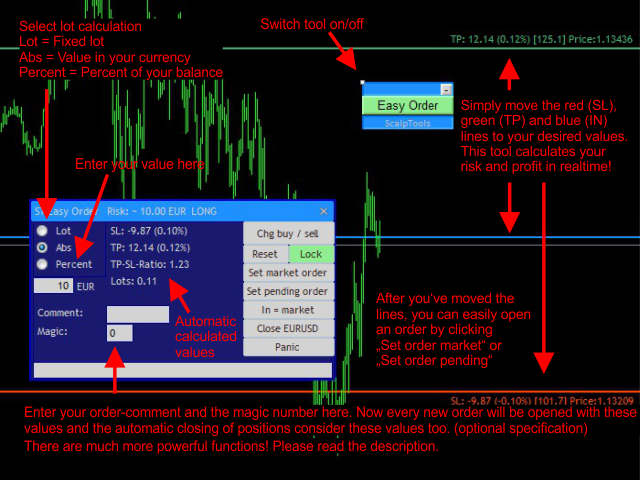
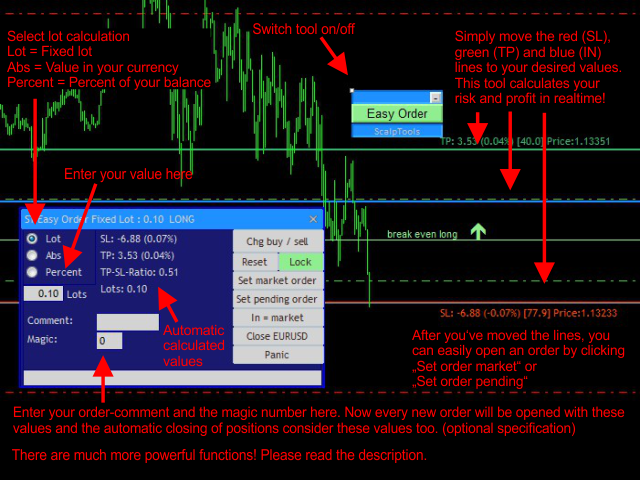
A very powerful and user friendly tool to create new orders and manage open positions. Easily create new market or pending orders with automatic stop loss, take profit and automatic calculated or fixed lot size. Just move the entry, stop loss and take profit levels on the chart to the desired values and enter the risk as an absolute value, as percent of your equity or directly as fixed lot size.
This tool automatically shows you the possible profit and loss and can open a market or pending order for you. Additional features are: trailing stop, automatic shift stop loss to break even, show break even levels, and automatic close orders on profit, loss or weekend. Filter all functions by symbol, magic, comment, order-type! If you start working with this tool the first time, just leave all parameters in the properties window as they are and start trading.
You can find the full description of this tool in my blog.
Parameters (excerpt)
Global parameter settings
- MaxRiskPercentOfEquity: Maximum risk per order in percent of your current balance.
- CloseProfitLossValueType
- PL_ABSOLUTE_CURRENCY: Your given profit/loss values will be calculated as an absolute value in your currency (e.g. 10.00 USD).
- PL_PERCENT_BALANCE: Your given profit/loss values will be calculated as a percent value of your account balance (e.g. 10.00 %).
- ProfitLossCalculationMethod
- PL_CALC_EVERY_SINGLE_ORDER: Every single order of the actual symbol will be checked separately.
- PL_CALC_ALL_ORDERS_SUM: The sum of orders of the actual symbol will be checked.
- PL_CALC_SEP_LONG_SHORT_SUM: The sum of long and the sum of short positions of the actual symbol will be checked separately.
- ThisEAChecksProfitLossForAllSymbols: If true, the EA will check every symbol and not only the current one, if false, this EA will only check the current chart symbol.
Graphic objects
- Chg buy/sell: Automatically reverse your order type and the depending lines.
- Reset lines: Set the Stop Loss and Take Profit to new values and the risk to 1% of your account equity.
- Lock: This will lock the SL and TP lines. You can now move all three lines with the blue IN line.
- Set market order: Open a market order with your current settings.
- Set pending order: Open a pending order with your current settings.
- Radio-Buttons:
- Lot: Your entered value will be the fixed lot size for your orders.
- Abs: Your entered value is the risk (stop loss) as absolute value in your currency. This tool calculates the lot size automatically.
- Percent: Your entered value is the risk (stop loss) as percent of your balance in your currency. This tool calculates the lot size automatically.
- Field to enter your risk: Enter your risk as a value, according to the selected radio button.
- Comment: Enter a comment for you orders here (optional).
- Magic: Enter the magic number for your orders here (optional).
- Close all: Close all open active orders of the current symbol (and the pending orders!).
- Panic: Close all orders.
- In=Market: Automatically keep your entry level (blue line) to the actual price. Turn it on for market orders.

















































L'utente non ha lasciato alcun commento sulla valutazione.