TimeFilter simple 4

1

The indicator is an inter-week hourly filter.

When executing trading operations, the indicator allows considering time features of each trading session.

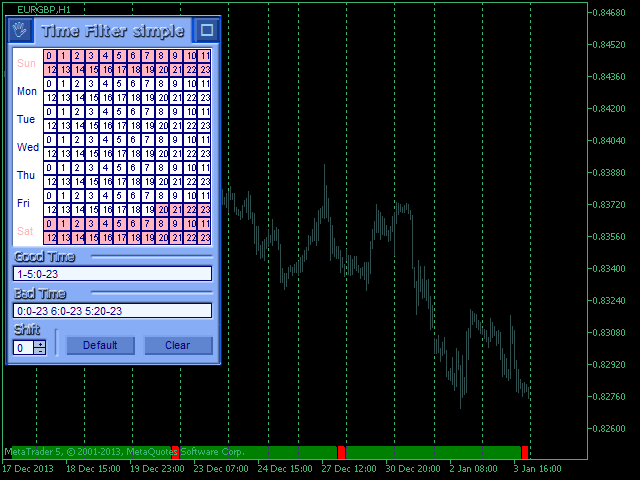
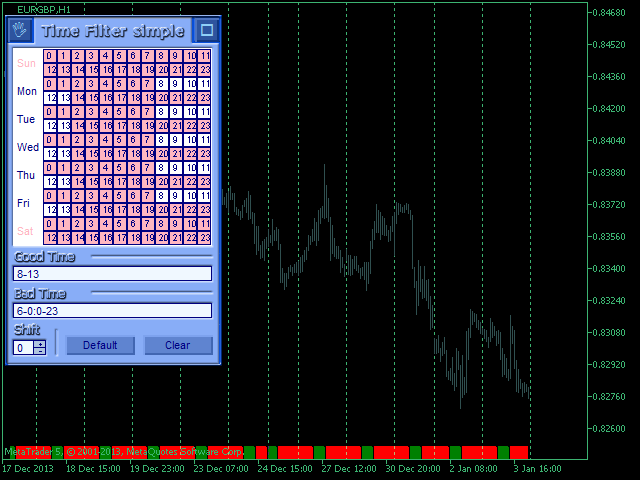
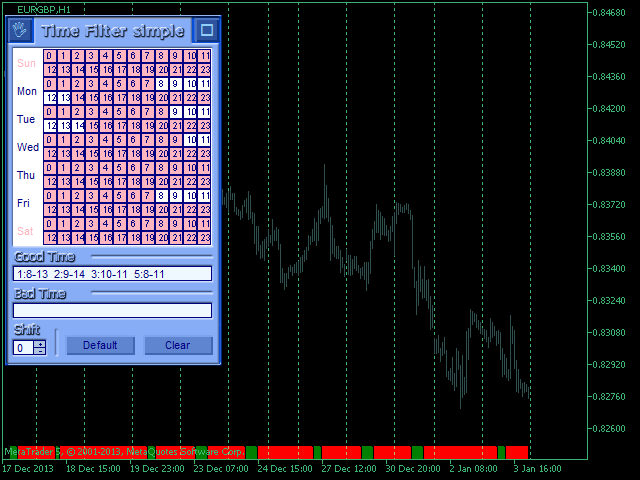
Permissive and restrictive filter intervals are set in string form. The used format is [first day]-[last day]:[first hour]-[last hour]. See the screenshots for examples.

Parameters:
  • Good Time for trade - intervals when trading is allowed.
  • Bad Time for trade - intervals when trading is forbidden.
  • time filter shift (hours) - hourly shift.
  • percentage filling - indication value.
  • Show On/Off - enable/disable the filter visualization.

Using in Expert Advisors: buffer 0 equal to 0 - trading is forbidden, otherwise - allowed.

Prodotti consigliati
Description: Please tick "Show object descriptions" in chart properties to enable hrays views That utility converts a trendline into a horizontal ray known as tool for drawing supply and demand zones. Simply create a trendline on a chart and once selected, it will get converted. Ray remains horizontal while dragging.  Quick ray plot: press "R" key to create horizontal ray. It will be snapped to the nearest OHLC value Further versions will be improved. For feature request please post new comm
AutoTrade IR v20
Mas Khairul Araaf
Auto trade V20 is a trading tool like Robot or Expert Advisor that is used for automatic trading, this type is Martingale EA, the recommended broker is FBS, EU Pair, default setting. If you want to find the best setting, please look for it by backtesting it, so that you find the best setting and help your trading become more profitable, please try this tool to help you trade. minimum deposit 200 $ cen lot 0.01, pipstep in points.

The Arrow Scalper
Fawwaz Abdulmantaser Salim Albaker
1 (2)
Dear Friend..  I share with you this simple Expert Adviser .. it is full automatic  this Expert Adviser following the trend of the pair you install on or any stocks or indices , it is works like that: - when the trend on H4 chart show a start of up trend the expert will wait till the 15M & 1H charts show an up trend the EA will open a buy order directly , and do the same for down trend and open a sell order the buy or sell  order lot size and take profit and stop loss will measured manually  by
FREE
Close by percentage MT4
Konstantin Kulikov
5 (1)
Hello friends. I wrote this utility specifically for use in my profile with a large number of Expert Advisors and sets ("Joint_profiles_from_grid_sets" https://www.mql5.com/en/blogs/post/747929 ). Now, in order to limit losses on the account, there is no need to change the "Close_positions_at_percentage_of_loss" parameter on each chart. Just open one additional chart, attach this utility and set the desired percentage for closing all trades on the account. The utility has the following function
Set TP & SL by Price – Auto Order Modifier for MT4 Imposta automaticamente livelli precisi di TP e SL su qualsiasi ordine ️ Compatibile con tutti i simboli e gli EA, filtrabile per simbolo o magic number Questo Expert Advisor consente di impostare Take Profit (TP) e Stop Loss (SL) utilizzando valori di prezzo esatti (es: 1.12345 su EURUSD). Nessun pip o punto — solo controllo preciso e mirato su tutti gli ordini, anche con filtri per simbolo o numero magico. Funzionalità principali:
Program Overview: This program is a trading tool designed to monitor and analyze the 7 major currency pairs. It is a variant of a similar program used for tracking stock indices, but this version focuses on the seven major currency pairs. The program helps in identifying and calculating significant price movements (gaps) between the high and low prices of these currency pairs over a specified time frame. It then provides insights through comments and alerts based on the calculated gaps. Major Cu
H4 GBPUSD Trend Scalper is a trend signal scalper The EA trades according to the trend strategy using original built-in indicator for opening and closing orders. The external inputs for limiting trading on Fridays and Mondays are available. The purpose of the strategy is to use the current trend with the most benefit. According to the results of testing and working on demo and real accounts, the best results achieved by using the Н4 timeframe on the GBP/USD pair Works on MetaTrader 4 Build 971+
L'indicatore SMC Venom Model BPR è uno strumento professionale per i trader che operano nell'ambito del concetto di Smart Money (SMC). Identifica automaticamente due modelli chiave sul grafico dei prezzi: FVG   (Fair Value Gap) è una combinazione di tre candele, in cui c'è un gap tra la prima e la terza candela. Forma una zona tra livelli in cui non c'è supporto di volume, il che spesso porta a una correzione dei prezzi. BPR   (Balanced Price Range) è una combinazione di due modelli FVG che for
Smart Equity Protector (PropFirm Edition) Smart Equity Protector (PropFirm Edition) is a professional account equity protection and risk-management utility for MetaTrader 4. This Expert Advisor is designed to protect trading accounts from excessive losses by monitoring account equity in real time and automatically closing trades when predefined risk limits are reached. ️ This product does NOT open trades and does NOT generate trading signals . It works as a safety and protection system for manu
FREE
Most professional traders declare strict compliance with risk management. This simple tool allows quick calculation of trading lot size in accordance with the following basic risk management rules: The maximum allowable risk is set as a fixed percentage of the account deposit (for example, 1-2%). The risk is measured as a distance in points between the order opening level and the stop loss level. It is always difficult for beginners to calculate trade lot based on the risk value, so this indicat
Auto Breakeven level
Makarii Gubaydullin
Livelli automatici di break-even Utilizzando   questo   strumento ,   p uoi attivare lo spostamento automatico dello SL, quando il trade raggiunge un profitto desiderato.  Particolarmente   importante   per   i   trader   a   breve termine   .   È disponibile anche l'opzione offset: parte del profitto può essere protetta. Strumento multifunzione : 66+ funzioni, incluso questo strumento  |   Contattami  se hai domande  |   Versione MT5 Processo di attivazione della funzione automatica di break-e
| Fully-automated Smart Money Concept (ICT) inspired trading solution with multi-strategy capabilities | Built by a grid trader >> for grid traders.  This is MT4 version, click  here  for  Blue CARA MT5  (settings and logics are same in both versions)     Real monitoring signal  -->  Cara Gold Intro Blue CARA EA   ('CARA') - short for  C omprehensive  A lgorithmic R esponsive A dvisor is a next-gen  multi-currency    multi-timeframe  EA base on the widely known (and perhapse most popular) Inn
News Scalping Executor is an utility which helps to trade high impact and huge volatility   news . This utility helps to create two opposite orders with risk management and profit protection. It moves automatically stop loss level to avoid losses as much as possible by using many different algorithms. It helps to avoid trading the news if spread suddenly becomes very huge. It can lock profit by moving stop loss or partially closing of orders. To be profitable with this type of trading you shou
NNFX Tool
Nguyen Thi Kieu Oanh
NNFX TOOL – The Essential Order Management Tool for the Modern Trader A "small but mighty" EA, designed to optimize your trading workflow: High Performance: Lightweight yet powerful operation, ensuring precise and efficient order execution. Versatile: Perfect for NNFX method followers, while being incredibly user-friendly for beginners and sophisticated enough for pro-traders. SPECIAL FEATURE - Mobile Trading Support: Automatically sets immediate Stop Loss (SL) and Take Profit (TP) for pending
FREE
Gyroscopes
Nadiya Mirosh
Gyroscope        professional forex expert   (for EURUSD, GBPUSD, USDJPY, AUDUSD, USDCHF, EURGBP, EURJPY, NZDUSD, USDCAD, EURCHF, AUDJPY, CADJPY pairs)   alyzing the market using the Elliot Wave Index. Elliott wave theory is the interpretation of processes in financial markets through a system of visual models (waves) on price charts. The author of the theory, Ralph Elliott, identified eight variants of alternating waves (of which five are in the trend and three are against the trend). The mov
Questo è un pannello comune che espone una rete di ordini di acquisto e vendita. Chiude questo consulente per l'ordine di profitto definito nelle impostazioni. Quindi, c'è un parametro e si chiama Ladder che include che la distanza tra gli ordini inizia ad aumentare di punti specificati dal parametro ladder (qui, nelle impostazioni principali è di 10 punti) significa un secondo ordine di 10 punti, un terzo ordine di 20 punti, un quarto ordine di 40 punti, ecc. Quindi, cosa c'è in questo consul
Presentando il Professional Manager Trader - uno strumento potente progettato per migliorare la tua esperienza di trading. Sviluppato con l'esperienza di un trader professionista a tempo pieno, questa interfaccia di trading gestisce efficacemente le tue operazioni e il tuo capitale. La sua strategia si basa su rotture e incorpora indicatori di conferma sviluppati personalmente, che vantano un comprovato track record di successo. Con un forte focus sulla gestione del rischio e del denaro, il Prof
FTMO Protector 7
Vyacheslav Izvarin
PROTECT YOUR FTMO Account in a simplest way Must-Have   Account Protector for any Prop-trading Account and Challenge MT4 / MT5 Expert Advisor that protects your Forex Prop Trading account from an unexpected drawdown! FTMO Protector  is a Tool that lets you manage trades and control your profit and loss across multiple Robots and currency pairs using a simple parameters and settings. Use as many EAs and Instruments you need, the Protector will: 1.   Calculate your midnight (01:00 System time) Bal
Auto Fibo Pro m
DMITRII GRIDASOV
Indicatore "Auto FIBO Pro" Crypto_Forex: è un ottimo strumento ausiliario nel trading! - L'indicatore calcola e posiziona automaticamente sul grafico i livelli di Fibo e le linee di tendenza locali (colore rosso). - I livelli di Fibonacci indicano le aree chiave in cui il prezzo può invertirsi. - I livelli più importanti sono 23,6%, 38,2%, 50% e 61,8%. - Puoi usarlo per lo scalping di inversione o per il trading di zone grid. - Ci sono molte opportunità per migliorare il tuo sistema attuale us
Noize Absorption Index MT4
Ekaterina Saltykova
5 (1)
Noize Absorption Index - is the manual trading system that measures the difference of pressure between bears forces and bulls forces. Green line - is a noize free index that showing curent situation. Zero value of index shows totally choppy/flat market.Values above zero level shows how powerfull bullish wave is and values below zero measures bearish forces.Up arrow appears on bearish market when it's ready to reverse, dn arrow appears on weak bullish market, as a result of reverse expectation. S
FDM Strategy
Paranchai Tensit
FDM Strategy is an Expert Advisor based on fractals and five dimension method. Five Dimensions expert system is developed based on a theory combining the Chaos Theory with the trading psychology and the effects that each has on the market movement. There is also an ADX (measuring trend strength with average directional movement index) used as a trading filter. Long and Short Trade Signals: If fractal to buy is above the Alligator's Teeth (red line), the pending Sell Stop order must be placed 1 p
Vizzion
Joel Protusada
Vizzion is a fully automated scalping Expert Advisor that can be run successfully using GBPJPY currency pair at H1 timeframe. Very Important This Expert Advisor can not run with any EAs in the same account. As part of the money management plan, it calculates and monitors the Margin Level % and assumes that all open trades are created by it. If you want an Expert Advisor that trades in a daily basis, this EA is not for you because using this requires a patience to wait for a few days or weeks on
If you are good at market analysis this Semi-automatic EA will help you to manage trade for entry and take profit as you analyzed You job is set the zone for buying or selling by moving the lines on MT4 chart For Supply and Demand Strategy - Support & Resistance System.. Buy low sell high from potential reversal point For this tool you only need to set the Market zone for buy or sell Start lots should be small for low drawdown for 0.01 standard lots for each $200 or more Default setting is for t
Grid Trading
Waseem Raza
5 (3)
Grid Trading EA is a semi-automated one-click trading EA for both Normal Trading and Grid/Martingale Trading . Normal Trading Simply click Buy or Sell directly from the chart. The EA will automatically manage trades by: Setting Stop Loss and Take Profit Managing Trailing Stop Grid / Martingale Trading When Grid Trading mode is enabled, the EA will automatically open additional grid orders at specified distances while increasing the lot size based on your settings. Inputs & Settings Lots — Initia
This tool will perform Trailing stop loss and Break even management for orders. Helps you limit or reduce the time spend watching orders on the screen, especially when you need to go to sleep. Just add this EA to 1 chart, you can manage all pairs. You can filter orders by comment, magic number, symbol, and order ticket number. When Breakeven it can add shift/offset pips (to cover the commission...). You can try in strategy tester before purchase. The EA will add Buy and Sell alternately, so yo
Utility per la gestione automatica degli ordini e dei rischi. Ti permette di trarre il massimo dai profitti e limitare le tue perdite. Creato da un trader praticante per i trader. L'utilità è facile da usare, funziona con qualsiasi ordine di mercato aperto manualmente da un trader o con l'aiuto di consulenti. Può filtrare gli scambi per numero magico. L'utilità può funzionare con qualsiasi numero di ordini contemporaneamente. Ha le seguenti funzioni: 1. Impostazione dei livelli di stop loss
DracoAI
Hua Manh Hung
DracoAI is a revolutionary automated forex trading robot based on neural network.  Loss coverage is our premium exclusive feature. DracoAI IS: THE BEST MONEY MAKING SERVICE & STABLE PASSIVE INCOME PROFIT, EVEN IF YOU DO NOT PARTICIPATE IN BIDDING FINANCIAL INDEPENDENCE AND STABILITY DracoAI IS SAFE, BECAUSE: WE GUARANTEE THE SAFETY OF YOUR FUNDS NEGATIVE RESULTS OF TRADING ARE COVERED BY OUR RESERVE FUND 100% CONFIDENTIALITY Monitoring  - most popular signal at MQL5 :  https://www.mql5.com/en/s
My Trade History PRO
Bernhard Schweigert
5 (4)
ATTUALMENTE SCONTATO DEL 20%!! La soluzione migliore per ogni principiante o trader esperto! Rivedere le proprie operazioni è il primo passo per diventare un trader di successo. I trader di successo hanno l'abitudine di rivedere regolarmente le proprie performance di trading. Questo strumento vi aiuterà a farlo. Il processo di revisione sarà più efficace con questo strumento per tracciare il vostro trading. Analizzate le vostre operazioni manuali o quelle del vostro EA. Utilizzate le 3 vis
The indicator enables measurement and analysis of accumulated volume (tick), in any chosen swing. The user's task is to mark individual measuring sections with the help of a "crayon's". The indicator automatically sums the volumes of individual candles. Volume analysis is a basic element of the VSA (volume spread analysis) technique. A method of using an indicator is shown on the film. Parameters description Anchor_mode - If true, one end of the measuring line is always hooked on the current ca
AnyChart MT4
Irek Gilmutdinov
AnyChart is a multifunctional tool allowing you to work with non-standard charts in MetaTrader 4. It includes collector of ticks and generator of charts for trading (hst files) and testing (fxt files). Supported chart types are second, tick and renko ones. Settings Starting Date - start date for chart plotting. Ending Date - end date for chart plotting. Chart Type - chart type: Time - time chart, each bar contains a certain time interval; Tick - volume chart, each bar contains a certain number
Gli utenti di questo prodotto hanno anche acquistato
Forex Trade Manager MT4
InvestSoft
4.98 (439)
Benvenuto a Trade Manager EA, lo strumento definitivo per la gestione del rischio , progettato per rendere il trading più intuitivo, preciso ed efficiente. Non è solo uno strumento per l'esecuzione degli ordini, ma una soluzione completa per la pianificazione delle operazioni, la gestione delle posizioni e il controllo del rischio. Che tu sia un principiante, un trader avanzato o uno scalper che necessita di esecuzioni rapide, Trade Manager EA si adatta alle tue esigenze, offrendo flessibilità s
Local Trade Copier EA MT4
Juvenille Emperor Limited
4.96 (110)
Sperimenta una copia di trading eccezionalmente veloce con il Local Trade Copier EA MT4 . Con la sua facile configurazione in 1 minuto, questo copiatore di trading ti consente di copiare i trades tra diversi terminali di MetaTrader sullo stesso computer Windows o su Windows VPS con velocità di copia ultra veloci inferiori a 0.5 secondi. Che tu sia un trader principiante o professionista, Local Trade Copier EA MT4 offre una vasta gamma di opzioni per personalizzarlo alle tue esigenze specifiche.
Trade Assistant MT4
Evgeniy Kravchenko
4.43 (195)
It helps to calculate the risk per trade, the easy installation of a new order, order management with partial closing functions, trailing stop of 7 types and other useful functions. Additional materials and instructions Installation instructions   -   Application instructions   -   Trial version of the application for a demo account Line function -   shows on the chart the Opening line, Stop Loss, Take Profit. With this function it is easy to set a new order and see its additional characteris
TradePanel MT4
Alfiya Fazylova
4.84 (95)
Trade Panel è un assistente commerciale multifunzionale. L'applicazione contiene più di 50 funzioni di trading per il trading manuale e permette di automatizzare la maggior parte delle attività commerciali. Prima dell'acquisto, è possibile testare la versione dimostrativa su un conto demo. Scaricare la versione di prova dell'applicazione per un account dimostrativo: https://www.mql5.com/it/blogs/post/762419 . Istruzioni complete qui . Commercio. Consente di effettuare operazioni di trading con u
VirtualTradePad PRO SE MT4 — pannello di trading avanzato e workspace grafico per MetaTrader 4 VirtualTradePad PRO SE è un pannello di trading professionale e un ambiente di gestione delle operazioni per MetaTrader 4 . Aiuta i trader ad aprire, gestire, proteggere, chiudere e analizzare le operazioni più rapidamente da un’unica interfaccia basata sul grafico. Il prodotto è stato creato per trader manuali attivi che hanno bisogno di qualcosa di più di un semplice insieme di pulsanti. PRO SE combi
Exp COPYLOT CLIENT for MT4
Vladislav Andruschenko
4.69 (65)
Copiatore professionale di operazioni per MetaTrader 4 Un copiatore di operazioni veloce, affidabile e professionale per MetaTrader 4 . COPYLOT consente di copiare operazioni Forex tra i terminali MetaTrader 4 e MetaTrader 5 , offrendo una sincronizzazione flessibile per diversi tipi di conto e modalità operative. La versione COPYLOT MT4 supporta: MetaTrader 4 → MetaTrader 4 MetaTrader 5 Hedge → MetaTrader 4 MetaTrader 5 Netting → MetaTrader 4   Versione MT5 Descrizione completa + DEMO + PDF Com
Il MT4 to Discord Signal Provider è uno strumento facile da usare e completamente personalizzabile, progettato per inviare segnali di trading direttamente a Discord. Questo strumento trasforma il tuo account di trading in un efficiente fornitore di segnali. Personalizza i formati dei messaggi secondo il tuo stile! Per facilitarne l'uso, seleziona tra i modelli pre-progettati e scegli quali elementi del messaggio includere o escludere. [ Demo ] [ Manuale ] [ Versione MT5 ] [ Versione Telegram ] 
Custom Alerts AIO: Monitora tutti i mercati — senza alcuna configurazione Panoramica Custom Alerts AIO è una soluzione di monitoraggio dei mercati pronta all’uso che non richiede alcuna configurazione. Tutti gli indicatori necessari — FX Power, FX Volume, FX Dynamic, FX Levels, IX Power — sono integrati internamente. Non vengono mostrati grafici, rendendolo ideale per generare alert in tempo reale in modo discreto ed efficiente. Supporta tutte le classi di asset offerte dal tuo broker: Forex,
ManHedger MT4
Peter Mueller
5 (2)
THIS EA IS A SEMI-AUTO EA, IT NEEDS USER INPUT. Manual & Test Version Please TEST this product before   BUYING  and watch my video about it. Contact me for user support or bug reports, or if you want the MT5 version! MT5 Version I do not guarantee any profits or financial success using this EA. With this Expert Advisor, you can: Implement your own   Zone Recovery   strategy to capitalize on trending markets. Create   Grid   trading strategies, to profit from ranging markets. Place orders easil
Copy Cat More Trade Copier MT4 (Copia Gatto MT4) non è solo un semplice copiatore locale di operazioni; è un quadro completo di gestione del rischio ed esecuzione, progettato per le sfide del trading moderno. Dai challenge delle prop firm alla gestione dei conti personali, si adatta a ogni situazione grazie a una combinazione di esecuzione robusta, protezione del capitale, configurazione flessibile e gestione avanzata delle operazioni. Il copiatore funziona sia in modalità Master (mittente) che
CloseIfProfitorLoss with Trailing
Vladislav Andruschenko
4.87 (31)
Close If Profit or Loss with Trailing per MetaTrader 4 — chiusura automatica per profitto totale o perdita totale Un’utilità pratica per MetaTrader 4 che chiude automaticamente le posizioni quando il profitto totale o la perdita totale raggiunge il livello impostato. L’Expert Advisor monitora le operazioni aperte, calcola il risultato flottante, può usare Trailing Profit e aiuta a gestire le posizioni più rapidamente rispetto a una reazione manuale. MetaTrader 4 è ancora molto utilizzato da tra
Coppy Master MT4
Sergey Batudayev
4 (3)
Copy Master MT4       è uno strumento di copia delle transazioni per i terminali MetaTrader 4 e MetaTrader 5. Supporta la copia in entrambe le direzioni: da MT4 a MT5, da MT5 a MT4, nonché tra conti dello stesso tipo MT4 a MT4. Per funzionare correttamente, tutti i terminali devono essere in esecuzione sullo stesso PC o VPS. [ Instruction  and Demo ]  Per la copia su MetaTrader 4, una versione separata —       Copy Master MT5       - è obbligatorio. Caratteristiche principali: Modalità di copia
The product will copy all telegram signal to MT4   ( which you are member  ) , also it can work as remote copier.  Easy to set up, copy order instant, can work with almost signal formats, image signal, s upport to translate other language to English Work with all type of channel or group, even channel have "Restrict Saving Content", work with  multi channel, multi MT5 Work as remote copier: with signal have ticket number, it will copy exactly via ticket number. Support to backtest signal. How to
Exp SafetyLock PRO
Vladislav Andruschenko
4.57 (28)
SAFETYLOCK for MetaTrader 4 è una utility premium di protezione del trading progettata per difendere le posizioni aperte dalle improvvise inversioni del mercato, posizionando automaticamente un ordine di sicurezza opposto. Non appena un trader o un Expert Advisor (EA) apre una posizione, SAFETYLOCK for MT4 crea un corrispondente ordine pendente (Buy Stop o Sell Stop) nella direzione opposta. Se il mercato si muove contro il trade originale, l'ordine pendente viene attivato e crea un lock protett
News Filter EA MT4
Rashed Samir
5 (9)
News Filter EA: Advanced Algo Trading Assistant News Filter EA is an advanced algo trading assistant designed to enhance your trading experience. By using the   News Filter EA , you can integrate a Forex economic news filter into your existing expert advisor, even if you do not have access to its source code. In addition to the news filter, you can also specify   trading days   and   hours   for your expert. The News Filter EA also includes   risk management   and   equity protection   features
EasyTrade MT4
Alain Verleyen
5 (1)
Easy Trade – Gestione Operativa Intelligente, Semplice e Potente Easy Trade è la soluzione tutto-in-uno per la gestione delle operazioni su MetaTrader, ideale per chi desidera mantenere il rischio sotto controllo e garantire un’esecuzione fluida. Progettato da zero con il feedback reale dei trader, Easy Trade rende semplice eseguire, monitorare e gestire operazioni su più simboli – senza complicare il tuo flusso di lavoro. Che tu faccia scalping manuale o gestisca un piccolo portafoglio di str
Partial Closure EA MT4
Juvenille Emperor Limited
5 (3)
Partial Closure EA MT4 ti consente di chiudere parzialmente qualsiasi operazione sul tuo conto, manualmente tramite una percentuale scelta della dimensione del lotto e/o per numero di ticket, oppure automaticamente a percentuali specifiche dei livelli di TP/SL, chiudendo una percentuale della dimensione iniziale del lotto su un massimo di 10 livelli di take profit e 10 di stop loss. Può gestire tutte o alcune delle operazioni nel tuo conto specificando o escludendo determinati numeri magici, co
Unlimited Trade Copier Pro
Vu Trung Kien
3.86 (7)
Unlimited Trade Copier Pro is a tool to copy trade remotely to multiple MT4, MT5 and cTrader accounts at different computers/locations over internet. This is an ideal solution for you if you are a signal provider and want to copy your trades to other receivers globally on your own rules. One provider can copy trades to multiple receivers and one receiver can get trade from multiple providers as well. The provider can even set the subscription expiry for each receiver, so that receiver will not b
Il MT4 to Telegram Signal Provider è uno strumento facile da usare e completamente personalizzabile che consente l'invio di segnali a Telegram, trasformando il tuo account in un fornitore di segnali. Il formato dei messaggi è completamente personalizzabile! Tuttavia, per un uso semplice, puoi anche optare per un modello predefinito e abilitare o disabilitare parti specifiche del messaggio. [ Dimostrativo ]  [ Manuale ] [ Versione MT5 ] [ Versione Discord ] [ Canale Telegram ]  New: [ Telegram To
The Expert Advisor will help you forward all pop-up alert with screenshot from  MetaTrader 4 to Telegram channel/ group, also forward all notifications to Telegram. Parameters  -  Telegram Bot Token - create bot on Telegram and get token.  -  Telegram Chat ID  - input your Telegram user ID,  group / channel ID  -  Forward Alert - default true, to forward alert.  -  Send message as caption of Screenshot - default false, set true to send message below Screenshot  How to setup and guide  - Telegram
Trade copier MT4
Alfiya Fazylova
4.58 (33)
Trade Copier è un'utilità professionale progettata per copiare e sincronizzare le transazioni tra conti di trading. La copiatura avviene dal conto/terminale del fornitore al conto/terminale del destinatario, che sono installati sullo stesso computer o vps. PROMOZIONE - Se avete già acquistato il "Trade copier MT5", potete ottenere gratuitamente il "Trade copier MT4" (per la copia MT4 > MT5 e MT4 < MT5). Per maggiori informazioni sulle condizioni, vi preghiamo di contattarci tramite messaggi priv
Telegram to MT4 Coppy
Sergey Batudayev
4 (10)
Da Telegram a MT4: la soluzione definitiva per la copia del segnale Semplifica il tuo trading con   Telegram su MT4   , l'utility all'avanguardia progettata per copiare i segnali di trading direttamente dai canali e dalle chat di Telegram sulla tua piattaforma MetaTrader 4, senza bisogno di DLL. Questa soluzione affidabile garantisce un'esecuzione impeccabile dei segnali con una precisione e opzioni di personalizzazione senza pari, risparmiando tempo e aumentando la tua efficienza. [ Instruction
Trade Dashboard MT4
Fatemeh Ameri
4.96 (53)
Trade Dashboard simplifies how you open, manage, and control your trades, with built-in lot size calculation. It allows you to execute trades, manage risk, and control positions directly on the chart, with tools such as partial close, breakeven, and trailing stop. Designed to reduce manual work and help you stay focused on your trading decisions. A demo version is available for testing. Detailed explanations of features are provided within the MQL5 platform. Installation instructions are include
The News Filter
Leolouiski Gan
5 (25)
Questo prodotto filtra tutti gli esperti consulenti e i grafici manuali durante il periodo delle notizie, così non dovrai preoccuparti di improvvisi picchi di prezzo che potrebbero distruggere le tue impostazioni di trading manuali o le negoziazioni effettuate da altri esperti consulenti. Questo prodotto viene fornito anche con un sistema completo di gestione degli ordini che può gestire le tue posizioni aperte e gli ordini in sospeso prima della pubblicazione di qualsiasi notizia. Una volta che
Smart Channel M4
Vahidreza Heidar Gholami
The trend in the market can be predicted using trend lines but the problem is you don’t know where exactly the price is going to touch the trend line where you can put your pending orders on. Smart Channel Expert Advisor makes it possible to put an advanced channel around the price data, which can be configured to handle placing orders, opening and closing positions, managing risk per trade, spread, slippage, and trailing stop-loss and take-profit automatically. Features Money Management (Calcul
Take a Break
Eric Emmrich
5 (31)
News filter, equity guard & session control for all your EAs — one tool, full protection Take a Break has evolved from a basic news filter into a comprehensive account protection solution . It pauses your other Expert Advisors during news events or based on custom filters. When trading resumes, it automatically restores your entire chart setup , including all EA settings. Why traders choose Take a Break One news filter for all your EAs — no more relying on individual built-in filters that may o
Ultimate Trailing Stop EA
BLAKE STEVEN RODGER
4.33 (15)
This EA Utility allows you to manage (with advanced filtering) unlimited open orders (manual or EA) with 16 trailing stop methods: fixed, percent, ATR Exit, Chandelier Exit, Moving Average, Candle High Low Exit, Bollinger Bands, Parabolic, Envelope, Fractal, Ichimoku Kijun-Sen, Alligator, Exit After X Minutes or Bars, RSI and Stochastic. The trailing stop can be either real or virtual, and you can exit fully or with a partial close percent on touch or bar close.  Moreover, you can add (overrid
Telegram to MT4 Multi-Channel Copier copia automaticamente i segnali di trading dai tuoi canali Telegram direttamente in MetaTrader 4. Niente bot, niente estensioni del browser, niente copia manuale. Ricevi un segnale su Telegram e l'EA apre l'operazione sul tuo terminale in pochi secondi. Il prodotto include due componenti: un'applicazione Windows che ascolta i tuoi canali Telegram, e questo Expert Advisor che esegue i segnali sul tuo terminale MT4. È disponibile anche la versione MT5. Guida di
Trading History MT4
Siarhei Vashchylka
5 (9)
Trading History - A program for trading and money management on the history of quotes in stratagy tester. It can work with pending and immediate orders, and is equipped with trailing stop, breakeven and take profit functions. Very good for training and testing different strategies. Manual (Be sure to read before purchasing) Advantages 1. Allows you to test any trading strategy in the shortest possible time 2. An excellent simulator for trading training. You can gain months of trading experience
Seconds Chart - uno strumento unico per creare grafici in secondi su MetaTrader 4 . Con Seconds Chart , puoi generare grafici con timeframe definiti in secondi, ottenendo una flessibilità e una precisione d'analisi ideali, non disponibili nei grafici standard in minuti o ore. Ad esempio, il timeframe S15 indica un grafico con candele di 15 secondi. Puoi utilizzare qualsiasi indicatore, expert advisor e script. È facile utilizzarli proprio come nei grafici standard. A differenza degli strumenti s
Altri dall’autore
TrailingStop 4
Andrej Nikitin
4.83 (6)
The Expert Advisor modifies the Stop Loss order position opened for the instrument of the current chart based on indicator values. Uses indicators Parabolic SAR ,  NRTR (Nick Rypock Trailing Reverse) ,  Moving Average  or linear regression channel. Switchable modes: Trailing stop only when in profit; Trailing stop only following the price; On every teak or on formed bars; Trailing for each order separately or for a total position. Has an option of "hidden stop", also you can exclude individual
TrailingStop
Andrej Nikitin
5 (6)
This utility is used to visually choose an indicator for trailing stop and select its parameters. The Expert Advisor modifies the Stop Loss order position opened for the instrument of the current chart based on indicator values. Uses indicators Parabolic SAR , NRTR (Nick Rypock Trailing Reverse) , Moving Average or linear regression channel. The indicators are added to or removed from the chart using the 'show' checkbox. The following options are available: Parabolic - trailing stop based on th
TrailingStop MA 4
Andrej Nikitin
4 (1)
The indicator draws two simple moving averages using High and Low prices. The MA_High line is displayed when the moving average is directed downwards. It can be used for setting a stop order for a sell position. The MA_Low line is displayed when the moving average is directed upwards. It can be used for setting a stop order for a buy position. The indicator is used in the TrailingStop Expert Advisor. Parameters Period - period of calculation of the moving average. Deviation - rate of convergence
FREE
Ticks
Andrej Nikitin
3 (1)
A simple tick indicator of Bid and Ask prices. The period separator (1 minute) is displayed as a histogram. Parameters Show Bid Line - show/hide the Bid line; Show Ask Line - show/hide the Ask line; Show Labels - show/hide the last price values.
FREE
Ticks Bars
Andrej Nikitin
4 (2)
This tick indicator draws synthetic bars/candlesticks that contain a definite number of ticks. Parameters: option prices - price option. It can be Bid, Ask or (Ask+Bid)/2. the number of ticks to identify Bar - number of ticks that form OHLC. price levels count - number of displayed price levels (no levels are displayed if set to 0 or a lower value). calculated bar  - number of bars on the chart. Buffer indexes: 0 - OPEN, 1 - HIGH, 2 - LOW, 3 - CLOSE.
FREE
TrailingStop MA
Andrej Nikitin
3.5 (2)
The indicator draws two simple moving averages using High and Low prices. The MA_High line is displayed when the moving average is directed downwards. It can be used for setting a stop order for a sell position. The MA_Low line is displayed when the moving average is directed upwards. It can be used for setting a stop order for a buy position. The indicator is used in the TrailingStop Expert Advisor. Parameters Period - period of calculation of the moving average. Deviation - rate of convergence
FREE
HistoryArrowRestore 4
Andrej Nikitin
5 (2)
The scripts adds order tracing icons in the chart window. Trace orders are similar to the standard terminal tracing. Icons are added for both closed orders and current (market) orders. The Days of history to check parameter means the depth of the order history to be traced (number of days). If the parameter value = 0, all orders in the available history will be traced.
FREE
Tick
Andrej Nikitin
4.5 (2)
A simple tick indicator of Bid and Ask prices. The period separator (1 minute) is displayed as a histogram. Parameters Price_levels_count - number of price levels to be displayed. Bar_under_calculation - number of bars of the indicator to be displayed on the chart.
FREE
Ticks RSI 4
Andrej Nikitin
The Relative Strength Index indicator drawn using a tick chart. After launching it, wait for enough ticks to come. Parameters: RSI Period - period of averaging. overbuying level - overbought level. overselling level - oversold level. calculated bar - number of bars on the chart for the indicator calculation. The following parameters are intended for adjusting the weight of RSI signals (from 0 to 100). You can find their description in the Signals of the Oscillator Relative Strength Index section
The Envelopes indicator drawn using a tick chart. After launching it, wait for enough ticks to come. Parameters: Averaging period - period of averaging. Smoothing type - type of smoothing. Can have any values of the enumeration ENUM_MA_METHOD . Option prices - price to be used. Can be Ask, Bid or (Ask+Bid)/2. Deviation of boundaries from the midline (in percents) - deviation from the main line in percentage terms. Price levels count - number of displayed price levels (no levels are displayed if
The Stochastic Oscillator indicator is drawn on the tick price chart. After launching it, wait for enough ticks to come. Parameters: K period - number of single periods used for calculation of the stochastic oscillator; D period - number of single periods used for calculation of the %K Moving Average line; Slowing - period of slowing %K; Calculated bar - number of bars in the chart for calculation of the indicator. The following parameters are intended for adjusting the weight of signals of the
Ticks MACD 4
Andrej Nikitin
The Moving Average Convergence/Divergence(MACD) indicator drawn using a tick chart. After launching it, wait for enough ticks to come. Parameters: Fast EMA period - indicator drawn using a tick chart. Slow EMA period - slow period of averaging. Signal SMA period - period of averaging of the signal line. calculated bar - number of bars on the chart for the indicator calculation. The following parameters are intended for adjusting the weight of MACD signals (from 0 to 100). You can find their desc
The Bollinger Bands indicator drawn using a tick chart. After launching it, wait for enough ticks to come. Parameters: Period - period of averaging. Deviation - deviation from the main line. Price levels count - number of displayed price levels (no levels are displayed if set to 0). Bar under calculation - number of bars on the chart for the indicator calculation. Buffer indexes: 0 - BASE_LINE, 1 - UPPER_BAND, 2 - LOWER_BAND, 3 - BID, 4 - ASK.
Ticks OsMA 4
Andrej Nikitin
The Moving Average of Oscillator(OsMA) indicator drawn using a tick chart. After launching it, wait for enough ticks to come. Parameters: Fast EMA period - fast period of averaging. Slow EMA period - slow period of averaging. Signal SMA period - period of averaging of the signal line. calculated bar - number of bars for the indicator calculation.
Ticks CCI 4
Andrej Nikitin
The Commodity Channel Index(CCI) indicator drawn using a tick chart. After launching it, wait for enough ticks to come. Parameters: period - number of single periods used for the indicator calculation. calculated bar - number of bars for the indicator calculation. The following parameters are intended for adjusting the weight of CCI signals (from 0 to 100). You can find their description in the Signals of the Commodity Channel Index section of MQL5 Reference. The oscillator has required directio
Ticks ADX 4
Andrej Nikitin
The Average Directional Movement Index indicator drawn using a tick chart. After launching it, wait for enough ticks to come. Parameters: Period - period of averaging. Сalculated bar - number of bars on the chart for the indicator calculation. Buffer indexes: 0 - MAIN_LINE, 1 - PLUSDI_LINE, 2 - MINUSDI_LINE.
The Standard Deviation (StdDev) indicator drawn using a tick chart. After launching it, wait for enough ticks to come. Parameters: Period - period of averaging. Method - method of averaging. calculated bar - number of bars for the indicator calculation.
The Momentum indicator drawn using a tick chart. After launching it, wait for enough ticks to come. Parameters: period - period of the indicator calculation. levels count - number of displayed levels (no levels are displayed if set to 0) calculated bar - number of bars for the indicator calculation.
The Bulls Power indicator drawn using a tick chart. After launching it, wait for enough ticks to come. Parameters: Period - period of averaging. The number of ticks to identify high/low - number of single ticks for determining high/low. Calculated bar - number of bars for the indicator calculation. The following parameters are intended for adjusting the weight of Bulls Power signals (from 0 to 100). You can find their description in the Signals of the Bulls Power oscillator section of MQL5 Refer
The  Bears Power indicator drawn using a tick chart. After launching it, wait for enough ticks to come. Parameters: Period - period of averaging. The number of ticks to identify high/low - number of single ticks for determining high/low. Calculated bar - number of bars for the indicator calculation. The following parameters are intended for adjusting the weight of Bears Power signals (from 0 to 100). You can find their description in the Signals of the Bears Power oscillator section of MQL5 Refe
Tiks ATR 4
Andrej Nikitin
The  Average True Range (ATR)  indicator drawn using a tick chart. After launching it, wait for enough ticks to come. Parameters: ATR Period  - number of single periods used for the indicator calculation. The number of ticks to identify Bar  - number of single ticks that form OHLC. Price levels count  - number of displayed price levels (no levels are displayed if set to 0 or a lower value). price mode  - choice of prices under calculation (can be bid, ask or average). Сalculated bar  - number of
Tiks WPR 4
Andrej Nikitin
The  Williams' Percent Range (%R)  indicator drawn using a tick chart. After launching it, wait for enough ticks to come. Parameters: WPR Period  - period of the indicator. Overbuying level  - overbought level. Overselling level  - oversold level. price mode  - choice of prices under calculation (can be bid, ask or average). Сalculated bar  - number of bars for the indicator calculation. The following parameters are intended for adjusting the weight of WPR signals (from 0 to 100). You can find t
The  Price Channel  indicator drawn using a tick chart. After launching it, wait for enough ticks to come. Parameters: Period  - period for determining the channel boundaries. Price levels count  - number of displayed price levels (no levels are displayed if set to 0). price mode  - choice of prices under calculation (can be bid, ask or average). Bar under calculation  - number of bars on the chart for the indicator calculation. Buffer indexes: 0 - Channel upper, 1 - Channel lower, 2 - Channel m
Abigail 4
Andrej Nikitin
Description: Abigail is a medium-term trading system making profit during the price rollback. The Expert Advisor has been optimized for working on EURUSD. However, it can successfully work with other currency pairs as well. You can examine the Expert Advisor's trading statistics for different brokers and symbols at MetaTrader 4 and MetaTrader 5 Trading Signals sections. Parameters: Risk management: enter volume - market entry volume. If the value is greater than 0 - number of lots, if less than
TimeFilter 4
Andrej Nikitin
TimeFilter indicator allows you to visually select bit masks (GoodHourOfDay, BadHoursOfDay, GoodDayOfWeek, BadDaysOfWeek) for the  Intraday Time Filter  module of trading signals of the Standard Library. The use of time filters allows you to take into account the particulars of each trading session in performing trading operations.
AccountQuickReport 4
Andrej Nikitin
5 (1)
The script creates account summary report in a separate window. The report can be created for all deals and for deals on selected financial instruments. It is possible to specify a time interval of calculation and save report to an htm file. Script inputs report starting date - initial report generation date. symbols selection for report - select a method of choosing tools for a report generation. allSymbol - report is generated for deals performed on all symbols. onlyCurrentSymbol - report is
PositionGroupClose 4
Andrej Nikitin
5 (1)
The EA performs trade operations of closing position groups. Positions are grouped by type. It is possible to select orders by the profit (loss) value. It is possible to form the closure groups manually. You can set a value for automatic closure of a positions group after reaching a certain profit/loss level or price level. The additional functions of the EA are called using the hot keys: SHIFT+A - show/hide Auto exit options. SHIFT+S - show/hide Settings panel. SHIFT+V - sound ON/OFF. SHIFT+I -
AddPosition 4
Andrej Nikitin
The Expert Advisor for increasing (or opening) market positions. Allows specifying the desired risk, target and searching for the best open price and trade volume. Configurable Parameters: lots - directly the volume of the position increase. % equity - the amount of growth as a percentage of the amount of funds. stop loss - directly the level of the stop loss order. loss - the level of the stop loss order depending on the allowable loss. take profit - directly the take profit level of the o
The Expert Advisor notifies that a price has crossed a line on the chart. It handles two types of lines - horizontal line and a trendline. The number of lines is unlimited. Parameters: prefix of signal line - prefix of object (line) names processed by the indicator. If the parameter is empty, it handles all object types: horizontal lines and trendlines. price Mode - price type (bid or ask). timeout - crossing alert timeout. number of repeats - the limit of crossing alert repeats. number of comme
Tick Advisor
Andrej Nikitin
Tick Advisor is an intraday trading system that tries to profit during the price rollback. Martingale can be enabled, but you should be extremely careful (take profit often and at a proper time!). You can examine the Expert Advisor's trading statistics for different brokers and symbols in the MetaTrader 4 Trading Signals sections. Parameters Risk management: enter volume - a volume for entry If the value is greater than 0 - number of lots, if less than 0 - percentage of available funds, if equa
Filtro:
Vita
168
Vita 2022.08.22 17:01 
 

This indicator can't control Expert Advisors. All explanations are lies. You shouldn't buy this indicator. Author is a scammer.

Rispondi alla recensione