Copy Trade GUI
- Utilità
- Versione: 2.30
- Attivazioni: 10

English
Title: Copy Trade GUI
Short description (summary field):
Local trade copier with a modern on-chart panel. Master and Copier in one EA, for MT4 and MT5.
Full description:
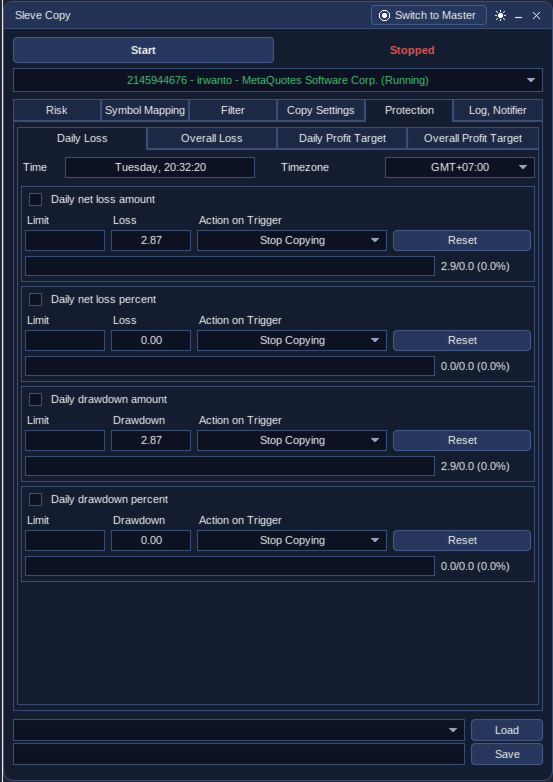
Copy Trade GUI is a local trade copier for MetaTrader 4 and MetaTrader 5. Run it on your source account as the Master and on your receiving accounts as Copiers. Switching roles takes one click inside a modern on-chart panel.
Trades are passed through a shared folder on the same computer or VPS. There is no server, no subscription, and no internet needed for copying.
Why Copy Trade GUI
- One EA, two roles. Master and Copier mode in a single panel, with dark and light themes.
- Any combination. MT4 to MT5, MT5 to MT4, MT4 to MT4, MT5 to MT5.
- Complete order copy. Market and pending orders, SL and TP, SL and TP updates, close, pending modify and delete.
- Normal and Reverse copy, with a switch for every order type.
- Many accounts, own rules. One master can feed many Copiers, and each Copier has its own risk, filters and protection.
Lot and risk
- Fix Lot
- Lot Multiplier
- Auto / Proportional (Balance, Equity or Free Margin, with contract size normalizing)
- Risk Per Trade (% Balance, % Equity or fixed money)
- Lot normalizing: round down, up or nearest, and skip or use minimum lot
Symbol mapping
- Auto Mapping recognizes broker prefixes and suffixes and close name variants.
- Grouped symbol tree with searchable dropdowns.
- Unmapped symbols are never traded.
Filters
- Symbol, magic number and comment (blacklist or whitelist)
- Time filter with schedules and time zones, including overnight ranges
- Max spread, max slippage and max copying difference, for all symbols or per symbol
Protection
- Daily loss and overall loss limits
- Daily profit target and overall profit target
- Measured by net amount, net percent, drawdown or run-up
- New entries are blocked when a limit is reached, until you press Reset
Log and Telegram notifier
- Every signal is traced from received to done or failed, with the reason.
- Optional Telegram messages for finished signals.
- On-chart notification cards for info, warnings and errors.
Built for reliability
- Session restore after a timeframe change or terminal restart
- Persistent ticket map, so the same trade is never copied twice
- Reconciliation at Start closes slave orders whose master order is gone
- Save and load complete configuration presets
Requirements and notes
- Master and Copier terminals must run on the same computer or VPS.
- Algo Trading must be enabled.
- On MT5, a hedging account is recommended.
- For Telegram, add https://api.telegram.org to the WebRequest list.
- Partial closes of the master are currently ignored. Stop Limit orders are not copied.
A full PDF guide is included in the product comments. Please test on a demo account first.
Risk warning: trading carries a high level of risk. Copying trades does not guarantee profit and can multiply losses.