Release Pilot News Trader
- Utilità
- Versione: 1.0
- Attivazioni: 10

Release Pilot News Trader: a news trading tool that executes your plan from the built-in MT5 calendar
Release Pilot is a tool for traders who trade economic releases (Nonfarm Payrolls, CPI, rate decisions, GDP, retail sales...) and want the orders placed on time, managed by rules and kept inside their risk limits. You choose the releases, the way to trade them and the risk; Release Pilot executes that plan at the right second. It is not a "set and forget" robot and makes no promise of profit: nothing is traded on a release you did not tick.
It reads the economic calendar that is built into MetaTrader 5: no WebRequest, no DLL, no websites to allow. It works on Windows, Mac and any VPS, including the MQL5 VPS.
Correct release times, without a GMT offset
Calendar times on MT5 are easy to get wrong by two or three hours, especially around daylight-saving changes. Release Pilot measures the calendar's clock against a fixed weekly release, reads the server clock, and checks the broker's daylight-saving offsets against the chart's own price spikes at past releases. The panel shows the result ("verified GMT+2"). Server-time and manual modes are available for unusual setups.
Plan the release on the panel
- The release list shows the coming high-impact releases of your symbol's currencies (for example USD for XAUUSD or US30), with forecast and previous values. Tick the releases you want to trade; picks are saved per account and symbol, and vertical lines mark them on the chart.
- Filters by currency, impact and words in the event name (speeches, auctions and press conferences are hidden by default). An Auto picking mode is available if you prefer to untick releases instead.
- Own releases can be added as text, for example when a release is rescheduled.
- A large countdown to the next picked release and the job status: waiting, orders placed, watching, in trade, done or skipped (with the reason).
Scheduled orders: four ways to execute
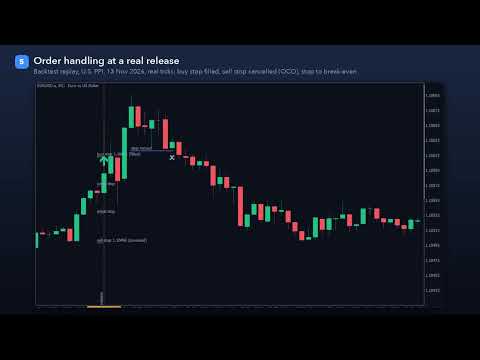
- Straddle: a buy stop and a sell stop are placed a set number of seconds before the release. Until a lock a few seconds before, they can follow the price so the distance stays the same. When one side fills, the other is cancelled automatically (OCO). Unfilled orders are removed after the expiry you set. Works on hedging and netting accounts.
- Breakout: after the release, a market entry when the price has moved a set distance away from the pre-release price. A max-chase setting skips the entry if the price has already run too far.
- Fade: waits for the spike, then enters on the retrace. The stop goes beyond the spike's extreme, and the target can be the pre-release price.
- Actual vs forecast: reads the actual value as soon as the calendar publishes it, compares it with the forecast using the calendar's own good/bad rating, and enters only above the minimum surprise you set, with optional price confirmation.
Switch the mode on the panel at any time; releases that have not started yet use the new mode.
Execution guards for fast markets
- Slippage guard: a fill worse than your limit is closed at once instead of being left open.
- Maximum spread in points and as a multiple of the normal spread measured before the release.
- Stop loss and take profit are re-anchored to the real fill price, so the planned risk stays the same after slippage.
- Stop and freeze levels are respected for every order, stop and modification; prices are rounded to the tick size.
- If both straddle sides fill in a fast market, the later one can be closed.
- Margin check before every order; the symbol's volume limits and filling modes are handled.
Exits
- Stop loss on every trade, optional take profit.
- Break-even with offset, trailing stop (start, distance, step) and a time exit after N minutes.
- All distances in ATR multiples (adapts to every symbol; ATR measured before the release) or in points.
- One trade per release. No grid, no martingale, no averaging.
Risk limits, prop-firm rules and news blocks
- Lot size from risk % of balance, risk money or fixed lots, never above the room left under the daily loss limit.
- Daily loss limit (from the day's starting balance, equity or the higher of both), maximum drawdown (static or trailing) and a maximum number of trades per day. At a limit no new trade is opened and, if you want, the tool's own trades and orders are closed.
- Prop-firm news rule: for firms that forbid trading around news, no order is opened inside the restricted window (for example 2 minutes before and after every high-impact release of the symbol's currencies). Entries can only happen after the window, and the tool's own trades can be closed before a window starts.
Reaction history of every release
For the selected release, the panel shows how your symbol moved the last 20 times: average and median spike in points, average move up and down, how often it ended higher, and a bar per past reaction. Use it to size your distances and stops. It describes the past, not the future.
Rehearse your plan in the Strategy Tester
The MT5 calendar is not available in the Strategy Tester, so Release Pilot ships with a replay of 5,848 past high-impact releases (January 2020 to November 2026), including their actual and forecast values. Every mode, guard and limit runs in the tester on any symbol, so you can watch how your settings would have handled a release before you use them. In the tester every release matching your filters is replayed. This is also how the free demo works. Tester results are hypothetical and do not predict future results.
Panel
- Mode switch, spread / stops / time-sync tiles, release list with tick boxes, reaction history, daily-loss and drawdown bars, and buttons to cancel orders and close trades (closing needs a second click).
- Light and dark themes, sharp at every Windows display scale, movable and minimisable.
- Alerts: popup, sound and push notifications for orders, fills, skips and limits.
Good to know
- Attach it to the chart of the symbol you want to trade, one chart per symbol, each with its own magic number.
- News trading depends on your broker's execution: spreads widen and orders can slip at a release. Try your plan on a demo account first and use the guards.
- The tool executes your decisions; it does not decide whether a release is worth trading and does not guarantee any result.
- Algo trading must be allowed in the terminal. No DLL and no WebRequest are used.