Release Pilot News Trader

Release Pilot News Trader: a news trading tool that executes your plan from the built-in MT5 calendar

Release Pilot is a tool for traders who trade economic releases (Nonfarm Payrolls, CPI, rate decisions, GDP, retail sales...) and want the orders placed on time, managed by rules and kept inside their risk limits. You choose the releases, the way to trade them and the risk; Release Pilot executes that plan at the right second. It is not a "set and forget" robot and makes no promise of profit: nothing is traded on a release you did not tick.

It reads the economic calendar that is built into MetaTrader 5: no WebRequest, no DLL, no websites to allow. It works on Windows, Mac and any VPS, including the MQL5 VPS.

Correct release times, without a GMT offset

Calendar times on MT5 are easy to get wrong by two or three hours, especially around daylight-saving changes. Release Pilot measures the calendar's clock against a fixed weekly release, reads the server clock, and checks the broker's daylight-saving offsets against the chart's own price spikes at past releases. The panel shows the result ("verified GMT+2"). Server-time and manual modes are available for unusual setups.

Plan the release on the panel

  • The release list shows the coming high-impact releases of your symbol's currencies (for example USD for XAUUSD or US30), with forecast and previous values. Tick the releases you want to trade; picks are saved per account and symbol, and vertical lines mark them on the chart.
  • Filters by currency, impact and words in the event name (speeches, auctions and press conferences are hidden by default). An Auto picking mode is available if you prefer to untick releases instead.
  • Own releases can be added as text, for example when a release is rescheduled.
  • A large countdown to the next picked release and the job status: waiting, orders placed, watching, in trade, done or skipped (with the reason).

Scheduled orders: four ways to execute

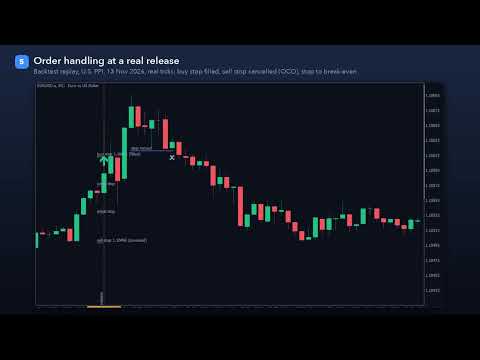
  • Straddle: a buy stop and a sell stop are placed a set number of seconds before the release. Until a lock a few seconds before, they can follow the price so the distance stays the same. When one side fills, the other is cancelled automatically (OCO). Unfilled orders are removed after the expiry you set. Works on hedging and netting accounts.
  • Breakout: after the release, a market entry when the price has moved a set distance away from the pre-release price. A max-chase setting skips the entry if the price has already run too far.
  • Fade: waits for the spike, then enters on the retrace. The stop goes beyond the spike's extreme, and the target can be the pre-release price.
  • Actual vs forecast: reads the actual value as soon as the calendar publishes it, compares it with the forecast using the calendar's own good/bad rating, and enters only above the minimum surprise you set, with optional price confirmation.

Switch the mode on the panel at any time; releases that have not started yet use the new mode.

Execution guards for fast markets

  • Slippage guard: a fill worse than your limit is closed at once instead of being left open.
  • Maximum spread in points and as a multiple of the normal spread measured before the release.
  • Stop loss and take profit are re-anchored to the real fill price, so the planned risk stays the same after slippage.
  • Stop and freeze levels are respected for every order, stop and modification; prices are rounded to the tick size.
  • If both straddle sides fill in a fast market, the later one can be closed.
  • Margin check before every order; the symbol's volume limits and filling modes are handled.

Exits

  • Stop loss on every trade, optional take profit.
  • Break-even with offset, trailing stop (start, distance, step) and a time exit after N minutes.
  • All distances in ATR multiples (adapts to every symbol; ATR measured before the release) or in points.
  • One trade per release. No grid, no martingale, no averaging.

Risk limits, prop-firm rules and news blocks

  • Lot size from risk % of balance, risk money or fixed lots, never above the room left under the daily loss limit.
  • Daily loss limit (from the day's starting balance, equity or the higher of both), maximum drawdown (static or trailing) and a maximum number of trades per day. At a limit no new trade is opened and, if you want, the tool's own trades and orders are closed.
  • Prop-firm news rule: for firms that forbid trading around news, no order is opened inside the restricted window (for example 2 minutes before and after every high-impact release of the symbol's currencies). Entries can only happen after the window, and the tool's own trades can be closed before a window starts.

Reaction history of every release

For the selected release, the panel shows how your symbol moved the last 20 times: average and median spike in points, average move up and down, how often it ended higher, and a bar per past reaction. Use it to size your distances and stops. It describes the past, not the future.

Rehearse your plan in the Strategy Tester

The MT5 calendar is not available in the Strategy Tester, so Release Pilot ships with a replay of 5,848 past high-impact releases (January 2020 to November 2026), including their actual and forecast values. Every mode, guard and limit runs in the tester on any symbol, so you can watch how your settings would have handled a release before you use them. In the tester every release matching your filters is replayed. This is also how the free demo works. Tester results are hypothetical and do not predict future results.

Panel

  • Mode switch, spread / stops / time-sync tiles, release list with tick boxes, reaction history, daily-loss and drawdown bars, and buttons to cancel orders and close trades (closing needs a second click).
  • Light and dark themes, sharp at every Windows display scale, movable and minimisable.
  • Alerts: popup, sound and push notifications for orders, fills, skips and limits.

Good to know

  • Attach it to the chart of the symbol you want to trade, one chart per symbol, each with its own magic number.
  • News trading depends on your broker's execution: spreads widen and orders can slip at a release. Try your plan on a demo account first and use the guards.
  • The tool executes your decisions; it does not decide whether a release is worth trading and does not guarantee any result.
  • Algo trading must be allowed in the terminal. No DLL and no WebRequest are used.
作者のその他のプロダクト
MACD Divergence Radar Pro Multi-Symbol Divergence Scanner & Visual Dashboard for MetaTrader 5 Regular & Hidden Divergence 20+ Pairs Simultaneous Scan Entry / SL / TP Levels History Statistics One-Click Chart Opening Auto Oscillator Sub-Window Overview MACD Divergence Radar Pro is a professional-grade divergence detection indicator that continuously scans multiple currency pairs and timeframes in real time. It identifies both regular and hidden MACD divergences — bullish and bearish — and presen
A chart overlay indicator for traders who want a structured view of Smart Money Concepts, market structure shifts, order block patterns, fair value gaps, equal highs and lows, and key multi-timeframe price levels directly inside MetaTrader 5. BOS and CHoCH · Internal and Swing Structure · Order Block Finder · Input-Controlled FVG Colors · EQH and EQL · Premium and Discount Zones Product Overview SMC Price Action Patterns is designed to convert raw price action into a clear, visual market map. T
FREE
Professional account protection for prop-firm challenges and funded accounts. It monitors drawdown, open risk, news windows, trading sessions, manual trades, profit targets, and challenge progress in real time, then warns, locks, de-risks, deletes orders, or closes managed exposure according to your rules. Two draggable on-chart panels — Economic Calendar and Performance Stats — keep news planning and account analytics on the chart without leaving MT5. Built for Prop-Firm Traders This EA does no
VoidFlow IFVG Trade Assistant Pro is a manual-first MetaTrader 5 trading panel for Inverse Fair Value Gap (IFVG) setups. It finds fair value gaps, confirms when price closes through them, scores every setup from 0 to 100, draws a complete trade plan and lets you place the order with one click and one confirmation. Automatic entries are available as an option you switch on yourself. Video walk-through: see the video on this page. Free demo: download it and run it in the Strategy Tester (the demo
Overview SR Confluence Pro is a professional MetaTrader 5 indicator for support & resistance and chart pattern analysis. It combines dual S&R engines (high-volume box engine + multi-timeframe pivot engine), automatic detection of 16+ classic chart patterns , and a confluence scoring system that rates how closely price structure and S&R levels align. Every zone is back-tested on the chart history — touches, bounces, breaks, false breaks and bounce rate are combined into a 0–100 strength score — a
ICT Market Structure Pro ICT Market Structure Pro is a Smart Money Concepts / ICT trading tool designed to automatically draw the most important structural and liquidity elements directly on the chart. The indicator helps traders read price action through an institutional lens by mapping market structure shifts, liquidity pools, order blocks, imbalances, premium/discount zones, and key ICT session windows in one place. It supports both single-timeframe and multi-timeframe analysis modes, with a
Trade Assistant Risk Calculator is an all-in-one floating trading panel (Expert Advisor) designed for professional manual traders on MetaTrader 5. It combines Visual Chart Trading , Automatic Risk Calculation , and Advanced Position Management into a single, compact interface. Stop calculating lot sizes manually. Stop guessing your Risk:Reward ratio. Simply drag lines on the chart, and the EA calculates the exact lot size to match your risk percentage, equity, or money target. Important Notes Th
Trade Assistant Risk Calculator is an all-in-one floating trading panel Expert Advisor for MetaTrader 5, built for professional manual traders. It combines visual chart trading , automatic risk calculation , and advanced position management in one compact interface. Stop calculating lot sizes manually. Stop guessing your Risk:Reward ratio. Drag the planning lines on the chart and the EA calculates the exact lot size for your selected risk percentage, equity, fixed-money risk, or fixed-lot workfl
MT5 Indicator · All Markets · Non-Repainting Signals · Entry / SL / TP1-TP3 · MTF + Scanner Momentum Pulse colors every candle by the real momentum behind it, not by price alone. Each bar is scored on five dimensions and placed in one of nine strength states . On top of that you get buy/sell signals with Entry, Stop Loss and three Take Profit levels , a multi-timeframe bias dashboard , a multi-symbol scanner , a forward test of every past signal with win rate and profit factor, and a risk-based
Supertrend core · 11 click-to-toggle confirmation filters · Multi-timeframe trend dashboard · Entry / SL / TP1-TP3 levels · Higher-timeframe filter · Trend cloud · 5,000-bar performance simulation with profit factor & drawdown TrendGuard Pro is a professional-grade MT5 scalping indicator that fortifies every entry signal with up to 11 independent confirmation filters . False breakouts are systematically eliminated before an arrow ever appears on the chart, letting you trade only the highest-pro
ICT Market Structure EA ICT Market Structure EA trades fair value gaps in the direction of market structure, only inside the ICT Silver Bullet hours, and only when the H4 and D1 structure agree. One EA on one chart trades a whole portfolio — by default EURUSD, XAUUSD, USTEC and US500 . Its higher-timeframe context uses the same detection code as the indicator ICT Market Structure Pro (swings, BOS / CHoCH, order blocks, FVGs, premium / discount). The default portfolio and settings were checked wi
Price Action 10 Setups EA Price Action 10 Setups EA automates ten classic bar-by-bar price-action setups — the patterns that discretionary price-action traders consider the most reliable: major trend reversals, final flags, breakouts, High 2 / Low 2 pullbacks, wedges, channels, measured moves, trading-range reversals, opening reversals and magnet (breakout) tests. Every setup is a fully coded rule set with a precise entry, stop and target, so the EA trades the patterns the same way every time. O
MACD Divergence Radar EA MACD Divergence Radar EA trades MACD divergences automatically. It uses the same signal engine as the indicator MACD Divergence Radar Pro — price pivots compared with the MACD histogram (OsMA) or the MACD main line, regular and hidden divergences, bullish and bearish — and turns every freshly confirmed divergence into a trade with a stop beyond the divergence pivot and a fixed reward-to-risk target. One EA on one chart can trade a whole portfolio; by default EURUSD, GBPU
TrendGuard Pro Auto EA is a fully automated trend-following Expert Advisor built on the TrendGuard Pro signal engine. It enters when the Supertrend flips and the confirmation filters agree, protects every trade with an ATR stop loss, can bank profits in steps at TP1 / TP2 / TP3, lets winners run with an ATR trailing stop, and exits on the opposite signal. It trades the chart symbol, or a whole portfolio of symbols from one chart, and is controlled from an interactive on-chart dashboard. Signal e
Price Action 10 Setups Indicator Price Action 10 Setups Indicator finds ten classic bar-by-bar price-action setups on your chart and turns every one of them into a complete trade plan: entry, stop loss and target , drawn on the chart, tracked bar by bar and summarised in a modern dashboard with per-setup statistics, a multi-symbol scanner and alerts. The detection is the same code as in Price Action 10 Setups EA (the automated version on the MQL5 Market): the indicator shows a signal exactly whe
Momentum Pulse EA trades the signals of the Momentum Pulse indicator automatically. The complete Momentum Pulse signal engine is built into the EA: every closed bar is coloured in one of nine momentum states, and a change of state becomes a buy or sell signal with its own Entry, Stop Loss and three take-profit levels. The EA takes those trades with risk-based position sizing, banks profit in steps at TP1 / TP2 / TP3 and manages the rest with breakeven and an ATR trailing stop. One chart can trad
Harmonic patterns with an honest track record. The indicator finds Gartley, Bat, Alt Bat, Butterfly, Crab, Deep Crab, Shark, Cypher, 5-0 and AB=CD patterns on your chart and on dozens of symbols and timeframes at once, draws the XABCD shape with its Potential Reversal Zone (PRZ) and Fibonacci ratios, gives entry, stop loss and three targets, and shows how often each pattern actually worked on each symbol: PRZ hold rate, TP1 and TP2 hit rate and average result in R , measured with exactly the sam
Currency Strength Matrix measures the strength of the 8 major currencies from all 28 pairs , plus gold and any indices you add, and shows it three ways on one chart: a multi-timeframe heatmap (M5 to D1), strength lines in a sub-window, and an automatic strongest-vs-weakest pair picker . Click any cell or pair and the chart switches to it. Closed bars never repaint, and the indicator shows you how its own picks behaved on the history you have loaded. How strength is measured Each currency is comp
Bitcoin Trend Rider EA Bitcoin Trend Rider EA is a trend-following and volatility-breakout Expert Advisor for BTCUSD , ETHUSD and other crypto CFDs. It stays out of sideways and dead markets, enters only when a trend is confirmed, puts a hard ATR stop on every order and lets winning trends run with a chandelier trailing stop. No grid, no martingale, no averaging down, no hedging tricks. Everything is visible: every input is in the Inputs window, the ready-made setups are listed below, and the lo
Gold Edge Portfolio EA trades XAUUSD with six independent, simple strategies at the same time . Each engine has its own on/off switch, its own magic number and its own risk per trade, and every trade is placed with a hard stop loss . There is no grid, no martingale, no averaging and no hedging — one position per engine at most. What makes it different is transparency : a dashboard on the chart shows the live state and the real statistics of every engine — trades, win rate, profit factor, net pro
Session Breakout Portfolio EA A session-range breakout portfolio for gold, the Nikkei and the yen, traded from one chart. Every market has a quiet session and an active open. The EA builds the range in the quiet session (Asian range, pre-open or opening range), in the exchange's own time zone with automatic daylight saving, and trades the breakout at the active session open with OCO stop orders. One stop-protected trade per market per day. No grid, no martingale, no averaging. Default portfolio
Trend Signal Navigator – trend, signals, targets and honest statistics in one indicator Trend Signal Navigator is an all-in-one trend signal system for MetaTrader 5. It shows the trend direction and regime, gives confirmed non-repainting BUY/SELL signals with an adaptive stop loss and three take-profit targets , marks reversal zones and key levels, and measures how its own signals performed on your chart in a live statistics panel. No hidden rules: every number in the panel can be re-counted fro
EA Performance Ledger shows what every Expert Advisor on your account really earns. MetaTrader shows one balance for the whole account; when several EAs, manual trades and copied signals share it, you cannot see which one carries the account and which one drains it. The Ledger reads the account history, rebuilds every closed position and splits the results by EA, symbol, strategy tag, direction and manual vs automated trading, in one clear dashboard. Read-only. The Ledger never places, modifies
Local Trade Copier Pro copies trades between MetaTrader 5 terminals running on the same Windows PC or VPS . One EA, two modes: run it as Master on the account that trades and as Receiver on every account that should follow. Positions, pending orders, SL/TP changes, partial closes and closes are copied within a few hundred milliseconds including the broker's execution (median 333 ms in our live test), through the terminals' shared Common Files folder: no DLL, no internet connection, no extra soft
Currency Strength Matrix EA — Strength Exhaustion on all 28 FX pairs Currency Strength Matrix EA measures the strength of the 8 major currencies ( EUR, GBP, AUD, NZD, USD, CAD, CHF, JPY , optionally plus gold) from all 28 currency pairs on three timeframes, and trades the moment when the strongest and the weakest currency are stretched too far. It is the automated companion of our Currency Strength Matrix Pro indicator and uses the same strength engine. Attach it to one chart (any symbol, any ti
Turn your MT5 account into a signal channel. TradeCast posts every trade action of your account to up to three Telegram channels, groups or private chats: new trades, pending orders, stop-loss and take-profit changes, breakeven, partial and full closes with the result in money, pips and R , a chart screenshot, and daily, weekly and monthly performance summaries. Trades opened by hand, by any Expert Advisor or from the MT5 mobile app are all detected, because TradeCast watches the account itself.
Custom Charts Pro builds seconds charts (S1 … S3600, any value), Renko , Range bars and Tick charts as real MetaTrader 5 custom symbols, from your broker's real ticks . It fills the history first, then keeps every chart updated live, for as many symbols and chart types as you like, from one control panel. The generated charts are normal MT5 charts: your indicators, templates, drawings and Expert Advisors work on them, and so does the Strategy Tester . Chart types Seconds : bars of N seconds (S1,
EA Robustness Lab tells you whether an Expert Advisor's results are robust or overfitted. A good backtest is not proof: it can come from a lucky order of trades, a few outsized wins, costs that were too optimistic, parameters fitted to the past, or a market regime that is gone. The Lab takes the closed trades of a strategy, puts them through Monte Carlo, walk-forward, stability, regime and optimisation tests, compares live trading with the backtest, and sums it all up in one robustness score fro
Volume Profile OrderFlow Suite puts volume profiles, VWAP and tick order flow on one MetaTrader 5 chart, with one panel. It also measures how price actually reacted at the profile levels on your symbol, so you can see from your broker's own data whether a level has been worth watching. The panel always shows which data is used. Forex and CFD symbols in MT5 only have tick volume (the number of price changes), so on those symbols the buy/sell side is an estimate. Symbols with exchange trades use r
Bar Replay Simulator turns any MetaTrader 5 chart into a trading practice room. Pick a symbol and a date in the past, press Start , and the market is replayed bar by bar or tick by tick while you trade on a virtual account : market and pending orders, stop loss and take profit lines you can drag, partial close, break-even, statistics in R, a trade journal and a report. One Expert Advisor, one click: no second program, no setup steps. It never sends an order to your broker. A real replay: only th
フィルタ:
レビューなし
レビューに返信