Fast Trade Assistant

Fast Trade Assistant Panel

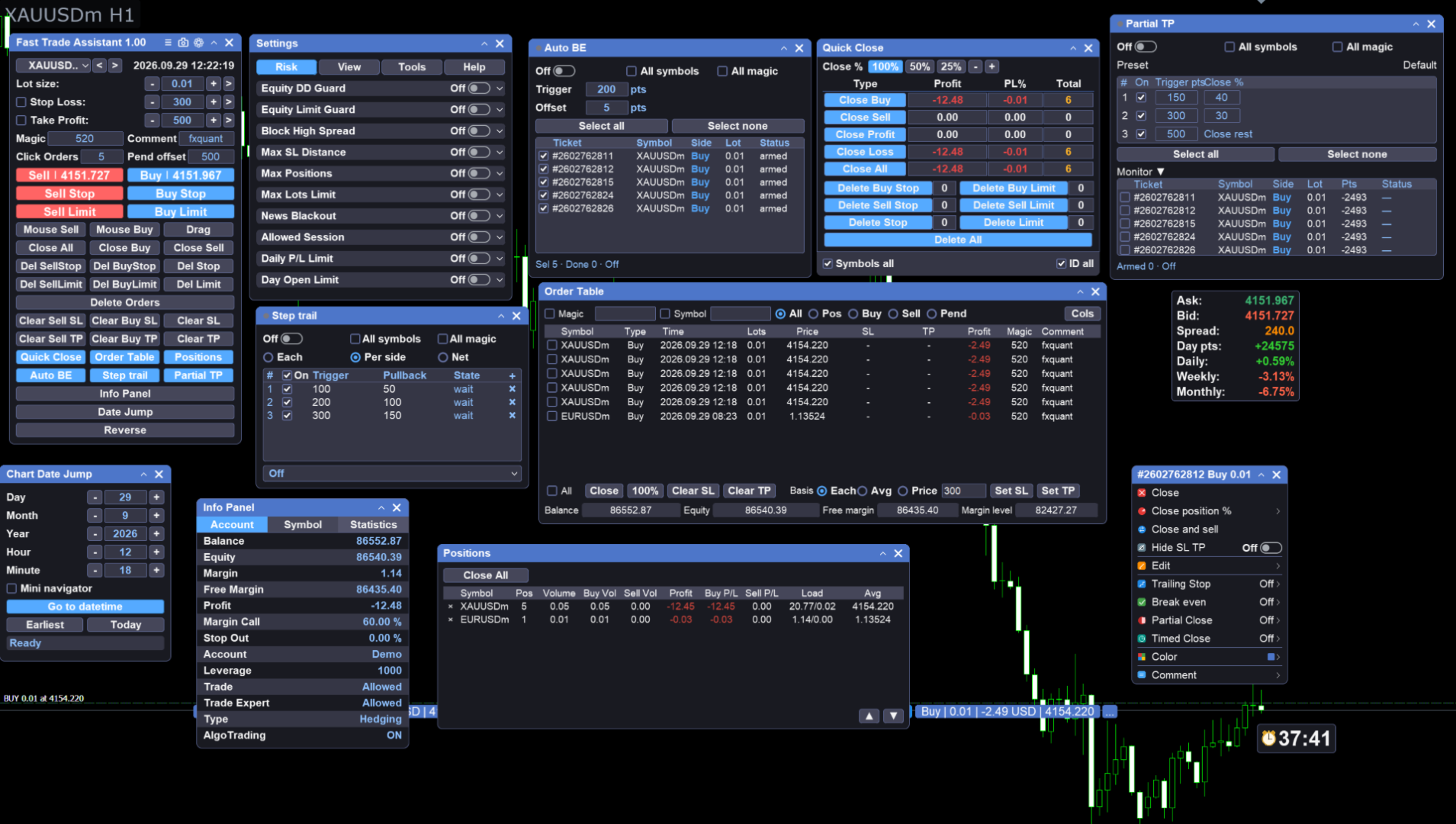
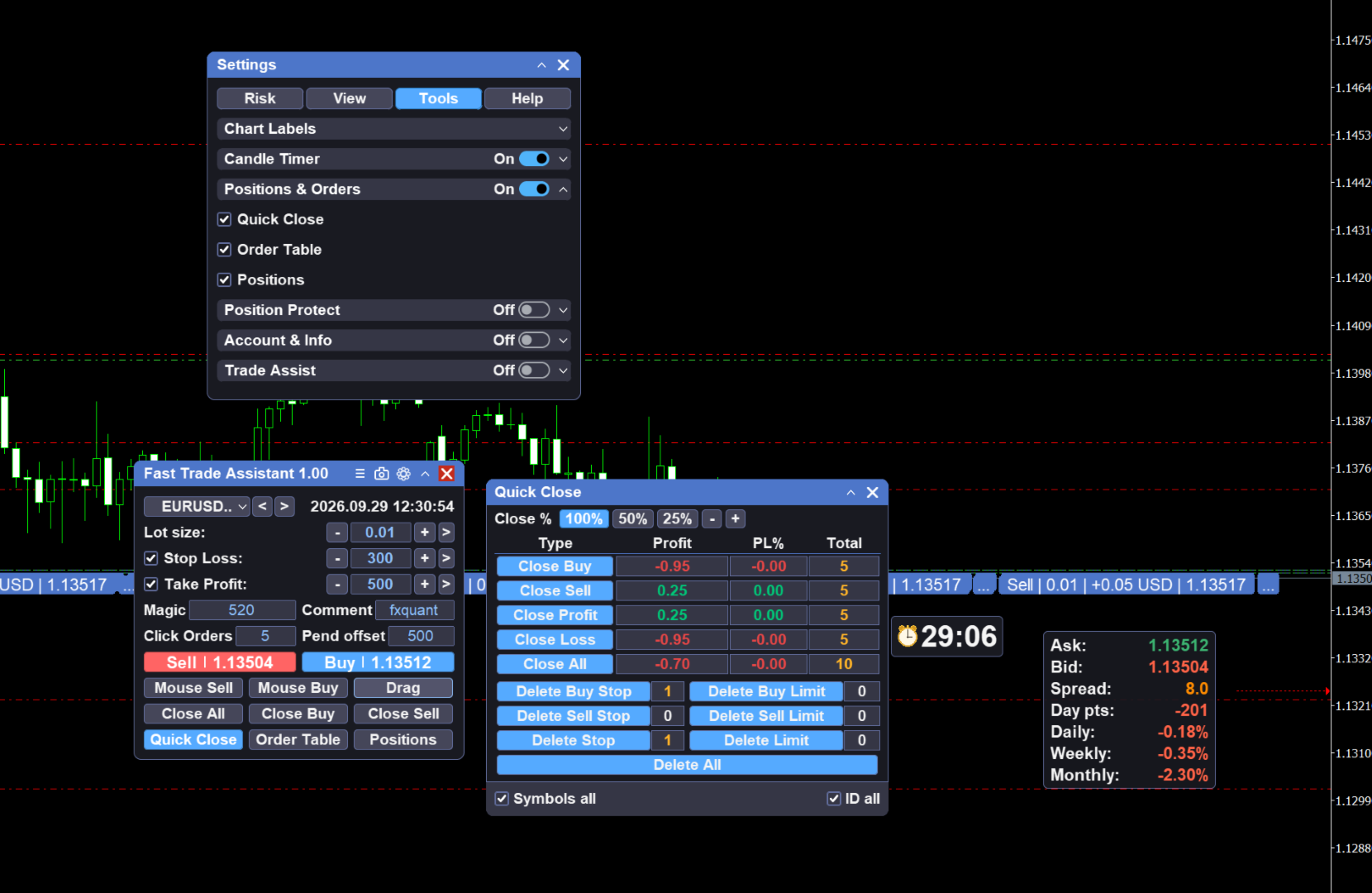
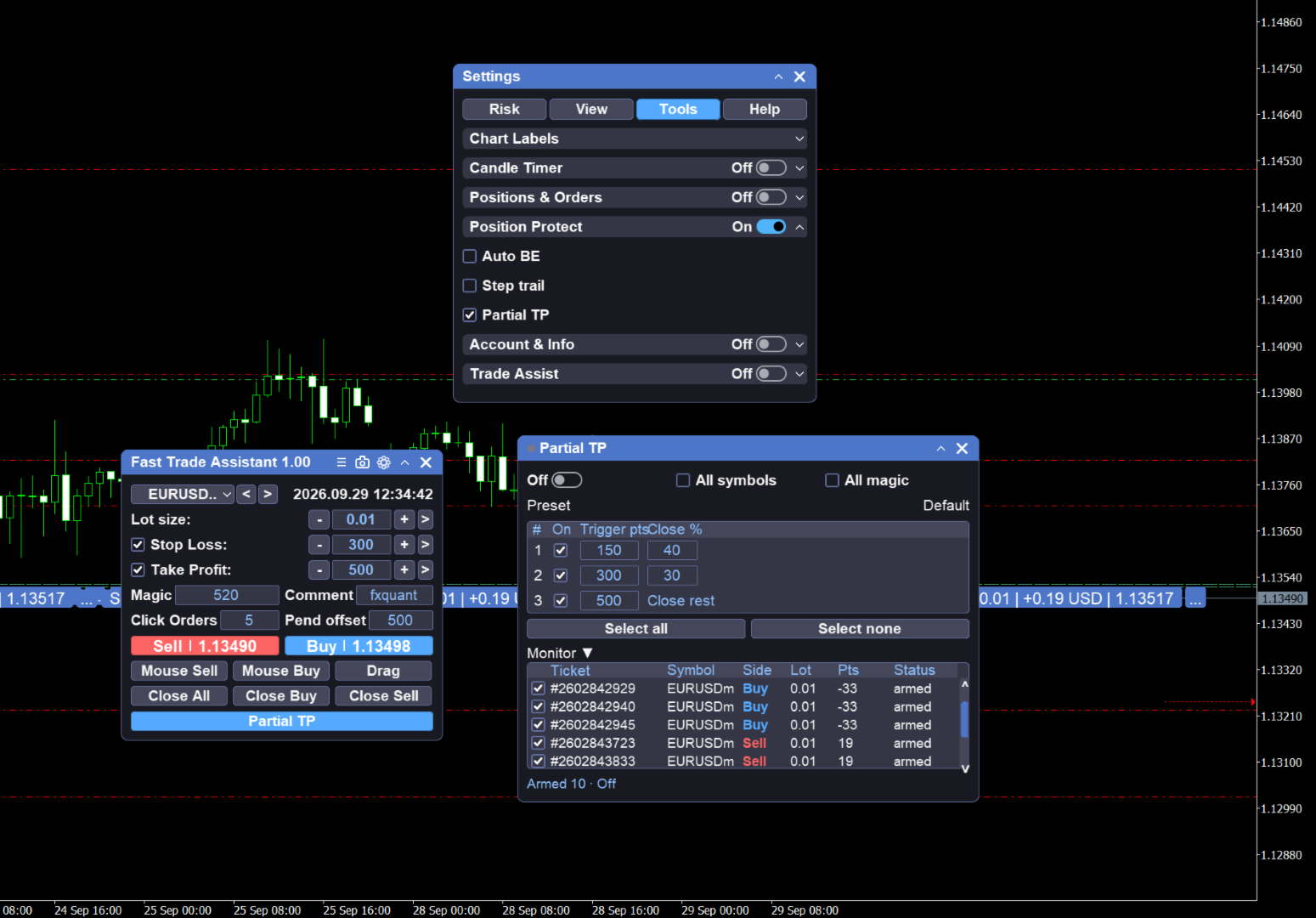
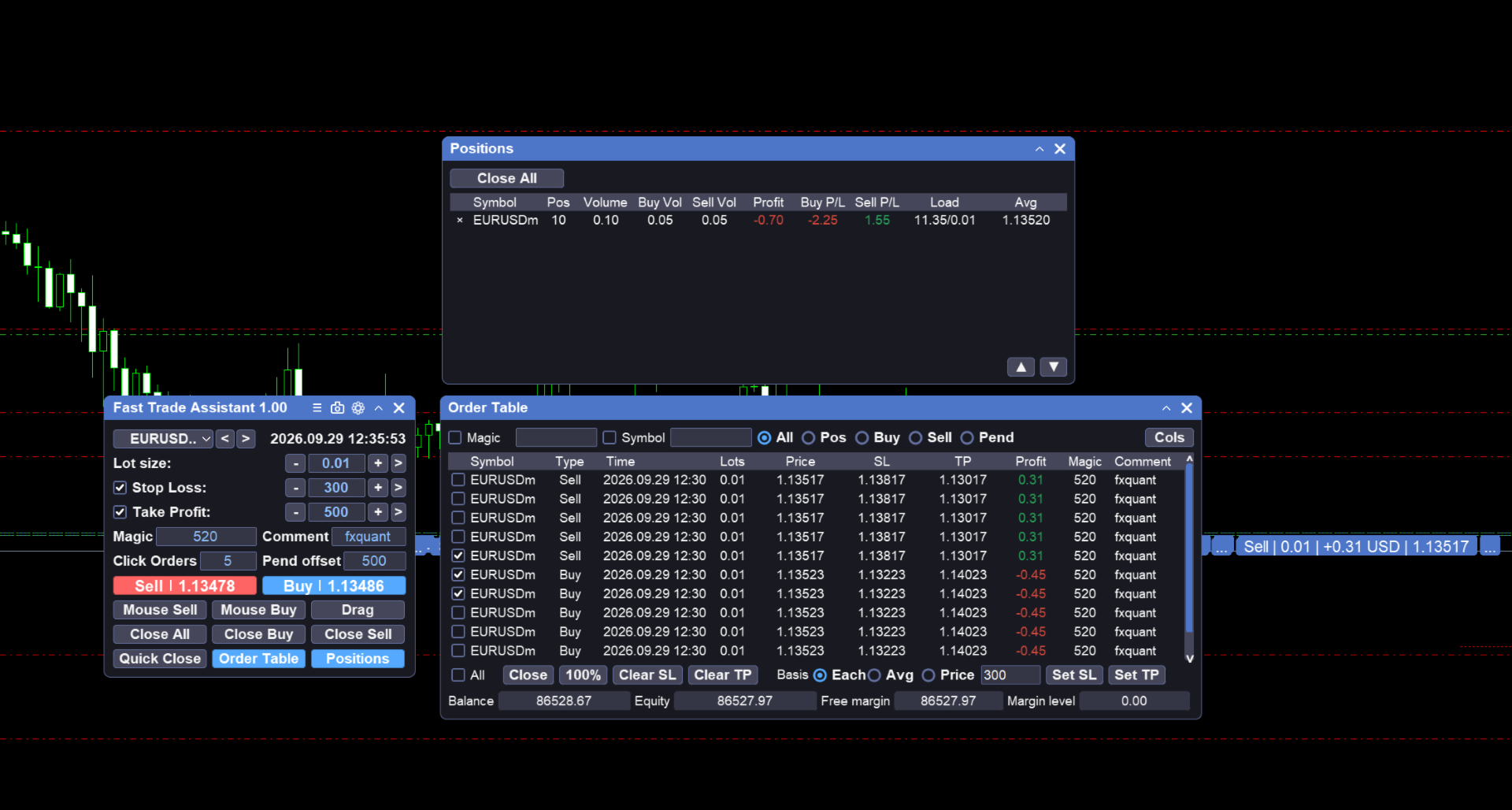
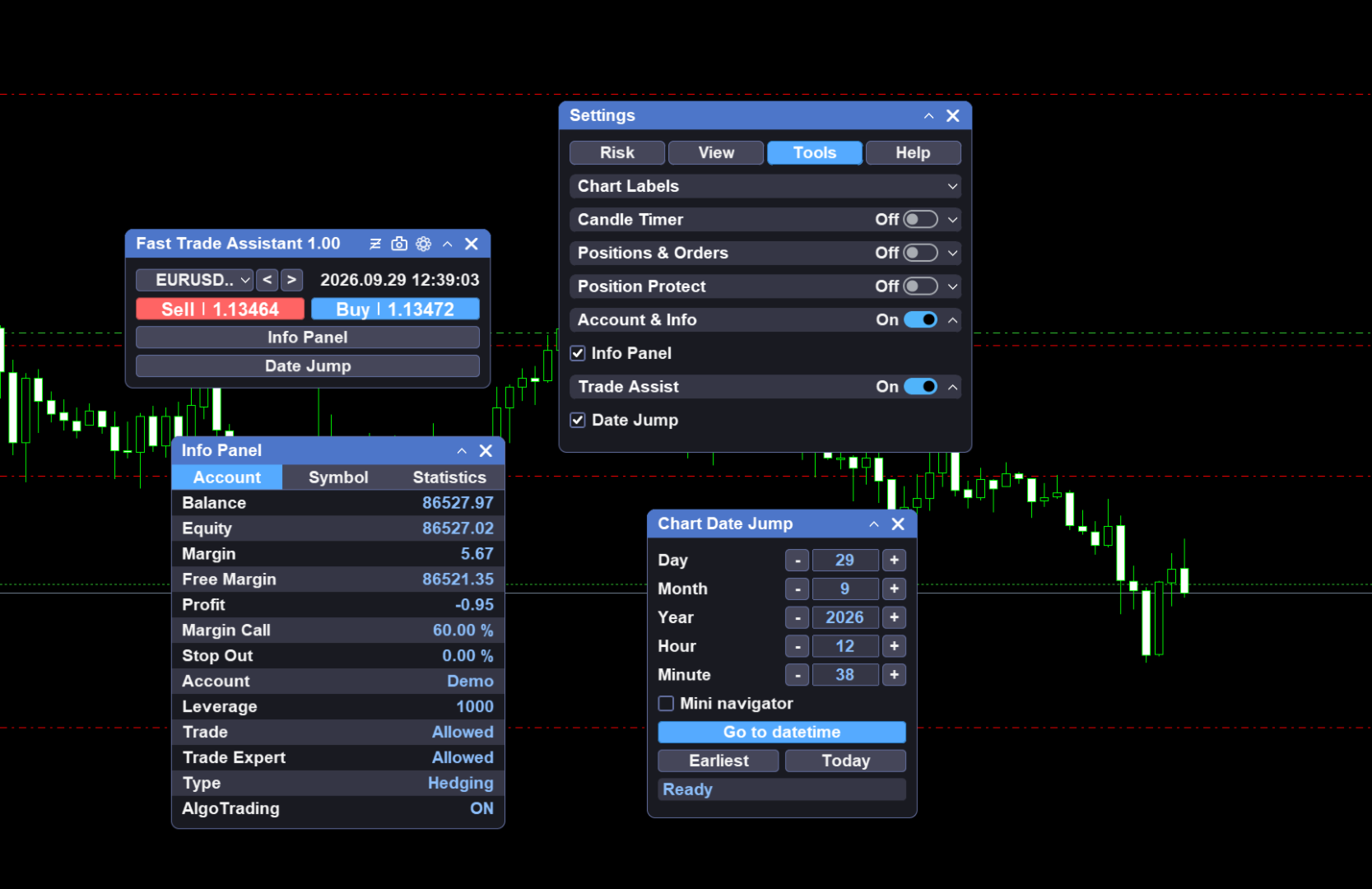
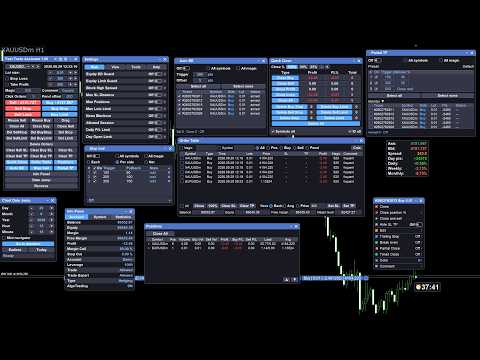
Fast Trade Assistant Panel is an on-chart trading utility for MetaTrader 5. It provides market orders, pending orders, risk-based lot sizing, selective close, break-even, step take-profit, keyboard trading, Super Trend, Inside/Outside Bars and a bar countdown timer. Settings are changed from the main panel and the Settings window. No EA Inputs setup is required to start trading.

Execution

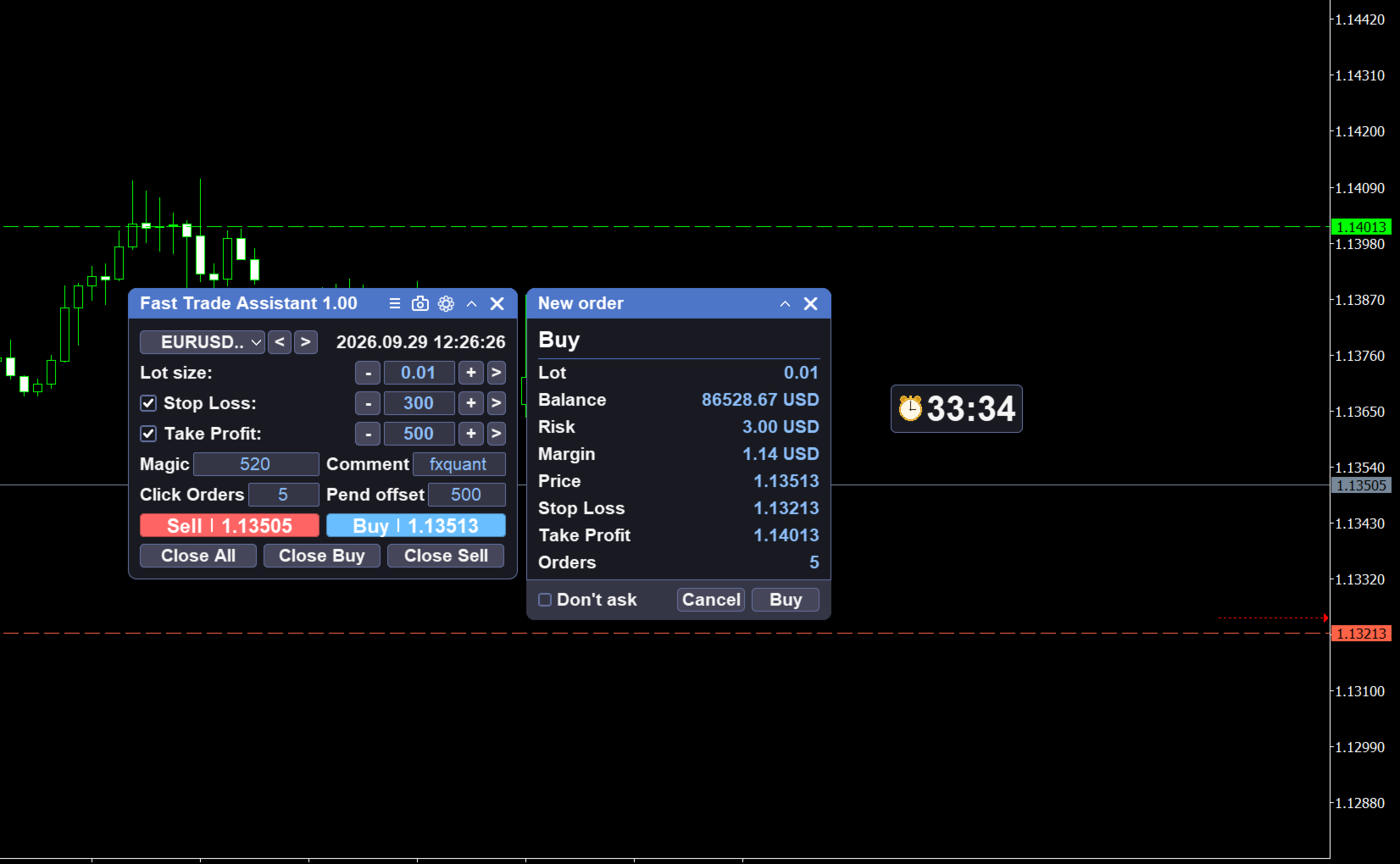
Market Buy and Sell use the lot size and the optional Stop Loss and Take Profit entered on the panel. Hovering over Buy or Sell previews dashed SL and TP lines and shows a status line with SL, TP and lot.

If the market is closed, Buy, Sell and Close show the alert "Market is closed!" and no order is sent. If the terminal is disconnected, they show the alert "Disconnected terminal!!!" and no order is sent. An alert also appears when an order cannot be opened because of invalid panel values.

Hotkeys for buy, sell, close and delete are optional and are enabled in Settings. Filters by magic number and by current symbol are available in Settings and on the panel. An asynchronous mode for mass-close requests can be enabled in Settings.

Risk and lot sizing

The size field on the main panel works in one of three modes: fixed lot, risk as a percentage of balance, or risk as a money amount. The mode is selected in Settings and the value is edited on the main panel. The two risk modes require Stop Loss to be enabled on the panel.

Panel layout

Main-panel buttons and tool entries can be shown or hidden in Settings, so the panel keeps only the controls you use.

Risk controls

The Risk page in Settings contains trading guards such as lot limits, daily limits, drawdown, spread and news or session limits. These guards are separate from the risk percentage in the lot field: the lot field sizes a new order, while the Risk page protects the account and the trading environment.

Pending orders

Supported types are Sell Limit, Sell Stop, Buy Limit and Buy Stop.

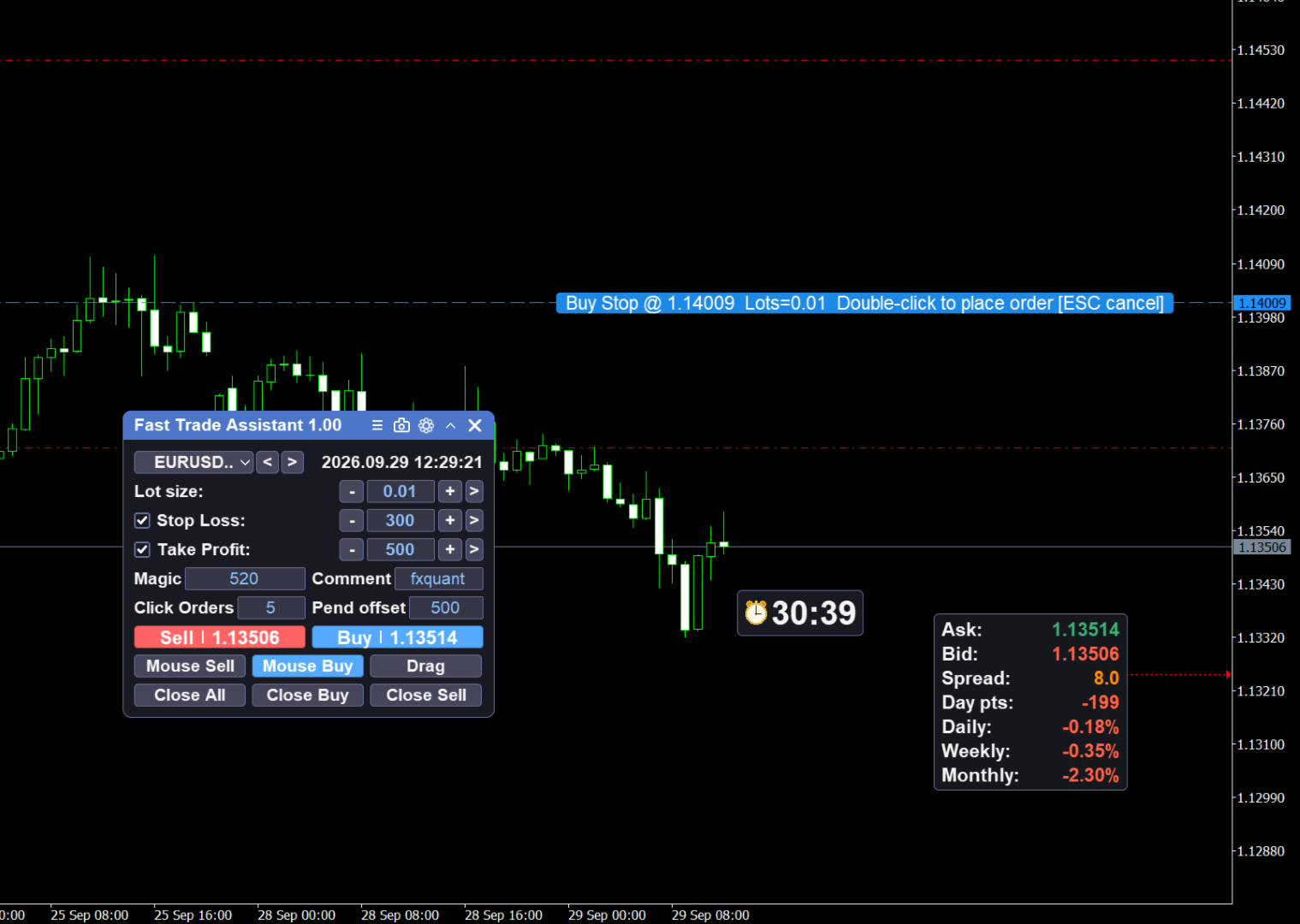
Mouse pending: select a type, move the price line along the chart and double-click to place the order. Esc cancels.

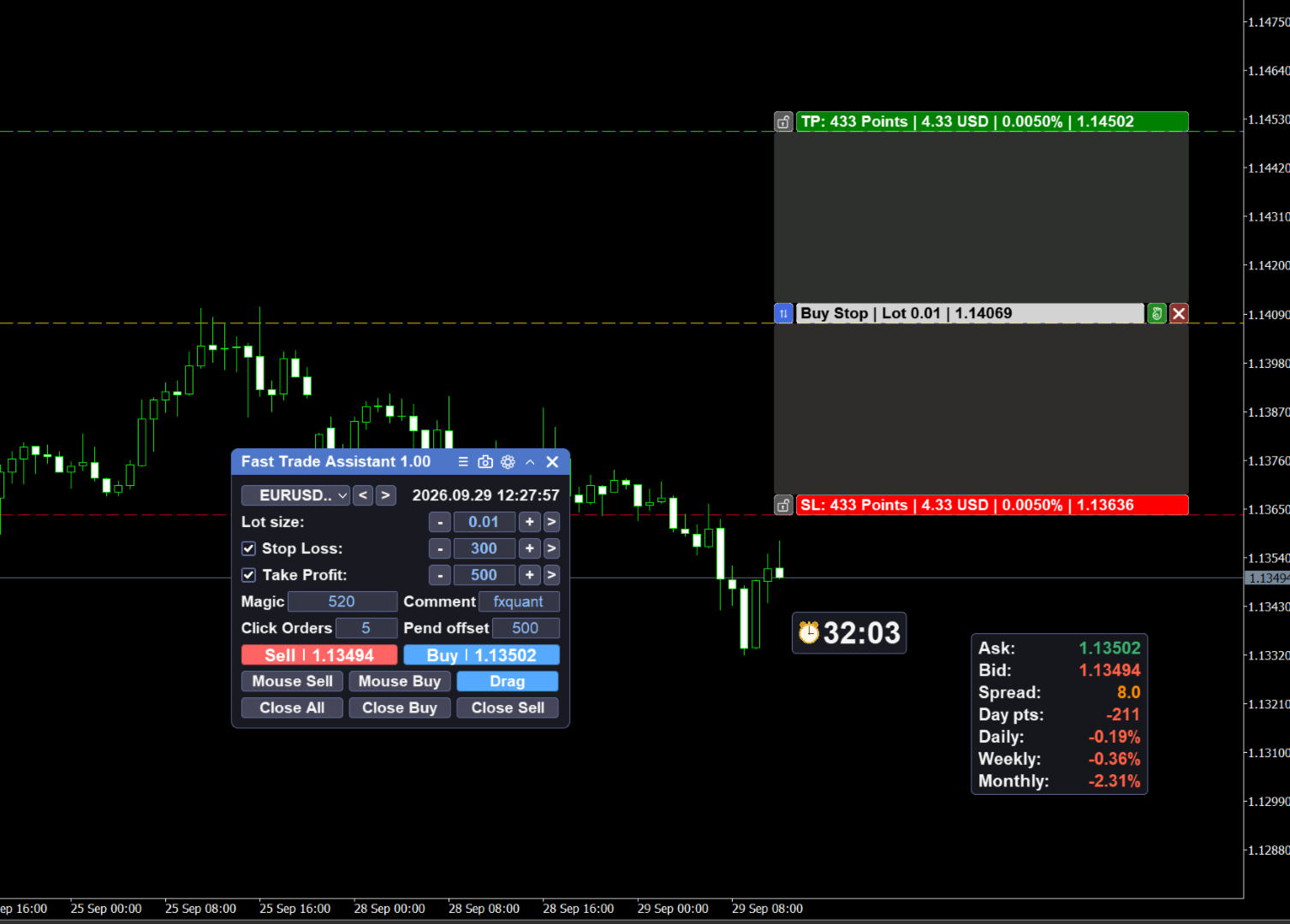
Drag Pending: drag the Entry, SL and TP bars and confirm to place the order. The lot follows the main panel lot field. Esc closes the tool.

Close tools

The main panel can close all positions and delete all pending orders. The One Key Close window closes positions by profit, loss, buy or sell, or a combination of these, and can also clear all positions and delete pending orders.

Position protection

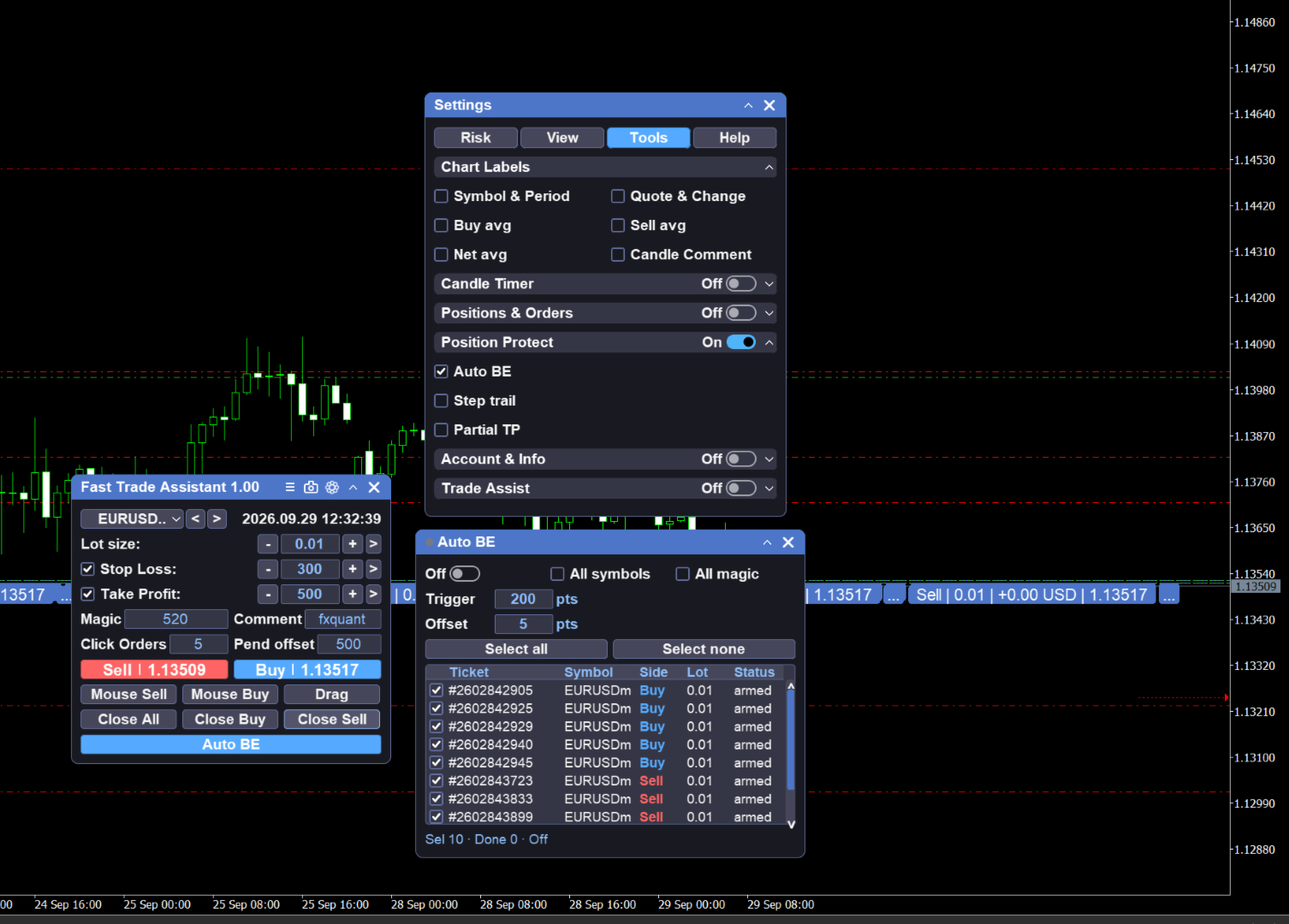
Break even is opened from the main Break even button. When floating profit reaches the trigger, the stop loss is moved to protect capital. Symbol and magic filters are available on the panel, and the title lamp and button state show whether the function is running.

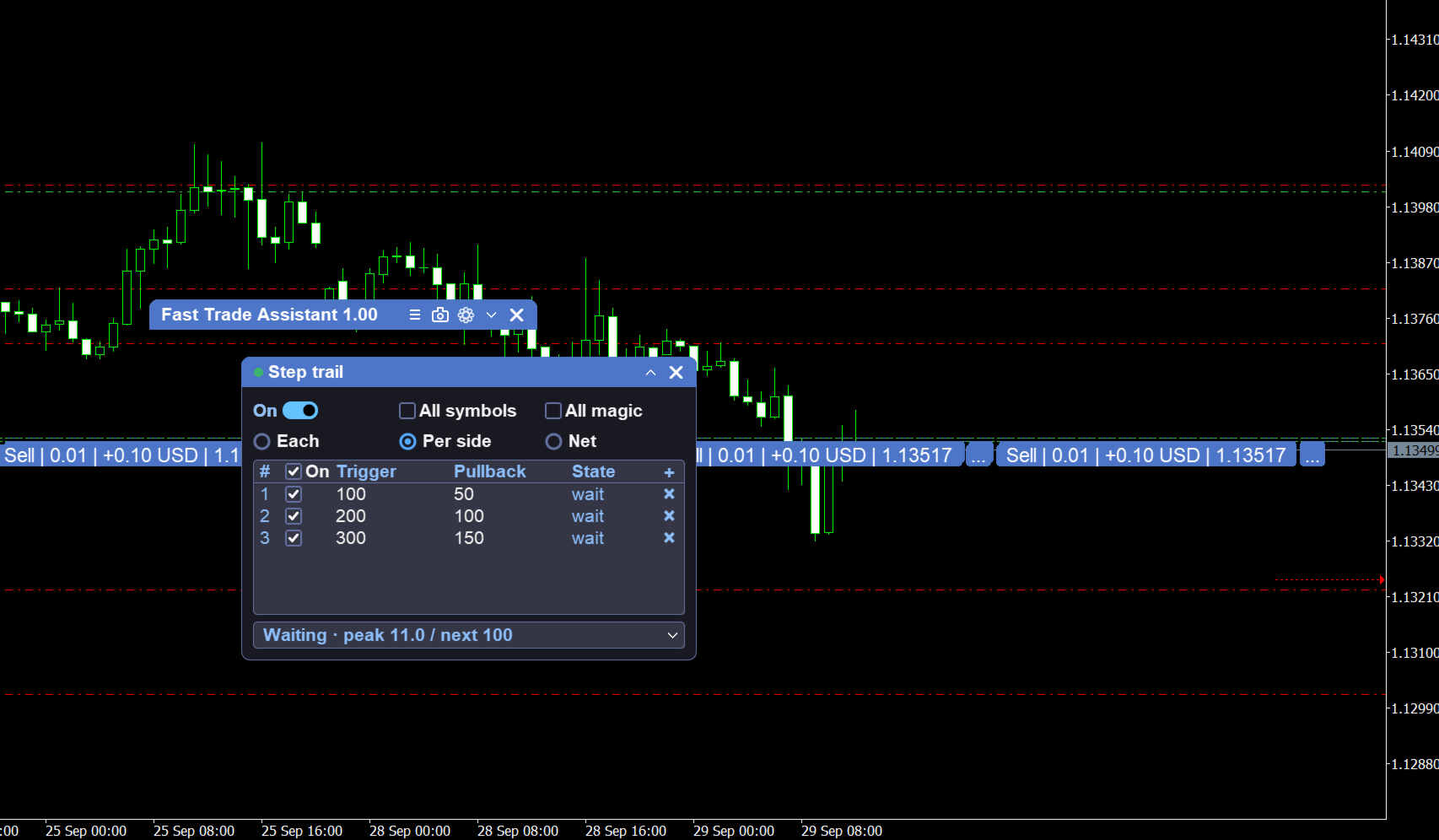
Step trail is opened from the main Step trail button. The step table works per ticket, by side or on net position, and advances take-profit targets step by step. Symbol and magic filters are available, and the function is enabled with a switch on the panel.

Keyboard trading

Open Keyboard from the main panel, turn on Enable and trade with the key tiles. Safe mode, Edit and Button can be checked separately. Filters by all symbols or all magic numbers are available.

Chart helpers

Candle Timer shows a bar close countdown on the chart. Its placement and style are set in Settings.

Super Trend is enabled in the Tools page of Settings and draws the trend line on the chart. ATR period, multiplier and signal display can be changed.

Inside/Outside Bars is enabled in the Tools page of Settings and marks inside and outside bars on the chart. Each type has its own display switch and color, and alerts can be sent as a popup or a push notification.

How to use

  1. Attach Fast Trade Assistant Panel to a chart and enable AutoTrading in the terminal.

  2. On the main panel, set the lot (or risk value) and the optional SL and TP. Open Settings to change lot mode, magic number, symbol filter, button layout, Risk guards, timer, Super Trend, Inside/Outside or hotkeys.

  3. Click Buy or Sell. If the order cannot be opened, an alert appears.

  4. For a mouse pending order, press LIMIT or STOP, move on the chart and double-click. Esc cancels.

  5. For a drag pending order, select a type (Buy Stop if none is selected), click Drag Pending, drag Entry, SL and TP, and confirm. Esc closes the tool.

  6. Use close all or delete all when needed. For selective close, open One Key Close.

  7. Open Break even for capital protection, or Step trail for stepped targets (fill the step table and enable).

  8. For keyboard trading, open Keyboard, turn on Enable and use the key tiles.
Prodotti consigliati
Auto Lot Equalizer
Bin Jumahat Johan
AutoLotEqualizer – Smart Position Balancing Tool AutoLotEqualizer is a precision trade management utility designed to keep your total BUY and SELL volumes balanced automatically. It detects differences between your open BUY and SELL positions and opens compensating trades — ensuring both sides stay equal in exposure. This helps grid, hedge, and basket systems maintain symmetry and control over total position risk — all while saving you time and manual effort. ️ Key Features Automatic Lot Ba
FREE
PZ Penta O MT5
PZ TRADING SLU
3.8 (5)
The Penta-O is a 6-point retracement harmonacci pattern which usually precedes big market movements. Penta-O patterns can expand and repaint quite a bit. To make things easier this indicator implements a twist: it waits for a donchian breakout in the right direction before signaling the trade. The end result is an otherwise repainting indicator with a very reliable trading signal. The donchian breakout period is entered as an input. [ Installation Guide | Update Guide | Troubleshooting | FAQ | A
FREE
See how your account is really doing at a glance, right on the chart. The dashboard reads your account and trade history and never opens, modifies or closes a trade. How it works Every second the dashboard reads balance, equity, margin and open positions. Closed results come from the deal history: for each closing deal the profit, swap, commission and fee are added together. From these deals it calculates closed profit for today, this week and this month, plus statistics for the period you choos
FREE
Value Chart Candlesticks
Flavio Javier Jarabeck
4.57 (14)
The idea of a Value Chart indicator was presented in the very good book I read back in 2020 , " Dynamic Trading Indicators: Winning with Value Charts and Price Action Profile ", from the authors Mark Helweg and David Stendahl. The idea is simple and the result is pure genius: Present candlestick Price analysis in a detrended way! HOW TO READ THIS INDICATOR Look for Overbought and Oversold levels. Of course, you will need to test the settings a lot to find the "correct" one for your approach. It
FREE
AntaresX Volume Profile
Juan Eduardo Verdala
AntaresX Volume Profile — Indicator for MetaTrader 5 AntaresX Volume Profile is an indicator that displays the price levels where the highest trading activity was concentrated during a selected period, and calculates the historical probability of the price reacting when it reaches each of those levels. What the indicator draws The indicator identifies three levels on the chart: POC (Point of Control): the price where the highest trading activity was recorded during the selected period. Displaye
FREE
Crystal Cross Sync
Muhammad Jawad Shabir
Crystal Cross Sync Advanced MT5 Chart Synchronization & Backtesting Engine Crystal Cross Sync is a high-performance MetaTrader 5 utility designed to transform the way traders analyze, replay, and synchronize market data. Built specifically for serious MT5 traders, this tool delivers ultra-fast chart synchronization, automatic time alignment, precision zoom control, and structured backtesting assistance — all in one optimized engine. This is not an indicator. This is a professional chart control
FREE
This MQL4 code is a   custom indicator   that draws multiple colored rectangles on a chart, spaced apart by a defined pip distance, and projected into the future. Here's a brief breakdown: Purpose: Draws several horizontal rectangles (zones) starting from a specified price. Rectangles are spaced apart vertically by a pip distance. Colors alternate between FirstColor and SecondColor . Rectangles can be drawn behind candles and optionally filled. Each rectangle extends into the future for a specif
FREE
Position Selective Close MT5
Francisco Manuel Vicente Berardo
The Position Selective Close is a multi-symbol multi-timeframe script used to close simultaneously various positions.  General Description   The Position Selective Close   possesses   three operation modes (Intersection,   Union   and All) that control the way   as   four position features (symbol, magic number,   type   and profit) are used. The modes, available through the Selection Mode input parameter, relate to the features, available through the “Select by Feature” and “Feature” input pa
FREE
Donchian Breakout And Rsi
Mattia Impicciatore
4.33 (3)
Descrizione generale Questo indicatore è una versione avanzata del classico Donchian Channel , arricchita con funzioni operative per il trading reale. Oltre alle tre linee tipiche (massimo, minimo e linea centrale), il sistema rileva i breakout e li segnala graficamente con frecce sul grafico, mostrando solo la linea opposta alla direzione del trend per semplificare la lettura. L’indicatore include: Segnali visivi : frecce colorate al breakout Notifiche automatiche : popup, push e email Filtro R
FREE
MP Smart Panel Tester
Pavlo Mostipan
5 (1)
️ SMART PANEL TESTER — TESTA LA TUA STRATEGIA. CONTROLLA IL TUO RISCHIO. SMART PANEL TESTER è una versione semplificata del SMART PANEL principale, progettata appositamente per testare strategie di trading in modo pratico ed efficiente nello Strategy Tester . L'obiettivo principale del pannello è il Risk Management . Una strategia di trading non dipende solo da buoni punti di ingresso: le sue prestazioni nel lungo periodo dipendono anche da quanto efficacemente viene controllato il rischio in
FREE
Prop Edge Heartbeat
Nuno Madeira Amaro Pire Costa
EA to prevent inactivity violations on prop firms. This EA will scout for your most recent trade and if it is older than the number of days defined, will enter a micro lot position size 0.01 on the pair defined. It is recommended to use a tight spread pair like EURUSD. This EA will not act as long as you have at least one trade in the last X days (defined on config). This EA will not place other trades or modify existing position.
FREE
RSI abcd
Francisco Gomes Da Silva
3.75 (4)
RSI ABCD Pattern Finder: Strategia Tecnica 1. Come Funziona l'Indicatore Combina il RSI classico con il rilevamento automatico di pattern armonici ABCD . Componenti Principali RSI standard (periodo regolabile) Marcatori di massimi e minimi (frecce) Pattern ABCD (linee verdi/rosse) Filtri ipercomprato (70) e ipervenduto (30) 2. Configurazione su MT5 period = 14 ; // Periodo RSI size = 4 ; // Dimensione massima del pattern OverBought = 70 ; // Livello ipercomprato OverSold = 30 ; // Livello iperve
FREE
Mirror Chart MT5
Andrej Hermann
5 (1)
The Mirror Chart MT5 is a overlay indicator specifically designed to project a second financial instrument directly onto the main chart window. This tool is invaluable for traders who rely on correlation analysis, as it visualizes the price movements of two different instruments in real time. Unlike traditional overlays, this indicator utilizes intelligent, dynamic centering and scaling logic. It continuously analyzes the visible price range in the current window for both symbols and calculates
FREE
JT360 DNA Mini PnL Pointer V1.04 Public Compatto. Chiaro. Sempre sott’occhio. JT360 DNA Mini PnL Pointer è un indicatore leggero per MetaTrader 5 che mostra il profitto o la perdita flottante aggregata di tutte le posizioni aperte sul simbolo del grafico corrente. La sua visualizzazione compatta sul grafico combina il PnL basato sul rischio, espresso in R, una sottile mini-barra e una matrice di colori personalizzabile. I colori distintivi JT360, turchese e magenta, evidenziano i valori estremi
FREE
Important Lines
Terence Gronowski
4.88 (24)
This indicator displays Pivot-Lines, preday high and low, preday close and the minimum and maximum of the previous hour. You just have to put this single indicator to the chart to have all these important lines, no need to setup many single indicators. Why certain lines are important Preday high and low : These are watched by traders who trade in a daily chart. Very often, if price climbs over or falls under a preday low/high there is an acceleration in buying/selling. It is a breakout out of a
FREE
AI Weekly Open Bias Trader
Fadi Hassan Khaled Ghanem
Usa il prezzo di apertura settimanale come linea di bias e opera sui rifiuti di quella linea nella direzione del bias settimanale. Come funziona L'EA valuta le proprie regole una volta per ogni barra chiusa del timeframe del segnale (H1 per impostazione predefinita), quindi i segnali non vengono ridisegnati e la logica è la stessa nel tester e su un grafico live. Quando compare il setup e non c'è alcuna posizione aperta di questo EA sul simbolo, apre un ordine a mercato con uno stop loss e un ta
FREE
Session Profiles
Basharat Umar Khan
5 (1)
Short Description Draws rolling Time-Price-Opportunity (TPO) and footprint volume profiles for the Asia, London, and New York sessions with POC/VAH/VAL levels, delta volume bias, order flow overlays, liquidity heatmaps, developing rolling lines, Naked POC (NPOC) tracking, Initial Balance breakouts, multi-session confluence zones, and automatic broker GMT-offset detection. Full Description Plots separate market-profile and volume-profile style histograms for the three major trading sessions (Asi
FREE
CandlePro X
Murtadha Majid Jeyad Al-Khuzaie
CandlePro X — Free Professional Candle Visualizer for MetaTrader 5 CandlePro X is a free chart visualization indicator for MetaTrader 5, designed to make candlestick charts cleaner, sharper, and easier to read. If you find it difficult to quickly distinguish bullish and bearish candles, especially on busy charts, CandlePro X helps solve this problem by giving your candles stronger colors, clearer contrast, and a more professional appearance. CandlePro X does not generate trading signals, pred
FREE
Free automatic Fibonacci is an indicator that automatically plots a Fibonacci retracement based on the number of bars you select on the BarsToScan setting in the indicator. The Fibonacci is automatically updated in real time as new highest and lowest values appears amongst the selected bars. You can select which level values to be displayed in the indicator settings. You can also select the color of the levels thus enabling the trader to be able to attach the indicator several times with differe
FREE
V-Connect Tick Data Validator is a utility for MetaTrader 5. It checks each tick and rejects invalid data. Features - Checks bid and ask prices - Checks spread and time - Uses only MQL5 functions - Logs results in the Experts tab - Real-time filtering: - Negative or zero spreads - Stale timestamps (>60 seconds) - Reversed bid/ask - **<1ms overhead** — runs on low-spec VPS - **Journal audit trail** — "TICK PASSED" / "TICK REJECTED" How to Use Attach to a chart. In your EA: if (validate_tick(tick
FREE
Swing Low
Teerathad Booranawisedkul
Key Features: Automatic swing detection on any timeframe (M1 to MN1) Visual arrow indicators (red for swing highs, blue for swing lows) Adjustable sensitivity with customizable swing strength parameter Dynamic arrow positioning that never overlaps with candles Instant display when changing timeframes - no delays Compatible with MT4 and MT5 platforms Clean, professional interface with minimal screen clutter Lightweight code for fast performance Customizable colors and arrow sizes Customizable S
FREE
Sessions Duck
Karim Abdelwahab
Overview Sessions Duck is a highly optimised, resource-efficient MetaTrader 5 indicator designed to automatically visualise the core global trading sessions (Asian, London, and New York) and display live, synchronised timezone data directly on your chart. Built specifically for performance, zero lag, and clean chart aesthetics, Sessions Duck provides day traders, scalpers, and session breakout traders with immediate market liquidity context without compromising terminal responsiveness—even when
FREE
Session Box Hours disegna rettangoli di sessione Asia, London e New York. Ogni box usa high/low delle barre nell’intervallo orario configurato. Solo contesto visuale — non invia ordini né genera segnali di ingresso. Cosa fa - tre sessioni: Asia, London, New York (ognuna on/off + ore/minuti + colore); - base oraria: orologio broker/server oppure ore GMT con offset Broker GMT; - sessioni overnight (fine ≤ inizio) passano al giorno successivo; - profondità storica via Days Back (default 10); - riem
FREE
Morning Range Breakout (Free Version) Morning Range Breakout (Free Version) is a straightforward trading advisor that implements a breakout strategy based on the morning range. It identifies the high and low within a specified time interval (e.g., 08:00–10:00 UTC) and opens a trade on a breakout upward or downward. The free version includes core functionality without restrictions. All parameters and messages are in English, per MQL5 Market requirements. Key Features Detects morning range based
FREE
XAU VWAP Mean Reversion H4 Expert Advisor for MetaTrader 5 — Gold / XAUUSD focus Version: 1.00 What it is XAU VWAP Mean Reversion H4 is an Expert Advisor for gold on the H4 chart. Intraday VWAP mean-reversion style participation on gold H4. Built for structured automated participation — not grid , not martingale . Evaluate on your broker and risk profile before any live use. This product is a technical system . Exact thresholds and entry equations remain internal product design and are not publ
FREE
Smart Grid MT5
Dmitry Kotov
5 (5)
Smart Grid MT5 automatically recognizes any symbol, period and scale of the chart and marks it up accordingly. It is possible to mark up the chart by trading sessions. The grid consists of the two main line types. Vertical lines There are two visualization methods: Standard - the lines are divided into three types, separating: Small time period. Medium time period. Large time period. Trading Session - the lines are divided into groups (a total of ten). Each group has two lines: the first is res

FREE
Levels tool
Sergei Kiriakov
Just a panel for drawing levels. Minimal but very useful thing. This is a reimagining of Color Levels Pro. ---- 4 types of customized levels. support for rectangle and line levels. The indicator parameters are very simple and are divided into blocks. For any update idea please contact me here. ---- Extension version " Levels tool pro " ---- don't suffer don't suffer ---- Enjoy your work!!!!!!!! ----
FREE
GOM Trade Manager
Wannapach Chinnaprapa
GOM Trade Manager helps you execute trades the way you want it. Works on all instruments Forex, Commodities, & Crypto. It helps you with lot calculations, spread addition and balance calculations so you can just focus on actual trading. For full automatic planned management, stackable triggers and spread widening protection >> check out GOM Trade Manager Pro . ------------------------------------------NOTABLE FEATURES------------------------------------------ You set everything based on bid
FREE
Deviation Trend Profile Overview Deviation Trend Profile is a MetaTrader 5 chart indicator that combines three visual layers in a single chart window: a moving average with momentum-based coloring, deviation bands calculated from volatility, and a horizontal distribution profile drawn to the right of the current price. The indicator is an analytical tool. It does not open, modify or close trades, and it is not a complete trading system. It is designed to help the user observe trend direction, mo
FREE
Ninja MT5 Doctor
Atsushi Katayama
NINJA MT5 DOCTOR PANORAMICA NINJA MT5 Doctor è un'utility MT5 gratuita e di sola lettura che acquisisce un'istantanea diagnostica una tantum del terminale, del conto, dei grafici aperti, dello storico selezionato e del simbolo del grafico host corrente. È un'utility in formato Expert Advisor, non un EA di trading né un indicatore. I nomi del pannello e dei parametri di input sono in inglese. COSA CONTROLLA Verifica la connessione al server del broker, le autorizzazioni al trading del terminale e
FREE
Gli utenti di questo prodotto hanno anche acquistato
Trade Assistant MT5
Evgeniy Kravchenko
4.43 (216)
It helps to calculate the risk per trade, the easy installation of a new order, order management with partial closing functions, trailing stop of 7 types and other useful functions. Additional materials and instructions Installation instructions - Application instructions Line function -   shows on the chart the Opening line, Stop Loss, Take Profit. With this function it is easy to set a new order and see its additional characteristics before opening.   Risk management  - The risk calculation
FarmedHedge Pair Trading Dashboard
Tanapisit Tepawarapruek
5 (7)
Farmed Hedge Yield Farming | All Markets (Manual - Hybrid - Semi/Automated EA) VERIFIED TRADING RESULTS - Farmed Hedge Yield Axi Copy:  https://www.mql5.com/en/signals/2356376 - Farmed Hedge Yield Exn Copy:   https://www.mql5.com/en/signals/2356404 - Farmed Hedge Yield V Copy:  https://www.mql5.com/en/signals/2357156 IMPORTANT NOTICE: FarmedHedge is a MANUAL-FOCUSED TRADING UTILITY ,not a fully automated EA. Results shown on this Signal include manual trades and overall strategic management.
Forex Trade Manager MT5
InvestSoft
4.98 (690)
Benvenuto a Trade Manager EA, lo strumento definitivo per la gestione del rischio , progettato per rendere il trading più intuitivo, preciso ed efficiente. Non è solo uno strumento per l'esecuzione degli ordini, ma una soluzione completa per la pianificazione delle operazioni, la gestione delle posizioni e il controllo del rischio. Che tu sia un principiante, un trader avanzato o uno scalper che necessita di esecuzioni rapide, Trade Manager EA si adatta alle tue esigenze, offrendo flessibilità s
Telegram to MT5 MultiChannel Copier
Sergio Marquez Uroz
4.68 (22)
Telegram to MT5 Multi-Channel Copier   copia automaticamente i segnali di trading dai tuoi canali Telegram e Discord direttamente su MetaTrader 5. Niente bot, niente estensioni del browser, niente copia manuale. Il segnale arriva su Telegram o Discord e l'EA apre l'operazione nel tuo terminale in pochi secondi. E prima di copiare un canale, il backtester integrato ti mostra cosa avrebbe fatto quel canale sul tuo conto. Il prodotto include due componenti: un'applicazione Windows che ascolta i tuo
Local Trade Copier EA MT5
Juvenille Emperor Limited
4.94 (150)
Local Trade Copier EA MT5 è un trade copier rapido e flessibile per copiare e gestire operazioni tra più conti MetaTrader 5 sullo stesso computer Windows o Windows VPS. Combina la sincronizzazione locale delle operazioni con controlli lato Receiver per dimensione del lotto, gestione del rischio, filtraggio delle operazioni, mappatura dei simboli, gestione delle operazioni e protezione del conto. Configura i terminali Transmitter e Receiver in circa 1 minuto e copia operazioni manuali o aperte d
TradePanel MT5
Alfiya Fazylova
4.89 (174)
Trade Panel è un assistente commerciale multifunzionale. L'applicazione contiene più di 50 funzioni di trading per il trading manuale e permette di automatizzare la maggior parte delle attività commerciali. Istruzioni per l'applicazione: https://www.mql5.com/it/blogs/post/762331 Versione di prova dell'applicazione per un conto demo: https://www.mql5.com/it/blogs/post/762419 Come installare l'applicazione: https://www.mql5.com/it/blogs/post/762362 Come testare l'applicazione in modalità visuale:
EA Overfitter
Stephen J Martret
5 (4)
That backtest looks great. But will it still be making money tomorrow, next week, next month? EA Overfitter re-runs your EA on 100 price histories it has never seen. One score tells you if the edge is real. A backtest tells you what an EA did on one price history — the one that happened to occur. What you cannot tell from it is how much of that result was the strategy and how much was the particular path. EA Overfitter answers that. It builds up to 100 synthetic price histories your EA has n
Copia i segnali Telegram con le tue regole di trading Telegram to MT5 Signal Trader copia automaticamente i segnali di trading testuali dai canali e gruppi Telegram pubblici e privati in MetaTrader 5. Gestisci più fornitori e conti MT5 da un'unica applicazione desktop, con impostazioni di rischio e di trading specifiche per ogni fornitore . Per copiare i segnali non servono bot Telegram né configurazioni API. Accedi semplicemente con il tuo account Telegram tramite numero di telefono o codice QR
Strategy Ledger Pro
Abdullah Uygar Tuna
5 (16)
Ora disponibile in italiano. Strategy Ledger Pro è un pannello di analisi del conto in sola lettura per MetaTrader 5. Separa i risultati del conto per Expert Advisor, strategia, simbolo e numero magic, così puoi vedere quanto contribuisce davvero ciascuno. Il pannello è disponibile in 11 lingue: English, Français, Deutsch, Español, Italiano, Português, Русский, Türkçe, 中文, 日本語 e 한국어. Prima di scaricare la demo. Il Market esegue la demo di qualsiasi prodotto a pagamento solo nello Strategy Teste
Exp COPYLOT CLIENT for MT5
Vladislav Andruschenko
3.97 (35)
Copiatore professionale di trade per MetaTrader 5 Un copiatore di trade veloce, professionale e affidabile per MetaTrader . COPYLOT consente di copiare operazioni Forex tra terminali MT4 e MT5 con supporto per conti Hedge e Netting . La versione MT5 di COPYLOT supporta: - MT5 Hedge → MT5 Hedge - MT5 Hedge → MT5 Netting - MT5 Netting → MT5 Hedge - MT5 Netting → MT5 Netting - MT4 → MT5 Hedge - MT4 → MT5 Netting Versione MT4 Descrizione completa + DEMO + PDF Come acquistare Come installare Come ot
News Trade EA MT5
Konstantin Kulikov
4.55 (11)
Presento un utile robot che io stesso utilizzo da diversi anni. Questo robot può essere utilizzato sia in modalità semiautomatica che completamente automatica. >>> Chat <<< Il programma contiene le impostazioni flessibili per fare trading sulle notizie del calendario economico. Non può essere verificato nel tester delle strategie. Soltanto il vero lavoro. Scarica l'ultimo archivio di impostazioni: https://www.mql5.com/en/blogs/post/747929 Monitoraggio dei segnali: https://www.mql5.com/en/signa
================================================================================ POC BREAKOUT - V20.72. Full Professional Grade Toolkit ================================================================================ POC Breakout is a full MetaTrader 5 trading dashboard for discretionary traders who want breakout signals, Point of Control (POC) context, volume profiles, order flow, market structure, news, alerts, and advanced trade planning in one professional workspace. Attached directly to you
The product will copy all telegram signal to MT5 ( which you are member) , also it can work as remote copier.  Easy to set up, copy order instant, can work with almost signal formats, image signal,  s upport to translate other language to English Work with all type of channel or group, even channel have "Restrict Saving Content", work with  multi channel, multi MT5 Work as remote copier: with signal have ticket number, it will copy exactly via ticket number. Support to backtest signal. How to s
Prossimo aggiornamento — Versione 2.52 in arrivo! [NOVITÀ] Preparati a 4 nuove funzionalità principali progettate per migliorare la tua analisi di mercato e il tuo flusso di lavoro nel trading Portiamo l’analisi di mercato a un livello superiore con 4 nuove funzionalità progettate per soddisfare le tue esigenze di trading. Ecco le novità: 1. TRADE OVERVIEW DASHBOARD 2. CONFLUENCE AT ZONE 3. STRONG & WEAK HIGH/LOW 4. OTE 1. TRADE OVERVIEW DASHBOARD Una dashboard che ti aiuta a comprendere più fa
EA Auditor
Stephen J Martret
5 (7)
EA Auditor is an independent analysis tool for traders evaluating Expert Advisors and trading signals on MetaTrader 5. It audits backtest reports, reviews posted developer signals, and cross-verifies the two against each other to help traders assess strategies before committing capital. The MQL5 market offers a wide range of Expert Advisors from many developers, with varying approaches, quality, and transparency. EA Auditor provides a consistent, data-driven framework for reviewing them, answer
Telegram To MT5 Ultra
Mirel Daniel Gheonu
5 (5)
Telegram To MT5 — Copiatore di segnali Trasforma le indicazioni di trading dei tuoi canali Telegram in veri ordini MT5 — automaticamente, su quanti account vuoi, con rischio e regole totalmente sotto il tuo controllo. Telegram To MT5 collega i canali VIP / di segnali che già segui su Telegram al tuo terminale MetaTrader 5. Un'app desktop companion gratuita legge i messaggi (anche dai canali che bloccano i bot), e questo Expert Advisor li esegue sul tuo conto — applicando le tue impostazioni di r
HINN MagicEntry Extra
ALGOFLOW OÜ
4.74 (19)
HINN MAGIC ENTRY – the ultimate tool for entry and position management! SIMPLE. FASTEST. INTUITIVE. MAX AUTOMATED. Place orders by selecting a level directly on the chart! full description   ::  demo-version  :: 60-sec-video-description Key features: - Market, limit, and pending orders - Automatic lot size calculation - Automatic spread and commission accounting - Unlimited partitial take-profits  - Breakeven and trailing stop-loss and take-profit  functions - Invalidation leves - Intuitive, a
Telegram to MT5 Coppy
Sergey Batudayev
5 (10)
Da Telegram a MT5:   la soluzione definitiva per la copia del segnale Semplifica il tuo trading con Telegram su MT5, il moderno strumento che copia i segnali di trading direttamente dai canali e dalle chat di Telegram sulla tua piattaforma MetaTrader 5, senza bisogno di DLL. Questa potente soluzione garantisce un'esecuzione precisa dei segnali, ampie opzioni di personalizzazione, fa risparmiare tempo e aumenta la tua efficienza. [ Instructions and DEMO ] Caratteristiche principali Integrazione d
Trade copier MT5
Alfiya Fazylova
4.61 (57)
Trade Copier è un'utilità professionale progettata per copiare e sincronizzare le transazioni tra conti di trading. La copiatura avviene dal conto/terminale del fornitore al conto/terminale del destinatario, che sono installati sullo stesso computer o vps. Prima di acquistare, puoi testare la versione demo su un account demo. Versione demo qui . Istruzioni complete qui . Funzionalità e vantaggi principali: Supporta la copia degli ordini: MT5> MT5, MT4> MT5, MT5> MT4, inclusi i conti di compensaz
AW Shepherd Safety MT5
AW Trading Software Limited
5 (5)
AW Shepherd Safety EA è un Expert Advisor per la gestione delle posizioni aperte. Il primo ordine lo apre il trader dal pannello, poi l'EA gestisce il basket da solo: aggiunge ordini di recupero con filtro del trend, chiude il lato su TakeProfit, trailing o stop e mostra i livelli di chiusura sul grafico. Acquisti e vendite sono gestiti separatamente, entrambi i lati possono essere aperti contemporaneamente. L'ordine di recupero non si apre semplicemente al raggiungimento del passo di prezzo, ma
News Filter EA
Rashed Samir
5 (2)
News Filter EA: Advanced Algo Trading Assistant News Filter EA is an advanced algo trading assistant designed to enhance your trading experience. By using the News Filter EA , you can integrate a Forex economic news filter into your existing expert advisor, even if you do not have access to its source code. In addition to the news filter, you can also specify trading days and hours for your expert. The News Filter EA also includes risk management  and equity protection features. MT4 Version Ma
MT5 to Telegram Signal Provider è un'utilità facile da usare e completamente personalizzabile che consente l'invio di segnali specificati a una chat, canale o gruppo Telegram, rendendo il tuo account un fornitore di segnali. A differenza della maggior parte dei prodotti concorrenti, non utilizza importazioni DLL. [ Dimostrativo ] [ Manuale ] [ Versione MT4 ] [ Versione Discord ] [ Canale Telegram ]  New: [ Telegram To MT5 ] Configurazione Una guida utente passo-passo è disponibile. Nessuna cono
Timeless Charts
Samuel Manoel De Souza
5 (9)
Timeless Charts è un'utilità di trading completa progettata per trader professionisti. Combina tipi di grafici personalizzati come Grafici a Secondi e Renko con analisi avanzata del flusso ordini tramite Footprints , Clusters , Profili di Volume , studi VWAP e strumenti di analisi ancorata per una visione più approfondita del mercato. Il trading e la gestione delle posizioni vengono eseguiti direttamente dal grafico tramite un pannello integrato di gestione delle operazioni , mentre Market Repla
Exp5 VirtualTradePad PRO SE for MT5
Vladislav Andruschenko
5 (1)
VirtualTradePad PRO SE MT5 — centro di controllo professionale per il trading su MetaTrader 5 VirtualTradePad PRO SE è un pannello di trading premium basato sul grafico e un ambiente di gestione delle operazioni per MetaTrader 5 . È progettato per i trader che desiderano esecuzione più rapida, controllo più chiaro delle posizioni, gestione strutturata delle operazioni, pianificazione visiva dei livelli e un workflow professionale direttamente dal grafico. Non è soltanto un semplice pannello BUY
Trader Evolution
Siarhei Vashchylka
5 (7)
" Trader Evolution " - A utility designed for traders who use wave and technical analysis in their work. One tab of the utility is capable of money management and opening orders, and the other can help in making Elliott wave and technical analysis. Manual (Be sure to read before purchasing) | Version for MT4 Advantages 1. Trading in a few clicks. Immediate and pending orders are available in the panel 2. Money management. The program automatically selects the appropriate lot size 3. Simplifies
AW Trade Manager
AW Trading Software Limited
AW Trade Manager è un pannello di trading per MetaTrader 5 con uno strumento rischio/rendimento sul grafico. Il trade si pianifica con le linee Entry, Stop Loss e Take Profit, che si trascinano con il mouse: le etichette mostrano prezzo, distanza e importo in denaro, le zone mostrano profitto e perdita, e il volume si calcola dal rischio. Prima dell'invio la finestra di conferma mostra l'intero trade con rischio, margine e regole della posizione. Manuale e istruzioni -> QUI / Demo LIVE gratuita
RETAILBERG FOOTPRINT CHART PRO — Order-Flow Workspace for MetaTrader 5 Version 7.00  |  Professional System  |  31 tools  |  One chart A full 150-page illustrated User Manual is included. Please read the full manual to understand this feature packed footprint chart elements and ui. https://www.mql5.com/en/blogs/post/777982 DEMO / STRATEGY TESTER — PLEASE READ FIRST
VirtualTradePad One Click Trading Panel
Vladislav Andruschenko
4.59 (74)
Pannello di trading per MetaTrader 5 — controllo professionale del trading in un clic dal grafico e dalla tastiera Un pannello di trading avanzato progettato per trader attivi, pensato per aprire, gestire e chiudere operazioni molto più velocemente rispetto all’interfaccia standard di MetaTrader. Questa soluzione è dedicata a chi desidera controllare posizioni, ordini pendenti, profitto totale ed esecuzione da un unico spazio di lavoro professionale. Non si tratta di un semplice utilitario. È u
Assistente di trading sul grafico e pannello di gestione del rischio Strumento completo sul grafico con Stop Loss (SL) e Take Profit (TP) multi-mode (ATR, R:R, punti, valuta del conto), analisi in tempo reale e calendario economico Ergotick Trade Manager è un pannello di trading professionale tutto-en-uno, progettato per trader discrezionali, candidati ai challenge delle prop firm e scalper. Unisce il calcolo automatico e istantaneo della dimensione del lotto, impostazioni multi-mode per Stop Lo
RS Trade Copier - il local trade copier ultra-veloce con una vera interfaccia grafica. Smetti di inserire i numeri di conto manualmente. Addio alle interminabili liste di oltre 200 parametri nelle impostazioni. Uno strumento affidabile e flessibile per copiare operazioni di trading tra multipli terminali MT5 e MT4. È adatto sia a trader esperti e servizi di segnali, sia a investitori privati. Permette di sincronizzare il trading da uno o più Fornitori a uno o più Clienti con elevata precisione e
Altri dall’autore
K-line Terminator - a countdown tool that accurately grasps every second Core Summary: Still anxious about not knowing when the current candlestick will end? 'Candlestick Terminator' is an indispensable tool in your trading toolbox! It utilizes a clear and intuitive countdown timer to display the precise time remaining for the currently active candlestick in real-time, helping you avoid making hasty decisions during the chaotic moments of candlestick transitions, thus allowing you to enter, exit
FREE
Introduction This is a Dashboard Indicator based on  Supter Trend Signal This Dashboard will Give you a visual to see the trend direction without having to flip through timeframes, so you can always be trading in direction of the trend, with little effort.  Advantage Non-Repainting Dashboard Arrows For Desktop MT5 Only Great For Scalping Great For Swing Trading Dashboard Arrow Entry Alerts Dashboard Arrow Signals alert   Strictly On The "Close Of The Candle" Mobile Alerts, Desktop Alerts, Email
K-line Terminator - a countdown tool that accurately grasps every second Core Summary: Still anxious about not knowing when the current candlestick will end? 'Candlestick Terminator' is an indispensable tool in your trading toolbox! It utilizes a clear and intuitive countdown timer to display the precise time remaining for the currently active candlestick in real-time, helping you avoid making hasty decisions during the chaotic moments of candlestick transitions, thus allowing you to enter, exit
FREE
Introduction This product is a risk control system in the entire series of Meida Quantitative products.。 This risk control can achieve risk control in various aspects such as mobile phone order listing, expert bugs, net worth, profit and loss, number of hands, odd number, price, time, discipline, etc Flexible implementation of specific risk control functions for combinations such as magic number groups, currency groups, and order annotation groups。 The screen displays which risk control function
功能介绍 本软件利用键盘快捷键来辅助短线操盘、快速刷单和组合下单,是短线操盘手的利器。 本软件支持快捷下单,批量平仓,批量挂单及平仓与开仓的组合交易,实现一键操作多个交易指令执行。 面对行情剧烈行情波动时,操盘手可从容应对,并快速准确的下单和平仓,让交易变的更简单。  适合人群 热爱交易并希望成为一名操盘手的人。 长时间盯盘,操盘风格为短平快的操盘手。 愿意提高短线操盘胜率并训练强大执行力的操盘手。 希望更加高效把握市场机会,并能快速且准确的执行交易指令的操盘手 安装和配置 先软件需要安装在Experts文件夹中。 在导航中刷新可显示本软件,然后双击在到图表。 输入参数中选择语言及界面主题。 主界面分两个标签栏目: 基本交易和组合交易。基本交易执行的是简单命令,组合交易执行多个命令捆绑。 设置要对应的交易参数之后,要选择启动,那么就按下对应的快捷键执行交易了。 修改快捷键和交易参数必须在非启用状态下,双击对应的表格单元填入参数,或者弹出下拉框选择。 快捷键列表 本软件支持的预设快捷键清单,包括买入、卖出、撤单等常见交易操作的快捷键。 双击快捷键弹出下拉框可以选择自定义快捷键,同时用
简介 本产品是迈达量化全系列产品中的一款风控系统 。 本风控可实现(手机挂单,专家Bug,净值,盈亏,手数,单数,价格,时间,纪律)等多方面风险控制。 可灵活的实现魔术编号组,货币组,订单注释组等组合特定风控功能。 屏幕显示开启了哪些风控功能,让使用更便利。 注意,该应用程序在策略测试器中不起作用。 您可以下载演示版 Risk Mgmt MT5-demo-V1.66 功能说明 软件界面可自由切换中英文显示,也可以选择加载或者不加载面板,以及是否显示屏幕信息。 用户可以自由选择对指定魔术编号组、订单注释及产品符号执行风控,不填写默认所有仓位与订单。 手机挂单风控,可以随时随地制定风控策略,如果默认参数任意货币挂单0.11手,可以实现停止EA操作,利用手机实现指定盈利与亏损平仓。 Bug风控开关及功能 :用于开启对EA软件缺陷的风控,当出现Bug EA运行的时候,执行关闭EA的操作。 纪律风控开关及功能:对不符合交易纪律的交易执行平仓操作,限制日内或者一周的亏损次数,手数及比例。  净值风控开关及功能:对满足条件的净值执行风控,净资产大于或小于设定值时,执行清仓或停止EA等操作。 手数风
简介 本产品是迈达量化全系列产品中的一款显示交易时段及财经日历的系统,它是一款完美的工具,可将您的图表屏幕划分为3个主要市场时段。 借助 Market Sessions ,您可以看到确切时间发生了什么事件,及对应的K线波动幅度,不再盲目地分析图表,并为自己制定更有利的交易策略。 它将市场分成亚洲、欧洲、美洲等,通过 Market Sessions ,您可以立即了解自己所处的时间范围以及整个市场情况。它将对您的分析和交易产生积极影响。 设计原理 亚洲,欧洲,美洲分布地球的三个不同板块,由于地理位置的差异,生活习惯及投资思维都不同,所以如此划分。 市场交易的主要交易都是集中再每个时段开盘时间之后的一段时间,或者是重要财经日历发布的时间。 每天都是这三个时段的自己相互的博弈,对于研究以博弈为交易理念的投资者有参考价值。 Market Sessions的优点 不用翻看财经日历,节省分析时间 财经日历直接标注再图表上,直观显示财经日历对图表的影响 辅助学习博弈的交易策略 三个时段辅助寻找市场的拐点,寻找市场基本面波动的范围 如何设置 Show Continent Sessions - 显示洲交易
功能介绍 本软件利用键盘快捷键来辅助短线操盘、快速刷单和组合下单,是短线操盘手的利器。 本软件支持快捷下单,批量平仓,批量挂单及平仓与开仓的组合交易,实现一键操作多个交易指令执行。 面对行情剧烈行情波动时,操盘手可从容应对,并快速准确的下单和平仓,让交易变的更简单。  适合人群 热爱交易并希望成为一名操盘手的人。 长时间盯盘,操盘风格为短平快的操盘手。 愿意提高短线操盘胜率并训练强大执行力的操盘手。 希望更加高效把握市场机会,并能快速且准确的执行交易指令的操盘手 安装和配置 先软件需要安装在Experts文件夹中。 在导航中刷新可显示本软件,然后双击在到图表。 输入参数中选择语言及界面主题。 主界面分两个标签栏目: 基本交易和组合交易。基本交易执行的是简单命令,组合交易执行多个命令捆绑。 设置要对应的交易参数之后,要选择启动,那么就按下对应的快捷键执行交易了。 修改快捷键和交易参数必须在非启用状态下,双击对应的表格单元填入参数,或者弹出下拉框选择。 快捷键列表 本软件支持的预设快捷键清单,包括买入、卖出、撤单等常见交易操作的快捷键。 双击快捷键弹出下拉框可以选择自定义快捷键,同时用
Prop Gauge is a risk panel with built-in protection for trading evaluations and funded accounts. It watches your account against the rules of the program you are in and shows, in one compact panel, how far you are from each limit. It does not open trades and does not generate signals — it only monitors and protects. What the panel shows Daily loss: amount and percentage used, remaining room, and the red-line equity level. Based on equity (floating P/L included) or balance. Daily reset at server
Filtro:
koudong4592
17
koudong4592 2026.11.01 12:09 

L'utente non ha lasciato alcun commento sulla valutazione.

LCH666888
14
LCH666888 2026.10.22 14:22 

L'utente non ha lasciato alcun commento sulla valutazione.

Bo Yu Yan
168
Bo Yu Yan 2026.10.20 13:00 

L'utente non ha lasciato alcun commento sulla valutazione.

Rispondi alla recensione