Tripwire Loop
- Experts
-
Alex Amuyunzu Raymond
 I’m an experienced MQL5 developer and software engineer specializing in building robust, high-performance algorithmic trading systems for MetaTrader 5. My work goes beyond standard EA development — I design intelligent, scalable solutions that combine market logic, automation, and external
 - Versione: 1.0
- Attivazioni: 5
Tripwire Loop - Set the Level. Let It Re-Arm. Stop Chasing the Same Price.
Tripwire Loop is a fixed-level execution engine for MetaTrader 5. You decide three prices: where to enter, where the trade is wrong, and where it is right. Tripwire Loop takes it from there. It enters when price touches your level and manages the trade with your exact Stop Loss and Take Profit. If the Stop Loss is hit, it re-arms the same Entry and waits for price to return. It keeps doing this until your Take Profit is reached, your attempt limit is used up, or you stop it.
There are no indicators, no signals, no AI and no predictions. It does not guess where the market is going. It executes your level, exactly the same way, every time, on every chart.
WHO IT IS FOR
Traders who already know their levels, whether from support and resistance, order blocks, liquidity zones or a daily plan. They are tired of staring at a screen waiting for the touch and of manually re-entering the same idea after being stopped out. It is also for traders who run several markets and need each chart to work on its own.
THE CYCLE, STEP BY STEP
- You choose direction, Entry, Stop Loss, Take Profit and a fixed lot size.
- The EA goes to ARMED and watches the market. Nothing opens yet.
- When price touches or crosses the Entry, it opens exactly one market position and immediately sets your SL and TP.
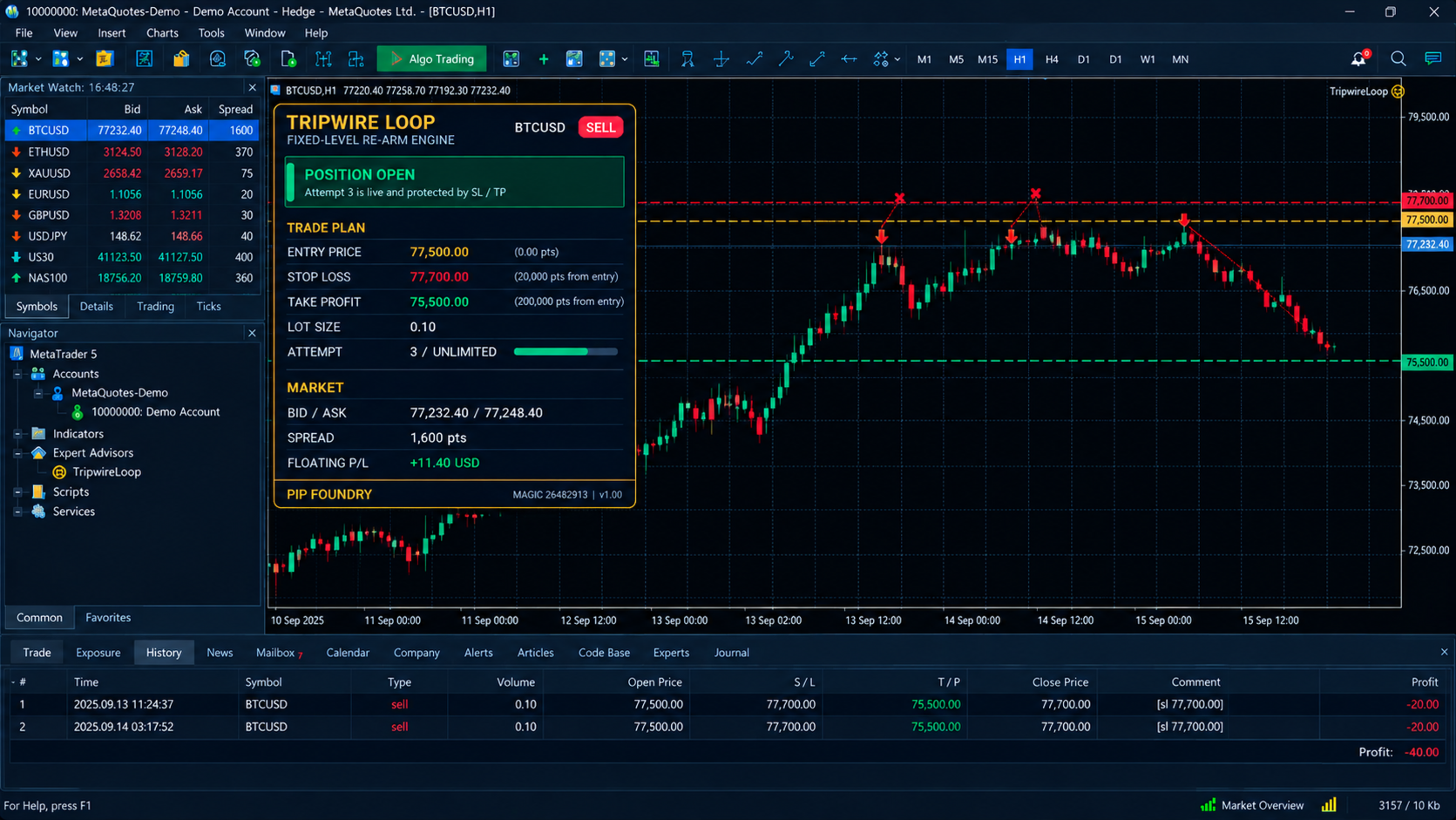
- If the Stop Loss closes the trade, the EA reads the trade history to confirm the closure was a Stop Loss. It then re-arms the same Entry, with the same SL, TP and lot.
- It opens another trade only when price comes back and reaches the Entry again. Price wobbling around the level cannot create duplicates.
- If the Take Profit closes the trade, the cycle is complete. The EA stops and will not re-enter unless you re-arm it.
- If you close a trade manually, the EA pauses that symbol instead of opening a new one.
- If you set a Maximum Attempts limit, the EA stops re-arming once that number of trades has been opened.
The same logic works in reverse for BUY.
WHAT MAKES IT DIFFERENT
- One position per chart, always. Before every order it re-checks for an existing position. If a broker timeout leaves an order in doubt, it waits and looks for the position before any retry.
- No martingale. The lot size is fixed and never changes after a loss.
- Independent instances. Each chart carries its own state, attempt counter and Magic Number. Bitcoin, Gold, Oil and Nasdaq can each run their own cycle at the same time.
- Any symbol name. It trades the chart symbol, so broker suffixes such as BTCUSDm or XAUUSDz make no difference.
- Restart and VPS recovery. The state is stored per account, symbol and Magic Number. After a restart it adopts any open position without duplicating it. If a trade closed while the EA was offline, it reads the history to see whether it was a Stop Loss, Take Profit or manual close.
- Broker-aware execution. It auto-detects the filling mode and checks trading permissions, symbol trade mode, free margin, volume limits, stop level and freeze level. Rejected orders are retried with a delay. Closed markets are handled without spamming orders.
- A professional on-chart dashboard. See below.
EVERY SETTING EXPLAINED
- Trade Direction: BUY or SELL.
- Entry Price: the level that triggers the trade.
- Stop Loss Price: the exact price where the trade is closed at a loss. For SELL it must be above the Entry, and for BUY below it.
- Take Profit Price: the exact price where the trade is closed in profit. It must be below the Entry for SELL and above it for BUY.
- Fixed Lot Size: the volume for every attempt. It is validated against your broker's minimum, maximum and step.
- Maximum Attempts: the number of trades the EA may open in a cycle. 0 means unlimited.
- Enable Trading: set to false to stop new entries. An existing position is left untouched.
- Magic Number: 0 generates a number automatically from the symbol. You can set your own if you run two charts on the same symbol.
- Reset / Re-arm: set to true once to start a fresh cycle, for example after a TP completion or a manual pause, then set it back to false. Changing the direction, Entry, SL or TP also starts a fresh cycle.
- Verbose Logging: writes diagnostic messages to the Experts log. It is off by default.
THE DASHBOARD
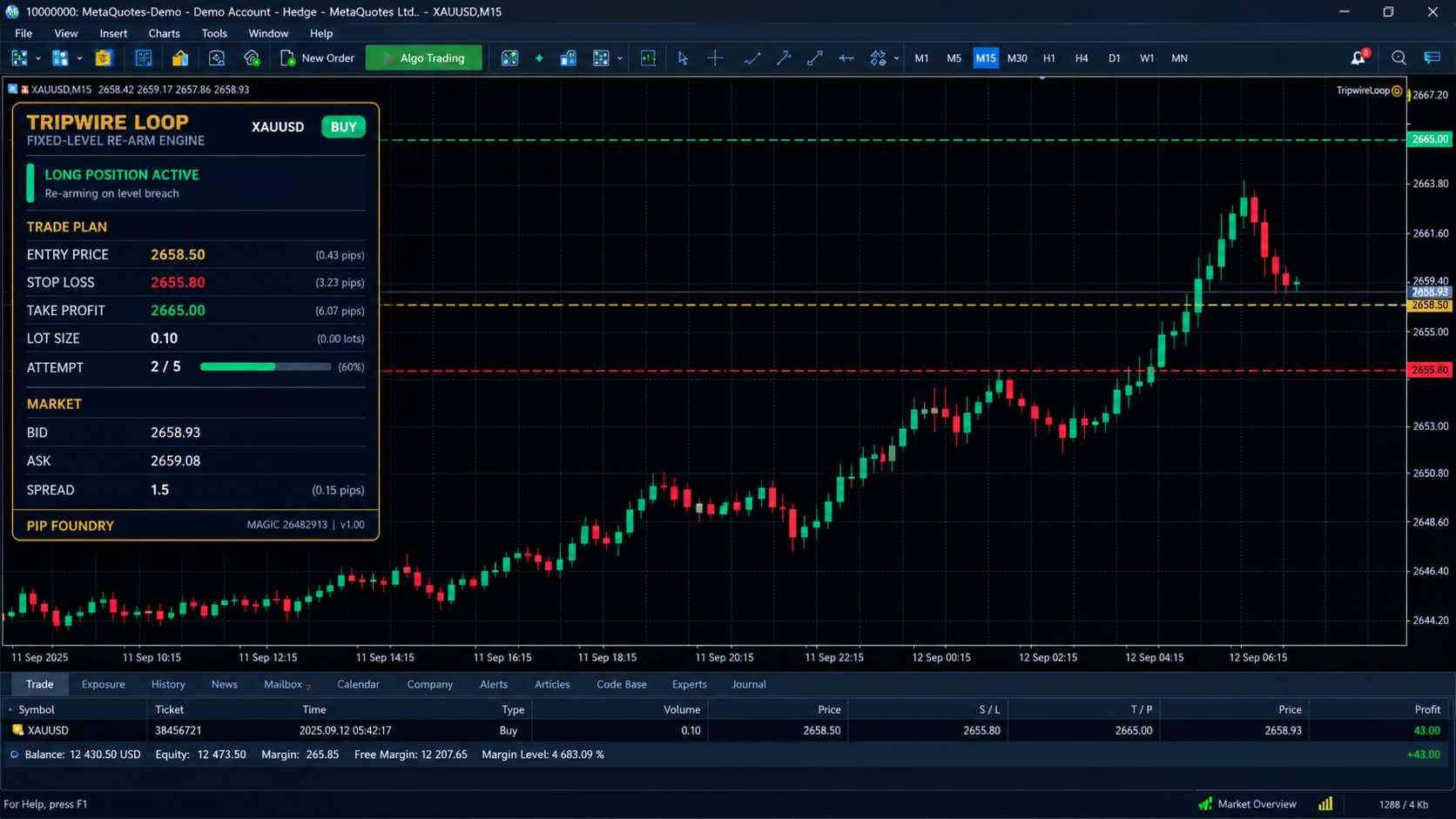
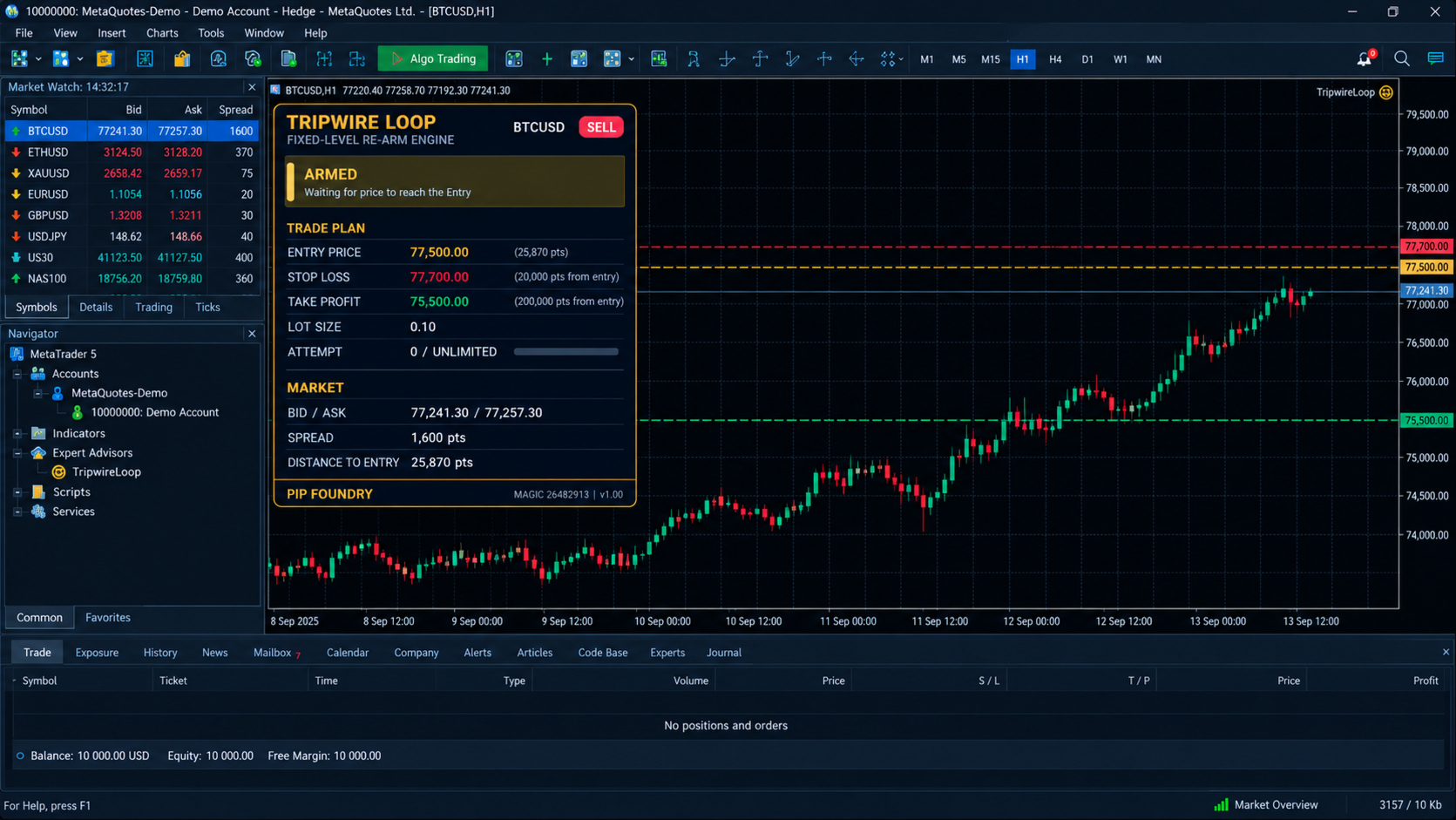
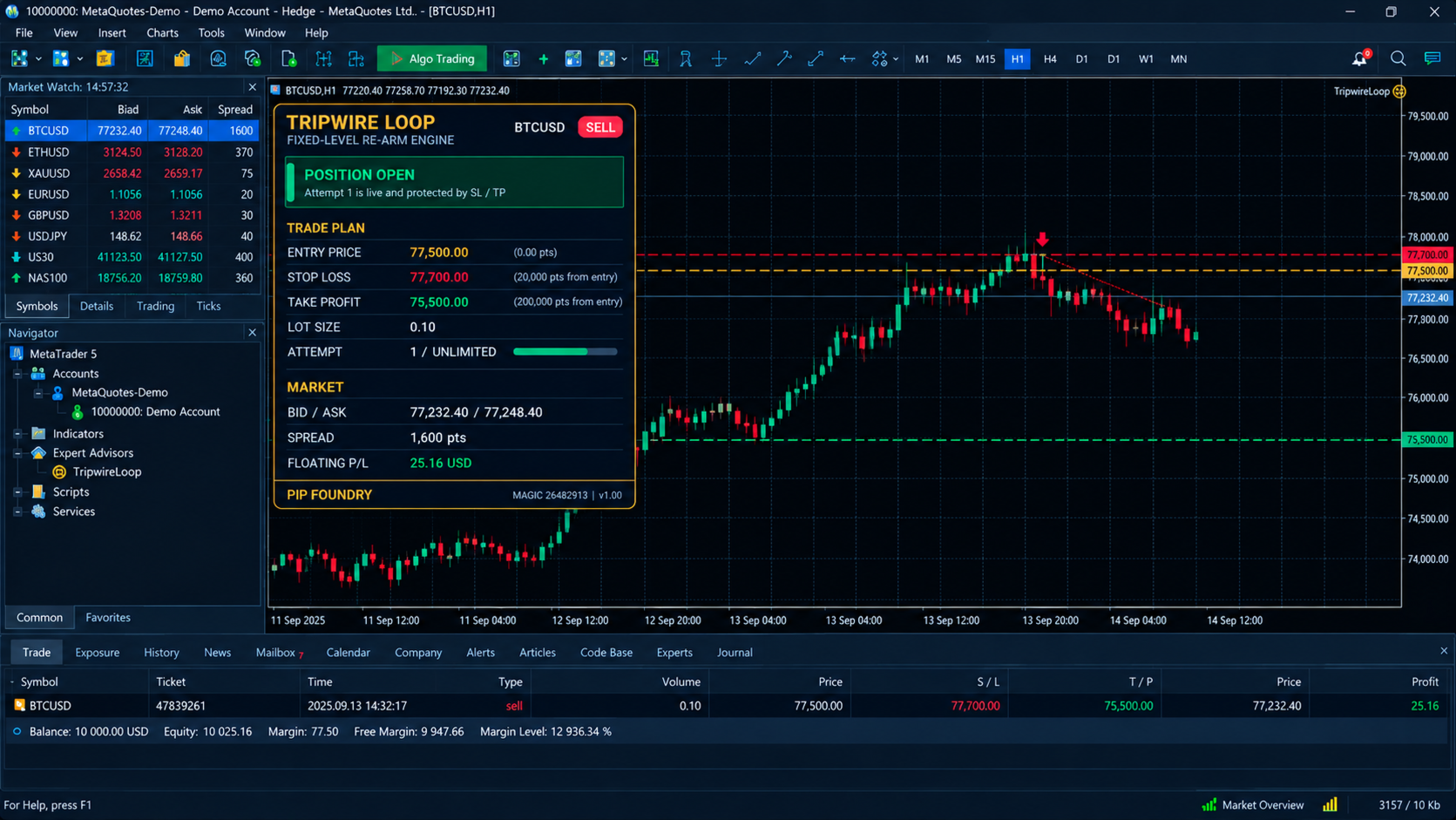
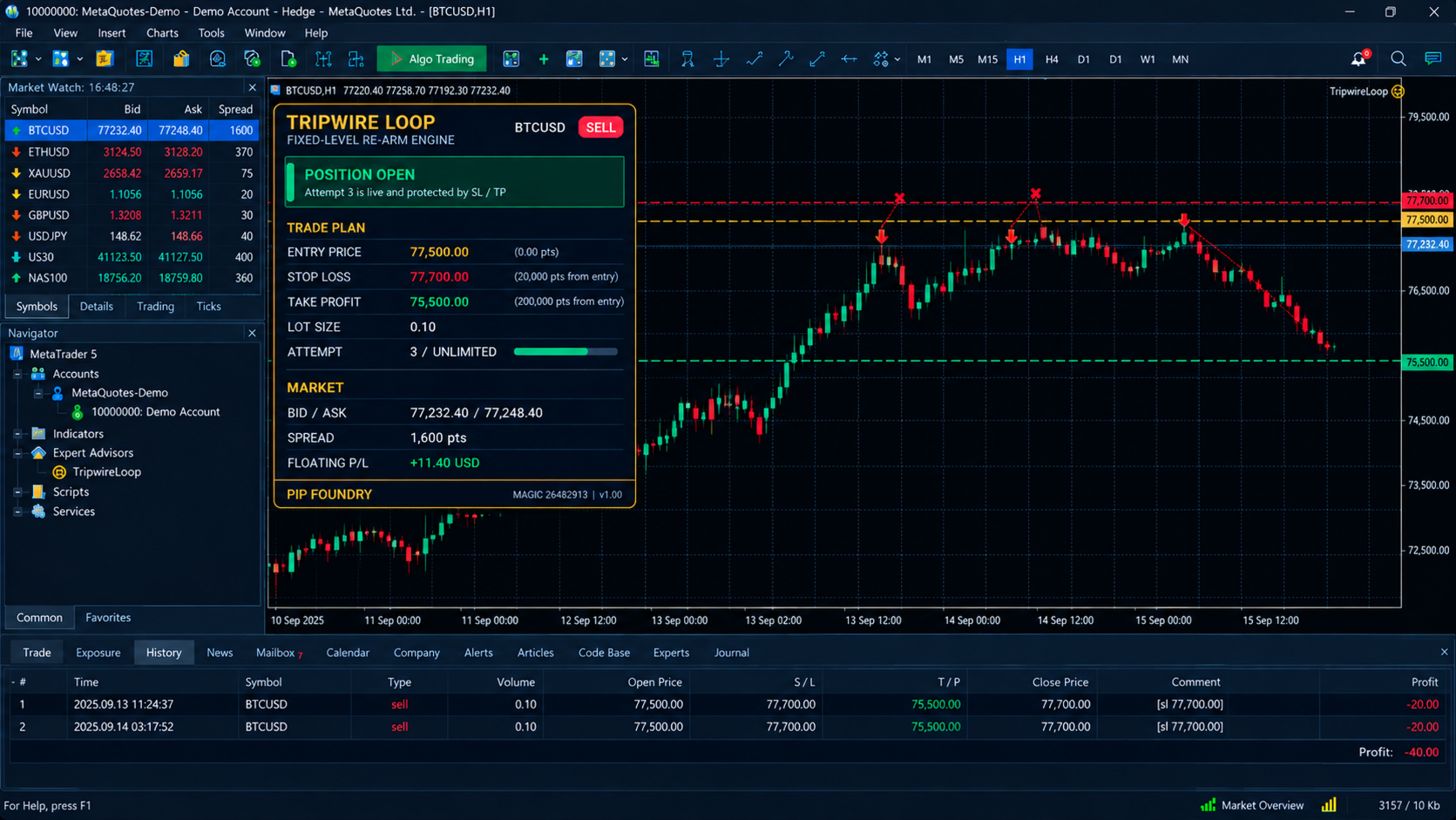
Tripwire Loop draws a dark, gold-trimmed control panel on your chart:
- The symbol and a BUY or SELL badge.
- A colour-coded status banner: ARMED in gold, POSITION OPEN in green, TP COMPLETED in cyan, PAUSED in orange and MAX ATTEMPTS in red.
- Your Entry, Stop Loss and Take Profit with their distances in points and the risk-to-reward ratio.
- Your lot size and the current attempt number, with a progress bar when you use an attempt limit.
- Live Bid/Ask, spread, and either the distance to your Entry or the floating profit of the open trade.
It also draws dashed Entry, SL and TP lines on the chart, so your plan stays visible against the price.
RUNNING FOUR MARKETS AT ONCE
Attach the same EA to as many charts as you like. Each chart has its own levels, lot, attempts and state. One chart hitting Take Profit does not affect the others, and one chart re-arming after a stop does not touch the others. Only two charts on the same symbol need different Magic Numbers.
EXECUTION DETAILS YOU SHOULD KNOW
- Entries are market orders. SELL triggers on the Bid and BUY on the Ask, so your actual fill can differ slightly from the Entry because of spread and slippage.
- If the EA is attached while price is already beyond the Entry, it does not enter at once. It waits for a fresh touch or cross of the level.
- If SL and TP cannot be set on a new position for about 20 seconds, the EA closes it for safety.
- If your lot is not affordable, it skips the trade and tells you why on the dashboard. It never silently changes your lot.
STRATEGY TESTER
The EA works in the MT5 Strategy Tester, and visual mode lets you watch every entry, stop, re-arm and take profit. If you leave Entry, SL and TP at zero in the tester, it generates demonstration levels so you can see the full behaviour immediately. On a live chart, zero levels show a setup warning instead.
GETTING STARTED
- Attach Tripwire Loop to a chart and enable Algo Trading.
- Set the direction, Entry, SL, TP, lot and attempt limit.
- Watch the banner turn to ARMED.
- Test on a demo account before going live.
FREQUENTLY ASKED
Does the lot grow after a loss? No. The lot is fixed for the whole cycle.
What happens after Take Profit? The cycle ends and the EA stays idle until you re-arm it.
Can it work on netting and hedging accounts? It is designed for both, since it manages one position per symbol and Magic Number.
RISK DISCLOSURE
Re-entering after each Stop Loss means every attempt risks the full distance to your SL, and unlimited attempts can add up to a large drawdown. Use the Maximum Attempts setting, size your lot carefully and test on a demo account first. Trading leveraged instruments carries a high level of risk, and no software can guarantee profit.