KillZones Display and Alert NY London Asia Daily
- Indicatori
-
Shin Kojima
 MT4 indicator developer with 10+ years of live trading experience.
Specializing in alert tools and scanners for ICT-based traders.
Zero complaints. Reliable tools. Real support.
MQL4 / MQL5 Development Services
• Custom Indicator Modifications - Versione: 1.0
FREE for the First 50 Users
================================================================
ShowKillZones v1.0
- Corrected NY AM end time from 11 to 10, and NY PM end time from 17 to 16 (adjusted to Kill Zone hours) [cite: 321, 326]
- Changed NY AM/PM labels to Kill Zone [cite: 321, 326]
v1.0 - User Manual [cite: 321]
================================================================
[Overview]
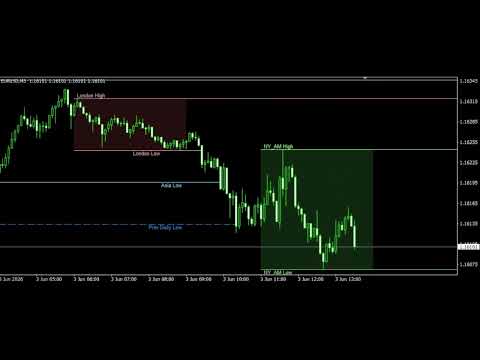
This indicator displays ICT Kill Zones (session hours) on the chart as background zones and triggers alerts at the high and low of each session. [cite: 321]
- London / NY AM / NY PM times are input in ET (Eastern Time). [cite: 321]
- Automatically detects US Daylight Saving Time (DST) → Automatically corrects UTC conversion. [cite: 321]
- Also displays Previous Daily High/Low, Higher Timeframe (HTF) High/Low, and Round Numbers. [cite: 321]
================================================================
Installation
================================================================
1. Copy ShowKillZones.mq4 to the following directory:
(MT4 Menu) File → Open Data Folder
→ MQL4 → Indicators folder
2. MT4 Navigator → Indicators → Refresh (F5)
3. Drag & drop onto the chart
================================================================
Kill Zone Hours List (Default Settings)
================================================================
┌─────────────────┬───────────┬───────────┬───────────┐
│ Session │ ET Input │ UTC (DST) │ UTC (WT) │
├─────────────────┼───────────┼───────────┼───────────┤
│ Asia │ Direct UTC│00:00-04:00│00:00-04:00│ [cite: 321]
│ London │02:00-05:00│06:00-09:00│07:00-10:00│ [cite: 321, 322]
│ NY AM │07:00-10:00│11:00-14:00│12:00-15:00│ [cite: 322]
│ NY PM │13:00-16:00│17:00-20:00│18:00-21:00│ [cite: 322]
└─────────────────┴───────────┴───────────┴───────────┘
* For Asia only, enter directly in UTC (Tokyo market is not affected by DST). [cite: 322]
* Setting Use_AutoDST = true will automatically switch between Summer (DST) and Winter time. [cite: 322]
================================================================
Parameter Descriptions
================================================================
[Alert Settings] [cite: 322]
Alert_Enable : ON/OFF for all alerts [cite: 322]
Alert_Popup : Show popup alert [cite: 322]
Alert_Email : Send email [cite: 322]
Alert_Push : Push notification to smartphone [cite: 322]
Alert_Timing [cite: 322]
1. INSTANT : The exact moment price crosses the line [cite: 322]
2. CLOSE : Breakout evaluation at candle close (excludes fakeouts) [cite: 322, 323]
3. CLOSE_ANY : Breakout evaluation including candle wicks on close [cite: 323]
Alert_Daily : Alert on Previous Daily High/Low [cite: 323]
Alert_HTF : Alert on HTF High/Low [cite: 323]
Alert_Asia : Alert on Asia zone High/Low [cite: 323]
Alert_London : Alert on London zone High/Low [cite: 323]
Alert_NY_AM : Alert on NY AM zone High/Low [cite: 323]
Alert_NY_PM : Alert on NY PM zone High/Low [cite: 323]
[Common Lines & Display Settings] [cite: 323]
Show_DailyHL : Previous Daily High/Low lines (Horizontal, auto-delete) [cite: 323]
Show_HTFHL : HTF High/Low lines (Dynamic reference) [cite: 323]
Show_RoundNumbers: Round Numbers (Plots every 100 Pips) [cite: 323]
RoundNum_Pips : Interval size (Automatically changes to 5000 for XAU/GOLD) [cite: 323]
Show_Labels : Toggle label display for each line ON/OFF [cite: 323, 324]
[Dynamic Reference Rules for HTF] [cite: 324]
M1 → M15 High/Low [cite: 324]
M5 → H1 [cite: 324]
M15 → H4 [cite: 324]
M30 → H4 [cite: 324]
H1 → D1 [cite: 324]
H4 → W1 [cite: 324]
D1 → MN1 [cite: 324]
[DST Settings] [cite: 324]
Use_AutoDST : Automatically detect US DST (Recommended: true) [cite: 324]
true → Summer time (EDT, UTC-4) from 2nd Sunday of March to 1st Sunday of November; [cite: 324]
Winter time (EST, UTC-5) otherwise. [cite: 324]
false → Fixes London/NY times exactly as input (Manual management). [cite: 324]
[Asia Session (UTC)] [cite: 324]
Asia_StartHour : Start time (UTC, Default: 0) [cite: 324]
Asia_EndHour : End time (UTC, Default: 4) [cite: 324]
Asia_BoxColor : Zone background color [cite: 324, 325]
Asia_LineColor : High/Low line color [cite: 325]
[London Session (ET)] [cite: 325]
London_StartHour_ET : Start time (ET, Default: 2) [cite: 325]
London_EndHour_ET : End time (ET, Default: 5) [cite: 325]
[NY AM Kill Zone (ET)] [cite: 325]
NYAM_StartHour_ET : Start time (ET, Default: 7) [cite: 325]
NYAM_EndHour_ET : End time (ET, Default: 10) [cite: 325]
[NY PM Kill Zone (ET)] [cite: 325]
NYPM_StartHour_ET : Start time (ET, Default: 13) [cite: 325]
NYPM_EndHour_ET : End time (ET, Default: 16) [cite: 325]
================================================================
How to Read the Zones
================================================================
■ Rectangular Background Zones [cite: 325]
The High-to-Low range within that specific session [cite: 325]
■ Horizontal Lines (Session High/Low) [cite: 325]
Automatically terminates when broken by a candle body close [cite: 325]
→ Only "still valid levels" remain on the chart [cite: 325]
■ Previous Daily High/Low Lines [cite: 325]
Extended and displayed until broken by a candle body close [cite: 325]
================================================================
Notes
================================================================
- Kill Zone boxes are automatically hidden on Daily, Weekly, and Monthly charts.
- The indicator automatically obtains the broker's server time, so no configuration adjustments are required when changing brokers.
- When Use_AutoDST = true, DST is automatically evaluated every year, completely eliminating the need for manual changes.
================================================================
Version History
================================================================
v1.31 (2026-06-04) [cite: 325]
- Corrected NY AM end time from 11 to 10, and NY PM end time from 17 to 16 (adjusted to Kill Zone hours) [cite: 326]
- Changed NY AM/PM labels to Kill Zone [cite: 326]
v1.0 (2026-06-03) [cite: 326]
- Changed London/NYAM/NYPM inputs to ET [cite: 326]
- Added US Daylight Saving Time (DST) auto-detection feature (IsUSDST()) [cite: 326]
- Added Use_AutoDST parameter [cite: 326]
- Asia remains direct UTC input (No change) [cite: 326]
v1.20 [cite: 326]
- Initial Release [cite: 326]
================================================================