IndexViz Pro MT5
- Indicatori
-
German Pablo Gori
 Developer Algorithmic Software & Trader | Founder CODE4TRADING
Argentina | 9 years as Retail Trader | 1000+ active traders using our products
CODE4TRADING: Democratizing Professional Trading Tools for Every Trader - Versione: 3.10
- Aggiornato: 26 marzo 2026
- Attivazioni: 7
> Institutional Grade Multi-Index Adaptive Indicator
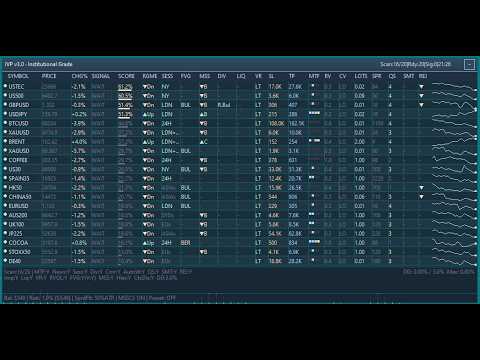
IndexViz Pro MT5 is a professional-grade, multi-index adaptive indicator designed for traders who demand institutional-level analysis across multiple markets simultaneously. Built for MetaTrader 5, IVP combines over 20 analytical modules into a single, unified visual dashboard that monitors stock indices, synthetic indices, commodities, forex pairs, and cryptocurrencies in real time.
Unlike conventional indicators that analyze a single instrument in isolation, IndexViz Pro scans your entire watchlist simultaneously, calculates a composite bias score for each symbol, and presents the results in a clean, color-coded dashboard directly on your chart. Every signal is filtered through multiple layers of confirmation before being displayed, ensuring that only high-quality setups reach your attention.
WHO IS THIS INDICATOR FOR
IndexViz Pro is designed for:
- Traders who operate across multiple indices such as US30, US100, US500, DAX, FTSE, JP225, and others
- Traders of synthetic indices including Volatility, Boom, Crash, Step, and Jump indices
- Commodity traders monitoring Gold, Silver, Oil, and related instruments
- Forex traders who want multi-symbol bias analysis at a glance
- Crypto traders monitoring BTC, ETH, and major pairs
- Any trader who values structured, data-driven decision making over intuition alone
CORE SIGNAL ENGINE
The signal engine calculates a composite bias score from 0 to 100 for each symbol, combining five weighted analytical components:
Trend Analysis (default weight 25%): Evaluates moving average alignment using a dynamic pool of EMA periods (10, 14, 20, 26, 34 for fast and 30, 40, 50, 65, 89 for slow), FrAMA confirmation, and price position relative to key moving averages. The active period is automatically selected based on current volatility conditions.
Momentum Analysis (default weight 25%): Uses RSI with an adaptive period pool (7, 9, 12, 14, 21), Stochastic crossovers, and overbought/oversold detection. RSI thresholds automatically widen during high-volatility periods to reduce false signals.
Volatility Analysis (default weight 20%): Analyzes Bollinger Band position, band width expansion, and ATR-based price movement to determine whether price is at extremes or in consolidation.
Volume Analysis (default weight 20%): Incorporates Money Flow Index (MFI), On-Balance Volume (OBV) divergence, and tick volume analysis to confirm directional bias with volume participation.
Divergence Analysis (default weight 10%): Detects RSI divergence, MACD histogram divergence, and OBV divergence simultaneously, identifying regular and hidden divergences across multiple lookback periods.
All five weights are fully customizable and can be auto-adapted based on historical performance of each component per symbol.
ADVANCED ANALYTICAL MODULES
Market Structure Shift (MSS): Detects Break of Structure (BOS) and Change of Character (CHoCH) events by identifying swing highs and lows over a configurable lookback period. Requires close confirmation to reduce false breaks. When a structure shift is detected, the trend score is boosted and the market regime is updated accordingly.
Fair Value Gaps (FVG): Identifies bullish and bearish fair value gaps in real time. Tracks mitigation percentage as price fills the gap. Vanish mode automatically removes filled gaps from the analysis. FVG alignment with impulse direction generates a conviction bonus.
Liquidity Sweeps: Detects bullish and bearish liquidity sweeps by identifying wicks that pierce prior session highs or lows and close back inside. Session-aware mode focuses sweeps on the relevant trading session for each instrument. Generates a conviction bonus when confirmed.
Impulse Tracking with Efficiency Ratio: Measures directional efficiency using the Kaufman Efficiency Ratio. When price moves with high efficiency (trending strongly in one direction), an impulse bonus is applied to the bias score. Adaptive ER mode adjusts the threshold dynamically based on current volatility.
Quad Stochastic System: Runs four independent Stochastic oscillators with different periods simultaneously. When all four align in oversold or overbought territory, a Super Signal is generated with maximum bonus. Partial alignment generates proportional bonuses. Includes candlestick pattern detection (engulfing, hammer, shooting star), flag pattern detection, and ABCD harmonic pattern detection.
SMT Divergence (Smart Money Technique): Compares correlated instrument pairs (US30/US500, EURUSD/GBPUSD, XAUUSD/XAGUSD, V75/V100) to detect divergences between correlated assets. When one instrument makes a new high or low while its correlated pair fails to confirm, an SMT divergence signal is generated with a conviction bonus.
Rejection Blocks: Identifies candles with significant upper or lower wicks relative to the total range, indicating institutional rejection. Bonus is amplified when the rejection occurs near the 200-period moving average.
Relative Volume (RVOL): Calculates current volume relative to the historical average for the same hour of day across the past 10 days. High RVOL confirms signal conviction and triggers additional bonuses. Extreme RVOL combined with liquidity sweeps or FVG generates EXTREME conviction level.
Volatility Regime Classification: Classifies current market conditions into four regimes: Low Trend, High Trend, Low Range, and High Range. Each regime applies a position size factor to suggested lot calculations and adjusts SL/TP multipliers accordingly.
Multi-Timeframe Alignment: Checks price alignment across M15, H1, H4, and D1 timeframes simultaneously. Visual blocks in the dashboard show alignment status for each timeframe. MTF misalignment reduces the bias score by 40%.
Index Correlation: Monitors correlated instruments within the same sector group (US Indices, EU Indices, Asia Indices, Metals, Forex Major). When the majority of instruments in a group align in the same direction, a correlation bonus is applied. Sector capitulation detection identifies when 75% or more of a group signals in the same direction.
RISK MANAGEMENT TOOLS
Suggested Stop Loss and Take Profit: Automatically calculates SL and TP levels based on ATR multipliers, timeframe scaling, and current volatility regime. Values are displayed in the dashboard and included in all alerts.
Suggested Lot Size: Calculates the recommended position size based on account balance, risk percentage, and SL distance. Adjusts automatically for the current volatility regime position size factor.
Daily Drawdown Monitor: Tracks daily equity drawdown in real time. When the configured maximum daily drawdown percentage is reached, all signals are blocked and the dashboard displays a prominent warning. Resets automatically at the start of each trading day.
Break-Even Suggestion: Monitors open positions and suggests moving the stop loss to break-even when price has moved at least one ATR in the signal direction.
VISUAL DASHBOARD
The dashboard is a fully interactive, canvas-based panel rendered directly on the chart. It supports:
- Drag and drop repositioning anywhere on the chart
- Minimize and maximize with a single click
- Automatic dark and light theme detection based on chart background color
- DPI-aware scaling for high-resolution displays (supports up to 3x scaling)
- Pagination for large symbol lists (configurable page size)
- Sortable columns: by symbol name, score descending, score ascending, or instrument type
- Score-based filtering to show only symbols above a minimum bias score
- Sparkline price history for each symbol
- Color-coded signal rows: green background for buy signals, red for sell signals
- Impulse highlighting for active impulse conditions
- News blocking indicator per symbol
- Spread blocking indicator per symbol
- Session status per symbol
- Daily change percentage per symbol
- Current price per symbol
- Suggested SL and TP in points or pips
- Conviction level (Low, Medium, High, Extreme) per symbol
- Relative volume value per symbol
- FVG, MSS, Divergence, Liquidity Sweep, Volatility Regime, SMT, and Rejection status per symbol
- MTF alignment visual blocks (4 timeframes per symbol)
- Sync progress bar for symbols still loading historical data
- Sector capitulation flash alert in the dashboard header
SUPPORTED INSTRUMENTS
IndexViz Pro automatically detects and configures the following instrument types:
Stock Indices: US30, US100, US500, DAX/DE40, FTSE/UK100, JP225, FR40/CAC40, AU200, HK50, ES35/IBEX35, EU50/STOXX50, CN50, INDIA50, and all common broker variants.
Synthetic Indices: Volatility 10, 25, 50, 75, 100 (standard and 1-second), Boom 300/500/1000, Crash 300/500/1000, Step Index, Range Break 100/200, Jump 10/25/50/75/100.
Commodities: XAUUSD (Gold), XAGUSD (Silver), USOIL, UKOIL/Brent, XPTUSD, XPDUSD, Natural Gas, Copper.
Forex: EURUSD, GBPUSD, USDJPY, AUDUSD, USDCAD, NZDUSD, USDCHF, and major crosses.
Cryptocurrencies: BTCUSD, ETHUSD, LTCUSD, XRPUSD, BNBUSD, SOLUSD, ADAUSD, DOTUSD.
Each instrument type receives a dedicated parameter configuration optimized for its typical behavior. Boom and Crash indices use shorter periods and wider RSI thresholds. High-volatility synthetic indices use adjusted BB deviations. Commodity and forex instruments use their respective session hours for session filtering.
Panel Transparency Control
A new input parameter has been added to the Dashboard section: Panel Transparency Level. This allows users to control the opacity of the dashboard panel independently of the chart background. Four levels are available: 25%, 50%, 75%, and 100%. The transparency applies to all panel background elements including headers, rows, borders, tooltips, and buttons, while text colors remain fully opaque to preserve readability. The default value is set to 75%, providing a subtle transparency that allows chart price action to remain visible behind the panel.
Universal Broker Compatibility
The symbol detection system has been upgraded to automatically handle broker-specific symbol naming conventions. A new normalization function strips common suffixes such as .cash, .m, .i, .pro, .raw, .ecn, .stp, and similar variants, as well as prefixes like fx_, cfd_, and idx_. When a symbol is not found under its standard name, the indicator automatically tests multiple naming variations before reporting it as unavailable. This eliminates the need for manual symbol name adjustments when switching between broker accounts or platforms.
ADAPTIVE PARAMETER SYSTEM
IndexViz Pro does not use fixed indicator periods. Instead, it maintains pools of pre-calculated indicator handles and dynamically selects the most appropriate period based on current volatility conditions measured by the ATR EMA ratio. When volatility increases, shorter periods are selected for faster response. When volatility decreases, longer periods are selected for smoother signals. This adaptation happens automatically without any user intervention.
The auto-weighting system analyzes the historical performance of each analytical component per symbol over a configurable lookback period and adjusts the component weights accordingly. Components that have historically produced more accurate signals for a given instrument receive higher weights automatically.
SIGNAL FILTERING SYSTEM
Every signal passes through the following filters before being displayed:
Economic Calendar Filter: Blocks signals within a configurable window before and after high-impact news events for the relevant currency or country. Uses the MetaTrader 5 built-in economic calendar.
Spread Filter: Compares current spread to ATR and blocks signals when spread exceeds the configured ATR ratio threshold.
Session Filter: Each instrument is assigned to its primary trading session (New York, London, European, Asian, Sydney). Signals generated outside the primary session receive a configurable penalty multiplier.
Multi-Timeframe Filter: Signals that conflict with the higher timeframe trend receive a 40% score reduction.
Minimum Bars Between Signals: Prevents signal clustering by enforcing a minimum number of bars between consecutive signals on the same instrument.
Daily Drawdown Block: Blocks all signals when the daily drawdown limit is reached.
ALERTS AND NOTIFICATIONS
When a signal is generated, IndexViz Pro sends:
- A MetaTrader 5 alert with full signal details including symbol, direction, bias score, signal strength, SL/TP in points, RVOL value, conviction level, suggested lots, and active pattern confirmations (FVG, BOS, CHoCH, SMT, Quad Stochastic Super Signal, Rejection Block)
- Optional push notification to the MetaTrader mobile app
- Console log entry for record keeping
INSTALLATION
- Copy the indicator file to the MQL5/Indicators folder of your MetaTrader 5 data directory.
- Restart MetaTrader 5 or refresh the Navigator panel.
- Drag the indicator onto any chart.
- The indicator will automatically detect all available instruments in your Market Watch and begin analysis.
- Optionally, enter a comma-separated list of specific symbols in the Symbol List input to restrict analysis to those instruments.
No additional files or libraries are required for basic operation.
CONFIGURATION GUIDE
General Configuration: Leave the Symbol List empty for automatic detection. Set the minimum bias score threshold (default 70) to control signal sensitivity. Lower values generate more signals with lower confidence. Higher values generate fewer signals with higher confidence.
Component Weights: Adjust the five component weights to match your trading style. Trend-following traders may increase the Trend weight. Mean-reversion traders may increase the Momentum and Volatility weights.
Filters: The ADX threshold controls the boundary between trending and ranging regime classification. The spread filter ratio prevents trading during abnormally wide spread conditions.
Risk Panel: Enter your account balance and risk percentage to enable automatic lot size calculation. The suggested lots displayed in the dashboard are calculated based on these values and the current ATR-based SL distance.
Dashboard: The dashboard can be repositioned by dragging the header. It can be minimized to show only the title bar. Font size and panel width are configurable. The auto-theme feature automatically switches between dark and light color palettes based on your chart background.
IMPORTANT NOTES
- This indicator is designed for analysis and signal identification. It does not place trades automatically.
- Past signal performance does not guarantee future results.
- Always apply proper risk management regardless of signal conviction level.
- The indicator requires historical data to be available for all monitored symbols. Symbols showing "Warming Up" status are still loading historical data and will become active automatically.
- For optimal performance, ensure that all symbols you wish to monitor are visible in your Market Watch before attaching the indicator.
SUPPORT
For questions, configuration assistance, or feedback, please visit the author's profile page at: https://www.mql5.com/es/users/pablogx9
IndexViz Pro MT5 (IVP) v3.0 - Institutional Grade Copyright Gori German Pablo 2026. All rights reserved.