Custom Instrument Watchlist
- Utilità
- Versione: 1.31
- Aggiornato: 4 aprile 2026
- Attivazioni: 10

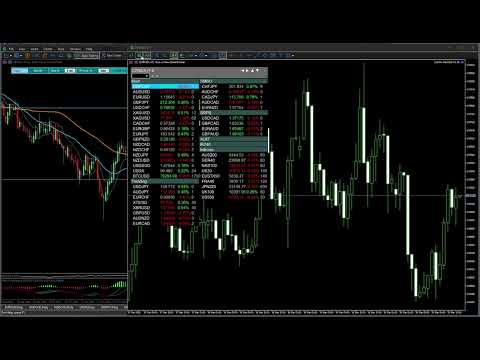
CWatch – Advanced Instrument Panel for MT5
CWatch transforms your MetaTrader 5 chart into a powerful, fully customizable market overview panel. Optimized for low CPU usage and stable operation even with large symbol lists. Works in weekend close, when no new ticks.
Organize symbols into categories, monitor LTP, Daily Change and Spread in real time, highlight active trades, and instantly open or activate charts — all from one clean interface.
Designed for active traders who want structure, speed, and clarity. Perfect for swing traders following many instruments.
Unlike the standard Market Watch window, this tool allows you to:
-
Organize symbols into custom categories
-
Search / Filter for quick find
-
Add delete symbols. Duplicates allowed (if user wants symbol in few categories)
-
Rearrange instruments visually, with just 2 mouse clicks
-
Collapse and expand groups
-
Monitor LTP (last traded price), spread and daily percentage change (optional)
-
Highlight instruments with active trades (green - buy, red - sell, yellow - pending order)
-
On double click open in same chart or activate already open charts instantly
It turns your chart into a fully interactive trading dashboard.
Important. You can use custom instrument names separated by commas, or use all from original MT5 watchlist (default use case) and later move them around in categories. However take notice that this tool is dependent on mt5 watchlist, so first enable/disable wanted instruments there.
Key Features
Search, Filter
Custom Categories
Create your own structured workflow. Categories can be as you want not get lost. Example:
-
Trend
-
Range
-
Setup Forming
-
In Trade
-
Indices
-
Or any custom group you prefer
Move instruments between categories with a simple 2 clicks. Click one to mark instrument, click two on wanted category and symbol is moved.
Two Layout Modes
Choose your preferred visual style:
• Category Columns Mode. Wide, easy to navigate between categories.
• Continuous Flow Mode. Similar to TradingView style.
Adapt the panel to your screen size and trading style.
Real-Time Market Data (optional)
Optional columns:
-
Current Spread
-
LTP (last traded price)
-
Daily Change (%)
-
If user wants something more, please contact me or leave request in comments and after consideration it might come to next version as custom dashboard on your wish
Sorting by Daily Change (ascending/descending) available.
Updates are optimized to avoid unnecessary CPU usage.
Trade Status Highlight
Instant visual feedback:
-
Green strip - Buy position
-
Red strip - Sell position
-
Yellow strip - Pending order
You always know where you are in the market.
Smart Chart Handling
Two chart opening modes:
-
Activate existing chart (if already open, if not - opens new chart). User should dedicate empty chart, undock it, and fit nearby your main platform, preferably in continuous layout mode to save horizontal space. In this mode you can use different EAs for other charts. Also chart drawings remains unique, where they should be, no "trendline", "rectangle" mess when instrument prices are similar if using same chart for instrument switching as mode 2.
-
Open new chart automatically in a same window. Fast, easy, but other EAs can not be attached. Also it might create some drawing mess if instrument prices are similar.
User should play around to see what fits better between two modes.
Multiple Profiles Support
Save different watchlist layouts using profile names. EA saves ".dat" files in MetaQuotes\Terminal\Common\Files directory. It enables user to have few customizable watchlist at once with unique profile names. Etc. user can use one watchlist for swing trading using columns and chart activate mode for changing instruments, on another monitor he can have another watchlist with unique profile nice, which looks differently and user uses it as continuous list with same chart switching for scalping purposes.
Color Themes
Built-in themes:
-
Dark
-
Light
-
Blue
-
Gray
-
Custom (fully adjustable colors)