GDXM Period Open Line
- Indicatori
- Versione: 1.0

GDXM Period Open Line
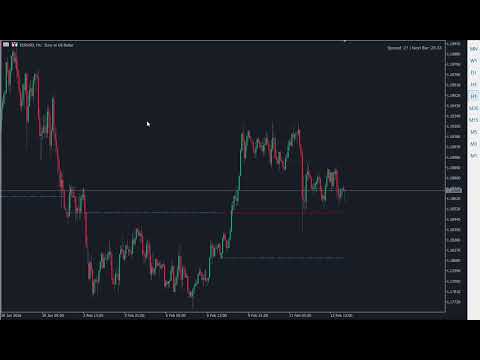
The GDXM Period Open Line is a powerful institutional tool designed for traders who follow ICT concepts, SMC (Smart Money Concepts), or price action strategies that rely on time-based price levels.
In institutional trading, the opening price of a specific period (Yearly, Monthly, Weekly, or Daily) serves as the "Equilibrium" point. Trading above the opening price is considered a premium (seek shorts), and trading below is considered a discount (seek longs). This indicator automates these levels, providing a clear visual map of institutional benchmarks.
It's better used if combined with GDXM Fractal PO3 Custom HTF and GDXM Period Separador.
Why use Period Open Lines?
According to the Power of 3 (PO3) concept, the opening price is the most critical level of any candle.
-
Bullish Bias: Price often dips below the Open (Manipulation) before expanding higher.
-
Bearish Bias: Price often rallies above the Open (Manipulation) before expanding lower.
-
Institutional Reference: Yearly and Monthly opens act as massive magnets for price and professional liquidity.
Key Features
-
Multi-Timeframe Analysis: Display Yearly, Monthly, Weekly, and Daily opening prices simultaneously.
-
Lookback Control: Choose how many previous periods you want to display (e.g., the last 4 weeks or last 2 years).
-
Dynamic Visuals: Each period is fully customizable by color, line style (solid, dashed, dotted), and width.
-
Clean Chart Design: The lines are drawn as segments from the start to the end of each period, avoiding chart clutter and "infinite" lines.
-
Real-Time Updates: High-performance code with timer events to ensure lines stay perfectly aligned with the current price action.
Input Parameters
Yearly Settings
-
Show Year: Enable/Disable yearly open lines.
-
Year Lookback: Number of previous years to display.
-
Show Current Year: Toggle the open line for the ongoing year.
Monthly/Weekly/Daily Settings
-
Lookback: Control the historical depth for each timeframe.
-
Current Period: Choose whether to see the "live" opening price or only historical ones.
-
Custom Styling: Distinct colors and styles for each timeframe to keep your analysis organized.
Visual Options
-
Lines Width: Set the thickness of all lines for better visibility on 4K or high-resolution monitors.
How to Trade with GDXM Period Open Line
-
Daily Bias: If the price is above the Weekly Open, look for sell setups at premium PD Arrays (Fair Value Gaps, Order Blocks).
-
Judas Swing: Identify the classic ICT "Judas Swing" when price moves against the daily bias, crossing the Daily Open before the true expansion.
-
Key Levels: Use the Yearly Open as a major support/resistance level for long-term swing trading.
Check out my other ICT indicators! Visit my profile to find more professional tools for Smart Money Concepts and Institutional Trading.