VolumeProfileADD
- Indicatori
- Henrique Magalhaes Lopes
- Versione: 1.51
- Attivazioni: 20
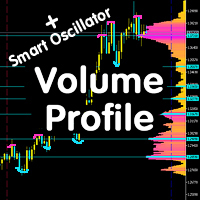
VolumeProfileADD – the multi-timeframe Volume Profile and Accumulation/Distribution Delta overlay for MetaTrader 5!
- Instantly visualize monthly, weekly, and daily volume profiles with precision POC, VAH, and VAL lines.
- Reveal true market sentiment with the A/D Delta layer: see buying (green) vs selling (red) pressure at a glance.
- Toggle individual daily profiles for deep intraday analysis.
- Weighted volume distribution highlights where the action really happens, right up to the close.
- Supports both Tick Volume and Real Volume, plus advanced tick-based delta for high accuracy.
Technical Description
VolumeProfileADD is a sophisticated MetaTrader 5 indicator designed for advanced volume analysis and market profiling. Key features include:
- Multi-Timeframe Volume Profiles: Simultaneously displays monthly (21 days), weekly (6 days), and daily profiles, each with customizable price rows (50–1000) and profile width.
-POC, VAH, VAL Lines: Automatically calculates and draws Point of Control, Value Area High, and Value Area Low for each timeframe, with full color and style customization.
- A/D Delta Overlay: Visualizes Accumulation/Distribution Delta per price level, using either Money Flow Multiplier (MFM) or real tick-based delta (auto-fallback for reliability). Positive delta (accumulation) is shown in green, negative (distribution) in red, and neutral in gray.
- Individual Daily Profiles: Toggleable display of up to 50 recent daily profiles, each with its own canvas, POC, VAH, and VAL, for granular intraday analysis.
- Weighted Volume Distribution: Volume is distributed toward the close price for more accurate representation of trading activity.
- Volume Source Flexibility: Choose between Tick Volume, Real Volume, or Tick-based Delta, adapting to your broker’s data.
- Advanced UI: Clean, modern on-chart controls, including a toggle button for daily profiles, volume scale ruler, and delta source label.
- Performance Optimized: Uses efficient data handling and drawing routines for smooth operation, even with high row counts.
- Robust Logging & Diagnostics: Multiple log levels, verbose diagnostics, and error reporting for easy troubleshooting.
Main Volume Profile in VolumeProfileADD:
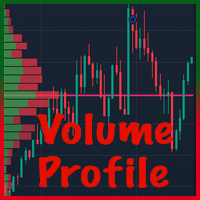
This indicator builds multi-timeframe volume profiles, visualizing the distribution of traded volume at each price level over user-defined periods. It supports monthly, weekly, and daily aggregations, each with its own Point of Control (POC), Value Area High (VAH), and Value Area Low (VAL) lines.
How the Volume Profile Works:
• The price range for the selected period (monthly, weekly, daily) is divided into rows (bins).
• For each bar in the aggregation period, volume is distributed into the corresponding price row(s), weighted toward the close price for accuracy.
• The result is a histogram showing where the most trading activity occurred at each price level.
• The profile is drawn on the right side of the chart, with different colors for monthly, weekly, and daily layers.
• POC, VAH, and VAL lines are calculated for each aggregation, showing the price of maximum volume and the value area (typically 70% of total volume).
Selectable Timeframes & Aggregations:
• Base Timeframe (M1, M5, M15, M30, H1):
- Determines the granularity of the data used for profile construction.
- Lower timeframes (M1) provide more precise profiles but require more data.
- Higher timeframes (H1) are faster but less detailed.
- The selected base timeframe is used for all volume calculations, regardless of the chart timeframe.
• Monthly Profile:
- Aggregates volume over the last N market days (default 21, user-selectable).
- Shows long-term price acceptance and major support/resistance zones.
- POC/VAH/VAL lines help identify the most important price levels for the month.
• Weekly Profile:
- Aggregates volume over the last N days (default 6, user-selectable).
- Useful for swing trading and identifying recent shifts in market structure.
- Weekly POC/VAH/VAL lines highlight short-term value areas.
• Daily Profile:
- Aggregates volume for the current day only.
- Best for intraday analysis, scalping, and detecting session-based support/resistance.
- Daily POC/VAH/VAL lines show where the market is accepting or rejecting price today.
Accumulation/Distribution Delta (A/D Delta) in VolumeProfileADD:
This indicator overlays an Accumulation/Distribution Delta (A/D Delta) histogram on the volume profile, visualizing the net buying (accumulation) or selling (distribution) pressure at each price level for the current day.
Calculation Bases Supported:
1. Money Flow Multiplier (MFM) Estimate (DELTA_MFM):
- Uses price and volume from each bar to estimate buying/selling pressure.
- Formula: MFM = ((Close - Low) - (High - Close)) / (High - Low)
- Delta = MFM * Volume (tick or real, as selected)
- Aggregated per price row, weighted toward the close price.
- Available on all brokers and timeframes.
Pros:
• Universally available (no special data required)
• Smooths out noise, works on historical data
Cons:
• Only an estimate; may not reflect true order flow
• Sensitive to bar shape, not actual trade direction
2. Tick-Based Delta (DELTA_TICK):
- Uses real tick trade data to count buy and sell trades at each price level.
- Buy trades: executed at ask; Sell trades: executed at bid.
- Delta = (Buy Volume - Sell Volume) per price row.
- Only available for the current day and if broker provides tick direction flags.
- If tick data is insufficient or lacks direction, the indicator auto-falls back to MFM.
Pros:
• Most accurate representation of real-time order flow
• Captures true market aggression at each price
Cons:
• Requires high-quality tick data with direction flags
• Not available on all brokers or for historical days
• Can be noisy in illiquid markets
Individual Daily Profiles in VolumeProfileADD:
This feature allows you to visualize a separate volume profile for each individual trading day, overlaid or toggled on the chart. It provides a granular, session-by-session view of volume distribution, POC, VAH, and VAL for each day.
How Individual Daily Profiles Work:
• For each of the last N days (up to 50, user-selectable), the indicator calculates a full volume profile:
- Price range is divided into rows (bins) for that day.
- Volume is distributed per price row, weighted toward the close price of each bar.
- POC (Point of Control), VAH (Value Area High), and VAL (Value Area Low) are computed for each day.
• Each daily profile is drawn as a horizontal histogram, stacked vertically by day, with its own color scheme and transparency.
• The feature is toggled on/off using the DP (Daily Profiles) button on the chart UI.
• Profiles are dynamically updated as new days form or as you scroll/zoom the chart.
How to Use Individual Daily Profiles:
• Enable the feature via the input parameter 'Enable Daily Profile Feature' or by clicking the DP button on the chart.
• When enabled, a panel appears showing the most recent N daily profiles, each with its own POC, VAH, and VAL lines.
• Use the profiles to:
- Compare how volume distribution shifts from day to day.
- Identify recurring support/resistance zones that persist across sessions.
- Spot anomalies (e.g., single prints, gaps, or thin zones) that may act as magnets or reversal points.
- Track the evolution of value (POC/VAH/VAL) to anticipate breakouts or mean reversion.
- Analyze how the current day's profile develops in real time compared to previous days.
• Profiles are automatically sized and positioned for clarity, and can be hidden at any time to declutter the chart.
Notice
The colored candles in the screenshots come from another indicator created by me, is a volume indicator, and comes for free if you have been purchased this indicator. Call me on PV.
I Have another volume by candle indicator here: VolumeBasedColorsBars
How to Report a Problem with VolumeProfileADD
1. Enable Verbose Logging:
In the indicator settings, set “Verbose Log” to “Yes” and adjust the “Log Level” to “DEBUG” for maximum detail.
2. Reproduce the Issue:
Apply the indicator to your chart and perform the actions that cause the problem.
3. Collect Log Information:
Open the MetaTrader “Experts” or “Journal” tab.
Copy all relevant log messages, especially those starting with [VPADD1.50] or error details.
4. Prepare Your Report:
Include a description of the issue, your MetaTrader version, broker name, and any screenshots if possible.
Paste the copied log messages into your report.
5. Send to Support:
Email your report to riqueml@outlook.com
Warning – No Warranties or Guarantees:
This indicator is provided “as is” without any warranties, guarantees, or representations regarding its accuracy, reliability, or suitability for any purpose. Trading financial markets involves significant risk of loss, and past performance does not guarantee future results. The creator and distributor of this indicator are not responsible for any losses, damages, or missed profits resulting from its use. Users assume full responsibility for their trading decisions and outcomes. Always use proper risk management and consult with a qualified financial advisor before trading.
Known Issue:
1. Absent Data on MT5 Startup Causes Fallback
- When MetaTrader 5 is first opened, the selected base timeframe may not have all historical data immediately available. In this situation, the VolumeProfileADD indicator automatically falls back to using the current chart timeframe for its calculations. While this keeps the indicator working, it can result in less accurate or less detailed profiles until the correct data is loaded.
Impact:
- Profiles may be less precise, and POC/VAH/VAL lines may shift after the correct data is available and the indicator recalculates.
Fast Workaround:
- To quickly resolve this, simply change the chart to another timeframe and then back to your desired timeframe. This action forces MT5 to fetch and build the necessary historical data, triggering a chart redraw and ensuring the indicator uses the correct base timeframe for accurate profiles.
Planned Fix:
- A patch is scheduled for the next version to improve detection of incomplete data and delay calculations until the selected base timeframe is fully loaded, guaranteeing the most accurate profiles are always displayed.