Interactive AVWAP Pro for MT5
- Indicatori
- Versione: 7.0
- Aggiornato: 10 ottobre 2026
- Attivazioni: 5

Interactive AVWAP Pro v7.0 — Institutional Volume-Weighted Average Price Analysis
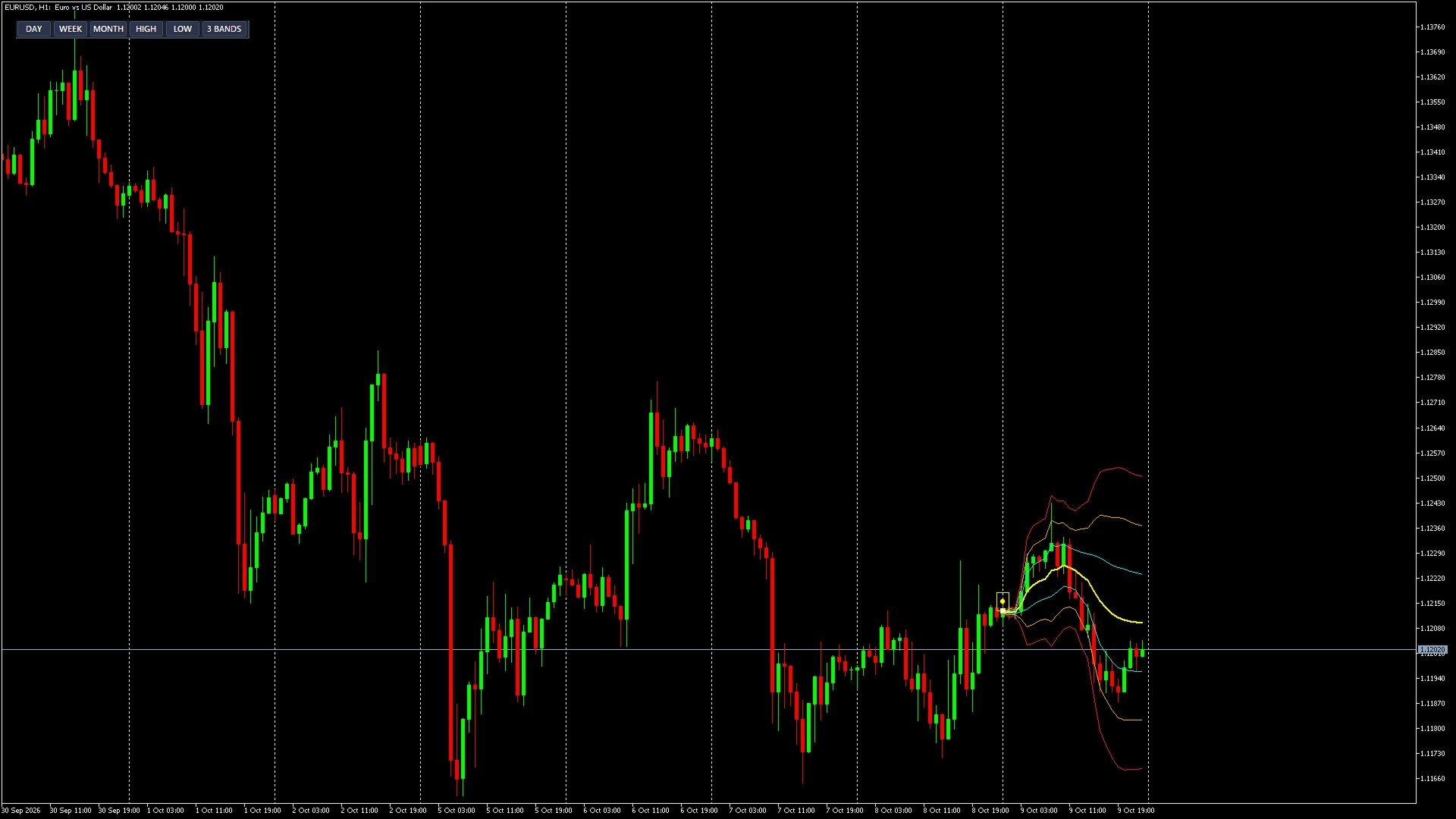
Interactive AVWAP Pro is a high-performance Anchored Volume-Weighted Average Price (AVWAP) indicator for MetaTrader. It brings the intuitive Drag-and-Drop functionality of modern charting platforms directly into MetaTrader, providing real-time recalculations with zero lag.
Key Features of Version 7.0
- Interactive Drag-and-Drop: grab and position the anchor point anywhere on the chart using your mouse (key highs, lows, news events) for instant recalculation.
- Multi-Anchor Cloning (Ctrl + Click): hold Ctrl and click on any price swing to spawn an independent AVWAP anchor. Run up to 10 independent AVWAPs simultaneously on a single chart.
- Standard Deviation Channels (SD Bands): cycle deviation modes directly from the screen (3 Bands, 1 Band, 2 Bands, or 1 Center Line) to identify Fair Value zones and overbought/oversold levels.
- Smart Alert Suite: real-time sound notifications, pop-up alerts, and mobile Push notifications when price touches or crosses key levels.
- Quick-Anchor Modes: 1-click automatic anchoring to the start of the Day, Week, Month, or local High/Low via the on-chart dashboard.
- Performance Optimized: optimized C++ calculation core ensuring smooth terminal operation on M1 charts with deep history.
- Volume Flexibility: supports Tick Volume (Forex) and Real Volume (Futures, Crypto, Stocks).
Feature Comparison: Free vs Pro
| Feature | Free Version | PRO Version |
|---|---|---|
| Interactive Anchor | 1 line | Up to 10 independent lines |
| Multi-Anchor (Ctrl + Click) | No | Yes |
| Standard Deviation Channels | Fixed mode | Up to 3 bands with 1-click cycle switching |
| Mobile Push & Sound Alerts | No | Sound, popup, and mobile Push alerts |
| On-Chart Dashboard | Basic | Full line and band control |
Want to test core features before purchasing? Try our free version: Fixed Time AVWAP (Free)
Input Parameters
- Language: user interface language (English / Russian).
- Anchor ID (Up to 10 points on 1 chart): unique instance number (from ID_01 to ID_10). To attach a 2nd, 3rd, or up to 10 independent anchor points on the same chart, simply drop the indicator again and select the next ID (ID_02, ID_03...) in the Inputs! Each line has its own color, SD bands, and anchor point.
- Start Mode: initial anchor position (Center, Day, Week, Month).
- Deviation Multipliers (SD 1, 2, 3): multipliers for standard deviation volatility channels.
- Alerts Configuration: toggle sound alerts, popups, and phone push notifications.
- Volume Type: Tick Volume for Forex or Real Volume for exchange-traded assets.
- Visual Customization: line thickness, channel colors, and anchor icon size.
Compatible with all asset classes: Forex, Crypto, Gold (XAUUSD), Indices, and Equities.