Simple Moving Averages
- Indicatori
- Versione: 1.0

Overview
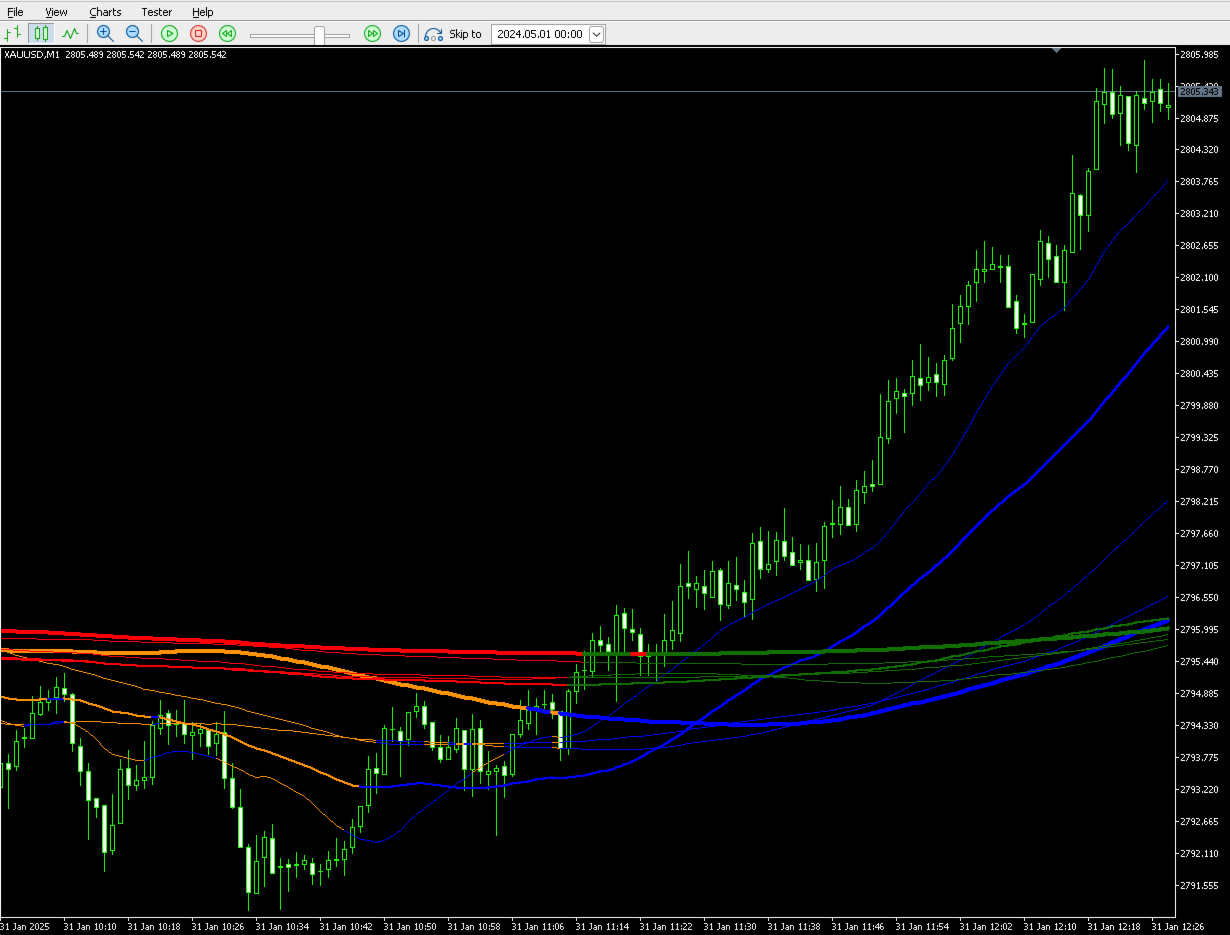
The Simple Moving Averages (SMA) indicator for MetaTrader 5 is a versatile analytical tool designed to help traders visualize price trends and potential support/resistance levels. It calculates and displays up to ten (10) customizable Simple Moving Averages directly on your chart, providing a comprehensive view of various trend durations.
Key Features
- Multiple SMAs: Plot up to 10 independent Simple Moving Averages simultaneously.
- Customizable Periods: Adjust the calculation period (length) for each SMA to suit your analytical needs.
- Flexible Price Sources: Choose the price type (e.g., Close, Open, High, Low, Median, Typical, Weighted) for each SMA's calculation.
- Dynamic Color Coding: Each SMA line changes color based on whether the current price is above or below its value, offering immediate visual cues on trend direction relative to the average.
- For SMAs 1-5: Blue when price is above or equal to SMA, Orange when price is below SMA.
- For SMAs 6-10: Green when price is above or equal to SMA, Red when price is below SMA.
- Individual Visibility Toggle: Easily enable or disable each of the 10 SMAs from appearing on your chart via input parameters, allowing for a clean and focused analysis.
How to Install
- Download: Obtain the SimpleMovingAverages.mq5 file.
- Open MetaEditor: In your MetaTrader 5 terminal, go to Tools -> MetaQuotes Language Editor (or press F4 ).
- Navigate to Indicators Folder: In MetaEditor, in the Navigator panel, expand Indicators .
- Place the File: Drag and drop the SimpleMovingAverages.mq5 file into the Indicators folder (e.g., MQL5/Indicators ).
- Compile: Double-click the file in MetaEditor or open it and press F7 to compile. Ensure there are no compilation errors.
- Restart MT5 (Optional but Recommended): Close and reopen your MetaTrader 5 terminal.
How to Use
- Attach to Chart: In your MetaTrader 5 terminal, open the Navigator window ( Ctrl+N ). Expand Indicators , find "Simple Moving Averages", and drag it onto the desired chart.
-
Input Parameters: A settings window will appear. Here you can customize the indicator:
- SMA #1 to SMA #10 (Groups):
- InpLenX : Set the period (number of bars) for the SMA calculation (e.g., 20, 50, 200).
- InpSrcX : Select the price type for the SMA calculation.
- PRICE_CLOSE (0): Default, uses closing price.
- PRICE_OPEN (1): Uses opening price.
- PRICE_HIGH (2): Uses high price.
- PRICE_LOW (3): Uses low price.
- PRICE_MEDIAN (4): Uses (High+Low)/2.
- PRICE_TYPICAL (5): Uses (High+Low+Close)/3.
- PRICE_WEIGHTED (6): Uses (High+Low+Close+Close)/4.
- Visibility (Group):
- InpShowSMAX : Toggle true to display the SMA, false to hide it.
- SMA #1 to SMA #10 (Groups):
-
Interpretation: The indicator plots the Simple Moving Averages directly on your price chart.
- When the price is above or equal to an SMA, the line will be colored (Blue for SMAs 1-5, Green for SMAs 6-10). This can suggest an uptrend relative to that specific average.
- When the price is below an SMA, the line will be colored differently (Orange for SMAs 1-5, Red for SMAs 6-10). This can suggest a downtrend relative to that specific average.
- Multiple SMAs can be used to identify stronger trends (e.g., all short, medium, and long-term SMAs aligning in one direction) or potential trend changes (e.g., shorter-term SMAs crossing longer-term SMAs).
Important Disclaimer and Risk Warning
Trading in financial markets carries a high level of risk, and it may not be suitable for all investors. The Simple Moving Averages indicator is a tool for technical analysis and does not guarantee any specific trading outcomes or profits. Past performance of any trading system or indicator is not necessarily indicative of future results. You should not invest money that you cannot afford to lose. Always consider your investment objectives and risk tolerance before trading.