Active Gold
- Experts
- Versione: 2.8
- Aggiornato: 13 giugno 2025
- Attivazioni: 10

Active Gold is an excellent 100% automated tool for online trading on the Forex Gold (XAUUSD) market, on the MT4 platform.
See: Example of trading with Automatic saving of investments and profits XAUUSD on Strategy Tester (Video clip on YouTube).
Active Gold — Advisor, developed specifically for gold trading (XAUUSD instrument). The basis of the work is opening orders on the Alligator and RSI indicators, thus the Advisor works on the "Trend Follow" strategy, which means following the trend.
The system is safe and does not use any dangerous methods such as grids or martingale. Each order has its own StopLoss to protect the account. To ensure the preservation of capital, the Advisor has a "Deposit Protection" function, which will automatically turn on the start of "Deposit Protection" when the profit level specified by the trader is reached. (Video clip on YouTube).
In fully automated trading, it is not recommended to make adjustments to the Advisor , even in cases of drawdown. Since in the long term, the Advisor is guaranteed to come out of the drawdown with a positive result. Therefore, the trader needs to be patient and not rush with quick income. Especially in periods of low market volatility, drawdowns can last for several days. At the same time, the trader gets the opportunity to have a calm and confident income of 10% monthly.
This Advisor is very easy to use and can be used by both professional traders and beginners. You can control the Advisor's variable functions and actions directly on the open terminal chart using the built-in, graphically active, trading panel. This is especially convenient for manual trading - it is easy to have full control over your trading strategy.
The advisor has a time filter that can be used if necessary. Working hours: 24 hours, Monday through Friday (time can be changed using the built-in graphical trading panel).
In addition, the Advisor has information tables (live statistics) that allow you to visually track trading results by trading days, weeks, months and year. These tables are available at any time and are enabled by pressing the corresponding buttons on the built-in trading panel.
Brief description
• Platform: MetaTrader 4.
• Account type: Hedge. Works on accounts with 5-digit quotes.
• For trading in automatic mode:
1. Turbo mode: TF M1.
2. Medium-term mode: TF H1.
• For trading on cent accounts, a deposit of 10,000 cents USD ($100) per Robot, with starting lot positions from 0.01.
• Account currency USD, XAU.
Explanation of the algorithm
The program calculates lots of opened, both market and deferred positions, based on the deposit load percentage, taking into account Leverage, StopLoss and Risk, while virtual take profit and stop loss are used (so that the broker does not see trading levels). In the autotrading mode, the input parameters of the Advisor are configured by default only for XAUUSD and set files are not needed.
The program provides 2 auto-trading modes:
1. On the M1 timeframe — turbo mode of autotrading (for "accelerating the deposit"), works only on the M1 timeframe. This is a mode of intraday trading, with increased risk, so the trader must carefully monitor the process. At the end of the intraday trading session, the Advisor automatically stops and is removed from the current chart, according to the terminal time set by the trader (using the Time_Mode button on the graphical trading panel).
2. On the H1 timeframe — medium-term autotrading mode, works around the clock. This is a conservative style, which produces a small but stable result of 10% monthly, no control over trading operations is required.
Recommendations
For XAUUSD The advisor works automatically, taking into account the above, all you need is to install it on MT4 and leave the PC on (or just use a VPS). medium-term auto trading mode , please do not interfere with the work of the Advisor , do not modify open positions and do not open additional positions manually. Trust the Advisor , it is a profitable expert, let it bring you profit.
After finishing working in turbo mode, be sure to switch to the medium-term mode on the H1 timeframe and you may not control further trading Advisor a. If you leave the turbo mode, the Advisor will be automatically removed from the chart at the end of the daily trading session, as indicated above.
When working manually, you can also use other tools. For manual trading, it is recommended to use a separate account that is not associated with automated trading.
Installation and configuration:
• Instructions for actions and settings are broadcast when the Robot is launched, during its installation on the chart. Double-click on the Robot icon in the Terminal Navigator, a table in Latin transcription will appear in the window that opens:
1. Read the information about the advisor in the properties - tab (About the program).
2. For the advisor to work on a real account: A password is required, either automatic or received when purchasing the advisor. Without a password, only on the Strategy Tester.
3. Advisor operation during Manual trading: Edit in the Buy, Sell, LOT, Risk% windows and click: [Buy] and/or [Sell] and/or [Take_Buy], [Take_Sell], [On_Take].
4. Advisor operation during Auto-trading: Buttons: [Autotrade], [ContTime] and [Virtual_Take]. Deposit protection in the account currency, set the amounts and click: [StartProtection] and [Insurance].
5. When loading on the chart, insert Magic (MN): The MN parameter is the unique number of the advisor, if pairs (see p.1), then MN auto.
6. You can enable Balance Protection in %%: Change or do not change the number in the Risk% window and click the [On.Risk%] button (virtual stop loss).
7. START the advisor: press the [START] button ---> .
• Below are instructions on how to install the Robot on the Strategy Tester.
• Visual control and management can be performed on the open chart via the active graphical trading panel.
• Support for positions opened manually in automatic trading mode is possible.
Testing trading on the Strategy Tester.
For a visual introduction to trading with the Advisor , install it on the Strategy Tester for XAUUSD.
In the Strategy Tester settings:
1. Check the box in the Visualization window;
2. Open the Expert Properties and change the parameter: Use_Graphics = true;
3. Set the spread: Current and custom date.
4. Timeframe M1 for turbo mode and deposit volume of at least 1000.
5. Timeframe H1 for medium-term trading and deposit volume of at least 1000.
Note:
1. To see how "Deposit Protection" works, in the expert properties set the desired amount to start the "Deposit Protection" function StartSave_Depo and the amount to save the balance increase SizeSave_Depo, and switch the parameter Use_SizeSave_Depo = true;
2. To speed up the work of the Advisor in the Strategy Tester, uncheck the box in the Visualization window and switch in the properties - Use_Graphics = false;
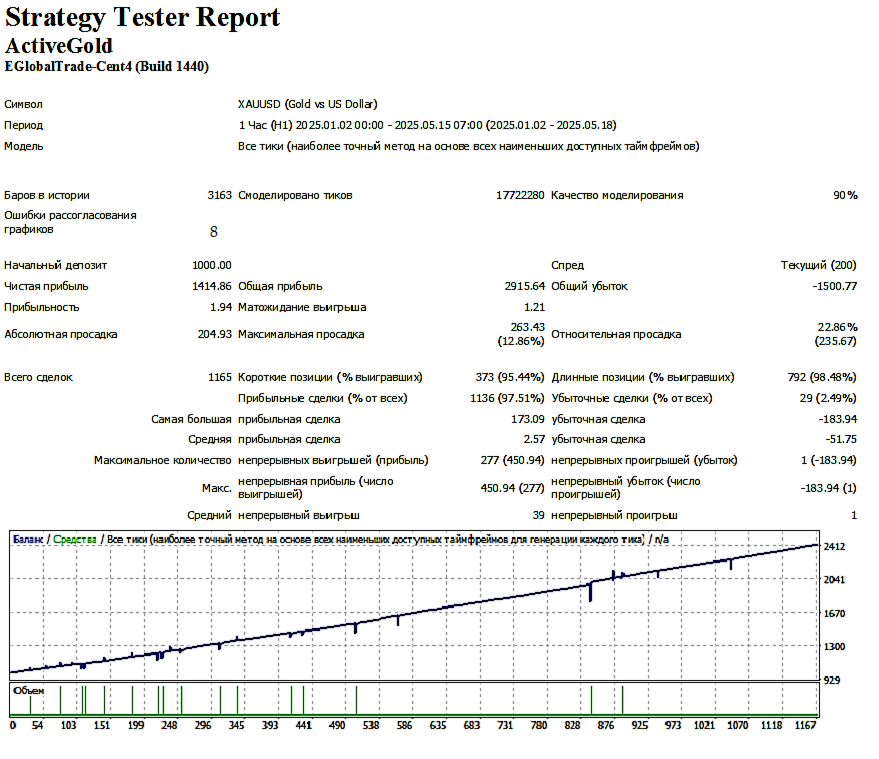
Advisor trading report on Strategy Tester on chart XAUUSD: (Screenshot pos. 1).
Example of trading with an advisor on the Strategy Tester on the XAUUSD chart : (Video clip on YouTube).
Risk Warning
This offer and any reports are not a call for trading in the financial markets, therefore the responsibility for using this program for automatic trading or manual work lies entirely with the user.