Strategic View Helper
- Utilità
- Versione: 2.57
- Aggiornato: 22 febbraio 2025

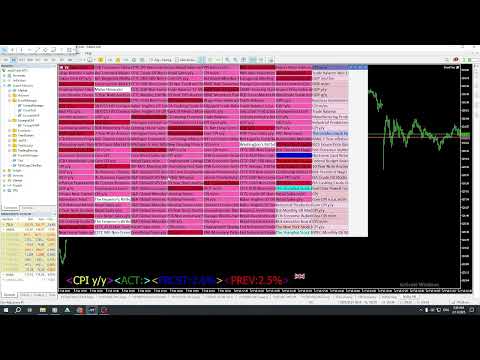
The Calendar News Indicator is your essential tool for informed trading, offering real-time updates on economic events and financial news. Here’s what it brings to your trading strategy:
-
Real-Time Updates: Stay ahead with immediate notifications of key economic indicators, central bank announcements, and geopolitical events that impact the markets.
-
Global Coverage: Track economic events from markets around the world. Whether you’re trading forex, stocks, or commodities, you’ll get the global perspective necessary to make informed decisions.
-
Impact Analysis: See at a glance the expected impact of upcoming events. The indicator highlights high, medium, and low-impact events, so you can prioritize your focus accordingly.
Indicator Description: Economic Calendar Sector Icons
This indicator provides a visual representation of economic calendar events by categorizing them into specific sectors. Each sector is represented by a unique symbol, allowing traders to quickly interpret market influences without detailed text descriptions. Here are the icons used for each calendar sector:
- Market (⌘) – Represents general market events affecting financial markets as a whole.
- GDP (☼) – Indicates events related to Gross Domestic Product, reflecting economic growth and productivity.
- Jobs (⛏) – Highlights employment data, including job creation and unemployment rates.
- Prices (⌛) – Signifies price indices, including inflation and cost of living adjustments.
- Money (⚡) – Relates to monetary policy announcements, interest rates, and financial liquidity.
- Government (♛♚) – Covers governmental decisions, including fiscal policy and political events impacting markets.
- Business (✡) – Denotes corporate-related events such as earnings reports and business sentiment indices.
- Consumer (ツ) – Represents consumer data, including confidence levels and retail sales.
- Housing (▲) – Indicates housing market statistics, such as home sales and construction data.
- Taxes (%) – Relates to tax policy changes and fiscal announcements influencing disposable income.
- Holidays (👍) – Marks public holidays that could affect market trading volumes and volatility.
This intuitive icon system enhances traders' decision-making by providing at-a-glance insights into economic events, improving situational awareness and trading strategy alignment.
How to Adjust and Toggle News Labels
-
Ctrl + Click: To move a news label to a new position, simply hold down the Shift key and click on the desired location on the chart. This action will update the label's position based on the new coordinates.
-
Tab + Click: To switch between displaying news labels in a row or column view, hold down the Tab key and click on any part of the chart. This will toggle the layout of the news labels, making it easy to choose your preferred display style.
-
The Shift button will change the label text from 'News Name' to 'Code View'.
You might notice that some exchange entries in the settings have "#" at the end, like this:
9:00-15:00-JP#
This simply means that the Strategic View Helper will not display any special events for that particular exchange.
Why is this useful?
- Reduced Clutter: If you're not interested in seeing holiday information for certain exchanges, using "-NO_EVENT" helps keep the display clean and focused.
- Performance: It might slightly improve performance by reducing the amount of data the informer needs to process.
How to Enable Event Display:
If you want to see events and holidays for an exchange that currently has "#", just remove that part from the input string. For example:
9:00-15:00-JP // Events will now be shown for the JP exchange
Let me know if you need further customization or have additional requests! 😊