 MetaTrader 5
 Sistemi Esperti
 Indicatori
 Script
 Librerie
 Archiviazione
Guarda come scaricare robot di trading gratuitamente
Ci trovi su Twitter!
Unisciti alla nostra fan page
Unisciti alla nostra fan page
Ti è piaciuto lo script? Provalo nel Terminale MetaTrader 5

ManualTradeOnStrategyTester - sistema esperto per MetaTrader 5

- Visualizzazioni:
- 17652
- Valutazioni:
- Pubblicato:
- Aggiornato:
-
 Ti stai perdendo delle opportunità di trading:
- App di trading gratuite
- Oltre 8.000 segnali per il copy trading
- Notizie economiche per esplorare i mercati finanziari
Registrazione AccediAccetti la politica del sito e le condizioni d’uso
Se non hai un account, registrati -
 Hai bisogno di un robot o indicatore basato su questo codice? Ordinalo su Freelance
Vai a Freelance
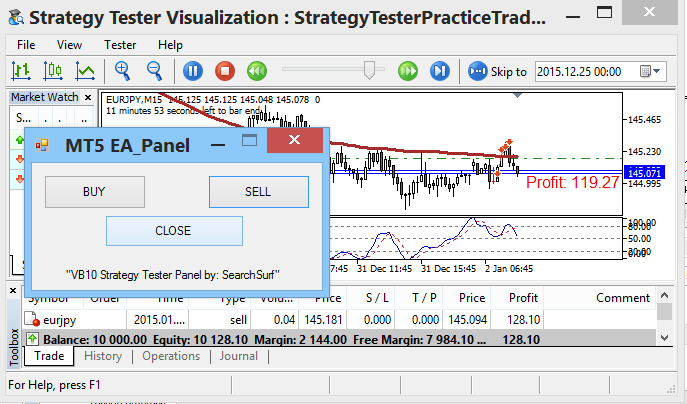
Here's one possible and a simple way to link a manual order for Strategy Tester use. Most of us know already that ChartEvent doesn't work with Strategy Tester, and the simplest objects — or should I say the only objects (at this time using basic MQL5 codes) that can be placed on the Strategy Tester are the "label" and the "button". For the label, there's no problem attaching it in, but for the button... even if you manage to place it in the tester, you won't be able to detect its state if clicked or unclicked without using advanced programming and linking it to other systems.
The trick part I used to attain this, is by using a simple file detection process. Think of this EA as a standalone receiver, at every tick movement the EA will keep checking a folder for a file that would trigger an order. If the required text file in a specific folder location is detected, the EA will then execute a command to process the order and delete the file afterwards. Thus, the existence of a certain file in a folder location is the main trigger command to execute a trade.
You can now use any or whatever way you can think of to command the EA to execute the order by just placing a certain file on a folder location.
In this EA, a simple "buy.txt", "sell.txt", or "close.txt" filename in the "...\Common\Files\" folder location of MetaTrader 5 would trigger a command to execute a certain order based on the file's name. The text files are empty, it's the filename that matters and its presence in the folder that counts. The files should appear one at a time in <common_data_folder>\Files (my folder looks like this: C:\Users\Rmd user\AppData\Roaming\MetaQuotes\Terminal\Common\Files\). Only one of the three files must appear at a time inside the folder, if not, the first one that EA reads will be executed, after which the EA deletes any or all files named on the three.
The other outside application you gonna need now is the one that will create or supply you the required text file on the said folder, or you can just simply find a way to transfer the mentioned filename on the target folder location. I've made mine in Visual Basic, I would love to share it but I doubt the site will allow me to upload an executable file here, so best is to create or look for such on your own, it is on any possible way you can think of, just simply place the command text file on the proper folder. Check out the discussion area at the bottom, I'll post how I made my panel.
Recommendations:
- If you want to use your own chosen indicator for the tester, save or rename an indicator template to "StrategyTesterPracticeTrade.tpl", same as the name of the EA you will use on the Strategy Tester.
- Take note on the proper folder location for command text files to appear (...\MetaQuotes\Terminal\Common\Files\).
- You can work out with this idea not only for Strategy Tester use, but also a way to link outside influence on your other EA codings. Ex: Instead of just the presence of a filename, you can use FileOpen and read the content of the file where a possible data can be placed and retrieved in for Take Profit, Stop Loss, and lot sizes data... etc... thus, your outside application can cover other possibilities you want your EA to react with.
 VWAP - Volume Weighted Average Price
VWAP is an intra-day calculation used primarily by algorithms and institutional traders to assess where a stock is trading relative to its volume weighted average for the day.
RJT Matches
This indicator helps determine the end and the beginning of trends based on the inclination of the matches.
VWAP Lite - Volume Weighted Average Price
VWAP is an intra-day calculation used primarily by algorithms and institutional traders to assess where a stock is trading relative to its volume weighted average for the day.
 CIsSession - class to set time intervals (sessions)
This simple class can be used to adjust, for example, trading ranges, or to enable / disable certain actions by time or day of the week.