Copperhead Scalp
- Experts
-
Alex Amuyunzu Raymond
 I’m an experienced MQL5 developer and software engineer specializing in building robust, high-performance algorithmic trading systems for MetaTrader 5. My work goes beyond standard EA development — I design intelligent, scalable solutions that combine market logic, automation, and external
 - Version: 2.0
- Activations: 5
Copperhead Scalp: Strike Fast. Cut Losses Faster. Let Winners Run.
Copperhead Scalp is a fully automated M5 scalping Expert Advisor for MetaTrader 5. It trades only when trend, momentum and volatility agree, sizes every position from your account risk, and manages each trade from entry to exit without you touching it. There is no martingale, no grid, no averaging down and no hedging. Every trade has a stop loss and a take profit from the first tick.
What it does
Every closed M5 bar, Copperhead Scalp checks whether the market is trending with momentum behind it. If it is, and every safety check passes, it opens one trade sized to your chosen risk. If any check fails, it stays out and shows you why on the chart.
Entry logic
- Trend filter: a 20 EMA above the 50 EMA defines an uptrend, and below it a downtrend. Only trades in the trend direction are considered.
- Price confirmation: the last closed candle must close on the trend side of the fast EMA.
- Momentum confirmation: RSI must be above the buy threshold (default 55) for longs or below the sell threshold (default 45) for shorts.
- Closed-bar signals only: signals are read from completed candles, so they do not repaint or flicker mid-bar.
Optional confirmation filters
All three are off by default and can be enabled to trade more selectively:
- Higher-timeframe trend filter: trade only in the direction of a slower EMA on a higher timeframe (default H1, 100 EMA).
- ADX strength filter: skip weak, directionless markets below a minimum ADX.
- Volatility band filter: skip dead markets and abnormal spikes by limiting the ATR range in pips.
Risk management
- Percentage risk sizing: lot size is calculated from balance, risk percent and the actual stop distance, so every trade risks the same amount. Default is 1%.
- ATR-based stop loss: the stop adapts to current volatility (default 1.5 x ATR), wider in fast markets and tighter in quiet ones.
- Fixed reward ratio: take profit is set as a multiple of the stop distance (default 2.0).
- Broker-safe stops: the EA respects your broker's minimum stop and freeze levels and adds its own floor, which prevents "Invalid stops" rejections.
- Margin pre-check: before sending an order it checks free margin, so small accounts never fire orders that are certain to fail.
- Position limit: one trade at a time per symbol by default, adjustable.
Active trade management
Once a trade is open, three tools work in sequence:
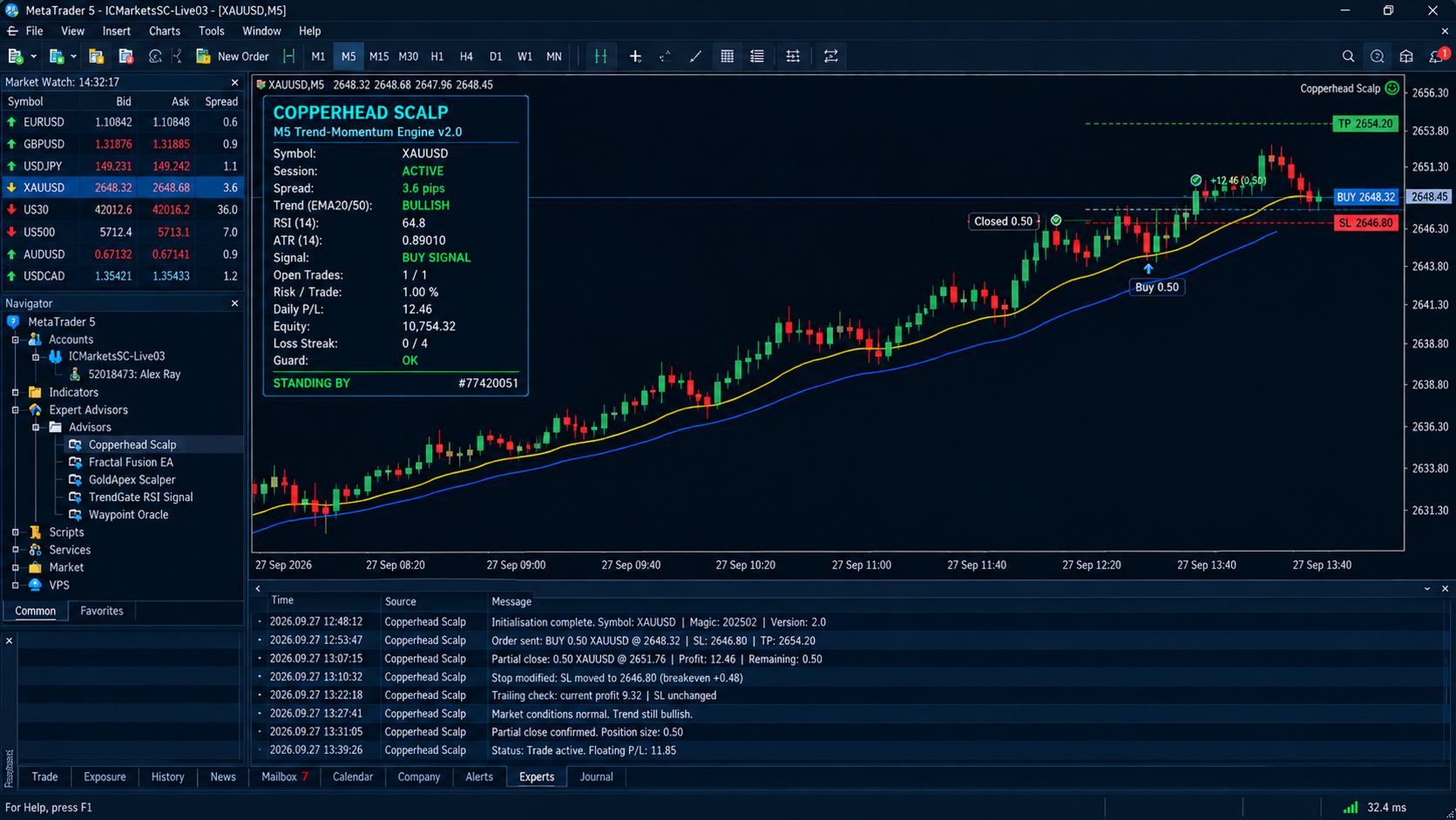
- Breakeven: after price moves a set ATR distance in your favour, the stop moves to entry plus a small offset.
- Partial close: at the next ATR target, a set percentage of the position (default 50%) is closed to bank profit. The rest runs with a protected stop. It is skipped automatically if the position is too small to split.
- ATR trailing stop: the remaining position is trailed at an ATR distance, moving only in steps to avoid constant modifications.
If a broker rejects a modification, the EA backs off on that ticket instead of retrying every bar.
Account protection
- Daily loss limit: new trades stop for the day if equity falls by your chosen percentage (default 5%) from the day's starting balance.
- Daily profit target: optionally stop after reaching a target.
- Loss-streak pause: after a set number of consecutive losing trades (default 4), the EA pauses for a set time (default 120 minutes). Partial closes are not counted as results.
- Cooldown after loss: optionally wait a set number of bars after any loss.
- Friday close-out: optionally close all positions and stop entries at a chosen hour on Friday to avoid weekend gaps.
Session, spread and news control
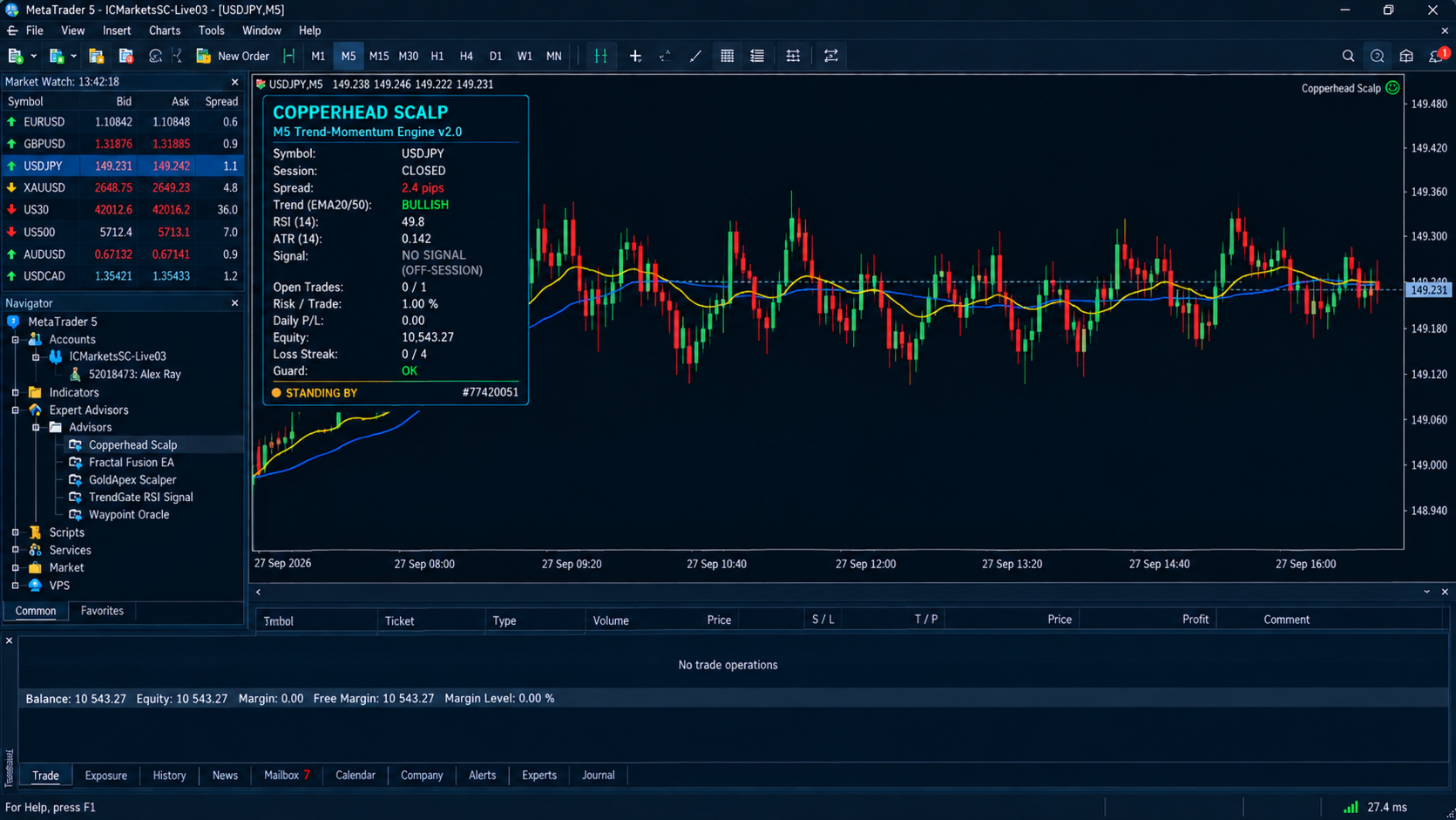
- Session filter: trade London, New York, or both, with hours set in broker time. Overlapping sessions and overnight ranges are handled correctly.
- Spread guard: no entries when the spread exceeds your limit in pips.
- News blackout windows: enter your own high-impact news times as a simple list (for example 12:25-12:45,14:25-14:45 ) and the EA stays flat during them. These are windows you define, not an automatic news feed.
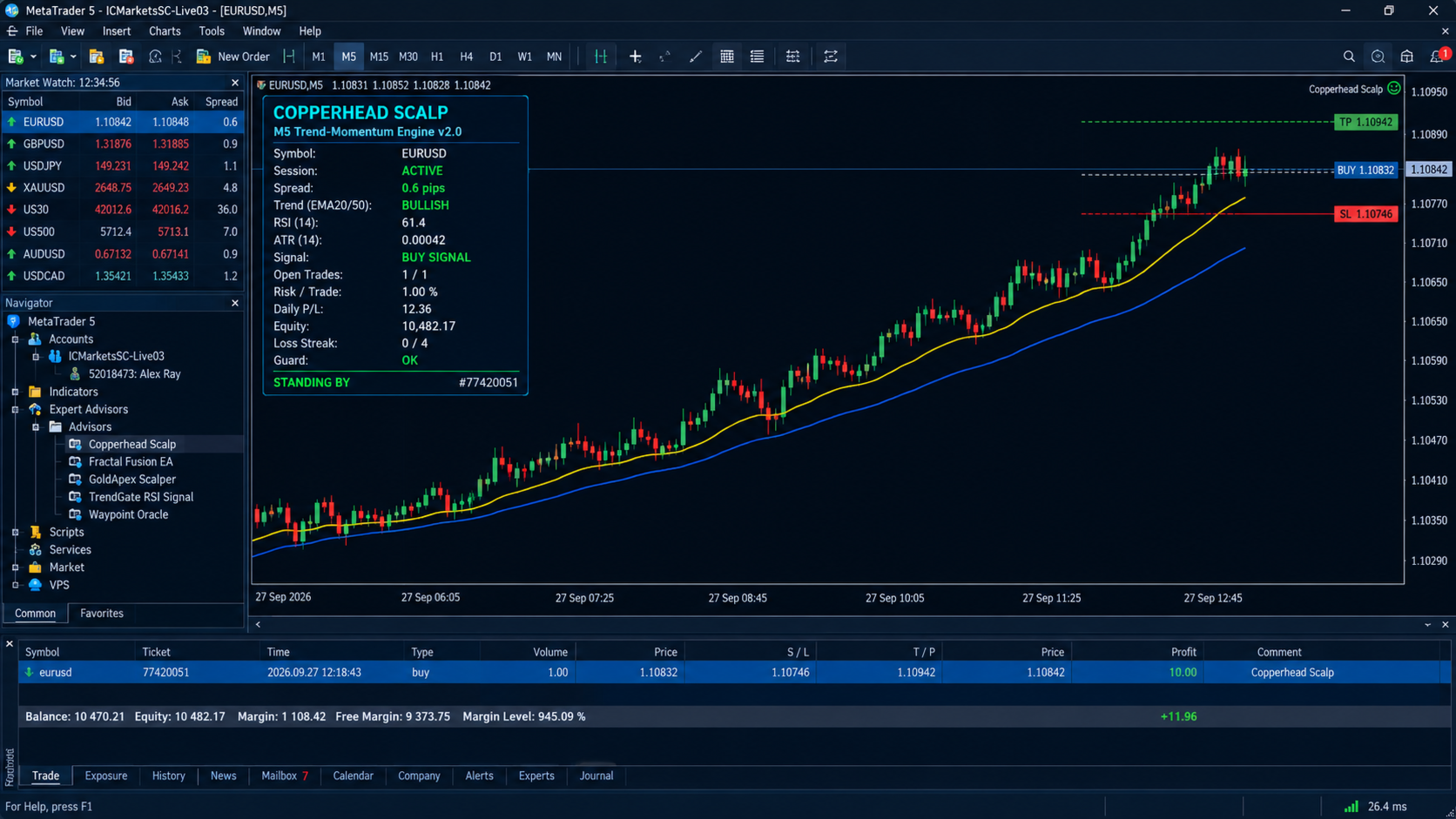
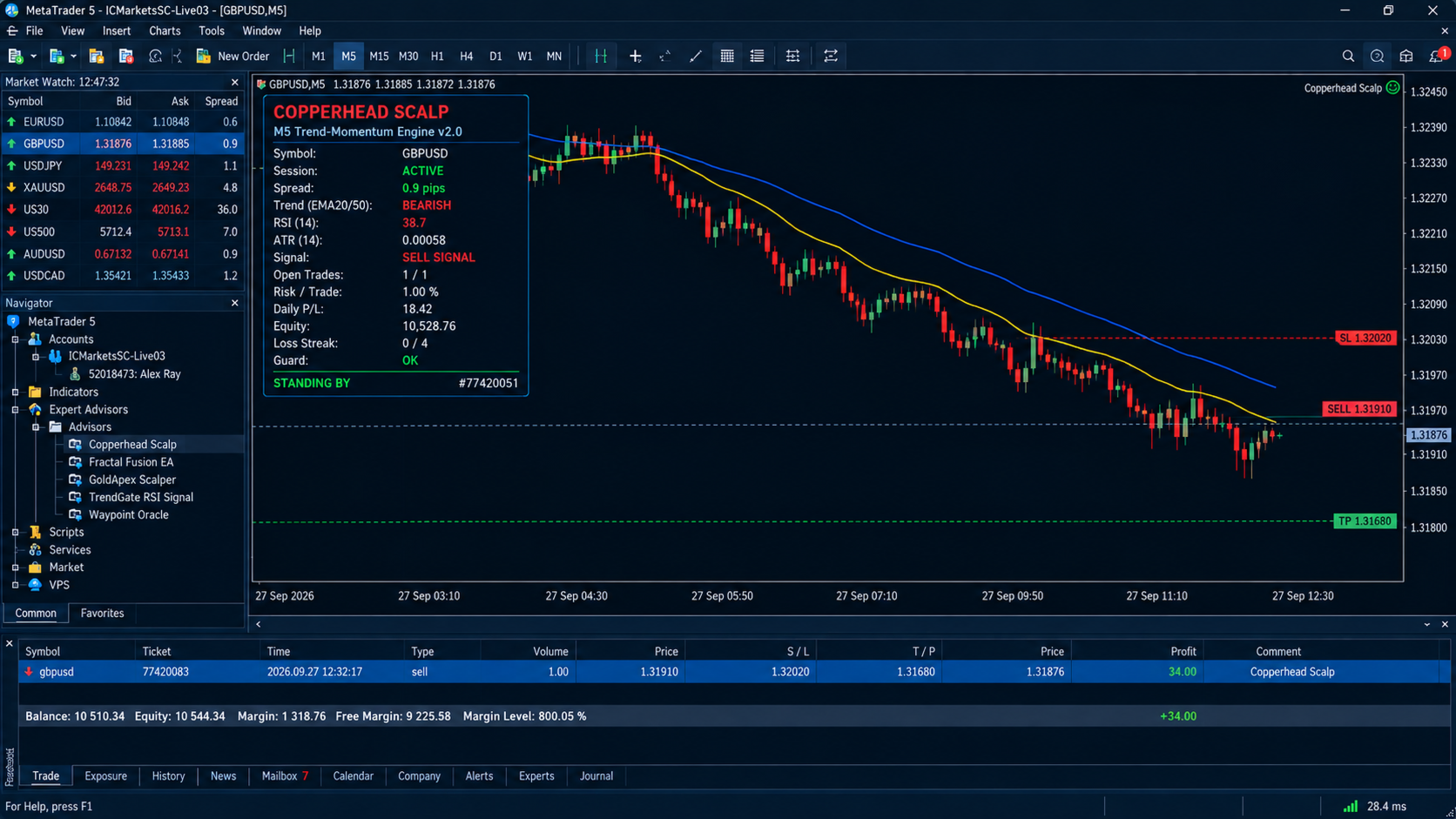
On-chart dashboard
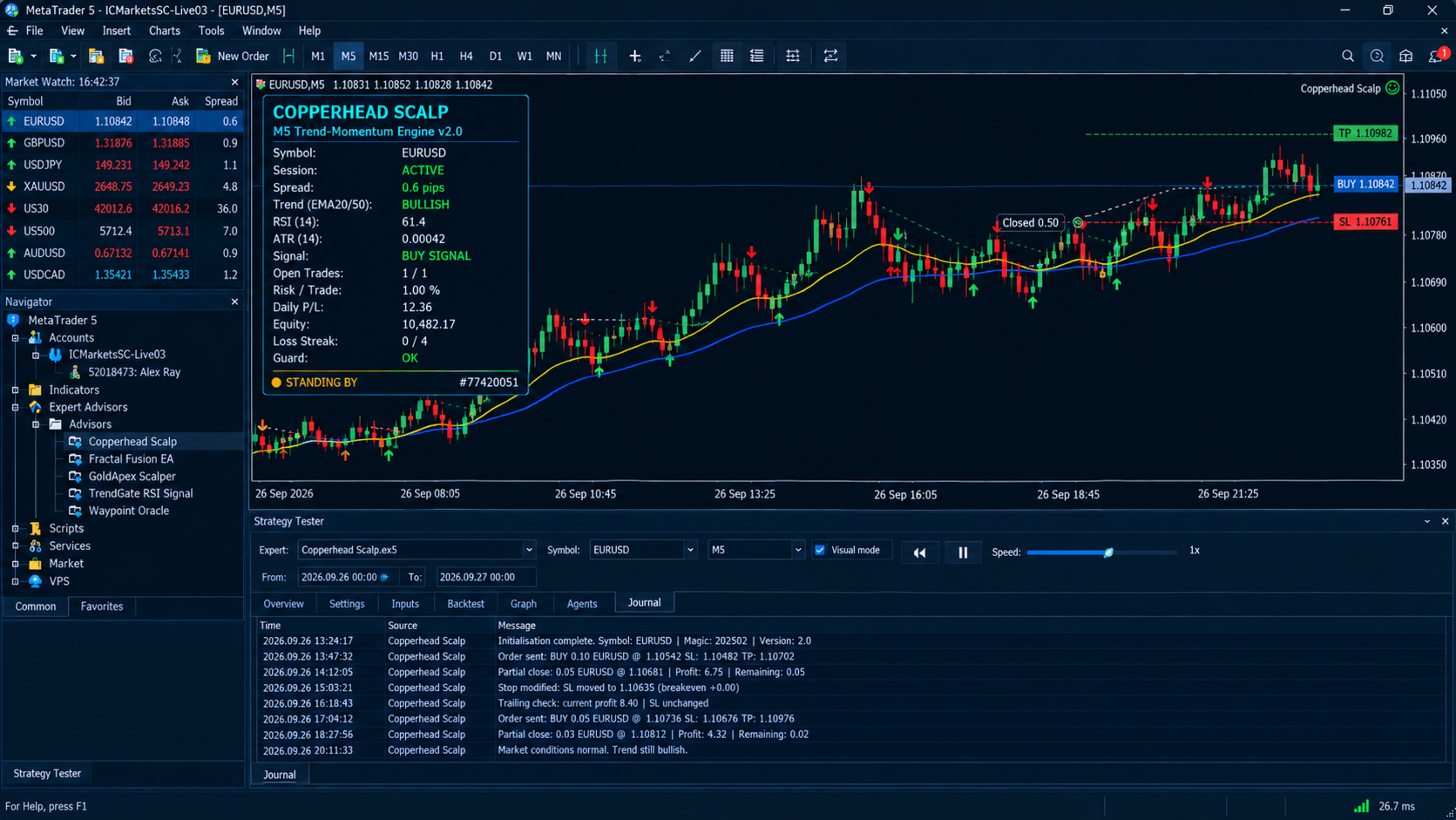
A clean panel on the chart shows, live:
- symbol, session status and spread
- EMA trend direction, RSI and ATR
- current signal, and the reason when a signal is blocked (off-session, news, spread, filtered, or a specific guard)
- open trades against the limit, risk per trade, daily profit/loss, equity and loss streak
- overall status (monitoring or standing by) and the magic number
The dashboard is drawn only on live charts and in visual tester mode.
Setup
- Chart timeframe: M5.
- Instruments: forex majors and other liquid symbols. Set the maximum spread to suit the instrument.
- Account: hedging or netting. A low-spread ECN or raw account is recommended for scalping.
- Minimum deposit: any deposit that allows the broker's minimum lot at your chosen risk. Small accounts are protected by the margin pre-check.
- VPS: recommended for 24/5 operation.
- Permissions: enable Algo Trading. No DLLs or web requests are needed.
- Magic number: adjustable, so it can run alongside other EAs on the same account.
Recommended first steps
- Run it in the Strategy Tester with "Every tick based on real ticks" on your broker's data.
- Forward test on a demo account for a few weeks before going live.
- Keep risk per trade low while you learn how it behaves on your symbol.
- Adjust session hours to your broker's server time.
Risk warning
Trading leveraged products involves a high risk of loss. Past or simulated results do not guarantee future results, and no EA can eliminate risk. Test on a demo account first, and only risk money you can afford to lose.