Risk Trade Panel
- Utilitaires
-
Aleksandr Bernes
 Développeur MQL5 axé sur des outils MetaTrader 5 pratiques : panneaux de trading, sizing du risque, utilitaires de sortie et indicateurs clairs.
Expérience :
• Plus de 10 ans en développement logiciel et automatisation
• Plusieurs années d’outils MT5 pour le trading discrétionnaire - Version: 1.0
- Activations: 10
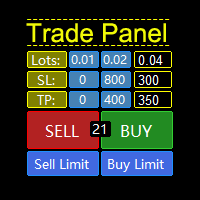
Risk Trade Panel est un Expert utilitaire MetaTrader 5 avec panneau sur le graphique pour le trading manuel. Il ne génère pas de signaux d’entrée et n’exécute ni grille ni martingale. Vous décidez d’acheter ou de vendre ; le panneau aide au dimensionnement, aux stops et au suivi de position. Fonctions - lot fixe ou selon un risque % du solde (ou de l’equity) par rapport à la distance du SL ; - BUY / SELL au marché avec SL et TP par défaut (points ou prix absolu) ; - ordres en attente : Buy Limit, Sell Limit, Buy Stop, Sell Stop ; - break-even : déplacer le SL à l’entrée (+ offset) quand le prix atteint un déclencheur en points ; - trailing : off, points fixes ou basé sur l’ATR ; - clôture partielle en pourcentage du volume ; - tout fermer / gagnants / perdants — filtré par magic et/ou symbole du graphique ; - raccourcis optionnels : B Buy, S Sell, C Close all, E Break-even, T Trail, P Partial ; - schéma ardoise sombre ou clair ; coin, taille et police réglables. Pour qui - traders manuels et semi-manuels sur comptes hedging (netting avec sémantique multi-positions plus simple) ; - ceux qui veulent un lot basé sur le risque et une gestion rapide des stops sans stratégie auto. Prérequis - MetaTrader 5 ; - Algo Trading activé (bouton vert) ; - marché ouvert pour l’envoi / la modification d’ordres ; - attacher au graphique du symbole tradé. Utilisation 1. Attacher RiskTradeManager à un graphique. 2. Régler le mode de lot (risque % ou fixe), SL/TP par défaut, magic et filtres. 3. Utiliser les boutons (ou raccourcis) pour ouvrir, gérer et fermer. 4. Vérifier la ligne d’état et Experts / Journal en cas d’échec. Notes - Ce n’est ni un produit de signaux ni un EA entièrement automatique. - Les performances passées de setups manuels ne garantissent pas les résultats futurs. - Vérifiez toujours stops et lot sur le symbole de votre broker (digits, lot min, stop level) avant le live. Vos retours sont les bienvenus. Avis et commentaires m’aident à améliorer le produit — dites ce qui marche et ce qu’il faudrait améliorer.