EAPortfolioMonitor Pro

EA Portfolio Monitor PRO gives you a complete overview of every Expert Advisor running on your MetaTrader 5 account — all from a single chart.

Instead of switching between charts to check how each EA is performing, this utility collects all closed trades and open positions automatically, groups them by EA (using Magic Number), and displays the results in a clean on-chart dashboard. At the end of the day, week, or month, it sends a formatted performance report directly to your Telegram.

What the dashboard shows

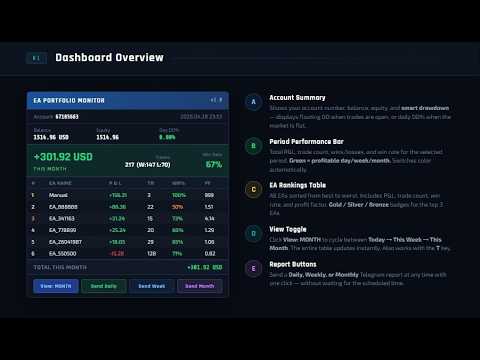
The on-chart panel updates every 30 seconds and displays the following for each EA:

  • P&L for the current day, current week, and current month
  • Number of closed trades (wins and losses)
  • Win rate percentage
  • Profit factor
  • Open positions count and floating P&L
  • Account balance, equity, and drawdown percentage

EAs are ranked automatically from best to worst based on the selected time period. You can switch between daily, weekly, and monthly view by clicking the toggle button on the dashboard or pressing T on your keyboard.

Telegram reports

When Telegram is configured, the utility sends:

  • A daily summary at a time you choose (default 23:50)
  • A weekly summary every Friday
  • A monthly summary at the end of each month
  • An instant alert when any EA exceeds your defined daily loss limit

All reports include a formatted table with each EA ranked by performance, showing P&L, trade count, and win rate. Reports use plain text formatting that displays correctly in all Telegram clients.

Telegram sending can be turned on or off at any time from the input settings.

How it works

The utility reads your account trade history using the standard MT5 history functions. It does not place, modify, or close any trades. It does not connect to any external server except the official Telegram API when reports are enabled.

All data is calculated directly from your account history. No external data feed is required.

Setup

  1. Attach the EA to any chart (one chart is enough for the whole account)
  2. Go to Tools → Options → Expert Advisors → Allow WebRequest
  3. Add https://api.telegram.org to the allowed URLs list
  4. Enter your Telegram Bot Token and Chat ID in the EA inputs
  5. The dashboard appears immediately and updates automatically

To get your Telegram Bot Token: open Telegram, search for @BotFather, create a new bot, and copy the token it provides. To get your Chat ID: send a message to your bot, then visit https://api.telegram.org/bot[YOUR_TOKEN]/getUpdates and look for the "id" field.

Input parameters

Telegram Settings

  • Telegram Token — your bot token from @BotFather
  • Telegram Chat ID — your personal or group chat ID
  • Send Reports — enable or disable all Telegram reports (default: true)

Report Schedule

  • Daily Report Time — time to send the daily report in HH:MM format (default: 23:50)
  • Weekly Report Day — day of week for weekly report, 1=Monday to 5=Friday (default: 5)
  • Monthly Report Day — day of month for the monthly report (default: 28)
  • Include Open Summary — include open positions in the daily report (default: true)
  • Refresh Interval — how often the dashboard updates in seconds (default: 30)

Risk Alerts

  • Enable Loss Alert — send an alert when an EA reaches the daily loss limit (default: true)
  • Max Daily Loss USD — the loss amount that triggers the alert per EA (default: 100)

Display

  • Show Dashboard — show or hide the on-chart panel (default: true)
  • Dashboard X / Y — position of the panel on the chart

Notes

  • The utility monitors up to 50 EAs simultaneously
  • EAs are identified by Magic Number. Manual trades are grouped separately under "Manual"
  • EA names are extracted automatically from trade comments when available
  • The dashboard is non-interactive with the chart — it does not interfere with price display or other indicators
  • Keyboard shortcuts: D = send daily report now, W = send weekly report now, M = send monthly report now, T = toggle dashboard view between daily / weekly / monthly

Requirements

  • MetaTrader 5 build 2361 or later
  • An active internet connection is required only for Telegram reports
  • WebRequest must be enabled in MT5 settings for Telegram to work
  • The utility should be attached to a chart that remains open (a separate blank chart is recommended)
Produits recommandés
InfoRisk
Andrej Nikitin
Info tool helps to estimate the current risks of open positions and orders. It allows to analyze open positions or/and pending orders, also there are USD/Percentage modes. Expands the margin load and the share of profit participation for individual positions. Информационная панель помогает оценить текущие риски по открытым позициям и ордерам. Есть возможность отдельного анализа рисков по позициям/отложенным ордерам, а также в режимах USD/Percentage. Раскладывает маржинальную нагрузку и долю учас
How the Chart Cleaner Script Works The Chart Cleaner is a one-click tool designed to instantly wipe your chart clean. When you drag and drop the script onto a chart, it scans for and removes all visual objects—including trend lines, horizontal lines, text labels, shapes, and any other drawings you have placed. The result is a completely clean, uncluttered chart, giving you a fresh workspace for your analysis. It's the fastest way to reset your chart to its default state.
Cet outil peut vous aider à clôturer toutes les commandes ouvertes en un seul clic, cliquez simplement sur « Tout fermer ». Si vous souhaitez uniquement clôturer les ordres rentables, cliquez sur le bouton « Fermer les ordres rentables ». Après avoir cliqué, tous les ordres flottants seront fermés ; Si vous souhaitez uniquement clôturer les ordres avec des pertes flottantes, cliquez sur le bouton « Fermer les ordres perdants ». Après avoir cliqué, tous les ordres avec des pertes flottantes seron
Chart Background Changer Utility
AL MOOSAWI ABDULLAH JAFFER BAQER
5 (1)

Chart Background Changer Utility v1.90 Professional Chart Customization Tool for MetaTrader 5 Product Description Transform your MetaTrader 5 trading experience with the Chart Background Changer Utility - a professional tool that allows you to personalize your charts with custom backgrounds, images, or colors. Whether you want to create a more visually appealing workspace or reduce eye strain with custom colors, this utility makes it simple and effortless. Key Features Three Background Modes:
Close Partial Orders
Marco Aurelio Santos Costa
In a simple and practical way, you can better manage your trades by choosing the number of lots you want to close directly at market. This feature helps reduce your risk exposure and make partial sales, protecting profits and balancing your position with more control. With just one button, simply choose the number of lots. Select the order you want to close. Done, your risk is reduced!
Itrade Manager
Nestor Smill Soler Olivero
Itrade manager expert advisor (EA) is a type of software that can be programmed to perform a variety of tasks related to managing trades in the financial markets. Some of the ways in which the Itrade manager EA can help you trade better include: Itrade manager EA can automatically modify, and close trades based on predefined rules and conditions, freeing you up to focus on other aspects of your trading strategy. Managing risk: Itrade manager EA can help you manage risk by placing stop-loss and t
Trade Panel MT5 by PGS
Giancarlo Giuseppi Bejar
PGS Trade Panel – Professional Trade Management Tool for MT5 Take full control of your trading with structured execution, real-time feedback, and customizable automation, all directly on your chart. Profit Guard System Trade Panel is an advanced on-chart trading tool designed to give you discipline, clarity, and precision in every trade. It supports manual, semi-automated, and automated workflows with multiple strategies that can be enabled, customized, or disabled at any time. Automatic Take P
* Super Assistant is an useful management tool that helps traders perform management tasks on MT4/MT5 account remotely via Telegram such as: - Get info (account, details of positions, pending orders, floating PL, price, economic news, etc) - Open trade (open instantly with preset parameters) - Manage trade (set SLTP automatically, break-even mode, max risk, close time every day, etc) - Close trade (close all, buy, sell, win positions by one click, set awaiting close by PL, time) - Set up notifi
This utility provides the ability to use hot keys in manual trading instantly responding to the current market situation. You can assign hot keys to open/close positions by their type, open/close all positions on the current chart and remove all orders on the current chart. You can also assign hot keys for five predefined trade volumes and switch between them if necessary with no need to change the volume manually from time to time. It is also possible to set the auto calculation of a trade volu
Basket trading /Basket  SL TP  Automatic SL TP Calculation   This utility will calculate SL and TP based on 2 input parameters  PerUnitTP -This means what is per .01 TP like 1 $ per .01 Lot. SLToTP_Ratio-This what is ration SL to TP if this parameter is 3 that means if TP is 1 $ then SL will be 2$ (per .01 Lot) so if total portfolio summing to .05 lot that that means TP will be automatically become 5 $ and SL become 10 $. This is very good utility when you want set SL TP for many open trade
Manual Trade Panel PRO for MT5 Product name **Manual Trade Panel PRO for MT5** Short description Advanced manual trading panel for MetaTrader 5 with BUY/SELL and BUY LIMIT/SELL LIMIT execution, balance-based lot sizing, automatic SL/TP, Break Even, trailing stop, partial close, candle timer, and open position pips counter. Full sales description **Manual Trade Panel PRO for MT5** is an advanced Expert Advisor designed for manual and semi-automatic trading in MetaTrader 5. The EA creates a c
Algosphere Terminal est un panneau de trading professionnel en un clic pour MetaTrader 5. Executez des ordres BUY et SELL instantanement avec Stop Loss et Take Profit predefinis en points. Fonctionnalites incluses: tailles de lot ajustables avec preselections rapides, surveillance du spread en direct avec alertes couleur, trailing stop avec activation configurable, fonction breakeven et outils de gestion des positions. Choisissez parmi quatre themes elegants: Obsidian, Emerald, Frost et Neon. Le
HINN MagicEntry Extra
ALGOFLOW OÜ
4.71 (14)
HINN MAGIC ENTRY – the ultimate tool for entry and position management! Place orders by selecting a level directly on the chart! full description   ::  demo-version  :: 60-sec-video-description Key features: - Market, limit, and pending orders - Automatic lot size calculation - Automatic spread and commission accounting - Unlimited partitial take-profits  - Breakeven and trailing stop-loss and take-profit  functions - Invalidation leves - Intuitive, adaptive, and customizable interface - Works
This Expert Advisor (EA) is designed to monitor trades on MetaTrader 5 and send notifications to one or more Telegram channels. It supports configurable messages, filters by symbol and magic number, and handles free trade signals on selected days. It also offers daily, weekly, and monthly trade reports. Features: - Sends notifications of trade openings, closings, and breakeven adjustments - Configurable message content, including simplified TP/SL/BE notifications with RR calculations - O
One-click breakeven management tool for manual traders. FEATURES - Move all open positions to breakeven with one click - Close all positions instantly - Cancel all pending orders - Draggable dark-theme panel with collapse toggle - Configurable buffer in pips - Visual feedback on every action - Works with all symbols and account types HOW TO USE 1. Attach to any chart 2. Panel appears with position count and buffer display 3. Click BREAKEVEN ALL to move SL to entry price plus buffer 4. Click C
Multichart Dashboard — Your Central Command Center for Trading The **Multichart Dashboard** Expert Advisor transforms your MetaTrader interface into a clean, professional trading hub. Manage up to **6 charts simultaneously** , switch between symbols in an instant and always stay in control — all within one compact, fully configurable panel. What does Multichart Dashboard do? **Up to 6 charts in parallel** — Set the desired number of charts (1–6) with a single input. All associated charts are
FREE
Découvrez tous mes produits pour MetaTrader 4, MetaTrader 5 ainsi que les versions d’essai gratuites : https://www.mql5.com/es/users/urocio/seller Vous disposez de deux versions de l’EA : Version complète avec symboles et fonctionnalités illimités. Version d’essai (gratuite) pour tester le fonctionnement de l’EA : elle fonctionne uniquement sur EURUSD, exécute 5 cycles consécutifs puis se met en pause pendant 7 jours avant de redémarrer. Créez vos propres stratégies de trading avec une fle
Trailing Stop Manager PRO — Gestion professionnelle du stop suiveur (MT5) Trailing Stop Manager PRO est un Expert Advisor pour MetaTrader 5 qui automatise la gestion du stop suiveur sur vos positions ouvertes. Il peut gérer toutes les positions du compte ou uniquement celles filtrées par symbole et/ou MagicNumber. L’EA intègre plusieurs fonctions : trailing stop fixe en pips, trailing basé sur l’ATR, break-even automatique, clôture partielle et un tableau de bord visuel. Objectif de l’outil Stan
Introducing Neural Bitcoin Impulse - an innovative trading bot created using neural network training technology on voluminous market data sets. The built-in mathematical model of artificial intelligence searches for the potential impulse of each next market bar and uses the resulting patterns of divergence and convergence between the predictive indicators and the price to form high-precision reversal points for opening trading positions. The trading robot is based on the Neural Bar Impulse ind
Broker Analysis Utility MT5
AL MOOSAWI ABDULLAH JAFFER BAQER
Broker Analysis Utility – Your Ultimate Broker Performance Monitor! Get Full Transparency on Your Broker's Execution Quality! Are you a trader who values precision, transparency, and performance? Broker Analysis Utility is an essential tool designed to monitor your broker's execution quality, connection stability, spreads, slippage, and trading costs in real-time. Whether you are a scalper, day trader, or long-term investor, understanding your broker's performance is crucial to optimizing your
Risk Manager for MT5
Sergey Batudayev
4.31 (16)
Expert Advisor Risk Manager pour MT5 est un programme très important et, à mon avis, nécessaire pour chaque commerçant. Avec cet Expert Advisor, vous pourrez contrôler le risque de votre compte de trading. Le contrôle des risques et des bénéfices peut être effectué à la fois en termes monétaires et en termes de pourcentage. Pour que l'Expert Advisor fonctionne, attachez-le simplement au tableau des paires de devises et définissez les valeurs de risque acceptables dans la devise du dépôt ou en
Indicator shows balance curves based on magic number for portfolio analysis. It allows to visually estimate different strategies performance on a single symbol. Any of magic number can be hidden by clicking on the value in legend. Parameters: HideAllOnStart - all magics are hidden and can be activated by clicking on its value; MAMode - shows average profit from trades; MAPeriod - Moving average period; Magics - a string with magic numbers separated by comma like "1,2,123". If this field is empty
What is this?   This Expert Advisor adds a visual trading panel to MetaTrader 5 charts. Key features:   - Open/close trades with one click   - Manage Stop Loss (SL) and Take Profit (TP) levels   - Auto-apply risk settings   - Light/dark theme toggle    Interface:   1. Main panel with buttons:      - `BUY` – open buy order      - `SELL` – open sell order      - `CLOSE ALL` – close all trades      - `On/Off` – hide/show panel   2. Input fields:      - `Stop Loss (SL)` – SL distance in points  
Buy by Trend
Konstantin Kulikov
Sometimes the markets are in such a trending phase that it is impossible not to notice and it is enough to simply buy with the trend. 1) So, we scroll through the charts of different instruments, and see a good entry point, so let's specify the desired price for the first order in the Price_for_First_Order parameter and the direction in the Trend_Direction parameter, this is already enough for a good deal. (If Price_for_First_Order=0, the position will open immediately at the market price.) 2) T
Utilitaire pour copier des transactions d'un compte MT5 ou d'un compte MT4 vers un autre compte MT5. Demo-version can be downloaded   here . Vous pouvez copier des positions entre les comptes netting et Hedging dans n'importe quelle combinaison. Vous pouvez définir des filtres en fonction du nom de l'outil et des numéros de position magiques à copier. Jusqu'à présent, la source envoie des informations uniquement sur les positions du marché. Les ordres en attente sont traités au moment où ils d
Il s'agit d'un EA qui peut vous aider à définir des stop loss, à prendre des bénéfices ou à clôturer des ordres pour tous les ordres ouverts appartenant à n'importe quel symbole. Simple à utiliser en entrant le symbole que vous négociez, puis en remplissant le prix stop loss ou le prix take profit et en cliquant sur le bouton Mettre à jour. Semblable à la fonction de clôture de commande groupée, entrez simplement le symbole avec lequel vous souhaitez clôturer la commande, puis cliquez sur le b
Aperçu de l'Expert Advisor (EA) KS Multiple Independent Strategies Auto Trading 1.9 Il s'agit d'un Expert Advisor (EA) MQL5 de niveau professionnel, conçu principalement pour le trading de l'or (XAUUSD) sur la plateforme MetaTrader 5. Il prend en charge de multiples stratégies de trading indépendantes, une gestion des risques avancée ainsi que divers filtres visant à optimiser les performances. Cet EA met l'accent sur l'automatisation, la protection des bénéfices et l'intégration avec des outil
Object Trader MT5 est un utilitaire de trading unique qui change l'approche de la gestion des ordres en attente. Au lieu de saisir les prix manuellement, vous créez simplement des objets graphiques sur le graphique, et l'utilitaire place et met à jour automatiquement les ordres attachés à ces objets. Concept de fonctionnement L'utilitaire permet "d'attacher" des ordres de trading à trois types d'objets graphiques : Rectangles — pour placer des ordres appariés (Buy Stop et Sell Stop) Lignes — p
Ce conseiller offre les fonctionnalités suivantes : Position ouverte : ouvrez un ordre long ou court lorsque le prix franchit la ligne de tendance. Liquidation : Liquidez les positions longues ou courtes lorsque le prix franchit la ligne de tendance. Trailing Stop Loss – L'EA suit la ligne de tendance et continue d'augmenter le stop loss pour les ordres à long terme ou de réduire le stop loss pour les ordres à court terme. La ligne peut être une ligne de tendance ou une ligne horizontale.      
Hardstop Risk Manager
ELITE FOREX TRADERS LLC
5 (1)
Unlock the power of professional risk management with the Hardstop Risk Manager — your ultimate safeguard against devastating trading losses! Are you tired of watching your hard-earned capital erode due to unexpected market swings? Then Unlock the power of professional risk management with the Hardstop Protection EA — your ultimate safeguard against devastating trading losses! This all-in-one, intelligent risk management tool continuously monitors your account, employing multiple layers of prot
Les acheteurs de ce produit ont également acheté
Trade Assistant MT5
Evgeniy Kravchenko
4.42 (208)
It helps to calculate the risk per trade, the easy installation of a new order, order management with partial closing functions, trailing stop of 7 types and other useful functions. Additional materials and instructions Installation instructions - Application instructions - Trial version of the application for a demo account Line function -   shows on the chart the Opening line, Stop Loss, Take Profit. With this function it is easy to set a new order and see its additional characteristics bef
Bienvenue sur Trade Manager EA, l’outil ultime de gestion des risques conçu pour rendre le trading plus intuitif, précis et efficace. Ce n’est pas seulement un outil d’exécution d’ordres ; c’est une solution complète pour la planification des trades, la gestion des positions et le contrôle des risques. Que vous soyez débutant, trader expérimenté ou scalpeur ayant besoin d’une exécution rapide, Trade Manager EA s’adapte à vos besoins, offrant une flexibilité sur tous les marchés, des devises et i
Local Trade Copier EA MT5
Juvenille Emperor Limited
4.96 (135)
Découvrez une expérience exceptionnellement rapide de copie de trades avec le   Local Trade Copier EA MT5 . Avec sa configuration facile en 1 minute, ce copieur de trades vous permet de copier des trades entre plusieurs terminaux MetaTrader sur le même ordinateur Windows ou Windows VPS avec des vitesses de copie ultra-rapides de moins de 0.5 seconde. Que vous soyez un trader débutant ou professionnel, le   Local Trade Copier EA MT5   offre une large gamme d'options pour le personnaliser en fonc
TradePanel MT5
Alfiya Fazylova
4.87 (153)
Trade Panel est un assistant commercial multifonction. L'application contient plus de 50 fonctions de trading pour le trading manuel et permet d'automatiser la plupart des tâches commerciales. Attention ! Les réductions sont limitées dans le temps, chaque mardi le prix augmentera de 5$ (jusqu'à 100$). Avant l'achat, vous pouvez tester la version de démonstration sur un compte de démonstration. Télécharger la version d'essai de l'application pour un compte de démonstration : https://www.mql5.com/
Version Bêta Le Telegram to MT5 Signal Trader est presque prêt pour la sortie officielle en version alpha. Certaines fonctionnalités sont encore en développement et vous pourriez rencontrer de petits bugs. Si vous rencontrez des problèmes, merci de les signaler, vos retours aident à améliorer le logiciel pour tout le monde. Telegram to MT5 Signal Trader est un outil puissant qui copie automatiquement les signaux de trading depuis des chaînes ou groupes Telegram vers votre compte MetaTrader 5 .
ABQ Visual Risk Sizer
Cristian David Castillo Arrieta
ABQ Visual Risk Sizer - Risque Institutionnel et Exécution de Transaction Catégorie : Utilitaires / Gestion du Risque Le calcul manuel des lots coûte du temps et de l'argent. Dans le trading moderne, particulièrement lors de la gestion de comptes financés (Prop Firms), une erreur de calcul de lotissage ou un délai de 5 secondes lors de la saisie d'un ordre peut signifier la violation de la règle de Drawdown quotidien ou la perte du prix d'entrée parfait. ABQ Visual Risk Sizer est un outil de qua
Exp COPYLOT CLIENT for MT5
Vladislav Andruschenko
3.82 (34)
Copieur professionnel de trades pour MetaTrader 5 Un copieur de trades rapide, professionnel et fiable pour MetaTrader . COPYLOT permet de copier des trades Forex entre les terminaux MT4 et MT5 avec prise en charge des comptes Hedge et Netting . La version MT5 de COPYLOT prend en charge : - MT5 Hedge → MT5 Hedge - MT5 Hedge → MT5 Netting - MT5 Netting → MT5 Hedge - MT5 Netting → MT5 Netting - MT4 → MT5 Hedge - MT4 → MT5 Netting Version MT4 Description complète + DEMO + PDF Comment acheter Comme
Farmed Hedge Yield Farming | All Markets (Manual - Hybrid - Semi/Automated EA) MULTI-ASSET SUPPORT Trade any asset available on your broker - Forex: Major, Minor, Exotic pairs - Crypto: BTC, ETH, XRP, SOL, BNB - Stocks: Apple, Tesla, Amazon, Google, etc. - Commodities: Gold, Silver, Oil, Gas - Indices: US30, NAS100, SPX500, DAX40 - Any CFD your broker offers VERIFIED TRADING RESULTS - Farmed Hedge Yield Axi Copy:  https://www.mql5.com/en/signals/2356376 - Farmed Hedge Yield Exn Copy:   https:/
Trade Dashboard MT5
Fatemeh Ameri
4.94 (123)
Trade Dashboard simplifies how you open, manage, and control your trades, with built-in lot size calculation. It allows you to execute trades, manage risk, and control positions directly on the chart, with tools such as partial close, breakeven, and trailing stop. Designed to reduce manual work and help you stay focused on your trading decisions. A demo version is available for testing. Detailed explanations of features are provided within the MQL5 platform. Installation instructions are include
Trade Manager DashPlus
Henry Lyubomir Wallace
5 (13)
DashPlus est un outil de gestion de trading avancé conçu pour améliorer l'efficacité et la performance de vos transactions sur la plateforme MetaTrader 5. Il offre un ensemble complet de fonctionnalités, incluant le calcul des risques, la gestion des ordres, des systèmes de grilles avancés, des outils basés sur les graphiques et des analyses de performance. Fonctionnalités principales 1. Grille de récupération Implémente un système de grille flexible et de moyenne pour gérer les transactions dan
Timeless Charts
Samuel Manoel De Souza
5 (4)
Timeless Charts est une solution de graphiques avancée conçue pour les traders professionnels qui ont besoin de graphiques personnalisés / unités de temps personnalisées – y compris les graphiques en secondes / unités de temps en secondes, les graphiques Renko / barres Renko, les graphiques en clusters / footprints et des outils avancés similaires à ceux disponibles sur les plateformes les plus populaires. Contrairement aux graphiques hors ligne traditionnels ou aux simples indicateurs personnal
Footprint Chart Pro — Professional OrderFlow EA for MetaTrader 5 Version 6.34 | Professional tool for real traders | Institutional-Grade Visualization DEMO USERS - PLEASE SELECT EVERY TICK / REAL TICK WHEN TESTING AND YOU HAVE DOWNLOADED HISTORICAL DATA. IF YOU SEE A WAITING SCREEN AND IT IS NOT DOWNLOADING, IT MEANS YOU HAVE LOW HISTORICAL DATA. TRY 1 MIN AND 5 MIN FIRST ON 1 DAY DATA. ONE DAY DATA SHOULD BE THE NEWEST AND MOST CURRENT DATE. PLEASE WAIT UNTIL THE MARKET HAS ROLLED OVER PERIOD.
Copy Cat More Trade Copier MT5 (Chat Copieur MT5) est un copieur de trades local et un framework complet de gestion des risques et d'exécution conçu pour les défis commerciaux d'aujourd'hui. Des défis de prop firms à la gestion de portefeuille personnel, il s'adapte à chaque situation avec une combinaison d'exécution robuste, de protection du capital, de configuration flexible et de gestion avancée des trades. Le copieur fonctionne à la fois en mode Master (expéditeur) et Slave (récepteur), avec
Seconds Chart MT5
Boris Sedov
4.59 (17)
Seconds Chart - un outil unique pour créer des graphiques en secondes dans MetaTrader 5 . Grâce à Seconds Chart , vous pouvez créer un graphique avec une période définie en secondes, offrant une flexibilité et une précision idéales pour l'analyse, indisponibles sur les graphiques standards en minutes ou en heures. Par exemple, la période S15 indique un graphique avec des bougies d'une durée de 15 secondes. Vous pouvez utiliser n'importe quels indicateurs et experts advisors compatibles avec les
Helios Pulse
Jonathan Mboya Kinaro
Helios Pulse v1.03 — Tableau de bord de probabilités en temps réel pour le trading manuel Helios Pulse transforme votre façon de lire le marché. Au lieu de jongler entre plusieurs fenêtres d'indicateurs et de décrypter des signaux contradictoires, vous obtenez une seule réponse claire : un pourcentage de probabilité en direct indiquant le biais directionnel actuel du marché, mis à jour en continu à chaque tick. Ceci n'est pas un énième panneau de flèches de signal. Helios Pulse est un moteur de
Anchor Trade Manager
Kalinskie Gilliam
5 (2)
Anchor: The EA Manager A coordination system for traders running multiple EAs. Anchor ensures only one EA can trade at a time, preventing conflicting positions and keeping your portfolio safer. Attach Anchor to any chart. Configure your EAs and their magic numbers. Anchor handles the rest. Built for portfolios. Built for discipline. Built for prop firms. The Problem Running multiple EAs on the same account creates risk. Two gold EAs can open opposite positions on the same candle. Three EA
The product will copy all telegram signal to MT5 ( which you are member) , also it can work as remote copier.  Easy to set up, copy order instant, can work with almost signal formats, image signal,  s upport to translate other language to English Work with all type of channel or group, even channel have "Restrict Saving Content", work with  multi channel, multi MT5 Work as remote copier: with signal have ticket number, it will copy exactly via ticket number. Support to backtest signal. How to s
MT5 to Telegram Signal Provider est un utilitaire facile à utiliser et entièrement personnalisable qui permet l'envoi de signaux spécifiés vers un chat, un canal ou un groupe Telegram, transformant ainsi votre compte en fournisseur de signaux. Contrairement à la plupart des produits concurrents, il n'utilise pas d'importations DLL. [ Démonstration ] [ Manuel ] [ Version MT4 ] [ Version Discord ] [ Canal Telegram ]  New: [ Telegram To MT5 ] Configuration Un guide utilisateur étape par étape est
Poc Breakout Signal: The Ultimate Institutional Order Flow & Price Action System Elevate your trading with Poc Breakout, a comprehensive technical analysis tool designed to bridge the gap between retail trading and institutional market understanding. This all-in-one system combines powerful Buy/Sell signals, advanced Volume Profile analysis, real-time Order Flow (Depth of Market), and critical macroeconomic data to give you a clear, unambiguous edge in the markets. Poc Breakout Signal decodes c
AntiOverfit PRO MT5
Enrique Enguix
5 (4)
Avant d’acheter un EA, vérifiez s’il tient vraiment la route ou s’il a simplement eu de la chance en backtest. La plupart des robots se vendent avec un beau backtest. Une courbe qui monte. Un bon profit factor. Très peu de doutes. Et pourtant, beaucoup de ces EA s’effondrent dès que le marché cesse de se comporter comme dans cet historique précis. Pourquoi ? Parce qu’un backtest ne prouve qu’une seule chose : que cette stratégie a fonctionné sur un parcours de prix bien précis. Il ne prouve pas
Ultimate Extractor
Clifton Creath
5 (9)
Ultimate Extractor - Professional Trading Analytics for MT5 *****this is the local HTML version of Ultimate Extractor. !!!!!it is not compatible with Cloud!!!! For the online version please reach out to me directly****** Ultimate Extractor transforms your MetaTrader 5 trading history into actionable insights with comprehensive analytics, interactive charts, and real-time performance tracking. What It Does Automatically analyzes your MT5 trading history across all Expert Advisors and generates
HINN Lazy Trader
ALGOFLOW OÜ
5 (2)
Limited time offer: 20% off for a few days only!  - Annual subscription $360 instead of $450  - Lifetime plan $550 instead of $690 The core idea: using the user interface, you configure the parameters the chart must meet before entering a position (or positions), choose which entry models to use, and set the rules for when trading and planning should end. Lazy Trader  handles the rest: it  takes over all the routine chart watching and execution! full description  :: 3 key videos [1] ->  [2]   -
Trade Assistant 38 in 1
Makarii Gubaydullin
4.91 (23)
Outil multifonctionnel : Calculateur de Lot, Ordres Grid, Ratio R/R, Gestionnaire de Trades, Zones d'Offre et de Demande, Price Action et bien plus Version Démo   |   Manuel d'Utilisation L'Assistant de Trading   ne fonctionne pas dans le testeur de stratégies : vous pouvez télécharger la   Version Démo ICI  pour tester l' utilitaire . Contactez-moi   pour toute question  / idée d'amélioration / en cas de bug détecté Si vous avez besoin d'une version MT4, elle est disponible ici Simplifiez, acc
Telegram to MT5 Coppy
Sergey Batudayev
5 (8)
Télégramme vers MT5 :   la solution ultime pour copier des signaux Simplifiez votre trading avec Telegram vers MT5, l'outil moderne qui copie les signaux de trading directement des canaux et chats Telegram vers votre plateforme MetaTrader 5, sans DLL. Cette solution puissante garantit une exécution précise des signaux, de nombreuses options de personnalisation, un gain de temps et une efficacité accrue. [ Instructions and DEMO ] Caractéristiques principales Intégration directe de l'API Telegram
EA Pause Manager
David Enrique Barrera Moncayo
4 (7)
EA Pause Manager — Your Smart Risk Guard & Scheduler (MT5) What It Does - Stops conflicting trades before they happen (based on active market positions).   - Pauses or resumes your EAs automatically based on:     - A simple “leader” rule: the first EA to trade becomes the leader and blocks the rest.     - A time schedule you set (e.g. no trading in Asian session). - Note : Interlock logic is triggered by executed market orders, not by pending orders (Buy Stop / Sell Stop). Why It Matters - Prot
Grid Manual MT5
Alfiya Fazylova
4.9 (21)
Grid Manual est un panneau de trading permettant de travailler avec une grille d'ordres. L'utilitaire est universel, possède des paramètres flexibles et une interface intuitive. Il fonctionne avec une grille d'ordres non seulement dans le sens des pertes, mais aussi dans le sens de l'augmentation des profits. Le commerçant n'a pas besoin de créer et de maintenir une grille d'ordres, l'utilitaire le fera. Il suffit d'ouvrir une ordre et "Grid Manual" créera automatiquement une grille de ordres po
Trader Evolution
Siarhei Vashchylka
5 (7)
" Trader Evolution " - A utility designed for traders who use wave and technical analysis in their work. One tab of the utility is capable of money management and opening orders, and the other can help in making Elliott wave and technical analysis. Manual (Be sure to read before purchasing) | Version for MT4 Advantages 1. Trading in a few clicks. Immediate and pending orders are available in the panel 2. Money management. The program automatically selects the appropriate lot size 3. Simplifies
EA Auditor
Stephen J Martret
5 (2)
EA AUDITOR — EA and Signal Verification Tool for MetaTrader 5 EA Auditor is an independent analysis tool for traders evaluating Expert Advisors and trading signals on MetaTrader 5. It audits backtest reports, reviews posted developer signals, and cross-verifies the two against each other to help traders assess strategies before committing capital. The MQL5 market offers a wide range of Expert Advisors from many developers, with varying approaches, quality, and transparency. EA Auditor provides a
Trade Manager DaneTrades
Levi Dane Benjamin
4.28 (29)
Trade Manager pour vous aider à entrer et sortir rapidement des transactions tout en calculant automatiquement votre risque. Y compris des fonctionnalités pour vous aider à éviter le sur-trading, le trading de vengeance et le trading émotionnel. Les transactions peuvent être gérées automatiquement et les mesures de performances du compte peuvent être visualisées dans un graphique. Ces fonctionnalités rendent ce panneau idéal pour tous les traders manuels et contribuent à améliorer la plateforme
Custom Alerts MT5
Daniel Stein
5 (8)
Custom Alerts : Surveillez plusieurs marchés sans jamais manquer une configuration clé Présentation Custom Alerts est une solution dynamique pour les traders qui souhaitent surveiller plusieurs instruments de manière centralisée. En intégrant les données de nos outils phares — comme FX Power, FX Volume, FX Dynamic, FX Levels et IX Power — Custom Alerts vous alerte automatiquement des mouvements importants du marché sans avoir à surveiller plusieurs graphiques ou risquer de manquer des opportun
Plus de l'auteur
Ultimate SMC Indicator
Hicham Mahmoud Almoustafa
1 (1)
Ultimate SMC Indicator v2.20 — Smart Money Concepts All-in-One Stop switching between 5 different indicators. Ultimate SMC gives you everything Smart Money traders need — in one clean indicator with interactive controls. GUIDE What makes this different? Most SMC indicators show you Order Blocks or FVGs separately. You still have to figure out which zones actually matter. Ultimate SMC does the hard work: it scans for Order Blocks, Fair Value Gaps, Liquidity Sweeps, Supply & Demand zones, Fibo
PulseAlgo and Commander
Hicham Mahmoud Almoustafa
5 (1)
PulseAlgo + Commander Pro — The Ultimate MT5 Trading Suite One tool. Six timeframes. Full control. PulseAlgo + Commander Pro is a professional-grade Expert Advisor that combines intelligent signal generation with a complete trade management panel — giving you everything you need to trade smarter, faster, and more consistently directly from your MT5 chart.   Key Features  SFX Signal Engine Multi-timeframe signal detection across M1, M5, M15, M30, H1 & H4 Configurable confirmation filters for h
PropTradeManager
Hicham Mahmoud Almoustafa
5 (1)
PropTrade Manager - Professional Trade Management Panel for Prop Firm Traders Are you trading a Prop Firm challenge and worried about breaking the rules? PropTrade Manager is a trade management panel built specifically for Prop Firm traders. It automatically protects your account from Daily DD, Max DD, and rule violations while giving you professional one-click execution tools. COMPLETE TRADING GUIDE PROP FIRM PROTECTION ENGINE 7 Built-in Presets: FTMO, MyForexFunds, The Funded Trader, True
MomentumRadar v1
Hicham Mahmoud Almoustafa
Momentum Radar v1 — Multi-Asset Momentum Scanner GUIDE:  https://www.mql5.com/en/blogs/post/768569 Momentum Radar FREE is a real-time momentum scanner that monitors 3  pairs simultaneously on a single dashboard. It calculates a composite momentum score for each pair and displays currency strength — helping you quickly identify which pairs are moving and in which direction. Monitored Pairs EURUSD, GBPUSD, USDJPY Features Momentum Score Dashboard Each pair displays a composite momentum score (0
FREE
PulseAlgo
Hicham Mahmoud Almoustafa
5 (1)
PulseAlgo v4 — Smart Signal Indicator for MetaTrader 5 Overview PulseAlgo is a professional-grade chart indicator designed for traders who demand clean, high-probability signals without the guesswork. The toolkit combines multiple layers of analysis into a single, unified system that adapts automatically to whatever timeframe you trade. Every signal on your chart has been filtered through a multi-stage confirmation engine. No single indicator triggers an entry alone. Instead, the system requ
FREE
SMC Market Pulse
Hicham Mahmoud Almoustafa
SMC Market Pulse Free Multi-Symbol SMC Dashboard for MetaTrader 5 Version 1.00  |  Free  |  MT5 Indicator Overview SMC Market Pulse is a free multi-symbol dashboard indicator for MetaTrader 5 that scans up to 30 trading pairs simultaneously using Smart Money Concepts (SMC) methodology. It detects market structure, order blocks, fair value gaps, and session context in real time — all displayed in a clean, color-coded on-chart dashboard. No configuration required. Simply attach the indicator to an
FREE
SmartTradeCommanderPRO
Hicham Mahmoud Almoustafa
Smart Trade Commander PRO — Professional Trade Management Panel for MetaTrader 5 The most complete trade management utility for MT5. One panel — total control. Built for serious traders who demand precision, speed, and professional-grade risk management on every trade. Works on all symbols: Gold (XAUUSD), Forex, Crypto, Indices, Commodities. All timeframes supported. WHAT DOES IT DO? Smart Trade Commander
SMC Trade CMD PRO
Hicham Mahmoud Almoustafa
SMC Trade Commander PRO — Smart Money Trade Panel + Telegram + Market Scanner LAUNCH OFFER: $79 (regular price $129). Rent from $30/month. Price increases after first 10 reviews. The only MT5 trade panel that combines Smart Money Concept zones, Telegram signals, and a multi-symbol market scanner — all in one EA. Built for manual traders who use SMC, ICT, or Price Action strategies and want fast execution with professional risk management. Works on all symbols: Gold, Forex, Crypto, Indices.
GoldSmartFVG PRO
Hicham Mahmoud Almoustafa
Gold Smart FVG PRO is a complete Smart Money Concept (SMC) indicator designed for gold traders. It combines seven analytical modules in a single tool with a real-time interactive dashboard and module control panel.   All modules can be toggled on and off directly from the chart using built-in buttons. No need to open the settings window. Five color themes and ten background options are available for full chart customization.     How It Works   The indicator detects and displays the following SM
News Filter Shield Pro
Hicham Mahmoud Almoustafa
Gold News Shield Pro automatically protects your Gold (XAUUSD) positions during high-impact economic news events. It uses the MT5 built-in Economic Calendar with a proprietary Gold Impact Score (GIS) system that calculates how each event specifically affects gold prices. CONTACT ME AFTER PURCHASE for the free Telegram Bridge EA, setup guide, and recommended settings. This product does not work in the Strategy Tester. Download the demo to evaluate on a live chart. Gold Impact Score (GIS) Ea
MomentumRadar
Hicham Mahmoud Almoustafa
Momentum Trend Radar ELITE — Multi-Asset Scanner with Trend-Momentum Fusion Momentum Trend Radar ELITE is a professional multi-asset scanning indicator for MetaTrader 5. It combines momentum analysis with trend detection to identify trading opportunities across multiple symbols and timeframes from a single chart. The indicator scans up to 28 currency pairs plus custom symbols (indices, crypto) in real-time. It calculates a unique Fusion Score that combines momentum, trend alignment, and volume
ProTraderCC
Hicham Mahmoud Almoustafa
ProTrader Command Center - Trading Analytics Dashboard Launch Price: $35 for the first 10 purchases. Price will increase to $60 after that. GUIDE --- You run multiple EAs on different accounts or servers. You check the results manually. You compare lot sizes, drawdowns, and win rates in your head or on spreadsheets. You wonder which EA is actually making money and which one is slowly draining your account. ProTrader Command Center solves this. Attach it to any chart and it reads your full t
SMC Visual Zones
Hicham Mahmoud Almoustafa
SMC Visual Zones and support/resistance This indicator shows you where institutional traders are placing their orders. It marks the key zones on your chart - order blocks, fair value gaps, structure breaks, liquidity levels, and support/resistance - so you can plan your entries around them. Works on any symbol and timeframe. Default settings are configured for XAUUSD on M15 and H1. How It Helps Your Trading Instead of drawing zones manually, the indicator detects them automatically and upd
Filtrer:
Aucun avis
Répondre à l'avis