EAPortfolioMonitor Pro

EA Portfolio Monitor PRO gives you a complete overview of every Expert Advisor running on your MetaTrader 5 account — all from a single chart.

Instead of switching between charts to check how each EA is performing, this utility collects all closed trades and open positions automatically, groups them by EA (using Magic Number), and displays the results in a clean on-chart dashboard. At the end of the day, week, or month, it sends a formatted performance report directly to your Telegram.

What the dashboard shows

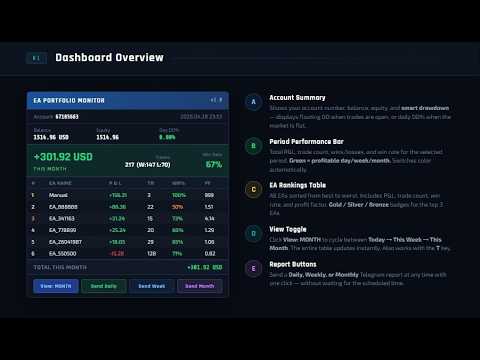
The on-chart panel updates every 30 seconds and displays the following for each EA:

  • P&L for the current day, current week, and current month
  • Number of closed trades (wins and losses)
  • Win rate percentage
  • Profit factor
  • Open positions count and floating P&L
  • Account balance, equity, and drawdown percentage

EAs are ranked automatically from best to worst based on the selected time period. You can switch between daily, weekly, and monthly view by clicking the toggle button on the dashboard or pressing T on your keyboard.

Telegram reports

When Telegram is configured, the utility sends:

  • A daily summary at a time you choose (default 23:50)
  • A weekly summary every Friday
  • A monthly summary at the end of each month
  • An instant alert when any EA exceeds your defined daily loss limit

All reports include a formatted table with each EA ranked by performance, showing P&L, trade count, and win rate. Reports use plain text formatting that displays correctly in all Telegram clients.

Telegram sending can be turned on or off at any time from the input settings.

How it works

The utility reads your account trade history using the standard MT5 history functions. It does not place, modify, or close any trades. It does not connect to any external server except the official Telegram API when reports are enabled.

All data is calculated directly from your account history. No external data feed is required.

Setup

  1. Attach the EA to any chart (one chart is enough for the whole account)
  2. Go to Tools → Options → Expert Advisors → Allow WebRequest
  3. Add https://api.telegram.org to the allowed URLs list
  4. Enter your Telegram Bot Token and Chat ID in the EA inputs
  5. The dashboard appears immediately and updates automatically

To get your Telegram Bot Token: open Telegram, search for @BotFather, create a new bot, and copy the token it provides. To get your Chat ID: send a message to your bot, then visit https://api.telegram.org/bot[YOUR_TOKEN]/getUpdates and look for the "id" field.

Input parameters

Telegram Settings

  • Telegram Token — your bot token from @BotFather
  • Telegram Chat ID — your personal or group chat ID
  • Send Reports — enable or disable all Telegram reports (default: true)

Report Schedule

  • Daily Report Time — time to send the daily report in HH:MM format (default: 23:50)
  • Weekly Report Day — day of week for weekly report, 1=Monday to 5=Friday (default: 5)
  • Monthly Report Day — day of month for the monthly report (default: 28)
  • Include Open Summary — include open positions in the daily report (default: true)
  • Refresh Interval — how often the dashboard updates in seconds (default: 30)

Risk Alerts

  • Enable Loss Alert — send an alert when an EA reaches the daily loss limit (default: true)
  • Max Daily Loss USD — the loss amount that triggers the alert per EA (default: 100)

Display

  • Show Dashboard — show or hide the on-chart panel (default: true)
  • Dashboard X / Y — position of the panel on the chart

Notes

  • The utility monitors up to 50 EAs simultaneously
  • EAs are identified by Magic Number. Manual trades are grouped separately under "Manual"
  • EA names are extracted automatically from trade comments when available
  • The dashboard is non-interactive with the chart — it does not interfere with price display or other indicators
  • Keyboard shortcuts: D = send daily report now, W = send weekly report now, M = send monthly report now, T = toggle dashboard view between daily / weekly / monthly

Requirements

  • MetaTrader 5 build 2361 or later
  • An active internet connection is required only for Telegram reports
  • WebRequest must be enabled in MT5 settings for Telegram to work
  • The utility should be attached to a chart that remains open (a separate blank chart is recommended)
Mais do autor
Ultimate SMC Indicator
Hicham Mahmoud Almoustafa
1 (1)
Ultimate SMC Indicator v2.20 — Smart Money Concepts All-in-One Stop switching between 5 different indicators. Ultimate SMC gives you everything Smart Money traders need — in one clean indicator with interactive controls. GUIDE What makes this different? Most SMC indicators show you Order Blocks or FVGs separately. You still have to figure out which zones actually matter. Ultimate SMC does the hard work: it scans for Order Blocks, Fair Value Gaps, Liquidity Sweeps, Supply & Demand zones, Fibo
PulseAlgo and Commander
Hicham Mahmoud Almoustafa
5 (1)
PulseAlgo + Commander Pro — The Ultimate MT5 Trading Suite One tool. Six timeframes. Full control. PulseAlgo + Commander Pro is a professional-grade Expert Advisor that combines intelligent signal generation with a complete trade management panel — giving you everything you need to trade smarter, faster, and more consistently directly from your MT5 chart.   Key Features  SFX Signal Engine Multi-timeframe signal detection across M1, M5, M15, M30, H1 & H4 Configurable confirmation filters for h
PropTradeManager
Hicham Mahmoud Almoustafa
5 (1)
PropTrade Manager - Professional Trade Management Panel for Prop Firm Traders Are you trading a Prop Firm challenge and worried about breaking the rules? PropTrade Manager is a trade management panel built specifically for Prop Firm traders. It automatically protects your account from Daily DD, Max DD, and rule violations while giving you professional one-click execution tools. COMPLETE TRADING GUIDE PROP FIRM PROTECTION ENGINE 7 Built-in Presets: FTMO, MyForexFunds, The Funded Trader, True
MomentumRadar v1
Hicham Mahmoud Almoustafa
Momentum Radar v1 — Multi-Asset Momentum Scanner GUIDE:  https://www.mql5.com/en/blogs/post/768569 Momentum Radar FREE is a real-time momentum scanner that monitors 3  pairs simultaneously on a single dashboard. It calculates a composite momentum score for each pair and displays currency strength — helping you quickly identify which pairs are moving and in which direction. Monitored Pairs EURUSD, GBPUSD, USDJPY Features Momentum Score Dashboard Each pair displays a composite momentum score (0
FREE
PulseAlgo
Hicham Mahmoud Almoustafa
5 (1)
PulseAlgo v4 — Smart Signal Indicator for MetaTrader 5 Overview PulseAlgo is a professional-grade chart indicator designed for traders who demand clean, high-probability signals without the guesswork. The toolkit combines multiple layers of analysis into a single, unified system that adapts automatically to whatever timeframe you trade. Every signal on your chart has been filtered through a multi-stage confirmation engine. No single indicator triggers an entry alone. Instead, the system requ
FREE
SMC Market Pulse
Hicham Mahmoud Almoustafa
SMC Market Pulse Free Multi-Symbol SMC Dashboard for MetaTrader 5 Version 1.00  |  Free  |  MT5 Indicator Overview SMC Market Pulse is a free multi-symbol dashboard indicator for MetaTrader 5 that scans up to 30 trading pairs simultaneously using Smart Money Concepts (SMC) methodology. It detects market structure, order blocks, fair value gaps, and session context in real time — all displayed in a clean, color-coded on-chart dashboard. No configuration required. Simply attach the indicator to an
FREE
SmartTradeCommanderPRO
Hicham Mahmoud Almoustafa
Smart Trade Commander PRO — Professional Trade Management Panel for MetaTrader 5 The most complete trade management utility for MT5. One panel — total control. Built for serious traders who demand precision, speed, and professional-grade risk management on every trade. Works on all symbols: Gold (XAUUSD), Forex, Crypto, Indices, Commodities. All timeframes supported. WHAT DOES IT DO? Smart Trade Commander
SMC Trade CMD PRO
Hicham Mahmoud Almoustafa
SMC Trade Commander PRO — Smart Money Trade Panel + Telegram + Market Scanner LAUNCH OFFER: $79 (regular price $129). Rent from $30/month. Price increases after first 10 reviews. The only MT5 trade panel that combines Smart Money Concept zones, Telegram signals, and a multi-symbol market scanner — all in one EA. Built for manual traders who use SMC, ICT, or Price Action strategies and want fast execution with professional risk management. Works on all symbols: Gold, Forex, Crypto, Indices.
GoldSmartFVG PRO
Hicham Mahmoud Almoustafa
Gold Smart FVG PRO is a complete Smart Money Concept (SMC) indicator designed for gold traders. It combines seven analytical modules in a single tool with a real-time interactive dashboard and module control panel.   All modules can be toggled on and off directly from the chart using built-in buttons. No need to open the settings window. Five color themes and ten background options are available for full chart customization.     How It Works   The indicator detects and displays the following SM
News Filter Shield Pro
Hicham Mahmoud Almoustafa
Gold News Shield Pro automatically protects your Gold (XAUUSD) positions during high-impact economic news events. It uses the MT5 built-in Economic Calendar with a proprietary Gold Impact Score (GIS) system that calculates how each event specifically affects gold prices. CONTACT ME AFTER PURCHASE for the free Telegram Bridge EA, setup guide, and recommended settings. This product does not work in the Strategy Tester. Download the demo to evaluate on a live chart. Gold Impact Score (GIS) Ea
MomentumRadar
Hicham Mahmoud Almoustafa
Momentum Trend Radar ELITE — Multi-Asset Scanner with Trend-Momentum Fusion Momentum Trend Radar ELITE is a professional multi-asset scanning indicator for MetaTrader 5. It combines momentum analysis with trend detection to identify trading opportunities across multiple symbols and timeframes from a single chart. The indicator scans up to 28 currency pairs plus custom symbols (indices, crypto) in real-time. It calculates a unique Fusion Score that combines momentum, trend alignment, and volume
ProTraderCC
Hicham Mahmoud Almoustafa
ProTrader Command Center - Trading Analytics Dashboard Launch Price: $35 for the first 10 purchases. Price will increase to $60 after that. GUIDE --- You run multiple EAs on different accounts or servers. You check the results manually. You compare lot sizes, drawdowns, and win rates in your head or on spreadsheets. You wonder which EA is actually making money and which one is slowly draining your account. ProTrader Command Center solves this. Attach it to any chart and it reads your full t
SMC Visual Zones
Hicham Mahmoud Almoustafa
SMC Visual Zones and support/resistance This indicator shows you where institutional traders are placing their orders. It marks the key zones on your chart - order blocks, fair value gaps, structure breaks, liquidity levels, and support/resistance - so you can plan your entries around them. Works on any symbol and timeframe. Default settings are configured for XAUUSD on M15 and H1. How It Helps Your Trading Instead of drawing zones manually, the indicator detects them automatically and upd
Filtro:
Sem comentários
Responder ao comentário