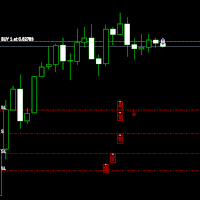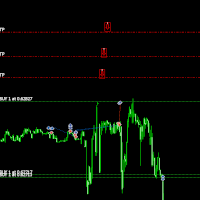
Add Consolidate Move TP

Move TakeProfit - Instructions d'utilisation

Comment l'utiliser

📌 Glisser-déposer

  • Cliquez et faites glisser le script sur le graphique à l’endroit où vous souhaitez définir le nouveau niveau de TakeProfit.
  • Relâchez le script au niveau de prix souhaité.

📌 Fenêtre de confirmation

  • Après avoir relâché le script, une boîte de confirmation apparaîtra.
  • Elle affichera le nombre de positions modifiées ainsi que le prix exact du TakeProfit.
  • Cliquez sur « Oui » pour confirmer ou sur « Non » pour annuler.

📌 Mise à jour automatique du TakeProfit

  • Si confirmé, le script mettra à jour le TakeProfit pour toutes les positions ouvertes sur le graphique actuel.
  • Si une position n’a pas de TakeProfit, il sera automatiquement ajouté au niveau sélectionné.

📌 Vérification de l’emplacement

  • Le script garantit que les positions d'achat (BUY) ont un TakeProfit au-dessus du prix d'entrée.
  • Les positions de vente (SELL) doivent avoir un TakeProfit en dessous du prix d'entrée.
  • Si une position a un TakeProfit mal placé, le script affichera une erreur et annulera l’opération.

📌 Gestion des restrictions du courtier

  • Certains courtiers exigent une distance minimale entre le TakeProfit et le prix du marché actuel.
  • Si le TakeProfit sélectionné est trop proche du prix, le serveur peut le rejeter.
  • Dans ce cas, le script affichera un message détaillé expliquant pourquoi le TakeProfit n’a pas pu être déplacé.

📌 Message de fin

  • Un message final confirmera combien de positions ont été mises à jour avec succès.

🎁 Bonus : Ajoute un TakeProfit si aucun n'existe !

  • Si une position ne possède pas encore de TakeProfit, le script en ajoutera automatiquement un au prix sélectionné.
  • Utile pour sécuriser des trades sans objectif de sortie clair.

📌 Remarques

  • Ce script ne modifie que les positions du symbole du graphique actuel.
  • Si aucune position valide n'est trouvée ou si le placement du TakeProfit est incorrect, un message d’erreur s’affichera.

Glissez, déposez, confirmez et gérez vos trades en toute simplicité ! 🚀
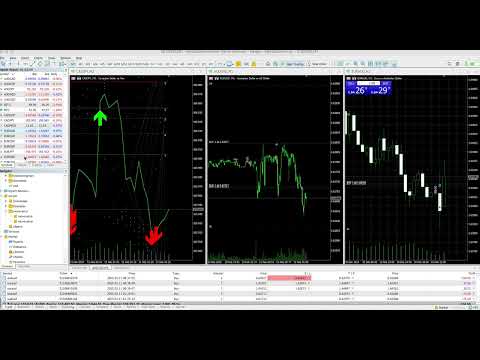

Video Add Consolidate Move TP
Produits recommandés
FiT Panel Pro
Thonglak Janyakorn
Overview FiT Panel Pro is a professional-grade trade management panel designed for MetaTrader 5 traders who demand speed, precision, and full control over their trades. Built with a modern dark-theme UI, it combines one-click execution with advanced risk management, visual SL/TP drag lines, automatic Fibonacci-based levels, and comprehensive order management — all in a single, compact panel. Whether you are a scalper, day trader, or swing trader, FiT Panel Pro gives you the edge you need to exec
FREE
Risk Manager – Account Protection Tool Risk Manager is an Expert Advisor for MetaTrader 5 designed to protect your trading account by applying automatic risk management rules. This tool does not open trades . It continuously monitors your account and enforces predefined limits to help prevent excessive losses and maintain disciplined trading. Risk Manager works in the background and can manage positions opened by manual trading or other Expert Advisors. It is particularly useful for: • Manual tr
FREE
Trade assistant pro v8
Ahmed Mohammed Bakr Bakr
2 (1)
FREE FREE FREE Trade Assistant MT5 – Professional Trading & Risk Management Panel Trade Assistant MT5 is an advanced trading panel designed to help traders execute orders faster, safer, and more professionally . It simplifies manual trading by combining smart order management , precise risk control , and one-click execution , making it ideal for both beginners and advanced traders. This tool does not trade automatically . Instead, it empowers you with full control while applying professional-gra
FREE
Objectif: Ouvre automatiquement les graphiques de tous les symboles du Market Watch avec le modèle default.tpl sur le timeframe actuel (TF) , en fermant tous les autres graphiques (sauf l’actif). Idéal pour analyser rapidement plusieurs instruments sans effort manuel! Fonctionnalités: Automatisation: Ouvre des dizaines de graphiques en un clic. Sécurité: Ferme les graphiques inutiles, en conservant l’actif. Flexibilité: Utilise votre modèle default.tpl (configurez-le à l’avance!).
FREE
GDS RiskLab TradeDesk Free Manual Trading Desk and Risk-Control Utility for MetaTrader 5 GDS RiskLab TradeDesk is a free chart-based utility for traders who want a cleaner manual trading workspace in MetaTrader 5. It is designed as a simple execution-support and risk-control panel. The goal is to keep the trading process more organized: review the chart, plan the trade, keep risk visible and execute manually with more structure. This tool does not generate buy or sell signals. It does not predic
FREE
Signalator Trade Summary Panel MT5 is a free local MetaTrader 5 utility that gives traders a clear account and open-trade overview directly on the chart. It is part of the Signalator Trading and Analysis Ecosystem — a growing set of practical MetaTrader tools for account monitoring, market analysis, symbol scanning, alerts and trader workflow improvement. This panel focuses on the account and position side of the workflow. It helps you quickly understand floating profit or loss, account status,
FREE
Manual position management. Missing SL. Price moves against you. No protection. Trade Manager Lite automates Stop Loss, Take Profit, Trailing Stop, and Break-Even for your open positions. Attach to one chart. Configure your default SL/TP distance. Let it manage your positions automatically. What's Included (FREE Version) Auto SL/TP: Applies missing Stop Loss and Take Profit to positions based on your configured distance in points Trailing Stop: Adjusts SL dynamically as price moves in your favor
FREE
Dynamic Candle Timer
Channaphat Yamuangmorn
Overview The Dynamic Candle Timer is a lightweight and efficient utility designed for MetaTrader 5. Unlike traditional candle timers that remain static in the corner of the chart, this indicator dynamically attaches to the current Bid price line. This allows traders to monitor the remaining candle time directly at the point of action, enhancing focus during fast-paced market movements. It is highly suitable for day traders and scalpers operating on XAUUSD, Forex, Crypto, or Indices. Key Feature
FREE
Click Trading
Jawad Tauheed
5 (2)
One Click Trading – Auto TP SL Developer TraderLinkz Version 1.00 Category Utility What it does Adds missing TP and SL to your manual trades and pending orders Sets them once per ticket Lets you move TP and SL afterward Works on hedging and netting accounts Scans on every tick and reacts on trade events Why you want it You place faster entries You get consistent risk and exit targets You reduce fat finger errors You keep full manual control Quick start Attach the EA to any chart Keep TP and SL e
FREE
Account Info EA It is a tool that presents on the graph all the positions of the account, and specific information concerning the positions, but also the account. It enables the user to have an image of his account at a glance. Use like any expert advisor. You can't attach it in the same chart with other expert advisor. It does not have the ability to open or manage positions. You can attach it on any chart and any timeframe.
FREE
Position Size Caculator
Nguyen Van Chien
5 (3)
Calculating the volume of orders every time you create an order is an extremely important thing in risk management Let this tool simplify your work! ----------------------------------------------------- How to use? Attach the indicator to the chart and set its parameters:  Risk size in %  or money and Risk Reward Ratio. Click on the ON button and locate the horizontal line to your would-be StopLoss level. Options: Click on the Pending/Instant button to locate the horizontal line  to your would-b
FREE
Core function Intelligent transaction management one-click opening and closing operation, which supports user-defined lots to set multiple closing modes: all closing, closing by direction and closing by profit and loss status. Professional risk control, real-time risk monitoring and spread control to avoid high-cost trading environment. Visual control panel has an intuitive graphical interface, and all functions can be operated with one button to display position information, profit and loss sta
FREE
Renko subwindow
Alexandre Vincent Traber
Overview Renko SubWindow affiche un graphique Renko en bougies colorées dans une fenêtre d'indicateur séparée, sans affecter le graphique principal. La taille de brique peut être fixe en points ou calculée dynamiquement via l'ATR pour des briques adaptatives basées sur la volatilité. How it works Reconstruit les briques Renko à partir des prix de clôture du symbole/timeframe actuel. Une nouvelle brique se forme dès que le prix dépasse la taille définie depuis la clôture de la brique précédente.
FREE
Quick Close 1S
Tan Au Phuong
5 (8)
Quick Close 1S est un outil conçu pour une gestion des trades rapide et organisée. Il offre un panneau de contrôle clair pour ouvrir ou fermer des ordres instantanément, appliquer des réglages SL/TP flexibles, gérer les objectifs de panier et contrôler le profit ou la perte global(e). Convient aux traders qui apprécient la précision, l’efficacité et une exécution claire dans leur trading quotidien. Fonctionnalités principales Contrôle simplifié des trades : Gérez les positions depuis un panneau
FREE
Free Global Stop Loss and Take Profit Setter with Break Even Free one click Stop Loss and Take Profit tool for manual trading. Apply a fixed SL and TP to every open position on the symbol, or move them all to break even, with a single button. It only modifies Stop Loss and Take Profit levels — it never opens or closes a trade. Set your SL and TP distance in points, click once, and every position on the current symbol is protected. The break even button moves stops to entry (or a configurable num
FREE
Important Lines
Terence Gronowski
4.88 (24)
This indicator displays Pivot-Lines, preday high and low, preday close and the minimum and maximum of the previous hour. You just have to put this single indicator to the chart to have all these important lines, no need to setup many single indicators. Why certain lines are important Preday high and low : These are watched by traders who trade in a daily chart. Very often, if price climbs over or falls under a preday low/high there is an acceleration in buying/selling. It is a breakout out of a
FREE
Stamina HUD
Michele Todesco
STAMINA HUD – Advanced Market & Trend Dashboard (MT5) STAMINA HUD   is a professional   market information panel   designed for traders who want   clarity, speed, and control   directly on the chart. It provides a   clean heads-up display (HUD)   with essential market data and   multi-timeframe trend direction , without cluttering the chart or generating trading signals. What STAMINA HUD Shows   Current Price   Spread (in real pips)   Today High–Low range (pips)   Average D
FREE
Hourly xx:00 Candle Direction Signal for MT5 Know the direction of every hourly opening candle. The Hourly xx:00 Candle Direction Signal automatically analyzes the candle that starts exactly at xx:00 on your selected timeframe (M1–H1) and instantly tells you whether it closed LONG , SHORT , or DOJI . Designed for traders who want a simple and reliable hourly bias, the indicator displays clear chart signals and can send real-time notifications to your desktop or mobile device. Features Detects
FREE
Lot by Risk MT5
Sergey Vasilev
4.88 (16)
La barre de trading Lot by Risk est conçue pour le trading manuel. C'est un moyen alternatif d'envoyer des ordres. La première caractéristique du panneau est l'affichage pratique des ordres à l'aide de lignes de contrôle. La deuxième caractéristique est le calcul du volume de la transaction à un risque donné en présence d'une ligne stop loss. Les lignes de contrôle sont affichées à l'aide de raccourcis clavier: take profit-touche T Par défaut; price-touche P par Défaut; stop loss – touche s p
FREE
MAFX Trading Manager
Mark Anthony Noblefranca Nazarrea
5 (1)
MAFX Trading Manager Panneau professionnel de gestion manuelle des trades pour MetaTrader 5 Présentation du produit MAFX Trading Manager est un panneau professionnel de gestion manuelle des trades pour MetaTrader 5, conçu pour aider les traders à exécuter et gérer leurs positions plus efficacement. Il offre une exécution rapide des ordres et des outils essentiels de gestion dans une interface compacte et conviviale. Ce produit s’adresse aux traders manuels souhaitant davantage de contrôle, de ra
FREE
Solarize – Professional Trading Panel for MetaTrader 5 Solarize is a premium trading panel designed for traders who demand speed, precision, and efficiency in every execution. Built with a luxurious Black & Gold interface, Solarize combines an elegant design with practical trading tools, allowing traders to manage positions, pending orders, risk, and account statistics from a single control panel. Whether you're a scalper, intraday trader, or swing trader, Solarize helps simplify your workflow
FREE
This utility keeps a watchful eye on your trading terminals and ensures that you are notified if any of them are disconnected. Simply attach the utility to a chart and connect to a monitoring service who can notify you. We use UptimeRobot for both VPS and terminal monitoring; however, any service supporting heartbeat monitoring can be employed. Many such services offer free plans and various notification methods, such as Cronitor.io
FREE
GRInvest Breakeven Manager is an MT5 trade-management Expert Advisor designed to manage existing open positions after entry. Its purpose is to automate breakeven protection, staged partial closes, trailing stops and position management while still giving the trader full manual control over individual trades. The EA does not need to open trades itself . It can manage manual trades and trades opened by other Expert Advisors according to the selected symbol, direction and magic-number filters. The
FREE
IMPORTANT NOTE: This is a professional Trade Management Utility and on-chart assistant. It is NOT an automated trading robot. It does not open trades on its own. The UltraFast Trade Manager MT5 is the ultimate execution and risk-management suite designed to give you absolute control over your manual and algorithmic trades. When managing multiple positions, calculating complex net break-even points, or constantly monitoring the economic calendar, hesitation can lead to costly mistakes. This utili
FREE
Pro Trading Panel Lite is a clean, professional trading panel built for traders who want fast, risk-controlled trade execution directly from the chart — no input fields to type into, no manual lot calculations, no switching between windows. Drop it on any chart, drag your SL and TP lines to where you want them, and click Buy or Sell. The lot size is calculated automatically from your defined risk percentage. That's it. A more advanced version of  Pro Trading Panel is available separately with a
FREE
TradingCoPilot
Viktor Mitrofanov
Trading Co-Pilot for MetaTrader 5 Advanced Position Management for Manual Traders Trading Co-Pilot is a professional trade management assistant designed for traders who open positions manually and want precise, automated control over risk and profit handling. It does not open trades. It manages them intelligently. You focus on entries. The Co-Pilot protects and optimizes the exit. How It Works Once you open a manual position, Trading Co-Pilot automatically: • Applies Stop Loss • Sets Take Profit
FREE
Price Range Pro for MT5
Joaquin Huxxppi Lo Prete
Price Range Pro for MT5 is a graphical chart utility for MetaTrader 5 that allows traders to measure price movements directly on the chart. The utility calculates and displays the absolute price change and the percentage change between two selected points. It can be used on different symbols and timeframes for visual market analysis. Features - Interactive click-and-drag range drawing. - Adjustable start and end handles. - Absolute price change display. - Percentage change display. - Direction-
FREE
================================================================ MATRIX CONDITION MONITOR Live Trade Condition Panel for MetaTrader 5 Fully Automatic -- Works with ALL Matrix EAs ================================================================ NEVER MISS A TRADE SETUP AGAIN Matrix Condition Monitor is a free utility that attaches to any chart and automatically checks all 10 trade conditions in real time -- showing you exactly why a trade will or will not open, and alerting you the moment ever
FREE
This MQL5 indicator creates a customizable grid of horizontal lines on your trading chart. Here's what it does: **Main Functions:** - Draws equally spaced horizontal lines across the visible price range - Supports two line types: horizontal lines or trend lines with forward projection - Automatically adjusts to price scale changes **Key Features:** 1. **Customizable Spacing**: Set grid distance in pips (20 pips by default) 2. **Flexible Starting Point**: Auto-calculates starting price or lets
FREE
Introduction Welcome to the world of Forex trading, where every tick of the market can be influenced by news events. Introducing our expert advisor for MetaTrader, your ultimate tool for navigating the complexities of news trading. This innovative advisor is specifically designed to automate your trading strategy during key macroeconomic releases, ensuring you never miss an opportunity.  When important indicators are announced, volatility often spikes, creating potential for profit. Our expert
FREE
Les acheteurs de ce produit ont également acheté
Trade Assistant MT5
Evgeniy Kravchenko
4.41 (216)
It helps to calculate the risk per trade, the easy installation of a new order, order management with partial closing functions, trailing stop of 7 types and other useful functions. Additional materials and instructions Installation instructions - Application instructions - Trial version of the application for a demo account Line function -   shows on the chart the Opening line, Stop Loss, Take Profit. With this function it is easy to set a new order and see its additional characteristics bef
Bienvenue sur Trade Manager EA, l’outil ultime de gestion des risques conçu pour rendre le trading plus intuitif, précis et efficace. Ce n’est pas seulement un outil d’exécution d’ordres ; c’est une solution complète pour la planification des trades, la gestion des positions et le contrôle des risques. Que vous soyez débutant, trader expérimenté ou scalpeur ayant besoin d’une exécution rapide, Trade Manager EA s’adapte à vos besoins, offrant une flexibilité sur tous les marchés, des devises et i
================================================================================ POC BREAKOUT - V20.72. Full Professional Grade Toolkit ================================================================================ POC Breakout is a full MetaTrader 5 trading dashboard for discretionary traders who want breakout signals, Point of Control (POC) context, volume profiles, order flow, market structure, news, alerts, and advanced trade planning in one professional workspace. Attached directly to you
Local Trade Copier EA MT5
Juvenille Emperor Limited
4.94 (148)
Découvrez une expérience exceptionnellement rapide de copie de trades avec le   Local Trade Copier EA MT5 . Avec sa configuration facile en 1 minute, ce copieur de trades vous permet de copier des trades entre plusieurs terminaux MetaTrader sur le même ordinateur Windows ou Windows VPS avec des vitesses de copie ultra-rapides de moins de 0.5 seconde. Que vous soyez un trader débutant ou professionnel, le   Local Trade Copier EA MT5   offre une large gamme d'options pour le personnaliser en fonc
Astro Trade MT5
Indra Maulana
5 (2)
25% discount on the release of the tool: only for the next 3 buyers Download the trial version: https://www.mql5.com/en/market/product/192656 AstroTrade Trading Assistant AstroTrade is a comprehensive multi-functional trading utility developed for the MetaTrader 5 platform. It integrates essential tools for trade execution, risk management, and technical monitoring into a single unified interface. The application is designed to assist traders in managing their daily operations through a visual
Version Bêta Le Telegram to MT5 Signal Trader est presque prêt pour la sortie officielle en version alpha. Certaines fonctionnalités sont encore en développement et vous pourriez rencontrer de petits bugs. Si vous rencontrez des problèmes, merci de les signaler, vos retours aident à améliorer le logiciel pour tout le monde. Telegram to MT5 Signal Trader est un outil puissant qui copie automatiquement les signaux de trading depuis des chaînes ou groupes Telegram vers votre compte MetaTrader 5 .
TradePanel MT5
Alfiya Fazylova
4.88 (167)
Trade Panel est un assistant commercial multifonction. L'application contient plus de 50 fonctions de trading pour le trading manuel et permet d'automatiser la plupart des tâches commerciales. Instructions d'utilisation + tutoriel vidéo : https://www.mql5.com/fr/blogs/post/762589 Version d'essai de l'application pour un compte démo : https://www.mql5.com/fr/blogs/post/762644 Comment installer l'application : https://www.mql5.com/fr/blogs/post/762645 Comment tester l'application en mode visuel :
Telegram to MT5 Multi-Channel Copier copie automatiquement les signaux de trading de vos canaux Telegram directement vers MetaTrader 5. Pas de bots, pas d'extensions de navigateur, pas de copie manuelle. Vous recevez un signal sur Telegram et l'EA ouvre l'opération sur votre terminal en quelques secondes. Le produit comprend deux composants : une application Windows qui écoute vos canaux Telegram, et cet Expert Advisor qui exécute les signaux sur votre terminal MT5. Une version MT4 est également
Telegram To MT5 Ultra
Mirel Daniel Gheonu
5 (4)
Telegram To MT5 — Copieur de signaux Transformez les appels de trading de vos canaux Telegram en véritables ordres MT5 — automatiquement, sur autant de comptes que vous le souhaitez, avec le risque et les règles entièrement sous votre contrôle. Telegram To MT5 relie les canaux VIP / de signaux que vous suivez déjà sur Telegram à votre terminal MetaTrader 5. Une application de bureau compagnon gratuite lit les messages (même des canaux qui bloquent les bots), et cet Expert Advisor les exécute sur
Exp COPYLOT CLIENT for MT5
Vladislav Andruschenko
3.97 (35)
Copieur professionnel de trades pour MetaTrader 5 Un copieur de trades rapide, professionnel et fiable pour MetaTrader . COPYLOT permet de copier des trades Forex entre les terminaux MT4 et MT5 avec prise en charge des comptes Hedge et Netting . La version MT5 de COPYLOT prend en charge : - MT5 Hedge → MT5 Hedge - MT5 Hedge → MT5 Netting - MT5 Netting → MT5 Hedge - MT5 Netting → MT5 Netting - MT4 → MT5 Hedge - MT4 → MT5 Netting Version MT4 Description complète + DEMO + PDF Comment acheter Comme
Anchor Trade Manager
Kalinskie Gilliam
5 (8)
Anchor: The EA Manager Your EAs manage their own trades. Anchor manages the account around them. Anchor gives you one place to control your EAs, manage risk and decide when trading is allowed. Any EA, any vendor, any broker or symbol. No source-code changes required. The Problem Most EAs only know what they are doing. They cannot see when another EA is already trading, when several EAs open and are stacking risk or when the account has reached your loss limit. Even using just one EA, it may not
HINN MagicEntry Extra
ALGOFLOW OÜ
4.71 (17)
HINN MAGIC ENTRY – the ultimate tool for entry and position management! SIMPLE. FASTEST. INTUITIVE. MAX AUTOMATED. Place orders by selecting a level directly on the chart! full description   ::  demo-version  :: 60-sec-video-description Key features: - Market, limit, and pending orders - Automatic lot size calculation - Automatic spread and commission accounting - Unlimited partitial take-profits  - Breakeven and trailing stop-loss and take-profit  functions - Invalidation leves - Intuitive, a
The product will copy all telegram signal to MT5 ( which you are member) , also it can work as remote copier.  Easy to set up, copy order instant, can work with almost signal formats, image signal,  s upport to translate other language to English Work with all type of channel or group, even channel have "Restrict Saving Content", work with  multi channel, multi MT5 Work as remote copier: with signal have ticket number, it will copy exactly via ticket number. Support to backtest signal. How to s
Signal Trading View to MT5 Pro
Mirel Daniel Gheonu
4.5 (2)
Signal TradingView to MT5 Pro Automator Exécution professionnelle instantanée entre TradingView et MetaTrader 5 Automatisez votre stratégie de trading avec le pont de communication le plus robuste entre les alertes TradingView et l'exécution réelle sur MT5. Conçu pour les traders qui exigent vitesse, flexibilité et une gestion des risques impeccable, cet Expert Advisor transforme tout message d'alerte en un ordre au marché ou à cours limité précis. POINTS FORTS ET AVANTAGES Moteur d'analyse univ
Trade copier MT5
Alfiya Fazylova
4.58 (52)
Trade Copier est un utilitaire professionnel conçu pour copier et synchroniser les commandesentre les comptes de trading. Les commandes sont copiées du compte/terminal du fournisseur vers le compte/terminal du destinataire, qui sont installés sur le même ordinateur ou vps. PROMOTION - Si vous avez déjà acquis le "Trade copier MT5", vous pouvez obtenir le "Trade copier MT4" gratuitement (pour la copie MT4 > MT5 et MT4 < MT5). Pour obtenir des informations plus détaillées sur les conditions, veuil
Envoyez-moi un message après l’achat pour recevoir le kit complet du manuel + un essai de 3 jours de l’API OpenAI pour tester les fonctionnalités d’IA + un autre cadeau bonus Le prix actuel est un tarif promotionnel limité pour la mise à jour du relancement d’août — sécurisez votre édition maintenant avant l’augmentation du prix. Prochain prix : $340 C’est complètement différent de tous les panneaux de trading que vous avez pu essayer ou voir sur le marché. C’est l’un des panneaux de trading al
Global Investing FX Terminal
Santiago Nicolas Pla Casuriaga
Le Global Investing FX Terminal est un dashboard FX tout-en-un pour MetaTrader 5 — taux directeurs des banques centrales, positionnement COT du CFTC, classements carry, surprises économiques, skew d'options, sentiment retail et corrélations, treize panneaux au total — restitué sur un unique canvas sans scintillement et mis à jour toutes les 10 secondes depuis un seul EA attaché. Aucun logiciel externe requis. L'analyse FX professionnelle nécessite un accès simultané à des données normalement rép
Trade Assistant 38 in 1
Makarii Gubaydullin
4.91 (23)
Outil multifonctionnel : Calculateur de Lot, Ordres Grid, Ratio R/R, Gestionnaire de Trades, Zones d'Offre et de Demande, Price Action et bien plus Version Démo   |   Manuel d'Utilisation L'Assistant de Trading   ne fonctionne pas dans le testeur de stratégies : vous pouvez télécharger la   Version Démo ICI  pour tester l' utilitaire . Contactez-moi   pour toute question  / idée d'amélioration / en cas de bug détecté Si vous avez besoin d'une version MT4, elle est disponible ici Simplifiez, acc
Seconds Chart MT5
Boris Sedov
4.61 (18)
Seconds Chart - un outil unique pour créer des graphiques en secondes dans MetaTrader 5 . Grâce à Seconds Chart , vous pouvez créer un graphique avec une période définie en secondes, offrant une flexibilité et une précision idéales pour l'analyse, indisponibles sur les graphiques standards en minutes ou en heures. Par exemple, la période S15 indique un graphique avec des bougies d'une durée de 15 secondes. Vous pouvez utiliser n'importe quels indicateurs et experts advisors compatibles avec les
Timeless Charts
Samuel Manoel De Souza
5 (8)
Timeless Charts est un utilitaire de trading tout-en-un destiné aux traders professionnels. Il combine des types de graphiques personnalisés tels que les graphiques en secondes et Renko avec une analyse avancée du flux d’ordre s utilisant Footprints , Clusters , Profils de Volume , études VWAP et outils d’analyse ancrés pour une compréhension plus approfondie du marché. Le trading et la gestion des positions sont effectués directement depuis le graphique via un panneau intégré de gestion des ord
Power Candles Strategy Scanner - Outil de recherche de configurations multi-symboles à optimisation automatique Le Power Candles Strategy Scanner utilise le même moteur d'auto-optimisation que celui qui alimente l'indicateur Power Candles, pour chaque symbole de votre Market Watch, en parallèle. Un panneau vous indique quels symboles sont statistiquement négociables à l'instant, quelle stratégie est la plus performante pour chacun, la paire Stop Loss / Take Profit optimale, et vous alerte dès qu
Farmed Hedge Yield Farming | All Markets (Manual - Hybrid - Semi/Automated EA) VERIFIED TRADING RESULTS - Farmed Hedge Yield Axi Copy:  https://www.mql5.com/en/signals/2356376 - Farmed Hedge Yield Exn Copy:   https://www.mql5.com/en/signals/2356404 - Farmed Hedge Yield V Copy:  https://www.mql5.com/en/signals/2357156 * Before purchasing, please feel free to send me a message if you have any questions about the product or setup. ** After purchase,  Contact me via private message to receive t
Trade Copier Ultimate
Janitha Sandaruwan Amaradasa Wickramasingha Arachchilage
5 (4)
Trade Copier Ultimate - Telegram to MT5 Signal Copier Trade Copier Ultimate automatically copies Telegram trading signals into MetaTrader 5. The EA can read signal messages, detect the symbol, order type, entry price, Stop Loss, Take Profit levels and selected update commands, then execute or manage the trade in MT5 using your lot and risk settings. It is more than a basic Telegram to MT5 copier. TCU also supports Bot API and user-account Bridge workflows, Discord signal routing, local MT5 to MT
Premium Trade Manager - Le panneau de trading avec un coach intégré Premium Trade Manager intègre un coach de trading directement dans votre graphique, avec un moteur d'exécution complet en dessous. Configurez le trade comme vous le faites toujours, puis laissez Max, votre coach de trading IA, analyser ce setup exact par rapport à votre compte en direct et vous donner un verdict clair avant de vous engager : le stop est-il discipliné, le risque est-il raisonnable, une publication à fort impact e
MT5 to Telegram Signal Provider est un utilitaire facile à utiliser et entièrement personnalisable qui permet l'envoi de signaux spécifiés vers un chat, un canal ou un groupe Telegram, transformant ainsi votre compte en fournisseur de signaux. Contrairement à la plupart des produits concurrents, il n'utilise pas d'importations DLL. [ Démonstration ] [ Manuel ] [ Version MT4 ] [ Version Discord ] [ Canal Telegram ]  New: [ Telegram To MT5 ] Configuration Un guide utilisateur étape par étape est
Trade Dashboard MT5
Fatemeh Ameri
4.95 (132)
Trade Dashboard simplifies how you open, manage, and control your trades, with built-in lot size calculation. It allows you to execute trades, manage risk, and control positions directly on the chart, with tools such as partial close, breakeven, and trailing stop. Designed to reduce manual work and help you stay focused on your trading decisions. A demo version is available for testing. Detailed explanations of features are provided within the MQL5 platform. Installation instructions are include
Risk Manager Pro MT5 is an account protection Expert Advisor for traders who want strict risk control inside MetaTrader 5. The utility monitors your account equity, daily and weekly results, drawdown, open positions, trade count, consecutive losses, and trading hours. When a configured limit is reached, it can automatically close positions, cancel pending orders, stop other EAs, send notifications, or close the terminal. Instead of relying on discipline during a stressful trading session, you de
EA Portfolio Analyzer
Jimmy Peter Eriksson
4 (1)
Guide d'installation :    Cliquez ici ! Analyser simultanément plusieurs conseillers experts Comparer les résultats des EA par numéro magique Suivi de la rentabilité et des pertes Filtrer les résultats par plage de dates Courbe d'équité visuelle et indicateurs détaillés Prêt à l'emploi en moins d'une minute EA Portfolio Analyzer EA Portfolio Analyzer est un   outil d'analyse professionnel   conçu pour suivre   en temps réel les performances de plusieurs Expert Advisors   de manière claire et st
SAFETYLOCK for MetaTrader 5 — système premium de verrouillage protecteur et de gestion des risques SAFETYLOCK for MT5 est un utilitaire professionnel pour MetaTrader 5 qui crée automatiquement un ordre en attente protecteur opposé pour une position déjà ouverte. Lorsqu’un trader ou un autre Expert Advisor ouvre une position, SAFETYLOCK peut placer un Buy Stop ou un Sell Stop protecteur à la distance spécifiée. Si le marché évolue contre la position initiale, cet ordre est activé et forme une str
Quant AI Agents
Ho Tuan Thang
5 (1)
Quant AI Agents are independent trading Expert Advisors. Instead of trading using a fixed strategy like other conventional EAs, Quant AI Agents   is a   multi-agent AI trading framework   that turns natural-language strategy prompts into live.  WANT THE SAME RESULTS AS MY LIVE SIGNAL?   Use the exact same brokers I do:   IC MARKETS , IC TRADING   .  Unlike the centralized stock market, Forex has no single, unified price feed.  Every broker sources liquidity from different providers, creating un
Plus de l'auteur
Blackjack Candle Count
Scott Adam Meldrum
5 (2)
BlackJack Counting EA J'ai inclus les paramètres principaux dont vous avez besoin pour ajuster l'EA, la logique entraînée par l'IA (le biais) étant codée en dur. Pour accélérer l'EA, l'affichage du compte courant a été omis. La logique est en place et fonctionne en arrière-plan. Téléchargez la démo et testez-la sur GOLD H2 ! Pour toute question, veuillez me contacter. Contexte J'ai toujours été captivé par la danse complexe entre stratégie, probabilité et psychologie inhérente aux jeux tels que
FREE
Indicateur Double Time Frame – Bougies dans les Bougies pour MT4 Vue d'ensemble L'indicateur « Bougies dans les Bougies » est un outil de visualisation multi-timeframes conçu spécialement pour MT4. Il superpose des bougies d’un timeframe supérieur sur un graphique d’un timeframe inférieur, vous permettant de voir comment les petites bougies se comportent à l’intérieur des grandes. Cette approche améliore l'analyse de la structure du marché, affine l'identification des tendances et clarifie l'act
FREE
L'indicateur de cadre temporel Wormhole pour MetaTrader 5 (MT5) n'est pas simplement un autre outil de trading, c'est votre avantage concurrentiel sur les marchés financiers. Conçu pour les traders novices et professionnels, le Wormhole transforme la manière dont vous analysez les données et prenez des décisions, vous assurant ainsi de toujours être un pas en avant. Pourquoi vous avez besoin de l'indicateur Wormhole (gratuit) Surpassez la concurrence : La possibilité d'afficher deux cadres tempo
FREE
Dual Timeframes
Scott Adam Meldrum
5 (1)
Indicateur à Double Période – Bougies dans les Bougies Vue d’ensemble L’ Indicateur Bougies dans les Bougies est un outil de visualisation multi-unité de temps qui superpose les bougies d’une unité de temps supérieure sur un graphique d’une unité de temps inférieure. Plutôt que de changer continuellement d’unité de temps, les traders peuvent observer comment les petites bougies se forment à l’intérieur des grandes bougies , améliorant ainsi l’analyse des tendances, des structures du marché et de
FREE
L'indicateur de cadre temporel Wormhole pour MetaTrader 5 (MT5) n'est pas qu'un simple outil de trading – c'est votre avantage compétitif sur les marchés financiers. Conçu pour les traders débutants comme professionnels, Wormhole transforme la manière dont vous analysez les données et prenez des décisions, vous garantissant toujours une longueur d'avance. Pourquoi vous avez besoin de l'indicateur Wormhole Surpassez la concurrence : La capacité de visualiser deux cadres temporels simultanément su
FREE
Un Trading Parfait – Pourquoi Vous Avez Besoin de Cet Assistant de Trading EA Pourquoi Cet EA Révolutionne le Trading Le trading repose sur le timing, la précision et la gestion des risques . La différence entre le succès et l’échec dépend souvent de l’efficacité avec laquelle vous exécutez vos transactions et contrôlez votre risque . Cet EA est conçu pour simplifier votre trading , garantissant que chaque transaction soit structurée, contrôlée et optimisée pour une rentabilité à long terme.
FREE
Move StopLoss - Instructions d'utilisation Comment l'utiliser Glisser-déposer Cliquez et faites glisser le script sur le graphique à l’endroit où vous souhaitez définir le nouveau niveau de StopLoss. Relâchez le script au niveau de prix souhaité. Fenêtre de confirmation Après avoir relâché le script, une boîte de confirmation apparaîtra. Elle affichera le nombre de positions modifiées ainsi que le prix exact du StopLoss. Cliquez sur « Oui » pour confirmer ou sur « Non » pour annuler. Mi
FREE
Filtrer:
Aucun avis
Répondre à l'avis