SimSim Active Take and StopLoss Lines MT5

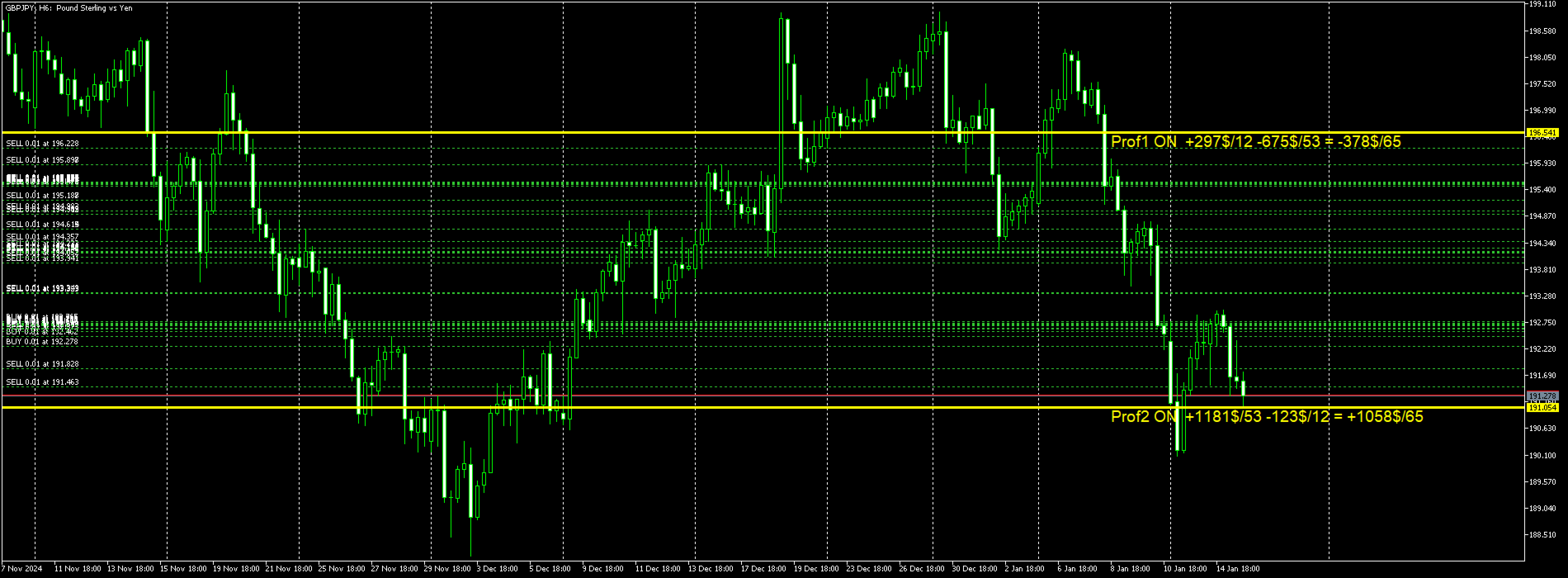
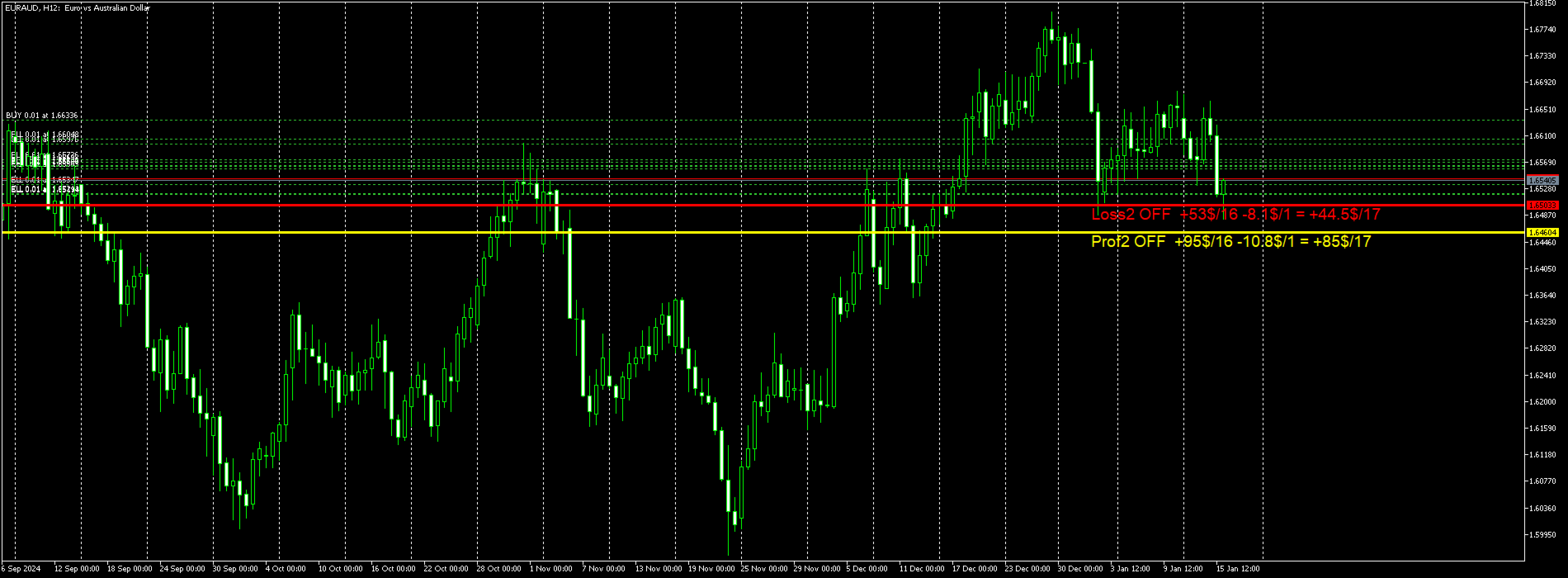
L'utilitaire fonctionne avec des lignes horizontales : Prof1, Prof2, Loss1, Loss2.
Ces lignes, qui ont des noms strictement fixes, sont dessinées par le trader indépendamment sur n'importe quel graphique de son terminal.
Il existe des options permettant de créer toutes les lignes à la fois ou de sélectionner l'une des quatre.
Le but des lignes devient évident lorsqu’on regarde leurs noms.
Les lignes Prof1 et Prof2 indiquent les niveaux de Take Profit de la transaction, mais sont présentées sous une forme visuelle, ce qui permet au trader de percevoir plus facilement les informations.
Les lignes Loss1 et Loss2 reflètent le niveau Stop Loss, créant une représentation claire et visuelle des risques.
Ainsi, cet outil permet de créer une visualisation claire des niveaux clés, permettant aux traders de prendre des décisions plus éclairées.


La particularité de cet utilitaire est qu'en l'installant sur un seul graphique, vous obtenez la possibilité de travailler avec des lignes sur n'importe quel graphique terminal.
L'utilitaire expert détecte automatiquement toutes les lignes Prof1, Prof2, Loss1, Loss2 dans le terminal et génère des informations sur toutes les transactions sur l'instrument (bénéfice, perte, quantité).

Le premier objectif de l’utilitaire est de fournir des informations sur les profits et les pertes.
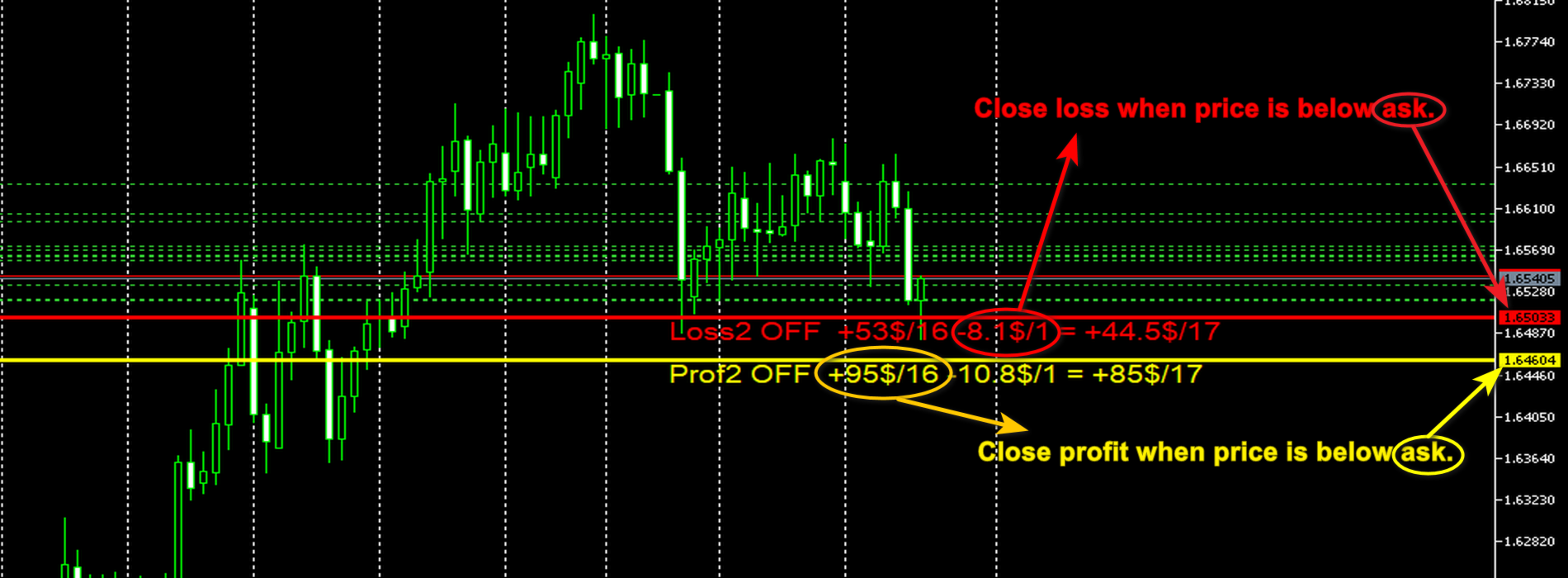
Utilisez les lignes Stop et Profit pour clôturer les transactions = faux Information uniquement, le symbole OFF sous les lignes interdit la clôture des transactions.
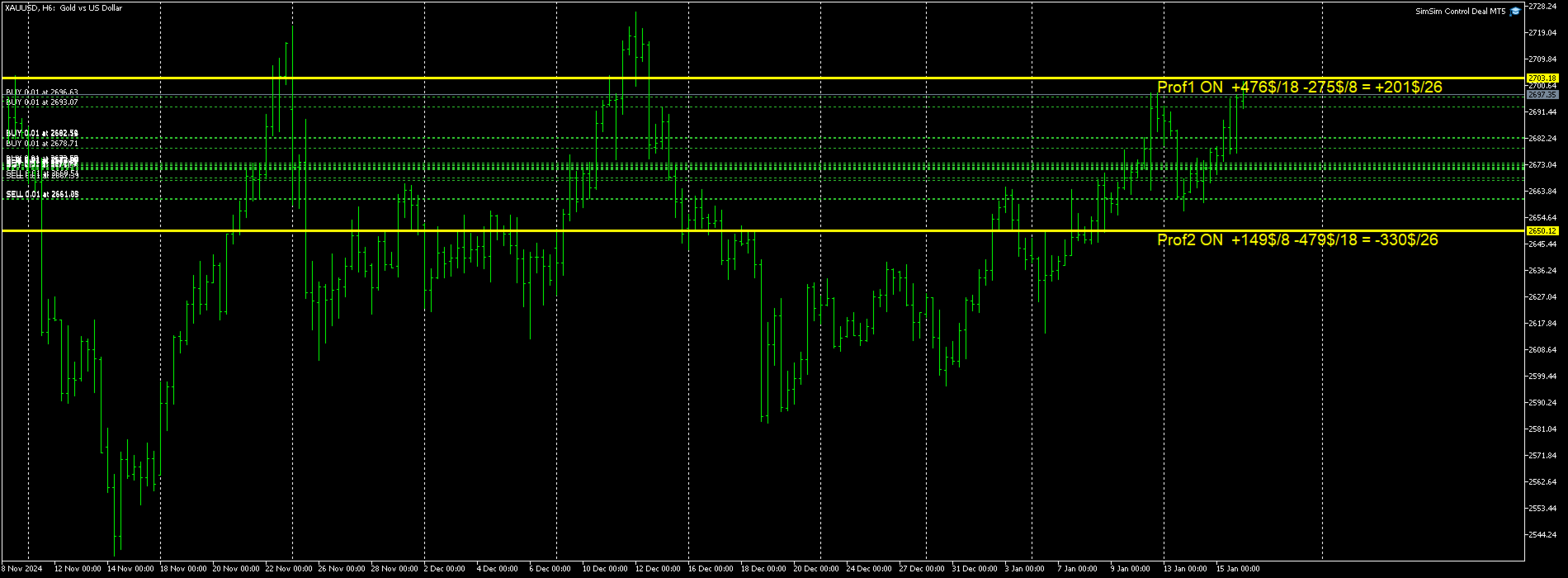
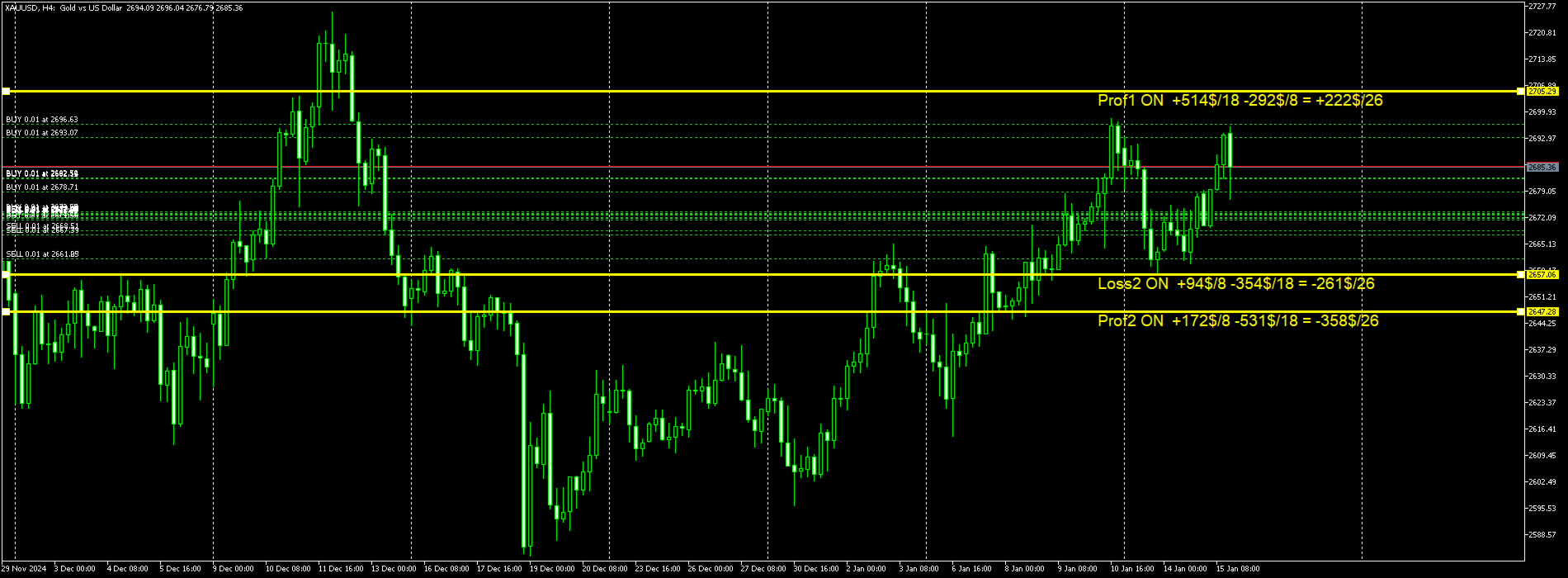
Calculez et placez une ligne de ce type sous les lignes : Prof1 OFF +584$/19 -396$/7 = +187$/26
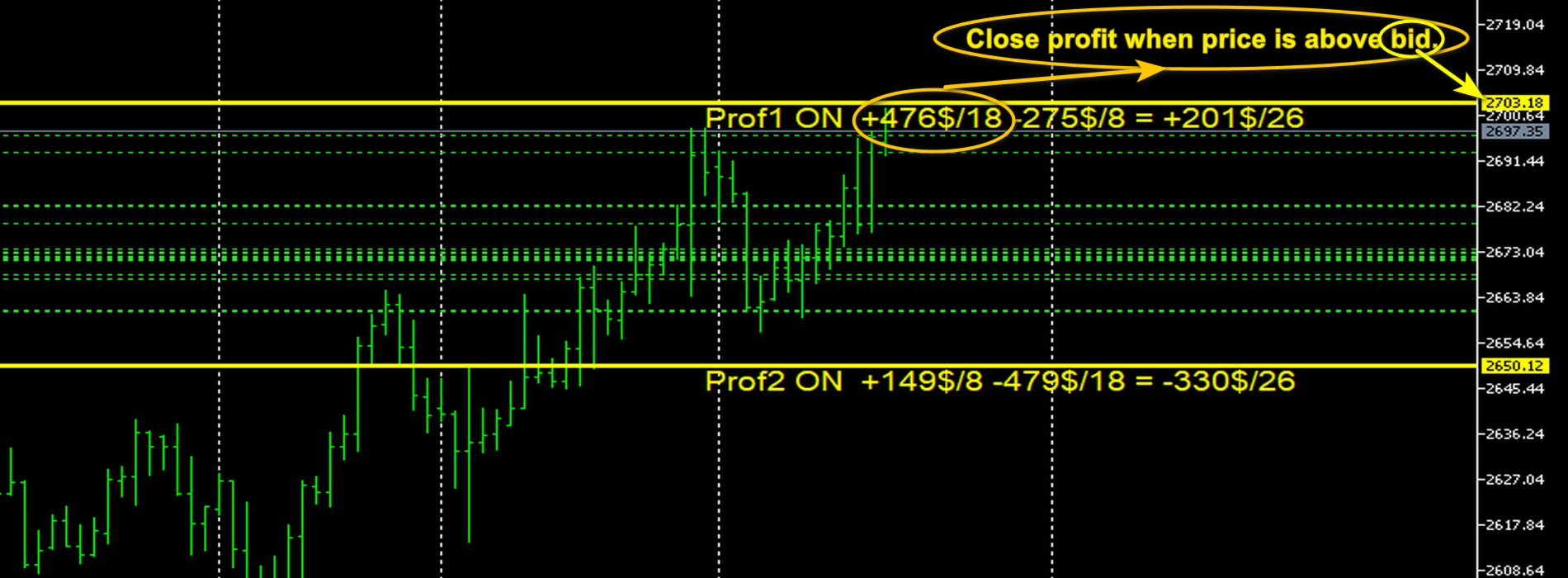
Explication : Nom de la ligne, ON ou OFF si la ligne est active ou non, le montant des transactions rentables et la quantité, puis le montant des pertes et la quantité, et enfin les montants finaux.
S'il n'y a pas de perte, alors le stock ressemble à ceci : Prof1 OFF +910$/9 Les 9 transactions sont rentables et le montant du bénéfice = 910$.
Ici, au lieu de la ligne Prof1, l'une des 4 lignes acceptables.
Le deuxième objectif de l’utilitaire est de clôturer des transactions.
Utilisez les lignes d'arrêt et de profit pour clôturer les transactions = vrai. Le mode de clôture de transaction est activé.
Le mode ON sous la ligne indique que les transactions peuvent être fermées.
La procédure de clôture des transactions RENTABLES.
Toutes les transactions d'ACHAT avec profit, où le prix BID du symbole est supérieur à la ligne Prof1 ou Prof2.
Toutes les transactions de VENTE avec profit, où le prix ASK du symbole est inférieur à la ligne Prof1 ou Prof2.
La procédure de clôture des transactions PERTES.
Toutes les transactions d'ACHAT avec une perte, où le prix ASK du symbole est inférieur à la ligne Loss1 ou Loss2.
Toutes les transactions de VENTE avec une perte, où le prix BID du symbole est supérieur à la ligne Loss1 ou Loss2.
Produits recommandés
Episode Health Monitor Episode Health Monitor is a trading utility for MetaTrader 5 designed to analyze the real-time condition of active trading positions directly on the chart. The tool evaluates the current “trading episode” - a group of open positions - and provides a structured view of risk, stability, and distance to potential failure. Instead of relying only on profit/loss or price movement, it helps identify whether the current position is stable, weakening, or approaching a critical st
Bober Real MT5
Arnold Bobrinskii
4.88 (16)
Bober Real MT5 is a fully automatic Forex trading Expert Advisor. This robot was made in 2014 year and did a lot of profitbale trades during this period. So far over 7000% growth on my personal account. There was many updates but 2019 update is the best one. The robot can run on any instrument, but the results are better with EURGBP, GBPUSD, on the M5 timeframe. Robot doesn't show good results in tester or live account if you run incorrect sets. Set files for Live accounts availible only for cu
TradePilotmt5
Hossein Khalil Alishir
TradePilot Expert Advisor (EA) for MetaTrader 5 TradePilot is a professional and user-friendly Expert Advisor (EA) for MetaTrader 5 (MT5) . It simplifies automated trading , risk management , and trade execution with a smart trading panel . Perfect for beginners and experienced traders looking for a reliable trade manager EA with automated lot size calculation and smart position management. Key Advantages User-Friendly Trading Panel: Customizable panel with buttons and hotkeys for fast ex
BulkOp Trade Manager
Ahmed Jumaa Saif Ali Almheiri
BulkOp Trade Manager Trade faster. Manage smarter. Close with confidence. BulkOp Trade Manager is a powerful MT5 utility EA built for traders who need speed, control, and clean execution directly from the chart. It is designed for active manual traders, scalpers, gold traders, and anyone who wants to manage multiple positions with less delay and fewer clicks. Why BulkOp? Ultra-fast Buy and Sell execution One-click Bulk Close Profit One-click Bulk Close Loss Keyboard trading control Bulk order e
CosmiCLab SMC FIBO CosmiCLab SMC FIBO is a professional trading indicator designed for traders who use Smart Money Concepts (SMC), market structure analysis and Fibonacci retracement levels. The indicator automatically detects market swings and builds Fibonacci levels based on the latest impulse movement. It also identifies market structure changes such as BOS (Break of Structure) and CHOCH (Change of Character), helping traders understand the current market direction. CosmiCLab SMC FIBO also pr
SolarTrade Suite Financial Robot: LaunchPad Market Expert - conçu pour ouvrir des transactions ! Il s'agit d'un robot de trading qui utilise des algorithmes spéciaux innovants et avancés pour calculer ses valeurs, votre assistant dans le monde des marchés financiers. Utilisez notre ensemble d'indicateurs de la série SolarTrade Suite pour mieux choisir le moment de lancer ce robot. Découvrez nos autres produits de la série SolarTrade Suite en bas de la description. Vous souhaitez naviguer en
Expert TP SL v04 - Professional Trading Assistant with AI Motivation System Advanced manual trading tool with automatic risk management, overtrading protection, and intelligent psychological support for disciplined trading. PRODUCT OVERVIEW Expert TP SL v04 is a comprehensive trading assistant designed for manual traders who want to maintain emotional discipline while automating risk calculations. This isn't just another order placement tool - it's a complete trading psychology system that pr
Candlestick Pattern Scanner is a multi-timeframe and multi-symbol dashboard and alert system that checks all timeframes and currency pairs for different candlestick patterns that are formed in them. Scanner is integrated   with support and resistance zones so you can check the candlestick patterns in most important areas of the chart to find breakout and reversal patterns in the price chart. Download demo version   (works on M4,M6,M12,H3,H8 timeframes and 20 symbols of Market Watch window) Read
ProTrade EA
Jim Ariel Camarce Ignao
Key Features   Automated Candle Pattern Recognition 10 Professional Patterns : Detects Bullish/Bearish Engulfing, Hammer/Shooting Star, Morning/Evening Star, Piercing/Dark Cloud, and 6 additional professional candlestick patterns Smart Filtering : Combine multiple patterns with configurable confirmation logic Volume Confirmation : Optional volume filter to validate pattern strength Multi-Timeframe Analysis : Separate execution and bias timeframes for better timing   Trading Dashboard Int
# Equity Monitor Pro  ## Short Description Equity Monitor Pro is a professional equity p**Equity Monitor Pro** is a powerful risk management tool that automatically protects your trading account by monitoring equity levels and enforcing prop firm style rules. Whether you're taking an FTMO challenge, trading a funded account, or just want to protect your capital, this EA runs silently alongside your trading strategy and takes action when it matters most. Protection tool designed for prop firm
SlopeChannelB MT5
MIKHAIL VINOGRADOV
SlopeChannelB – un outil d'analyse technique qui construit un canal de évolution des prix incliné, offrant des opportunités uniques pour évaluer la situation actuelle du marché et trouver des signaux de trading. Caractéristiques principales de l'indicateur : Canal de mouvement des prix incliné : L'indicateur aide à visualiser les niveaux de support et de résistance, qui peuvent indiquer des points de retournement potentiels ou des continuations de tendance. Couleurs variées des lignes et mi
Demo version T Position Size Calculator   doesn't work in the strategy tester. The Strategy Tester does not support the processing of ChartEvent. It does not support most of the panel's functionality. Contact me for any questions or ideas for improvement or in case of a bug found. Control and manage your trading like a professional trader with T Position Size Calculator. T Position Size Calculator – an MT5 Expert Adviser, is a user-friendly custom tools (Dialog Panel and Three Lines, Order Line
XauG0D Assistant
Darell Valiente Taganas
XauG0D Assistant – Smart Trading Panel for XAUUSD (MT5) XauG0D Assistant is a powerful and modern trading panel designed for MetaTrader 5, built specifically for XAUUSD traders who want speed, precision, and full control. It transforms your chart into a complete trading command center, combining manual execution with smart automation. This EA allows you to execute trades instantly, manage risk efficiently, and monitor your performance in real-time — all from a sleek and intuitive interface. Key
Noize Absorption Index - is the manual trading system that measures the difference of pressure between bears forces and bulls forces. Green line - is a noize free index that showing curent situation. Zero value of index shows totally choppy/flat market.Values above zero level shows how powerfull bullish wave is and values below zero measures bearish forces.Up arrow appears on bearish market when it's ready to reverse, dn arrow appears on weak bullish market, as a result of reverse expectation.
TradePanel EA – Manual + Semi-Auto Trading Dashboard TradePanel EA is a powerful assistant for traders who want precision, speed, and full control over their trades. It combines on-chart execution , basket profit management , drawdown protection , and market/session awareness into one easy-to-use panel. Core Features Click-to-Trade System Place BUY/SELL instantly from the panel Click on the chart to set Stop Loss — TP is auto-calculated by your chosen R:R Risk Control & Lot Sizing Risk
Auto SLTP Maker MT5  is an assistant for all those who forget to set StopLoss and/or TakeProfit in deal parameters, or trade on a very fast market and fail to place them in time. This tool automatically tracks trades without StopLoss and/or TakeProfit and checks what level should be set in accordance with the settings. The tool works both with market and pending orders. The type of orders to work with can be set in the parameters. It can track either trades for the instrument it runs on, or all
TradePad
Ruslan Khasanov
5 (1)
TradePad est un outil pour le trading manuel et algorithmique. Nous vous présentons une solution simple pour des opérations de trading rapides et le contrôle des positions sur plusieurs instruments de trading. Attention, l'application ne fonctionne pas dans le testeur de stratégie! Version d'essai de l'application pour un compte démo et une description de tous les outils L'interface de l'application est adaptée aux moniteurs haute résolution, simple et intuitive. Pour un travail confortable, le
ID Trade_Bot BS - an effective tool for automated trading using RSI Trade_Bot BS is an efficient solution for automated trading based on RSI, allowing flexible parameter customization and risk management. Thanks to the ability to choose a trading mode, dynamic Stop-Loss and Take-Profit levels, and trading mode adjustment (buying, selling, or both), it is suitable for various trading strategies. Key Features: Uses the RSI indicator to determine market conditions. Automatically opens an
Exclusive Imperium MT5 — Système de Trading Automatisé Exclusive Imperium MT5 est un Expert Advisor pour MetaTrader 5, basé sur des algorithmes d’analyse de marché et de gestion des risques. L’EA fonctionne en mode entièrement automatique et nécessite une intervention minimale du trader. Attention ! Contactez-moi immédiatement après l’achat afin de recevoir les instructions de configuration ! IMPORTANT : Tous les exemples, captures d’écran et tests sont fournis uniquement à titre de démonstratio
TradingCoPilot
Viktor Mitrofanov
Trading Co-Pilot for MetaTrader 5 Advanced Position Management for Manual Traders Trading Co-Pilot is a professional trade management assistant designed for traders who open positions manually and want precise, automated control over risk and profit handling. It does not open trades. It manages them intelligently. You focus on entries. The Co-Pilot protects and optimizes the exit. How It Works Once you open a manual position, Trading Co-Pilot automatically: • Applies Stop Loss • Sets Take Profit
FREE
DDKiller Pro
Njaratahiry Michael Randrianiaina
Arrête de faire sauter ton compte. Une bonne fois pour toutes. DDKiller Pro est le gardien du risque MT5 qui tourne silencieusement sur ton graphique et coupe le trading dès qu'une limite est atteinte — que tu passes un challenge prop firm ou que tu gères ton propre compte CFD. Le problème que tout trader connaît : Tu fixes tes règles. Tu les enfreins quand même. Un trade de vengeance. Une position surleviéragée. Une session qui efface un mois de gains. DDKiller Pro retire cette décision de tes
TradeStats Pro – Lot & Risk Analytics Panel for MT5 TradeStats Pro is an analytics panel for MetaTrader 5 that displays trading history and account statistics in a structured, readable format directly on the chart. Account Overview The panel shows real-time account data including balance, equity, margin, free margin, floating profit/loss, win rate, profit factor, and maximum drawdown in both value and percentage. Lot Exposure Tracking Total buy lot, sell lot, and net lot exposure from open posi
FREE
Trading Assistent is a multifunctional trading panel that combines all necessary tools for professional trading. The panel provides complete control over positions, in-depth risk analysis, and fast order execution. MAIN FUNCTIONAL BLOCKS Position Management: - Real-time viewing of all open positions - Sorting by symbol, profit, volume, and type - Visual indication of profitable and losing positions - Bulk closing operations - Breakeven function for profit protection Trading Operations: - I
Timeframe Trading Limiter
AL MOOSAWI ABDULLAH JAFFER BAQER
Timeframe Trading Limiter is a professional risk management and trade discipline utility designed for MetaTrader 5. It empowers traders to enforce strict, automated limits on the number of trades and the maximum allowable drawdown within each trading period, based directly on the chart timeframe selected. Whether you are a discretionary trader prone to overtrading, a prop firm challenge participant needing to adhere to strict rules, or an algorithmic trader running multiple strategies, this tool
Mine Farm
Maryna Kauzova
Mine Farm is one of the most classic and time-tested scalping strategies based on the breakdown of strong price levels. Mine Farm is the author's modification of the system for determining entry and exit points into the market... Mine Farm - is the combination of great potential with reliability and safety. Why Mine Farm?! - each order has a short dynamic Stop Loss - the advisor does not use any risky methods (averaging, martingale, grid, locking, etc.) - the advisor tries to get the most
Inverted_Chart_EA Utility Expert Advisor Inverted_Chart_EA creates and maintains a mirror-inverted chart of any symbol and timeframe. It automatically generates a custom instrument (e.g. US30_INV ) and keeps its price history updated in real time, with bars mirrored around a chosen pivot. This utility gives traders a new way to analyze the market from a different perspective by flipping the chart upside down. Why use an inverted chart? Highlight hidden patterns – price formations that look ordin
The Trendline Trade Panel was created to make it easier to train forex trading skills in backtester and at the same time make it easier to live trade using trendlines with the push of a button. This ea is perfect for beginners who want to learn to trade manually because all of its features are equipped with basic tools for trading forex. Other uses for Trendline Trade Panel: + Can be used to perform recovering loss positions made by other EA or positions that open manually. Fill in magic number
Local Copy Trader Utility - Professional Copy Trading System Overview Local Copy Trader Utility is the complete solution for mirroring trades between MetaTrader 5 accounts. With both Master and Slave functionality in one powerful Expert Advisor, it delivers reliable, lightning-fast trade copying with zero external dependencies. Perfect for managing multiple accounts, following trading signals, or transferring trades between brokers, this system ensures your positions stay perfectly synchronized
Bneu Execution Scaling System
Marvinson Salavia Caballero
Bneu Execution and Scaling System — Professional Trading Command Center Premium on-chart command center with 5 dashboard tabs. 28-pair opportunity radar scans every 8 seconds. Dual-gate qualification: indicator engine + AI confidence scoring. One-click execution with auto SL/TP and smart lot sizing. Full autopilot mode with 6 built-in safeguards. Multi-account trade copier (publisher or receiver in one EA). Adaptive Money Management protects every position automatically. WHAT IT DOES Attach
MT5 To Telegram Copier
Levi Dane Benjamin
3 (2)
Envoyez des signaux entièrement personnalisables de MT5 à Telegram et devenez un fournisseur de signaux ! Ce produit est présenté dans une interface graphique conviviale et visuellement attrayante. Personnalisez vos paramètres et commencez à utiliser le produit en quelques minutes seulement ! Guide de l'utilisateur + Démo  | Version MT4  | Version Discord Si vous souhaitez essayer une démo, veuillez consulter le Guide de l'utilisateur. L'émetteur de MT5 vers Telegram NE fonctionne PAS dans le t
Les acheteurs de ce produit ont également acheté
Trade Assistant MT5
Evgeniy Kravchenko
4.42 (211)
It helps to calculate the risk per trade, the easy installation of a new order, order management with partial closing functions, trailing stop of 7 types and other useful functions. Additional materials and instructions Installation instructions - Application instructions - Trial version of the application for a demo account Line function -   shows on the chart the Opening line, Stop Loss, Take Profit. With this function it is easy to set a new order and see its additional characteristics bef
Bienvenue sur Trade Manager EA, l’outil ultime de gestion des risques conçu pour rendre le trading plus intuitif, précis et efficace. Ce n’est pas seulement un outil d’exécution d’ordres ; c’est une solution complète pour la planification des trades, la gestion des positions et le contrôle des risques. Que vous soyez débutant, trader expérimenté ou scalpeur ayant besoin d’une exécution rapide, Trade Manager EA s’adapte à vos besoins, offrant une flexibilité sur tous les marchés, des devises et i
Local Trade Copier EA MT5
Juvenille Emperor Limited
4.96 (138)
Découvrez une expérience exceptionnellement rapide de copie de trades avec le   Local Trade Copier EA MT5 . Avec sa configuration facile en 1 minute, ce copieur de trades vous permet de copier des trades entre plusieurs terminaux MetaTrader sur le même ordinateur Windows ou Windows VPS avec des vitesses de copie ultra-rapides de moins de 0.5 seconde. Que vous soyez un trader débutant ou professionnel, le   Local Trade Copier EA MT5   offre une large gamme d'options pour le personnaliser en fonc
Quant AI Agents is NOT AN Expert Advisor. Quant AI Agents   is a   multi-agent AI trading framework   that turns natural-language strategy prompts into live.  WANT THE SAME RESULTS AS MY LIVE SIGNAL?   Use the exact same brokers I do:   IC MARKETS , IC TRADING   .  Unlike the centralized stock market, Forex has no single, unified price feed.  Every broker sources liquidity from different providers, creating unique data streams. Other brokers can only achieve trading performance equivalent to 60
TradePanel MT5
Alfiya Fazylova
4.87 (155)
Trade Panel est un assistant commercial multifonction. L'application contient plus de 50 fonctions de trading pour le trading manuel et permet d'automatiser la plupart des tâches commerciales. Avant l'achat, vous pouvez tester la version de démonstration sur un compte de démonstration. Télécharger la version d'essai de l'application pour un compte de démonstration : https://www.mql5.com/fr/blogs/post/762644 . Instructions complètes ici . Commerce. Permet d'effectuer des opérations commerciales e
Version Bêta Le Telegram to MT5 Signal Trader est presque prêt pour la sortie officielle en version alpha. Certaines fonctionnalités sont encore en développement et vous pourriez rencontrer de petits bugs. Si vous rencontrez des problèmes, merci de les signaler, vos retours aident à améliorer le logiciel pour tout le monde. Telegram to MT5 Signal Trader est un outil puissant qui copie automatiquement les signaux de trading depuis des chaînes ou groupes Telegram vers votre compte MetaTrader 5 .
Farmed Hedge Yield Farming | All Markets (Manual - Hybrid - Semi/Automated EA) MULTI-ASSET SUPPORT Trade any asset available on your broker - Forex: Major, Minor, Exotic pairs - Crypto: BTC, ETH, XRP, SOL, BNB - Stocks: Apple, Tesla, Amazon, Google, etc. - Commodities: Gold, Silver, Oil, Gas - Indices: US30, NAS100, SPX500, DAX40 - Any CFD your broker offers VERIFIED TRADING RESULTS - Farmed Hedge Yield Axi Copy:  https://www.mql5.com/en/signals/2356376 - Farmed Hedge Yield Exn Copy:   https:/
YuClusters
Yury Kulikov
4.93 (43)
Attention: You can view the program operation in the free version  YuClusters DEMO .  YuClusters is a professional market analysis system. The trader has unique opportunities to analyze the flow of orders, trade volumes, price movements using various charts, profiles, indicators, and graphical objects. YuClusters operates on data based on Time&Sales or ticks information, depending on what is available in the quotes of a financial instrument. YuClusters allows you to build graphs by combining da
Premium Trade Manager - Gestion de trades rapide et disciplinée pour MetaTrader 5 Premium Trade Manager est fait pour les traders qui veulent garder leur attention sur la décision pendant que le panneau prend en charge la routine : dimensionnement, placement, partiels, trailing, actualités et limites de prop firm, traités de la même façon disciplinée à chaque trade. C'est un panneau rapide sur le graphique pour MetaTrader 5 qui supprime le travail mécanique de chaque trade. Vous décidez de la di
Power Candles Strategy Scanner - Outil de recherche de configurations multi-symboles à optimisation automatique Le Power Candles Strategy Scanner utilise le même moteur d'auto-optimisation que celui qui alimente l'indicateur Power Candles, pour chaque symbole de votre Market Watch, en parallèle. Un panneau vous indique quels symboles sont statistiquement négociables à l'instant, quelle stratégie est la plus performante pour chacun, la paire Stop Loss / Take Profit optimale, et vous alerte dès qu
Trade Dashboard MT5
Fatemeh Ameri
4.94 (125)
Trade Dashboard simplifies how you open, manage, and control your trades, with built-in lot size calculation. It allows you to execute trades, manage risk, and control positions directly on the chart, with tools such as partial close, breakeven, and trailing stop. Designed to reduce manual work and help you stay focused on your trading decisions. A demo version is available for testing. Detailed explanations of features are provided within the MQL5 platform. Installation instructions are include
Exp COPYLOT CLIENT for MT5
Vladislav Andruschenko
3.91 (33)
Copieur professionnel de trades pour MetaTrader 5 Un copieur de trades rapide, professionnel et fiable pour MetaTrader . COPYLOT permet de copier des trades Forex entre les terminaux MT4 et MT5 avec prise en charge des comptes Hedge et Netting . La version MT5 de COPYLOT prend en charge : - MT5 Hedge → MT5 Hedge - MT5 Hedge → MT5 Netting - MT5 Netting → MT5 Hedge - MT5 Netting → MT5 Netting - MT4 → MT5 Hedge - MT4 → MT5 Netting Version MT4 Description complète + DEMO + PDF Comment acheter Comme
Trade copier MT5
Alfiya Fazylova
4.53 (43)
Trade Copier est un utilitaire professionnel conçu pour copier et synchroniser les commandesentre les comptes de trading. Les commandes sont copiées du compte/terminal du fournisseur vers le compte/terminal du destinataire, qui sont installés sur le même ordinateur ou vps. PROMOTION - Si vous avez déjà acquis le "Trade copier MT5", vous pouvez obtenir le "Trade copier MT4" gratuitement (pour la copie MT4 > MT5 et MT4 < MT5). Pour obtenir des informations plus détaillées sur les conditions, veuil
The product will copy all telegram signal to MT5 ( which you are member) , also it can work as remote copier.  Easy to set up, copy order instant, can work with almost signal formats, image signal,  s upport to translate other language to English Work with all type of channel or group, even channel have "Restrict Saving Content", work with  multi channel, multi MT5 Work as remote copier: with signal have ticket number, it will copy exactly via ticket number. Support to backtest signal. How to s
Trade Manager DaneTrades
Levi Dane Benjamin
4.28 (29)
Trade Manager pour vous aider à entrer et sortir rapidement des transactions tout en calculant automatiquement votre risque. Y compris des fonctionnalités pour vous aider à éviter le sur-trading, le trading de vengeance et le trading émotionnel. Les transactions peuvent être gérées automatiquement et les mesures de performances du compte peuvent être visualisées dans un graphique. Ces fonctionnalités rendent ce panneau idéal pour tous les traders manuels et contribuent à améliorer la plateforme
MT5 to Telegram Signal Provider est un utilitaire facile à utiliser et entièrement personnalisable qui permet l'envoi de signaux spécifiés vers un chat, un canal ou un groupe Telegram, transformant ainsi votre compte en fournisseur de signaux. Contrairement à la plupart des produits concurrents, il n'utilise pas d'importations DLL. [ Démonstration ] [ Manuel ] [ Version MT4 ] [ Version Discord ] [ Canal Telegram ]  New: [ Telegram To MT5 ] Configuration Un guide utilisateur étape par étape est
Custom Alerts AIO : Surveillez tous les marchés à la fois — sans aucune configuration Présentation Custom Alerts AIO est une solution de surveillance du marché prête à l’emploi, sans configuration nécessaire. Tous les indicateurs requis — FX Power, FX Volume, FX Dynamic, FX Levels, IX Power — sont directement intégrés. Aucun graphique n’est affiché, ce qui rend cet outil idéal pour la génération d’alertes en temps réel. Il prend en charge toutes les classes d’actifs proposées par votre courtie
Poc Breakout Signal: The Ultimate Institutional Order Flow & Price Action System Elevate your trading with Poc Breakout, a comprehensive technical analysis tool designed to bridge the gap between retail trading and institutional market understanding. This all-in-one system combines powerful Buy/Sell signals, advanced Volume Profile analysis, real-time Order Flow (Depth of Market), and critical macroeconomic data to give you a clear, unambiguous edge in the markets. Poc Breakout Signal decodes c
The News Filter MT5
Leolouiski Gan
4.77 (22)
Ce produit filtre tous les conseillers experts et les graphiques manuels pendant les heures de publication des actualités, de sorte que vous n'avez pas à vous soucier des pics de prix soudains qui pourraient détruire vos configurations de trading manuelles ou les transactions entrées par d'autres conseillers experts. Ce produit est également livré avec un système de gestion des ordres complet qui peut gérer vos positions ouvertes et vos ordres en attente avant la publication de toute actualité.
AntiOverfit PRO MT5
Enrique Enguix
5 (5)
Avant d’acheter un EA, vérifiez s’il tient vraiment la route ou s’il a simplement eu de la chance en backtest. La plupart des robots se vendent avec un beau backtest. Une courbe qui monte. Un bon profit factor. Très peu de doutes. Et pourtant, beaucoup de ces EA s’effondrent dès que le marché cesse de se comporter comme dans cet historique précis. Pourquoi ? Parce qu’un backtest ne prouve qu’une seule chose : que cette stratégie a fonctionné sur un parcours de prix bien précis. Il ne prouve pas
Anchor Trade Manager
Kalinskie Gilliam
5 (2)
Anchor: The EA Manager Run your full EA portfolio without conflicts, without stacked risk, and without watching every chart yourself. Anchor coordinates up to 64 Expert Advisors on a single account so only one trades at a time. Attach Anchor to any chart. Type your EA names and magic numbers in one line. Anchor handles the rest. Built for portfolios. Built for discipline. Built for prop firms. The Problem Running multiple EAs on the same account creates risk. Two gold EAs can open opposite posit
Ultimate Extractor
Clifton Creath
5 (9)
Ultimate Extractor - Professional Trading Analytics for MT5 *****this is the local HTML version of Ultimate Extractor. !!!!!it is not compatible with Cloud!!!! For the online version please reach out to me directly****** Ultimate Extractor transforms your MetaTrader 5 trading history into actionable insights with comprehensive analytics, interactive charts, and real-time performance tracking. What It Does Automatically analyzes your MT5 trading history across all Expert Advisors and generates
Seconds Chart MT5
Boris Sedov
4.59 (17)
Seconds Chart - un outil unique pour créer des graphiques en secondes dans MetaTrader 5 . Grâce à Seconds Chart , vous pouvez créer un graphique avec une période définie en secondes, offrant une flexibilité et une précision idéales pour l'analyse, indisponibles sur les graphiques standards en minutes ou en heures. Par exemple, la période S15 indique un graphique avec des bougies d'une durée de 15 secondes. Vous pouvez utiliser n'importe quels indicateurs et experts advisors compatibles avec les
Copy Cat More Trade Copier MT5 (Chat Copieur MT5) est un copieur de trades local et un framework complet de gestion des risques et d'exécution conçu pour les défis commerciaux d'aujourd'hui. Des défis de prop firms à la gestion de portefeuille personnel, il s'adapte à chaque situation avec une combinaison d'exécution robuste, de protection du capital, de configuration flexible et de gestion avancée des trades. Le copieur fonctionne à la fois en mode Master (expéditeur) et Slave (récepteur), avec
Footprint Chart Pro — Professional OrderFlow EA for MetaTrader 5 Version 6.34 | Professional tool for real traders | Institutional-Grade Visualization DEMO USERS - PLEASE SELECT EVERY TICK / REAL TICK WHEN TESTING AND YOU HAVE DOWNLOADED HISTORICAL DATA. IF YOU SEE A WAITING SCREEN AND IT IS NOT DOWNLOADING, IT MEANS YOU HAVE LOW HISTORICAL DATA. TRY 1 MIN AND 5 MIN FIRST ON 1 DAY DATA. ONE DAY DATA SHOULD BE THE NEWEST AND MOST CURRENT DATE. PLEASE WAIT UNTIL THE MARKET HAS ROLLED OVER PERIOD.
Signal TradingView to MT5 Pro Automator Exécution professionnelle instantanée entre TradingView et MetaTrader 5 Automatisez votre stratégie de trading avec le pont de communication le plus robuste entre les alertes TradingView et l'exécution réelle sur MT5. Conçu pour les traders qui exigent vitesse, flexibilité et une gestion des risques impeccable, cet Expert Advisor transforme tout message d'alerte en un ordre au marché ou à cours limité précis. POINTS FORTS ET AVANTAGES Moteur d'analyse univ
Panneau de trading pour MetaTrader 5 — contrôle professionnel du trading en un clic depuis le graphique et le clavier Un panneau de trading avancé conçu pour les traders actifs, afin d’ouvrir, gérer et clôturer des positions bien plus rapidement qu’avec l’interface standard de MetaTrader. Cette solution s’adresse à ceux qui veulent contrôler positions, ordres en attente, profit global et exécution depuis un seul espace de travail professionnel. Il ne s’agit pas d’un simple utilitaire. C’est un
HINN MagicEntry Extra
ALGOFLOW OÜ
4.71 (14)
HINN MAGIC ENTRY – the ultimate tool for entry and position management! Place orders by selecting a level directly on the chart! full description   ::  demo-version  :: 60-sec-video-description Key features: - Market, limit, and pending orders - Automatic lot size calculation - Automatic spread and commission accounting - Unlimited partitial take-profits  - Breakeven and trailing stop-loss and take-profit  functions - Invalidation leves - Intuitive, adaptive, and customizable interface - Works
Advanced Dashboard Ultra
Mirel Daniel Gheonu
5 (2)
Stats Dashboard & Journal ULTRA pour MT5 Le Centre de Commandement de Trading Complet : Analytique, Automatisation & Intelligence des Actualités. Stats Dashboard ULTRA est l'évolution ultime de l'outil d'analyse Pro. Il transforme MetaTrader 5 en une station de trading professionnelle, combinant une analyse de performance de niveau institutionnel avec une protection automatisée contre les actualités et des métriques psychologiques avancées. Conçu pour les traders manuels et les gestionnaires de
Entry In The Zone and SMC Multi Timeframe   is a real-time 2-in-1 market analysis tool that combines market structure analysis and a No Repaint BUY / SELL signal system into a single indicator, built on Smart Money Concepts (SMC) — a widely adopted framework used by professional traders to understand market structure. This indicator helps you see the market more clearly, make decisions based on structure rather than guesswork, and focus on high-probability zones where price is more likely to rea
Plus de l'auteur
"SimSim Expert Assistant" утилита для сопровождению сделок трейдера в терминале МТ4. Утилита бесплатная, пользуйтесь. Кроме того, утилита открывает сделки по сигналам индикаторов SimSim Trading (через глобальные). Параметр индикатора "Signal shaping for SimSim Expert Assistan" указывает на это. Как работать с утилитой. Expert Assistant работает в терминале МТ4 и устанавливается в папку Expert, в утилите нет ни одного параметра при старте. Все параметры находятся в списке глобальных переменных
FREE
SimSim arrow open up or down The indicator calculates and summarizes data from 23 standard indicators. What standard indicators to use, the trader chooses himself. As a result of the calculation, we obtain the current signal level. Positive values of the signal indicate a possible purchase, negative values indicate a sale.  The indicator implements a testing system that can be tested by downloading the demo version. An indicator can be a good addition to your trading strategy. The indicator
SimSim Histogram open up or down The indicator calculates and summarizes data from 25 standard indicators. What standard indicators to use, the trader determines for himself. As a result of the calculation, we obtain the current signal level, and color the histogram by color: buy, sell or neutral value. The indicator implements a testing system that can be tested by downloading the demo version. An indicator can be a good addition to your trading strategy. FIRST Trial on TRIAL - THEN RENT or
SimSim Tournament Currency Strength Table   This is a multi-currency indicator; it shows the relative strength of the currency and 28 major currency pairs. There are many similar indicators on the market, but let there be one more. In this indicator, unlike others, you can specify weighting factors for each timeframe. Weighting factors. Why are they? Each trader prefers to work with a specific time frame, which is the main one for him, and the signals from him are most important. Examples of s
The indicator calculates and summarizes data from 25 standard indicators. What standard indicators to use, the trader chooses himself. As a result of the calculation, we obtain the current signal level. Positive values of the signal indicate a possible purchase, negative values indicate a sale.  The indicator implements a testing system that can be tested by downloading the demo version. And the main user chooses the indicators necessary for him and indicates the parameters of these indicators
Indicator. "Indicator wave or Indicator Ma". Using 23 standard indicators and the author's algorithm, the levels of purchases (from 0 to +100) and sales (from 0 to -100) are calculated. Then, using the calculated levels, the "Wave Indicator" draws a wave with 21 moving averages. The wave number is equal to the averaging period of the calculated levels. Waves # 1 - 7 Fast Moving Averages Waves from No. 8 -14 moving averages Waves from No. 15-21 slow moving averages Looking at the figures drawn
Это стрелочный индикатор. Он выбирает данные от 23-х стандартных индикаторов и расчитывает уровень сигнала который показывает предполагаемое движение цены инструмента торговли. Минимальный уровень сигнала индикатора установлен в пределах -100 до +100%. Используйте усреднение для формирования сигнала. Как работать с индикаторам. Следим за сигналом и принимаем решения. Индикатор перерисовывается только на нулевой свечи, поэтому решения принимаются после закрытия свечи с новым сигналом, и сигнал
Это линейный индикатор. Он выбирает данные от 23-х стандартных индикаторов и рассчитывает уровень сигнала, который показывает предполагаемое движение цены инструмента торговли. Минимальный уровень сигнала индикатора установлен в пределах -100 до +100%. Используйте усреднение для формирования сигнала. Как работать с индикаторам. Следим за сигналом и принимаем решения. При пересечении нулевого уровня индикатора снизу вверх можно рассматривать покупки. При пересечении нулевого уровня сверху вни
Это индикатор гистограмма. Он выбирает данные от 23-х стандартных индикаторов и расчитывает уровень сигнала который показывает предполагаемое движение цены инструмента торговли. Минимальный уровень сигнала индикатора установлен в пределах -100 до +100%. Используйте усреднение для формирования сигнала. Как работать с индикаторам. Следим за сигналом и принимаем решения, цвета гистограммы показывают когда возможны покупки а когда продажи, или нейтральный цвет - сделать паузу. Индикатор перерисов
MT4 trend indicator works without redrawing. Provides signals for entering trades, works on charts of any instrument. Трендовый индикатор МТ4, работает без перерисовки.  Выдает сигналы для входа в сделки, работает на графиках любого инструмента. Input parameters are for styling and messages only. / Входные параметры только для оформления и сообщений. All original signal calculations do not need additional parameters. / Все оригинальные расчеты сигнала, не нуждаются в дополнительных параметрах.
Un indicateur très simple mais efficace. Il est basé sur la ligne KijunSen de l'indicateur Ichimoku et la MA moyenne construite sur cette ligne. Signal d'achat ou de vente : c'est le point d'intersection de deux lignes !!! J'utilise moi-même souvent la ligne KijunSen de l'indicateur Ichimoku pour le trading, si le prix est PLUS ÉLEVÉ, je ne considère que les ACHATS, si seules les VENTES sont INFÉRIEURES. Et après avoir fait la moyenne de la ligne KijunSen et formé la ligne KijunSen MA, les point
L'utilitaire fonctionne avec des lignes horizontales : Prof1, Prof2, Loss1, Loss2. Ces lignes, qui ont des noms strictement fixes, sont dessinées par le trader indépendamment sur n'importe quel graphique de son terminal. Il existe des options permettant de créer toutes les lignes à la fois ou de sélectionner l'une des quatre. Le but des lignes devient évident lorsqu’on regarde leurs noms. Les lignes Prof1 et Prof2 indiquent les niveaux de Take Profit de la transaction, mais sont présentées sous

MT5 trend indicator works without redrawing. Provides signals for entering trades, works on charts of any instrument. Трендовый индикатор МТ5, работает без перерисовки.  Выдает сигналы для входа в сделки, работает на графиках любого инструмента. Input parameters are for styling and messages only. / Входные параметры только для оформления и сообщений. All original signal calculations do not need additional parameters. / Все оригинальные расчеты сигнала, не нуждаются в дополнительных параметрах.
Un indicateur très simple mais efficace. Il est basé sur la ligne KijunSen de l’indicateur Ichimoku, sur laquelle est construite la moyenne mobile MA. Les signaux d’achat ou de vente se produisent lorsque ces deux lignes se croisent. J'utilise souvent la ligne indicatrice KijunSen pour mon trading : lorsque le prix est AU-DESSUS de cette ligne, je me concentre uniquement sur l'ACHAT, tandis que lorsqu'il est EN DESSOUS, je me concentre sur la VENTE. De plus, après avoir calculé la moyenne de
Série Expert : Conseiller SimSim Multiple ADX MT5. Multi-devises et multi-périodes, utilise l'indicateur standard ADX (Average Directional Movement Index). Le conseiller travaille avec des données obtenues grâce à l'optimisation. Trois étapes pour générer les fichiers sources permettant au conseiller de travailler. Étape 1. Nous créons un fichier ????.Xml.      T_Tf = H1 - Sélection de la plage horaire. Laps de temps.      K_Period = 21 - Période de moyenne.      P_Prof = 0 - Prendre des bé
Série Expert : Conseiller SimSim Multiple ADXWilder MT5. Multi-devises et multi-périodes, utilise l'indicateur ADXWilder (Average Directional Movement Index de Welles Wilder). Série Expert : Conseiller SimSim Multiple ADXWilder MT5. Multi-devises et multi-périodes, utilise l'indicateur ADXWilder (Average Directional Movement Index de Welles Wilder). Le conseiller travaille avec des données obtenues grâce à l'optimisation. Trois étapes pour générer les fichiers sources permettant au conseille
Filtrer:
Aucun avis
Répondre à l'avis