Fomo Killswitch Ultimate Trading Discipline
- Utilidades
- Versión: 3.51
- Actualizado: 30 septiembre 2026

Stop revenge trading, overtrading and blown accounts. Fomo Killswitch EA is a discipline assistant that automatically
enforces your daily risk limits, blocks impulsive entries and protects your account during prop firm challenges
– without relying on willpower.

---

## How it works

Fomo Killswitch runs alongside your existing trading setup and acts as a safety gate for your account:

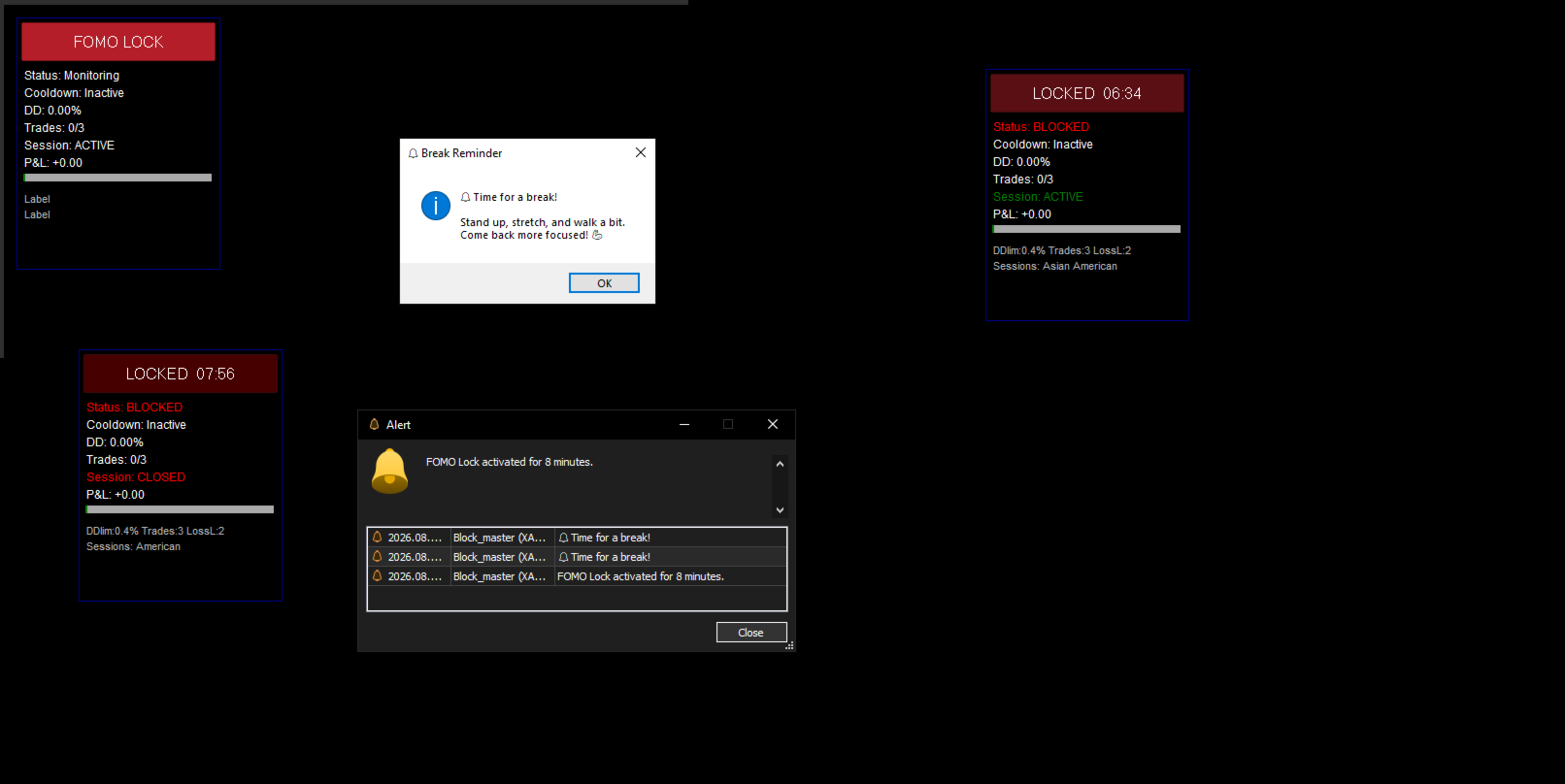
- One click locks new entries for a chosen period (FOMO Lock)
- After a significant loss, the EA automatically applies a cooldown
- Daily limits are enforced automatically: drawdown, profit target, trade count, lot size and consecutive losses
- When the daily loss limit is breached, the EA can close positions, close the chart or even shut down MetaTrader 5 (with alert and countdown)
- Trading sessions (Asian, European, American) with automatic exit at session end
- **Per‑trade take profit** by RR or % of balance
- **Break‑even lock** triggered by RR or % of balance, with offset
- **Trailing stop** with activation by RR or % of balance – replaces fixed take profit, letting you capture extended moves while protecting gains

All counters and states are preserved across terminal restarts using global variables, so the protection keeps working even after a restart.

---

## NEW in v3.08

- **Magic‑aware coexistence** – Fomo Killswitch can run side by side with another EA on the same chart, symbol and account. It manages its own trades **plus** any manual trade you open (magic 0), while leaving the other EA's trades untouched. No interference, no double management, no race conditions.
- **Frozen initial risk (no RR drift)** – break‑even, lock profit and trailing are all anchored to the trade's **original risk (1R at entry)**. Move the SL manually, hit BE, trail the stop — the "1R" reference never shifts. This kills the classic bug where RR inflates after the SL is moved and triggers BE/trailing at the wrong level.
- **Global minimum‑loss threshold** – small scratches (commissions, a few cents, sub‑threshold stops) are treated as **neutral**: they don't count as a loss, don't trigger the anti‑revenge cooldown, and don't advance the consecutive‑loss streak. Configured by % of balance or fixed amount.
- **Redesigned HUD** – clean sectioned layout (`STATUS / ACCOUNT / SESSION / DISCIPLINE`), colored status dot with the blocking reason spelled out, live drawdown budget bar that shifts from green to amber to red, and a compact footer showing only the active limits.

---

## Key features

- Daily drawdown limit (% of balance or fixed amount)
- Daily profit cap to lock in green days
- Max trades, max lots and consecutive loss limits
- Anti‑revenge trading cooldown with global min‑loss filter
- Per‑trade take profit by RR or % of balance
- **Break‑even lock** triggered by RR or % of balance, with offset — anchored on frozen initial risk
- **Trailing stop** – activation by RR or % of balance; distance set in RR; anchored on frozen initial risk
- **Magic‑aware** – manages manual trades (magic 0) and its own trades; ignores other EAs
- Customizable trading sessions (GMT)
- FOMO Lock with one‑click activation
- Break reminders (sound/popup, PT/EN)
- Redesigned HUD: status + reason, equity, P&L, drawdown bar, session, cooldown, streak
- Extreme loss blocker with terminal shutdown option
- **Graphic SL/TP lines** – visual reference for stop loss and target levels on chart

---

## Who is it for

- Prop firm traders needing strict drawdown control
- Traders who want to automate discipline and avoid overtrading
- Beginners building a safety system while they learn
- Professionals who prefer delegating emotional control to the algorithm
- Traders running multiple EAs on the same account who need a clean division of labor

---

## Compatibility

- Native MQL5, MetaTrader 5 only
- No DLL, no external libraries
- Lightweight – minimal CPU usage
- Runs alongside other EAs on the same chart (magic‑aware)

---

## Setup

All parameters are organized in clearly named input sections:

**General / FOMO Lock / Anti‑revenge & drawdown / Min loss to count / Profit limit / Per‑trade target / Break‑even trigger / Trailing stop / Graphic lines / Trading limits / Sessions / Daily reset / Extreme loss blocker / Break reminder**

---

## FAQ

**Q: Does it work together with my existing EA?**
A: Yes. Fomo Killswitch is magic‑aware. It manages its own trades and any manual trade you open, while leaving the other EA's trades completely untouched. You can run both on the same chart, symbol and account without conflict.

**Q: Does it place trades?**
A: No. Fomo Killswitch only monitors, blocks and enforces limits. It never opens positions on its own.

**Q: Will it manage my manual trades?**
A: Yes. Any trade opened with magic 0 (manual) is automatically managed by the EA — break‑even, trailing, take profit, and all discipline counters apply to it exactly as they would to an EA‑opened trade.

**Q: What happens if I move the stop loss manually?**
A: Nothing breaks. All risk calculations are anchored on the trade's **original risk at entry**, so break‑even and trailing keep firing at the correct levels regardless of where the SL currently sits.

**Q: Will it work on a prop firm account?**
A: It was designed for strict drawdown control and works on any MT5 account.

---

## Risk disclaimer

Trading involves risk. This tool assists with discipline but does not guarantee profits.
Past performance is not indicative of future results.

---

**Stop chasing the market. Start managing it.**