
Manzano Index Intelligence – Free Broker Compatibility Test & Installation Guide

Manzano Index Intelligence — Complete Guide & Free Broker Compatibility Test
What is really happening behind the Nasdaq 100, S&P 500 and Dow Jones 30? An index price alone cannot tell the whole story. Manzano Index Intelligence examines the individual stocks behind these major US indices to help traders explore market participation and constituent contributions.
This indicator depends on individual US stock symbols being available in MetaTrader 5. Some brokers offer the index CFD but only a small fraction of its constituent stocks. Run the free Manzano Index Coverage Checker before purchasing.
1. Download the free broker compatibility checker
Manzano Index Coverage Checker is a free MT5 script designed to check the constituent-stock coverage available through your broker for all three supported indices.
2. How to install and run the script in MetaTrader 5
- Download Manzano_Index_Coverage_Checker.ex5.
- Open your MetaTrader 5 terminal and select File → Open Data Folder.
- Open MQL5 → Scripts and copy the downloaded .ex5 file into this folder.
- Return to MetaTrader 5. In the Navigator panel, right-click Scripts and choose Refresh.
- Open any chart and run Manzano_Index_Coverage_Checker from the Scripts section.
- Choose the language in the input window if needed. The checker will display the coverage panel for the three indices.
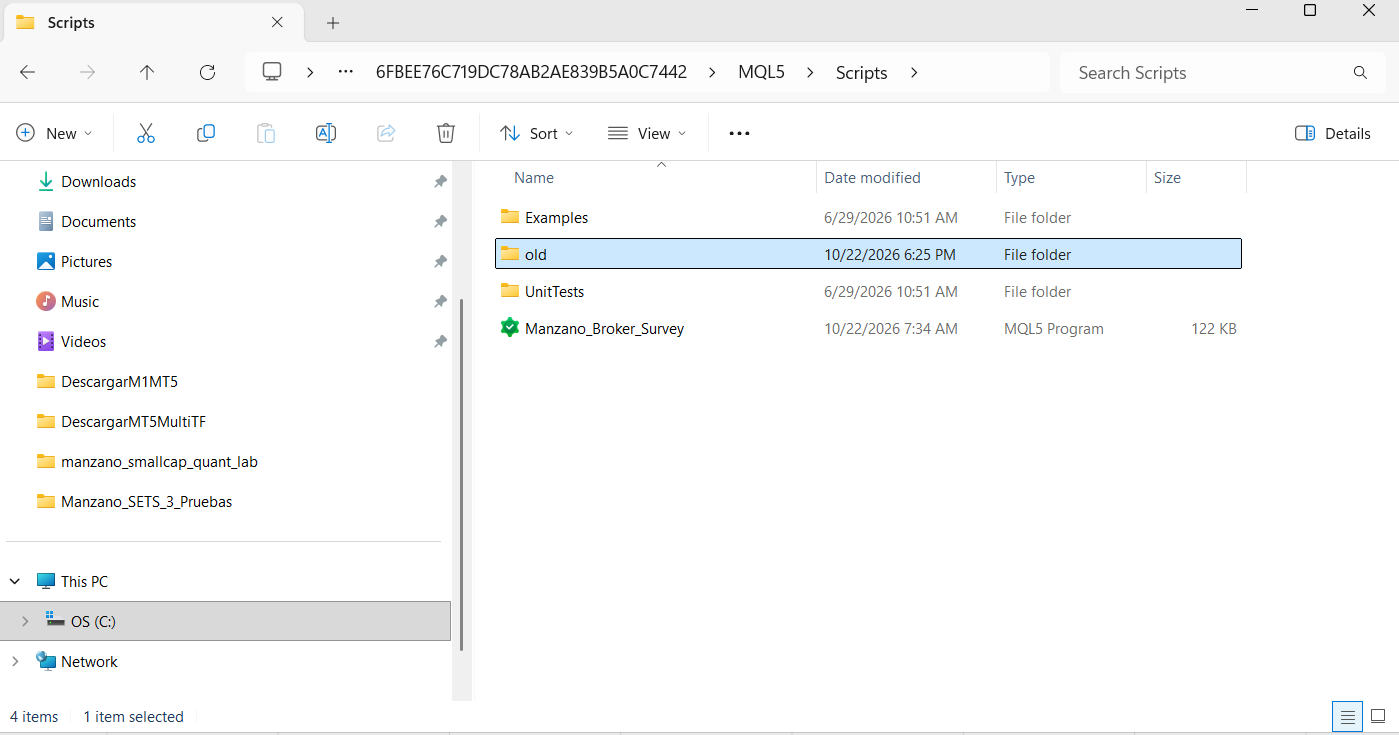
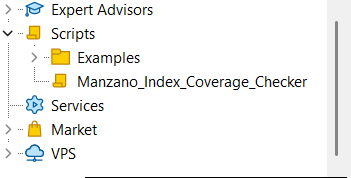
Figure 2. Locating Manzano Index Coverage Checker in the MetaTrader 5 Navigator panel.
The results are also printed in the MetaTrader 5 Experts log, where you can review the detected symbols, constituent counts, coverage and missing stocks.
3. Understanding the compatibility report
For each index, the checker displays the detected index CFD symbol, the number of constituent stocks found, the percentage of index weight covered, the main missing stocks and a compatibility verdict.
| Result | Condition | Meaning |
|---|---|---|
| COMPATIBLE | 85% or more | The index CFD is detected and constituent weight coverage meets the checker's threshold. |
| LIMITED | 60% to below 85% | An approximate reading may be possible, but missing stocks can materially affect the analysis. |
| NOT COMPATIBLE | Below 60%, or index CFD missing | The index does not meet the checker's requirements. |
Finding a large number of stocks is not enough. Missing a few heavily weighted constituents may matter more than missing many smaller ones. The checker therefore evaluates the percentage of constituent weight represented, not only the stock count.
4. Real-world comparison: FTMO Demo vs Darwinex Live
The following examples were captured with the checker on two different MetaTrader 5 broker accounts. They illustrate how the same indicator can have very different constituent coverage depending on the broker.
Example A — FTMO Demo
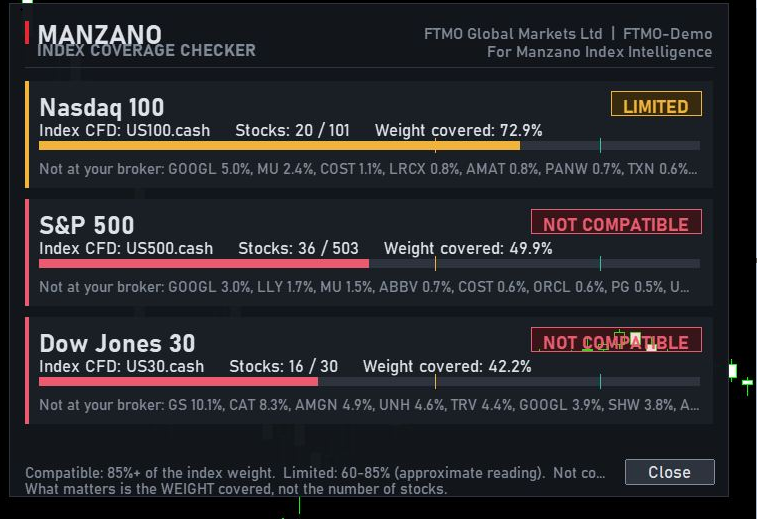
Figure 3. FTMO Demo — Limited Nasdaq 100 coverage (72.9%) and insufficient S&P 500 (49.9%) and Dow Jones 30 (42.2%) coverage.
| Index | Stocks | Weight | Result |
|---|---|---|---|
| Nasdaq 100 | 20 / 101 | 72.9% | LIMITED |
| S&P 500 | 36 / 503 | 49.9% | NOT COMPATIBLE |
| Dow Jones 30 | 16 / 30 | 42.2% | NOT COMPATIBLE |
Example B — Darwinex Live
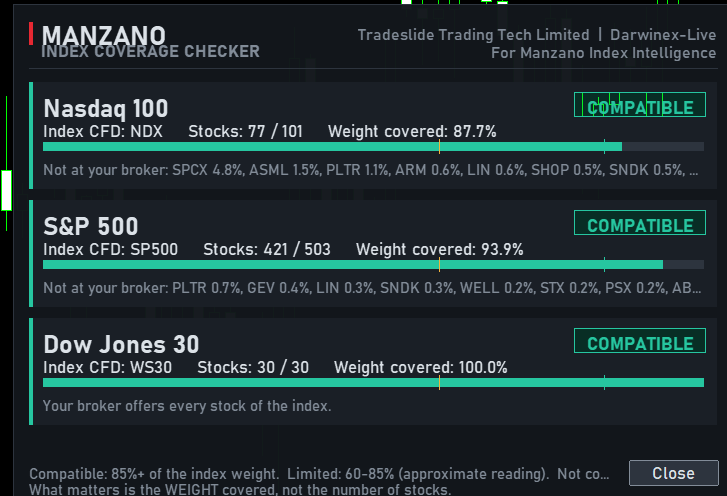
| Index | Stocks | Weight | Result |
|---|---|---|---|
| Nasdaq 100 | 77 / 101 | 87.7% | COMPATIBLE |
| S&P 500 | 421 / 503 | 93.9% | COMPATIBLE |
| Dow Jones 30 | 30 / 30 | 100.0% | COMPATIBLE |
These screenshots show the coverage detected on the tested accounts at the time of testing; they are not a permanent guarantee of any broker's offering. The checker assesses symbol and constituent-weight coverage, not the completeness, freshness or quality of historical market data. Results may vary by account type and broker configuration.
5. What comes next?
Once you have confirmed that your broker offers sufficient constituent coverage, continue with the following sections of this guide to learn how Manzano Index Intelligence presents index components, participation, contributions and its analysis panels.