Sandro Begashvili
Sandro Begashvili
5 (5)
  • Information
3 years
experience
8
products
37
demo versions
3
jobs
0
signals
0
subscribers
Sandro Begashvili - MQL5, MQL4, Python and Pine Script developer

I build trading software for MetaTrader 4 and MetaTrader 5: Expert Advisors, custom indicators and graphical trade panels.
MQL5 Channel: https://www.mql5.com/en/channels/rhinoquant

PRODUCTS

📥 Rhino Dashboard Trade Panel MT5: https://www.mql5.com/en/market/product/204925
📥 Rhino Dashboard Trade Panel MT4: https://www.mql5.com/en/market/product/206195

📥 Rhino Drawing Tools MT5: https://www.mql5.com/en/market/product/191269
📥 Rhino Drawing Tools MT4: https://www.mql5.com/en/market/product/197413

📥 Trading Simulator in Strategy Tester for MT5: https://www.mql5.com/en/market/product/107411
📥 Trading Simulator in Strategy Tester for MT4: https://www.mql5.com/en/market/product/132410

📥 Rhino PDF Trade Report MT5: https://www.mql5.com/en/market/product/189458
📥 Rhino PDF Trade Report MT4: https://www.mql5.com/en/market/product/189468

CONTACT

Telegram: https://t.me/MrMQL5Developer
Sandro Begashvili
Published article Creating a Cairo-Inspired Graphics Library for MetaTrader 5 (Part 3): Edges and the First Filled Shape
Creating a Cairo-Inspired Graphics Library for MetaTrader 5 (Part 3): Edges and the First Filled Shape

Part 3 implements a scanline rasterizer in pure MQL5. We convert path segments into top‑down edges, sweep each row, sort crossings, and apply the non‑zero winding rule to decide which pixels are inside. The result is a single Fill(path, color, buffer, w, h) routine that draws rectangles, stars, glyphs, or 2000‑edge shapes without per‑shape code, ready to integrate into your MQL5 projects.

Sandro Begashvili
Sandro Begashvili
.
🦏 Rhino Trade Manager v1.6: Free Demo (MT4 & MT5)

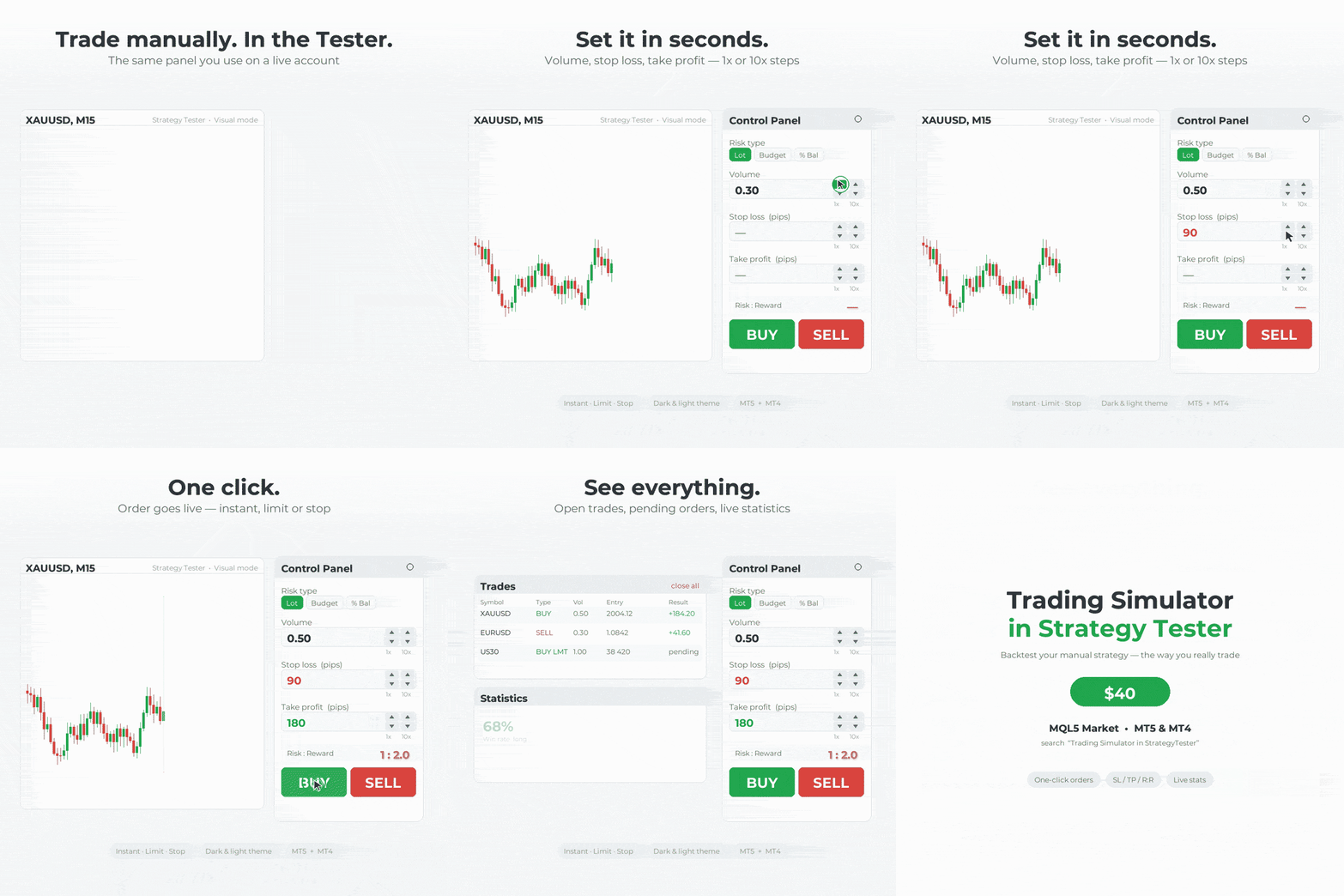
Practice trading on history just like on a live chart! Rhino Trade Manager turns the MetaTrader Strategy Tester into a real trading simulator.


⏳ This demo works until 2026.10.01.

✨ What you get:

✅ One-click Buy/Sell and pending orders in the Strategy Tester
✅ Risk-based lot size (fixed lot, money or % of balance)
✅ Drag Entry/SL/TP on the chart
✅ Edit Mode: change SL/TP of open trades and move pending orders
✅ Trade tables, statistics and a P/L calendar
✅ Daily / Weekly / Monthly / Lifetime P/L box
✅ Light and dark themes with 5 accent colours

🛠 How to install:

1️⃣ In MetaTrader: File → Open Data Folder
2️⃣ Copy the file into MQL5/Experts (MT5) or MQL4/Experts (MT4)
3️⃣ Restart MetaTrader or refresh the Navigator
4️⃣ Open the Strategy Tester, select the EA, enable Visual mode and start

⚠️ This demo has a limited number of trades per test and stops working after 2026.10.01.

@rhinoquant
Sandro Begashvili
Published article Building a PDF Creation Library in MQL5 (Part1): Writing a PDF by Hand
Building a PDF Creation Library in MQL5 (Part1): Writing a PDF by Hand

This article shows how a PDF works as plain text by hand‑written two files: a 592‑byte page and an 885‑byte trade ticket. It explains the file structure (header, body, xref, trailer), the required page objects and resources, and the operators that draw text, then provides an MQL5 script to generate them. First part of a pure‑MQL5 PDF library series.

Sandro Begashvili
Try Drawing Tools free on MetaTrader 4 and MetaTrader 5 Drawing Tools brings TradingView-style chart drawing to MetaTrader: trend lines, channels, Fibonacci levels, patterns, shapes, measuring tools and text - all drawn in time and price and rendered with a vector engine, so they stay sharp at an...
Sandro Begashvili Published product

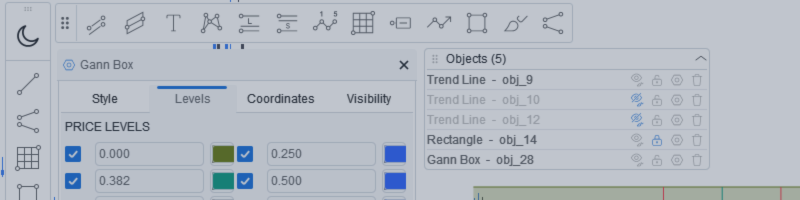
Rhino Chart Drawing Tools provides a TradingView-style drawing workflow for MetaTrader 4. It includes 54 drawing tools , a customizable toolbar, Favorites, quick styling, object settings, templates and an object manager. User manual: How to use the product Free demo version: Download the demo MetaTrader 5 version: Rhino Drawing Tools for MT5 Drawing Tools Group Object List Lines Trend line, ray, extended line, horizontal line, vertical line, horizontal ray, cross line, trend angle, arrow, path

Sandro Begashvili
RhinoDraw brings TradingView-style drawing tools to MetaTrader 5 and MetaTrader 4 . You get the toolbar, the magnet, the quick styling bar and the smooth, clean lines you are used to, inside your MetaTrader chart. This post explains the main features and how to use them...
Sandro Begashvili
Published article Creating a Cairo-Inspired Graphics Library for MetaTrader 5 (Part 2): Points, Contours and the Path
Creating a Cairo-Inspired Graphics Library for MetaTrader 5 (Part 2): Points, Contours and the Path

This second part adds the geometry layer to a Cairo‑inspired graphics library for MetaTrader 5. It defines a path of double‑precision points grouped into contours, records open/closed intent, and stores vertices in a flat array with start indices. We implement MoveTo, LineTo, Close, provide basic shape helpers, and include a demo that visualizes the built geometry for inspection and reuse.

Sandro Begashvili
Published article Creating a Cairo-Inspired Graphics Library for MetaTrader 5 (Part 1): Why the terminal needs its own 2D-renderer Contents
Creating a Cairo-Inspired Graphics Library for MetaTrader 5 (Part 1): Why the terminal needs its own 2D-renderer Contents

This article opens a step-by-step 2D graphics engine for MetaTrader. It standardizes ARGB colors and implements a reusable surface: a uint pixel buffer uploaded as a dynamic resource and shown via one OBJ_BITMAP_LABEL. You will draw rectangles and a vertical gradient, check real transparency, and learn an efficient update path with a single Flush call.

Sandro Begashvili
Published code Swing Detector by Pullback (Smart Money Concepts)
SMC Pullback marks swing highs and lows using the pullback definition instead of the usual 3-candle pattern. A high is confirmed only when price trades back through the low of the candle that made it — so every marked point is an actual rejection, and highs and lows always alternate. It evaluates closed bars only and never moves a marker once drawn, so it does not repaint. Two buffers expose the confirmed swing prices to an EA via iCustom.
· 2 4586 950
Sandro Begashvili Published product

Rhino Chart Drawing Tools for MetaTrader 5 Rhino Chart Drawing Tools provides a TradingView-style drawing workflow for MetaTrader 5. It includes 54 drawing tools, a customizable toolbar, favorites, quick styling, object settings, templates and an object manager. Drawing Tools Lines Trend line, ray, extended line, horizontal line, vertical line, horizontal ray, cross line, trend angle, arrow, path, polyline and info line. Channels Parallel channel, regression channel, flat channel, disjoint

Sandro Begashvili
Sandro Begashvili
One click turns your whole trading history into a clean, investor-ready PDF. 📄

Tired of screenshots and spreadsheets when someone asks for your track record? Rhino PDF Trade Report exports your full MetaTrader account history to a print-ready PDF — in one click.

✅ Performance overview: net result, win rate, profit factor, expectancy
✅ Equity curve + win/loss and buy/sell breakdown
✅ Results by weekday and by symbol — see what actually makes you money
✅ Full trade register: every closed trade, entry/exit, SL/TP, swap, commission, net profit
✅ True vector output — razor-sharp, selectable text, tiny file size

Filter by date range, number of trades, or a single symbol. Works on any broker, live or demo, hedging or netting. Perfect for investors, prop-firm applications, your accountant, or your own trading journal.

And it's completely FREE.

📥 MT5 version: https://www.mql5.com/en/market/product/189458
📥 MT4 version: https://www.mql5.com/en/market/product/189468

If it saves you time, a review helps more than you'd think. 🙏

#MetaTrader #MT4 #MT5 #Forex #TradingTools #AlgoTrading #TradingJournal #PropFirm
Sandro Begashvili
Rhino PDF Trade Report turns your MetaTrader account history into a clean, print-ready PDF report in one click. It is free , and it is available for both MetaTrader 4 and MetaTrader 5...
Sandro Begashvili Published product

Rhino PDF Trade Report — export your MT4 trading history to PDF Turn your MetaTrader 4 account history into a clean, print-ready PDF trading  report  in one click. Run the script, pick a date range or a number of trades, and get a document you can send to an investor, attach to a prop-firm application, file for your accountant, or keep as a trading journal. What you get Page 1 — performance overview Net result, number of trades, win rate , profit factor , expectancy and total volume

Sandro Begashvili Published product

Rhino PDF Trade Report — Export Your MT5 Trading History to PDF Turn your MetaTrader 5 trading history into a clean, print-ready PDF report. Select a date range, number of trades, or symbol, and generate a structured report for your trading journal, performance analysis, investor reporting, or record keeping. Performance Overview The first page provides a summary of your trading performance for the selected period: Performance metrics: Net result, number of trades, win rate, profit factor

Sandro Begashvili
Here is a Demo Version of Backtest Simulator in Strategy Tester MT5 , which allow you to test the Product. (I will update the demo version in small period of time) Step 1: Download the Demo Version Scroll to the bottom of this page...
Sandro Begashvili
Sandro Begashvili
Update Trading Simulators:

I added new features to Trade Manager (MT5 / MT4), which help you to handle your trading strategy better and better:


1) Add a new Advanced Risk Management Option. Using this feature, you can set Total SLs/TPs of Open Positions of Each Symbol with only one Click.

Let assume you have 4 open Position on EURUSD with different Entry Point and Volumes. Now you want set the Total SLs at level with Total Loss = $100, you can drag advanced tools and set it at $100 loss and Click OK. It automatically moves all the SLs to that level which cause $100 loss. Also same process for TPs.


Trading Simulator in StrategyTester MT5: https://www.mql5.com/en/market/product/107411
Trading Simulator in StrategyTester MT4: https://www.mql5.com/en/market/product/132410
2) Add an advanced Calendar which allow you to see at each day number of Trades and PNL with one click.

as you click on each day in Calendar you can see the Summary of Trades in that day.
Sandro Begashvili Published product

Rhino Backtest Manager - Trade Manager for Live Trading and the Strategy Tester Rhino Backtest Manager is a trade management panel that works both in live trading and in the MetaTrader 4 Strategy Tester. It allows you to place and manage orders manually inside the tester using the same interface as on a live account, so a strategy can be tested on historical data and then traded without changing tools. The panel calculates position volume from your risk settings, shows the money value of every

Sandro Begashvili
Sandro Begashvili
New Version of Backtest Simulator is Published


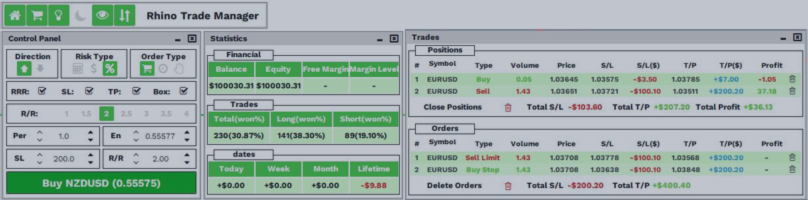
In this version I added many new features which allow you to do smooth trading in Live and Tester Mode. This Trade Manager works in Both Live and Tester mode. Simply you can run it in Tester mode and Test your Strategy manually.


MT5 available here: https://www.mql5.com/en/market/product/107411

MT4 available here: https://www.mql5.com/en/market/product/132410

What is New?!

✔️New User-Friendly Design
✔️Optimized for Live Trading (without Lag)
✔️Add more details to Trades Window
✔️Add Risk Reward Ratio Buttons
✔️Add Advanced Trade Box Manager
✔️Add Info to Orders and Positions
✔️Add Daily Profit/Loss Monitor
✔️Add Statistical report from trades
✔️Add Message Dialog Box
✔️Solve Bugs of previous Version
✔️Add Two Light and Dark Theme
✔️Create Sticky Label for Positions and Orders
✔️Add Watchlist to Live Trade
✔️Draggable TradeBox to set EntryPrice, Stoploss, Takeprofit In Live Mode
✔️Close/Open Windows


MT5 available here: https://www.mql5.com/en/market/product/107411
Sandro Begashvili
The Rhino Backtest Manager is a trade manager that works in both Live Mode and Strategy Tester Mode . Most trade managers run only on a live chart...
Sandro Begashvili
Left feedback to customer for job EA formula modification