CISD Indicator MT4

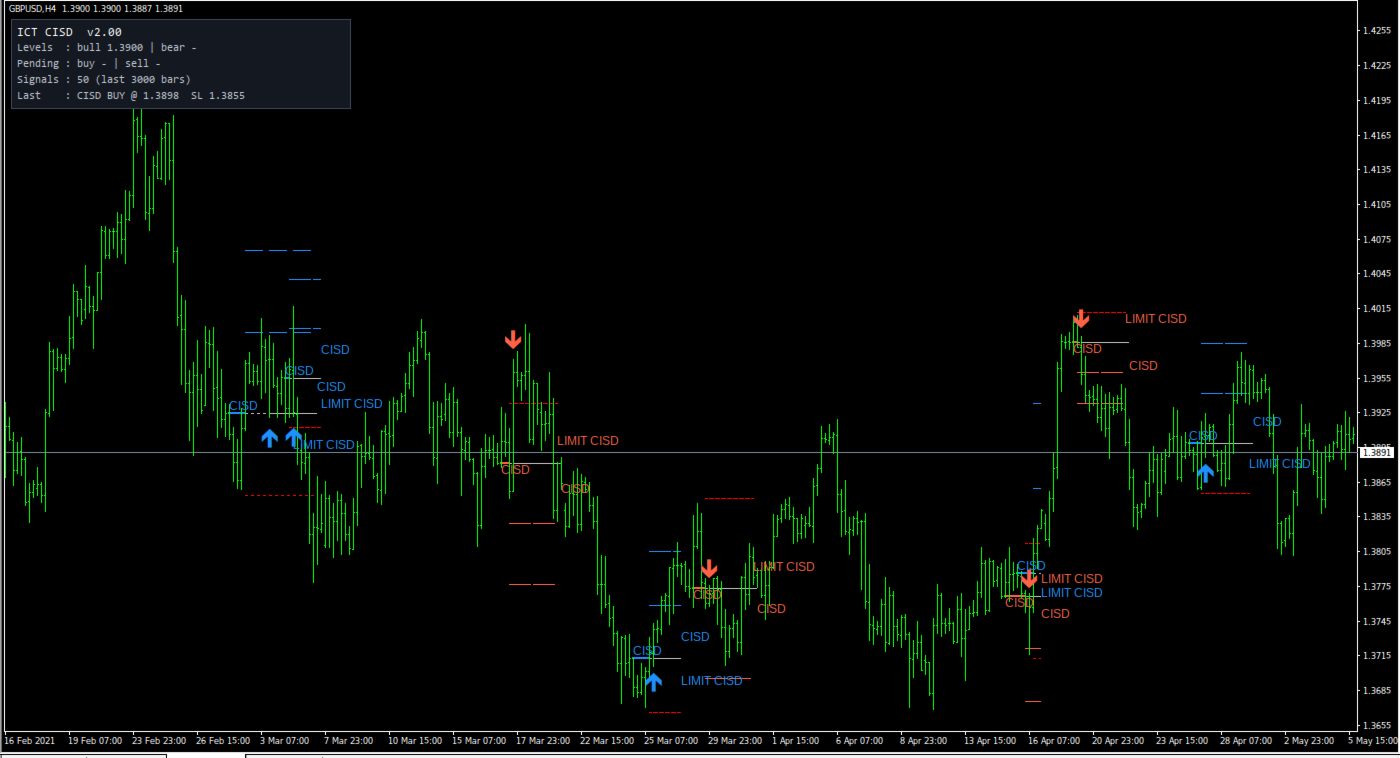
ICT CISD implements the Change in State of Delivery concept from the ICT methodology. The indicator tracks the current delivery series - an unbroken run of same-direction candle closes - and marks the moment price closes back through the OPEN of that series. That close-through is the CISD: the point where short-term delivery flips from sell-side to buy-side, or back. One CISD is marked per series, and a candle body must close through the level (wicks do not count). Everything is drawn directly on the chart: the CISD level line, the signal arrow, and a full simulated trade projection - entry, stop and two targets - so every signal can be read at a glance. The indicator does not place, modify or manage any orders; entries, stops and targets are chart drawings only. Key features: - Bullish and bearish CISD signals with arrows, level lines and labels. - Two drawn entry models: simulated limit entry at the CISD level (retest, default) or entry at the signal-candle close. - Drawn risk framework for each signal: stop beyond the delivery-leg extreme plus an ATR buffer, and two targets at configurable R multiples. - Live info panel: active bull/bear levels, pending drawn setups, signal count over the scanned history, and the last signal with its entry and stop. - Optional context filters, each a rule condition you can switch on or off: confirmed swing liquidity sweep, minimum displacement body (ATR multiple), fair value gap requirement, London / New York killzones, and a higher-timeframe EMA bias. - Alerts when a signal confirms and when a retest setup is drawn: popup, push notification, e-mail and sound. - Signal data exposed through indicator buffers for Expert Advisor integration. - Configurable history depth, line length, colors, panel position and label font size. - Identical feature set on MetaTrader 4 and MetaTrader 5. Ways to use it in trading: 1. Retest model (default). After a CISD, the indicator draws a simulated limit-entry setup at the CISD level, with the stop and both targets. The drawn setup stays on the chart for up to N bars; it is removed earlier if the leg extreme breaks. The panel shows whether a buy or sell setup is currently pending. 2. Signal-close model. Switch the entry model to "Market at the CISD candle close" to have the projection measured from the signal candle's close instead of the CISD level. The stop stays beyond the leg extreme, so the drawn risk distance is wider in this model. 3. Session filtering. Enable the killzone filter so only CISD signals that close inside the London (02:00-05:00 New York time) or New York (07:00-11:00 New York time) windows are marked. Use it to restrict signals to the sessions you trade. 4. Higher-timeframe bias. Set the HTF EMA filter to a higher timeframe (for example H4 or D1): bullish signals are then only marked above that timeframe's EMA and bearish signals only below it. 5. Combined conditions. Enable the sweep, displacement and FVG filters together so a signal is only marked when every selected condition is met. Each filter removes the signals that fail its rule; the panel counter shows how many passed. Input parameters (35 functional inputs; the 5 "====" entries in the dialog are group separators, not settings). The code applies no min/max clamping except where noted - there is no explicit range validation, so use valid practical values; invalid values may cause unexpected behavior. CISD definition - InpMinSeries - Minimum candles in the delivery series (int, default 1, unclamped): how many consecutive same-direction closes a series must contain before its open becomes a valid CISD level. Higher values require longer delivery legs, so fewer levels qualify. - InpMaxSeriesAge - CISD must happen within N bars of the series end (int, default 20, unclamped): a close-through arriving more than N bars after the series ended is ignored. Context filters - InpRequireSweep - Leg must run a confirmed swing high/low first (bool, default true): when on, a series only qualifies if its leg first took out a confirmed swing point. - InpSwingStrength - Swing pivot strength, bars each side (int, default 3, unclamped): bars required on each side to confirm a swing pivot; used by the sweep filter. - InpMinBodyATR - Displacement: min CISD body, x ATR14 (double, default 0.0 = off, unclamped): minimum body size of the CISD candle as a multiple of the 14-period ATR. 0 disables the condition. - InpRequireFVG - Displacement: CISD move must leave an FVG (bool, default false): when on, only CISD moves that leave a fair value gap qualify. - InpUseKillzones - CISD must close inside a killzone (bool, default false): enables the session time condition. - InpKZLondon - London killzone 02:00-05:00 NY (bool, default true): counts the London window when the killzone filter is on. - InpKZNewYork - New York killzone 07:00-11:00 NY (bool, default true): counts the New York window when the killzone filter is on. - InpTZMode - Broker server time zone (enum, default ICT_TZ_AUTO): how killzone times are mapped to server time. Values: ICT_TZ_AUTO (auto detect; NY+7 in the strategy tester), ICT_TZ_NY7 (server = New York + 7h, GMT+2/+3 with US DST), ICT_TZ_FIXED (fixed GMT offset, no DST), ICT_TZ_EUDST (GMT offset + European DST). - InpServerGMT - Server GMT offset (int, hours, default 2, unclamped): used with the ICT_TZ_FIXED and ICT_TZ_EUDST modes. - InpBiasTF - HTF EMA bias filter (ENUM_TIMEFRAMES, default PERIOD_CURRENT = off): pick a higher timeframe to activate the bias condition. - InpBiasPeriod - HTF EMA period (int, default 50, unclamped): period of the higher-timeframe EMA. Entry and risk - InpEntryMode - Entry model (enum, default CISD_ENTRY_RETEST): CISD_ENTRY_RETEST = simulated limit entry drawn at the CISD level; CISD_ENTRY_CLOSE = entry drawn at the signal-candle close. - InpRetestBars - Retest limit expires after N bars (int, default 10, unclamped): how many bars the drawn retest setup stays active. - InpSLBufferATR - Stop buffer, x ATR14 (double, default 0.10, unclamped): distance added beyond the leg extreme when drawing the stop. - InpTP1R - TP1, R multiple (double, default 1.0, unclamped): first target as a multiple of the entry-to-stop distance. - InpTP2R - TP2, R multiple (double, default 2.0, unclamped): second target as a multiple of the entry-to-stop distance. Display - InpHistoryBars - Bars to scan on load (int, default 3000, unclamped): history depth scanned for signals and shown in the panel counter. - InpShowPanel - Show info panel (bool, default true). - InpShowLevels - Draw the CISD level line (bool, default true). - InpDrawLevels - Draw entry / SL / TP lines (bool, default true). - InpLineBars - Length of level lines, bars (int, default 12; effective minimum 2 bars applied internally): horizontal length of the drawn level and projection lines. - InpBullColor - Bullish colour (color, default DodgerBlue). - InpBearColor - Bearish colour (color, default Tomato). - InpPanelBg - Panel background (color, default C'20,24,32'). - InpPanelX - Panel X (int, pixels, default 12, unclamped): panel distance from the chart's left edge. - InpPanelY - Panel Y (int, pixels, default 24, unclamped): panel distance from the chart's top edge. - InpLabelFont - Signal label font size (int, points, default 9, unclamped). Alerts - InpAlertPopup - Popup alert (bool, default true). - InpAlertPush - Push notification (bool, default false; requires MetaQuotes ID configured in the terminal). - InpAlertEmail - E-mail (bool, default false; requires e-mail configured in the terminal). - InpAlertSound - Sound (bool, default false). - InpSoundFile - Sound file (string, default "alert.wav"): terminal sound file played when sound alerts are on. - InpAlertArmed - Also alert when a retest limit is armed (bool, default true): when on, an alert also fires at the moment a retest setup is drawn, not only when a CISD confirms. Notes: the indicator draws levels and projections and sends alerts; it does not place trades and no outcome is guaranteed. Test it on a demo account before any live use.
More from author
No Chase Entry Filter
Mohamed Amr Mohamed Osama Abdelwahab
No Chase Entry Filter - Entries That Are Not Late Many losing trades are not wrong about direction. They are late. The idea was sound, the entry came after the move had already happened, and the stop was hit on an ordinary pullback that a better price would have survived. No Chase Entry Filter marks buy and sell entries from market structure, and refuses the ones taken at a bad price. A green dot means buy from here. A red dot means sell from here. A coloured level marks where the trade is cl
Perfect VWAP MT4
Mohamed Amr Mohamed Osama Abdelwahab
**Perfect VWAP** is a highly professional technical analysis tool designed for MetaTrader 5 that brings a modern twist to traditional Volume Weighted Average Price trading. Unlike standard VWAP indicators that reset at the beginning of each day, session, or week, this indicator utilizes a **Rolling Window approach**. It calculates VWAP dynamically over a user-defined moving period, rendering a smooth, uninterrupted curve perfectly suited for both intraday scalping and long-term swing trading.
FREE
Elliott Wave Principle MT4
Mohamed Amr Mohamed Osama Abdelwahab
**Trade the waves the way the book teaches — not by guesswork.** Meta Trader 5 version can be found at:  https://www.mql5.com/en/market/product/184530?source=Site +Market+My+Products+Page This indicator reads price structure and labels Elliott Wave impulses (1-2-3-4-5) and corrections (A-B-C) automatically, then shows you exactly where the next wave is likely to go and where the book says the trade is. It is built directly on *Elliott Wave Principle — Key to Market Behavior*   by A.J. Frost &
Elliott Wave Principle
Mohamed Amr Mohamed Osama Abdelwahab
**Trade the waves the way the book teaches — not by guesswork.** This indicator reads price structure and labels Elliott Wave impulses (1-2-3-4-5) and corrections (A-B-C) automatically, then shows you exactly where the next wave is likely to go and where the book says the trade is. It is built directly on *Elliott Wave Principle — Key to Market Behavior* by A.J. Frost & Robert Prechter, and it is faithful to the source: the four inviolable wave rules are enforced at 100%, so a count that isn't
Market Regime Detector
Mohamed Amr Mohamed Osama Abdelwahab
MORE TOOLS All my indicators, Expert Advisors and utilities are listed here: https://www.mql5.com/en/users/amrosama77/seller Market Regime Detector - Know Which Kind Of Market You Are In A breakout method loses money in a range. A mean reversion method loses money in a trend. Neither method is broken; they are simply being used in the wrong conditions. Market Regime Detector names the current conditions so you can decide whether your approach fits them. Three independent measurements are co
FREE
Perfect VWAP
Mohamed Amr Mohamed Osama Abdelwahab
MT4 version:  https://www.mql5.com/en/market/product/186266 **Perfect VWAP** is a highly professional technical analysis tool designed for MetaTrader 5 that brings a modern twist to traditional Volume Weighted Average Price trading. Unlike standard VWAP indicators that reset at the beginning of each day, session, or week, this indicator utilizes a **Rolling Window approach**. It calculates VWAP dynamically over a user-defined moving period, rendering a smooth, uninterrupted curve perfectly suit
FREE
No Chase Entry Filter MT4
Mohamed Amr Mohamed Osama Abdelwahab
5 (1)
No Chase Entry Filter - Entries That Are Not Late Many losing trades are not wrong about direction. They are late. The idea was sound, the entry came after the move had already happened, and the stop was hit on an ordinary pullback that a better price would have survived. No Chase Entry Filter marks buy and sell entries from market structure, and refuses the ones taken at a bad price. A green dot means buy from here. A red dot means sell from here. A coloured level marks where the trade is cl
Dual Scale Candles MT4
Mohamed Amr Mohamed Osama Abdelwahab
Dual Scale Candles MT4 draws a second symbol's candles over your chart, with the second symbol's own prices on a separate left scale. Compare two instruments on one chart. The overlay uses a linear price mapping to fit the second symbol to the chart. Choose alignment at the first available bar of the current day or week, at the oldest drawn bar, or choose Range Fit. Day and week modes show a vertical anchor line. If the beginning of the period is not loaded, the label identifies the partial peri
FREE
Dual Scale Candles
Mohamed Amr Mohamed Osama Abdelwahab
Dual Scale Candles overlays the real candles of a second symbol directly on your chart, with its own independent price scale on the left axis. Compare gold vs. a currency, oil vs. an index, or any two instruments on one chart - each keeps its true prices. The two series are aligned at a point you choose: the first bar of the current day shown on your chart, the first bar of the current week, or the oldest drawn bar - at the anchor bar, both series cross at the same level, marked by a vertical d
FREE
Kaufman Pairs Spread MT4
Mohamed Amr Mohamed Osama Abdelwahab
Professional Expert Advisor for MetaTrader, implementing proven trading methods Market-neutral spread trading: when the z-score of the ratio between two correlated symbols stretches, it shorts the rich leg and buys the cheap one, exiting near the mean. Inputs: - InpSymbolA — first leg symbol - InpSymbolB — second leg symbol - InpLookback — z-score lookback in bars - InpEntryZ — entry z-score threshold - InpExitZ — exit z-score threshold - InpLotsA — lot size for each leg - InpMagic — magic nu
Perfect VWAP Pro M4
Mohamed Amr Mohamed Osama Abdelwahab
Perfect VWAP Pro - Anchored VWAP, Session Anchoring and Band Squeeze Detection Most VWAP indicators calculate one thing: a rolling average over the last N bars. Perfect VWAP Pro adds the two calculations that professional traders actually ask for, a true anchored VWAP and a session anchored VWAP, and then measures what the deviation bands are doing rather than only drawing them. THREE CALCULATION MODES Anchored. Choose any date and the average accumulates forward from that point and never re
Chart Patterns full
Mohamed Amr Mohamed Osama Abdelwahab
Chart Patterns in Depth — Professional Pattern Detector Chart Patterns in Depth automatically detects, draws and manages the 16 classic chart pattern variants used by professional price-action traders: Symmetrical, Ascending and Descending Triangles, Head & Shoulders and its Inverse, Cup & Handle and its Inverse, Falling and Rising Wedges, Bullish and Bearish Rectangles, Flags, Pennants, Double Tops/Bottoms and Triple Tops/Bottoms. Unlike simple pattern scanners, this indicator implements a c
Market Regime Detector MT4
Mohamed Amr Mohamed Osama Abdelwahab
MORE TOOLS All my indicators, Expert Advisors and utilities are listed here: https://www.mql5.com/en/users/amrosama77/seller Market Regime Detector - Know Which Kind Of Market You Are In A breakout method loses money in a range. A mean reversion method loses money in a trend. Neither method is broken; they are simply being used in the wrong conditions. Market Regime Detector names the current conditions so you can decide whether your approach fits them. Three independent measurements are co
FREE
Cycle Channel Index
Mohamed Amr Mohamed Osama Abdelwahab
Cycle Channel Index shows where the current close sits inside the highest-high / lowest-low channel of the last N bars, on a normalized 0-100 scale, with a smoothed signal line. Reading the indicator: - Above 80: price is pressing the top of its recent range. - Below 20: price is pressing the bottom. - Signal line crossovers mark short-term shifts in momentum. - In ranging conditions, one way to use it is to watch the 20/80 zones for turns back inside; in trends, sustained readings above 50 can
MO Exit Manager
Mohamed Amr Mohamed Osama Abdelwahab
**Exit Manager — trail and close your trades by rule** Exit Manager takes over the exits on trades you already have open. You open positions however you like — by hand, from a signal, or from another EA — and this one manages them out with three rules you can mix: a peak-based Trailing Take-Profit, a Time-in-Trade close, and an ATR-trailing stop. It never opens a position. It only trails and closes the ones on the current symbol (all of them, or just one magic number), so it slots cleanly on
FREE
Performance Lens MT4
Mohamed Amr Mohamed Osama Abdelwahab
**Measure Utility (R-Meter) — MFE/MAE Trade Journal & Performance Dashboard** Stop chasing the "perfect" indicator. Your real edge is data — and this tool measures it for you. Measure Utility is a lightweight, measurement-only indicator that automatically tracks every trade you take and shows your true performance live on the chart. It never sends, modifies, or closes orders — it simply observes and reports, so it is completely safe to run alongside any strategy or EA. **What it tracks for e
FREE
MO Exit Manager MT4
Mohamed Amr Mohamed Osama Abdelwahab
**Exit Manager — trail and close your trades by rule** Exit Manager takes over the exits on trades you already have open. You open positions however you like — by hand, from a signal, or from another EA — and this one manages them out with three rules you can mix: a peak-based Trailing Take-Profit, a Time-in-Trade close, and an ATR-trailing stop. It never opens a position. It only trails and closes the ones on the current symbol (all of them, or just one magic number), so it slots cleanly on
FREE
Performance Lens
Mohamed Amr Mohamed Osama Abdelwahab
**Measure Utility (R-Meter) — MFE/MAE Trade Journal & Performance Dashboard** Stop chasing the "perfect" indicator. Your real edge is data — and this tool measures it for you. Measure Utility is a lightweight, measurement-only indicator that automatically tracks every trade you take and shows your true performance live on the chart. It never sends, modifies, or closes orders — it simply observes and reports, so it is completely safe to run alongside any strategy or EA. **What it tracks for e
FREE
MO Spread Monitor MT4
Mohamed Amr Mohamed Osama Abdelwahab
MO Spread Monitor — know your spread before it costs you Spread Monitor shows the live spread in points against a limit you set, with a clear OK / BLOCKED state and an alert whenever the spread blows past the limit. It also tracks the session maximum, the running average, and how many times the limit was exceeded. Widening spread quietly eats entries and stops. This tiny utility makes it visible, so you can avoid trading through news spikes and illiquid hours. Inputs: • InpMaxSpreadPoints —
FREE
MO Spread Monitor
Mohamed Amr Mohamed Osama Abdelwahab
MO Spread Monitor — know your spread before it costs you Spread Monitor shows the live spread in points against a limit you set, with a clear OK / BLOCKED state and an alert whenever the spread blows past the limit. It also tracks the session maximum, the running average, and how many times the limit was exceeded. Widening spread quietly eats entries and stops. This tiny utility makes it visible, so you can avoid trading through news spikes and illiquid hours. Inputs: • InpMaxSpreadPoints —
FREE
Big Candle Scanner Dashboard MT 4
Mohamed Amr Mohamed Osama Abdelwahab
What's new in version 2: - On-chart control panel: every feature is now one click away, draggable anywhere on the chart, position is saved - Candle count per period: show 1..N candles (1 = current, 2 = current + last, ...) for Daily, Weekly, Monthly and Yearly independently - New color scheme: ONE color per period — bullish candles use the light shade, bearish the dark shade of the same color - On-chart color palette: change any period's color with one click, no settings dialog needed - FILL but
Gann S9 Pro Signals and Star MT4
Mohamed Amr Mohamed Osama Abdelwahab
5 (1)
**Gann Square of Nine 2 — Advanced Price & Time Forecaster** MT5 version: https://www.mql5.com/en/market/product/183730?source=Site +Market+My+Products+Page The Square of Nine is one of W.D. Gann's most powerful forecasting tools. This indicator is a complete second-generation implementation for MetaTrader 5, built directly on Patrick Mikula's "The Definitive Guide to Forecasting Using W.D. Gann's Square of Nine." It adds a full interactive toolbar, a trading signals panel, a Gann Star diagram,
Price Power MT4
Mohamed Amr Mohamed Osama Abdelwahab
**Price Power — Buy vs Sell Power from Price Position** Price Power measures, at a glance, how much room price has above and below the current level. It counts how many of the last candles sit above the current price (buy power) and how many sit below it (sell power), and shows both as numbers and as lines on your chart. When far more candles are above price than below, there is more room and pressure to the downside; when far more are below, the bias is to the upside. The panel gives you the
Resistances and Support MT4
Mohamed Amr Mohamed Osama Abdelwahab
**Resistances and Support — Strength-Rated Zones with Alerts** Resistance and support are among the most important factors when you enter the market. This indicator automatically finds them for you and shows how strong each one is. Instead of plain lines, it draws support and resistance as ZONES, because price reacts to areas, not exact prices. Each zone is rated by how many times price has respected it — the stronger the zone, the bolder it is drawn. You instantly see which levels matter mos
Chart Patterns full MT4
Mohamed Amr Mohamed Osama Abdelwahab
Chart Patterns in Depth — Professional Pattern Detector Chart Patterns in Depth automatically detects, draws and manages the 16 classic chart pattern variants used by professional price-action traders: Symmetrical, Ascending and Descending Triangles, Head & Shoulders and its Inverse, Cup & Handle and its Inverse, Falling and Rising Wedges, Bullish and Bearish Rectangles, Flags, Pennants, Double Tops/Bottoms and Triple Tops/Bottoms. Unlike simple pattern scanners, this indicator implements a c
Harmonic Strategy Suite Pro MT4
Mohamed Amr Mohamed Osama Abdelwahab
HARMONIC STRATEGY SUITE PRO MT5 Harmonic Strategy Suite Pro   is a technical indicator and strategy-evaluation dashboard designed for MT5. Unlike basic pattern finders that only plot lines, this indicator features a built-in on-chart backtester that simulates professional trade execution, calculates precise target probability metrics, and dynamically adapts its layout for maximum readability.  KEY FEATURES Interactive Draggable Dashboard:   Tracks real-time statistical metrics (Passed Entries, T
Discipline Coach MT4
Mohamed Amr Mohamed Osama Abdelwahab
Discipline Coach is a trading-psychology mentor that operates directly on your MetaTrader 5 charts. *Please contact me after purchase for your gift    - Coach Only: It does not place, modify, or close trades. It acts purely as an     observer, evaluator, and guide.   - Core Principle: It shifts your focus from financial outcomes (profit/loss)     to execution quality. It evaluates how strictly you adhere to your own     declared rules. Core Features 1.  Plan Gate (Onboarding): A setup wizard
Analog Market Clock MT4
Mohamed Amr Mohamed Osama Abdelwahab
24-Hour Market Clock | Draggable & Customizable Track global market sessions at a glance with our professional 24-Hour Market Clock. Designed for traders who need precise timing, this indicator displays the Sydney, Tokyo, London, and New York sessions in a beautiful, easy-to-read circular interface. Key Features: •   Fully Draggable:   Click and drag the clock anywhere on your chart. •   Z-Order Control:   Choose to display the clock above or behind the candlesticks. •   Transparent/Custo
Adaptive Intraday Breakout MT4
Mohamed Amr Mohamed Osama Abdelwahab
Professional Expert Advisor for MetaTrader, implementing proven trading methods An intraday breakout around the daily open with a self-adjusting band: tight in trending conditions, wide in noise. All positions are closed at end of day - no overnight risk. Inputs: - InpERPeriod — Efficiency Ratio period - InpATRPeriod — ATR period - InpBandMin — band ATR multiple in trending markets (ER = 1) - InpBandMax — band ATR multiple in noisy markets (ER = 0) - InpLots — fixed lot size - InpSLMult — sto
Cycle Channel Index MT4
Mohamed Amr Mohamed Osama Abdelwahab
Cycle Channel Index shows where the current close sits inside the highest-high / lowest-low channel of the last N bars, on a normalized 0-100 scale, with a smoothed signal line. Reading the indicator: - Above 80: price is pressing the top of its recent range. - Below 20: price is pressing the bottom. - Signal line crossovers mark short-term shifts in momentum. - In ranging conditions, one way to use it is to watch the 20/80 zones for turns back inside; in trends, sustained readings above 50 can
Filter:
No reviews
Reply to review