EVA Gold Trade Manager MT5
- Utilities
-
Martin Alejandro Bamonte
 With 24 years of trading experience and 14 years in programming, my journey has been one of constant learning. From an early age, I was fascinated by the challenge of understanding the markets, that unpredictable universe... It was then that I discovered how technology could translate complexity
 - Version: 1.0
- Activations: 10
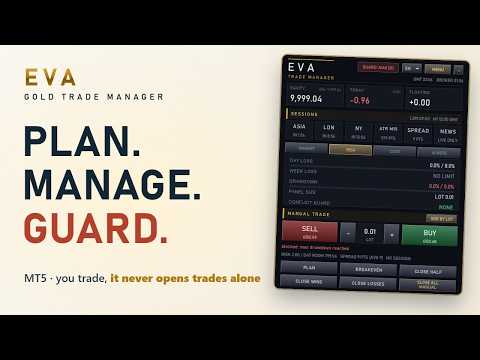
EVA Gold Trade Manager is a one-click trade panel, position size calculator and account guard for MetaTrader 5, designed around XAUUSD and available in 11 languages. Drag the entry, stop and target lines on the chart and you see the lot, the money at risk and the reward before you click. Breakeven, close half and trailing manage your trades, including the ones you open from your phone. When a daily, weekly or drawdown limit is reached, the guard locks the panel, closes the trades it manages and tells you why.
It never opens a trade by itself. You open every trade, and every automatic action follows a rule you set.
The panel answers three questions you ask every trading day:
- "How much is my broker really charging me?"
- "Will this trade break my daily limit or my challenge?"
- "Why can't I trade right now?"
Size by risk, trade in one click
- Size by a percentage of the balance or by a fixed lot. If the broker's minimum lot risks more than the percentage you chose, the panel tells you in red, with the real percentage.
- BUY and SELL in one click, with the stop in points or as a multiple of ATR (M15) and the target at the reward-to-risk ratio you choose.
- Trade planner: three lines for entry, stop and target. The panel picks a market, limit or stop order from where you put the entry, writes the money at risk and the reward next to the lines, and sends the order with one click.
- Before you click, one line on the panel shows the money at risk, the room left before your daily limit and the spread against your average for the month. Data, never a verdict.
Manage the trade
BREAKEVEN moves the stop to the entry plus your offset, and tells you when the price has not moved far enough yet. CLOSE HALF, CLOSE WINS and CLOSE LOSSES take one click each, and CLOSE ALL asks for a second click, so a stray click does nothing. Automatic breakeven after a set number of R and a trailing stop in points or ATR are there when you want them.
By default the panel manages its own trades and the ones you open by hand on the same symbol, from MetaTrader's one-click trading, your phone or the web terminal. Trades from other experts are left alone unless you set the scope to every trade on the symbol, so it runs next to the EAs you already use.
An account guard that locks the panel
Set a daily loss limit, a weekly loss limit and a maximum drawdown. A warning comes first, at 80% of a loss limit by default. When the limit is reached, the guard locks the panel and closes the trades it manages. While the lock lasts, a trade in scope opened by hand, from your phone for example, is closed as well, so the limit holds away from the desk too. The panel always says which limit stopped it and why.
A daily profit cap locks the panel without closing anything, and LOCK PANEL locks it by hand whenever you want a break. The "Account guard" option, off by default, extends the close to every trade on the account.
Prop challenge mode
Prop mode tracks the profit target, the daily loss, the maximum drawdown, the trading days and a consistency rule that stops your day at a set share of the target. Reaching the profit target locks the panel as well. The PROP CHALLENGE profile in Quick Start loads starting values that you adjust to your firm's rules.
What your broker really costs you
The COST tab adds up the spread you paid, the slippage against the price you asked for, the commission and the swap, in account money, with the average per trade and the total for the month. Compare brokers with your own numbers.
Sessions and news on the panel
The SESSIONS block shows Asia, London and New York, open or counting down to the open, with daylight saving time handled for London and New York, plus the ATR (M15), the spread and the next strong news. The news shield reads the MetaTrader economic calendar for NFP, CPI and FOMC and, if you want, locks the trade buttons during each window.
Ask EVA, an AI assistant that explains and proposes
Ask on the chart or from Telegram, for example "How much did I pay in commissions this month?" or "Lower my daily loss limit to 3%". EVA reads your live account and answers in your language. When you ask for a change, EVA shows the value now and the new one, and nothing changes until you press CONFIRM. A riskier change asks twice, and UNDO puts it back.
It runs on your own API key: Google Gemini and Groq have free tiers, and OpenRouter, Ollama, OpenAI, Anthropic, DeepSeek, Mistral and xAI work too. A backup provider can take over when the main one is busy. EVA also writes a short note on each trade and, once a day, a briefing on the sessions, volatility, spread, news and your limits. The AI never opens, closes or changes a trade, and never tells you which way to trade.
EVA on your phone
Connect your own Telegram bot: paste the token, press CONNECT and press Start in your bot, with no chat ID to look up. You get trade alerts, guard alerts, the AI notes and a daily summary, plus the commands /status, /positions, /today, /pause, /resume, /confirm and /undo. Any other message you send goes to Ask EVA. /pause locks the panel from your phone, a discipline brake when you need one.
One panel, in your language
The panel, the screens, Telegram and the AI speak English, Spanish, Portuguese, French, Italian, German, Russian, Turkish, Chinese, Japanese and Korean. Quick Start has three profiles, PERSONAL, PROP CHALLENGE and STRICT, and every value stays editable. The Journal lists your closed trades by origin (panel, by hand, other experts), the Risk Center shows every limit, and SAVE, LOAD and AUTOSAVE keep your settings per account and symbol.
Try it in the Strategy Tester
Download the demo, open the Strategy Tester on XAUUSD M5 and tick Visual mode. The demo is interactive: BUY and SELL, PLAN, BREAKEVEN, the CLOSE buttons, MENU and the screens respond while the test runs. To see the guard at work, size by risk at 1% per trade and set the daily loss limit to 1.5% in the inputs: when the day's losses reach 1.5%, the guard closes what is open, locks the panel and says why. Dragging the planner lines works on a live chart; in the tester, the buttons do the work.
Rent it for one month
Ask EVA, the AI notes, Telegram and the news calendar need a live chart, so the tester cannot show them, and the COST tab means the most with your own broker. Renting it for one month, at 30 USD, is the way to try all of it on your own account.
Launch price
59 USD for the first 10 copies. Every 10 copies sold, the price goes up by 10 USD, until it reaches 99 USD. Next price: 69 USD.
Start in three steps
- Attach it to an XAUUSD chart and turn on Algo Trading, so the panel can send your orders.
- Open MENU > Quick Start, pick a profile and press APPLY.
- Press SAVE. Optional: add your AI key and connect your Telegram bot. Their screens show the address to add in Tools > Options > Expert Advisors > Allow WebRequest.
Support and updates
Ask in the comments of this product or by private message here on MQL5. Updates are included.