
You are missing trading opportunities:
- Free trading apps
- Over 8,000 signals for copying
- Economic news for exploring financial markets
Registration
Log in
You agree to website policy and terms of use
If you do not have an account, please register
Hi
I am wanting to run multiple accounts on my VPS. Each account with it's own EA running. When I switch accounts, my EA opens on the account i login to. I need it to continue running on the original account. How do I stop this from happening.
Thanking you in advance
Aldo
A MetaQuotes virtual host can only host one trade account at a time, so you will need multiple virtual hosts ...
If using 3rd party VPS, then a single MetaTrader desktop terminal can only run one trade account at a time. So you will need to run multiple terminals (maximum of 32).
Hello everyone.
I started to study MQL4 last week with the intention of making something similar to the Magic Keys device.
Reading the MQL4 manual raised some questions and I was wondering if someone could help me to solve them.
I wonder if it would be possible to create a macro so I can select the rectangle tool and draw in the chart.I would like to
be able to activate/select some of the tools that have no shortcut in the mt4 plataform from a macro pad.
Is that possible? If so, could you tell me what do I need to learn or focuss my attention on?
Thank you.
SaltedPN
Good day everyone,
I am experiencing some problem which I find difficult to explain and hence difficult to find a working solution from the Codebase and forums. I have an indicator which runs well when back testing but when I place it on a live chart, it shows/draws bogus arrows. If I recompile the code while the indicator is placed on a live chart, the bogus arrows become even more. I am thinking that somewhere in the code I have to delete old data from buffers/arrays or set them to empty values, but I don't know how to do that because I don't understand what is causing the bogus arrows.
Please see image below: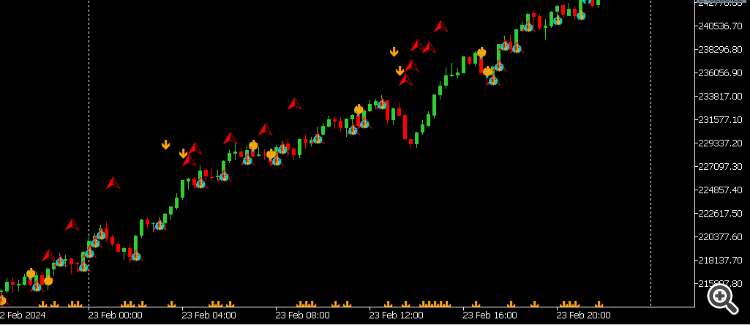
The code is below, I have excluded the unnecessary if conditions which in the end only set bool variables to either true or false.
Your assistance in explaining why the bogus arrows appear and showing me how to get rid of them is much appreciated.
Good day everyone,
I am experiencing some problem which I find difficult to explain and hence difficult to find a working solution from the Codebase and forums. I have an indicator which runs well when back testing but when I place it on a live chart, it shows/draws bogus arrows. If I recompile the code while the indicator is placed on a live chart, the bogus arrows become even more. I am thinking that somewhere in the code I have to delete old data from buffers/arrays or set them to empty values, but I don't know how to do that because I don't understand what is causing the bogus arrows.
Please see image below:
The code is below, I have excluded the unnecessary if conditions which in the end only set bool variables to either true or false.
Your assistance in explaining why the bogus arrows appear and showing me how to get rid of them is much appreciated.
I found the solution, and now I see how simple it was. Before the indicator runs, clean all buffers. Since you would like to do this only once, clean the buffers at the instance the indicator is first dropped on the chart, and that would be when prev_calculated is zero. See code below:
I looked all over the internet but all the API's I could find were either just wrappers that still needed a terminal or were just really expensive.
So I am making my own API that won't need a terminal and will work on any platform. And I wanted to know if anyone else would be interested so I could develop with the public in mind.
I looked all over the internet but all the API's I could find were either just wrappers that still needed a terminal or were just really expensive.
So I am making my own API that won't need a terminal and will work on any platform. And I wanted to know if anyone else would be interested so I could develop with the public in mind.
This section is about MT4, not MT5.
You can't do such API legally. MT5 servers require an MT5 Terminal or official WebTerminal to connect.
Hello, I have a ready made EA, however its not opening trades on tester, the EA is based on MA cross over, and Martingale applied, kindly help me with fixing the errors, here is the EA below
input int TimeFrame1 = PERIOD_M15; // Timeframe 15 minuites
input int EMA1_Period1 = 50; // EMA period for TimeFrame1
input int EMA2_Period1 = 200; // Another EMA period for TimeFrame1
input double LotSize = 0.1; // Initial lot size
input double MartingaleMultiplier = 2.0; // Martingale multiplier
input double StopLoss = 50; // Stop loss in pips
input double TakeProfit = 100; // Take profit in pips
input bool UseHedging = true; // Enable/disable hedging
input double TrailingStart = 20; // Trailing stop start distance in pips
input double TrailingStop = 10; // Trailing stop distance in pips
input int RSI_High = 70; // RSI high level for filtering
input int RSI_Low = 30; // RSI low level for filtering
input int GridStep = 200; // Grid trading step in pips
input int MaxGridTrades = 15; // Maximum number of grid trades allowed
input int GridGap = 100; // Minimum distance between grid levels in pips
input double EquityStopLoss = 20.0; // Equity stop loss percentage
input bool FilterNewTrades = false; // Filter for new trades
input bool DynamicPips = false; // Enable dynamic pips calculation
input double DEL = 100.0; // Delete pending order distance in pips
//--- Global variables
double InitialLotSize;
double InitialAccountBalance;
int MAGIC_NUMBER = 12345;
//+------------------------------------------------------------------+
//| Expert initialization function |
//+------------------------------------------------------------------+
int OnInit()
{
InitialLotSize = LotSize;
InitialAccountBalance = AccountEquity();
Print("EA Initialized");
// Subscribe to necessary events if needed
EventSetTimer(1); // Run every second
return(INIT_SUCCEEDED);
}
//+------------------------------------------------------------------+
//| Expert deinitialization function |
//+------------------------------------------------------------------+
void OnDeinit(const int reason)
{
   Print("MultiTF EA Deinitialized");

   // Clean up any resources if needed
   EventKillTimer();

void OnTimer()
{
   ExecuteTradingLogic();
}
//+------------------------------------------------------------------+
//| Custom function to execute trading logic |
//+------------------------------------------------------------------+
void ExecuteTradingLogic()
{
// Check for equity stop loss
if(CheckEquityStopLoss())
return;
// Check for EMA crossovers on a single timeframe
bool buySignal = CheckEMACrossover(TimeFrame1, EMA1_Period1, EMA2_Period1);
bool sellSignal = CheckEMACrossover(TimeFrame1, EMA1_Period1, EMA2_Period1, true);
// Apply RSI filter
double rsi = iRSI(NULL, 0, 14, PRICE_CLOSE, 0);
if(rsi > RSI_High)
buySignal = false; // Prevent buy trades
if(rsi < RSI_Low)
sellSignal = false; // Prevent sell trades
// Debug prints for signals
Print("Buy Signal: ", buySignal, " | Sell Signal: ", sellSignal);
// Filter new trades if the parameter is set
if(FilterNewTrades)
return;
// Open trades based on signals
if(buySignal)
{
Print("Opening Buy Trade");
OpenTrade(OP_BUY);
}
if(sellSignal)
{
Print("Opening Sell Trade");
OpenTrade(OP_SELL);
}
// Update trailing stops for open trades
UpdateTrailingStops();
// Check for grid trading opportunities
if(GridStep > 0 && GridGap > 0)
CheckGridTrading();
}
//+------------------------------------------------------------------+
//| Custom function to check grid trading opportunities |
//+------------------------------------------------------------------+
void CheckGridTrading()
{
double gridLevel = NormalizeDouble(SymbolInfoDouble(Symbol(), SYMBOL_POINT) * GridStep, Digits);
double currentPrice = SymbolInfoDouble(Symbol(), SYMBOL_BID);
// Calculate nearest grid level
double nearestBuyLevel = MathCeil(SymbolInfoDouble(Symbol(), SYMBOL_BID) / gridLevel) * gridLevel;
double nearestSellLevel = MathFloor(SymbolInfoDouble(Symbol(), SYMBOL_BID) / gridLevel) * gridLevel;
// Check if we can open new buy grid trade
if(nearestBuyLevel - SymbolInfoDouble(Symbol(), SYMBOL_BID) >= GridGap * Point)
OpenTradeAtPrice(OP_BUY, nearestBuyLevel);
// Check if we can open new sell grid trade
if(SymbolInfoDouble(Symbol(), SYMBOL_BID) - nearestSellLevel >= GridGap * Point)
OpenTradeAtPrice(OP_SELL, nearestSellLevel);
}
//+------------------------------------------------------------------+
//| Custom function to open trades at a specific price |
//+------------------------------------------------------------------+
void OpenTradeAtPrice(int tradeType, double price)
{
double lotSize = LotSize;
// Martingale logic
if(tradeType == OP_BUY)
{
lotSize = CalculateLotSize(OP_BUY);
if(!UseHedging && OrdersTotal() > 0)
CloseAll(OP_SELL);
}
else if(tradeType == OP_SELL)
{
lotSize = CalculateLotSize(OP_SELL);
if(!UseHedging && OrdersTotal() > 0)
CloseAll(OP_BUY);
}
// Calculate stop loss and take profit prices
double sl = 0, tp = 0;
if(tradeType == OP_BUY)
{
     sl = price - StopLoss * Point;
     tp = price + TakeProfit * Point;
}
else if(tradeType == OP_SELL)
{
sl = price + StopLoss * Point;
tp = price - TakeProfit * Point;
}
// Place trade
int ticket = OrderSend(Symbol(), tradeType, lotSize, price, 3, sl, tp, "", MAGIC_NUMBER, 0, Blue);
if(ticket < 0)
{
Print("Error opening trade: ", GetLastError(), " (", ErrorDescription(GetLastError()), ")");
}
}
//+------------------------------------------------------------------+
//| Custom function to check for equity stop loss |
//+------------------------------------------------------------------+
bool CheckEquityStopLoss()
{
double currentEquity = AccountEquity();
double equityDrawdown = ((InitialAccountBalance - currentEquity) / InitialAccountBalance) * 100;
if(equityDrawdown >= EquityStopLoss)
{
CloseAllTrades();
return(true);
}
return(false);
}
//+------------------------------------------------------------------+
//| Custom function to get error description |
//+------------------------------------------------------------------+
string ErrorDescription(int error)
{
switch(error)
{
case 1: return "No error returned";
case 2: return "Common error";
case 3: return "Invalid trade parameters";
case 4: return "Trade server is busy";
case 5: return "Old version of the client terminal";
case 6: return "No connection with trade server";
case 7: return "Not enough rights";
case 8: return "Too frequent requests";
case 9: return "Malfunctional trade operation";
case 10: return "Invalid price";
case 11: return "Invalid stops";
case 12: return "Invalid trade volume";
case 13: return "Market is closed";
case 14: return "Trade is disabled";
case 15: return "Not enough money";
case 16: return "Price changed";
case 17: return "Off quotes";
case 18: return "Broker is busy";
case 19: return "Requote";
case 20: return "Order is locked";
case 21: return "Long positions only allowed";
case 22: return "Too many requests";
default: return "Unknown error";
}
}
//+------------------------------------------------------------------+
//| Custom function to close all trades |
//+------------------------------------------------------------------+
void CloseAllTrades()
{
for(int i=OrdersTotal()-1; i>=0; i--)
{
if(OrderSelect(i, SELECT_BY_POS, MODE_TRADES))
{
int ticket = OrderTicket(); // Store the ticket number for logging
if(OrderType() == OP_BUY || OrderType() == OP_SELL)
{
bool closeResult = OrderClose(ticket, OrderLots(), OrderClosePrice(), 3, clrRed);
if(closeResult)
{
Print("Order ", ticket, " closed successfully.");
}
else
{
Print("Failed to close order ", ticket, ": Error ", GetLastError(), " (", ErrorDescription(GetLastError()), ")");
}
}
}
}
}
//+------------------------------------------------------------------+
//| Custom function to get EMA value |
//+------------------------------------------------------------------+
double GetEMA(int timeFrame, int period, int shift)
{
return(iMA(NULL, timeFrame, period, 0, MODE_EMA, PRICE_CLOSE, shift));
}
//+------------------------------------------------------------------+
//| Custom function to check EMA crossover |
//+------------------------------------------------------------------+
bool CheckEMACrossover(int timeFrame, int emaPeriod1, int emaPeriod2, bool reverse = false)
{
double ema1_prev = iMA(NULL, timeFrame, emaPeriod1, 0, MODE_EMA, PRICE_CLOSE, 1);
double ema2_prev = iMA(NULL, timeFrame, emaPeriod2, 0, MODE_EMA, PRICE_CLOSE, 1);
double ema1_curr = iMA(NULL, timeFrame, emaPeriod1, 0, MODE_EMA, PRICE_CLOSE, 0);
double ema2_curr = iMA(NULL, timeFrame, emaPeriod2, 0, MODE_EMA, PRICE_CLOSE, 0);
if(!reverse)
return (ema1_prev < ema2_prev && ema1_curr > ema2_curr);
else
return (ema1_prev > ema2_prev && ema1_curr < ema2_curr);
}
//+------------------------------------------------------------------+
//| Custom function to open trades |
//+------------------------------------------------------------------+
void OpenTrade(int tradeType)
{
double lotSize = LotSize;
// Martingale logic
if(tradeType == OP_BUY)
{
lotSize = CalculateLotSize(OP_BUY);
if(!UseHedging && OrdersTotal() > 0)
CloseAll(OP_SELL);
}
else if(tradeType == OP_SELL)
{
lotSize = CalculateLotSize(OP_SELL);
if(!UseHedging && OrdersTotal() > 0)
CloseAll(OP_BUY);
}
// Place trade
double price = tradeType == OP_BUY ? Ask : Bid;
int ticket = OrderSend(Symbol(), tradeType, lotSize, price, 3, 0, 0, "", MAGIC_NUMBER, 0, clrBlue);
if(ticket < 0)
{
Print("Error opening trade: ", GetLastError(), " (", ErrorDescription(GetLastError()), ")");
}
}
//+------------------------------------------------------------------+
//| Custom function to calculate lot size for Martingale strategy |
//+------------------------------------------------------------------+
double CalculateLotSize(int tradeType)
{
double lotSize = InitialLotSize;
int trades = 0;
for(int i=0; i<OrdersTotal(); i++)
{
if(OrderSelect(i, SELECT_BY_POS, MODE_TRADES))
{
if(OrderType() == tradeType)
trades++;
}
}
if(trades > 0)
lotSize *= MathPow(MartingaleMultiplier, trades);
return(lotSize);
}
//+------------------------------------------------------------------+
//| Custom function to close all trades of a specific type |
//+------------------------------------------------------------------+
void CloseAll(int tradeType)
{
for(int i=OrdersTotal()-1; i>=0; i--)
{
if(OrderSelect(i, SELECT_BY_POS, MODE_TRADES))
{
if(OrderType() == tradeType)
{
bool closeResult = OrderClose(OrderTicket(), OrderLots(), OrderClosePrice(), 3, clrRed);
if(!closeResult)
{
Print("Failed to close order ", OrderTicket(), ": Error ", GetLastError(), " (", ErrorDescription(GetLastError()), ")");
}
}
}
}
}
//+------------------------------------------------------------------+
//| Custom function to update trailing stops |
//+------------------------------------------------------------------+
void UpdateTrailingStops()
{
for(int i=0; i<OrdersTotal(); i++)
{
if(OrderSelect(i, SELECT_BY_POS, MODE_TRADES))
{
if(OrderType() == OP_BUY)
{
if(Bid - OrderOpenPrice() >= TrailingStart * Point)
{
double newStopLoss = Bid - TrailingStop * Point;
if(newStopLoss > OrderStopLoss())
{
bool result = OrderModify(OrderTicket(), OrderOpenPrice(), newStopLoss, OrderTakeProfit(), 0, Green);
if(!result)
{
Print("Failed to modify buy order ", OrderTicket(), ": Error ", GetLastError(), " (", ErrorDescription(GetLastError()), ")");
}
}
}
}
else if(OrderType() == OP_SELL)
{
if(OrderOpenPrice() - Ask >= TrailingStart * Point)
{
double newStopLoss = Ask + TrailingStop * Point;
if(newStopLoss < OrderStopLoss())
{
bool result = OrderModify(OrderTicket(), OrderOpenPrice(), newStopLoss, OrderTakeProfit(), 0, Red);
if(!result)
{
Print("Failed to modify sell order ", OrderTicket(), ": Error ", GetLastError(), " (", ErrorDescription(GetLastError()), ")");
}
}
}
}
}
}
}
Please edit your (original) post and use the CODE button (or Alt+S)! (For large amounts of code, attach it.)
General rules and best pratices of the Forum. - General - MQL5 programming forum #25 (2019)
Messages Editor
Forum rules and recommendations - General - MQL5 programming forum (2023)
Help you with what? You haven't stated a problem, you stated a want. Show us your attempt (using the CODE button) and state the nature of your difficulty.
No free help (2017)
Or pay someone. Top of every page is the link Freelance.
Hiring to write script - General - MQL5 programming forum (2018)
We're not going to code it for you (although it could happen if you are lucky or the issue is interesting).
No free help (2017)
Do not post code that will not even compile.
MT4: Learn to code it.
MT5: Begin learning to code it.
If you don't learn MQL4/5, there is no common language for us to communicate. If we tell you what you need, you can't code it. If we give you the code, you don't know how to integrate it into your code.
I need HEEEELP, please, it's URGENT...really ! - General - MQL5 programming forum (2017)
You buy at the Ask and sell at the Bid. Pending Buy Stop orders become market orders when hit by the Ask.
Your buy order's TP/SL (or Sell Stop's/Sell Limit's entry) are triggered when the Bid / OrderClosePrice reaches it. Using Ask±n, makes your SL shorter and your TP longer, by the spread. Don't you want the specified amount used in either direction?
Your sell order's TP/SL (or Buy Stop's/Buy Limit's entry) will be triggered when the Ask / OrderClosePrice reaches it. To trigger close at a specific Bid price, add the average spread.
MODE_SPREAD (Paul) - MQL4 programming forum - Page 3 #25
The charts show Bid prices only. Turn on the Ask line to see how big the spread is (Tools → Options (control+O) → charts → Show ask line.)
Most brokers with variable spreads widen considerably at end of day (5 PM ET) ± 30 minutes.
My GBPJPY shows average spread = 26 points, average maximum spread = 134.
My EURCHF shows average spread = 18 points, average maximum spread = 106.
(your broker will be similar).
Is it reasonable to have such a huge spreads (20 PIP spreads) in EURCHF? - General - MQL5 programming forum (2022)
Magic number only allows an EA to identify its trades from all others. Using OrdersTotal/OrdersHistoryTotal (MT4) or PositionsTotal (MT5), directly and/or no Magic number/symbol filtering on your OrderSelect / Position select loop means your code is incompatible with every EA (including itself on other charts and manual trading.)
Symbol Doesn't equal Ordersymbol when another currency is added to another seperate chart . - MQL4 programming forum (2013)
PositionClose is not working - MQL5 programming forum (2020)
MagicNumber: "Magic" Identifier of the Order - MQL4 Articles (2006)
Orders, Positions and Deals in MetaTrader 5 - MQL5 Articles (2011)
Limit one open buy/sell position at a time - General - MQL5 programming forum (2022)
You need one Magic Number for each symbol/timeframe/strategy.
Trade current timeframe, one strategy, and filter by symbol requires one MN.
If trading multiple timeframes, and filter by symbol requires use a range of MN (base plus timeframe).
Why are MT5 ENUM_TIMEFRAMES strange? - General - MQL5 programming forum - Page 2 #11 (2020)