 MetaTrader 5
 Experts
 Indicators
 Scripts
 Libraries
 Storage
Watch how to download trading robots for free
Find us on Twitter!
Join our fan page
Join our fan page
You liked the script? Try it in the MetaTrader 5 terminal

EA Safety Check - scan EA source for DLLs, data leaks and martingale - script for MetaTrader 5
Saad Ferdi

MQL5 and Python developer focused on gold and forex.
I build and fix MT5 Expert Advisors and indicators, with clean source code and clear input settings.
I build and fix MT5 Expert Advisors and indicators, with clean source code and clear input settings.
- Views:
- 25
- Published:
-
 You are missing trading opportunities:
- Free trading apps
- Over 8,000 signals for copying
- Economic news for exploring financial markets
Registration Log inYou agree to website policy and terms of use
If you do not have an account, please register -
 Need a robot or indicator based on this code? Order it on Freelance
Go to Freelance
EA Safety Check is a script that scans the source code of an Expert Advisor or indicator (.mq5, .mq4, .mqh) before you run it. It reads the files as text and never executes them. The result is a short report with every risky line, why it matters, and a verdict per file.
It was written for traders who download EAs from forums, chats or sellers outside the Market and want a quick first check: is this code sending my account data somewhere, starting programs on my PC, or doubling the lot after every loss?
How to use
- Create the folder MQL5\Files\SafetyCheck\ (File > Open Data Folder > MQL5 > Files).
- Copy the .mq5 / .mq4 / .mqh files you want to check into it.
- Drag the script onto any chart. The report is printed in the Experts tab, saved to MQL5\Files\SafetyCheck_report.txt, and a summary alert shows the verdict for each file.
What it checks
- HIGH: DLL imports, ShellExecute / WinExec / CreateProcess, Windows internet API (InternetOpen, URLDownloadToFile...), FileDelete / FolderDelete, martingale lot multiplication, and text hidden as numbers that decodes to a URL, DLL or .php/.exe file.
- MEDIUM: WebRequest, sockets, SendFTP / SendMail, web addresses, the shared Common folder, reading account login / name / server / balance / equity, CharArrayToString tricks, grid logic, trades opened with stop-loss 0, signals on the forming bar (shift 0).
- INFO (optional): fixed dates in the code (often an expiry) and account-number locks.
Verdicts: DANGER (outside code or account data together with internet access), RISKY (any HIGH finding), CHECK (MEDIUM findings only) or no red flags.
Example
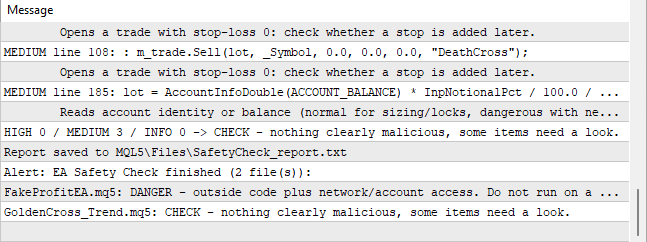
The screenshot shows the end of a run on two files. The first is a deliberately bad test file: it imports wininet.dll and shell32.dll, sends the account login and balance with WebRequest, hides a URL in a number array, multiplies the lot after each trade and deletes a file in the Common folder. It gets 8 HIGH findings and the DANGER verdict, and the hidden array is decoded so you can read the real address. The second is a normal trend-following EA: it only gets CHECK, because it opens trades without a stop-loss by design and reads the balance for position sizing.
Limits
- Source files only. Compiled .ex5 / .ex4 files are encrypted and cannot be checked this way: ask the seller for the source.
- It is a static text check. A clean report is not proof that an EA is safe or profitable; it lists what needs a human look. Some findings are normal (for example reading the balance for lot sizing) and only matter in combination with network or DLL code.
- The script only reads files inside MQL5\Files (the MetaTrader sandbox) and writes one report file there.
 JONY ISLAM EMA Cluster Signals with Entry SL TP MTF Panel
JONY ISLAM EMA Cluster Signals is a technical indicator that plots a 4-EMA cluster cloud to identify trend direction. It generates Buy/Sell arrow signals and automatically calculates Entry, Stop Loss, and TP1-TP3 levels using ATR. It also features a built-in Multi-Timeframe (M1-W1) trend panel.
Trend Filtered Donchian Breakout Channel
Plots a Donchian channel and a long-period SMA and marks only those closed-bar channel breakouts that are on the same side of the SMA.
Previous Day High/Low with First Touch Marker
Draws the previous day's high and low over each day and marks the first touch of each level, with an optional alert.
MACD Signals
Indicator edition for new platform.