 MetaTrader 5
 Experts
 Indicators
 Scripts
 Libraries
 Storage
Join our fan page

High precision tick spread monitor with real time Max and Avg curves for MT4 and MT5. - indicator for MetaTrader 5

Specializing in high-performance MT4/MT5 Expert Advisors, technical indicators, and quantitative trading tools.
📊 Focus: Robust risk management, Machine Learning models, and automated execution.
- Views:
- 23
- Published:
-
 You are missing trading opportunities:
- Free trading apps
- Over 8,000 signals for copying
- Economic news for exploring financial markets
Registration Log inYou agree to website policy and terms of use
If you do not have an account, please register -
 Need a robot or indicator based on this code? Order it on Freelance
Go to Freelance
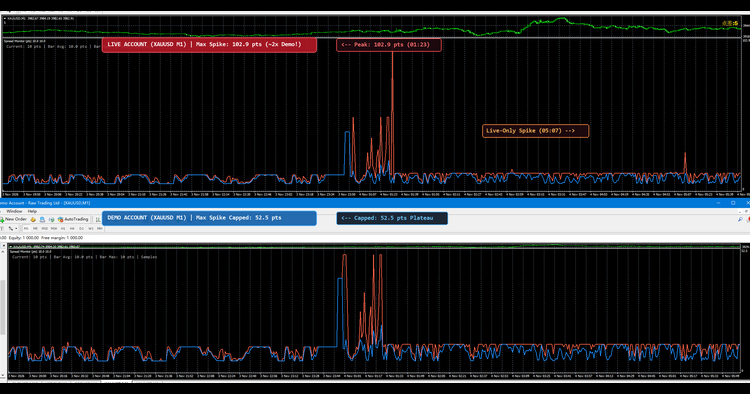
Spread is one of the most critical execution friction points in modern retail trading, particularly for scalpers, algorithmic systems, and news traders. While standard MetaTrader terminal charts only reflect the single-point snapshot spread at the current millisecond, true market conditions fluctuate significantly across each candle. Substantial spread widenings during daily server rollovers (swap time), session transitions, and high-impact economic news releases are completely invisible on standard price charts.
The Spread Monitor indicator is an analytical subwindow diagnostic tool designed for both MetaTrader 4 and MetaTrader 5. It continuously tracks incoming live ticks and draws two distinctive statistical curves per bar: the Maximum Spread reached within that period, and the Average Spread across all captured ticks. This empirical data helps traders verify true broker execution quality and properly calibrate risk parameters.
Underlying Concepts and Interpretation
- Max Spread Curve (Tomato Line): Pinpoints the peak spread spike within each candlestick. This metric is essential for algorithmic traders to set realistic Max Spread Allowed protection filters on automated EAs, preventing orders from triggering during liquidity gaps.
- Avg Spread Curve (Dodger Blue Line): Represents the true volume-weighted mean spread over the duration of the bar. It gives manual scalpers and day traders an objective benchmark of their actual transaction cost.
- Live Subwindow Dashboard: Displays current live spread, active bar average, active bar maximum, and recorded tick count in real time in the top-left corner of the indicator window.
Recommended Symbols and Timeframes
This indicator is universal and can be attached to any financial instrument, including Forex currency pairs (EURUSD, GBPUSD, USDJPY), Gold (XAUUSD), equity indices, and crypto CFDs. It is most informative on lower timeframes such as M1, M5, and M15, where intra-bar spread widening is most prominent during session rollovers and macroeconomic releases.
Description of Input Parameters
All external parameters are documented below to allow convenient configuration directly from the Inputs dialog:
| Parameter | Default Value | Description |
|---|---|---|
| InpUsePips | false | Display measurement unit. Set to true to display in standard 4-digit Pips (e.g., 1.5 pips), or false for raw 5-digit Points (e.g., 15 points). |
| InpTickHistoryBars (MT5 only) | 500 | Number of historical bars to automatically reconstruct using MT5 native tick history (CopyTicksRange). Set to 0 to disable historical backfill. |
| InpSaveToFile | true | Enables automatic local CSV history caching. Preserves accumulated tick spread statistics across terminal restarts and chart timeframe changes. |
| InpShowDashboard | true | Toggles the real-time subwindow text dashboard showing Current, Avg, Max spreads and Tick count. |
| InpTextColor | clrSilver | Color of the dashboard text overlay in the subwindow. |
| InpFontSize | 9 | Font size used for the subwindow real-time dashboard. |
Note: On MetaTrader 4, legacy history files do not record historical tick spreads, so the indicator records live ticks while connected. On MetaTrader 5, the indicator leverages native local tick storage to accurately reconstruct past bar spreads immediately upon loading.
 VrDz Bot Scalp and Swing EA with Always ON Secure Layer Pro Panel
Lightweight Expert Advisor combining Scalp & Swing logic with an "Always-ON" position-securing layer. Includes a fully interactive on-chart panel with manual trade buttons, risk- based lot sizing, partial close, break-even, trailing stop, swing SL/TP switching, and a one-click "Secure All" tool.
Prop News Countdown - news window timer for prop firm accounts
Countdown to the next high-impact news from the MT5 economic calendar, with a red NEWS WINDOW warning for prop-firm news rules. Display and alerts only - it never trades.
Accelerator Oscillator (AC)
The Acceleration/Deceleration Indicator (AC) measures acceleration and deceleration of the current driving force.
MACD Signals
Indicator edition for new platform.