 MetaTrader 5
 Experts
 Indicators
 Scripts
 Libraries
 Storage
Join our fan page

Prop News Countdown - news window timer for prop firm accounts - indicator for MetaTrader 5

- Views:
- 78
- Rating:
- Published:
-
 You are missing trading opportunities:
- Free trading apps
- Over 8,000 signals for copying
- Economic news for exploring financial markets
Registration Log inYou agree to website policy and terms of use
If you do not have an account, please register -
 Need a robot or indicator based on this code? Order it on Freelance
Go to Freelance
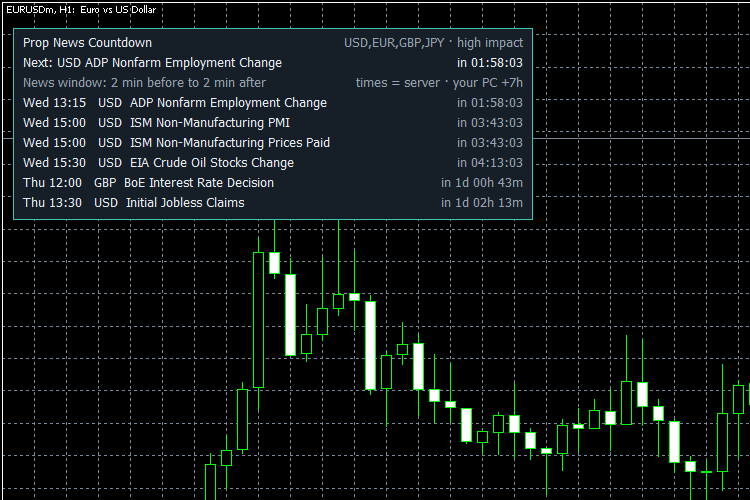
Many prop-firm accounts do not allow trading a few minutes before and after high-impact news. Prop News Countdown reads the built-in MT5 economic calendar and shows on the chart:
- Next news and a live countdown (hh:mm:ss)
- A list of the upcoming events (time, currency, name, time left)
- A red "NEWS WINDOW NOW" panel from X minutes before to Y minutes after each event - set X and Y to match your firm's rule
- A dotted vertical line on the chart at each news time
- Optional alerts: a few minutes before the news, and when the news window starts (popup and/or MT5 mobile push)
The indicator never opens, closes or modifies trades. It is a display and reminder tool only.
Inputs
1. News filter
- InpCurrencies - AUTO = currencies of the chart symbol, or a list such as USD,EUR,GBP,JPY. With AUTO, currencies that have no calendar news (e.g. XAU on XAUUSD, BTC on BTCUSD) are skipped automatically, so a gold chart shows USD news.
- InpImportance - high impact only, or moderate + high
- InpLookAheadHours - how far ahead to look (1-168 hours)
2. News window (use your prop firm's rule)
- InpMinBefore - window starts this many minutes before the news
- InpMinAfter - window ends this many minutes after the news
3. Alerts
- InpAlertMin - alert this many minutes before the news (0 = off)
- InpAlertWindow - alert when the news window starts
- InpPush - also send a push notification to MT5 mobile (Tools > Options > Notifications)
4. Display
- InpShowCount - how many upcoming events to list (1-10)
- InpDrawLines - vertical line at each news time
- InpX, InpY - panel position in pixels
- InpFontSize - panel font size
When something is wrong
- Calendar not readable or empty (e.g. not synced yet after start): the panel turns red and says "CALENDAR NOT AVAILABLE - check the news manually!" and retries every 30 seconds. It never shows "no news" when it could not read the calendar.
- Events without an exact time (all-day / tentative) are listed with "(time not exact)" but are not used for the news window.
- Unknown currency in InpCurrencies is shown as a warning on the panel.
- Each alert is sent once per event, also after a terminal restart or a timeframe change.
Notes
- All times are trade-server time (your broker / prop firm server). The panel also shows the difference to your PC clock.
- Uses TimeTradeServer(), so the countdown keeps running on weekends and when no ticks arrive.
- The economic calendar is not available in the Strategy Tester. In the tester the indicator only shows a message. Attach it to a live or demo chart.
- Alert flags are shared by all copies on the same terminal, so the same event alerts only once even if the indicator is on several charts.
- News data comes from the MetaQuotes economic calendar. Always double-check your firm's own rules and news list - the firm's rule is what counts.
- Not affiliated with any prop firm.
- Not yet tested on a live chart: the red NEWS WINDOW state and the popup / push alerts were checked by the built-in self-test only. Please test on a demo chart before relying on it.
What was tested
- Compiled in MetaEditor with 0 errors and 0 warnings.
- Built-in self-test on a live demo chart: 30 checks passed, 0 failed (currency list, news-window edges, countdown format, sorting, AUTO currency filter on XAUUSD, real calendar read).
- Panel, vertical lines and object cleanup checked on a live EURUSD chart.
Installation
- Copy PropNewsCountdown.mq5 to MQL5\Indicators\
- Compile in MetaEditor (or restart MT5)
- Drag the indicator onto any chart and set the minutes of your firm's news rule
Free to use. Feedback in the comments is welcome.
TradingView Style Chart Drag and Zoom for MT5
Drag the MetaTrader 5 chart freely in any direction and stretch the price and time scales with the mouse, the way TradingView does it. One click on ON/OFF returns the normal chart. A small indicator that draws nothing, never trades and works next to any Expert Advisor.
London Breakout: Asian Range Box
Plots the range of the Asian session and marks breakouts during the London session with arrows, stop and target levels, and alerts
Accelerator Oscillator (AC)
The Acceleration/Deceleration Indicator (AC) measures acceleration and deceleration of the current driving force.
MACD Signals
Indicator edition for new platform.