 MetaTrader 5
 Experts
 Indicators
 Scripts
 Libraries
 Storage
Join our fan page

ORB Box + VWAP Stats - opening range box, 1R/2R targets, session VWAP and historical break statistics - indicator for MetaTrader 5

I build clean, well-tested Expert Advisors and indicators for MetaTrader 4 and 5, with a focus on rule-based strategies and solid risk management.
What I can do for you:
- Views:
- 174
- Rating:
- Published:
-
 You are missing trading opportunities:
- Free trading apps
- Over 8,000 signals for copying
- Economic news for exploring financial markets
Registration Log inYou agree to website policy and terms of use
If you do not have an account, please register -
 Need a robot or indicator based on this code? Order it on Freelance
Go to Freelance
Need a robot or indicator based on this code? Order it on Freelance
Go to Freelance

What it does
For each session the indicator takes the high and low of the opening range (default 13:30 GMT, 30 minutes, i.e. the first half hour of the US cash session) and draws a box over it. Once the range has finished, the high and low are extended to the session end (default 20:00 GMT) together with the targets.
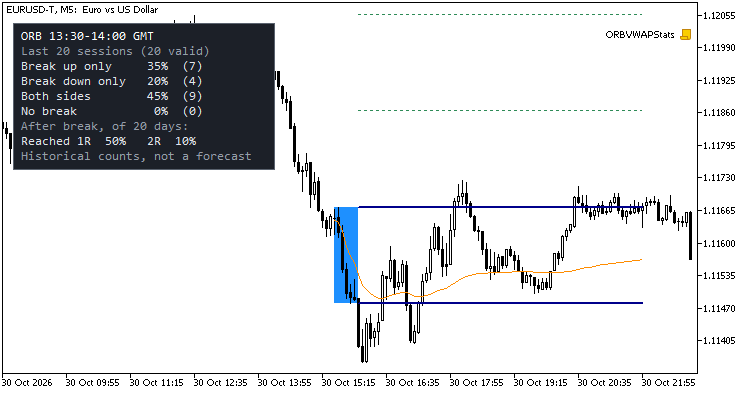
- Targets use the box height as "R": long 1R = range high + R, long 2R = range high + 2R, short 1R = range low - R, short 2R = range low - 2R. (A breakout entered at the box edge with the opposite edge as stop would risk exactly R.)
- Session VWAP: cumulative typical price ((H+L+C)/3) weighted by volume, restarted at the session start. Tick volume by default; with the "real volume" option it uses real volume when the symbol has it and falls back to tick volume otherwise (the Experts tab says which one is used).
- Session hours are entered in GMT and shifted by Server time = GMT + N hours . To type server time directly, set the offset to 0. Sessions that cross midnight are supported.
- The range length must be a multiple of the chart timeframe (for example 30 minutes on M1, M5, M10, M15 or M30; 15 minutes on M5 or M15).
Statistics panel (historical, not a forecast)
Over the last N finished sessions (default 20) that have a complete opening range, it shows the share of sessions in which a bar CLOSED:
- above the range high only, below the range low only, on both sides, or on neither side;
- and, among the sessions with a break, the share in which price afterwards reached 1R and 2R in the direction of the first break (bars after the break bar, using their high/low, until the session end).
Please read these numbers for what they are. They are counts of what happened in the sample, with a small N, on your broker's data. They do not tell you what will happen next, they do not include costs or slippage, and "reached 1R" does not check whether the opposite side of the box was touched first, so it is not a win rate. The still-running session is not counted.
No repainting
- Range, targets and break state are computed only from bars that have already closed. The range levels are shown only after the range bars are complete and never change afterwards.
- The VWAP buffer of the still-forming bar repeats the value of the last closed bar; every closed bar keeps its final value.
- Break alerts are evaluated on closed bars only. An alert is raised once per direction per session. History is not alerted when the indicator is attached or reloaded.
Buffers for Expert Advisors (iCustom)
| Buffer | Content |
|---|---|
| 0 | Opening range high |
| 1 | Opening range low |
| 2 | Long 1R target (range high + 1R) |
| 3 | Long 2R target (range high + 2R) |
| 4 | Short 1R target (range low - 1R) |
| 5 | Short 2R target (range low - 2R) |
| 6 | Session VWAP |
| 7 | Break state: +1 first close outside the box was above, -1 below, 0 none yet |
Buffers 0-5 and 7 are EMPTY_VALUE until the range has finished (from the first bar that opens at or after the range end) and again after the session end. Buffer 6 starts with the first closed bar of the session and ends with the session. Read shift 1 for the value that is valid for the last closed bar. Buffers 0-6 are plotted as lines; buffer 7 is not drawn (see the Data Window).
Example (EA side), reading the range high and the VWAP of the last closed bar:
int h = iCustom(_Symbol, PERIOD_M5, "ORBVWAPStats");
double hi[1], vw[1];
if(CopyBuffer(h, 0, 1, 1, hi) == 1 && hi[0] != EMPTY_VALUE &&
   CopyBuffer(h, 6, 1, 1, vw) == 1 && vw[0] != EMPTY_VALUE)
   Print("OR high: ", hi[0], "  VWAP: ", vw[0]);
Passing only the indicator name uses the default inputs.
Inputs
- Session: GMT offset (default 2), range start (default 13:30), range length (30 min), session end (20:00).
- VWAP: show, volume type (tick / real if available).
- Statistics: number of sessions (20), show panel, corner and offsets, optional print of the numbers to the Experts log.
- Look: sessions to draw (10), fill, colours, line width.
- Alerts: popup, push, sound and file name.
Notes
- Timeframes above M30 are rejected with a message in the Experts tab. Bars belong to the range or the session by their open time.
- The server offset is fixed by you. Brokers and exchanges change their offset with daylight saving time (the US cash open moves between 13:30 and 14:30 GMT); adjust the input when that happens, past bars are not shifted automatically.
- Days follow the broker server time and the hours you enter; weekends and holidays without bars are simply skipped.
- Tick volume is not exchange volume; the VWAP built on it is an approximation.
- Not financial advice; it only marks levels and counts events that already happened.
Testing
Checked in the Strategy Tester (EURUSD M5, September-October 2026, broker data) against an independent calculation from the raw rates: the opening range levels, targets, VWAP and break state matched on every bar compared (about 200,000 values), the buffer values read live on each closed bar were identical to the final values (no repainting), the statistics panel showed exactly the expected counts, and the break alerts raised were exactly the ones expected from the raw data.
Session High Low Alerts - Asia, London and New York session highs and lows with non-repainting break alerts
Draws the high and low of the Asia, London and New York sessions as boxes or lines extended to the end of the day, with configurable session hours and a server time zone adjustment. Optional previous day and previous week high/low. When a CLOSED bar breaks the high or low of a session that has already finished, it can raise a popup alert, a push notification and/or a sound, once per level per day. Alerts are evaluated on closed bars only, so they do not repaint. The 10 levels are exposed in indicator buffers, so an Expert Advisor can read them with iCustom(). It recalculates only new bars, works on any timeframe up to H1, and deletes all its chart objects when removed. Read-only: it never opens, modifies or closes a trade. No DLLs, no web requests.
Candle Pattern Stats - engulfing, pin bar and inside bar with a rolling historical hit rate
Marks bullish and bearish engulfing, bullish and bearish pin bar and inside bar patterns with arrows, using closed bars only, so nothing repaints. The definitions (wick and body proportions, minimum bar size in ATR) are inputs, with an optional EMA trend filter. For each pattern a small panel shows a rolling historical statistic: the share of the last N resolved cases where price moved X ATR in the pattern direction before moving Y ATR against it, together with the number of cases. X, Y, N and the waiting time are inputs. The numbers describe what happened on your chart history; they do not predict the next trade. Optional alerts on closed bars (popup, push, sound). 20 buffers (signal, hit rate and sample size per pattern) can be read with iCustom(). Uses prev_calculated, deletes its chart objects when removed. Read-only: it never trades. No DLLs, no web requests.
Key Levels with Touch Counter - previous day/week/month highs and lows plus round numbers, with touch and sweep counts
Draws the previous day, previous week and previous month high and low, plus automatic round-number levels around the current price. Every level carries a label with how many times price touched it and how many times a bar swept it (pierced the level and closed back on the original side). Counts use closed bars only, so they do not repaint. Optional alerts (popup, push, email, sound) for sweeps and new touches. Touch tolerance is a fraction of ATR or a fixed number of points. The 6 previous-period levels and their touch counts are exposed in 12 indicator buffers for use from an Expert Advisor with iCustom(). Works on any timeframe up to H4. Read-only: it never opens, modifies or closes a trade. No DLLs, no web requests.
MACD Signals
Indicator edition for new platform.