 MetaTrader 5
 Experts
 Indicators
 Scripts
 Libraries
 Storage
Join our fan page

Broker Time - server, UTC, New York, London, Sydney, Tokyo with the right summer time (class + session lines) - indicator for MetaTrader 5

I build and fix trading tools for MetaTrader 4 and MetaTrader 5:
• Expert Advisors (EAs) built from your strategy rules
• Custom indicators, alerts and on-chart panels
- Views:
- 73
- Rating:
- Published:
-
 You are missing trading opportunities:
- Free trading apps
- Over 8,000 signals for copying
- Economic news for exploring financial markets
Registration Log inYou agree to website policy and terms of use
If you do not have an account, please register -
 Need a robot or indicator based on this code? Order it on Freelance
Go to Freelance
Need a robot or indicator based on this code? Order it on Freelance
Go to Freelance
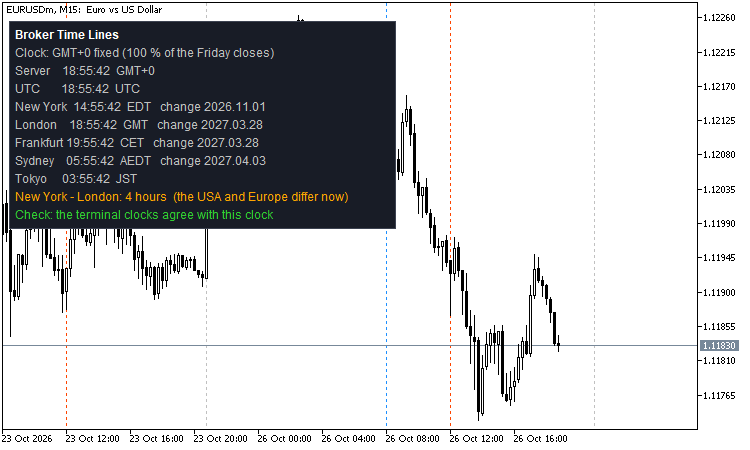 "Start at 08:00 New York" sounds simple. In MetaTrader it is not: the server clock of your broker is not any real time zone, the USA and Europe change their clocks on different weekends (for 1 - 3 weeks every spring and autumn New York - London is 4 hours instead of 5), the Strategy Tester gives TimeGMT() = TimeLocal() = server time, and TimeGMT() on a live chart is only as good as the time zone of your PC. This package solves it with plain date rules, no web request and no DLL.
Files
- BrokerTime.mqh - class CBrokerTime (copy to MQL5\Include or keep next to your EA).
- BrokerTimeLines.mq5 - indicator: session lines on every day and a clock panel. Put both files in the same folder to compile the indicator.
What the class knows
- Zones: UTC, New York, London, Frankfurt (Central Europe), Sydney (NSW), Tokyo, the broker server and one fixed offset of your choice.
- Summer time rules: USA 2nd Sunday of March 07:00 UTC to 1st Sunday of November 06:00 UTC (since 2007; 1st Sunday of April to the last Sunday of October for 1987 - 2006); EU and UK last Sunday of March to last Sunday of October at 01:00 UTC; Sydney 1st Sunday of October to 1st Sunday of April (since 2008); Tokyo UTC+9 all year.
- Broker clocks: GMT+2 / GMT+3 with summer time on the US dates (the usual retail clock: 17:00 New York is always 00:00 server time), GMT+2 / GMT+3 on the EU dates, or a fixed GMT offset (for example GMT+0).
- The clock of your broker is found automatically: DetectFromHistory(symbol) looks at up to 40 Friday closes of the H1 history (forex closes at 17:00 New York; it needs at least 4 weekends) and picks the clock that fits most of them (US dates, EU dates or a fixed whole-hour offset from GMT-12 to GMT+14); Confidence() tells how many fitted. It works in the Strategy Tester, where the terminal clocks cannot tell you. You can also set the clock by hand: SetServer(BT_SERVER_US / BT_SERVER_EU / BT_SERVER_FIXED, offset).
Use in an EA
#include <BrokerTime.mqh> CBrokerTime bt; ... bt.DetectFromHistory(_Symbol); // OnInit; false = no history yet MqlDateTime d; TimeToStruct(TimeCurrent(), d); datetime open = bt.ZoneTimeToServer(BT_NEW_YORK, d.year, d.mon, d.day, 8, 30); // 08:30 New York as server time bool newYorkSummer = bt.IsSummerTime(BT_NEW_YORK, bt.ServerToUtc(TimeCurrent())); double hours = bt.DifferenceHours(BT_NEW_YORK, BT_LONDON, bt.ServerToUtc(TimeCurrent())); // -5, or -4 in a gap week
Other calls: UtcToZone(), ZoneToUtc(), ServerToUtc(), UtcToServer(), Convert(from, to, time), OffsetAt(), NextChange(zone, utc) (the next clock change), Abbreviation() (EST, EDT, GMT, BST, CET, CEST, AEDT, AEST, JST), ZoneName(), LiveOffsetSeconds() (live only: server minus GMT from the terminal clocks, as a cross-check).
A local time that does not exist (the skipped hour in spring) is taken with the winter offset; a local time that happens twice (autumn) is taken as the first one, the same rule as Python's zoneinfo with fold = 0.
The indicator
- Three lines, each with a zone, hour, minute, text and colour. Default: London 08:00, New York 08:00 and New York 17:00 (the day end of forex).
- Lines for the last N days (20 by default), no lines on Saturday and Sunday of the zone.
- Panel: clock found (and how many Friday closes agreed), server time, UTC, New York, London, Frankfurt, Sydney and Tokyo with abbreviation and date of the next change, "New York - London: 4 hours (the USA and Europe differ now)" in a gap week, and a live check against the terminal clocks.
- Every line is placed with the summer time of ITS OWN date, so last month's lines stay right after a clock change.
- It draws only on a chart (nothing in the non-visual tester) and never trades.
How it was tested
- 234,119 comparisons with Python's zoneinfo (the IANA time zone database): UTC to zone (offset, summer flag, date of the next change), zone to UTC (including the skipped and the repeated hour), server clock to UTC and back, around every clock change of every zone and at random times. Result: 0 differences. Exact range: New York from 1987, London and Frankfurt from 1996, Sydney from 2008 (older Sydney dates are approximated), Tokyo always.
- 42 lines drawn by the indicator on a live EURUSD H1 chart across the European clock change of 25 October 2026: every line at exactly 08:00 / 08:00 / 17:00 of its zone on a weekday, 0 differences against zoneinfo.
- Live on the demo server of a broker: found as GMT+0 fixed, 100 % of the Friday closes; New York 14:55 EDT, London GMT, Sydney AEDT, next changes 1 Nov 2026, 28 Mar 2027 and 3 Apr 2027, "New York - London: 4 hours" - all correct for 26 October 2026; the check against the terminal clocks agreed.
- The indicator was loaded in the Strategy Tester on EURUSD H1, XAUUSD D1, GBPUSD M30 and EURUSD M1 without errors.
Good to know
- The rules are the law of today: USA, EU and Australia could change them. The rules are 6 small functions at the top of the class (UsOn, UsOff, EuOn, EuOff, AuEnd, AuStart), so a change is a small edit.
- The "US dates" and "EU dates" server clocks were checked against zoneinfo, not on a live broker of that kind (the demo broker used is GMT+0). If your broker is different, check the panel once against your broker's own description.
- The broker clock found from the history assumes forex closes at 17:00 New York; on a symbol that closes at another time (some CFDs, crypto) use a currency pair as the search symbol (input).
Heikin Ashi Candles
A clean Heikin Ashi indicator that draws on the main chart window. It also adds one horizontal line at the average price, (Open + High + Low + Close) / 4, of the last closed candle of a chosen timeframe. By default this is H1, and the line uses the normal candles, not Heikin Ashi.
Smart Money Concepts BOS CHoCH
Market structure indicator for Gold (XAUUSD), EURUSD and any symbol: swing highs and lows with HH HL LH LL labels, BOS and CHoCH drawn on closed candles, alerts and 4 buffers for EAs. Open source code.
Risk Lot Calculator - lot size from your risk and stop (class for EAs + chart panel)
Drag the stop-loss line and read the lot size that risks exactly your money or percent. The CRiskSizer class does the same in an EA: lot rounded down, minimum lot never forced, max lot, volume limit, stop level and margin checked.
 Stationarity: KPSS, Phillips-Perron, DF-GLS, Zivot-Andrews and variance ratio tests
Five tests to tell a random walk from a mean-reverting series: KPSS, Phillips-Perron, DF-GLS, Zivot-Andrews with the break date, and the variance ratio.