 MetaTrader 5
 Experts
 Indicators
 Scripts
 Libraries
 Storage
Join our fan page

Prop Firm Guard - daily loss and max drawdown protection - expert for MetaTrader 5

- Views:
- 72
- Published:
-
 You are missing trading opportunities:
- Free trading apps
- Over 8,000 signals for copying
- Economic news for exploring financial markets
Registration Log inYou agree to website policy and terms of use
If you do not have an account, please register -
 Need a robot or indicator based on this code? Order it on Freelance
Go to Freelance
Need a robot or indicator based on this code? Order it on Freelance
Go to Freelance
Prop Firm Guard protects challenge and funded accounts from the two rules that end most prop firm accounts: the daily loss limit and the maximum drawdown.
It does not open trades. Attach it to any chart and keep trading as usual, manually or with other Expert Advisors. Prop Firm Guard checks your equity every second, and as soon as the limit is reached it:
- closes every open position on the account
- deletes every pending order
- closes any new trade opened while the limit is still hit (optional)
- shows an alert, and a push notification if enabled
The block lasts until the next daily reset for the daily loss limit, and stays active for the maximum drawdown. Every action is written to the Experts log (limit reached, position closed, order deleted).
Symbol and timeframe
Any. Prop Firm Guard watches the whole account, not one symbol, so attach it to a single chart of any symbol and timeframe. Use only one copy per account.
How the limits are measured
- Account size: the starting balance of your challenge (or 0 to use the current balance).
- Daily loss: measured from a reference taken at the start of each trading day, either the balance, or the higher of balance and equity (the rule used by many prop firms).
- Maximum drawdown: static (from the account size) or trailing (from the highest equity reached).
- Safety margin: lets the EA act a little before the real limit, to absorb slippage and spread.
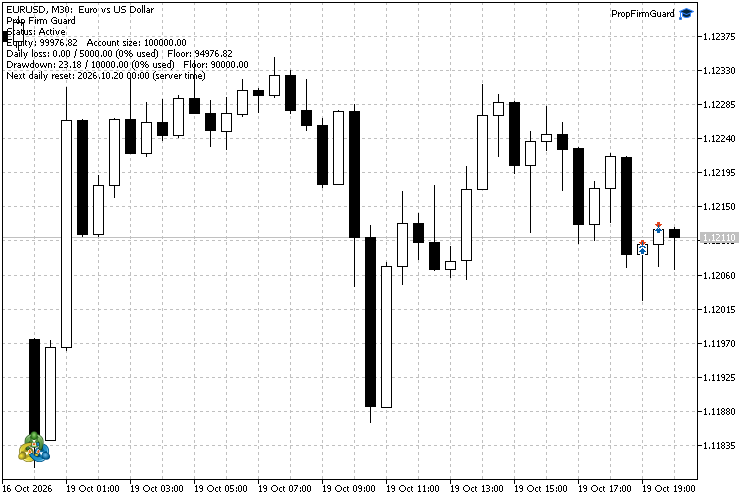
The state is saved, so the protection survives a restart of the terminal, a change of chart or a reconnection. The chart shows the current status, equity, daily loss used, drawdown used and the time of the next daily reset.
Inputs
- Account size (0 = current balance)
- Max daily loss (%) - default 5
- Max total drawdown (%) - default 10
- Safety margin: act earlier by (%) - default 0
- Daily loss reference - balance, or higher of balance and equity
- Drawdown mode - static or trailing
- Reset hour (server time, 0-23) - check your prop firm's reset time
- Keep closing new trades while a limit is hit
- Warn when this % of a limit is used (0 = off) - default 80
- Send push notifications
- Reset saved state on start - use it only to clear a block during testing, keep it off in normal use
Important
- Check the exact rules of your prop firm (limit values, daily reset time, balance or equity reference) and set the inputs accordingly. Rules differ between firms.
- Prop Firm Guard reacts to prices it receives. In fast markets, gaps or slippage, the final loss can be larger than the limit. Use the safety margin to act earlier.
- Keep the terminal running (or use a VPS): the protection only works while MetaTrader 5 is open and connected.
- Algo Trading must be enabled for the EA to close positions.
- This tool helps you respect risk limits. It does not guarantee that you will pass a challenge or keep a funded account.
 Risk of Ruin: how often your account blows up at a chosen risk per trade
Reads your closed trades, converts each to an R-multiple and simulates many future runs at a chosen risk per trade. Reports the probability of hitting a drawdown floor, the probability of ending profitable, the median ending balance and the 95% range. Read-only.
GDS Renko RSI + MACD 4-Mode Demo EA
An educational MetaTrader 5 Expert Advisor with four RSI and MACD signal modes calculated on completed Renko bricks. Fixed-size Renko is built internally from Bid ticks. No external indicators, DLLs, custom symbols or offline charts are required.
 Failed Breakout Detector
Marks breakouts of the recent trading range and the breakouts that fail (price closes back inside within a few bars). Closed bars only, alerts, buffers for iCustom.
 XlsxWriter: Excel .xlsx files from MQL5 without DLL
An include file that writes real Excel workbooks (.xlsx) from MQL5 without DLLs: several sheets, numbers, text and real Excel dates, a frozen bold header and filters. Example script: the account deals and the daily results to Excel.